
萬字博文教你搞懂java源碼的日期和時間相關用法

介紹
本篇文章主要介紹java源碼中提供了哪些日期和時間的類
日期和時間的兩套API
java提供了兩套處理日期和時間的API
1、舊的API,放在java.util 這個包下的:比較常用的有Date和Calendar等
2、新的API是java 8新引入的,放在java.time 這個包下的:LocalDateTime,ZonedDateTime,DateTimeFormatter和Instant等
為什么會有兩套日期時間API,這個是有歷史原因的,舊的API是jdk剛開始就提供的,隨著版本的升級,逐漸發(fā)現原先的api不滿足需要,暴露了一些問題,所以在java 8 這個版本中,重新引入新API。
這兩套API都要了解,為什么呢?
因為java 8 發(fā)布時間是2014年,很多之前的系統(tǒng)還是沿用舊的API,所以這兩套API都要了解,同時還要掌握兩套API相互轉化的技術。
一:Date
支持版本及以上
JDK1.0
介紹
Date類說明
Date類負責時間的表示,在計算機中,時間的表示是一個較大的概念,現有的系統(tǒng)基本都是利用從1970.1.1 00:00:00 到當前時間的毫秒數進行計時,這個時間稱為epoch(時間戳)
package java.util;

public class Date
    implements java.io.Serializable, Cloneable, Comparable<Date>
{
 ...

      private transient long fastTime;
     ....
}
復制代碼java.util.Date是java提供表示日期和時間的類,類里有個long 類型的變量fastTime,它是用來存儲以毫秒表示的時間戳。
date常用的用法
import java.util.Date;
-----------------------------------------
		//獲取當前時間
		Date date = new Date();
		System.out.println("獲取當前時間:"+date);
		//獲取時間戳
		System.out.println("獲取時間戳:"+date.getTime());

		// date時間是否大于afterDate 等于也為false
		Date afterDate = new Date(date.getTime()-3600*24*1000);
		System.out.println("after:"+date.after(afterDate));
		System.out.println("after:"+date.after(date));

		// date時間是否小于afterDate 等于也為false
		Date beforeDate = new Date(date.getTime()+3600*24*1000);
		System.out.println("before:"+date.before(beforeDate));
		System.out.println("before:"+date.before(date));

		//兩個日期比較
		System.out.println("compareTo:"+date.compareTo(date));
		System.out.println("compareTo:"+date.compareTo(afterDate));
		System.out.println("compareTo:"+date.compareTo(beforeDate));

		//轉為字符串
		System.out.println("轉為字符串:"+date.toString());
		//轉為GMT時區(qū) toGMTString() java8 中已廢棄
		System.out.println("轉為GMT時區(qū):"+date.toGMTString());
		//轉為本地時區(qū) toLocaleString() java8 已廢棄
		System.out.println("轉為本地時區(qū):"+date.toLocaleString());
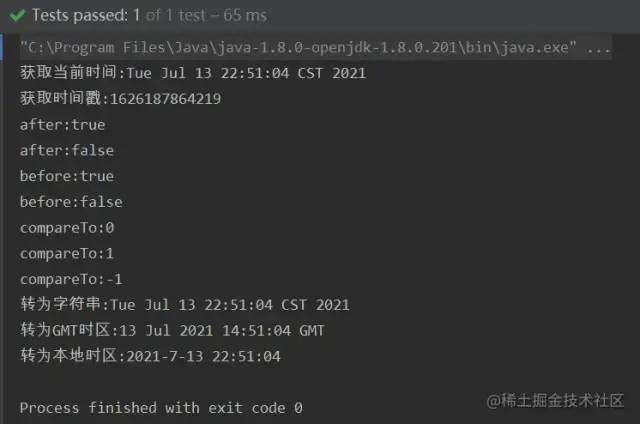
復制代碼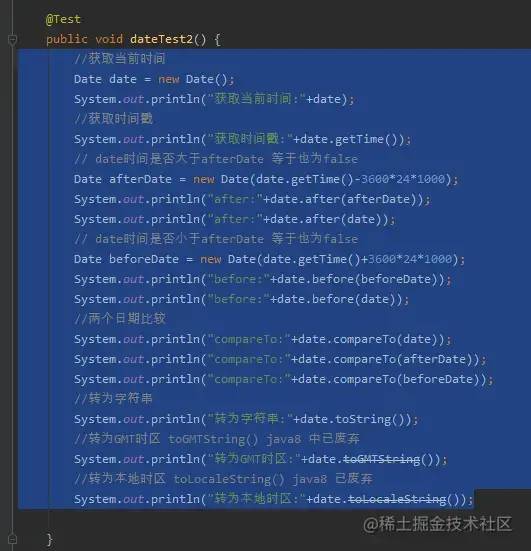
自定義時間格式-SimpleDateFormat
date的toString方法轉成字符串,不是我們想要的時間格式,如果要自定義時間格式,就要使用SimpleDateFormat
		//獲取當前時間
		Date date = new Date();
		System.out.println("獲取當前時間:"+date);
		SimpleDateFormat simpleDateFormat = new SimpleDateFormat("yyyy-MM-dd HH:mm:ss");
		System.out.println(simpleDateFormat.format(date));
		SimpleDateFormat simpleDateFormat1 = new SimpleDateFormat("yyyy年MM月dd日 HH時mm分ss秒");
		System.out.println(simpleDateFormat1.format(date));
復制代碼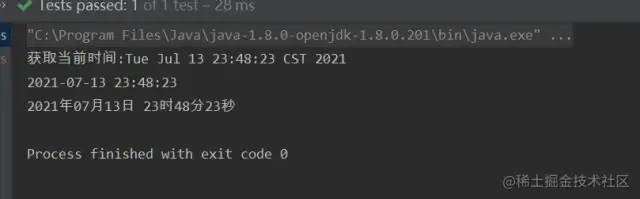
SimpleDateFormat也可以方便的將字符串轉成Date
//獲取當前時間
		String str = "2021-07-13 23:48:23";
		try {
			Date date = new SimpleDateFormat("yyyy-MM-dd HH:mm:ss").parse(str);
			System.out.println(date);
		} catch (ParseException e) {
			e.printStackTrace();
		}
復制代碼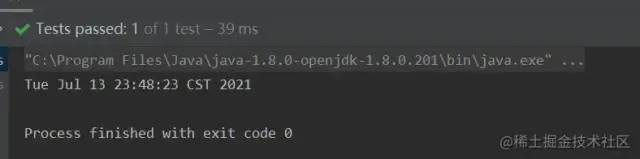
日期和時間格式化參數說明
yyyy:年
MM:月
dd:日
hh:1~12小時制(1-12)
HH:24小時制(0-23)
mm:分
ss:秒
S:毫秒
E:星期幾
D:一年中的第幾天
F:一月中的第幾個星期(會把這個月總共過的天數除以7)
w:一年中的第幾個星期
W:一月中的第幾星期(會根據實際情況來算)
a:上下午標識
k:和HH差不多,表示一天24小時制(1-24)。
K:和hh差不多,表示一天12小時制(0-11)。
z:表示時區(qū)

復制代碼
SimpleDateFormat線程不安全原因及解決方案
SimpleDateFormat線程為什么是線程不安全的呢?
來看看SimpleDateFormat的源碼,先看format方法:
// Called from Format after creating a FieldDelegate
    private StringBuffer format(Date date, StringBuffer toAppendTo,
                                FieldDelegate delegate) {
        // Convert input date to time field list
        calendar.setTime(date);
		...
    }
復制代碼問題就出在成員變量calendar,如果在使用SimpleDateFormat時,用static定義,那SimpleDateFormat變成了共享變量。那SimpleDateFormat中的calendar就可以被多個線程訪問到。
SimpleDateFormat的parse方法也是線程不安全的:
 public Date parse(String text, ParsePosition pos)
    {
     ...
         Date parsedDate;
        try {
            parsedDate = calb.establish(calendar).getTime();
            // If the year value is ambiguous,
            // then the two-digit year == the default start year
            if (ambiguousYear[0]) {
                if (parsedDate.before(defaultCenturyStart)) {
                    parsedDate = calb.addYear(100).establish(calendar).getTime();
                }
            }
        }
        // An IllegalArgumentException will be thrown by Calendar.getTime()
        // if any fields are out of range, e.g., MONTH == 17.
        catch (IllegalArgumentException e) {
            pos.errorIndex = start;
            pos.index = oldStart;
            return null;
        }

        return parsedDate;
 }
復制代碼
由源碼可知,最后是調用**parsedDate = calb.establish(calendar).getTime();**獲取返回值。方法的參數是calendar,calendar可以被多個線程訪問到,存在線程不安全問題。
我們再來看看**calb.establish(calendar)**的源碼
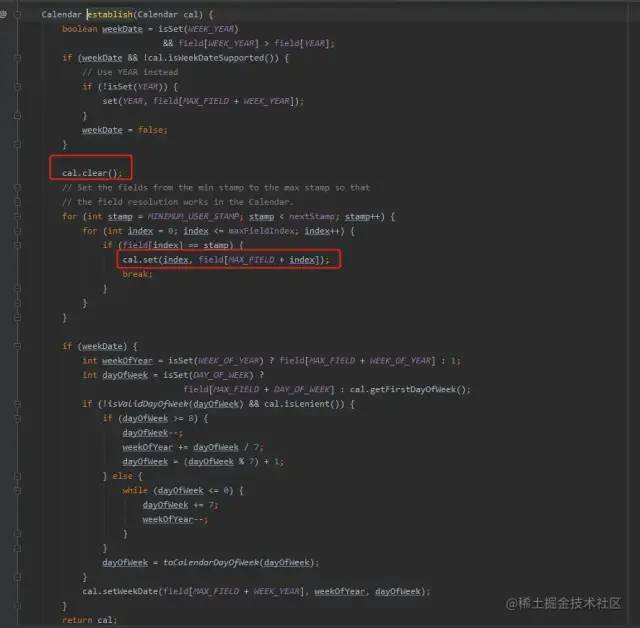
calb.establish(calendar)方法先后調用了cal.clear()和cal.set(),先清理值,再設值。但是這兩個操作并不是原子性的,也沒有線程安全機制來保證,導致多線程并發(fā)時,可能會引起cal的值出現問題了。
驗證SimpleDateFormat線程不安全
public class SimpleDateFormatDemoTest {

	private static SimpleDateFormat simpleDateFormat = new SimpleDateFormat("yyyy-MM-dd HH:mm:ss");

    public static void main(String[] args) {
    		//1、創(chuàng)建線程池
        ExecutorService pool = Executors.newFixedThreadPool(5);
        //2、為線程池分配任務
        ThreadPoolTest threadPoolTest = new ThreadPoolTest();
        for (int i = 0; i < 10; i++) {
            pool.submit(threadPoolTest);
        }
        //3、關閉線程池
        pool.shutdown();
    }


    static class  ThreadPoolTest implements Runnable{

        @Override
        public void run() {
				String dateString = simpleDateFormat.format(new Date());
				try {
					Date parseDate = simpleDateFormat.parse(dateString);
					String dateString2 = simpleDateFormat.format(parseDate);
					System.out.println(Thread.currentThread().getName()+" 線程是否安全: "+dateString.equals(dateString2));
				} catch (Exception e) {
					System.out.println(Thread.currentThread().getName()+" 格式化失敗 ");
				}
        }
    }
}
復制代碼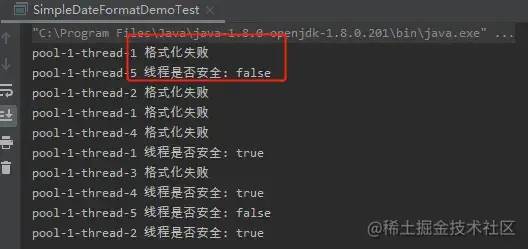
出現了兩次false,說明線程是不安全的。而且還拋異常,這個就嚴重了。
解決方案
這個是阿里巴巴 java開發(fā)手冊中的規(guī)定:

1、不要定義為static變量,使用局部變量
2、加鎖:synchronized鎖和Lock鎖
3、使用ThreadLocal方式
4、使用DateTimeFormatter代替SimpleDateFormat(DateTimeFormatter是線程安全的,java 8+支持)
5、使用FastDateFormat 替換SimpleDateFormat(FastDateFormat 是線程安全的,Apache Commons Lang包支持,不受限于java版本)
解決方案1:不要定義為static變量,使用局部變量
就是要使用SimpleDateFormat對象進行format或parse時,再定義為局部變量。就能保證線程安全。
public class SimpleDateFormatDemoTest1 {

    public static void main(String[] args) {
    		//1、創(chuàng)建線程池
        ExecutorService pool = Executors.newFixedThreadPool(5);
        //2、為線程池分配任務
        ThreadPoolTest threadPoolTest = new ThreadPoolTest();
        for (int i = 0; i < 10; i++) {
            pool.submit(threadPoolTest);
        }
        //3、關閉線程池
        pool.shutdown();
    }


    static class  ThreadPoolTest implements Runnable{

		@Override
		public void run() {
			SimpleDateFormat simpleDateFormat = new SimpleDateFormat("yyyy-MM-dd HH:mm:ss");
			String dateString = simpleDateFormat.format(new Date());
			try {
				Date parseDate = simpleDateFormat.parse(dateString);
				String dateString2 = simpleDateFormat.format(parseDate);
				System.out.println(Thread.currentThread().getName()+" 線程是否安全: "+dateString.equals(dateString2));
			} catch (Exception e) {
				System.out.println(Thread.currentThread().getName()+" 格式化失敗 ");
			}
		}
    }
}
復制代碼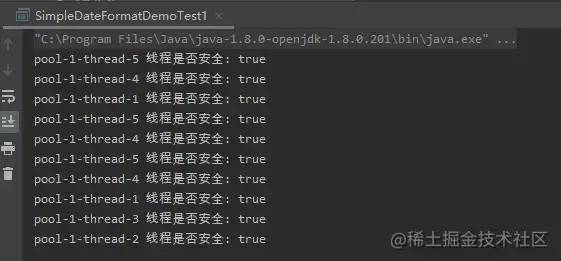
由圖可知,已經保證了線程安全,但這種方案不建議在高并發(fā)場景下使用,因為會創(chuàng)建大量的SimpleDateFormat對象,影響性能。
解決方案2:加鎖:synchronized鎖和Lock鎖
加synchronized鎖:SimpleDateFormat對象還是定義為全局變量,然后需要調用SimpleDateFormat進行格式化時間時,再用synchronized保證線程安全。
public class SimpleDateFormatDemoTest2 {
private static SimpleDateFormat simpleDateFormat = new SimpleDateFormat("yyyy-MM-dd HH:mm:ss");
public static void main(String[] args) {
//1、創(chuàng)建線程池
ExecutorService pool = Executors.newFixedThreadPool(5);
//2、為線程池分配任務
ThreadPoolTest threadPoolTest = new ThreadPoolTest();
for (int i = 0; i < 10; i++) {
pool.submit(threadPoolTest);
}
//3、關閉線程池
pool.shutdown();
}
static class ThreadPoolTest implements Runnable{
@Override
public void run() {
try {
synchronized (simpleDateFormat){
String dateString = simpleDateFormat.format(new Date());
Date parseDate = simpleDateFormat.parse(dateString);
String dateString2 = simpleDateFormat.format(parseDate);
System.out.println(Thread.currentThread().getName()+" 線程是否安全: "+dateString.equals(dateString2));
}
} catch (Exception e) {
System.out.println(Thread.currentThread().getName()+" 格式化失敗 ");
}
}
}
}
復制代碼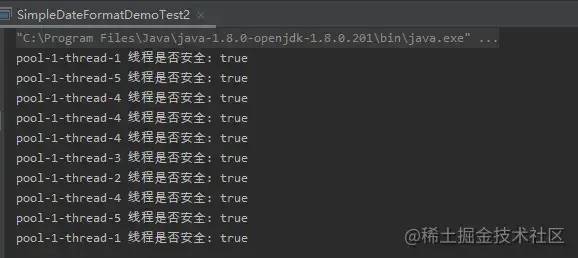 如圖所示,線程是安全的。定義了全局變量SimpleDateFormat,減少了創(chuàng)建大量SimpleDateFormat對象的損耗。但是使用synchronized鎖,
同一時刻只有一個線程能執(zhí)行鎖住的代碼塊,在高并發(fā)的情況下會影響性能。但這種方案不建議在高并發(fā)場景下使用加Lock鎖:加Lock鎖和synchronized鎖原理是一樣的,都是使用鎖機制保證線程的安全。
如圖所示,線程是安全的。定義了全局變量SimpleDateFormat,減少了創(chuàng)建大量SimpleDateFormat對象的損耗。但是使用synchronized鎖,
同一時刻只有一個線程能執(zhí)行鎖住的代碼塊,在高并發(fā)的情況下會影響性能。但這種方案不建議在高并發(fā)場景下使用加Lock鎖:加Lock鎖和synchronized鎖原理是一樣的,都是使用鎖機制保證線程的安全。
public class SimpleDateFormatDemoTest3 {

	private static SimpleDateFormat simpleDateFormat = new SimpleDateFormat("yyyy-MM-dd HH:mm:ss");
	private static Lock lock = new ReentrantLock();
    public static void main(String[] args) {
    		//1、創(chuàng)建線程池
        ExecutorService pool = Executors.newFixedThreadPool(5);
        //2、為線程池分配任務
        ThreadPoolTest threadPoolTest = new ThreadPoolTest();
        for (int i = 0; i < 10; i++) {
            pool.submit(threadPoolTest);
        }
        //3、關閉線程池
        pool.shutdown();
    }

    static class  ThreadPoolTest implements Runnable{

		@Override
		public void run() {
			try {
				lock.lock();
					String dateString = simpleDateFormat.format(new Date());
					Date parseDate = simpleDateFormat.parse(dateString);
					String dateString2 = simpleDateFormat.format(parseDate);
					System.out.println(Thread.currentThread().getName()+" 線程是否安全: "+dateString.equals(dateString2));
			} catch (Exception e) {
				System.out.println(Thread.currentThread().getName()+" 格式化失敗 ");
			}finally {
				lock.unlock();
			}
		}
    }
}
復制代碼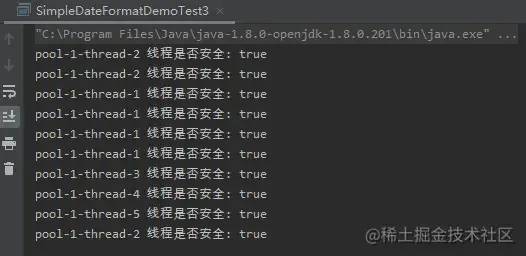 由結果可知,加Lock鎖也能保證線程安全。要注意的是,最后一定要釋放鎖,代碼里在finally里增加了lock.unlock();,保證釋放鎖。在高并發(fā)的情況下會影響性能。這種方案不建議在高并發(fā)場景下使用
解決方案3:使用ThreadLocal方式
使用ThreadLocal保證每一個線程有SimpleDateFormat對象副本。這樣就能保證線程的安全。
public class SimpleDateFormatDemoTest4 {

	private static ThreadLocal threadLocal = new ThreadLocal(){
		@Override
		protected DateFormat initialValue() {
			return new SimpleDateFormat("yyyy-MM-dd HH:mm:ss");
		}
	};
    public static void main(String[] args) {
    		//1、創(chuàng)建線程池
        ExecutorService pool = Executors.newFixedThreadPool(5);
        //2、為線程池分配任務
        ThreadPoolTest threadPoolTest = new ThreadPoolTest();
        for (int i = 0; i < 10; i++) {
            pool.submit(threadPoolTest);
        }
        //3、關閉線程池
        pool.shutdown();
    }

    static class  ThreadPoolTest implements Runnable{

		@Override
		public void run() {
			try {
					String dateString = threadLocal.get().format(new Date());
					Date parseDate = threadLocal.get().parse(dateString);
					String dateString2 = threadLocal.get().format(parseDate);
					System.out.println(Thread.currentThread().getName()+" 線程是否安全: "+dateString.equals(dateString2));
			} catch (Exception e) {
				System.out.println(Thread.currentThread().getName()+" 格式化失敗 ");
			}finally {
				//避免內存泄漏,使用完threadLocal后要調用remove方法清除數據
				threadLocal.remove();
			}
		}
    }
}
復制代碼 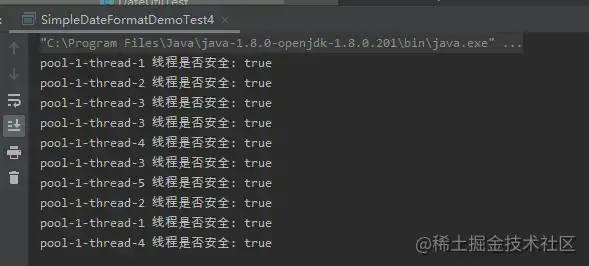
使用ThreadLocal能保證線程安全,且效率也是挺高的。適合高并發(fā)場景使用。
解決方案4:使用DateTimeFormatter代替SimpleDateFormat
使用DateTimeFormatter代替SimpleDateFormat(DateTimeFormatter是線程安全的,java 8+支持)DateTimeFormatter介紹
public class DateTimeFormatterDemoTest5 {
	private static DateTimeFormatter dateTimeFormatter = DateTimeFormatter.ofPattern("yyyy-MM-dd HH:mm:ss");

	public static void main(String[] args) {
		//1、創(chuàng)建線程池
		ExecutorService pool = Executors.newFixedThreadPool(5);
		//2、為線程池分配任務
		ThreadPoolTest threadPoolTest = new ThreadPoolTest();
		for (int i = 0; i < 10; i++) {
			pool.submit(threadPoolTest);
		}
		//3、關閉線程池
		pool.shutdown();
	}


	static class  ThreadPoolTest implements Runnable{

		@Override
		public void run() {
			try {
				String dateString = dateTimeFormatter.format(LocalDateTime.now());
				TemporalAccessor temporalAccessor = dateTimeFormatter.parse(dateString);
				String dateString2 = dateTimeFormatter.format(temporalAccessor);
				System.out.println(Thread.currentThread().getName()+" 線程是否安全: "+dateString.equals(dateString2));
			} catch (Exception e) {
				e.printStackTrace();
				System.out.println(Thread.currentThread().getName()+" 格式化失敗 ");
			}
		}
	}
}
復制代碼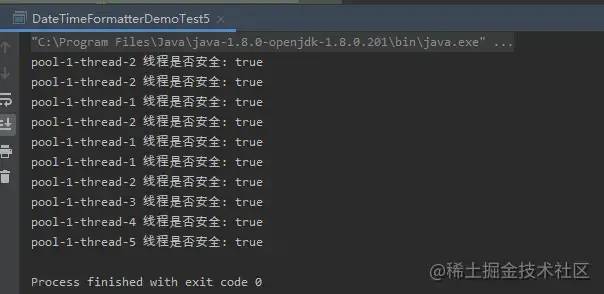 使用DateTimeFormatter能保證線程安全,且效率也是挺高的。適合高并發(fā)場景使用。
解決方案5:使用FastDateFormat 替換SimpleDateFormat
使用FastDateFormat 替換SimpleDateFormat(FastDateFormat 是線程安全的,Apache Commons Lang包支持,不受限于java版本)
public class FastDateFormatDemo6 {
	private static FastDateFormat fastDateFormat = FastDateFormat.getInstance("yyyy-MM-dd HH:mm:ss");

	public static void main(String[] args) {
		//1、創(chuàng)建線程池
		ExecutorService pool = Executors.newFixedThreadPool(5);
		//2、為線程池分配任務
		ThreadPoolTest threadPoolTest = new ThreadPoolTest();
		for (int i = 0; i < 10; i++) {
			pool.submit(threadPoolTest);
		}
		//3、關閉線程池
		pool.shutdown();
	}


	static class  ThreadPoolTest implements Runnable{

		@Override
		public void run() {
			try {
				String dateString = fastDateFormat.format(new Date());
				Date parseDate =  fastDateFormat.parse(dateString);
				String dateString2 = fastDateFormat.format(parseDate);
				System.out.println(Thread.currentThread().getName()+" 線程是否安全: "+dateString.equals(dateString2));
			} catch (Exception e) {
				e.printStackTrace();
				System.out.println(Thread.currentThread().getName()+" 格式化失敗 ");
			}
		}
	}
}
復制代碼使用FastDateFormat能保證線程安全,且效率也是挺高的。適合高并發(fā)場景使用。
FastDateFormat源碼分析
 Apache Commons Lang 3.5
復制代碼
//FastDateFormat
@Override
public String format(final Date date) {
return printer.format(date);
}
@Override
public String format(final Date date) {
final Calendar c = Calendar.getInstance(timeZone, locale);
c.setTime(date);
return applyRulesToString(c);
}
復制代碼源碼中 Calender 是在 format 方法里創(chuàng)建的,肯定不會出現 setTime 的線程安全問題。這樣線程安全疑惑解決了。那還有性能問題要考慮?
我們來看下FastDateFormat是怎么獲取的
FastDateFormat.getInstance();
FastDateFormat.getInstance(CHINESE_DATE_TIME_PATTERN);
復制代碼
看下對應的源碼
/**
 * 獲得 FastDateFormat實例,使用默認格式和地區(qū)
 *
 * @return FastDateFormat
 */
public static FastDateFormat getInstance() {
   return CACHE.getInstance();
}

/**
 * 獲得 FastDateFormat 實例,使用默認地區(qū)

 * 支持緩存
 *
 * @param pattern 使用{@link java.text.SimpleDateFormat} 相同的日期格式
 * @return FastDateFormat
 * @throws IllegalArgumentException 日期格式問題
 */
public static FastDateFormat getInstance(final String pattern) {
   return CACHE.getInstance(pattern, null, null);
}
復制代碼
這里有用到一個CACHE,看來用了緩存,往下看
private static final FormatCache CACHE = new FormatCache(){
   @Override
   protected FastDateFormat createInstance(final String pattern, final TimeZone timeZone, final Locale locale) {
      return new FastDateFormat(pattern, timeZone, locale);
   }
};

//
abstract class FormatCache<F extends Format> {
    ...
    private final ConcurrentMap cInstanceCache = new ConcurrentHashMap<>(7);

	private static final ConcurrentMap C_DATE_TIME_INSTANCE_CACHE = new ConcurrentHashMap<>(7);
    ...
}
復制代碼 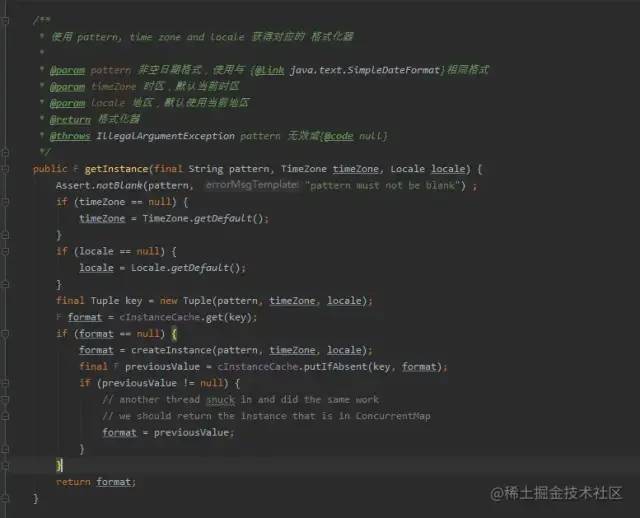
在getInstance 方法中加了ConcurrentMap 做緩存,提高了性能。且我們知道ConcurrentMap 也是線程安全的。
實踐
/**
 * 年月格式 {@link FastDateFormat}:yyyy-MM
 */
public static final FastDateFormat NORM_MONTH_FORMAT = FastDateFormat.getInstance(NORM_MONTH_PATTERN);
復制代碼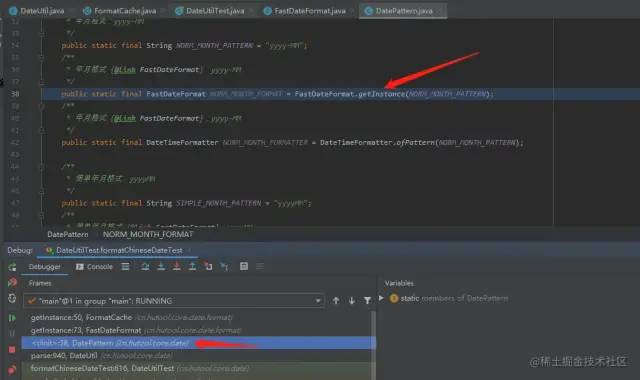
//FastDateFormat
public static FastDateFormat getInstance(final String pattern) {
   return CACHE.getInstance(pattern, null, null);
}
復制代碼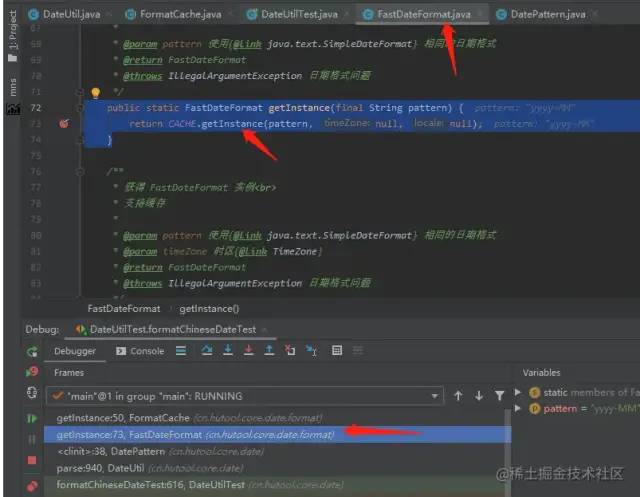
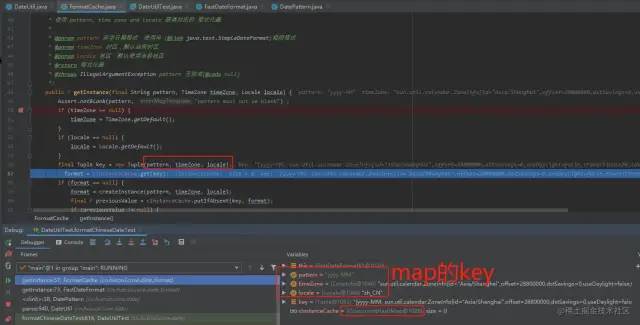
如圖可證,是使用了ConcurrentMap 做緩存。且key值是格式,時區(qū)和locale(語境)三者都相同為相同的key。
問題
1、tostring()輸出時,總以系統(tǒng)的默認時區(qū)格式輸出,不友好。
2、時區(qū)不能轉換
3、日期和時間的計算不簡便,例如計算加減,比較兩個日期差幾天等。
4、格式化日期和時間的SimpleDateFormat對象是線程不安全的
5、Date對象本身也是線程不安全的
public class Date
    implements java.io.Serializable, Cloneable, Comparable<Date>
{
    ...
}
復制代碼
二:Calendar
支持版本及以上
JDK1.1
介紹
Calendar類說明
Calendar類提供了獲取或設置各種日歷字段的各種方法,比Date類多了一個可以計算日期和時間的功能。
Calendar常用的用法
		// 獲取當前時間:
		Calendar c = Calendar.getInstance();
		int y = c.get(Calendar.YEAR);
		int m = 1 + c.get(Calendar.MONTH);
		int d = c.get(Calendar.DAY_OF_MONTH);
		int w = c.get(Calendar.DAY_OF_WEEK);
		int hh = c.get(Calendar.HOUR_OF_DAY);
		int mm = c.get(Calendar.MINUTE);
		int ss = c.get(Calendar.SECOND);
		int ms = c.get(Calendar.MILLISECOND);
		System.out.println("返回的星期:"+w);
		System.out.println(y + "-" + m + "-" + d + " "  + " " + hh + ":" + mm + ":" + ss + "." + ms);
復制代碼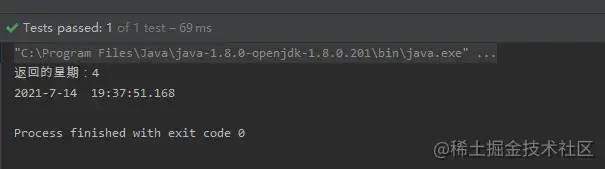
如上圖所示,月份計算時,要+1;返回的星期是從周日開始計算,周日為1,1~7表示星期;
Calendar的跨年問題和解決方案
問題
背景:在使用Calendar 的api getWeekYear()讀取年份,在跨年那周的時候,程序獲取的年份可能不是我們想要的,例如在2019年30號時,要返回2019,結果是返回2020,是不是有毒
// 獲取當前時間:
		Calendar c = Calendar.getInstance();
		c.clear();
		String str = "2019-12-30";
		try {
			c.setTime(new SimpleDateFormat("yyyy-MM-dd").parse(str));
			int y = c.getWeekYear();
			System.out.println(y);
		} catch (ParseException e) {
			e.printStackTrace();
		}
復制代碼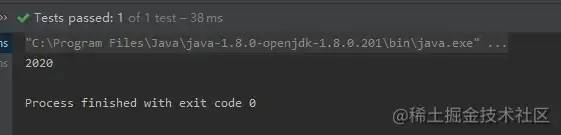
分析原因
老規(guī)矩,從源碼入手
Calendar類
    -------------------------
    //@since 1.7
    public int getWeekYear() {
        throw new UnsupportedOperationException();
    }
復制代碼
這個源碼有點奇怪,getWeekYear()方法是java 7引入的。它的實現怎么是拋出異常,但是執(zhí)行時,又有結果返回。
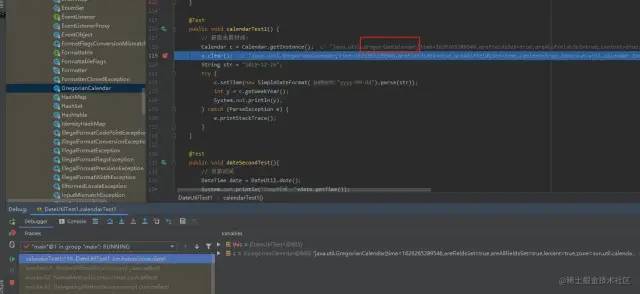
斷點跟進,通過Calendar.getInstance()獲取的Calendar實例是GregorianCalendar
GregorianCalendar
    --------------------------------------
public int getWeekYear() {
        int year = get(YEAR); // implicitly calls complete()
        if (internalGetEra() == BCE) {
            year = 1 - year;
        }

        // Fast path for the Gregorian calendar years that are never
        // affected by the Julian-Gregorian transition
        if (year > gregorianCutoverYear + 1) {
            int weekOfYear = internalGet(WEEK_OF_YEAR);
            if (internalGet(MONTH) == JANUARY) {
                if (weekOfYear >= 52) {
                    --year;
                }
            } else {
                if (weekOfYear == 1) {
                    ++year;
                }
            }
            return year;
        }
        ...
        }
復制代碼
方法內獲取的年份剛開始是正常的
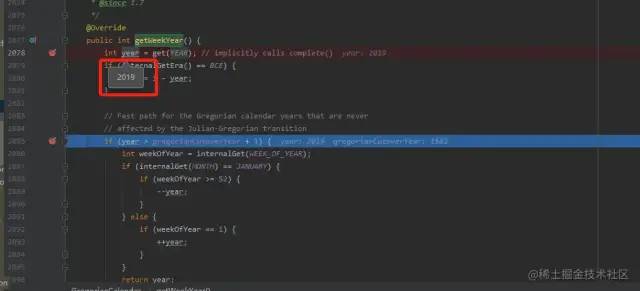
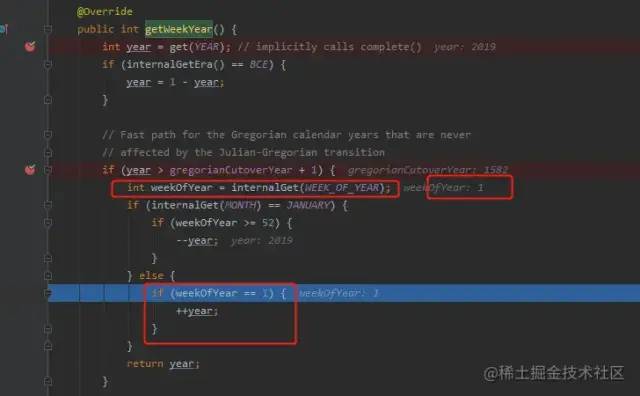
在JDK中會把前一年末尾的幾天判定為下一年的第一周,因此上面程序的結果是1
解決方案
使用Calendar類 get(Calendar.YEAR)獲取年份
問題
1、讀取月份時,要+1
2、返回的星期是從周日開始計算,周日為1,1~7表示星期
3、Calendar的跨年問題,獲取年份要用c.get(Calendar.YEAR),不要用c.getWeekYear();
4、獲取指定時間是一年中的第幾周時,調用cl.get(Calendar.WEEK_OF_YEAR),要注意跨年問題,跨年的那一周,獲取的值為1。離跨年最近的那周為52。
三:LocalDateTime
支持版本及以上
jdk8
介紹
LocalDateTime類說明
表示當前日期時間,相當于:yyyy-MM-ddTHH:mm:ss
LocalDateTime常用的用法
獲取當前日期和時間
		LocalDate d = LocalDate.now(); // 當前日期
		LocalTime t = LocalTime.now(); // 當前時間
		LocalDateTime dt = LocalDateTime.now(); // 當前日期和時間
		System.out.println(d); // 嚴格按照ISO 8601格式打印
		System.out.println(t); // 嚴格按照ISO 8601格式打印
		System.out.println(dt); // 嚴格按照ISO 8601格式打印
復制代碼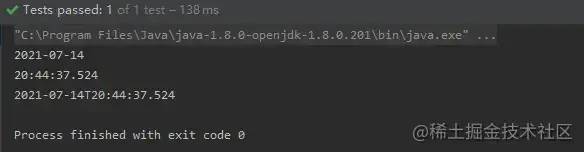
由運行結果可行,本地日期時間通過now()獲取到的總是以當前默認時區(qū)返回的
獲取指定日期和時間
		LocalDate d2 = LocalDate.of(2021, 07, 14); // 2021-07-14, 注意07=07月
		LocalTime t2 = LocalTime.of(13, 14, 20); // 13:14:20
		LocalDateTime dt2 = LocalDateTime.of(2021, 07, 14, 13, 14, 20);
		LocalDateTime dt3 = LocalDateTime.of(d2, t2);
		System.out.println("指定日期時間:"+dt2);
		System.out.println("指定日期時間:"+dt3);
復制代碼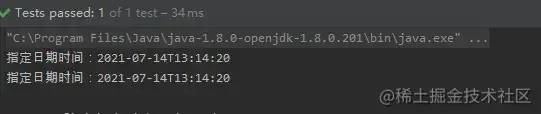
日期時間的加減法及修改
		LocalDateTime currentTime = LocalDateTime.now(); // 當前日期和時間
		System.out.println("------------------時間的加減法及修改-----------------------");
		//3.LocalDateTime的加減法包含了LocalDate和LocalTime的所有加減,上面說過,這里就只做簡單介紹
		System.out.println("3.當前時間:" + currentTime);
		System.out.println("3.當前時間加5年:" + currentTime.plusYears(5));
		System.out.println("3.當前時間加2個月:" + currentTime.plusMonths(2));
		System.out.println("3.當前時間減2天:" + currentTime.minusDays(2));
		System.out.println("3.當前時間減5個小時:" + currentTime.minusHours(5));
		System.out.println("3.當前時間加5分鐘:" + currentTime.plusMinutes(5));
		System.out.println("3.當前時間加20秒:" + currentTime.plusSeconds(20));
		//還可以靈活運用比如:向后加一年,向前減一天,向后加2個小時,向前減5分鐘,可以進行連寫
		System.out.println("3.同時修改(向后加一年,向前減一天,向后加2個小時,向前減5分鐘):" + currentTime.plusYears(1).minusDays(1).plusHours(2).minusMinutes(5));
		System.out.println("3.修改年為2025年:" + currentTime.withYear(2025));
		System.out.println("3.修改月為12月:" + currentTime.withMonth(12));
		System.out.println("3.修改日為27日:" + currentTime.withDayOfMonth(27));
		System.out.println("3.修改小時為12:" + currentTime.withHour(12));
		System.out.println("3.修改分鐘為12:" + currentTime.withMinute(12));
		System.out.println("3.修改秒為12:" + currentTime.withSecond(12));
復制代碼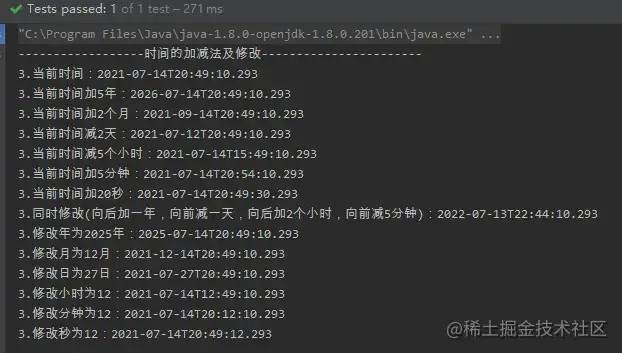
LocalDateTime和Date相互轉化
Date轉LocalDateTime
		System.out.println("------------------方法一:分步寫-----------------------");
		//實例化一個時間對象
		Date date = new Date();
		//返回表示時間軸上同一點的瞬間作為日期對象
		Instant instant = date.toInstant();
		//獲取系統(tǒng)默認時區(qū)
		ZoneId zoneId = ZoneId.systemDefault();
		//根據時區(qū)獲取帶時區(qū)的日期和時間
		ZonedDateTime zonedDateTime = instant.atZone(zoneId);
		//轉化為LocalDateTime
		LocalDateTime localDateTime = zonedDateTime.toLocalDateTime();
		System.out.println("方法一:原Date = " + date);
		System.out.println("方法一:轉化后的LocalDateTime = " + localDateTime);

		System.out.println("------------------方法二:一步到位(推薦使用)-----------------------");
		//實例化一個時間對象
		Date todayDate = new Date();
		//Instant.ofEpochMilli(long l)使用1970-01-01T00:00:00Z的紀元中的毫秒來獲取Instant的實例
		LocalDateTime ldt = Instant.ofEpochMilli(todayDate.getTime()).atZone(ZoneId.systemDefault()).toLocalDateTime();
		System.out.println("方法二:原Date = " + todayDate);
		System.out.println("方法二:轉化后的LocalDateTime = " + ldt);
復制代碼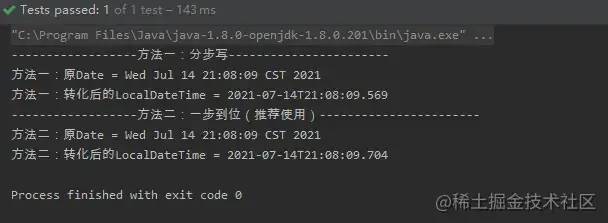
LocalDateTime轉Date
		System.out.println("------------------方法一:分步寫-----------------------");
		//獲取LocalDateTime對象,當前時間
		LocalDateTime localDateTime = LocalDateTime.now();
		//獲取系統(tǒng)默認時區(qū)
		ZoneId zoneId = ZoneId.systemDefault();
		//根據時區(qū)獲取帶時區(qū)的日期和時間
		ZonedDateTime zonedDateTime = localDateTime.atZone(zoneId);
		//返回表示時間軸上同一點的瞬間作為日期對象
		Instant instant = zonedDateTime.toInstant();
		//轉化為Date
		Date date = Date.from(instant);
		System.out.println("方法一:原LocalDateTime = " + localDateTime);
		System.out.println("方法一:轉化后的Date = " + date);

		System.out.println("------------------方法二:一步到位(推薦使用)-----------------------");
		//實例化一個LocalDateTime對象
		LocalDateTime now = LocalDateTime.now();
		//轉化為date
		Date dateResult = Date.from(now.atZone(ZoneId.systemDefault()).toInstant());
		System.out.println("方法二:原LocalDateTime = " + now);
		System.out.println("方法二:轉化后的Date = " + dateResult);
復制代碼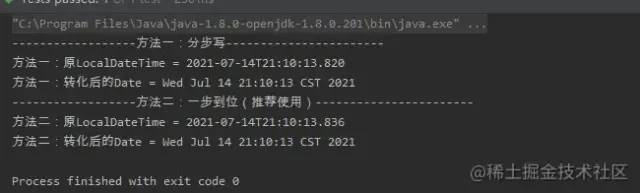
線程安全
網上大家都在說JAVA 8提供的LocalDateTime是線程安全的,但是它是如何實現的呢
今天讓我們來挖一挖
public final class LocalDateTime
        implements Temporal, TemporalAdjuster, ChronoLocalDateTime<LocalDate>, Serializable {
        ...
        }
復制代碼
由上面的源碼可知,LocalDateTime是不可變類。我們都知道一個Java并發(fā)編程規(guī)則:不可變對象永遠是線程安全的。
對比下Date的源碼 ,Date是可變類,所以是線程不安全的。
public class Date
    implements java.io.Serializable, Cloneable, Comparable<Date>
{
...
}
復制代碼
四:ZonedDateTime
支持版本及以上
jdk8
介紹
ZonedDateTime類說明
表示一個帶時區(qū)的日期和時間,ZonedDateTime可以理解為LocalDateTime+ZoneId
從源碼可以看出來,ZonedDateTime類中定義了LocalDateTime和ZoneId兩個變量。
且ZonedDateTime類也是不可變類且是線程安全的。
public final class ZonedDateTime
        implements Temporal, ChronoZonedDateTime<LocalDate>, Serializable {

    /**
     * Serialization version.
     */
    private static final long serialVersionUID = -6260982410461394882L;

    /**
     * The local date-time.
     */
    private final LocalDateTime dateTime;
    /**
     * The time-zone.
     */
    private final ZoneId zone;

    ...
}
復制代碼
ZonedDateTime常用的用法
獲取當前時間+帶時區(qū)+時區(qū)轉換
		// 默認時區(qū)獲取當前時間
		ZonedDateTime zonedDateTime = ZonedDateTime.now();
		// 用指定時區(qū)獲取當前時間,Asia/Shanghai為上海時區(qū)
		ZonedDateTime zonedDateTime1 = ZonedDateTime.now(ZoneId.of("Asia/Shanghai"));
		//withZoneSameInstant為轉換時區(qū),參數為ZoneId
		ZonedDateTime zonedDateTime2 = zonedDateTime.withZoneSameInstant(ZoneId.of("America/New_York"));
		System.out.println(zonedDateTime);
		System.out.println(zonedDateTime1);
		System.out.println(zonedDateTime2);
復制代碼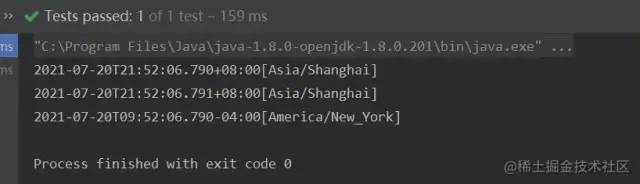
LocalDateTime+ZoneId變ZonedDateTime
		LocalDateTime localDateTime = LocalDateTime.now();
		ZonedDateTime zonedDateTime1 = localDateTime.atZone(ZoneId.systemDefault());
		ZonedDateTime zonedDateTime2 = localDateTime.atZone(ZoneId.of("America/New_York"));
		System.out.println(zonedDateTime1);
		System.out.println(zonedDateTime2);
復制代碼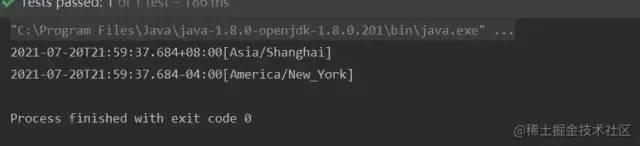
上面的例子說明了,LocalDateTime是可以轉成ZonedDateTime的。
DateTimeFormatter常用的用法
		ZonedDateTime zonedDateTime = ZonedDateTime.now();
		DateTimeFormatter formatter = DateTimeFormatter.ofPattern("yyyy-MM-dd'T'HH:mm ZZZZ");
		System.out.println(formatter.format(zonedDateTime));

		DateTimeFormatter usFormatter = DateTimeFormatter.ofPattern("E, MMMM/dd/yyyy HH:mm", Locale.US);
		System.out.println(usFormatter.format(zonedDateTime));

		DateTimeFormatter chinaFormatter = DateTimeFormatter.ofPattern("yyyy MMM dd EE HH:mm", Locale.CHINA);
		System.out.println(chinaFormatter.format(zonedDateTime));
復制代碼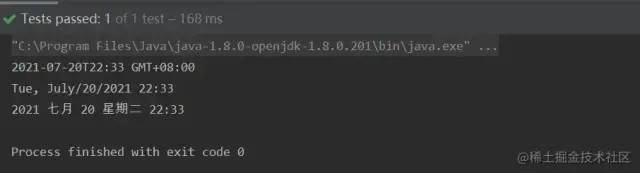
DateTimeFormatter的坑
1、在正常配置按照標準格式的字符串日期,是能夠正常轉換的。如果月,日,時,分,秒在不足兩位的情況需要補0,否則的話會轉換失敗,拋出異常。
		DateTimeFormatter DATE_TIME_FORMATTER = DateTimeFormatter.ofPattern("yyyy-MM-dd HH:mm:ss.SSS");
		LocalDateTime dt1 = LocalDateTime.parse("2021-7-20 23:46:43.946", DATE_TIME_FORMATTER);
		System.out.println(dt1);
復制代碼
會報錯:
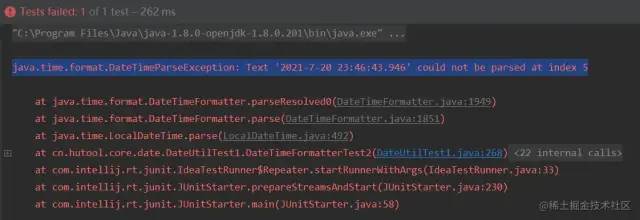
java.time.format.DateTimeParseException: Text '2021-7-20 23:46:43.946' could not be parsed at index 5
復制代碼
分析原因:是格式字符串與實際的時間不匹配
"yyyy-MM-dd HH:mm:ss.SSS"
"2021-7-20 23:46:43.946"
中間的月份格式是MM,實際時間是7
解決方案:保持格式字符串與實際的時間匹配
	DateTimeFormatter DATE_TIME_FORMATTER = DateTimeFormatter.ofPattern("yyyy-MM-dd HH:mm:ss.SSS");
		LocalDateTime dt1 = LocalDateTime.parse("2021-07-20 23:46:43.946", DATE_TIME_FORMATTER);
		System.out.println(dt1);
復制代碼
2、YYYY和DD謹慎使用
		LocalDate date = LocalDate.of(2020,12,31);
		DateTimeFormatter formatter = DateTimeFormatter.ofPattern("YYYYMM");
		// 結果是 202112
		System.out.println( formatter.format(date));
復制代碼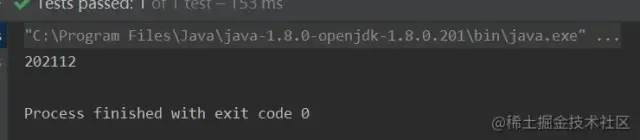
Java’s DateTimeFormatter pattern “YYYY” gives you the week-based-year, (by default, ISO-8601 standard) the year of the Thursday of that week.
復制代碼
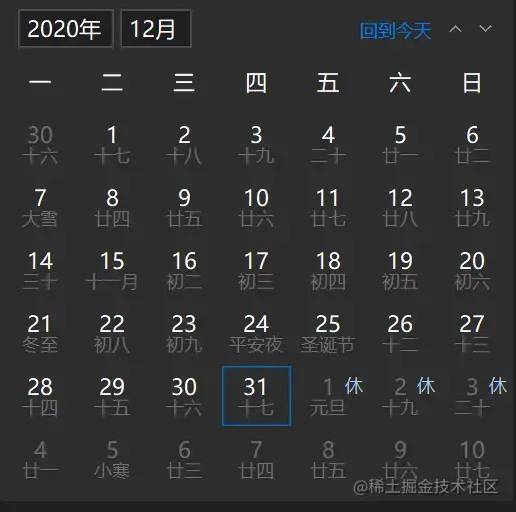
YYYY是取的當前周所在的年份,week-based year 是 ISO 8601 規(guī)定的。2020年12月31號,周算年份,就是2021年
 private static void tryit(int Y, int M, int D, String pat) {
        DateTimeFormatter fmt = DateTimeFormatter.ofPattern(pat);
        LocalDate         dat = LocalDate.of(Y,M,D);
        String            str = fmt.format(dat);
        System.out.printf("Y=%04d M=%02d D=%02d " +
            "formatted with " +
            "\"%s\" -> %s\n",Y,M,D,pat,str);
    }
    public static void main(String[] args){
        tryit(2020,01,20,"MM/DD/YYYY");
        tryit(2020,01,21,"DD/MM/YYYY");
        tryit(2020,01,22,"YYYY-MM-DD");
        tryit(2020,03,17,"MM/DD/YYYY");
        tryit(2020,03,18,"DD/MM/YYYY");
        tryit(2020,03,19,"YYYY-MM-DD");
    }
復制代碼
Y=2020 M=01 D=20 formatted with "MM/DD/YYYY" -> 01/20/2020
Y=2020 M=01 D=21 formatted with "DD/MM/YYYY" -> 21/01/2020
Y=2020 M=01 D=22 formatted with "YYYY-MM-DD" -> 2020-01-22
Y=2020 M=03 D=17 formatted with "MM/DD/YYYY" -> 03/77/2020
Y=2020 M=03 D=18 formatted with "DD/MM/YYYY" -> 78/03/2020
Y=2020 M=03 D=19 formatted with "YYYY-MM-DD" -> 2020-03-79
復制代碼最后三個日期是有問題的,因為大寫的DD代表的是處于這一年中那一天,不是處于這個月的那一天,但是dd就沒有問題。
例子參考于:www.cnblogs.com/tonyY/p/121…
所以建議使用yyyy和dd。
六:Instant
支持版本及以上
jdk8
介紹
Instant類說明
public final class Instant
        implements Temporal, TemporalAdjuster, Comparable<Instant>, Serializable {
        ...
        }
復制代碼Instant也是不可變類且是線程安全的。其實Java.time 這個包是線程安全的。
Instant是java 8新增的特性,里面有兩個核心的字段
	...
	private final long seconds;

    private final int nanos;
	...
復制代碼
一個是單位為秒的時間戳,另一個是單位為納秒的時間戳。
是不是跟**System.currentTimeMillis()**返回的long時間戳很像,System.currentTimeMillis()返回的是毫秒級,Instant多了更精確的納秒級時間戳。
Instant常用的用法
 		Instant now = Instant.now();
		System.out.println("now:"+now);
		System.out.println(now.getEpochSecond()); // 秒
		System.out.println(now.toEpochMilli()); // 毫秒
復制代碼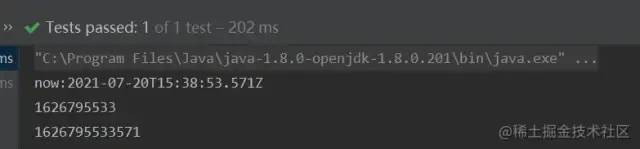
Instant是沒有時區(qū)的,但是Instant加上時區(qū)后,可以轉化為ZonedDateTime
		Instant ins = Instant.now();
		ZonedDateTime zdt = ins.atZone(ZoneId.systemDefault());
		System.out.println(zdt);
復制代碼
long型時間戳轉Instant
要注意long型時間戳的時間單位選擇Instant對應的方法轉化
//1626796436 為秒級時間戳
Instant ins = Instant.ofEpochSecond(1626796436);
ZonedDateTime zdt = ins.atZone(ZoneId.systemDefault());
System.out.println("秒級時間戳轉化:"+zdt);
//1626796436111l 為秒級時間戳
Instant ins1 = Instant.ofEpochMilli(1626796436111l);
ZonedDateTime zdt1 = ins1.atZone(ZoneId.systemDefault());
System.out.println("毫秒級時間戳轉化:"+zdt1);
復制代碼
Instant的坑
Instant.now()獲取的時間與北京時間相差8個時區(qū),這是一個細節(jié),要避坑。
看源碼,用的是UTC時間。
public static Instant now() {
        return Clock.systemUTC().instant();
    }
復制代碼
解決方案:
Instant now = Instant.now().plusMillis(TimeUnit.HOURS.toMillis(8));
System.out.println("now:"+now);
復制代碼
作者:小虛竹and掘金
鏈接:https://juejin.cn/post/7023961450859233293
來源:稀土掘金
著作權歸作者所有。商業(yè)轉載請聯(lián)系作者獲得授權,非商業(yè)轉載請注明出處。