
MySQL 默認最大連接數是多少?
上午剛工作10分左右,同事說在使用jira時出現(xiàn)問題,具體截圖如下:

通過上圖的報錯信息:定位為mysql數據庫連接數的問題
解決方法:
1.登錄mysql進行查看
Mysql –uroot –p123456
mysql> show variables like'%max_connections%';
+-----------------+-------+
| Variable_name   | Value |
+-----------------+-------+
| max_connections | 151  |
+-----------------+-------+
1 row in set (0.00 sec)
很奇怪,最大連接數怎么是151呢,mysql默認的最大連接數不是100么?
后來想一下可能是版本不同的問題,默認連接數也不同。
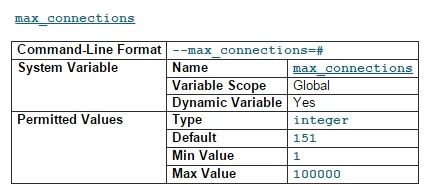
為了確認mysql5.5.3默認的最大連接數為151,去mysql官網查看了一下:mysql默認的最大連接數為151,上限為100000。另外,MySQL 系列面試題和答案我都整理好了,關注公眾號互聯(lián)網架構師回復 "2T" 獲取。
在/etc/my.cnf文件中[mysqld]部分增加max_connections=1000,重啟mysql服務,問題解決。
補充1:mysql其他版本默認的最大連接數
Mysql5.5 mysql5.6 mysql5.7:默認的最大連接數都是151,上限為:100000
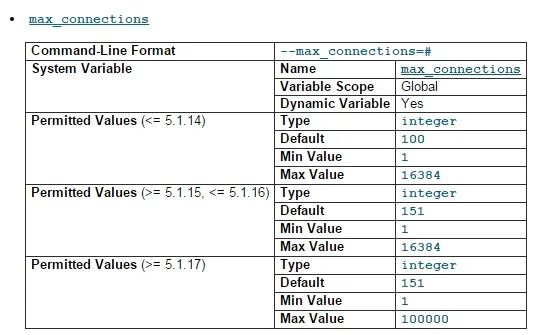
Mysql5.1根據其小版本的不同,默認的最大連接數和可修改的連接數上限也有所不同
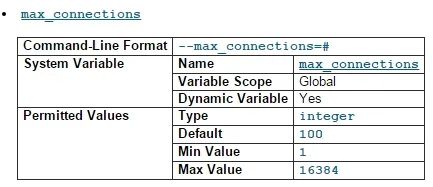
Mysql5.0版本:默認的最大連接數為100,上限為16384
補充2:修改mysql數據庫默認的最大連接數
方法一:修改mysql的主配置文件/etc/my.cnf,[mysqld]部分添加“max_connections=1000(這個根據實際的需要來進行設置即可)”,重啟mysql服務。
方法二:mysql客戶端登錄,通過命令行修改全局變量來進行修改
mysql -uroot -p123456
mysql> set global_max_connections = 200;
mysql> show processlist;
mysql> show status;
修改完成后進行查看,mysql的最大連接數
mysql> show variables like '%max_connections%';
+-----------------+-------+
| Variable_name   | Value |
+-----------------+-------+
| max_connections | 1000  |
+-----------------+-------+
1 row in set (0.00 sec)
方法三:解開mysql源代碼,進入里面的SQL目錄修改mysqld.cc找到下面一行:
{"max_connections", OPT_MAX_CONNECTIONS,
  "The number of simultaneous clients allowed.", (gptr*) &max_connections,
  (gptr*) &max_connections, 0, GET_ULONG, REQUIRED_ARG, 100, 1, 16384, 0, 1,
  0},
把它改為:
{"max_connections", OPT_MAX_CONNECTIONS,
  "The number of simultaneous clients allowed.", (gptr*) &max_connections,
  (gptr*) &max_connections, 0, GET_ULONG, REQUIRED_ARG, 1500, 1, 16384, 0, 1,
  0},
保存退出,然后./configure ;make;make install可以獲得同樣的效果
方法四:通過修改mysqld_safe來修改mysql的連接數
編輯 mysqld_safe配置文件,找到如下內容:
then $NOHUP_NICENESS $ledir/$MYSQLD
  $defaults --basedir=$MY_BASEDIR_VERSION
  --datadir=$DATADIR $USER_OPTION
  --pid-file=$pid_file
  --skip-external-locking
  -O max_connections=1500
  >> $err_log 2>&1 else
  eval "$NOHUP_NICENESS $ledir/$MYSQLD
  $defaults --basedir=$MY_BASEDIR_VERSION
  --datadir=$DATADIR $USER_OPTION
  --pid-file=$pid_file
  --skip-external-locking $args
  -O max_connections=1500 >>
  $err_log 2>&1"
保存退出并重啟mysql服務。
參考文章:
http://blog.chinaunix.net/uid-20592013-id-94956.html
http://blog.csdn.net/tongle_deng/article/details/6932733
作者:mohan87821000
來源:https://blog.51cto.com/5250070/1672803
正文結束
1.不認命,從10年流水線工人,到谷歌上班的程序媛,一位湖南妹子的勵志故事
5.37歲程序員被裁,120天沒找到工作,無奈去小公司,結果懵了...
一個人學習、工作很迷茫?
點擊「閱讀原文」加入我們的小圈子!
