
一篇必看的React文章
本文適合有 React?基礎(chǔ)的小伙伴進(jìn)階學(xué)習(xí)
作者:廣東靚仔
一、前言
本文基于開源項目:
https://github.com/facebook/react
進(jìn)行簡單的梳理,希望能夠讓讀者一文搞懂React 機(jī)制。
1.React中文文檔
? ? 本文需要對React有所了解,如果暫時沒看過React,可以點(diǎn)擊下文,學(xué)習(xí)React基礎(chǔ)再來閱讀。
傳送門:?https://react.docschina.org/
二、簡單的demo
? ??
? ? 我們先來看個簡單的demo
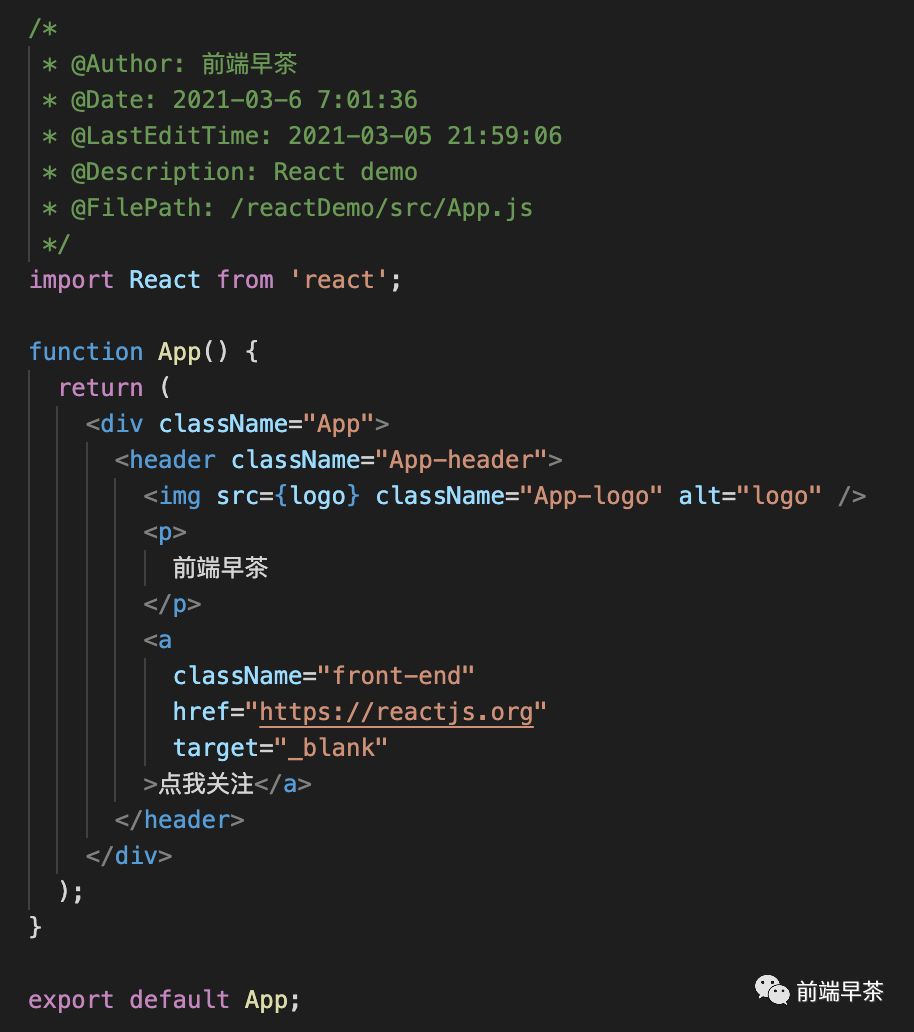
? ? 上面是一個簡單的例子,很容易猜到頁面會刪除“前端早茶”文字,以及一個按鈕“點(diǎn)我關(guān)注”。
? ? 接下來,我們刪除?import React from 'react'?刪除這行代碼,然后仍要得到同樣的效果,怎么實現(xiàn)呢?
? ??毫無疑問,我們需要實現(xiàn)自己的React,項目目錄結(jié)構(gòu)如下:
+--?src?????????????????//?開發(fā)目錄
|???+-- gdlz ???????????//?存放自己實現(xiàn)react(文件名:廣東靚仔)
|???|????+--index.js????//?自己react的邏輯
|???+--index.js?????????//?主頁面
主頁面index.js代碼如下:
/*
?*?@Author:?前端早茶
?*?@Date:?2021-03-05?21:59:06
?*?@LastEditTime:?2021-03-06?07:28:44
?*?@Description:?my?react
?*?@FilePath:?/reactDemo/src/index.js
?*/
import?React?from?'./gdlz'
const?ReactDOM?=?React
class?Child?extends?React.Component{
??constructor?(props)?{
????super(props)
????this.state?=?{
??????count:?1
????}
??}
??handleClick?=?()?=>?{
????this.setState({
??????count:?this.state.count + 1
????})
??}
??render?()?{
????return?<div>
??????<h2?onClick={this.handleClick}>{this.state.count}</h2>
????</div>
??}
}
ChildComponent?=?React.useComponent(Child)

function?App?(props){
??const?[count,?setCount]?=?React.useState(1)
??return?<div?id="container"?className="front-end">
????<h1>{props.title},?{count}</h1>
????<button?onClick={()?=>?setCount(count+1)}>關(guān)注</button>
????<hr/>
????<ChildComponent></ChildComponent>
??</div>
}
let?element?=?<App?title="前端早茶"?/>

ReactDOM.render(element,?document.getElementById('root'))
從上面的代碼中,我們可以看到,主頁面index里面有:
?React.Component
?React.useComponent
?React.useState
?ReactDOM.render
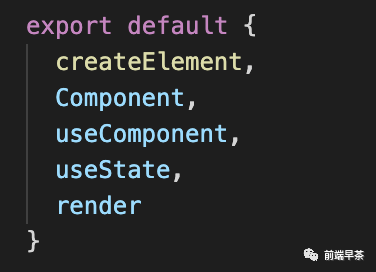
因此我們需要實現(xiàn):
Component,
useComponent
useState,
render,
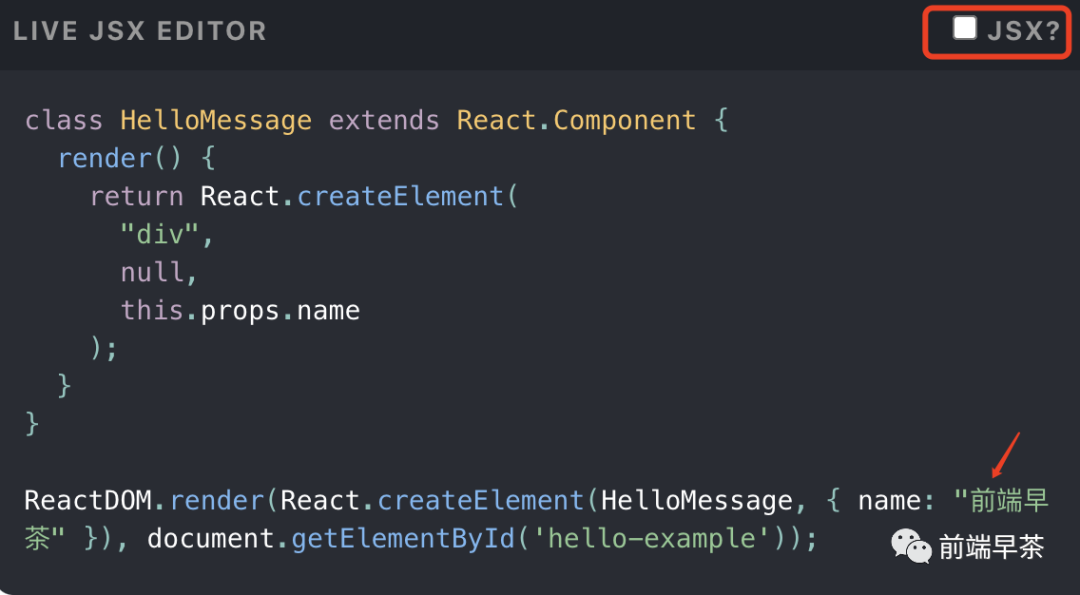
需要注意,createElement 是我們的基礎(chǔ),具體原因是因為React使用的是JSX,需要轉(zhuǎn)為React.createElement的。
我截取了React官網(wǎng)的一個demo,大家會更直觀
自己的React里面最后要導(dǎo)出內(nèi)容如下:
三、createElement
/**
?*?@description:?createElement?函數(shù)
?*?@param?{*}?type?類型
?*?@param?{*}?props?參數(shù)
?*?@param?{array}?children?子元素
?*?@return?{*}?對象
?*/
function?createElement(type,?props,?...children)?{
??return?{
????type,
????props:?{
??????...props,
??????children:?children.map(child?=>
????????typeof?child?===?"object"
????????????child
??????????:?createTextElement(child)
??????),
????},
??}

/**
?*?@description:?createTextElement?函數(shù)
?*?@param?{*}?text?文本,用于直接渲染文字
?*?@return?{*}?對象
?*/
function?createTextElement(text)?{
??return?{
????type:?"TEXT",
????props:?{
??????nodeValue:?text,
??????children:?[],
????},
??}
}
四、Component、useComponent
/**
?*?@description:?Component?組件函數(shù)
?*?@param?{*}
?*?@return?{*}
?*/
class?Component?{
??constructor(props){
????this.props?=?props
??}
}
/**
?*?@description:?useComponent
?*?@param?{*}?Component?傳入的class組件
?*?@return?{*}
?*/
function?useComponent(Component){
??return?function(props){
????const?component?=?new?Component(props)
????let?[state,?setState]?=?useState(component.state)
????component.props?=?props
????component.state?=?state
????component.setState?=?setState
????console.log(component)
????return?component.render()
??}
}
五、useState
//?下一個單元任務(wù)
let?nextUnitOfWork?=?null
//?工作中的fiber
let?wipRoot?=?null
let?currentRoot?=?null
let?deletions?=?null
let?wipFiber?=?null
let?hookIndex?=?null
/**
?*?@description:?useState?函數(shù)
?*?@param?{*}?init?component.state
?*?@return?{*}
?*/
function?useState(init){
??const?oldHook?=
??wipFiber.base?&&
??wipFiber.base.hooks?&&
??wipFiber.base.hooks[hookIndex]
??const?hook?=?{
????state:?oldHook???oldHook.state?:?init,
????queue:?[],
??}
??const?actions?=?oldHook???oldHook.queue?:?[]
??actions.forEach(action?=>?{
????hook.state?=?action
??})
??const?setState?=?action?=>?{
????hook.queue.push(action)
????wipRoot?=?{
??????dom:?currentRoot.dom,
??????props:?currentRoot.props,
??????base:?currentRoot,
????}
????nextUnitOfWork?=?wipRoot
????deletions?=?[]
??}
??wipFiber.hooks.push(hook)
??hookIndex++
??return?[hook.state,?setState]
}
六、render
//?設(shè)置全局?下一個任務(wù)單元
let?nextUnitOfWork?=?null
/**
?*?@description:?render函數(shù)
?*?@param?{*}?vdom?虛擬dom
?*?@param {*} container 容器
?*?@return?{*}
?*/
function?render(vdom,?container){
??//?工作中的fiber?
??wipRoot?=?{
????dom:?container,
????props:?{
??????children:?[vdom],
????},
????base:?currentRoot,
??}
??deletions?=?[]
??nextUnitOfWork?=?wipRoot
}
? ? 從這個render可以看到,我們里面有使用到下一個任務(wù)單元,很明顯會涉及到協(xié)調(diào)調(diào)度children的邏輯。由于篇幅關(guān)系這里簡單描述一下:
? ? 任務(wù)調(diào)度reconcileChildren
? ? 假如當(dāng)前有任務(wù),而且當(dāng)前幀還沒結(jié)束,我們獲取下一個任務(wù)單元,并且記錄起來。當(dāng)沒有下一個任務(wù)了,咋們提交root。在這當(dāng)中我們會使用到window.requestIdleCallback()這個函數(shù)。其作用是在瀏覽器的空閑時段內(nèi)調(diào)用的函數(shù)排隊,函數(shù)一般會按先進(jìn)先調(diào)用的順序執(zhí)行。關(guān)于這個函數(shù)的具體介紹,我們可以在MDN進(jìn)行閱讀。
這里稍微提一下,React17如果子節(jié)點(diǎn)是數(shù)組,會調(diào)用reconcileChildrenArray。
七、總結(jié)
? ? 我們實現(xiàn)了一個自己的React,很明顯我們有很多細(xì)節(jié)沒有考慮進(jìn)去。不過經(jīng)過梳理我們現(xiàn)在對React有了一個清晰的認(rèn)識,閱讀源碼的時候我們分塊進(jìn)行理解,化整為零~
關(guān)注前端早茶,我們一起學(xué)習(xí),共同進(jìn)步