
前端 B 端權(quán)限控制
點(diǎn)擊上方 前端瓶子君,關(guān)注公眾號(hào)
回復(fù)算法,加入前端編程面試算法每日一題群

后臺(tái)管理平臺(tái)內(nèi)部權(quán)限大部分涉及到到兩種方式:資源權(quán)限 & 數(shù)據(jù)權(quán)限
說(shuō)明:下面的代碼是react + ant design pro的例子。
1. 基本介紹
資源權(quán)限:菜單導(dǎo)航欄 & 頁(yè)面 & 按鈕 資源可見(jiàn)權(quán)限。 數(shù)據(jù)權(quán)限:對(duì)于頁(yè)面上的數(shù)據(jù)操作,同一個(gè)人同一個(gè)頁(yè)面不同的數(shù)據(jù)可能存在不同的數(shù)據(jù)操作權(quán)限。
權(quán)限緯度
角色緯度:大部分的情況為:用戶 => 角色 => 權(quán)限 用戶緯度:用戶 => 權(quán)限
表現(xiàn)形式
基礎(chǔ)表現(xiàn)形式還是樹(shù)結(jié)構(gòu)的展現(xiàn)形式,因?yàn)閷?duì)應(yīng)的菜單-頁(yè)面-按鈕是一個(gè)樹(shù)的從主干到節(jié)點(diǎn)的數(shù)據(jù)流向。
2. 權(quán)限數(shù)據(jù)錄入與展示
采用樹(shù)結(jié)構(gòu)進(jìn)行處理。唯一需要處理的是父子節(jié)點(diǎn)的聯(lián)動(dòng)關(guān)系處理。這里因?yàn)椴煌墓净蛘呦到y(tǒng)可能對(duì)于這部分的數(shù)據(jù)錄入方式不同,所以久不貼圖了。
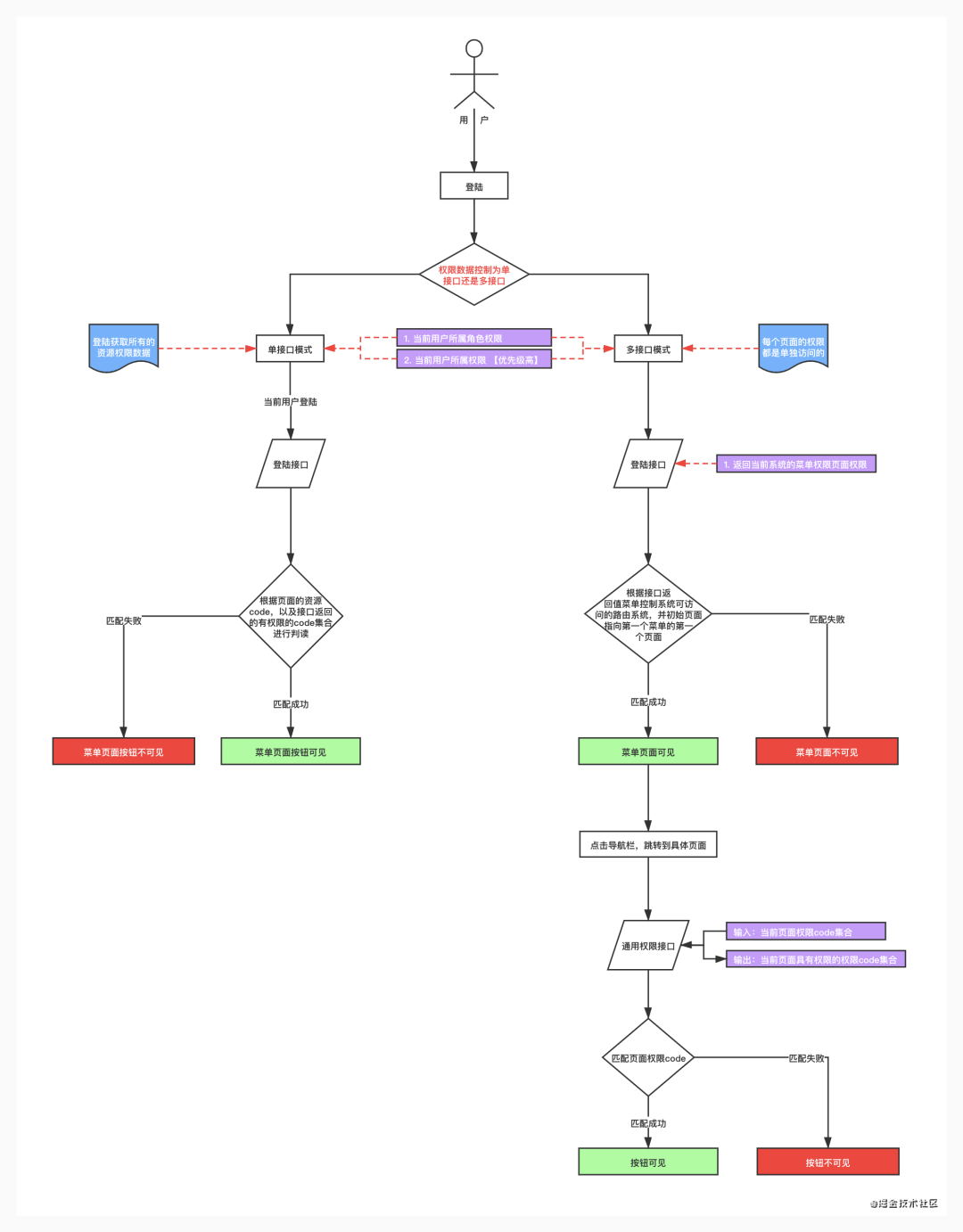
3.用戶資源權(quán)限流程圖
4 前端權(quán)限控制
前端控制權(quán)限也是分為兩部分,菜單頁(yè)面 與 按鈕。因?yàn)榍岸藱?quán)限控制的實(shí)現(xiàn),會(huì)因?yàn)楹笈_(tái)接口形式有所影響,但是大體方向是相同。還是會(huì)分為這兩塊內(nèi)容。這里對(duì)于權(quán)限是使用多接口查詢權(quán)限,初始登錄查詢頁(yè)面權(quán)限,點(diǎn)擊業(yè)務(wù)頁(yè)面,查詢對(duì)應(yīng)業(yè)務(wù)頁(yè)面的資源code。
4.1 菜單權(quán)限
菜單權(quán)限控制需要了解兩個(gè)概念:
一個(gè)是可見(jiàn)的菜單頁(yè)面 :左側(cè)dom節(jié)點(diǎn) 一個(gè)是可訪問(wèn)的菜單頁(yè)面 :系統(tǒng)當(dāng)中路由這一塊
這里說(shuō)的意思是:我們所說(shuō)的菜單權(quán)限控制,大多只是停留在菜單是否可見(jiàn),但是系統(tǒng)路由的頁(yè)面可見(jiàn)和頁(yè)面上的菜單是否可見(jiàn)是兩回事情。假設(shè)系統(tǒng)路由/path1可見(jiàn),盡管頁(yè)面上的沒(méi)有/path1對(duì)應(yīng)的菜單顯示。我們直接在瀏覽器輸入對(duì)應(yīng)的path1,還是可以訪問(wèn)到對(duì)應(yīng)的頁(yè)面。這是因?yàn)橄到y(tǒng)路由那一塊其實(shí)我們是沒(méi)有去處理的。
了解了這個(gè)之后,我們需要做菜單頁(yè)面權(quán)限的時(shí)候就需要去考慮兩塊,并且是對(duì)應(yīng)的。
4.1.1 路由權(quán)限 【代碼地址[2] demo地址[3]】
這里是有兩種做法:
第一種,控制路由的配置,當(dāng)然不是路由配置文件里去配置。而是生效的路由配置里去做。 第二種,完全不做這里的路由控制,而是在路由跳轉(zhuǎn)到?jīng)]有權(quán)限的頁(yè)面,寫(xiě)邏輯校驗(yàn)是否有當(dāng)前的權(quán)限,然后手動(dòng)跳轉(zhuǎn)到403頁(yè)面。
這里還是先用第一種做法來(lái)做:因?yàn)檫@里用第一種做了之后,菜單可見(jiàn)權(quán)限自動(dòng)適配好了。會(huì)省去我們很多事情。
a. 路由文件,定義菜單頁(yè)面權(quán)限。并且將exception以及404的路由添加notInAut標(biāo)志,這個(gè)標(biāo)志說(shuō)明:這兩個(gè)路由不走權(quán)限校驗(yàn)。同理的還有 /user。
export default [
  // user
  {
    path: '/user',
    component: '../layouts/UserLayout',
    routes: [
      { path: '/user', redirect: '/user/login' },
      { path: '/user/login', component: './User/Login' },
      { path: '/user/register', component: './User/Register' },
      { path: '/user/register-result', component: './User/RegisterResult' },
    ],
  },
  // app
  {
    path: '/',
    component: '../layouts/BasicLayout',
    Routes: ['src/pages/Authorized'],
    authority: ['admin', 'user'],
    routes: [
      // dashboard
      { path: '/', redirect: '/list/table-list' },
      // forms
      {
        path: '/form',
        icon: 'form',
        name: 'form',
        code: 'form_menu',
        routes: [
          {
            path: '/form/basic-form',
            code: 'form_basicForm_page',
            name: 'basicform',
            component: './Forms/BasicForm',
          },
        ],
      },
      // list
      {
        path: '/list',
        icon: 'table',
        name: 'list',
        code: 'list_menu',
        routes: [
          {
            path: '/list/table-list',
            name: 'searchtable',
            code: 'list_tableList_page',
            component: './List/TableList',
          },
        ],
      },
      {
        path: '/profile',
        name: 'profile',
        icon: 'profile',
        code: 'profile_menu',
        routes: [
          // profile
          {
            path: '/profile/basic',
            name: 'basic',
            code: 'profile_basic_page',
            component: './Profile/BasicProfile',
          },
          {
            path: '/profile/advanced',
            name: 'advanced',
            code: 'profile_advanced_page',
            authority: ['admin'],
            component: './Profile/AdvancedProfile',
          },
        ],
      },
      {
        name: 'exception',
        icon: 'warning',
        notInAut: true,
        hideInMenu: true,
        path: '/exception',
        routes: [
          // exception
          {
            path: '/exception/403',
            name: 'not-permission',
            component: './Exception/403',
          },
          {
            path: '/exception/404',
            name: 'not-find',
            component: './Exception/404',
          },
          {
            path: '/exception/500',
            name: 'server-error',
            component: './Exception/500',
          },
          {
            path: '/exception/trigger',
            name: 'trigger',
            hideInMenu: true,
            component: './Exception/TriggerException',
          },
        ],
      },
      {
        notInAut: true,
        component: '404',
      },
    ],
  },
];

復(fù)制代碼
b. 修改app.js 文件,加載路由
export const dva = {
  config: {
    onError(err) {
      err.preventDefault();
    },
  },
};

let authRoutes = null;

function ergodicRoutes(routes, authKey, authority) {
  routes.forEach(element => {
    if (element.path === authKey) {
      Object.assign(element.authority, authority || []);
    } else if (element.routes) {
      ergodicRoutes(element.routes, authKey, authority);
    }
    return element;
  });
}

function customerErgodicRoutes(routes) {
  const menuAutArray = (localStorage.getItem('routerAutArray') || '').split(',');

  routes.forEach(element => {
    // 沒(méi)有path的情況下不需要走邏輯檢查
    // path 為 /user 不需要走邏輯檢查
    if (element.path === '/user' || !element.path) {
      return element;
    }

    // notInAut 為true的情況下不需要走邏輯檢查
    if (!element.notInAut) {
      if (menuAutArray.indexOf(element.code) >= 0 || element.path === '/') {
        if (element.routes) {
          element.routes = customerErgodicRoutes(element.routes);

          element.routes = element.routes.filter(item => !item.isNeedDelete);
        }
      } else {
        element.isNeedDelete = true;
      }
    }

    /**
     * 后臺(tái)接口返回子節(jié)點(diǎn)的情況,父節(jié)點(diǎn)需要溯源處理
     */
    // notInAut 為true的情況下不需要走邏輯檢查
    // if (!element.notInAut) {
    //   if (element.routes) {
    //     // eslint-disable-next-line no-param-reassign
    //     element.routes = customerErgodicRoutes(element.routes);

    //     // eslint-disable-next-line no-param-reassign
    //     if (element.routes.filter(item => item.isNeedSave && !item.hideInMenu).length) {
    //       // eslint-disable-next-line no-param-reassign
    //       element.routes = element.routes.filter(item => item.isNeedSave);
    //       if (element.routes.length) {
    //         // eslint-disable-next-line no-param-reassign
    //         element.isNeedSave = true;
    //       }
    //     }
    //   } else if (menuAutArray.indexOf(element.code) >= 0) {
    //     // eslint-disable-next-line no-param-reassign
    //     element.isNeedSave = true;
    //   }
    // } else {
    //   // eslint-disable-next-line no-param-reassign
    //   element.isNeedSave = true;
    // }

    return element;
  });

  return routes;
}

export function patchRoutes(routes) {
  Object.keys(authRoutes).map(authKey =>
    ergodicRoutes(routes, authKey, authRoutes[authKey].authority),
  );

  customerErgodicRoutes(routes);

  /**
   * 后臺(tái)接口返回子節(jié)點(diǎn)的情況,父節(jié)點(diǎn)需要溯源處理
   */
  window.g_routes = routes.filter(item => !item.isNeedDelete);

  /**
   * 后臺(tái)接口返回子節(jié)點(diǎn)的情況,父節(jié)點(diǎn)需要溯源處理
   */
  // window.g_routes = routes.filter(item => item.isNeedSave);
}

export function render(oldRender) {
  authRoutes = '';
  oldRender();
}

復(fù)制代碼
c. 修改login.js,獲取路由當(dāng)中的code便利獲取到,進(jìn)行查詢權(quán)限
import { routerRedux } from 'dva/router';
import { stringify } from 'qs';
import { fakeAccountLogin, getFakeCaptcha } from '@/services/api';
import { getAuthorityMenu } from '@/services/authority';
import { setAuthority } from '@/utils/authority';
import { getPageQuery } from '@/utils/utils';
import { reloadAuthorized } from '@/utils/Authorized';
import routes from '../../config/router.config';

export default {
  namespace: 'login',

  state: {
    status: undefined,
  },

  effects: {
    *login({ payload }, { call, put }) {
      const response = yield call(fakeAccountLogin, payload);
      yield put({
        type: 'changeLoginStatus',
        payload: response,
      });
      // Login successfully
      if (response.status === 'ok') {
        // 這里的數(shù)據(jù)通過(guò)接口返回菜單頁(yè)面的權(quán)限是什么

        const codeArray = [];
        // eslint-disable-next-line no-inner-declarations
        function ergodicRoutes(routesParam) {
          routesParam.forEach(element => {
            if (element.code) {
              codeArray.push(element.code);
            }
            if (element.routes) {
              ergodicRoutes(element.routes);
            }
          });
        }

        ergodicRoutes(routes);
        const authMenuArray = yield call(getAuthorityMenu, codeArray.join(','));
        localStorage.setItem('routerAutArray', authMenuArray.join(','));

        reloadAuthorized();
        const urlParams = new URL(window.location.href);
        const params = getPageQuery();
        let { redirect } = params;
        if (redirect) {
          const redirectUrlParams = new URL(redirect);
          if (redirectUrlParams.origin === urlParams.origin) {
            redirect = redirect.substr(urlParams.origin.length);
            if (redirect.match(/^\/.*#/)) {
              redirect = redirect.substr(redirect.indexOf('#') + 1);
            }
          } else {
            window.location.href = redirect;
            return;
          }
        }
        // yield put(routerRedux.replace(redirect || '/'));

        // 這里之所以用頁(yè)面跳轉(zhuǎn),因?yàn)槁酚傻闹匦略O(shè)置需要頁(yè)面重新刷新才可以生效
        window.location.href = redirect || '/';
      }
    },

    *getCaptcha({ payload }, { call }) {
      yield call(getFakeCaptcha, payload);
    },

    *logout(_, { put }) {
      yield put({
        type: 'changeLoginStatus',
        payload: {
          status: false,
          currentAuthority: 'guest',
        },
      });
      reloadAuthorized();
      yield put(
        routerRedux.push({
          pathname: '/user/login',
          search: stringify({
            redirect: window.location.href,
          }),
        }),
      );
    },
  },

  reducers: {
    changeLoginStatus(state, { payload }) {
      setAuthority(payload.currentAuthority);
      return {
        ...state,
        status: payload.status,
        type: payload.type,
      };
    },
  },
};

復(fù)制代碼
d. 添加service
import request from '@/utils/request';

// 查詢菜單權(quán)限
export async function getAuthorityMenu(codes) {
  return request(`/api/authority/menu?resCodes=${codes}`);
}

// 查詢頁(yè)面按鈕權(quán)限
export async function getAuthority(params) {
  return request(`/api/authority?codes=${params}`);
}

復(fù)制代碼
4.1.2 路由權(quán)限 菜單可見(jiàn)權(quán)限
參照上面的方式,這里的菜單可見(jiàn)權(quán)限不用做其他的操作。
4.2 按鈕權(quán)限 【代碼地址[4] demo地址[5]】
按鈕權(quán)限上就涉及到兩塊,資源權(quán)限和數(shù)據(jù)權(quán)限。數(shù)據(jù)獲取的方式不同,代碼邏輯上會(huì)稍微有點(diǎn)不同。核心是業(yè)務(wù)組件內(nèi)部的code,在加載的時(shí)候就自行累加,然后在頁(yè)面加載完成的時(shí)候,發(fā)送請(qǐng)求。拿到數(shù)據(jù)之后,自行進(jìn)行權(quán)限校驗(yàn)。盡量減少業(yè)務(wù)頁(yè)面代碼的復(fù)雜度。
資源權(quán)限邏輯介紹:
PageHeaderWrapper包含的業(yè)務(wù)頁(yè)面存在按鈕權(quán)限 按鈕權(quán)限通過(guò)AuthorizedButton包含處理,需要添加code。但是業(yè)務(wù)頁(yè)面因?yàn)槭菃为?dú)頁(yè)面發(fā)送當(dāng)前頁(yè)面code集合去查詢權(quán)限code,然后在AuthorizedButton進(jìn)行權(quán)限邏輯判斷。 所以AuthorizedButton的componentWillMount生命周期進(jìn)行當(dāng)前業(yè)務(wù)頁(yè)面的code累加。累加完成之后,通過(guò)PageHeaderWrapper的componentDidMount生命周期函數(shù)發(fā)送權(quán)限請(qǐng)求,拿到權(quán)限code,通過(guò)公有g(shù)lobalAuthority model讀取數(shù)據(jù)進(jìn)行權(quán)限邏輯判斷。 對(duì)于業(yè)務(wù)頁(yè)面的調(diào)用參考readme進(jìn)行使用。因?yàn)閷?duì)于彈出框內(nèi)部的code,在業(yè)務(wù)列表頁(yè)面渲染的時(shí)候,組件還未加載,所以通過(guò)extencode提前將code累加起來(lái)進(jìn)行查詢權(quán)限。
數(shù)據(jù)權(quán)限介紹:
涉及數(shù)據(jù)權(quán)限,則直接將對(duì)應(yīng)的數(shù)據(jù)規(guī)則放進(jìn)AuthorizedButton內(nèi)部進(jìn)行判斷,需要傳入的數(shù)據(jù)則直接通過(guò)props傳入即可。因?yàn)閿?shù)據(jù)權(quán)限的規(guī)則不同,這里就沒(méi)有舉例子。 需要注意的邏輯是資源權(quán)限和數(shù)據(jù)權(quán)限是串行的,先判斷資源權(quán)限,然后判斷數(shù)據(jù)權(quán)限。
a. 添加公用authority model
/* eslint-disable no-unused-vars */
/* eslint-disable no-prototype-builtins */
import { getAuthority } from '@/services/authority';

export default {
  namespace: 'globalAuthority',

  state: {
    hasAuthorityCodeArray: [], // 獲取當(dāng)前具有權(quán)限的資源code
    pageCodeArray: [], // 用來(lái)存儲(chǔ)當(dāng)前頁(yè)面存在的資源code
  },

  effects: {
    /**
     * 獲取當(dāng)前頁(yè)面的權(quán)限控制
     */
    *getAuthorityForPage({ payload }, { put, call, select }) {
      // 這里的資源code都是自己加載的
      const pageCodeArray = yield select(state => state.globalAuthority.pageCodeArray);
      const response = yield call(getAuthority, pageCodeArray);

      if (pageCodeArray.length) {
        yield put({
          type: 'save',
          payload: {
            hasAuthorityCodeArray: response,
          },
        });
      }
    },

    *plusCode({ payload }, { put, select }) {
      // 組件累加當(dāng)前頁(yè)面的code,用來(lái)發(fā)送請(qǐng)求返回對(duì)應(yīng)的權(quán)限code
      const { codeArray = [] } = payload;
      const pageCodeArray = yield select(state => state.globalAuthority.pageCodeArray);

      yield put({
        type: 'save',
        payload: {
          pageCodeArray: pageCodeArray.concat(codeArray),
        },
      });
    },

    // eslint-disable-next-line no-unused-vars
    *resetAuthorityForPage({ payload }, { put, call }) {
      yield put({
        type: 'save',
        payload: {
          hasAuthorityCodeArray: [],
          pageCodeArray: [],
        },
      });
    },
  },

  reducers: {
    save(state, { payload }) {
      return {
        ...state,
        ...payload,
      };
    },
  },
};

復(fù)制代碼
b. 修改PageHeaderWrapper文件【因?yàn)樗械臉I(yè)務(wù)頁(yè)面都是這個(gè)組件的子節(jié)點(diǎn)】
import React, { PureComponent } from 'react';
import { FormattedMessage } from 'umi/locale';
import Link from 'umi/link';
import PageHeader from '@/components/PageHeader';
import { connect } from 'dva';
import MenuContext from '@/layouts/MenuContext';
import { Spin } from 'antd';
import GridContent from './GridContent';
import styles from './index.less';

class PageHeaderWrapper extends PureComponent {
  componentDidMount() {
    const { dispatch } = this.props;
    dispatch({
      type: 'globalAuthority/getAuthorityForPage', // 發(fā)送請(qǐng)求獲取當(dāng)前頁(yè)面的權(quán)限code
    });
  }

  componentWillUnmount() {
    const { dispatch } = this.props;
    dispatch({
      type: 'globalAuthority/resetAuthorityForPage',
    });
  }

  render() {
    const { children, contentWidth, wrapperClassName, top, loading, ...restProps } = this.props;

    return (
      <Spin spinning={loading}>
        <div style={{ margin: '-24px -24px 0' }} className={wrapperClassName}>
          {top}
          <MenuContext.Consumer>
            {value => (
              <PageHeader
                wide={contentWidth === 'Fixed'}
                home={<FormattedMessage id="menu.home" defaultMessage="Home" />}
                {...value}
                key="pageheader"
                {...restProps}
                linkElement={Link}
                itemRender={item => {
                  if (item.locale) {
                    return <FormattedMessage id={item.locale} defaultMessage={item.title} />;
                  }
                  return item.title;
                }}
              />
            )}
          </MenuContext.Consumer>
          {children ? (
            <div className={styles.content}>
              <GridContent>{children}</GridContent>
            </div>
          ) : null}
        </div>
      </Spin>
    );
  }
}

export default connect(({ setting, globalAuthority, loading }) => ({
  contentWidth: setting.contentWidth,
  globalAuthority,
  loading: loading.models.globalAuthority,
}))(PageHeaderWrapper);

復(fù)制代碼
c. 添加AuthorizedButton公共組件
import React, { Component } from 'react';
import PropTypes from 'prop-types';
import { connect } from 'dva';

@connect(({ globalAuthority }) => ({
  globalAuthority,
}))
class AuthorizedButton extends Component {
  static contextTypes = {
    isMobile: PropTypes.bool,
  };

  componentWillMount() {
    // extendcode 擴(kuò)展表格中的code還沒(méi)有出現(xiàn)的情況
    const {
      dispatch,
      code,
      extendCode = [],
      globalAuthority: { pageCodeArray },
    } = this.props;

    let codeArray = [];

    if (code) {
      codeArray.push(code);
    }

    if (extendCode && extendCode.length) {
      codeArray = codeArray.concat(extendCode);
    }

    // code已經(jīng)存在,證明是頁(yè)面數(shù)據(jù)渲染之后或者彈出框的按鈕資源,不需要走dva了
    if (pageCodeArray.indexOf(code) >= 0) {
      return;
    }

    dispatch({
      type: 'globalAuthority/plusCode',
      payload: {
        codeArray,
      },
    });
  }

  checkAuthority = code => {
    const {
      globalAuthority: { hasAuthorityCodeArray },
    } = this.props;

    return hasAuthorityCodeArray.indexOf(code) >= 0; // 資源權(quán)限
  };

  render() {
    const { children, code } = this.props;

    return (
      <span style={{ display: this.checkAuthority(code) ? 'inline' : 'none' }}>{children}</span>
    );
  }
}

export default AuthorizedButton;

復(fù)制代碼
d. 添加AuthorizedButton readme文件
github.com/rodchen-kin…[6]
4.3 按鈕權(quán)限擴(kuò)展-鏈接權(quán)限控制 【代碼地址[7] demo地址[8]】
背景:頁(yè)面上有需要控制跳轉(zhuǎn)鏈接的權(quán)限,有權(quán)限則可以跳轉(zhuǎn),沒(méi)有權(quán)限則不能跳轉(zhuǎn)。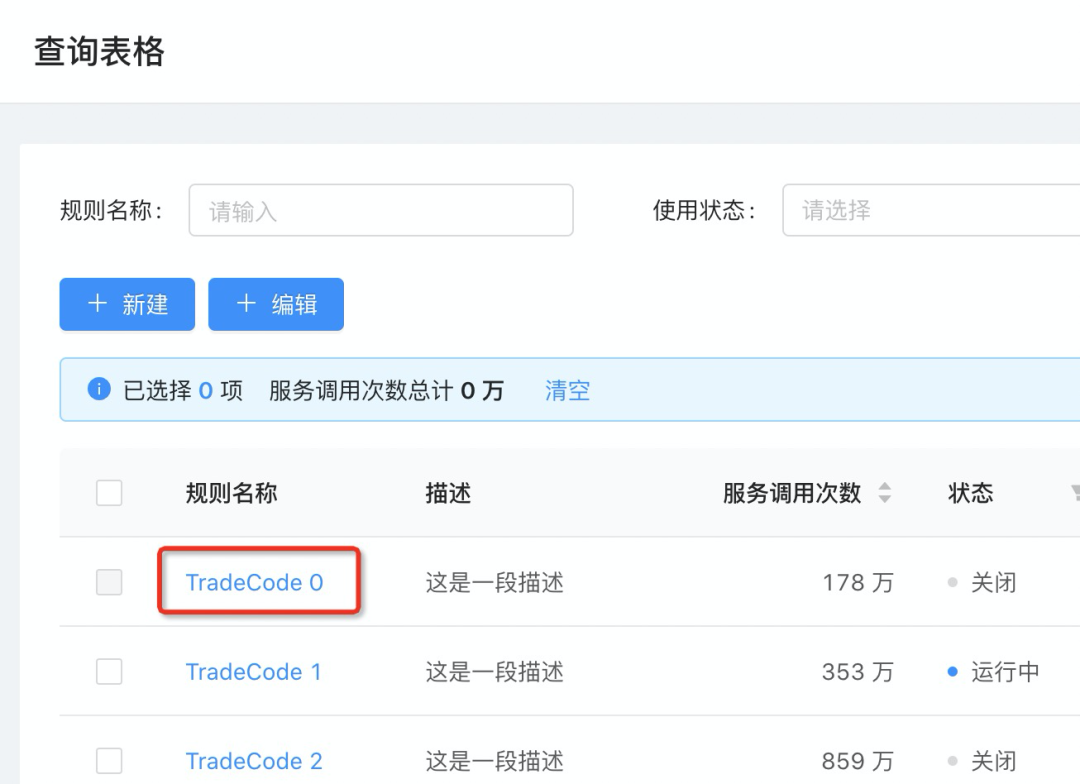
a.公共model添加新的state:codeAuthorityObject
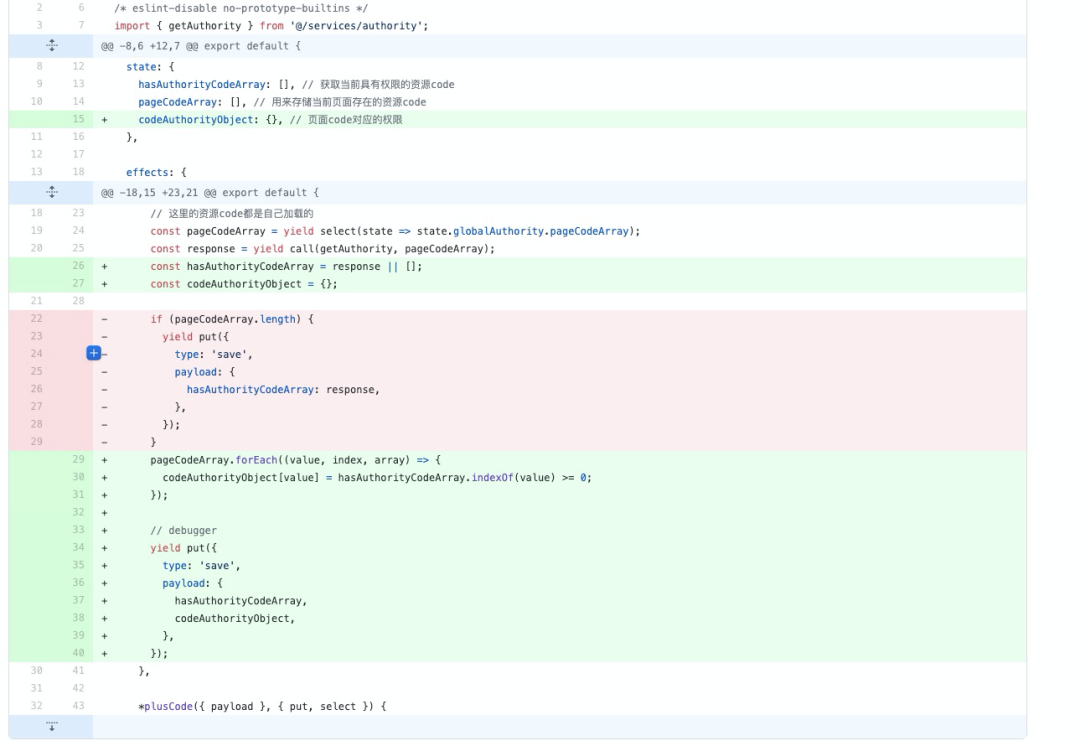
通過(guò)redux-devtool,查看到codeAuthorityObject的狀態(tài)值為:key:code值,value的值為true/false。true代表,有權(quán)限,false代表無(wú)權(quán)限。主要用于開(kāi)發(fā)人員自己做相關(guān)處理。

b.需要控制的按鈕code,通過(guò)其他方式擴(kuò)展進(jìn)行code計(jì)算,發(fā)送請(qǐng)求獲取權(quán)限

c.獲取數(shù)據(jù)進(jìn)行數(shù)據(jù)控制

4.4 按鈕數(shù)據(jù)權(quán)限
demo分支:github.com/rodchen-kin…[9] demo代碼:github.com/rodchen-kin…[10]
背景
數(shù)據(jù)權(quán)限是對(duì)于業(yè)務(wù)組件內(nèi)部表格組件的數(shù)據(jù)進(jìn)行的數(shù)據(jù)操作權(quán)限。列表數(shù)據(jù)可能歸屬于不同的數(shù)據(jù)類型,所以具有不同的數(shù)據(jù)操作權(quán)限。對(duì)于批量操作則需要判斷選擇的數(shù)據(jù)是否都具有操作權(quán)限,然后顯示是否可以批量操作,如果有一個(gè)沒(méi)有操作權(quán)限,都不能進(jìn)行操作。
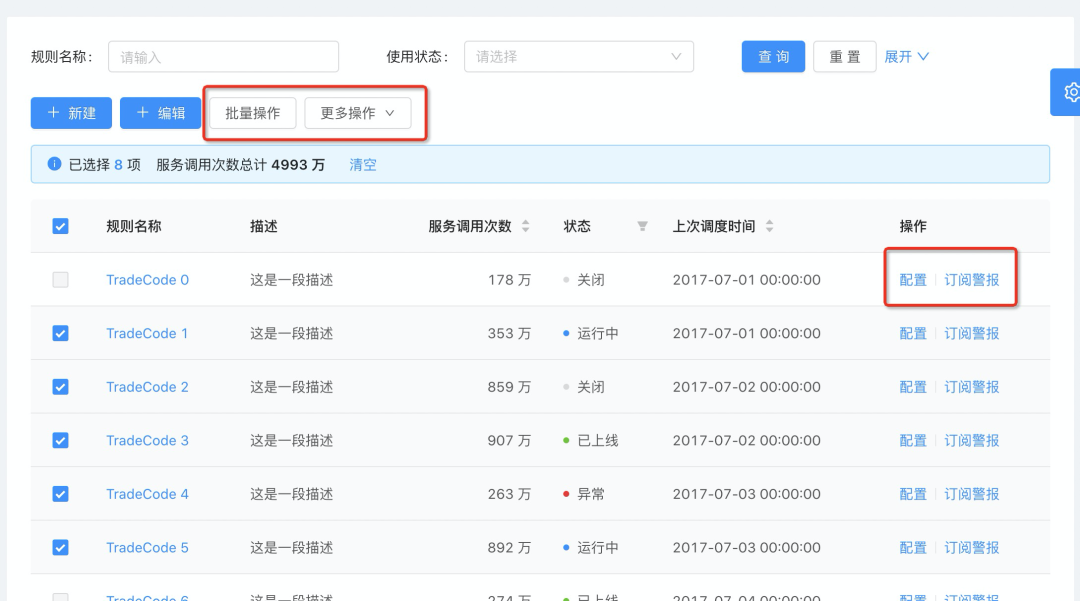
總體思路
場(chǎng)景:
比如在商品列表中,每條商品記錄后面的“操作”一欄下用三個(gè)按鈕:【編輯】、【上架/下架】、【刪除】,而對(duì)于某一個(gè)用戶,他可以查看所有的商品,但對(duì)于某些品牌他可以【上架/下架】但不能【編輯】,則前端需要控制到每一個(gè)商品后面的按鈕的可用狀態(tài)。
比如用戶A對(duì)于某一條業(yè)務(wù)數(shù)據(jù)(id=1999)有編輯權(quán)限,則這條記錄上的【編輯】按鈕對(duì)他來(lái)說(shuō)是可見(jiàn)的(前提是他首先要有【編輯】這個(gè)按鈕的資源權(quán)限),但對(duì)于另一條記錄(id=1899)是沒(méi)有【編輯】權(quán)限,則這條記錄上的【編輯】按鈕對(duì)他來(lái)說(shuō)是不可見(jiàn)的。
按鈕【actType】屬性定義
每個(gè)數(shù)據(jù)操作的按鈕上加一個(gè)屬性 “actType”代表這個(gè)按鈕的動(dòng)作類型(如:編輯、刪除、審核等),這個(gè)屬性是資權(quán)限的接口返回的,前端在調(diào)這個(gè)接口時(shí)將這個(gè)屬性記錄下來(lái),或者保存到對(duì)應(yīng)的控件中。所以前端可以不用關(guān)于這個(gè)屬性的每個(gè)枚舉值代表的是什么含義,只需根據(jù)接口的返回值賦值就好。用興趣的同學(xué)也可以參考一下actType取值如下:1 可讀,2 編輯,3 可讀+可寫(xiě), 4 可收貨,8 可發(fā)貨,16 可配貨, 32 可審核,64 可完結(jié)
業(yè)務(wù)接口返回權(quán)限類型字段【permissionType】
對(duì)于有權(quán)限控制的業(yè)務(wù)數(shù)據(jù),列表接口或者詳情接口都會(huì)返回一個(gè)“permissionType”的字段,這個(gè)字段代表當(dāng)前用戶對(duì)于這條業(yè)務(wù)數(shù)據(jù)的權(quán)限類型,如當(dāng) permissionType=2 代表這個(gè)用戶對(duì)于這條數(shù)據(jù)有【編輯權(quán)限】,permisionType=4 代表這個(gè)用戶對(duì)于這條業(yè)務(wù)數(shù)據(jù)有收貨的權(quán)限,permisionType=6表示這個(gè)用戶對(duì)于這條記錄用編輯和發(fā)貨的權(quán)限(6=2+4)
怎么控制按鈕的可用狀態(tài)?
現(xiàn)在列表上有三個(gè)按鈕,【編輯】、【收貨】、【完結(jié)】,它們對(duì)應(yīng)的“actType”分別為2、4、64,某一條數(shù)據(jù)的permissionType=3,這時(shí)這三個(gè)按鈕的狀態(tài)怎么判斷呢,permissionType=3 我們可以分解為 1+2,表示這個(gè)用戶對(duì)于這條記錄有“可讀”+“編輯”權(quán)限,則這三個(gè)按鈕中,只有【編輯】按鈕是可用的。那么判斷的公式為:
((data[i].permissionType & obj.actType)==obj.actType)
復(fù)制代碼
前端的js數(shù)據(jù)進(jìn)行&判斷
需要進(jìn)行數(shù)據(jù)轉(zhuǎn)換
data.toString(2): 將數(shù)據(jù)進(jìn)行2進(jìn)制轉(zhuǎn)換成二進(jìn)制字符串。 parseInt(permissionType,2) : 二進(jìn)制字符串轉(zhuǎn)換成二進(jìn)制數(shù)據(jù)。
代碼修改
接口mock返回?cái)?shù)據(jù)
response = [{
      "type": 3,
      "name": "創(chuàng)建活動(dòng)-10001",
      "actType": 0,
      "code": "10001"
    }, {
      "type": 3,
      "name": "編輯-10002",
      "actType": 2,
      "code": "10002"
    }, {
      "type": 3,
      "name": "配置-10005",
      "actType": 4,
      "code": "10005"
    }, {
      "type": 3,
      "name": "訂閱警報(bào)-10006",
      "actType": 8,
      "code": "10006"
    }, {
      "type": 3,
      "name": "查詢?cè)斍?20001",
      "actType": 16,
      "code": "20001"
    }, {
      "type": 3,
      "name": "批量操作-10007",
      "actType": 32,
      "code": "10007"
    }, {
      "type": 3,
      "name": "更多操作-10008",
      "actType": 64,
      "code": "10008"
    }]
復(fù)制代碼
每一個(gè)返回的接口權(quán)限會(huì)將對(duì)應(yīng)的actType一起返回。
getAuthorityForPage代碼修改 簡(jiǎn)單修改一下,因?yàn)橹胺祷氐氖莄ode數(shù)組,現(xiàn)在返回的是對(duì)象
   /**
     * 獲取當(dāng)前頁(yè)面的權(quán)限控制
     */
    *getAuthorityForPage({ payload }, { put, call, select }) {
      // 這里的資源code都是自己加載的
      const pageCodeArray = yield select(state => state.globalAuthority.pageCodeArray);
      const response = yield call(getAuthority, pageCodeArray);
      const hasAuthorityCodeArray = response || [];
      const codeAuthorityObject = {};

      pageCodeArray.forEach((value, index, array) => {
        codeAuthorityObject[value] = hasAuthorityCodeArray.map(item => item.code).indexOf(value) >= 0;
      });

      // debugger
      yield put({
        type: 'save',
        payload: {
          hasAuthorityCodeArray,
          codeAuthorityObject,
        },
      });
    },
復(fù)制代碼

修改AuthorizedButton代碼 增加數(shù)據(jù)權(quán)限判斷
/* eslint-disable eqeqeq */
import React, { Component } from 'react';
import PropTypes from 'prop-types';
import { connect } from 'dva';

@connect(({ globalAuthority }) => ({
  globalAuthority,
}))
class AuthorizedButton extends Component {
  static contextTypes = {
    isMobile: PropTypes.bool,
  };

  componentWillMount() {
    // extendcode 擴(kuò)展表格中的code還沒(méi)有出現(xiàn)的情況
    const {
      dispatch,
      code,
      extendCode = [],
      globalAuthority: { pageCodeArray },
    } = this.props;

    let codeArray = [];

    if (code) {
      codeArray.push(code);
    }

    if (extendCode && extendCode.length) {
      codeArray = codeArray.concat(extendCode);
    }

    // code已經(jīng)存在,證明是頁(yè)面數(shù)據(jù)渲染之后或者彈出框的按鈕資源,不需要走dva了
    if (pageCodeArray.indexOf(code) >= 0) {
      return;
    }

    dispatch({
      type: 'globalAuthority/plusCode',
      payload: {
        codeArray,
      },
    });
  }

  checkAuthority = code => {
    const {
      globalAuthority: { hasAuthorityCodeArray },
    } = this.props;

    return hasAuthorityCodeArray.map(item => item.code).indexOf(code) >= 0 && this.checkDataAuthority(); // 資源權(quán)限
  };


  /**
   * 檢測(cè)數(shù)據(jù)權(quán)限
   */
  checkDataAuthority = () => {
    const {
      globalAuthority: { hasAuthorityCodeArray },
      code,                                         // 當(dāng)前按鈕的code
      actType,                                      // 當(dāng)前按鈕的actType的值通過(guò)傳遞傳入
      recordPermissionType,                         // 單條數(shù)據(jù)的數(shù)據(jù)操作權(quán)限總和
      actTypeArray
    } = this.props;

    if (recordPermissionType || actTypeArray) {     // 單條數(shù)據(jù)權(quán)限校驗(yàn)
      const tempCode = hasAuthorityCodeArray.filter(item => item.code === code)
      let tempActType = ''

      if (actType) {
        tempActType = actType
      } else if (tempCode.length) {
        tempActType = tempCode[0].actType
      } else {
        return true;                                // 默認(rèn)返回true
      }

      if (actTypeArray) {                           // 批量操作
        return !actTypeArray.some(item => !this.checkPermissionType(item.toString(2), tempActType.toString(2)))
      }

      // 單條數(shù)據(jù)操作
      return this.checkPermissionType(recordPermissionType.toString(2), tempActType.toString(2))
    }

    return true;                                    // 如果字段沒(méi)有值的情況下,證明不需要進(jìn)行數(shù)據(jù)權(quán)限
  }

  /**
   * 二進(jìn)制檢查當(dāng)前當(dāng)前數(shù)據(jù)是否具有當(dāng)前權(quán)限
   * @param {*} permissionType
   * @param {*} actType
   */
  checkPermissionType = (permissionType, actType) =>
     (parseInt(permissionType,2) & parseInt(actType,2)).toString(2) == actType


  render() {
    const { children, code } = this.props;

    return (
      <span style={{ display: this.checkAuthority(code) ? 'inline' : 'none' }}>{children}</span>
    );
  }
}

export default AuthorizedButton;

復(fù)制代碼
調(diào)用方式
單條數(shù)據(jù)操作
<AuthoriedButton code="10005" recordPermissionType={record.permissionType}>
  <a onClick={() => this.handleUpdateModalVisible(true, record)}>配置</a>
</AuthoriedButton>
復(fù)制代碼
批量操作
 <AuthoriedButton code="10007" actTypeArray={getNotDuplicateArrayById(selectedRows, 'permissionType')}>
     <Button>批量操作</Button>
 </AuthoriedButton>
復(fù)制代碼
關(guān)于本文
來(lái)源:耳東蝸牛
https://juejin.cn/post/6969799489519353863