
Docker基礎(chǔ)操作篇-Dokerfile(含源碼)

本文目錄
第一步:安裝Docker
第二步:安裝第一個(gè)Mysql鏡像
第三步:使用物理機(jī)中的Navicat連接虛擬機(jī)中的MySql鏡像
第四步:下載小名的測(cè)試程序
第五步:我們通過(guò)物理機(jī)的瀏覽器訪問(wèn)一下容器里面的項(xiàng)目吧~
第一步:安裝Docker
1. 執(zhí)行命令:
[root@eamon ~]# curl -fsSL https://get.docker.com | bash -s docker --mirror Aliyun2. 安裝成功后,查看Docker版本:
[root@eamon ~]# docker version
Client: Docker Engine - Community
 Version: 20.10.3
 API version: 1.41
 Go version: go1.13.15
 Git commit:        48d30b5
 Built:             Fri Jan 29 14:34:14 2021
 OS/Arch: linux/amd64
 Context:           default
 Experimental:      true
Cannot connect to the Docker daemon at unix:///var/run/docker.sock. Is the docker daemon running?
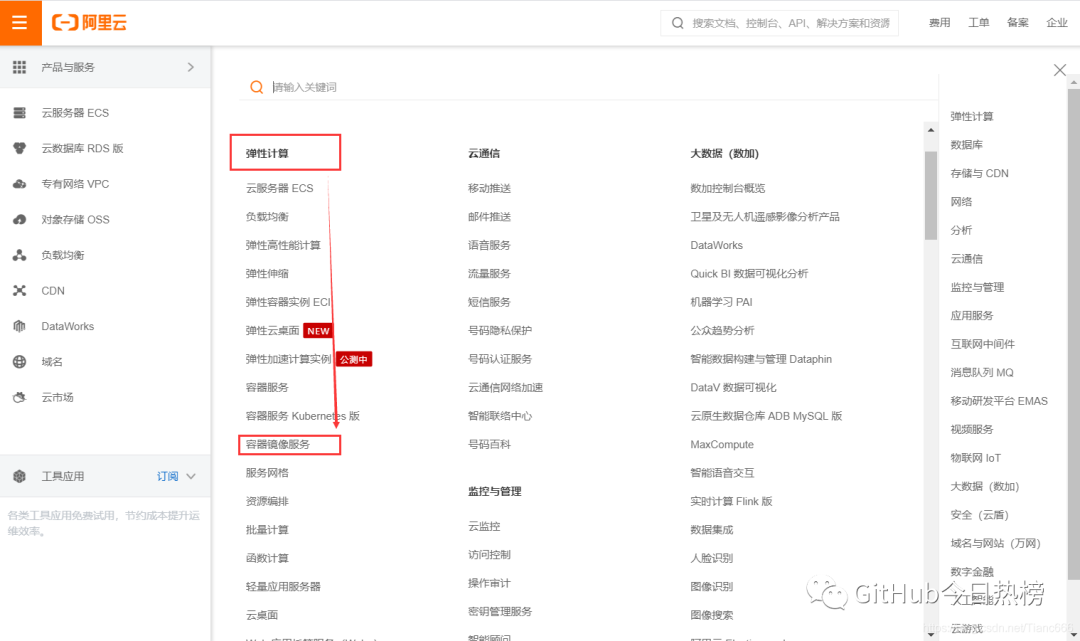
3. 注冊(cè)阿里云賬號(hào) → 選擇“容器鏡像服務(wù)”(免費(fèi))
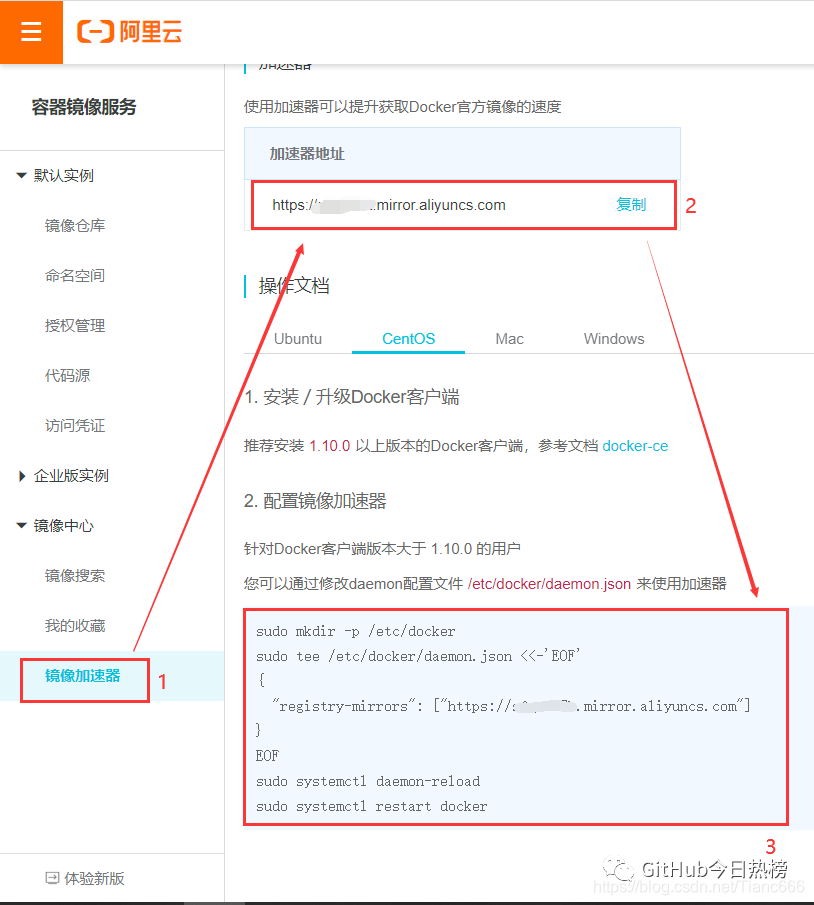
4. 選擇最后一個(gè)“鏡像加速器”,按照下面的教程,完成4步配置Dokcer的阿里云加速器
5. 啟動(dòng)Docker
[root@eamon ~]# systemctl start docker第二步:安裝第一個(gè)Mysql鏡像
1. 方法一:查看mysql在DockerHub中有哪些鏡像
[root@eamon ~]# docker search mysql
NAME DESCRIPTION STARS OFFICIAL AUTOMATED
mysql MySQL is a widely used, open-source relation… 10466     [OK]
mariadb MariaDB is a community-developed fork of MyS… 3891      [OK]
mysql/mysql-server Optimized MySQL Server Docker images. Create… 768                  [OK]
percona Percona Server is a fork of the MySQL relati… 526       [OK]
centos/mysql-57-centos7 MySQL 5.7 SQL database server 87
mysql/mysql-cluster Experimental MySQL Cluster Docker images. Cr… 79
centurylink/mysql Image containing mysql. Optimized to be link… 59                   [OK]
bitnami/mysql Bitnami MySQL Docker Image 48                   [OK]
deitch/mysql-backup REPLACED! Please use http://hub.docker.com/r… 41                   [OK]
databack/mysql-backup Back up mysql databases to... anywhere! 37
prom/mysqld-exporter 37                   [OK]
tutum/mysql Base docker image to run a MySQL database se… 35
schickling/mysql-backup-s3 Backup MySQL to S3 (supports periodic backup… 29                   [OK]
linuxserver/mysql A Mysql container, brought to you by LinuxSe… 27
centos/mysql-56-centos7 MySQL 5.6 SQL database server 20
circleci/mysql MySQL is a widely used, open-source relation… 20
arey/mysql-client Run a MySQL client from a docker container 17                   [OK]
mysql/mysql-router MySQL Router provides transparent routing be… 17
fradelg/mysql-cron-backup MySQL/MariaDB database backup using cron tas… 11                   [OK]
openshift/mysql-55-centos7 DEPRECATED: A Centos7 based MySQL v5.5 image… 6
devilbox/mysql Retagged MySQL, MariaDB and PerconaDB offici… 3
ansibleplaybookbundle/mysql-apb An APB which deploys RHSCL MySQL 2                    [OK]
widdpim/mysql-client Dockerized MySQL Client (5.7) including Curl… 1                    [OK]
jelastic/mysql An image of the MySQL database server mainta… 1
monasca/mysql-init A minimal decoupled init container for mysql 0
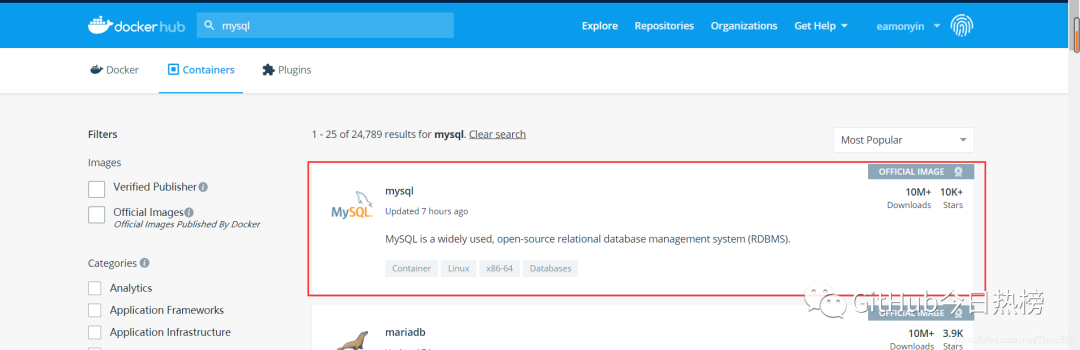
方法二:在DockerHub官網(wǎng)查看(需要注冊(cè)賬號(hào),且外網(wǎng)速度比較慢):
DockerHub官網(wǎng)
搜索MySql → 點(diǎn)擊MySql
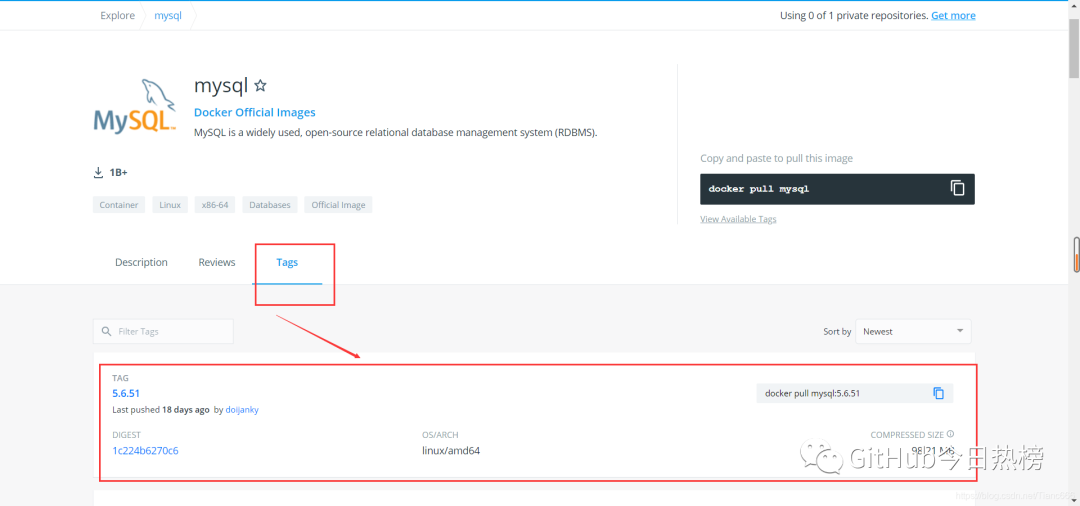
點(diǎn)擊“Tags”查看都有哪些mysql鏡像
2. 根據(jù)所需拉取相應(yīng)的MySql版本(這里我使用的MySql5.7):
(1)拉取MySql鏡像:
[root@eamon ~]# docker pull mysql:5.7
5.7: Pulling from library/mysql
a076a628af6f: Pull complete
f6c208f3f991: Pull complete
88a9455a9165: Pull complete
406c9b8427c6: Pull complete
7c88599c0b25: Pull complete
25b5c6debdaf: Pull complete
43a5816f1617: Pull complete
1831ac1245f4: Pull complete
37677b8c1f79: Downloading [======================> ] 48.79MB/108.4MB
27e4ac3b0f6e: Download complete
7227baa8c445: Download complete
(2)待到MySql每一層鏡像都呈Pull complete即為拉取鏡像完成
[root@eamon ~]# docker pull mysql:5.7
5.7: Pulling from library/mysql
a076a628af6f: Pull complete
f6c208f3f991: Pull complete
88a9455a9165: Pull complete
406c9b8427c6: Pull complete
7c88599c0b25: Pull complete
25b5c6debdaf: Pull complete
43a5816f1617: Pull complete
1831ac1245f4: Pull complete
37677b8c1f79: Pull complete
27e4ac3b0f6e: Pull complete
7227baa8c445: Pull complete
Digest: sha256:b3d1eff023f698cd433695c9506171f0d08a8f92a0c8063c1a4d9db9a55808df
Status: Downloaded newer image for mysql:5.7
docker.io/library/mysql:5.7
3. 運(yùn)行MySql鏡像
#參數(shù)含義
-d 后臺(tái)啟動(dòng)
-p [小寫(xiě)p]端口映射(-p hostPort:containerPort)
-P [大寫(xiě)P]自動(dòng)分配端口
-v 卷掛載
-e 環(huán)境配置
--name 容器名字
#執(zhí)行命令
[root@eamon ~]# docker run -d -p 3306:3306 -v /home/mysql/data:/var/lib/mysql -e MYSQL_ROOT_PASSWORD=123456 --name mysql01 mysql:5.7
4.查看MySql容器是否運(yùn)行起來(lái)了
[root@eamon ~]# docker ps
CONTAINER ID IMAGE COMMAND CREATED STATUS PORTS NAMES
1a2058874e0b mysql:5.7  "docker.s…"   13 minutes 13 minutes 0.0.0.0:3306->3306/tcp, 33060/tcp mysql01
至此,MySql鏡像安裝成功??
第三步:使用物理機(jī)中的Navicat連接虛擬機(jī)中的MySql鏡像
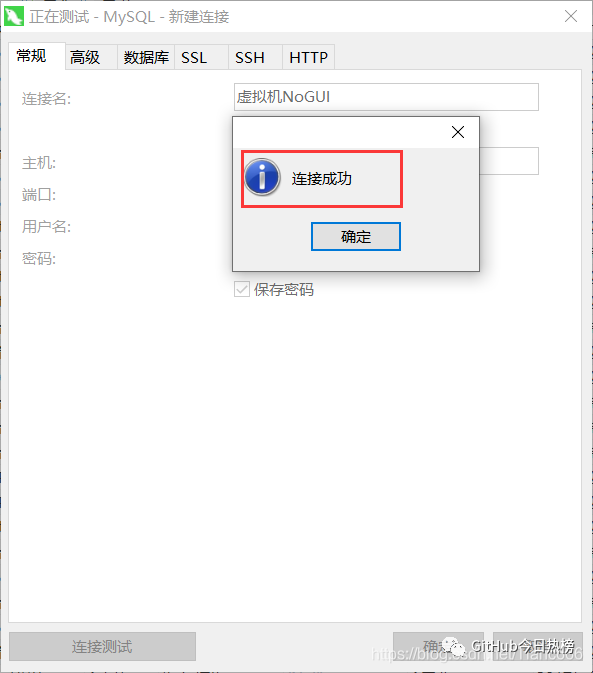
1.查看虛擬機(jī)ip(ifconfig命令) → 連接Navicat → 測(cè)試連接
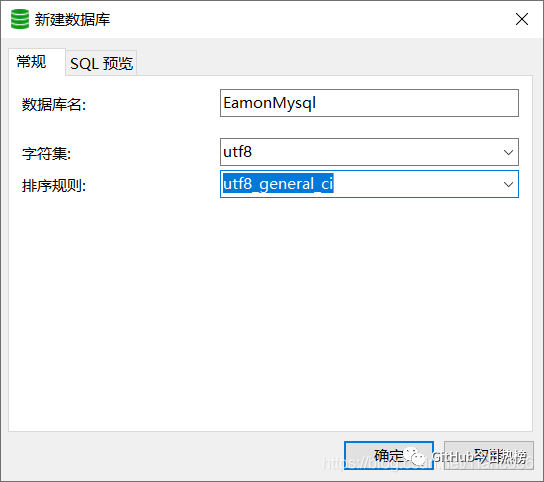
2.這里我們通過(guò)Navicat新建一個(gè)數(shù)據(jù)庫(kù)
3. 進(jìn)入MySql容器內(nèi)部,查看新創(chuàng)建的數(shù)據(jù)庫(kù)“EamonMysql”
分別運(yùn)行4個(gè)命令:
#1.獲得mysql容器id
[root@eamon ~]# docker ps
#2.進(jìn)入容器內(nèi)部
[root@eamon ~]# docker exec -it 1a20 /bin/bash
#3.登錄mysql
root@1a2058874e0b:/# mysql -uroot -p123456
#4.查看數(shù)據(jù)庫(kù)
mysql> show databases;
運(yùn)行過(guò)程:
#獲得mysql容器id
[root@eamon ~]# docker ps
CONTAINER ID IMAGE COMMAND CREATED STATUS PORTS NAMES
1a2058874e0b mysql:5.7  "docker.s…"   13 minutes 13 minutes 0.0.0.0:3306->3306/tcp, 33060/tcp mysql01
#通過(guò)進(jìn)入容器內(nèi)部
[root@eamon ~]# docker exec -it 1a20 /bin/bash
#登錄mysql
root@1a2058874e0b:/# mysql -uroot -p123456
mysql: [Warning] Using a password on the command line interface can be insecure.
Welcome to the MySQL monitor. Commands end with ; or \g.
Your MySQL connection id is 5
Server version: 5.7.33 MySQL Community Server (GPL)

Copyright (c) 2000, 2021, Oracle and/or its affiliates.

Oracle is a registered trademark of Oracle Corporation and/or its
affiliates. Other names may be trademarks of their respective
owners.

Type 'help;' or '\h' for help. Type '\c' to clear the current input statement.
#查看數(shù)據(jù)庫(kù)
mysql> show databases;
+--------------------+
| Database |
+--------------------+
| information_schema |
| EamonMysql |
| mysql |
| performance_schema |
| sys |
+--------------------+
5 rows in set (0.00 sec)

mysql>
4.查看后,退出容器內(nèi)部:
mysql> exit
Bye
root@1a2058874e0b:/# exit
exit
[root@eamon ~]#
這里呢,大家可以導(dǎo)入我的表結(jié)構(gòu)和數(shù)據(jù),小名后面的測(cè)試程序會(huì)用到
SET NAMES utf8mb4;
SET FOREIGN_KEY_CHECKS = 0;


-- ----------------------------
-- Table structure for user
-- ----------------------------
DROP TABLE IF EXISTS `user`;
CREATE TABLE `user`  (
  `id` int(11) NOT NULL AUTO_INCREMENT,
  `name` varchar(255) CHARACTER SET utf8 COLLATE utf8_general_ci NULL DEFAULT NULL,
  `age` int(11) NULL DEFAULT NULL,
  PRIMARY KEY (`id`) USING BTREE
) ENGINE = InnoDB AUTO_INCREMENT = 4 CHARACTER SET = utf8 COLLATE = utf8_general_ci ROW_FORMAT = Dynamic;


-- ----------------------------
-- Records of user
-- ----------------------------
INSERT INTO `user` VALUES (1, '小名', 23);
INSERT INTO `user` VALUES (2, '哐cei', 60);
INSERT INTO `user` VALUES (3, '王麻子', 70);


SET FOREIGN_KEY_CHECKS = 1;
第四步:下載小名的測(cè)試程序https://github.com/EamonYin/DockerTest/tree/MySql
1.這里呢,小名用Spring boot+mybatis-plus為大家搭建了一個(gè)簡(jiǎn)單的測(cè)試程序
跟著小名教程一步步做的小伙伴,只需修改mysql的地址就可以了(如果不清楚如何設(shè)置虛擬機(jī)靜態(tài)IP
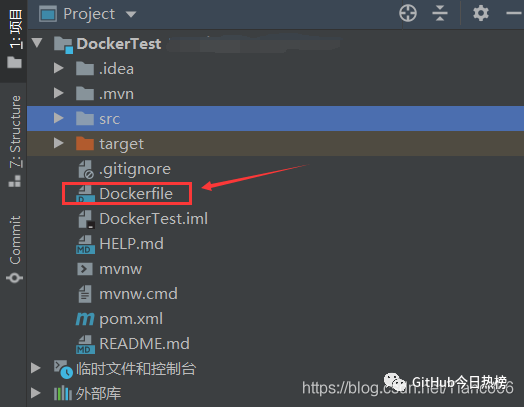
PS:細(xì)心的小伙伴會(huì)注意到小名的這個(gè)測(cè)試程序比普通項(xiàng)目多了一個(gè)DockerFile文件
那么小名來(lái)解釋一下這個(gè)DockerFile文件吧
#項(xiàng)目需要java8的鏡像支持,待會(huì)部署到Docker上時(shí),Docker如果沒(méi)有找到j(luò)dk8的鏡像話,會(huì)自動(dòng)幫你下載
FROM java:8
#把本地的文件拷貝到容器鏡像中,名字為eamon
COPY *.jar /eamon.jar
#在容器運(yùn)行的時(shí)候要運(yùn)行的命令
CMD ["--server.port=8080"]
#暴露容器端口
EXPOSE 8080
#追加命令到 --server.port=8080 之后追加 java -jar命令
ENTRYPOINT ["java","-jar","/eamon.jar"]
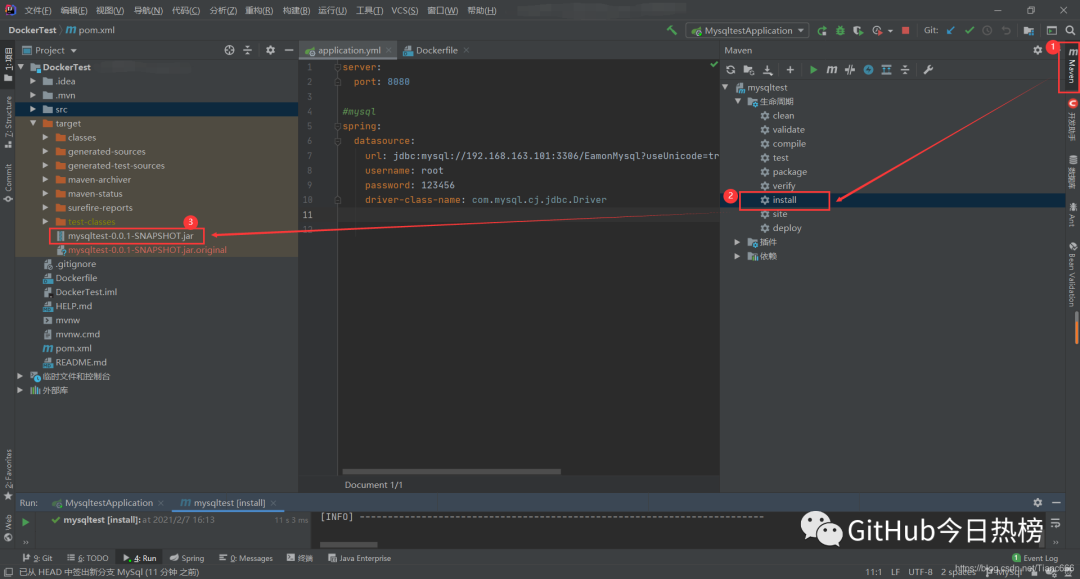
2.修改好url后,把小名的測(cè)試程序打成jar包,如下圖:
3.上傳jar包和Dockerfile到服務(wù)器
這里小名使用的Finalshell,直接將本地文件拖拽到服務(wù)器上的Demo目錄里即可;用XShell的同學(xué)請(qǐng)自行處理,此處不做演示:
#進(jìn)入 /home 目錄
[root@eamon /]# cd /home
#創(chuàng)建 Demo 文件夾
[root@eamon home]# mkdir Demo
#進(jìn)入 Demo 文件夾
[root@eamon home]# cd Demo
#查看上傳好的兩個(gè)文件
[root@eamon Demo]# ls
Dockerfile mysqltest-0.0.1-SNAPSHOT.jar
4.把剛剛上傳的文件,構(gòu)建成鏡像
命令:
docker build -t eamonmysql .#進(jìn)入Demo目錄
[root@eamon /]# cd /home/Demo/
#查看文件
[root@eamon Demo]# ll
總用量 33508
-rw-r--r--. 1 root root 124 2月 7 16:24 Dockerfile
-rw-r--r--. 1 root root 34305144 2月 7 16:24 mysqltest-0.0.1-SNAPSHOT.jar
#構(gòu)建名為eamonmysql的鏡像【錯(cuò)誤】
[root@eamon Demo]# docker build -t eamonmysql
"docker build" requires exactly 1 argument.
See 'docker build --help'.
Usage: docker build [OPTIONS] PATH | URL | -
Build an image from a Dockerfile
#構(gòu)建名為eamonmysql的鏡像【正確】
[root@eamon Demo]# docker build -t eamonmysql .
Sending build context to Docker daemon 34.31MB
Step 1/5 : FROM java:8
8: Pulling from library/java
5040bd298390: Pull complete
fce5728aad85: Pull complete
76610ec20bf5: Pull complete
60170fec2151: Pull complete
e98f73de8f0d: Pull complete
11f7af24ed9c: Pull complete
49e2d6393f32: Pull complete
bb9cdec9c7f3: Pull complete
Digest: sha256:c1ff613e8ba25833d2e1940da0940c3824f03f802c449f3d1815a66b7f8c0e9d
Status: Downloaded newer image for java:8
---> d23bdf5b1b1b
Step 2/5 : COPY *.jar /eamon.jar
---> 4659e16236b2
Step 3/5 : CMD ["--server.port=8080"]
---> Running in e9c72dda067f
Removing intermediate container e9c72dda067f
---> 94808e1967a8
Step 4/5 : EXPOSE 8080
---> Running in d18fb18812a1
Removing intermediate container d18fb18812a1
---> 82aa873f6a9d
Step 5/5 : ENTRYPOINT ["java","-jar","/eamon.jar"]
---> Running in 92355f08991e
Removing intermediate container 92355f08991e
---> 829877ea522f
Successfully built 829877ea522f
Successfully tagged eamonmysql:latest看出docker build -t eamonmysql和docker build -t eamonmysql .的區(qū)別了嗎?
對(duì)了!就是結(jié)尾的.!千萬(wàn)不要像小名這樣粗心呦~
官方文檔地址:
https://docs.docker.com/engine/reference/commandline/build/
This example specifies that the PATH is ., and so all the files in the local directory get tard and sent to the Docker daemon. The PATH specifies where to find the files for the “context” of the build on the Docker daemon. Remember that the daemon could be running on a remote machine and that no parsing of the Dockerfile happens at the client side (where you’re running docker build). That means that all the files at PATH get sent, not just the ones listed to ADD in the Dockerfile.
簡(jiǎn)單來(lái)說(shuō):Path設(shè)置成.的意思是:在當(dāng)前目錄下的多有文件都被發(fā)送進(jìn)了Docker的守護(hù)進(jìn)程
5.運(yùn)行剛才的鏡像
[root@eamon Demo]# docker run -d -P --name eamon-mysql-test eamonmysql
2fa54dcc77b8b9984400ee14cfd6690b77ab653c59241fcf3130c738328b184c
[root@eamon Demo]# docker ps
CONTAINER ID IMAGE COMMAND CREATED STATUS PORTS NAMES
2fa54dcc77b8 eamonmysql "java -jar /eamon.ja…"  10 s 8 s 0.0.0.0:49153->8080/tcp eamon-mysql-test
1a2058874e0b mysql:5.7  "docker-entrypoint.s…"  2 d 28 m 0.0.0.0:3306->3306/tcp, 33060/tcp mysql01
至此我們的eamonmysql鏡像運(yùn)行成功??
第五步:我們通過(guò)物理機(jī)的瀏覽器訪問(wèn)一下容器里面的項(xiàng)目吧~??

大功告成!
細(xì)心的小伙伴會(huì)發(fā)現(xiàn)們這里的端口號(hào)怪怪的,這是因?yàn)椋厦嫘∶拿罾镉玫氖?P[大寫(xiě)P]這一點(diǎn),小名在第二步的第3小點(diǎn)里提到過(guò),這里重溫一下吧~
-p [小寫(xiě)p]端口映射(-p hostPort:containerPort)
-P [大寫(xiě)P]自動(dòng)分配端口
作者:進(jìn)階的小名
出處:blog.csdn.net/Tianc666/article/details/113800210
關(guān)注GitHub今日熱榜,專注挖掘好用的開(kāi)發(fā)工具,致力于分享優(yōu)質(zhì)高效的工具、資源、插件等,助力開(kāi)發(fā)者成長(zhǎng)!
點(diǎn)個(gè)在看,你最好看