“免費(fèi)”容器存儲及備份恢復(fù)方案

云原生時代為什么還需要本地存儲?
云原生時代,對于有存儲應(yīng)用的容器化上云,一般的解決思路是“計算存儲分離”,計算層通過容器技術(shù)實現(xiàn)彈性伸縮,而相應(yīng)的存儲層也需要配合進(jìn)行“動態(tài)掛載”,要實現(xiàn)動態(tài)掛載能力,使用基于網(wǎng)絡(luò)的存儲系統(tǒng)可能是最佳選擇。然而,“網(wǎng)絡(luò)”存儲的磁盤 IO 性能差、自帶高可用能力的中間件系統(tǒng)不需要存儲層的“動態(tài)掛載” 等種種原因,業(yè)界對本地存儲還是“青睞有加”。因此類似 rabbitmq、kafka 這樣的中間件系統(tǒng),優(yōu)先使用本地盤,然后通過 k8s 增強(qiáng)自動化運(yùn)維能力,解決原來磁盤手動管理問題,實現(xiàn)動態(tài)分配、擴(kuò)容、隔離。
有沒有更適合 k8s 的備份恢復(fù)方案?
傳統(tǒng)的數(shù)據(jù)備份方案,一種是利用存儲數(shù)據(jù)的服務(wù)端實現(xiàn)定期快照的備份,另一種是在每臺目標(biāo)服務(wù)器上部署專有備份 agent 并指定備份數(shù)據(jù)目錄,定期把數(shù)據(jù)遠(yuǎn)程復(fù)制到外部存儲上。這兩種方式均存在“備份機(jī)制固化”、“數(shù)據(jù)恢復(fù)慢”等問題,無法適應(yīng)容器化后的彈性、池化部署場景。我們需要更貼合 k8s 容器場景的備份恢復(fù)能力,實現(xiàn)一鍵備份、快速恢復(fù)。
整體計劃
準(zhǔn)備一個 k8s 集群,master 節(jié)點(diǎn)不跑 workload,最好能有 2 個 worker 節(jié)點(diǎn); 部署 carina 云原生本地容器存儲方案,測試本地盤自動化管理能力 部署 velero 云原生備份方案,測試數(shù)據(jù)備份和恢復(fù)能力
k8s 環(huán)境
版本:v1.19.14 集群規(guī)模:1master 2worker 磁盤掛載情況:除了根目錄使用了一塊獨(dú)立盤,初始狀態(tài)未使用其他的磁盤
部署 carina
1、部署腳本
可以參考官方文檔[1],部署方式區(qū)分 1.22 版本前后,大概率由于 1.22 版本很多 API 發(fā)生變更。
2、本地裸盤準(zhǔn)備:
為每個 worker 掛載一塊裸盤,建議至少 20G,carina 默認(rèn)會占用 10G 磁盤空間,作為存儲管理元數(shù)據(jù)。由于我自己使用了谷歌云,可以通過如下步驟實現(xiàn):第一個是 ssd,第二個是 hdd。
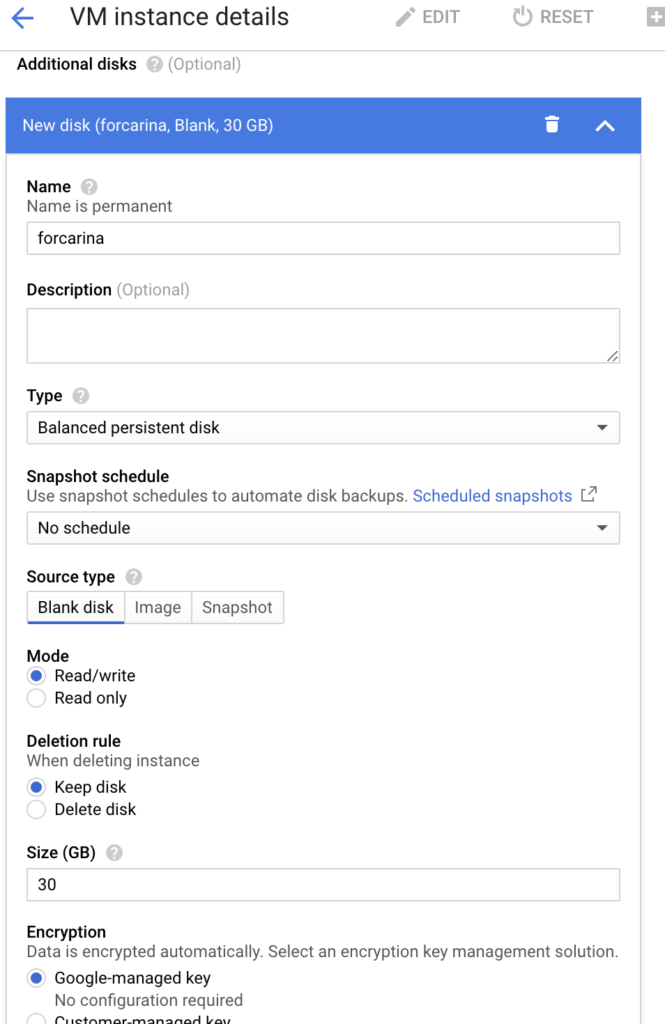
gcloud apply ssd
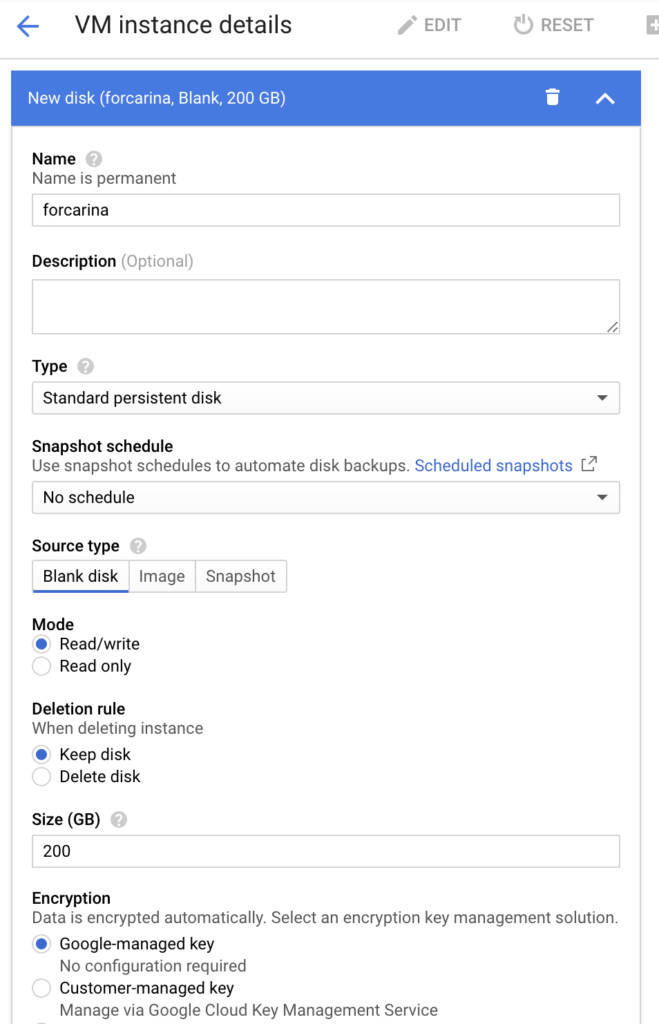
gcloud apply hdd
3、確認(rèn) carina 組件能夠搜索并讀取到新掛載的裸盤,需要通過修改 carina 默認(rèn)掃描本地盤的策略:
#?通過以下命令查看配置掃描策略的configmap
#?官網(wǎng)說明文檔:https://github.com/carina-io/carina/blob/main/docs/manual/disk-manager.md
>?kubectl?describe?cm?carina-csi-config?-n?kube-system
Name:?????????carina-csi-config
Namespace:????kube-system
Labels:???????class=carina
Annotations:??

Data
====
config.json:
----
{
??#?根據(jù)google?cloud磁盤的命名規(guī)則作了更改,匹配以sd開頭的磁盤
??"diskSelector":?["sd+"],
??#?掃描周期180秒
??"diskScanInterval":?"180",
??"diskGroupPolicy":?"type",
??"schedulerStrategy":?"spradout"
}
4、通過查看 carina 組件狀態(tài),確認(rèn)本地盤已經(jīng)被識別
>?kubectl?get?node?u20-w1?-o?template?--template={{.status.capacity}}
map[carina.storage.io/carina-vg-hdd:200?carina.storage.io/carina-vg-ssd:20?cpu:2?ephemeral-storage:30308240Ki?hugepages-1Gi:0?hugepages-2Mi:0?memory:4022776Ki?pods:110]

>?kubectl?get?node?u20-w1?-o?template?--template={{.status.allocatable}}
map[carina.storage.io/carina-vg-hdd:189?carina.storage.io/carina-vg-ssd:1?cpu:2?ephemeral-storage:27932073938?hugepages-1Gi:0?hugepages-2Mi:0?memory:3920376Ki?pods:110]

#?可以看到hdd容量已經(jīng)變成200了、SSD容量變成20,為什么能區(qū)分ssd和hdd呢?這里先按下不表
#?這里也能看到預(yù)留了10G空間不可使用,因為200G新盤剛加入只有189G(考慮到有磁盤單位換算帶來的誤差)可用。
#?這些信息很重要,當(dāng)pv創(chuàng)建時會從該node信息中獲取當(dāng)前節(jié)點(diǎn)磁盤容量,然后根據(jù)pv調(diào)度策略進(jìn)行調(diào)度

#?還有個集中查看磁盤使用情況的入口
>?kubectl?get?configmap?carina-node-storage?-n?kube-system?-o?json?|?jq?.data.node
[

???{
??????"allocatable.carina.storage.io/carina-vg-hdd":"189",
??????"allocatable.carina.storage.io/carina-vg-ssd":"1",
??????"capacity.carina.storage.io/carina-vg-hdd":"200",
??????"capacity.carina.storage.io/carina-vg-ssd":"20",
??????"nodeName":"u20-w1"
???},
???{
??????"allocatable.carina.storage.io/carina-vg-hdd":"189",
??????"allocatable.carina.storage.io/carina-vg-ssd":"0",
??????"capacity.carina.storage.io/carina-vg-hdd":"200",
??????"capacity.carina.storage.io/carina-vg-ssd":"0",
??????"nodeName":"u20-w2"
???}
]
5、為什么能自動識別 hdd 和 sdd 呢?
#?carina-node服務(wù)啟動時會自動將節(jié)點(diǎn)上磁盤按照SSD和HDD進(jìn)行分組并組建成vg卷組
#?使用命令lsblk?--output?NAME,ROTA查看磁盤類型,ROTA=1為HDD磁盤?ROTA=0為SSD磁盤
#?支持文件存儲及塊設(shè)備存儲,其中文件存儲支持xfs和ext4格式
#?下面是事前聲明的storageclass,用來自動創(chuàng)建pv
>?k?get?sc?csi-carina-sc?-o?json?|?jq?.metadata.annotations
{
????"kubectl.kubernetes.io/last-applied-configuration":{
????????"allowVolumeExpansion":true,
????????"apiVersion":"storage.k8s.io/v1",
????????"kind":"StorageClass",
????????"metadata":{
????????????"annotations":{},
????????????"name":"csi-carina-sc"
????????},
????????"mountOptions":[
????????????"rw"
????????],
????????"parameters":{
????????????"csi.storage.k8s.io/fstype":"ext4"
????????},
????????"provisioner":"carina.storage.io",
????????"reclaimPolicy":"Delete",
????????"volumeBindingMode":"WaitForFirstConsumer"
????}
}
測試 carina 自動分配 PV 能力
1、想要 carina 具備自動創(chuàng)建 PV 能力,需要先聲明并創(chuàng)建 storageclass。
#?創(chuàng)建storageclass的yaml
---
apiVersion:?storage.k8s.io/v1
kind:?StorageClass
metadata:
??name:?csi-carina-sc
provisioner:?carina.storage.io?#?這是該CSI驅(qū)動的名稱,不允許更改
parameters:
??#?支持xfs,ext4兩種文件格式,如果不填則默認(rèn)ext4
??csi.storage.k8s.io/fstype:?ext4
??#?這是選擇磁盤分組,該項目會自動將SSD及HDD磁盤分組
??# SSD:ssd HDD: hdd
??#?如果不填會隨機(jī)選擇磁盤類型
??#carina.storage.io/disk-type:?hdd
reclaimPolicy:?Delete
allowVolumeExpansion:?true?#?支持?jǐn)U容,定為true便可
#?WaitForFirstConsumer表示被容器綁定調(diào)度后再創(chuàng)建pv
volumeBindingMode:?WaitForFirstConsumer
#?支持掛載參數(shù)設(shè)置,這里配置為讀寫模式
mountOptions:
??-?rw
kubectl apply 后,可以通過以下命令確認(rèn):
>?kubectl?get?sc?csi-carina-sc?-o?json?|?jq?.metadata.annotations
{
????"kubectl.kubernetes.io/last-applied-configuration":{
????????"allowVolumeExpansion":true,
????????"apiVersion":"storage.k8s.io/v1",
????????"kind":"StorageClass",
????????"metadata":{
????????????"annotations":{},
????????????"name":"csi-carina-sc"
????????},
????????"mountOptions":[
????????????"rw"
????????],
????????"parameters":{
????????????"csi.storage.k8s.io/fstype":"ext4"
????????},
????????"provisioner":"carina.storage.io",
????????"reclaimPolicy":"Delete",
????????"volumeBindingMode":"WaitForFirstConsumer"
????}
}
2、部署帶存儲的測試應(yīng)用
測試場景比較簡單,使用簡單 nginx 服務(wù),掛載數(shù)據(jù)盤,存放自定義 html 頁面。
#?pvc?for?nginx?html
---
apiVersion:?v1
kind:?PersistentVolumeClaim
metadata:
??name:?csi-carina-pvc-big
??namespace:?default
spec:
??accessModes:
????-?ReadWriteOnce
??resources:
????requests:
??????storage:?10Gi
??#?指定carina的storageclass名稱
??storageClassName:?csi-carina-sc
??volumeMode:?Filesystem

#?nginx?deployment?yaml
---
apiVersion:?apps/v1
kind:?Deployment
metadata:
??name:?carina-deployment-big
??namespace:?default
??labels:
????app:?web-server-big
spec:
??replicas:?1
??selector:
????matchLabels:
??????app:?web-server-big
??template:
????metadata:
??????labels:
????????app:?web-server-big
????spec:
??????containers:
????????-?name:?web-server
??????????image:?nginx:latest
??????????imagePullPolicy:?"IfNotPresent"
??????????volumeMounts:
????????????-?name:?mypvc-big
??????????????mountPath:?/usr/share/nginx/html?#?nginx默認(rèn)將頁面內(nèi)容存放在這個文件夾
??????volumes:
????????-?name:?mypvc-big
??????????persistentVolumeClaim:
????????????claimName:?csi-carina-pvc-big
????????????readOnly:?false
查看測試應(yīng)用運(yùn)行情況:
#?pvc
>?kubectl?get?pvc
NAME?????????????????STATUS???VOLUME?????????????????????????????????????CAPACITY???ACCESS?MODES???STORAGECLASS????AGE
csi-carina-pvc-big???Bound????pvc-74e683f9-d2a4-40a0-95db-85d1504fd961???10Gi???????RWO????????????csi-carina-sc???109s

#?pv
>?kubectl?get?pv
NAME???????????????????????????????????????CAPACITY???ACCESS?MODES???RECLAIM?POLICY???STATUS???CLAIM????????????????????????STORAGECLASS????REASON???AGE
pvc-74e683f9-d2a4-40a0-95db-85d1504fd961???10Gi???????RWO????????????Delete???????????Bound????default/csi-carina-pvc-big???csi-carina-sc????????????109s

#?nginx?pod
>?kubectl?get?po?-l?app=web-server-big?-o?wide
NAME????????????????????????????????????READY???STATUS????RESTARTS???AGE?????IP??????????NODE?????NOMINATED?NODE???READINESS?GATES
carina-deployment-big-6b78fb9fd-mwf8g???1/1?????Running???0??????????3m48s???10.0.2.69???u20-w2??????????????

#?查看相關(guān)node的磁盤使用情況,可分配的大小已經(jīng)發(fā)生變化,縮小了10
>?kubectl?get?node?u20-w2?-o?template?--template={{.status.allocatable}}
map[carina.storage.io/carina-vg-hdd:179?carina.storage.io/carina-vg-ssd:0?cpu:2?ephemeral-storage:27932073938?hugepages-1Gi:0?hugepages-2Mi:0?memory:3925000Ki?pods:110]
登錄運(yùn)行測試服務(wù)的 node 節(jié)點(diǎn),查看磁盤掛載情況:
#?磁盤分配情況如下,有meta和pool兩個lvm
>?lsblk
...
sdb???????8:16???0???200G??0?disk
├─carina--vg--hdd-thin--pvc--74e683f9--d2a4--40a0--95db--85d1504fd961_tmeta
│???????253:0????0????12M??0?lvm
│?└─carina--vg--hdd-thin--pvc--74e683f9--d2a4--40a0--95db--85d1504fd961-tpool
│???????253:2????0????10G??0?lvm
│???├─carina--vg--hdd-thin--pvc--74e683f9--d2a4--40a0--95db--85d1504fd961
│???│???253:3????0????10G??1?lvm
│???└─carina--vg--hdd-volume--pvc--74e683f9--d2a4--40a0--95db--85d1504fd961
│???????253:4????0????10G??0?lvm??/var/lib/kubelet/pods/57ded9fb-4c82-4668-b77b-7dc02ba05fc2/volumes/kubernetes.io~
└─carina--vg--hdd-thin--pvc--74e683f9--d2a4--40a0--95db--85d1504fd961_tdata
????????253:1????0????10G??0?lvm
??└─carina--vg--hdd-thin--pvc--74e683f9--d2a4--40a0--95db--85d1504fd961-tpool
????????253:2????0????10G??0?lvm
????├─carina--vg--hdd-thin--pvc--74e683f9--d2a4--40a0--95db--85d1504fd961
????│???253:3????0????10G??1?lvm
????└─carina--vg--hdd-volume--pvc--74e683f9--d2a4--40a0--95db--85d1504fd961
????????253:4????0????10G??0?lvm??/var/lib/kubelet/pods/57ded9fb-4c82-4668-b77b-7dc02ba05fc2/volumes/kubernetes.io~
#?vgs
>?vgs
??VG????????????#PV?#LV?#SN?Attr???VSize????VFree
??carina-vg-hdd???1???2???0?wz--n-?<200.00g?189.97g
#?lvs
>?lvs
??LV??????????????????????????????????????????????VG????????????Attr???????LSize??Pool??????????????????????????????????????????Origin?Data%??Meta%??Move?Log?Cpy%Sync?Convert
??thin-pvc-74e683f9-d2a4-40a0-95db-85d1504fd961???carina-vg-hdd?twi-aotz--?10.00g??????????????????????????????????????????????????????2.86???11.85
??volume-pvc-74e683f9-d2a4-40a0-95db-85d1504fd961?carina-vg-hdd?Vwi-aotz--?10.00g?thin-pvc-74e683f9-d2a4-40a0-95db-85d1504fd961????????2.86

#?使用lvm命令行工具查看磁盤掛載信息
>?pvs
??PV?????????VG????????????Fmt??Attr?PSize????PFree
??/dev/sdb???carina-vg-hdd?lvm2?a--??<200.00g?189.97g
>?pvdisplay
??---?Physical?volume?---
??PV?Name???????????????/dev/sdb
??VG?Name???????????????carina-vg-hdd
??PV?Size???????????????<200.00?GiB?/?not?usable?3.00?MiB
??Allocatable???????????yes
??PE?Size???????????????4.00?MiB
??Total?PE??????????????51199
??Free?PE???????????????48633
??Allocated?PE??????????2566
??PV?UUID???????????????Wl6ula-kD54-Mj5H-ZiBc-aHPB-6RHI-mXs9R9

>?lvs
??LV??????????????????????????????????????????????VG????????????Attr???????LSize??Pool??????????????????????????????????????????Origin?Data%??Meta%??Move?Log?Cpy%Sync?Convert
??thin-pvc-74e683f9-d2a4-40a0-95db-85d1504fd961???carina-vg-hdd?twi-aotz--?10.00g??????????????????????????????????????????????????????2.86???11.85
??volume-pvc-74e683f9-d2a4-40a0-95db-85d1504fd961?carina-vg-hdd?Vwi-aotz--?10.00g?thin-pvc-74e683f9-d2a4-40a0-95db-85d1504fd961????????2.86
>?lvdisplay
??---?Logical?volume?---
??LV?Name????????????????thin-pvc-74e683f9-d2a4-40a0-95db-85d1504fd961
??VG?Name????????????????carina-vg-hdd
??LV?UUID????????????????kB7DFm-dl3y-lmop-p7os-3EW6-4Toy-slX7qn
??LV?Write?Access????????read/write?(activated?read?only)
??LV?Creation?host,?time?u20-w2,?2021-11-09?05:31:18?+0000
??LV?Pool?metadata???????thin-pvc-74e683f9-d2a4-40a0-95db-85d1504fd961_tmeta
??LV?Pool?data???????????thin-pvc-74e683f9-d2a4-40a0-95db-85d1504fd961_tdata
??LV?Status??????????????available
??#?open?????????????????2
??LV?Size????????????????10.00?GiB
??Allocated?pool?data????2.86%
??Allocated?metadata?????11.85%
??Current?LE?????????????2560
??Segments???????????????1
??Allocation?????????????inherit
??Read?ahead?sectors?????auto
??-?currently?set?to?????256
??Block?device???????????253:2

??---?Logical?volume?---
??LV?Path????????????????/dev/carina-vg-hdd/volume-pvc-74e683f9-d2a4-40a0-95db-85d1504fd961
??LV?Name????????????????volume-pvc-74e683f9-d2a4-40a0-95db-85d1504fd961
??VG?Name????????????????carina-vg-hdd
??LV?UUID????????????????vhDYe9-KzPc-qqJk-2o1f-TlCv-0TDL-643b8r
??LV?Write?Access????????read/write
??LV?Creation?host,?time?u20-w2,?2021-11-09?05:31:19?+0000
??LV?Pool?name???????????thin-pvc-74e683f9-d2a4-40a0-95db-85d1504fd961
??LV?Status??????????????available
??#?open?????????????????1
??LV?Size????????????????10.00?GiB
??Mapped?size????????????2.86%
??Current?LE?????????????2560
??Segments???????????????1
??Allocation?????????????inherit
??Read?ahead?sectors?????auto
??-?currently?set?to?????256
??Block?device???????????253:4
進(jìn)入磁盤,添加自定義內(nèi)容,查看存儲情況
#?進(jìn)入容器內(nèi),創(chuàng)建自定義頁面
>?kubectl?exec?-ti?carina-deployment-big-6b78fb9fd-mwf8g?--?/bin/bash
/#?cd?/usr/share/nginx/html/
/usr/share/nginx/html#?ls
lost+found
/usr/share/nginx/html#?echo?"hello?carina"?>?index.html
/usr/share/nginx/html#?curl?localhost
hello?carina
/usr/share/nginx/html#?echo?"test?carina"?>?test.html
/usr/share/nginx/html#?curl?localhost/test.html
test?carina

#?登錄node節(jié)點(diǎn),進(jìn)入掛載點(diǎn),查看上面剛剛創(chuàng)建的內(nèi)容
>?df?-h
...
/dev/carina/volume-pvc-74e683f9-d2a4-40a0-95db-85d1504fd961??9.8G???37M??9.7G???1%?/var/lib/kubelet/pods/57ded9fb-4c82-4668-b77b-7dc02ba05fc2/volumes/kubernetes.io~csi/pvc-74e683f9-d2a4-40a0-95db-85d1504fd961/mount
>?cd?/var/lib/kubelet/pods/57ded9fb-4c82-4668-b77b-7dc02ba05fc2/volumes/kubernetes.io~csi/pvc-74e683f9-d2a4-40a0-95db-85d1504fd961/mount
>?ll
total?32
drwxrwsrwx?3?root?root??4096?Nov??9?05:54?./
drwxr-x---?3?root?root??4096?Nov??9?05:31?../
-rw-r--r--?1?root?root????13?Nov??9?05:54?index.html
drwx------?2?root?root?16384?Nov??9?05:31?lost+found/
-rw-r--r--?1?root?root????12?Nov??9?05:54?test.html
部署 velero
1、下載 velero 命令行工具,本次使用的是 1.7.0 版本
>?wget?
>?tar?-xzvf?velero-v1.7.0-linux-amd64.tar.gz
>?cd?velero-v1.7.0-linux-amd64?&&?cp?velero?/usr/local/bin/
>?velero
Velero?is?a?tool?for?managing?disaster?recovery,?specifically?for?Kubernetes
cluster?resources.?It?provides?a?simple,?configurable,?and?operationally?robust
way?to?back?up?your?application?state?and?associated?data.

If?you're?familiar?with?kubectl,?Velero?supports?a?similar?model,?allowing?you?to
execute?commands?such?as?'velero?get?backup'?and?'velero?create?schedule'.?The?same
operations?can?also?be?performed?as?'velero?backup?get'?and?'velero?schedule?create'.

Usage:
??velero?[command]

Available?Commands:
??backup????????????Work?with?backups
??backup-location???Work?with?backup?storage?locations
??bug???????????????Report?a?Velero?bug
??client????????????Velero?client?related?commands
??completion????????Generate?completion?script
??create????????????Create?velero?resources
??debug?????????????Generate?debug?bundle
??delete????????????Delete?velero?resources
??describe??????????Describe?velero?resources
??get???????????????Get?velero?resources
??help??????????????Help?about?any?command
??install???????????Install?Velero
??plugin????????????Work?with?plugins
??restic????????????Work?with?restic
??restore???????????Work?with?restores
??schedule??????????Work?with?schedules
??snapshot-location?Work?with?snapshot?locations
??uninstall?????????Uninstall?Velero
??version???????????Print?the?velero?version?and?associated?image
2、部署 minio 對象存儲,作為 velero 后端存儲
為了部署 velero 服務(wù)端,需要優(yōu)先準(zhǔn)備好一個后端存儲。velero 支持很多類型的后端存儲,詳細(xì)看這里:https://velero.io/docs/v1.7/supported-providers/[2]。只要遵循 AWS S3 存儲接口規(guī)范的,都可以對接,本次使用兼容 S3 接口的 minio 服務(wù)作為后端存儲,部署 minio 方式如下,其中就使用到了 carina storageclass 提供磁盤創(chuàng)建能力:
#?參考文檔:https://velero.io/docs/v1.7/contributions/minio/
#?統(tǒng)一部署在minio命名空間
---
apiVersion:?v1
kind:?Namespace
metadata:
??name:?minio
#?為minio后端存儲申請8G磁盤空間,走的就是carina?storageclass
---
apiVersion:?v1
kind:?PersistentVolumeClaim
metadata:
??name:?minio-storage-pvc
??namespace:?minio
spec:
??accessModes:
????-?ReadWriteOnce
??resources:
????requests:
??????storage:?8Gi
??storageClassName:?csi-carina-sc?#?指定carina?storageclass
??volumeMode:?Filesystem
---
apiVersion:?apps/v1
kind:?Deployment
metadata:
??namespace:?minio
??name:?minio
??labels:
????component:?minio
spec:
??strategy:
????type:?Recreate
??selector:
????matchLabels:
??????component:?minio
??template:
????metadata:
??????labels:
????????component:?minio
????spec:
??????volumes:
??????-?name:?storage
????????persistentVolumeClaim:
??????????claimName:?minio-storage-pvc
??????????readOnly:?false
??????-?name:?config
????????emptyDir:?{}
??????containers:
??????-?name:?minio
????????image:?minio/minio:latest
????????imagePullPolicy:?IfNotPresent
????????args:
????????-?server
????????-?/storage
????????-?--config-dir=/config
????????-?--console-address?":9001"?#?配置前端頁面的暴露端口
????????env:
????????-?name:?MINIO_ACCESS_KEY
??????????value:?"minio"
????????-?name:?MINIO_SECRET_KEY
??????????value:?"minio123"
????????ports:
????????-?containerPort:?9000
????????-?containerPort:?9001
????????volumeMounts:
????????-?name:?storage
??????????mountPath:?"/storage"
????????-?name:?config
??????????mountPath:?"/config"
#?使用nodeport創(chuàng)建svc,提供對外服務(wù)能力,包括前端頁面和后端API
---
apiVersion:?v1
kind:?Service
metadata:
??namespace:?minio
??name:?minio
??labels:
????component:?minio
spec:
??#?ClusterIP?is?recommended?for?production?environments.
??#?Change?to?NodePort?if?needed?per?documentation,
??#?but?only?if?you?run?Minio?in?a?test/trial?environment,?for?example?with?Minikube.
??type:?NodePort
??ports:
????-?name:?console
??????port:?9001
??????targetPort:?9001
????-?name:?api
??????port:?9000
??????targetPort:?9000
??????protocol:?TCP
??selector:
????component:?minio

#?初始化創(chuàng)建velero的bucket
---
apiVersion:?batch/v1
kind:?Job
metadata:
??namespace:?minio
??name:?minio-setup
??labels:
????component:?minio
spec:
??template:
????metadata:
??????name:?minio-setup
????spec:
??????restartPolicy:?OnFailure
??????volumes:
??????-?name:?config
????????emptyDir:?{}
??????containers:
??????-?name:?mc
????????image:?minio/mc:latest
????????imagePullPolicy:?IfNotPresent
????????command:
????????-?/bin/sh
????????-?-c
????????-?"mc?--config-dir=/config?config?host?add?velero??minio?minio123?&&?mc?--config-dir=/config?mb?-p?velero/velero"
????????volumeMounts:
????????-?name:?config
??????????mountPath:?"/config"
部署 minio 完成后如下所示:
>?kubectl?get?all?-n?minio
NAME?????????????????????????READY???STATUS????RESTARTS???AGE
pod/minio-686755b769-k6625???1/1?????Running???0??????????6d15h

NAME????????????TYPE???????CLUSTER-IP??????EXTERNAL-IP???PORT(S)??????????????????????????AGE
service/minio???NodePort???10.98.252.130???????????36369:31943/TCP,9000:30436/TCP???6d15h

NAME????????????????????READY???UP-TO-DATE???AVAILABLE???AGE
deployment.apps/minio???1/1?????1????????????1???????????6d15h

NAME???????????????????????????????DESIRED???CURRENT???READY???AGE
replicaset.apps/minio-686755b769???1?????????1?????????1???????6d15h
replicaset.apps/minio-c9c844f67????0?????????0?????????0???????6d15h

NAME????????????????????COMPLETIONS???DURATION???AGE
job.batch/minio-setup???1/1???????????114s???????6d15h
打開 minio 頁面,使用部署時定義的賬號登錄:
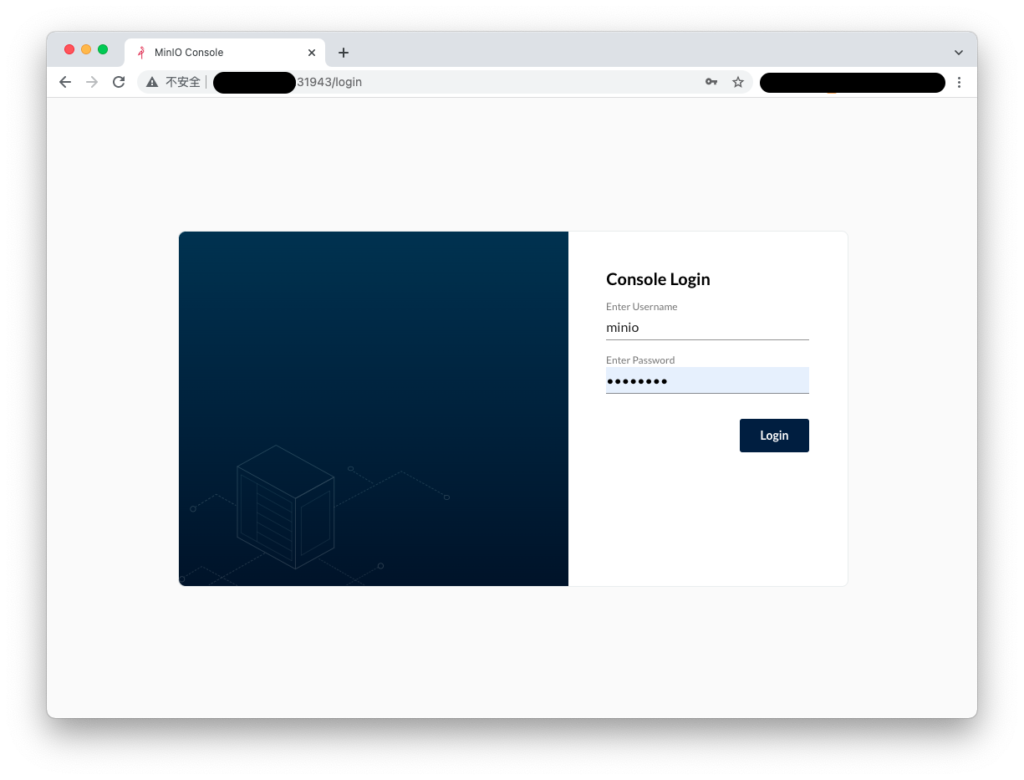
minio login
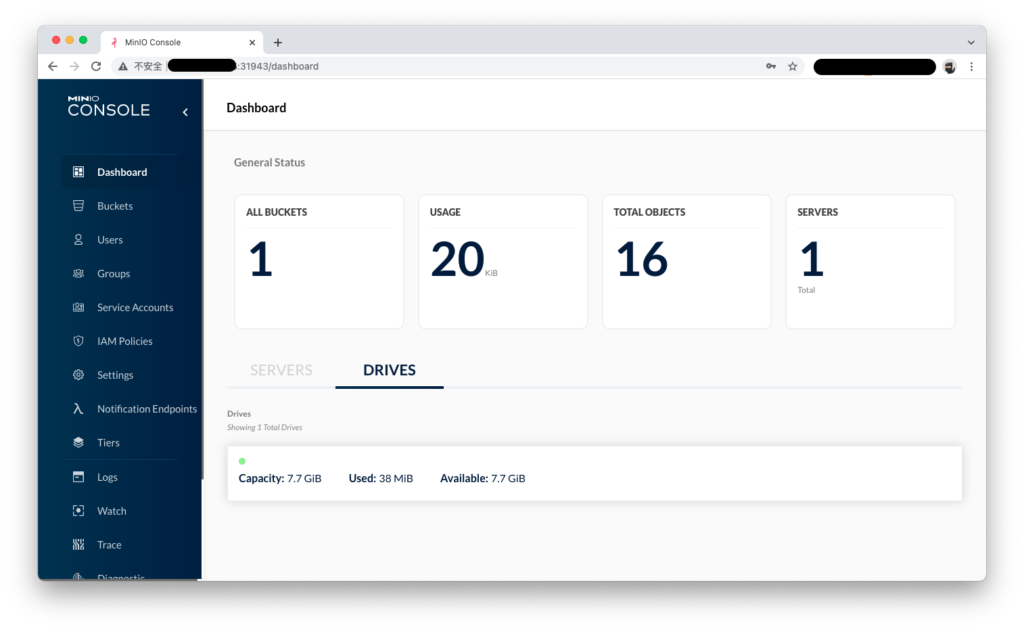
minio dashboard
3、安裝 velero 服務(wù)端
#?注意添加--use-restric,開啟pv數(shù)據(jù)備份
#?注意最后一行,使用了k8s?svc域名服務(wù),
velero?install
????--provider?aws
????--plugins?velero/velero-plugin-for-aws:v1.2.1
????--bucket?velero
????--secret-file?./minio-cred
????--namespace?velero
????--use-restic
????--use-volume-snapshots=false
????--backup-location-config?region=minio,s3ForcePathStyle="true",s3Url=http://minio.minio.svc:9000
安裝完成后如下所示:
#?除了velero之外,
#?還有restic,它是負(fù)責(zé)備份pv數(shù)據(jù)的核心組件,需要保證每個節(jié)點(diǎn)上的pv都能備份,因此它使用了daemonset模式
#?詳細(xì)參考:
>?kubectl?get?all?-n?velero
NAME??????????????????????????READY???STATUS????RESTARTS???AGE
pod/restic-g5q5k??????????????1/1?????Running???0??????????6d15h
pod/restic-jdk7h??????????????1/1?????Running???0??????????6d15h
pod/restic-jr8f7??????????????1/1?????Running???0??????????5d22h
pod/velero-6979cbd56b-s7v99???1/1?????Running???0??????????5d21h

NAME????????????????????DESIRED???CURRENT???READY???UP-TO-DATE???AVAILABLE???NODE?SELECTOR???AGE
daemonset.apps/restic???3?????????3?????????3???????3????????????3?????????????????????6d15h

NAME?????????????????????READY???UP-TO-DATE???AVAILABLE???AGE
deployment.apps/velero???1/1?????1????????????1???????????6d15h

NAME????????????????????????????????DESIRED???CURRENT???READY???AGE
replicaset.apps/velero-6979cbd56b???1?????????1?????????1???????6d15h
使用 velero 備份應(yīng)用及其數(shù)據(jù)
使用 velero backup 命令備份帶 pv 的測試應(yīng)用
#?通過--selector選項指定應(yīng)用標(biāo)簽
#?通過--default-volumes-to-restic選項顯式聲明使用restric備份pv數(shù)據(jù)
>?velero?backup?create?nginx-backup?--selector?app=web-server-big?--default-volumes-to-restic
I1109?09:14:31.380431?1527737?request.go:655]?Throttling?request?took?1.158837643s,?request:?GET:
Backup?request?"nginx-pv-backup"?submitted?successfully.
Run?`velero?backup?describe?nginx-pv-backup`?or?`velero?backup?logs?nginx-pv-backup`?for?more?details.
#?無法查看執(zhí)行備份的日志,說是無法訪問minio接口,很奇怪
>?velero?backup?logs?nginx-pv-backup
I1109?09:15:04.840199?1527872?request.go:655]?Throttling?request?took?1.146201139s,?request:?GET:
An?error?occurred:?Get?"" :?dial?tcp:?lookup?minio.minio.svc?on?127.0.0.53:53:?no?such?host
#?可以看到詳細(xì)的備份執(zhí)行信息,
#?這個備份是會過期的,默認(rèn)是1個月有效期
>?velero?backup?describe?nginx-pv-backup
I1109?09:15:25.834349?1527945?request.go:655]?Throttling?request?took?1.147122392s,?request:?GET:
Name:?????????nginx-pv-backup
Namespace:????velero
Labels:???????velero.io/storage-location=default
Annotations:??velero.io/source-cluster-k8s-gitversion=v1.19.14
??????????????velero.io/source-cluster-k8s-major-version=1
??????????????velero.io/source-cluster-k8s-minor-version=19
Phase:??Completed
Errors:????0
Warnings:??1
Namespaces:
??Included:??*
??Excluded:??
Resources:
??Included:????????*
??Excluded:????????
??Cluster-scoped:??auto
Label?selector:??app=web-server-big
Storage?Location:??default
Velero-Native?Snapshot?PVs:??auto
TTL:??720h0m0s
Hooks:??
Backup?Format?Version:??1.1.0
Started:????2021-11-09?09:14:32?+0000?UTC
Completed:??2021-11-09?09:15:05?+0000?UTC
Expiration:??2021-12-09?09:14:32?+0000?UTC
Total?items?to?be?backed?up:??9
Items?backed?up:??????????????9
Velero-Native?Snapshots:?
Restic?Backups?(specify?--details?for?more?information):
??Completed:??1
2、打開 minio 頁面,查看備份數(shù)據(jù)的明細(xì)
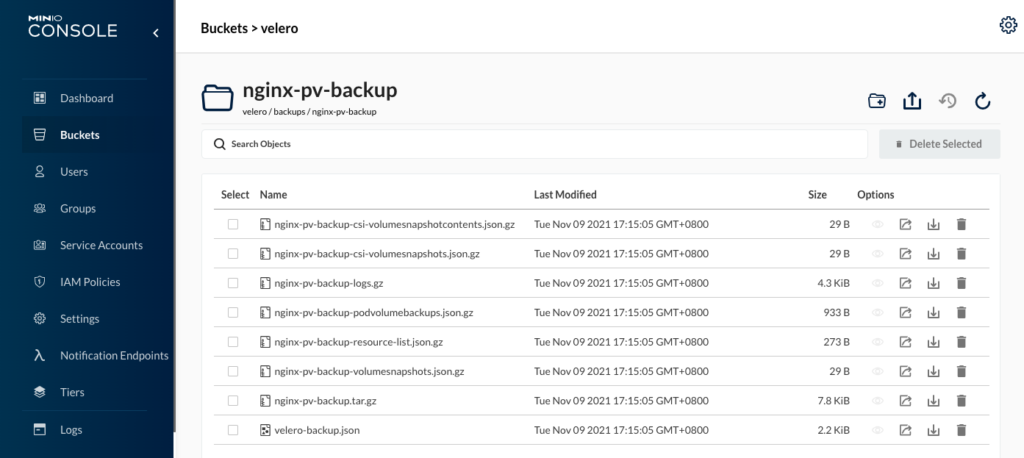
在**backups文件夾下有個nginx-pv-backup**文件夾,里面有很多壓縮文件,有機(jī)會可以分析下。
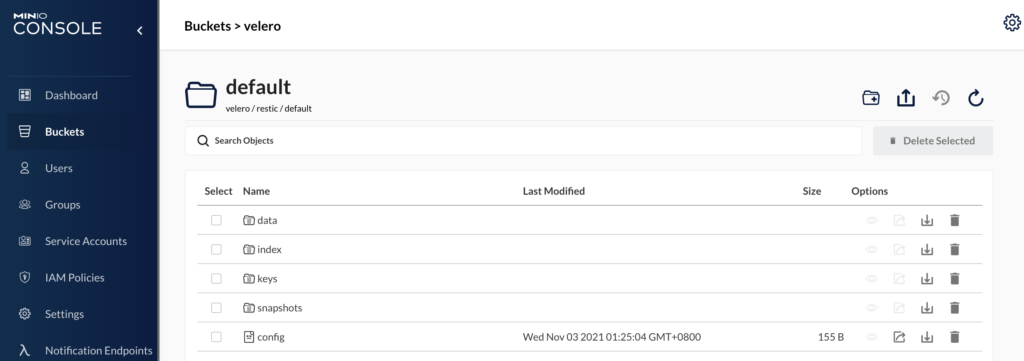
在 restric 文件夾下,產(chǎn)生了一堆數(shù)據(jù),查了資料,它是加密保存的,因此無法顯性看出備份 pv 的數(shù)據(jù)。接下來我們嘗試下恢復(fù)能力,就能驗證其數(shù)據(jù)備份能力。
使用 velero 恢復(fù)應(yīng)用及其數(shù)據(jù)
1、刪除測試應(yīng)用及其數(shù)據(jù)
#?delete?nginx?deployment
>?kubectl?delete?deploy?carina-deployment-big

#?delete?nginx?pvc
#?檢查pv是否已經(jīng)釋放
>?kubectl?delete?pvc?csi-carina-pvc-big
2、通過 velero restore 恢復(fù)測試應(yīng)用和數(shù)據(jù)
#?恢復(fù)
>?velero?restore?create?--from-backup?nginx-pv-backup
Restore?request?"nginx-pv-backup-20211109094323"?submitted?successfully.
Run?`velero?restore?describe?nginx-pv-backup-20211109094323`?or?`velero?restore?logs?nginx-pv-backup-20211109094323`?for?more?details.
root@u20-m1:/home/legendarilylwq#?velero?restore?describe?nginx-pv-backup-20211109094323
I1109?09:43:50.028122?1534182?request.go:655]?Throttling?request?took?1.161022334s,?request:?GET:
Name:?????????nginx-pv-backup-20211109094323
Namespace:????velero
Labels:???????
Annotations:??

Phase:?????????????????????????????????InProgress
Estimated?total?items?to?be?restored:??9
Items?restored?so?far:?????????????????9

Started:????2021-11-09?09:43:23?+0000?UTC
Completed:??

Backup:??nginx-pv-backup

Namespaces:
??Included:??all?namespaces?found?in?the?backup
??Excluded:??

Resources:
??Included:????????*
??Excluded:????????nodes,?events,?events.events.k8s.io,?backups.velero.io,?restores.velero.io,?resticrepositories.velero.io
??Cluster-scoped:??auto

Namespace?mappings:??

Label?selector:??

Restore?PVs:??auto

Restic?Restores?(specify?--details?for?more?information):
??New:??1

Preserve?Service?NodePorts:??auto

>?velero?restore?get
NAME?????????????????????????????BACKUP????????????STATUS??????STARTED?????????????????????????COMPLETED???????????????????????ERRORS???WARNINGS???CREATED?????????????????????????SELECTOR
nginx-pv-backup-20211109094323???nginx-pv-backup???Completed???2021-11-09?09:43:23?+0000?UTC???2021-11-09?09:44:14?+0000?UTC???0????????2??????????2021-11-09?09:43:23?+0000?UTC???
3、驗證測試應(yīng)用和數(shù)據(jù)是否恢復(fù)
#?查看po、pvc、pv是否自動恢復(fù)創(chuàng)建
>?kubectl?get?po
NAME????????????????????????????????????READY???STATUS????RESTARTS???AGE
carina-deployment-big-6b78fb9fd-mwf8g???1/1?????Running???0??????????93s
kubewatch-5ffdb99f79-87qbx??????????????2/2?????Running???0??????????19d
static-pod-u20-w1???????????????????????1/1?????Running???15?????????235d

>?kubectl?get?pvc
NAME?????????????????STATUS???VOLUME?????????????????????????????????????CAPACITY???ACCESS?MODES???STORAGECLASS????AGE
csi-carina-pvc-big???Bound????pvc-e81017c5-0845-4bb1-8483-a31666ad3435???10Gi???????RWO????????????csi-carina-sc???100s

>?kubectl?get?pv
NAME???????????????????????????????????????CAPACITY???ACCESS?MODES???RECLAIM?POLICY???STATUS???CLAIM????????????????????????STORAGECLASS????REASON???AGE
pvc-a07cac5e-c38b-454d-a004-61bf76be6516???8Gi????????RWO????????????Delete???????????Bound????minio/minio-storage-pvc??????csi-carina-sc????????????6d17h
pvc-e81017c5-0845-4bb1-8483-a31666ad3435???10Gi???????RWO????????????Delete???????????Bound????default/csi-carina-pvc-big???csi-carina-sc????????????103s

>?kubectl?get?deploy
NAME????????????????????READY???UP-TO-DATE???AVAILABLE???AGE
carina-deployment-big???1/1?????1????????????1???????????2m20s
kubewatch???????????????1/1?????1????????????1???????????327d

#?進(jìn)入容器,驗證自定義頁面是否還在
>?kubectl?exec?-ti?carina-deployment-big-6b78fb9fd-mwf8g?--?/bin/bash
/#?cd??/usr/share/nginx/html/
/usr/share/nginx/html#?ls?-l
total?24
-rw-r--r--?1?root?root????13?Nov??9?05:54?index.html
drwx------?2?root?root?16384?Nov??9?05:31?lost+found
-rw-r--r--?1?root?root????12?Nov??9?05:54?test.html
/usr/share/nginx/html#?curl?localhost
hello?carina
/usr/share/nginx/html#?curl?localhost/test.html
test?carina
4、仔細(xì)分析恢復(fù)過程
下面是恢復(fù)后的測試應(yīng)用的詳細(xì)信息,有個新增的 init container,名叫**restric-wait**,它自身使用了一個磁盤掛載。
>?kubectl?describe?po?carina-deployment-big-6b78fb9fd-mwf8g
Name:?????????carina-deployment-big-6b78fb9fd-mwf8g
Namespace:????default
Priority:?????0
Node:?????????u20-w2/10.140.0.13
Start?Time:???Tue,?09?Nov?2021?09:43:47?+0000
Labels:???????app=web-server-big
??????????????pod-template-hash=6b78fb9fd
??????????????velero.io/backup-name=nginx-pv-backup
??????????????velero.io/restore-name=nginx-pv-backup-20211109094323
Annotations:??
Status:???????Running
IP:???????????10.0.2.227
IPs:
??IP:???????????10.0.2.227
Controlled?By:??ReplicaSet/carina-deployment-big-6b78fb9fd
Init?Containers:
??restic-wait:
????Container?ID:??containerd://ec0ecdf409cc60790fe160d4fc3ba0639bbb1962840622dc20dcc6ccb10e9b5a
????Image:?????????velero/velero-restic-restore-helper:v1.7.0
????Image?ID:??????docker.io/velero/velero-restic-restore-helper@sha256:6fce885ce23cf15b595b5d3b034d02a6180085524361a15d3486cfda8022fa03
????Port:??????????
????Host?Port:?????
????Command:
??????/velero-restic-restore-helper
????Args:
??????f4ddbfca-e3b4-4104-b36e-626d29e99334
????State:??????????Terminated
??????Reason:???????Completed
??????Exit?Code:????0
??????Started:??????Tue,?09?Nov?2021?09:44:12?+0000
??????Finished:?????Tue,?09?Nov?2021?09:44:14?+0000
????Ready:??????????True
????Restart?Count:??0
????Limits:
??????cpu:?????100m
??????memory:??128Mi
????Requests:
??????cpu:?????100m
??????memory:??128Mi
????Environment:
??????POD_NAMESPACE:??default?(v1:metadata.namespace)
??????POD_NAME:???????carina-deployment-big-6b78fb9fd-mwf8g?(v1:metadata.name)
????Mounts:
??????/restores/mypvc-big?from?mypvc-big?(rw)
??????/var/run/secrets/kubernetes.io/serviceaccount?from?default-token-kw7rf?(ro)
Containers:
??web-server:
????Container?ID:???containerd://f3f49079dcd97ac8f65a92f1c42edf38967a61762b665a5961b4cb6e60d13a24
????Image:??????????nginx:latest
????Image?ID:???????docker.io/library/nginx@sha256:644a70516a26004c97d0d85c7fe1d0c3a67ea8ab7ddf4aff193d9f301670cf36
????Port:???????????
????Host?Port:??????
????State:??????????Running
??????Started:??????Tue,?09?Nov?2021?09:44:14?+0000
????Ready:??????????True
????Restart?Count:??0
????Environment:????
????Mounts:
??????/usr/share/nginx/html?from?mypvc-big?(rw)
??????/var/run/secrets/kubernetes.io/serviceaccount?from?default-token-kw7rf?(ro)
Conditions:
Type??????????????Status
??Initialized???????True
??Ready?????????????True
??ContainersReady???True
??PodScheduled??????True
Volumes:
??mypvc-big:
????Type:???????PersistentVolumeClaim?(a?reference?to?a?PersistentVolumeClaim?in?the?same?namespace)
????ClaimName:??csi-carina-pvc-big
????ReadOnly:???false
??default-token-kw7rf:
????Type:????????Secret?(a?volume?populated?by?a?Secret)
????SecretName:??default-token-kw7rf
????Optional:????false
QoS?Class:???????Burstable
Node-Selectors:??
Tolerations:?????node.kubernetes.io/not-ready:NoExecute?op=Exists?for?300s
?????????????????node.kubernetes.io/unreachable:NoExecute?op=Exists?for?300s
Events:
??Type?????Reason??????????????????Age????From?????????????????????Message
??----?????------??????????????????----???----?????????????????????-------
??Warning??FailedScheduling????????7m20s??carina-scheduler?????????pod?6b8cf52c-7440-45be-a117-8f29d1a37f2c?is?in?the?cache,?so?can't?be?assumed
??Warning??FailedScheduling????????7m20s??carina-scheduler?????????pod?6b8cf52c-7440-45be-a117-8f29d1a37f2c?is?in?the?cache,?so?can't?be?assumed
??Normal???Scheduled???????????????7m18s??carina-scheduler?????????Successfully?assigned?default/carina-deployment-big-6b78fb9fd-mwf8g?to?u20-w2
??Normal???SuccessfulAttachVolume??7m18s??attachdetach-controller??AttachVolume.Attach?succeeded?for?volume?"pvc-e81017c5-0845-4bb1-8483-a31666ad3435"
??Normal???Pulling?????????????????6m59s??kubelet??????????????????Pulling?image?"velero/velero-restic-restore-helper:v1.7.0"
??Normal???Pulled??????????????????6m54s??kubelet??????????????????Successfully?pulled?image?"velero/velero-restic-restore-helper:v1.7.0"?in?5.580228382s
??Normal???Created?????????????????6m54s??kubelet??????????????????Created?container?restic-wait
??Normal???Started?????????????????6m53s??kubelet??????????????????Started?container?restic-wait
??Normal???Pulled??????????????????6m51s??kubelet??????????????????Container?image?"nginx:latest"?already?present?on?machine
??Normal???Created?????????????????6m51s??kubelet??????????????????Created?container?web-server
??Normal???Started?????????????????6m51s??kubelet??????????????????Started?container?web-server
感興趣希望深入研究整體恢復(fù)應(yīng)用的過程,可以參考官網(wǎng)鏈接:https://velero.io/docs/v1.7/restic/#customize-restore-helper-container[3],代碼實現(xiàn)看這里:https://github.com/vmware-tanzu/velero/blob/main/pkg/restore/restic_restore_action.go[4]
以上通過 step by step 演示了如何使用 carina 和 velero 實現(xiàn)容器存儲自動化管理和數(shù)據(jù)的快速備份和恢復(fù),這次雖然只演示了部分功能(還有如磁盤讀寫限速、按需備份恢復(fù)等高級功能等待大家去嘗試),但從結(jié)果可以看出,已實現(xiàn)了有存儲應(yīng)用的快速部署、備份和恢復(fù),給 k8s 集群異地災(zāi)備方案帶來了“簡單”的選擇。我自己也準(zhǔn)備把 Wordpress 博客也用這個方式備份起來。
參考鏈接
??https://mp.weixin.qq.com/s/VC6kVfcBCUQfG6RwM6F1QA 使用 Velero 備份還原 Kubernetes 集群
引用鏈接
官方文檔: https://github.com/carina-io/carina/blob/main/README_zh.md#%E5%BF%AB%E9%80%9F%E5%BC%80%E5%A7%8B
[2]https://velero.io/docs/v1.7/supported-providers/: https://velero.io/docs/v1.7/supported-providers/
[3]https://velero.io/docs/v1.7/restic/#customize-restore-helper-container: https://velero.io/docs/v1.7/restic/#customize-restore-helper-container
[4]https://github.com/vmware-tanzu/velero/blob/main/pkg/restore/restic_restore_action.go: https://github.com/vmware-tanzu/velero/blob/main/pkg/restore/restic_restore_action.go
原文鏈接:https://davidlovezoe.club/wordpress/archives/1260


你可能還喜歡
點(diǎn)擊下方圖片即可閱讀


云原生是一種信仰???
關(guān)注公眾號
后臺回復(fù)?k8s?獲取史上最方便快捷的 Kubernetes 高可用部署工具,只需一條命令,連 ssh 都不需要!


點(diǎn)擊?"閱讀原文"?獲取更好的閱讀體驗!
發(fā)現(xiàn)朋友圈變“安靜”了嗎?