
base64和文件互轉(zhuǎn)小工具-Java界面版
前言
由于工作中經(jīng)常需要base64和文件之間相互轉(zhuǎn)換,于是想到開(kāi)發(fā)一個(gè)小工具來(lái)快速轉(zhuǎn)換,這樣就不用每次打開(kāi)寫好的代碼編譯執(zhí)行了。搞了兩個(gè)版本,此為Java版。
可以選擇開(kāi)發(fā)JavaWeb版本和開(kāi)發(fā)桌面應(yīng)用版本,我這里選擇使用Java Swing開(kāi)發(fā)Java桌面應(yīng)用,那樣打包出來(lái)可以不用依賴瀏覽器了。
Java Swing的開(kāi)發(fā)教程這里找了一篇網(wǎng)上的資料:
https://blog.csdn.net/xietansheng/article/details/72814492
官方文檔也貼一下:
https://docs.oracle.com/javase/tutorial/uiswing/index.html
需求功能
Swing就不在說(shuō)了,不了解的同學(xué)可以去看看教程,不難。先說(shuō)一下實(shí)現(xiàn)的功能:
能將任何文件(例如zip,png,txt,xlsx等等格式)轉(zhuǎn)換為base64字符串,并將轉(zhuǎn)換出來(lái)的base64字符串保存在該文件的當(dāng)前目錄的一個(gè)同名txt文件中,同名文件會(huì)覆蓋。
能將轉(zhuǎn)換后的base64字符串還原為文件,這里需要指定文件的后綴名,也就是還原成什么格式的文件。選擇保存了base64的字符串的txt,即可轉(zhuǎn)換成原文件。
每次轉(zhuǎn)換有彈窗提示,并且在下方的文本框中輸出轉(zhuǎn)換結(jié)果。
能記錄上次選擇的目錄,第二次選擇文件的時(shí)候會(huì)默認(rèn)打開(kāi)前一次打開(kāi)的地方。
代碼實(shí)現(xiàn)
代碼結(jié)構(gòu)
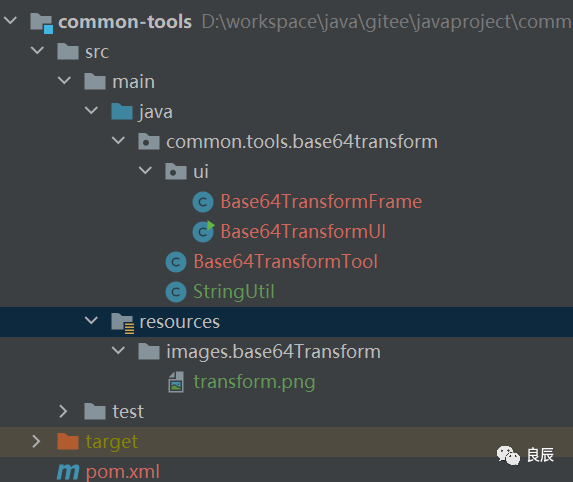
Base64TransformFrame.java
//自定義窗口類
public class Base64TransformFrame extends JFrame {
? ?private JButton toBase64Button = new JButton("toBase64");
? ?private JButton toFileButton = new JButton("toFile");
? ?private JTextField suffixText = new JTextField("zip");
? ?private JTextArea textArea = new JTextArea();
? ?private String currentDirectoryPath = null;
? ?public Base64TransformFrame(String title){
? ? ? ?super(title);
? ? ? ?this.setIconImage(new ImageIcon(getClass().getResource("/images/base64Transform/transform.png")).getImage());
? ? ? ?//內(nèi)容面板
? ? ? ?Container container = getContentPane();
? ? ? ?container.setLayout(new BorderLayout());
? ? ? ?toBase64Button.setPreferredSize(new Dimension(100,30));
? ? ? ?toFileButton.setPreferredSize(new Dimension(100,30));
? ? ? ?suffixText.setToolTipText("請(qǐng)?zhí)顚懳募缶Y,如zip");
? ? ? ?suffixText.setPreferredSize(new Dimension(60,30));
? ? ? ?JPanel panel = new JPanel();
? ? ? ?panel.setLayout(new FlowLayout());
? ? ? ?panel.add(toBase64Button);
? ? ? ?panel.add(toFileButton);
? ? ? ?panel.add(suffixText);
? ? ? ?container.add(panel,BorderLayout.NORTH);
? ? ? ?container.add(textArea,BorderLayout.CENTER);
? ? ? ?textArea.setFont(new Font("微軟雅黑",0,16));
? ? ? ?toBase64Button.addActionListener((e)->{
? ? ? ? ? ?JFileChooser jf = new JFileChooser(currentDirectoryPath);
? ? ? ? ? ?jf.showOpenDialog(this);//顯示打開(kāi)的文件對(duì)話框
? ? ? ? ? ?File file = ?jf.getSelectedFile();//使用文件類獲取選擇器選擇的文件
? ? ? ? ? ?if(file == null){
? ? ? ? ? ? ? ?JOptionPane.showMessageDialog(this,"請(qǐng)選擇文件!","提示",JOptionPane.WARNING_MESSAGE);
? ? ? ? ? ? ? ?return;
? ? ? ? ? }
? ? ? ? ? ?currentDirectoryPath = file.getParent();
? ? ? ? ? ?String filePath = file.getAbsolutePath();//返回路徑名
? ? ? ? ? ?String base64FilePath = null;
? ? ? ? ? ?try {
? ? ? ? ? ? ? ?base64FilePath = Base64TransformTool.fileToBase64Str(filePath,null);
? ? ? ? ? } catch (IOException ioException) {
? ? ? ? ? ? ? ?ioException.printStackTrace();
? ? ? ? ? }
? ? ? ? ? ?String message = "ToBase64成功,文件路徑為:"+base64FilePath;
? ? ? ? ? ?textArea.append(message+"\n");
? ? ? ? ? ?//JOptionPane彈出對(duì)話框類,顯示絕對(duì)路徑名
? ? ? ? ? ?JOptionPane.showMessageDialog(this, message, "提示",JOptionPane.INFORMATION_MESSAGE);
? ? ? });
? ? ? ?toFileButton.addActionListener((e)->{
? ? ? ? ? ?JFileChooser jf = new JFileChooser(currentDirectoryPath);
? ? ? ? ? ?jf.showOpenDialog(this);//顯示打開(kāi)的文件對(duì)話框
? ? ? ? ? ?File file = ?jf.getSelectedFile();//使用文件類獲取選擇器選擇的文件
? ? ? ? ? ?if(file == null){
? ? ? ? ? ? ? ?JOptionPane.showMessageDialog(this,"請(qǐng)選擇文件!","提示",JOptionPane.WARNING_MESSAGE);
? ? ? ? ? ? ? ?return;
? ? ? ? ? }
? ? ? ? ? ?currentDirectoryPath = file.getParent();
? ? ? ? ? ?String base64FilePath = file.getAbsolutePath();//返回路徑名
? ? ? ? ? ?String fileSuffix = suffixText.getText();
? ? ? ? ? ?if(fileSuffix==null || "".equals(fileSuffix)){
? ? ? ? ? ? ? ?JOptionPane.showMessageDialog(this,"請(qǐng)輸入文件后綴");
? ? ? ? ? }
? ? ? ? ? ?String filePath = null;
? ? ? ? ? ?try {
? ? ? ? ? ? ? filePath = Base64TransformTool.base64ToFile(base64FilePath,null,fileSuffix);
? ? ? ? ? } catch (IOException ioException) {
? ? ? ? ? ? ? ?ioException.printStackTrace();
? ? ? ? ? }
? ? ? ? ? ?String message = "ToFile成功,文件路徑為:"+filePath;
? ? ? ? ? ?textArea.append(message+"\n");
? ? ? ? ? ?//JOptionPane彈出對(duì)話框類,顯示絕對(duì)路徑名
? ? ? ? ? ?JOptionPane.showMessageDialog(this, message , "提示",JOptionPane.INFORMATION_MESSAGE);
? ? ? });
? }
}
Base64TransformTool.java
//文件與base64字符相互轉(zhuǎn)換的工具類
public class Base64TransformTool {

 ? ?/**
 ? ? * 將文件轉(zhuǎn)換為base64字符串,并寫入txt文本文件(由于base64字符可能會(huì)很長(zhǎng))
 ? ? * 返回保存base64字符串的路徑
 ? ? *
 ? ? * @param filePath ? ?  需要轉(zhuǎn)換的文件的路徑
 ? ? * @param base64FileDir 保存base64字符串的路徑,默認(rèn)當(dāng)前路徑
 ? ? * @return 返回保存base64字符串的路徑
 ? ? */
 ? ?public static String fileToBase64Str(String filePath, String base64FileDir) throws IOException {
 ? ? ? ?checkParamNotNull(filePath);
 ? ? ? ?Path path = Paths.get(filePath);
 ? ? ? ?byte[] fileBytes = Files.readAllBytes(path);
 ? ? ? ?byte[] base64Byte = Base64.getEncoder().encode(fileBytes);
 ? ? ? ?String fileName = path.getFileName().toString();
 ? ? ? ?String base64FileName = fileName.substring(0, fileName.lastIndexOf(".")) + ".txt";
 ? ? ? ?Files.write(Paths.get(path.getParent().toString(), base64FileName), base64Byte);
 ? ? ? ?return path.getParent().toString() + File.separator + base64FileName;
 ?  }

 ? ?/**
 ? ? * 將base64字符串還原成文件
 ? ? * 返回文件路徑
 ? ? * @param base64FilePath base64字符串的文件路徑
 ? ? * @param filePath ? ? ? 還原的文件路徑,默認(rèn)當(dāng)前ase64字符串的文件路徑
 ? ? * @param suffix ? ? ? ? 文件后綴名
 ? ? * @return 返回文件路徑
 ? ? */
 ? ?public static String base64ToFile(String base64FilePath, String filePath, String suffix) throws IOException {
 ? ? ? ?checkParamNotNull(base64FilePath,suffix);
 ? ? ? ?if(filePath == null){
 ? ? ? ? ? ?filePath = base64FilePath.substring(0,base64FilePath.lastIndexOf(".")+1)
 ? ? ? ? ? ? ? ? ? ?+ suffix;
 ? ? ?  }
 ? ? ? ?byte[] base64Byte = Files.readAllBytes(Paths.get(base64FilePath));
 ? ? ? ?try {
 ? ? ? ? ? ?Files.write(Paths.get(filePath), Base64.getDecoder().decode(base64Byte), StandardOpenOption.CREATE);
 ? ? ?  } catch (IOException e) {
 ? ? ? ? ? ?e.printStackTrace();
 ? ? ?  }
 ? ? ? ?return filePath;
 ?  }

 ? ?private static void checkParamNotNull(Object param,Object... others){
 ? ? ? ?if(param == null){
 ? ? ? ? ? ?throw new IllegalArgumentException("參數(shù)不能為空");
 ? ? ?  }
 ? ? ? ?if(param instanceof String){
 ? ? ? ? ? ?if(((String) param).length() == 0){
 ? ? ? ? ? ? ? ?throw new IllegalArgumentException("參數(shù)不能為空");
 ? ? ? ? ?  }
 ? ? ?  }
 ? ? ? ?if(others!=null){
 ? ? ? ? ? ?Object[] params = others;
 ? ? ? ? ? ?for (Object o : params) {
 ? ? ? ? ? ? ? ?checkParamNotNull(o);
 ? ? ? ? ?  }
 ? ? ?  }
 ?  }
}
Base64TransformUI.java
//UI啟動(dòng)類
public class Base64TransformUI {
 ? ?/**
 ? ? * 得到顯示器屏幕的寬高
 ? ? */
 ? ?public static int windowsWidth = Toolkit.getDefaultToolkit().getScreenSize().width;
 ? ?public static int windowsHeight = Toolkit.getDefaultToolkit().getScreenSize().height;
 ? ?/**
 ? ? * 定義窗體的寬高
 ? ? */
 ? ?public static int frameWidth = 600;
 ? ?public static int frameHeight = 400;

 ? ?public static void createGUI(){
 ? ? ? ?//創(chuàng)建一個(gè)窗口
 ? ? ? ?Base64TransformFrame frame = new Base64TransformFrame("Base64<->File");
 ? ? ? ?//設(shè)置窗口關(guān)閉則退出程序
 ? ? ? ?frame.setDefaultCloseOperation(JFrame.EXIT_ON_CLOSE);

 ? ? ? ?//設(shè)置窗口大小
 ? ? ? ?frame.setSize(frameWidth,frameHeight);
 ? ? ? ?frame.setBounds((windowsWidth-frameWidth)/2,(windowsHeight-frameHeight)/2,frameWidth,frameHeight);

 ? ? ? ?//顯示窗口
 ? ? ? ?frame.setVisible(true);
 ?  }

 ? ?public static void main(String[] args) {
 ? ? ? ?SwingUtilities.invokeLater(()->createGUI());
 ?  }
}
pom.xml
<?xml version="1.0" encoding="UTF-8"?>
<project xmlns="http://maven.apache.org/POM/4.0.0"
 ? ? ? ? xmlns:xsi="http://www.w3.org/2001/XMLSchema-instance"
 ? ? ? ? xsi:schemaLocation="http://maven.apache.org/POM/4.0.0 http://maven.apache.org/xsd/maven-4.0.0.xsd">
 ? ?<modelVersion>4.0.0</modelVersion>

 ? ?<groupId>groupId</groupId>
 ? ?<artifactId>common-tools</artifactId>
 ? ?<version>1.0-SNAPSHOT</version>

 ? ?<properties>
 ? ? ? ?<java.version>1.8</java.version>
 ? ? ? ?<maven.compiler.source>1.8</maven.compiler.source>
 ? ? ? ?<maven.compiler.target>1.8</maven.compiler.target>
 ? ?</properties>


 ? ?<build>
 ? ? ? ?<finalName>common-tools</finalName>
 ? ? ? ?<plugins>
 ? ? ? ? ? ?<plugin>
 ? ? ? ? ? ? ? ?<groupId>org.apache.maven.plugins</groupId>
 ? ? ? ? ? ? ? ?<artifactId>maven-shade-plugin</artifactId>
 ? ? ? ? ? ? ? ?<version>3.2.1</version>
 ? ? ? ? ? ? ? ?<executions>
 ? ? ? ? ? ? ? ? ? ?<execution>
 ? ? ? ? ? ? ? ? ? ? ? ?<phase>package</phase>
 ? ? ? ? ? ? ? ? ? ? ? ?<goals>
 ? ? ? ? ? ? ? ? ? ? ? ? ? ?<goal>shade</goal>
 ? ? ? ? ? ? ? ? ? ? ? ?</goals>
 ? ? ? ? ? ? ? ? ? ? ? ?<configuration>
 ? ? ? ? ? ? ? ? ? ? ? ? ? ?<transformers>
 ? ? ? ? ? ? ? ? ? ? ? ? ? ? ? ?<transformer implementation="org.apache.maven.plugins.shade.resource.ManifestResourceTransformer">
 ? ? ? ? ? ? ? ? ? ? ? ? ? ? ? ? ? ?<!--這里寫你的main函數(shù)所在的類的路徑名,也就是Class.forName的那個(gè)字符串-->
 ? ? ? ? ? ? ? ? ? ? ? ? ? ? ? ? ? ?<mainClass>common.tools.base64transform.ui.Base64TransformUI</mainClass>
 ? ? ? ? ? ? ? ? ? ? ? ? ? ? ? ?</transformer>
 ? ? ? ? ? ? ? ? ? ? ? ? ? ?</transformers>
 ? ? ? ? ? ? ? ? ? ? ? ?</configuration>
 ? ? ? ? ? ? ? ? ? ?</execution>
 ? ? ? ? ? ? ? ?</executions>
 ? ? ? ? ? ?</plugin>
 ? ? ? ?</plugins>
 ? ?</build>
</project>
最終效果
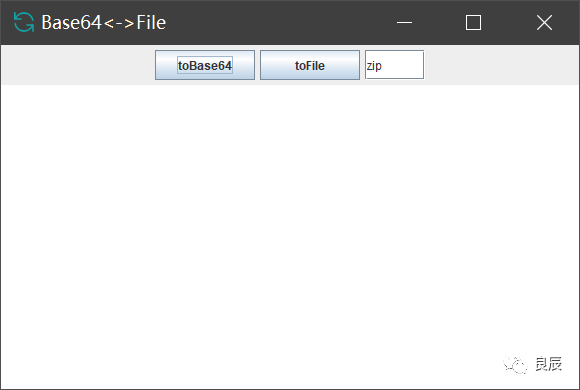
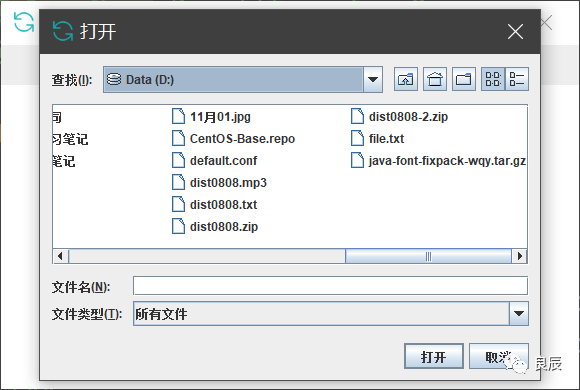
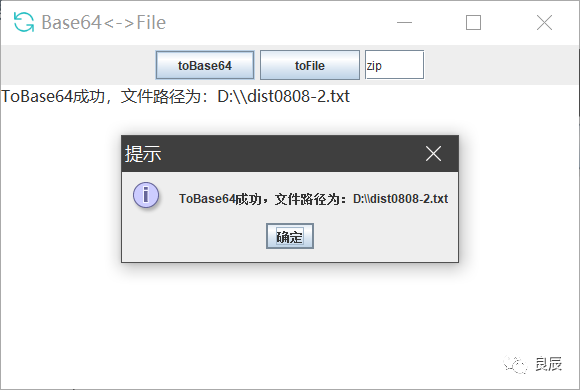
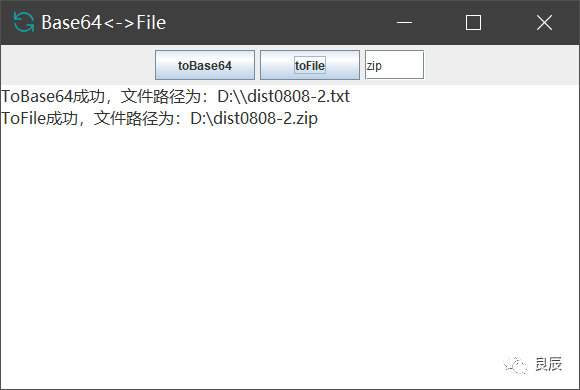
并不好看,但是上述功能還是實(shí)現(xiàn)了。但是這樣每次都要打開(kāi)自己的idea去執(zhí)行還是有點(diǎn)麻煩,所以我想把它打成一個(gè)可執(zhí)行文件exe。
安裝包制作
打包代碼為jar
點(diǎn)擊maven->package或者到項(xiàng)目目錄執(zhí)行mvn package
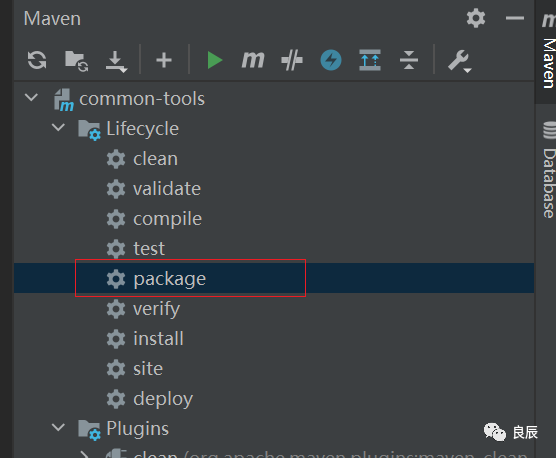
得到common-tools.jar,在target目錄可以找到。
exe4j將jar打包成exe
鏈接:https://pan.baidu.com/s/1HrnqjSGUZB2U_gqSCdvtrw
提取碼:1mri 注冊(cè)碼:L-g782dn2d-1f1yqxx1rv1sqd
可參考這篇文章:https://blog.csdn.net/m0_37701381/article/details/104163877
只是有兩個(gè)地方需要注意,一個(gè)是注冊(cè)碼的輸入。
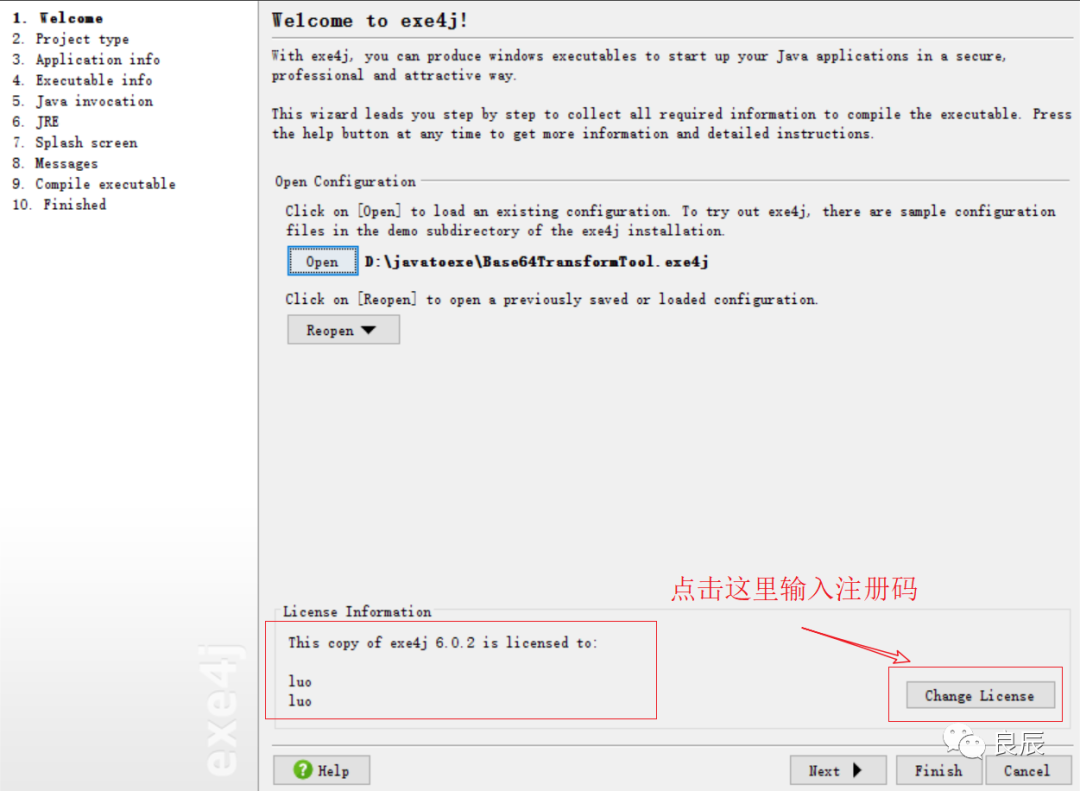
另一個(gè)是,如果不想要exe運(yùn)行的時(shí)候出來(lái)一個(gè)cmd窗口就選擇GUI application
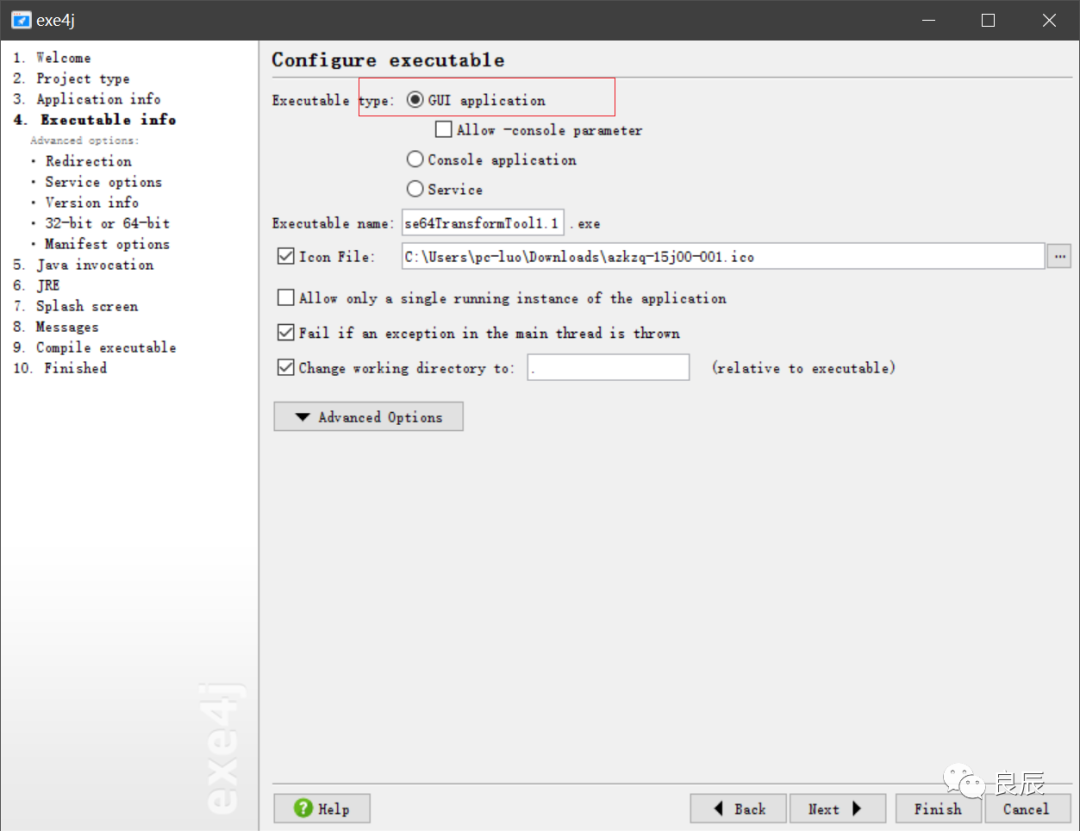
其他的按照上面那位大佬寫的進(jìn)行操作即可。操作完成會(huì)得到一個(gè)exe程序,雙擊即可運(yùn)行。
inno setup將exe和jre進(jìn)行打包合并
操作到上面那步其實(shí)已經(jīng)得到exe了,為什么還需要進(jìn)行和jre合并呢?那是為了可以讓咱們這個(gè)exe可以安裝到任何的window電腦,那個(gè)電腦不需要安裝java環(huán)境,安裝我們這個(gè)即可運(yùn)行。
鏈接:https://pan.baidu.com/s/1-yirBtvg1Ck16p4__BYYFw提取碼:md7u
這個(gè)基本也可以按照上面那位大佬的教程進(jìn)行操作即可,這里不在累贅,附上一下腳本配置:
; Script generated by the Inno Setup Script Wizard.
; SEE THE DOCUMENTATION FOR DETAILS ON CREATING INNO SETUP SCRIPT FILES!

#define MyAppName "Base64TransformTool"
#define MyAppVersion "1.5"
#define MyAppPublisher "My Company, Inc."
#define MyAppURL "http://www.example.com/"
#define MyAppExeName "Base64TransformTool1.1.exe"

#define MyJreName "jre"

[Setup]
; NOTE: The value of AppId uniquely identifies this application.
; Do not use the same AppId value in installers for other applications.
; (To generate a new GUID, click Tools | Generate GUID inside the IDE.)
AppId={{DF8BE89A-E1F5-4ABE-ACDC-5B079BB7C637}
AppName={#MyAppName}
AppVersion={#MyAppVersion}
;AppVerName={#MyAppName} {#MyAppVersion}
AppPublisher={#MyAppPublisher}
AppPublisherURL={#MyAppURL}
AppSupportURL={#MyAppURL}
AppUpdatesURL={#MyAppURL}
DefaultDirName={pf}\{#MyAppName}
DisableProgramGroupPage=yes
OutputDir=C:\Users\pc-luo\Desktop\exe
OutputBaseFilename=setup
Compression=lzma
SolidCompression=yes

[Languages]
Name: "english"; MessagesFile: "compiler:Default.isl"

[Tasks]
Name: "desktopicon"; Description: "{cm:CreateDesktopIcon}"; GroupDescription: "{cm:AdditionalIcons}"; Flags: unchecked

[Files]
Source: "C:\Users\pc-luo\Desktop\exe\Base64TransformTool1.1.exe"; DestDir: "{app}"; Flags: ignoreversion
Source: "D:\install\Java\jre1.8.0_201\*"; DestDir: "{app}\{#MyJreName}"; Flags: ignoreversion recursesubdirs createallsubdirs
; Source: "C:\Users\pc-luo\Desktop\Base64TransformTool.exe"; DestDir: "{app}"; Flags: ignoreversion
; NOTE: Don't use "Flags: ignoreversion" on any shared system files

[Icons]
Name: "{commonprograms}\{#MyAppName}"; Filename: "{app}\{#MyAppExeName}"
Name: "{commondesktop}\{#MyAppName}"; Filename: "{app}\{#MyAppExeName}"; Tasks: desktopicon

[Run]
Filename: "{app}\{#MyAppExeName}"; Description: "{cm:LaunchProgram,{#StringChange(MyAppName, '&', '&&')}}"; Flags: nowait postinstall skipifsilent
最終得到setup.exe安裝包程序,下面截圖里面的名字是我自己重命名了一下的。
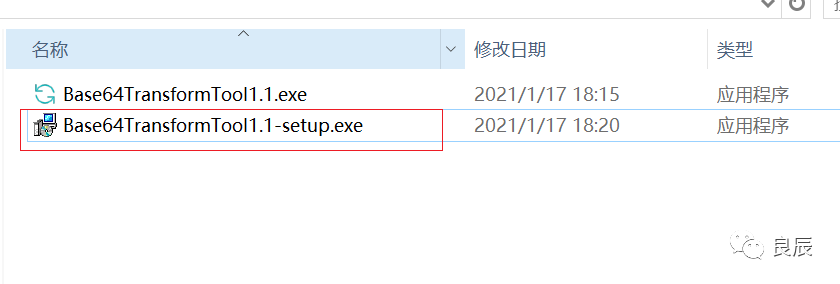
雙擊它是會(huì)出來(lái)安裝步驟的:
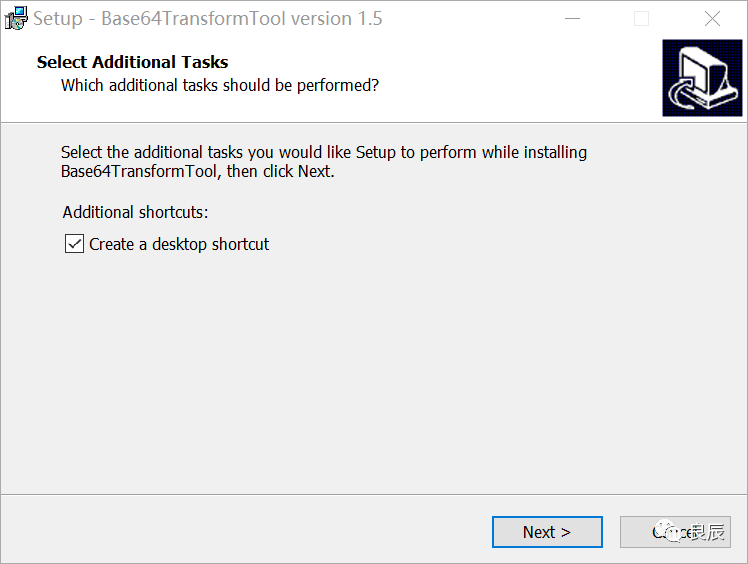
一直下一步,安裝完成之后的安裝目錄結(jié)構(gòu)是這樣的:
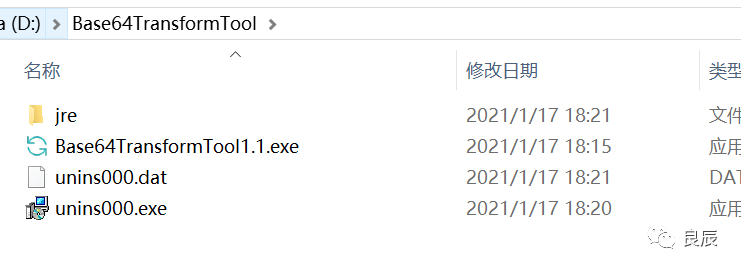
雙擊Base64TransformTool1.1.exe即可運(yùn)行,雙擊uninx000.exe即可卸載。至此,base64和文件互轉(zhuǎn)小工具java版就結(jié)束了。
終于打破我的Flag了,一直都是在想?yún)s沒(méi)有去做去實(shí)現(xiàn),這是個(gè)好的開(kāi)始。好了,本次內(nèi)容就是這些,學(xué)無(wú)止境,關(guān)注我,我們一起學(xué)習(xí)進(jìn)步。如果覺(jué)得內(nèi)容還可以,幫忙點(diǎn)個(gè)贊,點(diǎn)個(gè)在看唄,謝謝~我們下期見(jiàn)。