
SpringBoot+WebSocket實時監(jiān)控異常
大家好,我是寶哥!
寫在前面
此異常非彼異常,標題所說的異常是業(yè)務上的異常。
最近做了一個需求,消防的設(shè)備巡檢,如果巡檢發(fā)現(xiàn)異常,通過手機端提交,后臺的實時監(jiān)控頁面實時獲取到該設(shè)備的信息及位置,然后安排員工去處理。
因為需要服務端主動向客戶端發(fā)送消息,所以很容易的就想到了用WebSocket來實現(xiàn)這一功能。
WebSocket就不做介紹了,上鏈接:
https://developer.mozilla.org/zh-CN/docs/Web/API/WebSocket
前端略微復雜,需要在一張位置分布圖上進行鼠標描點定位各個設(shè)備和根據(jù)不同屏幕大小渲染,本文不做介紹,只是簡單地用頁面樣式進行效果呈現(xiàn)。
綠色代表正常,紅色代表異常
預期效果,未接收到請求前----->id為3的提交了異常,id為3的王五變成了紅色

實現(xiàn)
前端:
直接貼代碼
html>
<html>
????<head>
????????<meta?charset="utf-8"?/>
????????<title>實時監(jiān)控title>
????head>
????<style>
????????.item?{
????????????display:?flex;
????????????border-bottom:?1px?solid?#000000;
????????????justify-content:?space-between;
????????????width:?30%;
????????????line-height:?50px;
????????????height:?50px;
????????}

????????.item?span:nth-child(2){
????????????margin-right:?10px;
????????????margin-top:?15px;
????????????width:?20px;
????????????height:?20px;
????????????border-radius:?50%;
????????????background:?#55ff00;
????????}
????????.nowI{
????????????background:?#ff0000?!important;
????????}
????style>
????<body>
????????<div?id="app">
????????????<div?v-for="item?in?list"?class="item">
????????????????<span>{{item.id}}.{{item.name}}span>
????????????????<span?:class='item.state==-1?"nowI":""'>span>
????????????div>
????????div>
????body>
????<script?src="./js/vue.min.js">script>
????<script?type="text/javascript">
????????var?vm?=?new?Vue({
????????????el:?"#app",
????????????data:?{
????????????????list:?[{
????????????????????????id:?1,
????????????????????????name:?'張三',
????????????????????????state:?1
????????????????????},
????????????????????{
????????????????????????id:?2,
????????????????????????name:?'李四',
????????????????????????state:?1
????????????????????},
????????????????????{
????????????????????????id:?3,
????????????????????????name:?'王五',
????????????????????????state:?1
????????????????????},
????????????????????{
????????????????????????id:?4,
????????????????????????name:?'韓梅梅',
????????????????????????state:?1
????????????????????},
????????????????????{
????????????????????????id:?5,
????????????????????????name:?'李磊',
????????????????????????state:?1
????????????????????},
????????????????]
????????????}
????????})

????????var?webSocket?=?null;
????????if?('WebSocket'?in?window)?{
????????????//創(chuàng)建WebSocket對象
????????????webSocket?=?new?WebSocket("ws://localhost:18801/webSocket/"?+?getUUID());

????????????//連接成功
????????????webSocket.onopen?=?function()?{
????????????????console.log("已連接");
????????????????webSocket.send("消息發(fā)送測試")
????????????}
????????????//接收到消息
????????????webSocket.onmessage?=?function(msg)?{
????????????????//處理消息
????????????????var?serverMsg?=?msg.data;
????????????????var?t_id?=?parseInt(serverMsg)????//服務端發(fā)過來的消息,ID,string需轉(zhuǎn)化為int類型才能比較
????????????????for?(var?i?=?0;?i?????????????????????var?item?=?vm.list[i];
????????????????????if(item.id?==?t_id){
????????????????????????item.state?=?-1;
????????????????????????vm.list.splice(i,1,item)
????????????????????????break;
????????????????????}
????????????????}
????????????};

????????????//關(guān)閉事件
????????????webSocket.onclose?=?function()?{
????????????????console.log("websocket已關(guān)閉");
????????????};
????????????//發(fā)生了錯誤事件
????????????webSocket.onerror?=?function()?{
????????????????console.log("websocket發(fā)生了錯誤");
????????????}
????????}?else?{
????????????alert("很遺憾,您的瀏覽器不支持WebSocket!")
????????}

????????function?getUUID()?{????//獲取唯一的UUID
????????????return?'xxxxxxxx-xxxx-4xxx-yxxx-xxxxxxxxxxxx'.replace(/[xy]/g,?function(c)?{

????????????????var?r?=?Math.random()?*?16?|?0,
????????????????????v?=?c?==?'x'???r?:?(r?&?0x3?|?0x8);
????????????????return?v.toString(16);
????????????});
????????}
????script>
html>
后端:
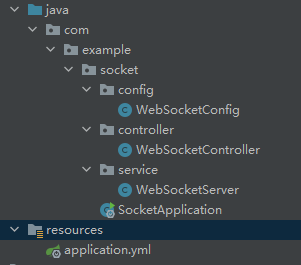
項目結(jié)構(gòu)是這樣子的,后面的代碼關(guān)鍵注釋都有,就不重復描述了
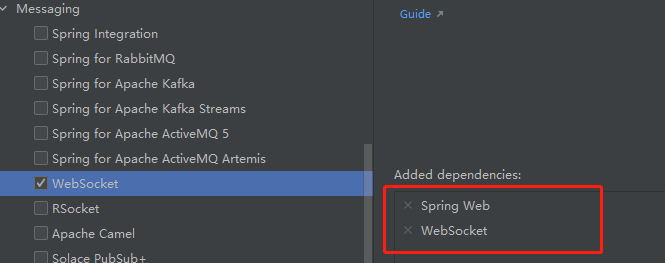
1、新建SpringBoot工程,選擇web和WebSocket依賴
2、配置application.yml
#端口
server:
??port:?18801

#密碼,因為接口不需要權(quán)限,所以加了個密碼做校驗
mySocket:
??myPwd:?jae_123
3、WebSocketConfig配置類
@Configuration
public?class?WebSocketConfig?{

????/**
?????*?注入一個ServerEndpointExporter,該Bean會自動注冊使用@ServerEndpoint注解申明的websocket?endpoint
?????*/
????@Bean
????public?ServerEndpointExporter?serverEndpointExporter(){
????????return?new?ServerEndpointExporter();
????}
}
4、WebSocketServer類,用來進行服務端和客戶端之間的交互
/**
?*?@author?jae
?*?@ServerEndpoint("/webSocket/{uid}")?前端通過此URI與后端建立鏈接
?*/

@ServerEndpoint("/webSocket/{uid}")
@Component
public?class?WebSocketServer?{

????private?static?Logger?log?=?LoggerFactory.getLogger(WebSocketServer.class);

????//靜態(tài)變量,用來記錄當前在線連接數(shù)。應該把它設(shè)計成線程安全的。
????private?static?final?AtomicInteger?onlineNum?=?new?AtomicInteger(0);

????//concurrent包的線程安全Set,用來存放每個客戶端對應的WebSocketServer對象。
????private?static?CopyOnWriteArraySet?sessionPools?=?new?CopyOnWriteArraySet();

????/**
?????*?有客戶端連接成功
?????*/
????@OnOpen
????public?void?onOpen(Session?session,?@PathParam(value?=?"uid")?String?uid){
????????sessionPools.add(session);
????????onlineNum.incrementAndGet();
????????log.info(uid?+?"加入webSocket!當前人數(shù)為"?+?onlineNum);
????}

????/**
?????*?連接關(guān)閉調(diào)用的方法
?????*/
????@OnClose
????public?void?onClose(Session?session)?{
????????sessionPools.remove(session);
????????int?cnt?=?onlineNum.decrementAndGet();
????????log.info("有連接關(guān)閉,當前連接數(shù)為:{}",?cnt);
????}

????/**
?????*?發(fā)送消息
?????*/
????public?void?sendMessage(Session?session,?String?message)?throws?IOException?{
????????if(session?!=?null){
????????????synchronized?(session)?{
????????????????session.getBasicRemote().sendText(message);
????????????}
????????}
????}

????/**
?????*?群發(fā)消息
?????*/
????public?void?broadCastInfo(String?message)?throws?IOException?{
????????for?(Session?session?:?sessionPools)?{
????????????if(session.isOpen()){
????????????????sendMessage(session,?message);
????????????}
????????}
????}

????/**
?????*?發(fā)生錯誤
?????*/
????@OnError
????public?void?onError(Session?session,?Throwable?throwable){
????????log.error("發(fā)生錯誤");
????????throwable.printStackTrace();
????}

}
5、WebSocketController類,用于進行接口測試
@RestController
@RequestMapping("/open/socket")
public?class?WebSocketController?{

????@Value("${mySocket.myPwd}")
????public?String?myPwd;

????@Autowired
????private?WebSocketServer?webSocketServer;

????/**
?????*?手機客戶端請求接口
?????*?@param?id????發(fā)生異常的設(shè)備ID
?????*?@param?pwd???密碼(實際開發(fā)記得加密)
?????*?@throws?IOException
?????*/
????@PostMapping(value?=?"/onReceive")
????public?void?onReceive(String?id,String?pwd)?throws?IOException?{
????????if(pwd.equals(myPwd)){??//密碼校驗一致(這里舉例,實際開發(fā)還要有個密碼加密的校驗的),則進行群發(fā)
????????????webSocketServer.broadCastInfo(id);
????????}
????}

}
測試
1、打開前端頁面,進行WebSocket連接
控制臺輸出,連接成功

2、因為是模擬數(shù)據(jù),所以全部顯示正常,沒有異常提交時的頁面呈現(xiàn)

3、接下來,我們用接口測試工具Postman提交一個異常

注意id為3的這個數(shù)據(jù)的狀態(tài)變化

我們可以看到,id為3的王五狀態(tài)已經(jīng)變成異常的了,實時通訊成功。
參考:
https://developer.mozilla.org/zh-CN/docs/Web/API/WebSocket
最后
工作中有這方面關(guān)于實時監(jiān)控的需求,可以參考一下哦。
不足之處歡迎指出,覺得有用的話就點個推薦吧!
來源:cnblogs.com/jae-tech/p/15409340.html
精彩推薦:
14 個 Spring MVC 頂級技巧,隨時用隨時爽,一直用一直爽!
微服務架構(gòu)統(tǒng)一安全認證設(shè)計與實踐