
常見(jiàn)內(nèi)網(wǎng)穿透工具使用總結(jié)
鏈接:http://v0w.top/2020/08/11/IntranetProxy/
0x00 前言
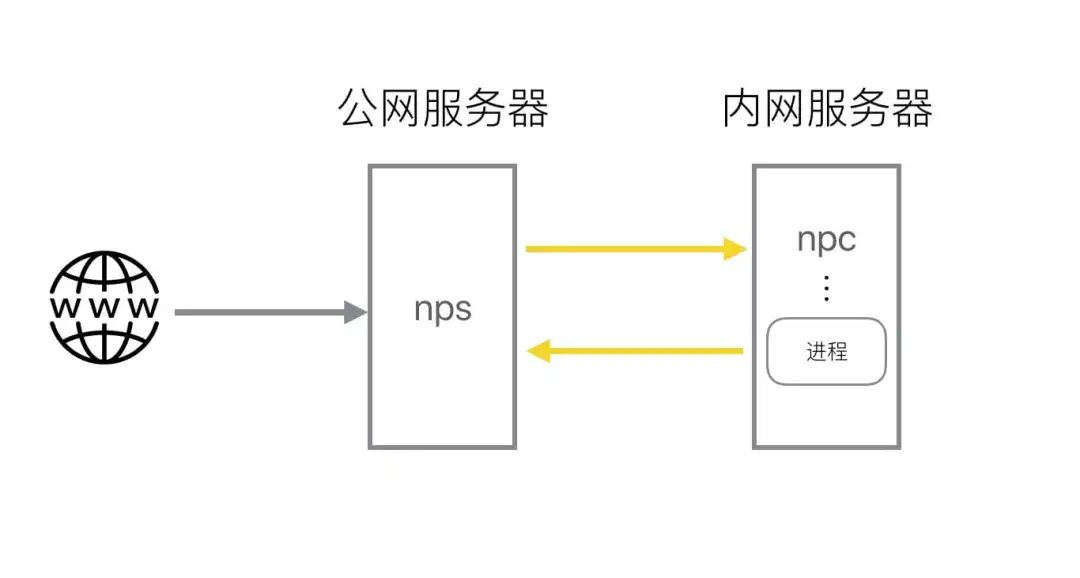
nps是一款輕量級(jí)、高性能、功能強(qiáng)大的內(nèi)網(wǎng)穿透代理服務(wù)器。目前支持tcp、udp流量轉(zhuǎn)發(fā),可支持任何tcp、udp上層協(xié)議(訪問(wèn)內(nèi)網(wǎng)網(wǎng)站、本地支付接口調(diào)試、ssh訪問(wèn)、遠(yuǎn)程桌面,內(nèi)網(wǎng)dns解析等等……),此外還支持內(nèi)網(wǎng)http代理、內(nèi)網(wǎng)socks5代理、p2p等,并帶有功能強(qiáng)大的web管理端。
一臺(tái)有公網(wǎng)IP的服務(wù)器(VPS)運(yùn)行服務(wù)端(NPS)
一個(gè)或多個(gè)運(yùn)行在內(nèi)網(wǎng)的服務(wù)器或者PC運(yùn)行客戶端(NPC)
Go語(yǔ)言編寫(xiě)
支持跨平臺(tái)
支持多種協(xié)議的代理
web管理端
https://github.com/ehang-io/nps/releases
cd ~wget https://github.com/cnlh/nps/releases/download/v0.23.2/linux_amd64_server.tar.gztar xzvf linux_amd64_server.tar.gzcd ~/nps
conf/nps.conf即可:vim conf/nps.conf
#web下面的幾個(gè)參數(shù),web_host= 服務(wù)器IP或者域名web_username= admin(登錄用戶名)web_password= 你的密碼web_port=8080(web管理端口)
#bridge?可以更改 NPC的連接端口。比如我們拿到一臺(tái)權(quán)限受限的服務(wù)器,有防火墻,可能只有部分端口(80,443)可以出網(wǎng),就需要修改成出網(wǎng)端口。##bridgebridge_type=tcpbridge_port=443 # 修改連接端口bridge_ip=0.0.0.0
啟動(dòng)
#Mac/Linux./nps test|start|stop|restart|status 測(cè)試配置文件|啟動(dòng)|停止|重啟|狀態(tài)#Windowsnps.exe test|start|stop|restart|status 測(cè)試配置文件|啟動(dòng)|停止|重啟|狀態(tài)
NPC
./npc -server=你的IP:8024 -vkey=唯一驗(yàn)證密碼 -type=tcp
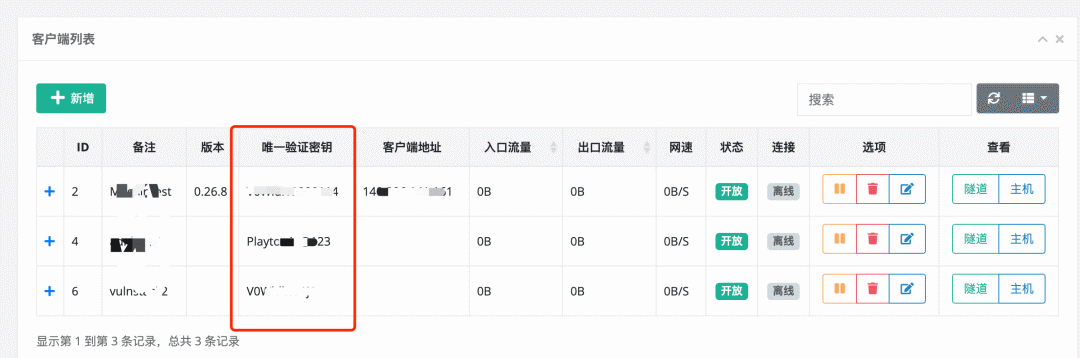
+中看到,詳細(xì)的客戶端連接命令:
新增的方式添加客戶端連接,每一個(gè)連接的vkey都是唯一區(qū)分的。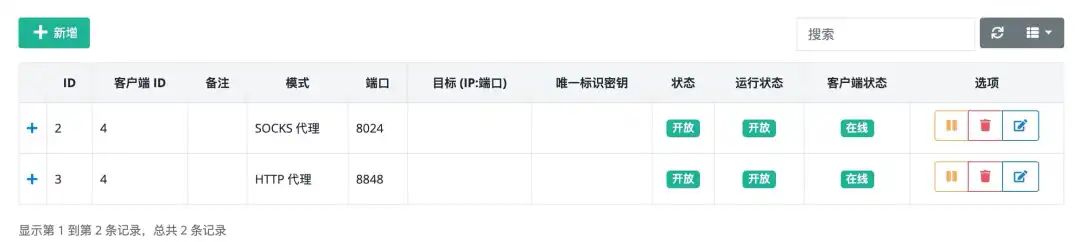
frp 是一個(gè)專(zhuān)注于內(nèi)網(wǎng)穿透的高性能的反向代理應(yīng)用,支持 TCP、UDP、HTTP、HTTPS 等多種協(xié)議。可以將內(nèi)網(wǎng)服務(wù)以安全、便捷的方式通過(guò)具有公網(wǎng) IP 節(jié)點(diǎn)的中轉(zhuǎn)暴露到公網(wǎng)。
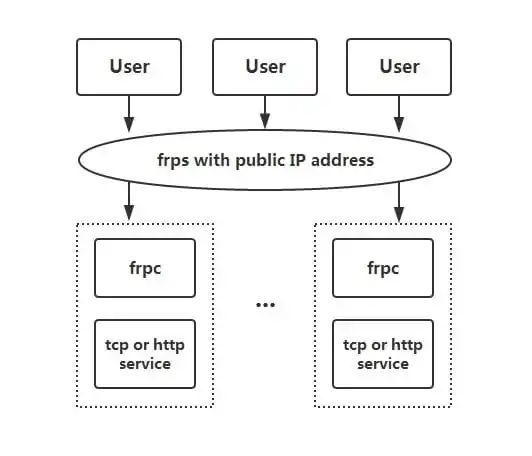
客戶端服務(wù)端通信支持 TCP、KCP 以及 Websocket 等多種協(xié)議。
端口復(fù)用,多個(gè)服務(wù)通過(guò)同一個(gè)服務(wù)端端口暴露。
跨平臺(tái),但是支持的比nps少一點(diǎn)
多種插件,提供很多功能
下載:https://github.com/fatedier/frp/releases
以下內(nèi)容摘自:https://segmentfault.com/a/1190000021876836
1. 通過(guò) rdp 訪問(wèn)家里的機(jī)器
token?參數(shù)一致則身份驗(yàn)證通過(guò):# frps.ini[common]bind_port = 7000# 用于身份驗(yàn)證,請(qǐng)自行修改,要保證服務(wù)端與客戶端一致token = abcdefgh
./frps -c ./frps.ini# frpc.ini[common]server_addr = x.x.x.xserver_port = 7000# 用于身份驗(yàn)證,請(qǐng)自行修改,要保證服務(wù)端與客戶端一致token = abcdefgh[rdp]type = tcplocal_ip = 127.0.0.1local_port = 3389remote_port = 6000
./frpc -c ./frpc.inix.x.x.x:6000'start_frpc.vbs'請(qǐng)根據(jù)實(shí)際情況修改路徑CreateObject("WScript.Shell").Run """D:\Program Files\frp_windows_amd64\frpc.exe""" & "-c" & """D:\Program Files\frp_windows_amd64\frpc.ini""",0
C:\Users\\AppData\Roaming\Microsoft\Windows\Start Menu\Programs\Startup # frpc.ini[common]server_addr = x.x.x.xserver_port = 7000# 用于身份驗(yàn)證,請(qǐng)自行修改,要保證服務(wù)端與客戶端一致token = abcdefgh[ssh]type = tcplocal_ip = 127.0.0.1local_port = 22remote_port = 6000
ssh -oPort=6000 [email protected]# frps.ini[common]bind_port = 7000vhost_http_port = 8080# 用于身份驗(yàn)證,請(qǐng)自行修改,要保證服務(wù)端與客戶端一致token = abcdefgh
./frps -c ./frps.iniwww.yourdomain.com:# frpc.ini[common]server_addr = x.x.x.xserver_port = 7000# 用于身份驗(yàn)證,請(qǐng)自行修改,要保證服務(wù)端與客戶端一致token = abcdefgh[web]type = httplocal_port = 80custom_domains = www.yourdomain.com
./frpc -c ./frpc.iniwww.yourdomain.com?的域名 A 記錄解析到 IP?x.x.x.x,如果服務(wù)器已經(jīng)有對(duì)應(yīng)的域名,也可以將 CNAME 記錄解析到服務(wù)器原先的域名。http://www.yourdomain.com:8080?即可訪問(wèn)到處于內(nèi)網(wǎng)機(jī)器上的 Web 服務(wù)。static_file?插件可以對(duì)外提供一個(gè)簡(jiǎn)單的基于 HTTP 的文件訪問(wèn)服務(wù)。static_file?插件,配置如下:# frpc.ini[common]server_addr = x.x.x.xserver_port = 7000# 用于身份驗(yàn)證,請(qǐng)自行修改,要保證服務(wù)端與客戶端一致token = abcdefgh[test_static_file]type = tcpremote_port = 6000plugin = static_file# 要對(duì)外暴露的文件目錄plugin_local_path = /tmp/file# 訪問(wèn) url 中會(huì)被去除的前綴,保留的內(nèi)容即為要訪問(wèn)的文件路徑plugin_strip_prefix = staticplugin_http_user = abcplugin_http_passwd = abc
http://x.x.x.x:6000/static/?來(lái)查看位于?/tmp/file?目錄下的文件,會(huì)要求輸入已設(shè)置好的用戶名和密碼。[common]dashboard_port = 7500# dashboard 用戶名密碼,默認(rèn)都為 admindashboard_user = admindashboard_pwd = admin
http://[server_addr]:7500?訪問(wèn) dashboard 界面,用戶名密碼默認(rèn)為?admin。# frpc.ini[ssh]type = tcplocal_port = 22remote_port = 6000use_encryption = trueuse_compression = true
use_encryption = true,將 frpc 與 frps 之間的通信內(nèi)容加密傳輸,將會(huì)有效防止流量被攔截。use_compression = true?對(duì)傳輸內(nèi)容進(jìn)行壓縮,可以有效減小 frpc 與 frps 之間的網(wǎng)絡(luò)流量,加快流量轉(zhuǎn)發(fā)速度,但是會(huì)額外消耗一些 CPU 資源。frpc.ini?的?common?中配置?tls_enable = true?來(lái)啟用此功能,安全性更高。# frpc.ini[ssh]type = tcplocal_port = 22remote_port = 6000bandwidth_limit = 1MB
bandwidth_limit?字段啟用此功能,目前僅支持?MB?和?KB?單位。range:?段落標(biāo)記來(lái)實(shí)現(xiàn),客戶端會(huì)解析這個(gè)標(biāo)記中的配置,將其拆分成多個(gè) proxy,每一個(gè) proxy 以數(shù)字為后綴命名。# frpc.ini[range:test_tcp]type = tcplocal_ip = 127.0.0.1local_port = 6000-6006,6007remote_port = 6000-6006,6007
test_tcp_0, test_tcp_1 ... test_tcp_7。EW 是一套便攜式的網(wǎng)絡(luò)穿透工具,具有 SOCKS v5服務(wù)架設(shè)和端口轉(zhuǎn)發(fā)兩大核心功能,可在復(fù)雜網(wǎng)絡(luò)環(huán)境下完成網(wǎng)絡(luò)穿透。但是,現(xiàn)在工具已經(jīng)不更新了。。。
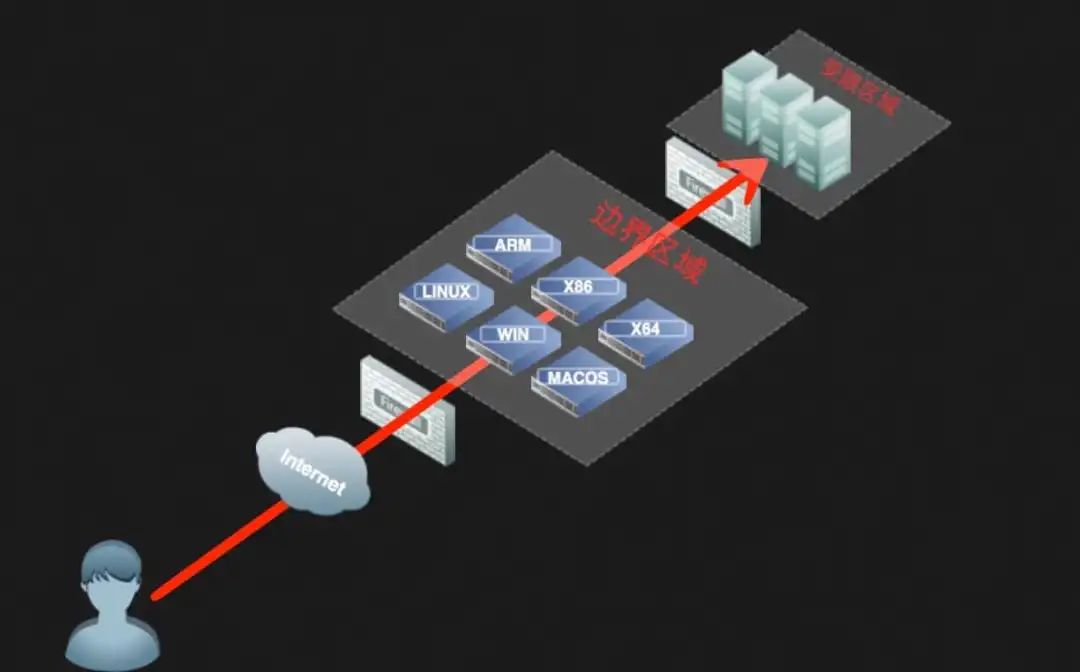
輕量級(jí),C語(yǔ)言編寫(xiě)
可以設(shè)置多級(jí)代理
跨平臺(tái)
但是只支持Socks5代理
以下使用方法均摘自:http://rootkiter.com/EarthWorm/
1. 正向 SOCKS v5 服務(wù)器
$ ./ew -s ssocksd -l 1080
2. 反彈 SOCKS v5 服務(wù)器
a) 先在一臺(tái)具有公網(wǎng) ip 的主機(jī)A上運(yùn)行以下命令:
$ ./ew -s rcsocks -l 1080 -e 8888
$ ./ew -s rssocks -d 1.1.1.1 -e 8888
3. 多級(jí)級(jí)聯(lián)
$ ./ew -s lcx_listen -l 1080 -e 8888$ ./ew -s lcx_tran -l 1080 -f 2.2.2.3 -g 9999$ ./ew -s lcx_slave -d 1.1.1.1 -e 8888 -f 2.2.2.3 -g 9999
lcx_tran?的用法$ ./ew -s ssocksd -l 9999$ ./ew -s lcx_tran -l 1080 -f 127.0.0.1 -g 9999
lcx_listen、lcx_slave?的用法$ ./ew -s lcx_listen -l 1080 -e 8888$ ./ew -s ssocksd -l 9999$ ./ew -s lcx_slave -d 127.0.0.1 -e 8888 -f 127.0.0.1 -g 9999
$ ./ew -s rcsocks -l 1080 -e 8888$ ./ew -s lcx_slave -d 127.0.0.1 -e 8888 -f 127.0.0.1 -g 9999$ ./ew -s lcx_listen -l 9999 -e 7777$ ./ew -s rssocks -d 127.0.0.1 -e 7777
SOCKS v5 -> 1080 -> 8888 -> 9999 -> 7777 -> rssocksngrok 是一個(gè)反向代理,通過(guò)在公共端點(diǎn)和本地運(yùn)行的 Web 服務(wù)器之間建立一個(gè)安全的通道,實(shí)現(xiàn)內(nèi)網(wǎng)主機(jī)的服務(wù)可以暴露給外網(wǎng)。ngrok 可捕獲和分析所有通道上的流量,便于后期分析和重放,所以ngrok可以很方便地協(xié)助服務(wù)端程序測(cè)試。
4.2 特點(diǎn)
官方維護(hù),一般較為穩(wěn)定
跨平臺(tái),閉源
有流量記錄和重發(fā)功能
進(jìn)入ngrok官網(wǎng)(https://ngrok.com/),注冊(cè)ngrok賬號(hào)并下載ngrok; 根據(jù)官網(wǎng)給定的授權(quán)碼,運(yùn)行如下授權(quán)命令;
./ngrok authtoken 1hAotxhmORtzCYvUc3BsxDBPh1H_******************./ngrok http 80即可將機(jī)器的80端口http服務(wù)暴露到公網(wǎng),并且會(huì)提供一個(gè)公網(wǎng)域名。
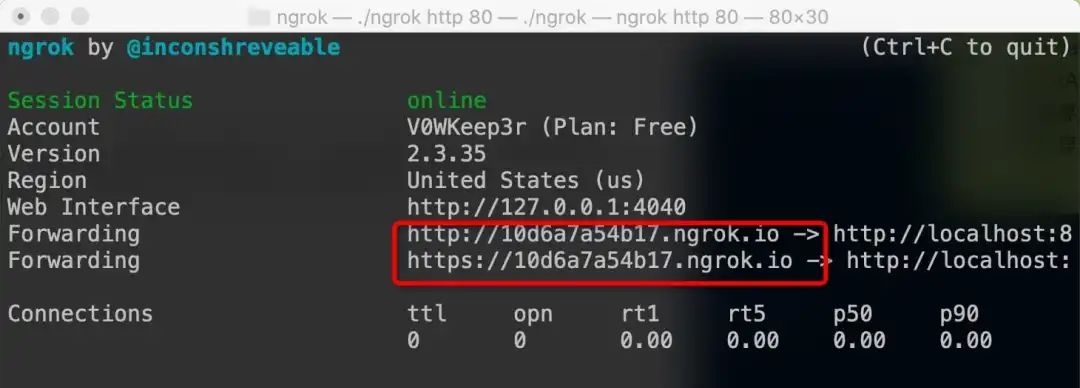
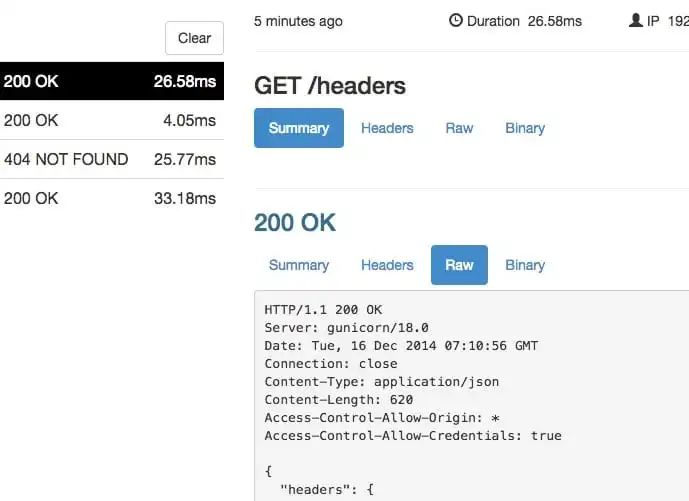
ngrok http -auth="user:password" file:///Users/alan/share
ngrok http "file:///C:\Users\alan\Public Folder"
ngrok tcp 3389
更多使用方法參考:https://ngrok.com/docs
-https://xz.aliyun.com/t/7701
-https://segmentfault.com/a/1190000021876836
http://rootkiter.com/EarthWorm/
黑客破解 APP 常用工具,低調(diào)低調(diào)!
這款網(wǎng)絡(luò)排查工具,堪稱(chēng)神器!