
一篇文章帶你了解SVG 剪切路徑
回復(fù)“前端”即可獲贈前端相關(guān)學(xué)習(xí)資料
SVG剪切路徑(也稱為SVG剪切)用于根據(jù)特定路徑剪切SVG形狀。路徑內(nèi)部的形狀部分可見,外部的部分不可見。
一、剪輯路徑
這是一個簡單的剪輯路徑。
SVG代碼:
<html><head><meta charset="utf-8"><title>項目title>head><body style="background-color: aqua;"><svg width="200" height="100" style="border: 1px solid #cccccc;"><defs><clippath id="clipPath"><rect x="15" y="15" width="40" height="40">rect>clippath>defs><circle cx="25" cy="25" r="20" style="fill: #ff0000s; clip-path: url(#clipPath); ">circle>svg><svg width="200" height="100" style="border: 1px solid #cccccc;"><defs><clippath id="clipPath2"><rect x="15" y="15" width="40" height="40">rect>clippath>defs><circle cx="25" cy="25" r="20" style="fill: #ff0000; clip-path: url(#clipPath2); ">circle><rect x="15" y="15" width="40" height="40" style="stroke: #000000; fill:none;">rect>svg>body>html>
這個實(shí)SVG代碼定義了一個形狀類似于矩形(
運(yùn)行效果:
左下方是生成的圖像。右邊是同一圖像,但也繪制了剪切路徑。

注
在剪切路徑內(nèi)只有圓的部分是可見的。其余部分將被剪切。
二、高級剪切路徑
可以使用矩形以外的其他形狀作為剪切路徑。可以使用圓形,橢圓形,多邊形或自定義路徑。任何SVG形狀都可以用作剪切路徑。
這是將
SVG代碼:
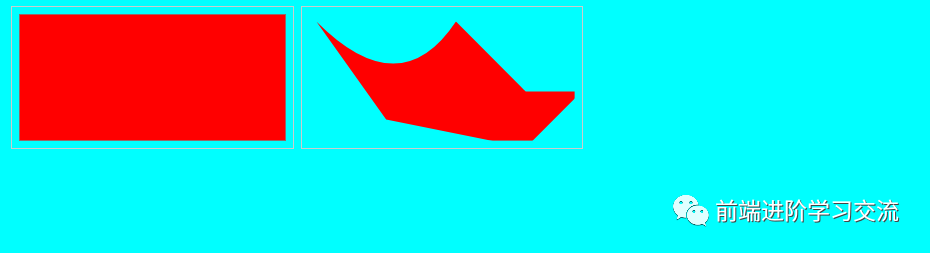
<svg width="200" height="100" style="border: 1px solid #cccccc;"><rect x="5" y="5" width="190" height="90" style="stroke: none; fill:#00ff00; ">rect>svg><svg width="200" height="100" style="border: 1px solid #cccccc;"><defs><clippath id="clipPath3"><path d="M10,10 q60,60 100,0 q50,50 50,50 l40,0 l-40,40 l-100,-20">path>clippath>defs><rect x="5" y="5" width="190" height="90" style="stroke: none; fill:#00ff00; clip-path: url(#clipPath3);">rect>svg>
運(yùn)行效果:
這是生成的圖像-在右側(cè)。左側(cè)顯示沒有剪切路徑的圖像。
1. 在組上剪裁路徑
可以在一組SVG形狀上使用剪切路徑,而不是分別在每個形狀上使用。只需將形狀放在
示例SVG代碼
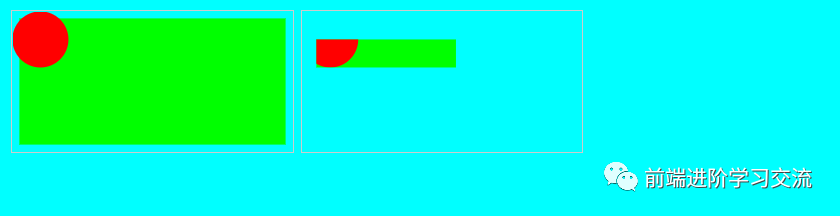
<svg width="200" height="100" style="border: 1px solid #cccccc;"><rect x="5" y="5" width="190" height="90" style="stroke: none; fill:#00ff00; ">rect><circle cx="20" cy="20" r="20" style="stroke: none; fill: #ff0000;">circle>svg><svg width="200" height="100" style="border: 1px solid #cccccc;"><defs><clippath id="clipPath4"><rect x="10" y="20" width="100" height="20">rect>clippath>defs><g style="clip-path: url(#clipPath4);"><rect x="5" y="5" width="190" height="90" style="stroke: none; fill:#00ff00;">rect><circle cx="20" cy="20" r="20" style="stroke: none; fill: #ff0000;">circle>g>svg>
運(yùn)行效果:
下面是沒有剪切路徑的圖像,然后是應(yīng)用剪切路徑的圖像:
2. 文本作為剪切路徑
也可以將文本用作剪切路徑。這是一個實(shí)SVG代碼:
SVG代碼:
<svg width="200" height="100" style="border: 1px solid #cccccc;"><rect x="5" y="5" width="190" height="90" style="stroke: none; fill:#00ff00; ">rect><circle cx="20" cy="20" r="20" style="stroke: none; fill: #ff0000;">circle>svg><svg width="200" height="100" style="border: 1px solid #cccccc;"><defs><clippath id="clipPath5"><text x="10" y="20" style="font-size: 20px; ">This is a texttext>clippath>defs><g style="clip-path: url(#clipPath5);"><rect x="5" y="5" width="190" height="90" style="stroke: none; fill:#00ff00;">rect><circle cx="20" cy="20" r="20" style="stroke: none; fill: #ff0000;">circle>g>svg>
這是帶有和不帶有剪切路徑的結(jié)果圖像:
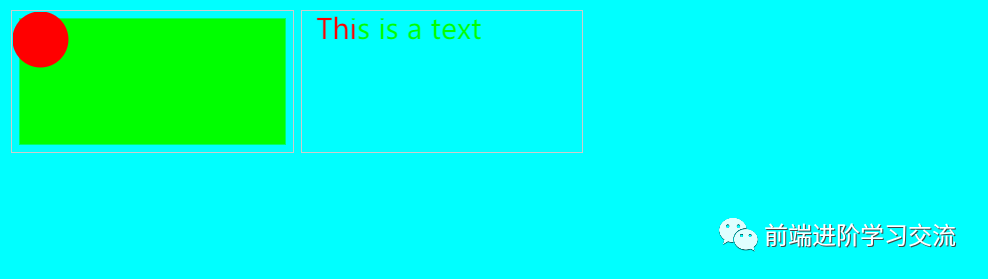
正如看到的,現(xiàn)在只顯示文本內(nèi)部形狀的一部分。
三、總結(jié)
本文基于SVG基礎(chǔ),介紹了如何剪切路徑,可以根據(jù)特定路徑剪切SVG形狀。還介紹了高級的剪切路徑(在組上剪裁路徑、文本作為剪切路徑)通過項目的分析,案例的效果圖的展示,能夠讓讀者更好的理解SVG路徑剪切的用法。
歡迎大家積極嘗試,有時候看到別人實(shí)現(xiàn)起來很簡單,但是到自己動手實(shí)現(xiàn)的時候,總會有各種各樣的問題,切勿眼高手低,勤動手,才可以理解的更加深刻。
希望能夠幫助你更好的學(xué)習(xí)。
-------------------?End?-------------------
往期精彩文章推薦:

歡迎大家點(diǎn)贊,留言,轉(zhuǎn)發(fā),轉(zhuǎn)載,感謝大家的相伴與支持
想加入前端學(xué)習(xí)群請在后臺回復(fù)【入群】
萬水千山總是情,點(diǎn)個【在看】行不行