用System.currentTimeMillis() 竟然遇到性能問(wèn)題,有點(diǎn)不相信~
點(diǎn)擊關(guān)注公眾號(hào),Java干貨及時(shí)送達(dá)

真香!24W字的Java面試手冊(cè)(點(diǎn)擊查看)
獲取當(dāng)前時(shí)間戳,System.currentTimeMillis()是極其常用的基礎(chǔ)
Java API,廣泛地用來(lái)獲取時(shí)間戳或測(cè)量代碼執(zhí)行時(shí)長(zhǎng)等,在我們的印象中應(yīng)該快如閃電。但實(shí)際上在并發(fā)調(diào)用或者特別頻繁調(diào)用它的情況下(比如一個(gè)業(yè)務(wù)繁忙的接口,或者吞吐量大的需要取得時(shí)間戳的流式程序),其性能表現(xiàn)會(huì)令人大跌眼鏡。
直接看下面的Demo
public class CurrentTimeMillisPerfDemo {
    private static final int COUNT = 100;

    public static void main(String[] args) throws Exception {
        long beginTime = System.nanoTime();
        for (int i = 0; i < COUNT; i++) {
            System.currentTimeMillis();
        }

        long elapsedTime = System.nanoTime() - beginTime;
        System.out.println("100 System.currentTimeMillis() serial calls: " + elapsedTime + " ns");

        CountDownLatch startLatch = new CountDownLatch(1);
        CountDownLatch endLatch = new CountDownLatch(COUNT);
        for (int i = 0; i < COUNT; i++) {
            new Thread(() -> {
                try {
                    startLatch.await();
                    System.currentTimeMillis();
                } catch (InterruptedException e) {
                    e.printStackTrace();
                } finally {
                    endLatch.countDown();
                }
            }).start();
        }

        beginTime = System.nanoTime();
        startLatch.countDown();
        endLatch.await();
        elapsedTime = System.nanoTime() - beginTime;
        System.out.println("100 System.currentTimeMillis() parallel calls: " + elapsedTime + " ns");
    }
}
執(zhí)行結(jié)果如下圖。
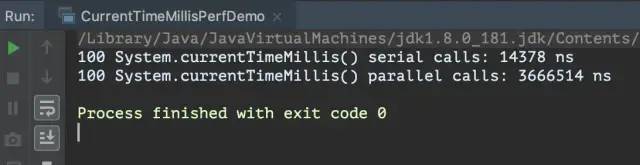
可見(jiàn),并發(fā)調(diào)用System.currentTimeMillis()一百次,耗費(fèi)的時(shí)間是單線程調(diào)用一百次的250倍。如果單線程的調(diào)用頻次增加(比如達(dá)到每毫秒數(shù)次的地步),也會(huì)觀察到類似的情況。實(shí)際上在極端情況下,System.currentTimeMillis()的耗時(shí)甚至?xí)葎?chuàng)建一個(gè)簡(jiǎn)單的對(duì)象實(shí)例還要多,看官可以自行將上面線程中的語(yǔ)句換成new HashMap<>之類的試試看。
jlong os::javaTimeMillis() {
  timeval time;
  int status = gettimeofday(&time, NULL);
  assert(status != -1, "linux error");
  return jlong(time.tv_sec) * 1000  +  jlong(time.tv_usec / 1000);
}
http://pzemtsov.github.io/2017/07/23/the-slow-currenttimemillis.html
調(diào)用gettimeofday()需要從用戶態(tài)切換到內(nèi)核態(tài); gettimeofday()的表現(xiàn)受Linux系統(tǒng)的計(jì)時(shí)器(時(shí)鐘源)影響,在HPET計(jì)時(shí)器下性能尤其差; 系統(tǒng)只有一個(gè)全局時(shí)鐘源,高并發(fā)或頻繁訪問(wèn)會(huì)造成嚴(yán)重的爭(zhēng)用。
另外,可以用以下的命令查看和修改時(shí)鐘源。
~ cat /sys/devices/system/clocksource/clocksource0/available_clocksource
tsc hpet acpi_pm
~ cat /sys/devices/system/clocksource/clocksource0/current_clocksource
tsc
~ echo 'hpet' > /sys/devices/system/clocksource/clocksource0/current_clocksource
public class CurrentTimeMillisClock {
    private volatile long now;

    private CurrentTimeMillisClock() {
        this.now = System.currentTimeMillis();
        scheduleTick();
    }

    private void scheduleTick() {
        new ScheduledThreadPoolExecutor(1, runnable -> {
            Thread thread = new Thread(runnable, "current-time-millis");
            thread.setDaemon(true);
            return thread;
        }).scheduleAtFixedRate(() -> {
            now = System.currentTimeMillis();
        }, 1, 1, TimeUnit.MILLISECONDS);
    }

    public long now() {
        return now;
    }

    public static CurrentTimeMillisClock getInstance() {
        return SingletonHolder.INSTANCE;
    }

    private static class SingletonHolder {
        private static final CurrentTimeMillisClock INSTANCE = new CurrentTimeMillisClock();
    }
}
使用的時(shí)候,直接CurrentTimeMillisClock.getInstance().now()就可以了。不過(guò),在System.currentTimeMillis()的效率沒(méi)有影響程序整體的效率時(shí),就不必忙著做優(yōu)化,這只是為極端情況準(zhǔn)備的。
如有文章對(duì)你有幫助,
歡迎關(guān)注??、點(diǎn)贊??、轉(zhuǎn)發(fā)??!
推薦, Java面試手冊(cè) 內(nèi)容包括網(wǎng)絡(luò)協(xié)議、Java基礎(chǔ)、進(jìn)階、字符串、集合、并發(fā)、JVM、數(shù)據(jù)結(jié)構(gòu)、算法、MySQL、Redis、Mongo、Spring、SpringBoot、MyBatis、SpringCloud、Linux以及各種中間件(Dubbo、Nginx、Zookeeper、MQ、Kafka、ElasticSearch)等等... 點(diǎn)擊文末“閱讀原文”可直達(dá)