
自學鴻蒙應用開發(fā)(27)- 自定義ListDialog
執(zhí)行效果
上一篇文章中說過,直接使用鴻蒙系統(tǒng)中的ListDialog大致是下面的效果:
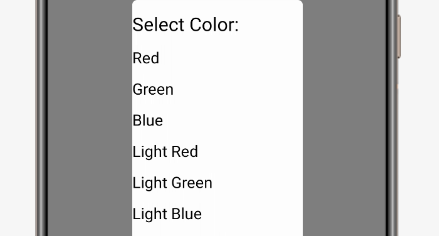
這個效果過于簡陋,無法用于實際的產品開發(fā)。本文介紹如何定制自己的ListDialog。還是先看演示視頻:
準備布局
定制ListDialog的第一步是為列表項定義布局,這里采用ListContainer示例中相同的布局,首先是偶數項:
<DirectionalLayoutxmlns:ohos="http://schemas.huawei.com/res/ohos"ohos:height="match_content"ohos:width="match_parent"ohos:left_margin="16vp"ohos:right_margin="16vp"ohos:orientation="vertical"><Textohos:id="$+id:item_index"ohos:height="match_content"ohos:width="match_content"ohos:padding="4vp"ohos:text="Item0"ohos:text_size="20fp"ohos:text_color="#FF0000"ohos:layout_alignment="center"/>DirectionalLayout>
接著是奇數項:
<DirectionalLayoutxmlns:ohos="http://schemas.huawei.com/res/ohos"ohos:height="match_content"ohos:width="match_parent"ohos:left_margin="16vp"ohos:right_margin="16vp"ohos:orientation="vertical"><Textohos:id="$+id:item_index"ohos:height="match_content"ohos:width="match_content"ohos:padding="4vp"ohos:text="Item0"ohos:text_size="25fp"ohos:text_color="#007F00"ohos:italic="true"/>DirectionalLayout>
接下來是SampleItem,繼續(xù)使用ListContainer示例中的代碼:
package com.example.helloharmony;public class SampleItem {private String name;private int layout;private int item;public SampleItem(String name, int layout, int item) {this.name = name;this.layout = layout;this.item = item;}public String getName() {return name;}public void setName(String name) {this.name = name;}public int getLayout(){return layout;}public int getItem(){return item;}}
再下來是SampleItemProvider,仍然使用ListContainer示例中的代碼:
package com.example.helloharmony;import?ohos.aafwk.ability.AbilitySlice;import?ohos.agp.components.*;import?java.util.List;public class SampleItemProvider extends BaseItemProvider {private Listlist; private AbilitySlice slice;public SampleItemProvider(Listlist, AbilitySlice slice) {this.list = list;this.slice = slice;}public int getCount() {return list.size();}public Object getItem(int position) {return list.get(position);}public long getItemId(int position) {return position;}public Component getComponent(int position, Component convertComponent, ComponentContainer componentContainer) {SampleItem sampleItem = list.get(position);Component cpt = convertComponent;if(cpt == null || cpt.getId() != sampleItem.getLayout()) {cpt = LayoutScatter.getInstance(slice).parse(sampleItem.getLayout(), null, false);}Text text = (Text) cpt.findComponentById(sampleItem.getItem());text.setText(sampleItem.getName());return cpt;}}
到目前為止的代碼都是沿用ListContainer中的代碼,不再重復說明。
生成自定義的列表對話框
雖然從邏輯上沒有必要,第4行仍然調用了setItems。因為如果不這樣做,程序就會異常退出。個人猜想還是類庫的完成度不夠。
第6行,第7行生成自定義的SampleItem數據和SampleItemProvider。第8行將生成的SampleItemProvider對象傳遞給ListDialog對象。
private void showCustomizedListDialog() {ListDialog dlg = new ListDialog(this);String []items = {"Red", "Green", "Blue", "Light Red", "Light Green", "Light Blue"};dlg.setItems(items);dlg.setTitleText("Customized List Dialog");Listlist = getData(); SampleItemProvider sampleItemProvider = new SampleItemProvider(list,this);dlg.setProvider(sampleItemProvider);dlg.show();((ListContainer)dlg.getListContainer()).setItemSelectedListener(new ListContainer.ItemSelectedListener() {@Overridepublic void onItemSelected(ListContainer listContainer, Component component, int i, long l) {new ToastDialog(getContext()).setText(((SampleItem)sampleItemProvider.getItem(i)).getName()).show();dlg.destroy();}});}
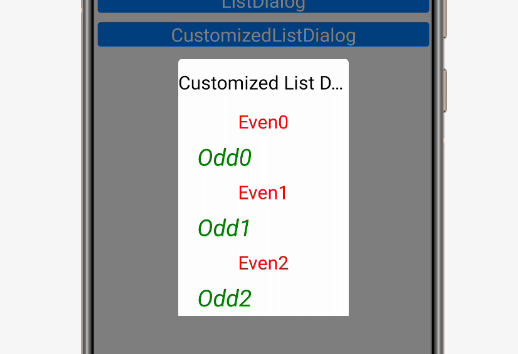
第10行代碼開始,為ListDialog中的ListContainer執(zhí)行項目被選中后的處理內容。下面是代碼執(zhí)行后的效果:
注意事項
目前的這種做法在鴻蒙文檔中并沒有說明,不排除將來發(fā)生變化的可能性。希望早日看到官方文檔中的正式說法。
參考代碼
完整代碼可以從以下鏈接下載:
https://github.com/xueweiguo/Harmony/tree/master/HelloHarmony
參考資料
ListContainer用法說明
自學鴻蒙應用開發(fā)(16)- ListContainer
ListDialog類
https://developer.harmonyos.com/cn/docs/documentation/doc-references/listdialog-0000001054120087
作者著作介紹
《實戰(zhàn)Python設計模式》是作者去年3月份出版的技術書籍,該書利用Python 的標準GUI 工具包tkinter,通過可執(zhí)行的示例對23 個設計模式逐個進行說明。這樣一方面可以使讀者了解真實的軟件開發(fā)工作中每個設計模式的運用場景和想要解決的問題;另一方面通過對這些問題的解決過程進行說明,讓讀者明白在編寫代碼時如何判斷使用設計模式的利弊,并合理運用設計模式。
對設計模式感興趣而且希望隨學隨用的讀者通過本書可以快速跨越從理解到運用的門檻;希望學習Python GUI 編程的讀者可以將本書中的示例作為設計和開發(fā)的參考;使用Python 語言進行圖像分析、數據處理工作的讀者可以直接以本書中的示例為基礎,迅速構建自己的系統(tǒng)架構。
覺得本文有幫助?請分享給更多人。
關注微信公眾號【面向對象思考】輕松學習每一天!
面向對象開發(fā),面向對象思考!