
輕量級壓測工具hey介紹與實踐
二進制安裝
Linux 64-bit:?https://storage.googleapis.com/hey-release/hey_linux_amd64
Mac 64-bit:?https://storage.googleapis.com/hey-release/hey_darwin_amd64
Windows 64-bit:?https://storage.googleapis.com/hey-release/hey_windows_amd64
源碼安裝
??????? 需要提交安裝GO語言環(huán)境https://www.runoob.com/go/go-environment.html
git clone?https://github.com/rakyll/hey.git
go get -u github.com/rakyll/hey
go install github.com/rakyll/hey
go build
hey壓測簡明示例
指定時長的get請求:客戶端(-c)并發(fā)為2, 持續(xù)發(fā)送請求2s (-c)
hey -z 5s -c 2 https://www.baidu.com/
指定請求總數(shù)的get請求:運行2000次(-n),客戶端并發(fā)為50(-c)
hey -n 2000 -c 50? https://www.baidu.com/
指定host的get請求:使用的cpu核數(shù)為2 (-cpus), 壓測時長為5s(-z), 并發(fā)數(shù)為2
hey -z 5s -c 2 -cpus 2 -host "baidu.com" https://220.181.38.148
請求帶header的get接口:壓測時長為5s (-z), 客戶端發(fā)送請求的速度為128QPS, 請求頭用-H添加
hey -z 5s -q 128 -H "client-ip:0.0.0.0" -H "X-Up-Calling-Line-Id:X.L.Xia" https://www.baidu.com/
請求post請求
hey -z 5s -c 50 -m POST -H "info:firstname=xiuli; familyname=xia" -d "year=2020&month=1&day=21" https://www.baidu.com/
代理模式,需額外配置proxy:因部分ip頻繁發(fā)請求有風(fēng)險,故可用-x設(shè)置白名單代理向服務(wù)器發(fā)請求
hey -z 5s -c 10 -x "http://127.0.0.1:8001"?http://baidu.com/
shell for循環(huán)實現(xiàn)壓測
for i in `seq 10`; do curl -v http://baidu.com; done
使用方法
Usage: hey [options...]
Options:
? // 指定運行的總請求數(shù)。默認值為200。
? -n? Number of requests to run. Default is 200.
? // 客戶端并發(fā)執(zhí)行的請求數(shù),默認為50。總請求數(shù)不能小于并發(fā)數(shù)。
? -c? Number of workers to run concurrently. Total number of requests cannot
????? be smaller than the concurrency level. Default is 50.
? // 客戶端發(fā)送請求的速度限制,以每秒響應(yīng)數(shù)QPS為單位,默認沒有限制。
? -q? Rate limit, in queries per second (QPS) per worker. Default is no rate limit.
? // 發(fā)送請求的持續(xù)時長,超時后程序停止并退出。若指定了持續(xù)時間,則忽略總請求數(shù)(-n),例如-z 10s,-z 3m
? -z? Duration of application to send requests. When duration is reached,
????? application stops and exits. If duration is specified, n is ignored.
????? Examples: -z 10s -z 3m.
? // 輸出類型。若沒有提供,則打印摘要。CSV是唯一支持的格式,結(jié)果以逗號分隔各個指標(biāo)項。
? -o? Output type. If none provided, a summary is printed.
????? "csv" is the only supported alternative. Dumps the response
????? metrics in comma-separated values format.
? // HTTP方法,例如GET,POST,PUT,DELETE,HEAD,OPTIONS方法
? -m? HTTP method, one of GET, POST, PUT, DELETE, HEAD, OPTIONS.
? // HTTP請求頭,可以用-H連續(xù)添加多個請求頭。
? -H? Custom HTTP header. You can specify as many as needed by repeating the flag.
????? For example, -H "Accept: text/html" -H "Content-Type: application/xml" .
? // 每個請求的超時時間(以秒為單位)。默認值為20s,數(shù)值0代表永不超時。
? -t? Timeout for each request in seconds. Default is 20, use 0 for infinite.
? // HTTP響應(yīng)頭
? -A? HTTP Accept header.
? // HTTP請求正文
? -d? HTTP request body.
? // HTTP請求正文文件
? -D? HTTP request body from file. For example, /home/user/file.txt or ./file.txt.
? // 內(nèi)容類型,默認為“ text / html”。
? -T? Content-type, defaults to "text/html".
? // 基本身份驗證,用戶名:密碼。
? -a? Basic authentication, username:password.
? // HTTP代理地址作, 使用host:port格式。
? -x? HTTP Proxy address as host:port.
? // 啟用HTTP / 2
? -h2 Enable HTTP/2.
? // HTTP主機頭
? -host HTTP Host header.
? // 禁用壓縮。
? -disable-compression? Disable compression.
? // 禁用保持活動狀態(tài),防止重新使用不同的HTTP請求之間的TCP連接。
? -disable-keepalive??? Disable keep-alive, prevents re-use of TCP
??????????????????????? connections between different HTTP requests.
? // 禁用HTTP重定向?????????????????????
? -disable-redirects??? Disable following of HTTP redirects
? // 使用的cpu內(nèi)核數(shù)。當(dāng)前計算機的默認值為8核。
? -cpus???????????????? Number of used cpu cores.
??????????????????????? (default for current machine is 8 cores)
Windows下命令行
hey_windows_amd64.exe -n 9000 -c 100 -m "POST" -T "application/json" -H "Authorization: Bearer eyJhbGciOiJIUzI1NiIsInR5cCI6IkpXVCJ9.eyJodHRwOi8vc2NoZW1hcy54bWxzb2FwLm9yZy93cy8yMDA1LzA1L2lkZW50aXR5L2NsYWltcy9uYW1laWRlbnRpZmllciI6IjEzNzI1MTUyNTI1Iiwic3ViIjoiMTM3MjUxNTI1MjUiLCJqdGkiOiIxZTU2MzlhNS02YjQzLTRmNTctYWFkYi0yN2UyNzcyOTliNTgiLCJpYXQiOjE1ODM3OTg0NzAsIm5iZiI6MTU4Mzc5ODQ3MCwiZXhwIjoxNTgzODg0ODcwLCJpc3MiOiJHREg1IiwiYXVkIjoiR0RINSJ9.n5sUWANx28LXmvipMMl0cAtorMCei5NxJXUDEnHcd7E"
http://localhost:8881/api/services/app/GZGoddessFestival/TurnOn
hey實戰(zhàn)
對于多個實例的應(yīng)用,如并發(fā)鎖。實際業(yè)務(wù)場景中分布式鎖。
nginx配置
upstream backend? {
?????? server 127.0.0.1:5000;
??????? server 127.0.0.1:6001;
??? }
??? server {
??????? listen?????? 8881;
??????? server_name? localhost;
??????? #charset koi8-r;
??????? #access_log? logs/host.access.log? main;
??????? location / {
????????? proxy_pass? http://backend;
??????? }
}
我們分別在本地部署兩個相同版本的實例,分別端口是5000,6001,如上是我們反向代理的配置。對外監(jiān)聽的8881端口。
2個實例本地啟動,dotnetcore應(yīng)用默認是5000端口
dotnet Api.Web.Host.dll --urls=http://localhost:6001/
dotnet Api.Web.Host.dll
我們獲取對應(yīng)接口的URL,準(zhǔn)備負載測試如下,9000請求,100并發(fā), HTTP POST,自定義HTTP HEADER 用于認證:

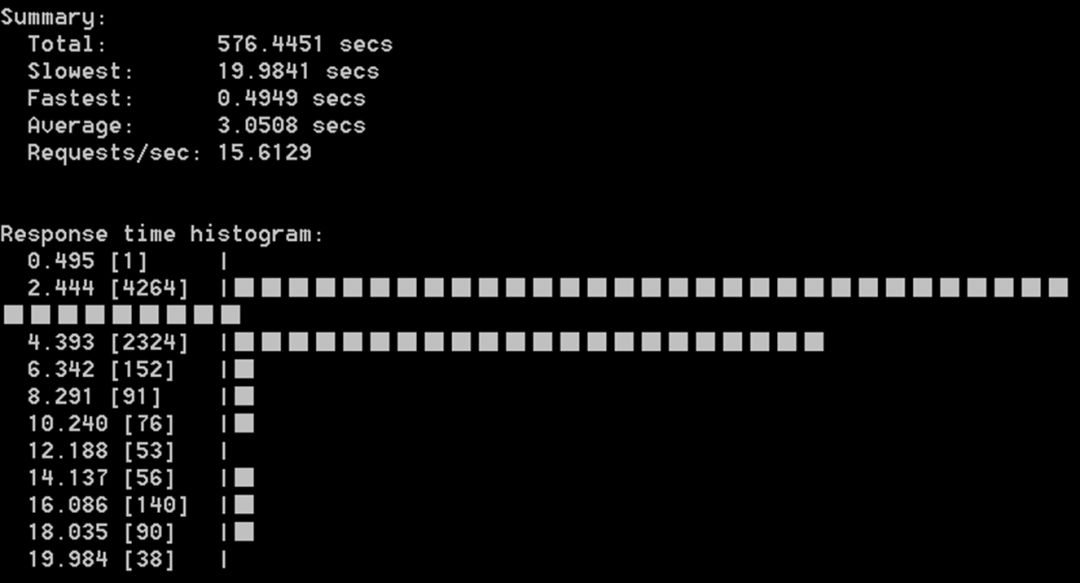
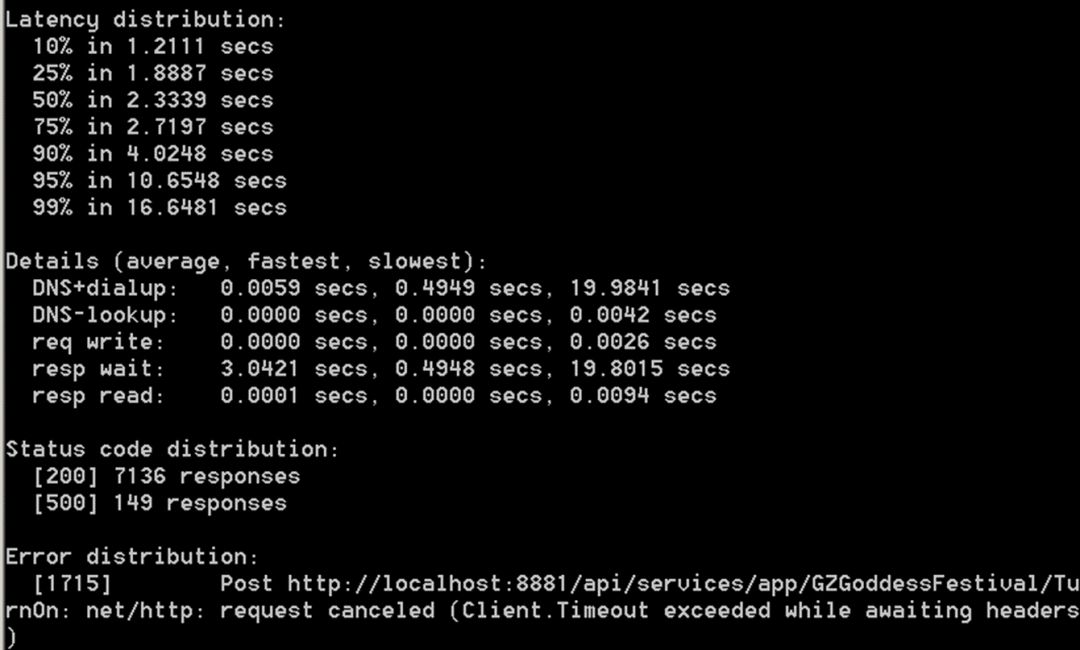
以上是簡單的測試摘要,HTTP STATUS 200 共計 7136個,HTTP 500 149個,最慢的請求19.8秒
Nginx的日志
6.1; WOW64) AppleWebKit/537.36 (KHTML, like Gecko) Chrome/80.0.3987.132 Safari/537.36"
127.0.0.1 - - [10/Mar/2020:07:56:45 +0800] "POST /api/services/app/Ability/TestRsa HTTP/1.1" 200 455 "http://localhost:8881/swagger/index.html" "Mozilla/5.0 (Windows NT 6.1; WOW64) AppleWebKit/537.36 (KHTML, like Gecko) Chrome/80.0.3987.132 Safari/537.36"
127.0.0.1 - - [10/Mar/2020:07:56:48 +0800] "POST /api/services/app/Ability/TestRsa HTTP/1.1" 200 455 "http://localhost:8881/swagger/index.html" "Mozilla/5.0 (Windows NT 6.1; WOW64) AppleWebKit/537.36 (KHTML, like Gecko) Chrome/80.0.3987.132 Safari/537.36"
127.0.0.1 - - [10/Mar/2020:07:58:09 +0800] "GET /api/services/app/GZGoddessFestival/TurnOn HTTP/1.1" 404 0 "-" "Mozilla/5.0 (Windows NT 6.1; WOW64) AppleWebKit/537.36 (KHTML, like Gecko) Chrome/80.0.3987.132 Safari/537.36"
127.0.0.1 - - [10/Mar/2020:07:59:06 +0800] "POST /api/services/app/GZGoddessFestival/TurnOn HTTP/1.1" 401 206 "-" "Fiddler"
127.0.0.1 - - [10/Mar/2020:07:59:16 +0800] "POST /api/services/app/GZGoddessFestival/TurnOn HTTP/1.1" 401 206 "-" "hey/0.0.1"
127.0.0.1 - - [10/Mar/2020:07:59:16 +0800] "POST /api/services/app/GZGoddessFestival/TurnOn HTTP/1.1" 401 206 "-" "hey/0.0.1"
127.0.0.1 - - [10/Mar/2020:07:59:16 +0800] "POST /api/services/app/GZGoddessFestival/TurnOn HTTP/1.1" 401 206 "-" "hey/0.0.1"
127.0.0.1 - - [10/Mar/2020:07:59:16 +0800] "POST /api/services/app/GZGoddessFestival/TurnOn HTTP/1.1" 401 206 "-" "hey/0.0.1"
以上日志中我們也看到hey的請求,TurnOn這個接口是用于游戲抽獎,我們使用簡單的工具實現(xiàn)負載測試,用于檢測程序接口在并發(fā)的TPS,同時驗證接口是否有獎品超發(fā)的情況。
總結(jié)
實際項目中,現(xiàn)在可能是微服務(wù)的,本地的微服務(wù)程序需要進行依賴隔離。上面演示的僅僅是單體應(yīng)用。Hey做為一個輕量級負載工具,同時也支持擴平臺。Hey有開源,對于Go語言也是學(xué)習(xí)的案例。
但對于復(fù)雜場景的負載測試需要輸出詳盡報告則不太適用。

騰訊、阿里、滴滴后臺面試題匯總總結(jié) — (含答案)
面試:史上最全多線程面試題 !
最新阿里內(nèi)推Java后端面試題
JVM難學(xué)?那是因為你沒認真看完這篇文章

關(guān)注作者微信公眾號 —《JAVA爛豬皮》
了解更多java后端架構(gòu)知識以及最新面試寶典


看完本文記得給作者點贊+在看哦~~~大家的支持,是作者源源不斷出文的動力
作者:Petter Liu?
出處:http://www.cnblogs.com/wintersun/?