
老板要我做一個 IP 屬地功能!
你知道的越多,不知道的就越多,業(yè)余的像一棵小草!
你來,我們一起精進!你不來,我和你的競爭對手一起精進!
編輯:業(yè)余草
juejin.cn/post/7118954784853327903
推薦:https://www.xttblog.com/?p=5251
老板要我做一個 IP 屬地功能!我摸索了 1 天,搞定了。??
細心的朋友應該會發(fā)現(xiàn),最近,繼新浪微博之后,頭條、騰訊、抖音、知乎、快手、小紅書等各大平臺陸陸續(xù)續(xù)都上線了“網(wǎng)絡用戶IP地址顯示功能”,境外用戶顯示的是國家,國內(nèi)的用戶顯示的省份,而且此項顯示無法關閉,歸屬地強制顯示。
作為技術人,那!這個功能要怎么實現(xiàn)呢?
HttpServletRequest 獲取 IP
下面,我就來講講,Java中是如何獲取IP屬地的,主要分為以下幾步:
通過 HttpServletRequest 對象,獲取用戶的 「IP」 地址 通過 IP 地址,獲取對應的省份、城市
首先需要寫一個 IP 獲取的工具類,因為每一次用戶的 Request 請求,都會攜帶上請求的 IP 地址放到請求頭中
import javax.servlet.http.HttpServletRequest;
import java.net.InetAddress;
import java.net.NetworkInterface;
import java.net.UnknownHostException;

/**
 * 常用獲取客戶端信息的工具
 */
public class NetworkUtil {

    /**
     * 獲取ip地址
     */
    public static String getIpAddress(HttpServletRequest request) {
        String ip = request.getHeader("x-forwarded-for");
        if (ip == null || ip.length() == 0 || "unknown".equalsIgnoreCase(ip)) {
            ip = request.getHeader("Proxy-Client-IP");
        }
        if (ip == null || ip.length() == 0 || "unknown".equalsIgnoreCase(ip)) {
            ip = request.getHeader("WL-Proxy-Client-IP");
        }
        if (ip == null || ip.length() == 0 || "unknown".equalsIgnoreCase(ip)) {
            ip = request.getHeader("HTTP_CLIENT_IP");
        }
        if (ip == null || ip.length() == 0 || "unknown".equalsIgnoreCase(ip)) {
            ip = request.getHeader("HTTP_X_FORWARDED_FOR");
        }
        if (ip == null || ip.length() == 0 || "unknown".equalsIgnoreCase(ip)) {
            ip = request.getRemoteAddr();
        }
        // 本機訪問
        if ("localhost".equalsIgnoreCase(ip) || "127.0.0.1".equalsIgnoreCase(ip) || "0:0:0:0:0:0:0:1".equalsIgnoreCase(ip)){
            // 根據(jù)網(wǎng)卡取本機配置的IP
            InetAddress inet;
            try {
                inet = InetAddress.getLocalHost();
                ip = inet.getHostAddress();
            } catch (UnknownHostException e) {
                e.printStackTrace();
            }
        }
        // 對于通過多個代理的情況,第一個IP為客戶端真實IP,多個IP按照','分割
        if (null != ip && ip.length() > 15) {
            if (ip.indexOf(",") > 15) {
                ip = ip.substring(0, ip.indexOf(","));
            }
        }
        return ip;
    }

    /**
     * 獲取mac地址
     */
    public static String getMacAddress() throws Exception {
        // 取mac地址
        byte[] macAddressBytes = NetworkInterface.getByInetAddress(InetAddress.getLocalHost()).getHardwareAddress();
        // 下面代碼是把mac地址拼裝成String
        StringBuilder sb = new StringBuilder();
        for (int i = 0; i < macAddressBytes.length; i++) {
            if (i != 0) {
                sb.append("-");
            }
            // mac[i] & 0xFF 是為了把byte轉化為正整數(shù)
            String s = Integer.toHexString(macAddressBytes[i] & 0xFF);
            sb.append(s.length() == 1 ? 0 + s : s);
        }
        return sb.toString().trim().toUpperCase();
    }

}
通過此方法,從請求Header中獲取到用戶的IP地址。
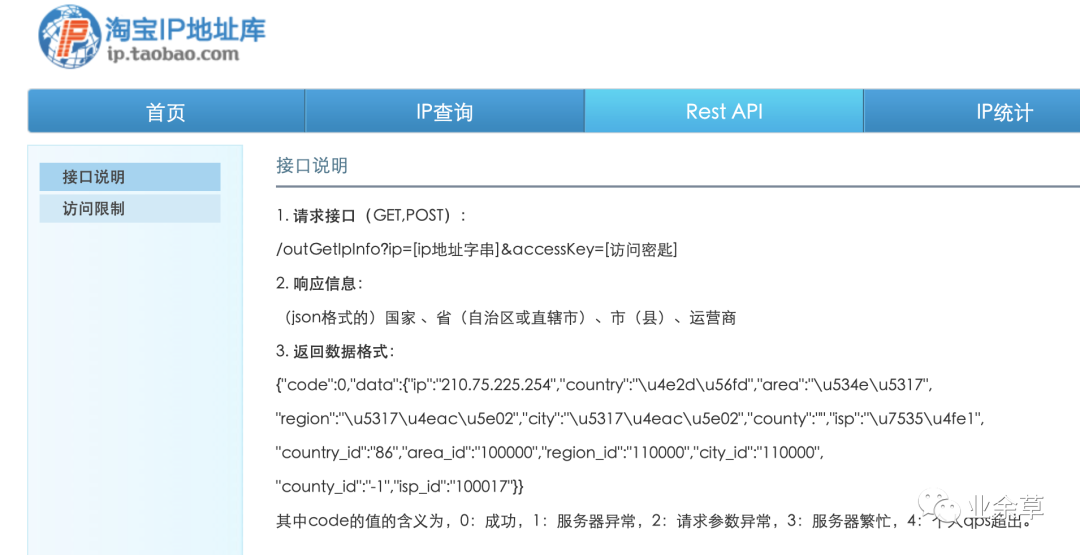
之前我在做的項目中,也有獲取IP地址歸屬地省份、城市的需求,用的是:淘寶IP庫。
地址:https://ip.taobao.com/。
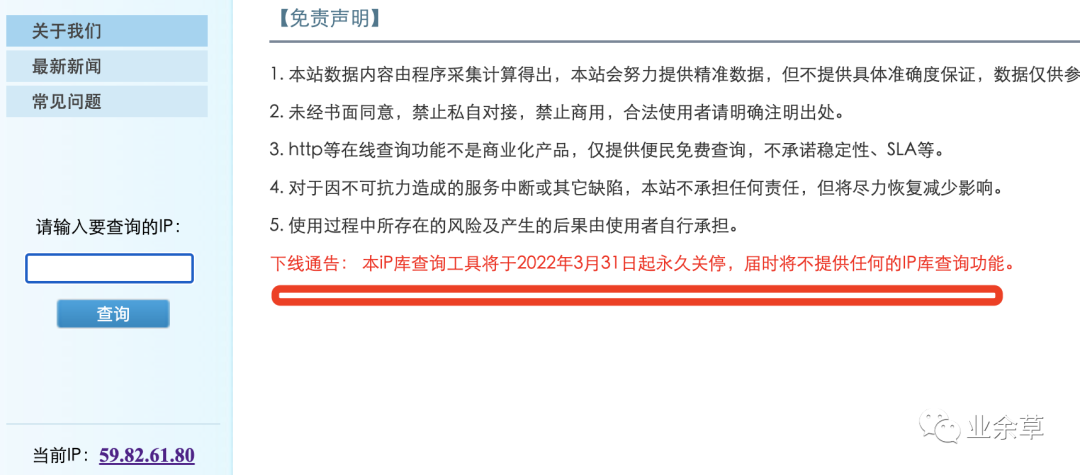
再見ip.taobao,全網(wǎng)顯示 IP 歸屬地。
原來的請求源碼如下:
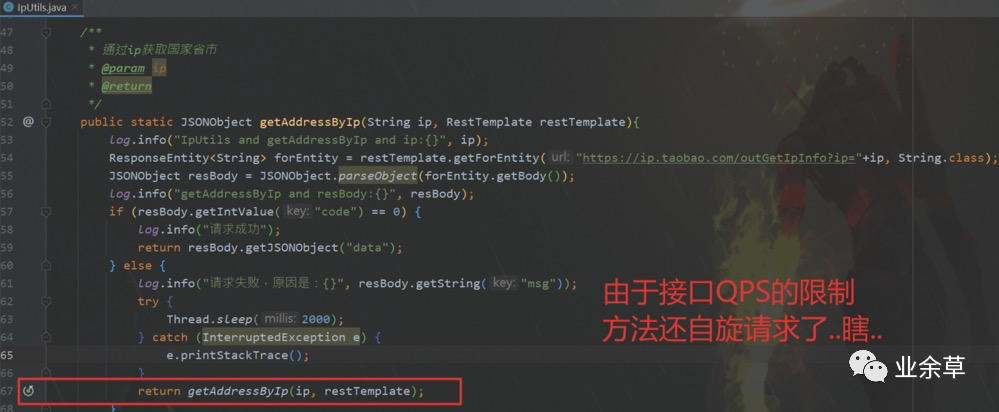
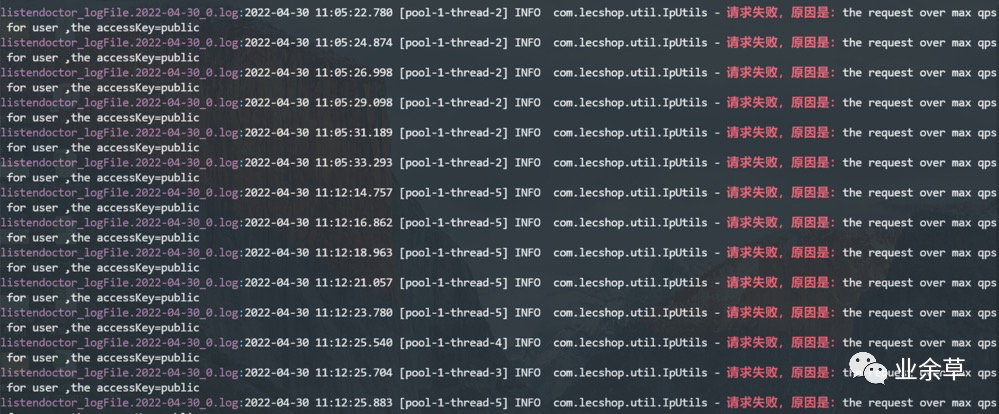
可以看到日志log文件中,大量的the request over max qps for user問題。

Ip2region
下面,給大家介紹下之前在Github沖浪時發(fā)現(xiàn)的今天的主角:
Ip2region開源項目,github地址:https://github.com/lionsoul2014/ip2region。
?目前最新已更新到了v2.0版本,ip2region v2.0是一個離線IP地址定位庫和IP定位數(shù)據(jù)管理框架,10微秒級別的查詢效率,準提供了眾多主流編程語言的 xdb 數(shù)據(jù)生成和查詢客戶端實現(xiàn)。
?
99.9%準確率:
?數(shù)據(jù)聚合了一些知名ip到地名查詢提供商的數(shù)據(jù),這些是他們官方的的準確率,經(jīng)測試著實比經(jīng)典的純真IP定位準確一些。
?
ip2region的數(shù)據(jù)聚合自以下服務商的開放API或者數(shù)據(jù)(升級程序每秒請求次數(shù)2到4次):
01, >80%, 淘寶IP地址庫,http://ip.taobao.com/%5C02, ≈10%, GeoIP,https://geoip.com/%5C03, ≈2%, 純真IP庫,http://www.cz88.net/%5C
備注:如果上述開放API或者數(shù)據(jù)都不給開放數(shù)據(jù)時ip2region將停止數(shù)據(jù)的更新服務。
多查詢客戶端的支持
已經(jīng)集成的客戶端有:java、C#、php、c、python、nodejs、php擴展(php5和php7)、golang、rust、lua、lua_c, nginx。
| binding | 描述 | 開發(fā)狀態(tài) | binary查詢耗時 | b-tree查詢耗時 | memory查詢耗時 |
|---|---|---|---|---|---|
| c | ANSC c binding | 已完成 | 0.0x毫秒 | 0.0x毫秒 | 0.00x毫秒 |
| c# | c# binding | 已完成 | 0.x毫秒 | 0.x毫秒 | 0.1x毫秒 |
| golang | golang binding | 已完成 | 0.x毫秒 | 0.x毫秒 | 0.1x毫秒 |
| java | java binding | 已完成 | 0.x毫秒 | 0.x毫秒 | 0.1x毫秒 |
| lua | lua實現(xiàn)的binding | 已完成 | 0.x毫秒 | 0.x毫秒 | 0.x毫秒 |
| lua_c | lua的c擴展 | 已完成 | 0.0x毫秒 | 0.0x毫秒 | 0.00x毫秒 |
| nginx | nginx的c擴展 | 已完成 | 0.0x毫秒 | 0.0x毫秒 | 0.00x毫秒 |
| nodejs | nodejs | 已完成 | 0.x毫秒 | 0.x毫秒 | 0.1x毫秒 |
| php | php實現(xiàn)的binding | 已完成 | 0.x毫秒 | 0.1x毫秒 | 0.1x毫秒 |
| php5_ext | php5的c擴展 | 已完成 | 0.0x毫秒 | 0.0x毫秒 | 0.00x毫秒 |
| php7_ext | php7的c擴展 | 已完成 | 0.0毫秒 | 0.0x毫秒 | 0.00x毫秒 |
| python | python bindng | 已完成 | 0.x毫秒 | 0.x毫秒 | 0.x毫秒 |
| rust | rust binding | 已完成 | 0.x毫秒 | 0.x毫秒 | 0.x毫秒 |
Ip2region V2.0 特性
「1、標準化的數(shù)據(jù)格式」
每個 ip 數(shù)據(jù)段的 region 信息都固定了格式:國家|區(qū)域|省份|城市|ISP,只有中國的數(shù)據(jù)絕大部分精確到了城市,其他國家部分數(shù)據(jù)只能定位到國家,后前的選項全部是0。
「2、數(shù)據(jù)去重和壓縮」
xdb 格式生成程序會自動去重和壓縮部分數(shù)據(jù),默認的全部 IP 數(shù)據(jù),生成的 ip2region.xdb 數(shù)據(jù)庫是 11MiB,隨著數(shù)據(jù)的詳細度增加數(shù)據(jù)庫的大小也慢慢增大。
「3、極速查詢響應」
即使是完全基于 xdb 文件的查詢,單次查詢響應時間在十微秒級別,可通過如下兩種方式開啟內(nèi)存加速查詢:
vIndex 索引緩存 :使用固定的 512KiB 的內(nèi)存空間緩存 vector index 數(shù)據(jù),減少一次 IO 磁盤操作,保持平均查詢效率穩(wěn)定在10-20微秒之間。 xdb 整個文件緩存:將整個 xdb 文件全部加載到內(nèi)存,內(nèi)存占用等同于 xdb 文件大小,無磁盤 IO 操作,保持微秒級別的查詢效率。
「4、極速查詢響應」
v2.0 格式的 xdb 支持億級別的 IP 數(shù)據(jù)段行數(shù),region 信息也可以完全自定義,例如:你可以在 region 中追加特定業(yè)務需求的數(shù)據(jù),例如:GPS信息/國際統(tǒng)一地域信息編碼/郵編等。也就是你完全可以使用 ip2region 來管理你自己的 IP 定位數(shù)據(jù)。
ip2region xdb java 查詢客戶端實現(xiàn)
「使用方式」
引入maven倉庫:
<dependency>
    <groupId>org.lionsoul</groupId>
    <artifactId>ip2region</artifactId>
    <version>2.6.4</version>
</dependency>
「完全基于文件的查詢」
import org.lionsoul.ip2region.xdb.Searcher;
import java.io.*;
import java.util.concurrent.TimeUnit;

public class SearcherTest {
    public static void main(String[] args) {
        // 1、創(chuàng)建 searcher 對象
        String dbPath = "ip2region.xdb file path";
        Searcher searcher = null;
        try {
            searcher = Searcher.newWithFileOnly(dbPath);
        } catch (IOException e) {
            System.out.printf("failed to create searcher with `%s`: %s\n", dbPath, e);
            return;
        }

        // 2、查詢
        try {
            String ip = "1.2.3.4";
            long sTime = System.nanoTime();
            String region = searcher.search(ip);
            long cost = TimeUnit.NANOSECONDS.toMicros((long) (System.nanoTime() - sTime));
            System.out.printf("{region: %s, ioCount: %d, took: %d μs}\n", region, searcher.getIOCount(), cost);
        } catch (Exception e) {
            System.out.printf("failed to search(%s): %s\n", ip, e);
        }

        // 3、備注:并發(fā)使用,每個線程需要創(chuàng)建一個獨立的 searcher 對象單獨使用。
    }
}
「緩存VectorIndex索引」
我們可以提前從 xdb 文件中加載出來 VectorIndex 數(shù)據(jù),然后全局緩存,每次創(chuàng)建 Searcher 對象的時候使用全局的 VectorIndex 緩存可以減少一次固定的 IO 操作,從而加速查詢,減少 IO 壓力。
import org.lionsoul.ip2region.xdb.Searcher;
import java.io.*;
import java.util.concurrent.TimeUnit;

public class SearcherTest {
    public static void main(String[] args) {
        String dbPath = "ip2region.xdb file path";

        // 1、從 dbPath 中預先加載 VectorIndex 緩存,并且把這個得到的數(shù)據(jù)作為全局變量,后續(xù)反復使用。
        byte[] vIndex;
        try {
            vIndex = Searcher.loadVectorIndexFromFile(dbPath);
        } catch (Exception e) {
            System.out.printf("failed to load vector index from `%s`: %s\n", dbPath, e);
            return;
        }

        // 2、使用全局的 vIndex 創(chuàng)建帶 VectorIndex 緩存的查詢對象。
        Searcher searcher;
        try {
            searcher = Searcher.newWithVectorIndex(dbPath, vIndex);
        } catch (Exception e) {
            System.out.printf("failed to create vectorIndex cached searcher with `%s`: %s\n", dbPath, e);
            return;
        }

        // 3、查詢
        try {
            String ip = "1.2.3.4";
            long sTime = System.nanoTime();
            String region = searcher.search(ip);
            long cost = TimeUnit.NANOSECONDS.toMicros((long) (System.nanoTime() - sTime));
            System.out.printf("{region: %s, ioCount: %d, took: %d μs}\n", region, searcher.getIOCount(), cost);
        } catch (Exception e) {
            System.out.printf("failed to search(%s): %s\n", ip, e);
        }

        // 備注:每個線程需要單獨創(chuàng)建一個獨立的 Searcher 對象,但是都共享全局的制度 vIndex 緩存。
    }
}
「緩存整個xdb數(shù)據(jù)」
我們也可以預先加載整個 ip2region.xdb 的數(shù)據(jù)到內(nèi)存,然后基于這個數(shù)據(jù)創(chuàng)建查詢對象來實現(xiàn)完全基于文件的查詢,類似之前的 memory search。
import org.lionsoul.ip2region.xdb.Searcher;
import java.io.*;
import java.util.concurrent.TimeUnit;

public class SearcherTest {
    public static void main(String[] args) {
        String dbPath = "ip2region.xdb file path";

        // 1、從 dbPath 加載整個 xdb 到內(nèi)存。
        byte[] cBuff;
        try {
            cBuff = Searcher.loadContentFromFile(dbPath);
        } catch (Exception e) {
            System.out.printf("failed to load content from `%s`: %s\n", dbPath, e);
            return;
        }

        // 2、使用上述的 cBuff 創(chuàng)建一個完全基于內(nèi)存的查詢對象。
        Searcher searcher;
        try {
            searcher = Searcher.newWithBuffer(cBuff);
        } catch (Exception e) {
            System.out.printf("failed to create content cached searcher: %s\n", e);
            return;
        }

        // 3、查詢
        try {
            String ip = "1.2.3.4";
            long sTime = System.nanoTime();
            String region = searcher.search(ip);
            long cost = TimeUnit.NANOSECONDS.toMicros((long) (System.nanoTime() - sTime));
            System.out.printf("{region: %s, ioCount: %d, took: %d μs}\n", region, searcher.getIOCount(), cost);
        } catch (Exception e) {
            System.out.printf("failed to search(%s): %s\n", ip, e);
        }

        // 備注:并發(fā)使用,用整個 xdb 數(shù)據(jù)緩存創(chuàng)建的查詢對象可以安全的用于并發(fā),也就是你可以把這個 searcher 對象做成全局對象去跨線程訪問。
    }
}
IDEA中做個測試
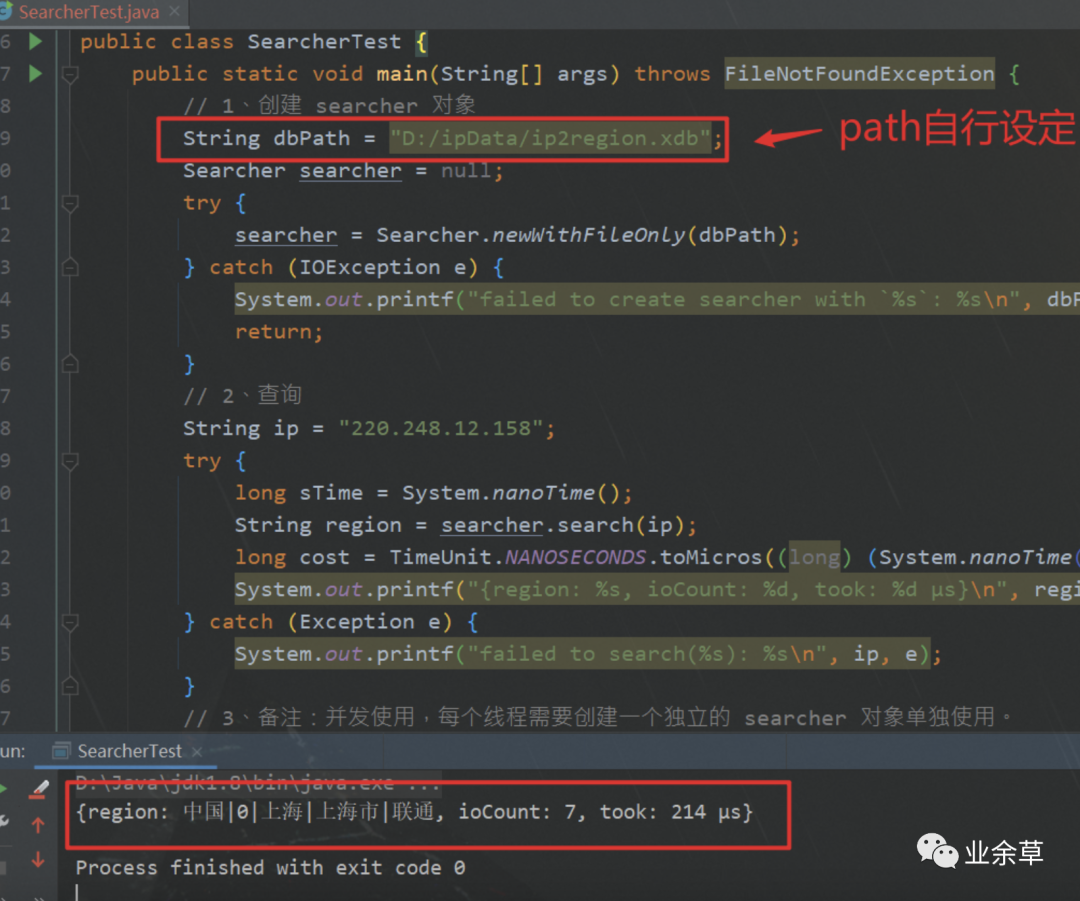
完全基于文件的查詢
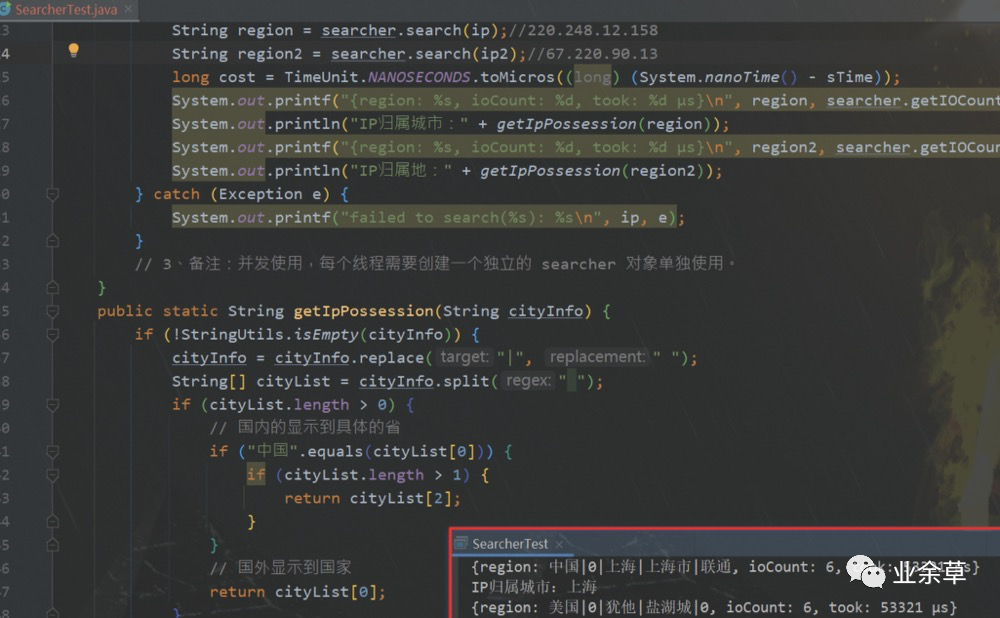
ip屬地國內(nèi)的話,會展示省份,國外的話,只會展示國家。可以通過如下圖這個方法進行進一步封裝,得到獲取IP屬地的信息。
?下面是官網(wǎng)給出的命令運行jar方式給出的測試demo,可以理解下
?
編譯測試程序
通過 maven 來編譯測試程序。
# cd 到 java binding 的根目錄
cd binding/java/
mvn compile package
然后會在當前目錄的 target 目錄下得到一個 ip2region-{version}.jar 的打包文件。
查詢測試
可以通過 java -jar ip2region-{version}.jar search 命令來測試查詢:
?  java git:(v2.0_xdb) ? java -jar target/ip2region-2.6.0.jar search
java -jar ip2region-{version}.jar search [command options]
options:
 --db string              ip2region binary xdb file path
 --cache-policy string    cache policy: file/vectorIndex/content
例如:使用默認的 data/ip2region.xdb 文件進行查詢測試:
?  java git:(v2.0_xdb) ? java -jar target/ip2region-2.6.0.jar search --db=../../data/ip2region.xdb
ip2region xdb searcher test program, cachePolicy: vectorIndex
type 'quit' to exit
ip2region>> 1.2.3.4
{region: 美國|0|華盛頓|0|谷歌, ioCount: 7, took: 82 μs}
ip2region>>
輸入 ip 即可進行查詢測試,也可以分別設置 cache-policy 為 file/vectorIndex/content 來測試三種不同緩存實現(xiàn)的查詢效果。
bench 測試
可以通過 java -jar ip2region-{version}.jar bench 命令來進行 bench 測試,一方面確保 xdb 文件沒有錯誤,一方面可以評估查詢性能:
?  java git:(v2.0_xdb) ? java -jar target/ip2region-2.6.0.jar bench
java -jar ip2region-{version}.jar bench [command options]
options:
 --db string              ip2region binary xdb file path
 --src string             source ip text file path
 --cache-policy string    cache policy: file/vectorIndex/content
例如:通過默認的 data/ip2region.xdb 和 data/ip.merge.txt 文件進行 bench 測試:
?  java git:(v2.0_xdb) ? java -jar target/ip2region-2.6.0.jar bench --db=../../data/ip2region.xdb --src=../../data/ip.merge.txt
Bench finished, {cachePolicy: vectorIndex, total: 3417955, took: 8s, cost: 2 μs/op}
可以通過分別設置 cache-policy 為 file/vectorIndex/content 來測試三種不同緩存實現(xiàn)的效果。@Note: 注意 bench 使用的 src 文件要是生成對應 xdb 文件相同的源文件。
?到這里獲取用戶IP屬地已經(jīng)完成啦,這篇文章介紹的v2.0版本,有興趣的小伙伴可以登錄上門的github地址了解下v1.0版本
?
如若覺得有用,歡迎收藏+點贊!