一個(gè)完整的 GUI 自動(dòng)化測(cè)試程序
在介紹了 GUI 測(cè)試、輔助特性、報(bào)表生成等技術(shù)點(diǎn)之后,現(xiàn)在可以將它們串聯(lián)起來,實(shí)現(xiàn)一個(gè)較為完整的自動(dòng)化測(cè)試程序。
以常見的用戶登錄為例,要進(jìn)行自動(dòng)化測(cè)試,需要考慮以下場(chǎng)景:
模擬鍵盤輸入密碼(空密碼、錯(cuò)誤密碼、正確密碼);
模擬鼠標(biāo)點(diǎn)擊登錄按鈕;
校驗(yàn)錯(cuò)誤提示信息,判斷是否與預(yù)期相符;
......
自動(dòng)生成測(cè)試報(bào)告。
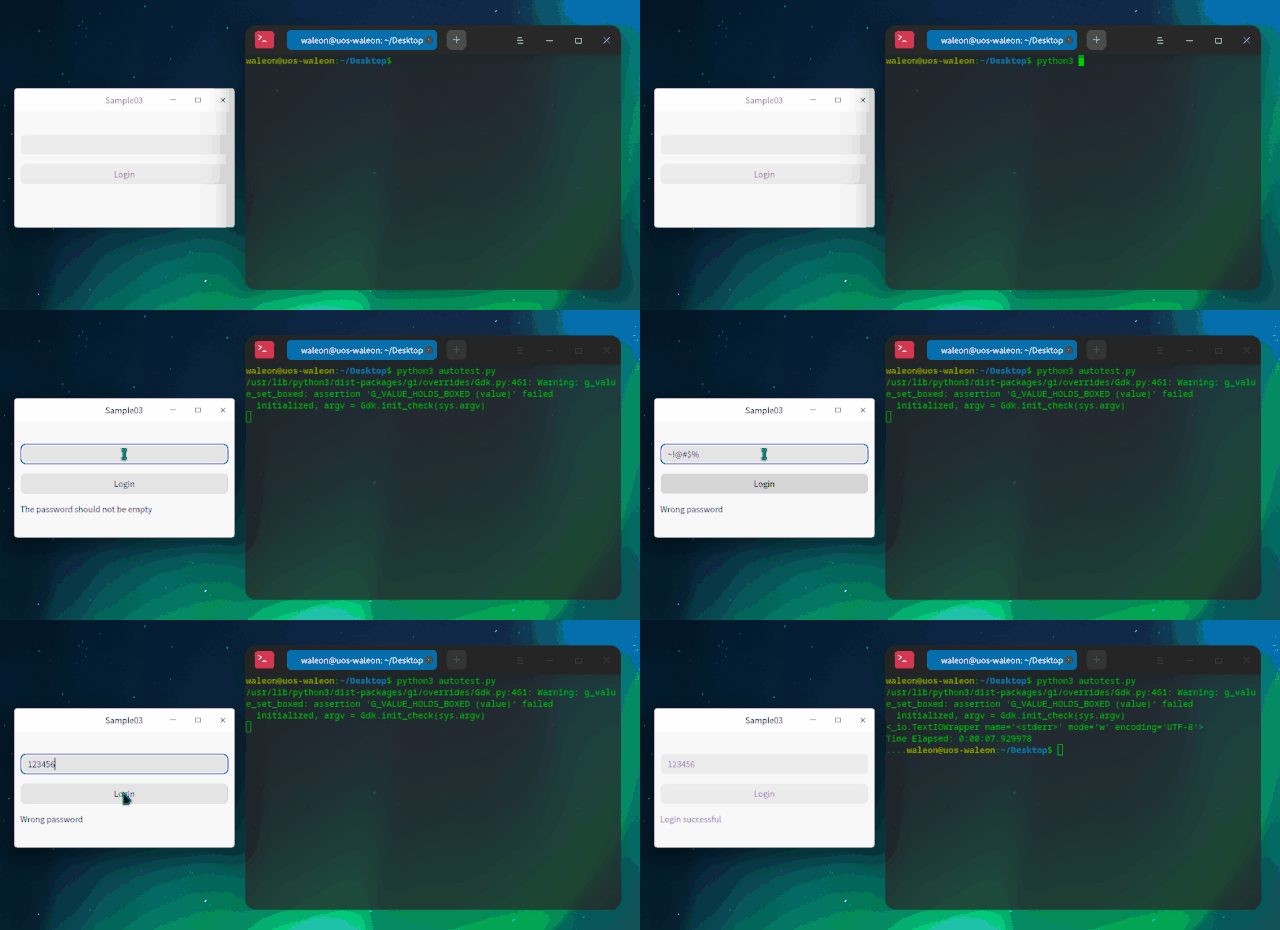
先來看一下我們的程序,以及自動(dòng)化腳本執(zhí)行效果:
當(dāng)腳本跑完之后,會(huì)生成一個(gè)自動(dòng)化測(cè)試報(bào)告:
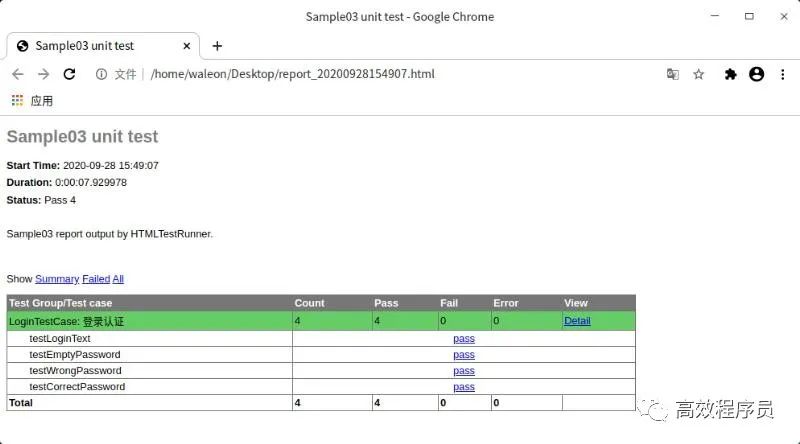
里面包含了所有的測(cè)試結(jié)果,分析起來特別方便!
1
登錄界面
來看具體的實(shí)現(xiàn),登錄界面包含了密碼框、登錄按鈕、提示標(biāo)簽:
#ifndef?WIDGET_H
#define?WIDGET_H

#include?
#include?

class?QLabel;
class?QLineEdit;
class?QPushButton;

class?Widget?:?public?QWidget
{
????Q_OBJECT

public:
????//?錯(cuò)誤狀態(tài)
????typedef?enum?ErrorStatus?{
????????NoError?=?0,
????????EmptyPassword,
????????WrongPassword
????}?ErrorStatus;

????explicit?Widget(QWidget?*parent?=?Q_NULLPTR);
????~Widget()?Q_DECL_OVERRIDE;

private?Q_SLOTS:
????void?login();

private:
????void?initUi();
????void?retranslateUi();
????void?initConnections();
????void?initAccessible();

private:
????QLineEdit?*m_lineEdit;
????QPushButton?*m_button;
????QLabel?*m_tipLabel;
????QMap?m_errorMap;
};

#endif?//?WIDGET_H
當(dāng)點(diǎn)擊登錄按鈕后,會(huì)觸發(fā)槽函數(shù) login(),此時(shí)會(huì)校驗(yàn)輸入的密碼,并進(jìn)行錯(cuò)誤提示:
#include?"widget.h"
#include?
#include?
#include?
#include?

Widget::Widget(QWidget?*parent)
????:?QWidget(parent)
{
????initUi();
????retranslateUi();
????initConnections();
????initAccessible();
}

Widget::~Widget()
{

}

void?Widget::initUi()
{
????m_lineEdit?=?new?QLineEdit(this);
????m_button?=?new?QPushButton(this);
????m_tipLabel?=?new?QLabel(this);

????QVBoxLayout?*layout?=?new?QVBoxLayout();
????layout->addStretch();
????layout->addWidget(m_lineEdit);
????layout->addWidget(m_button);
????layout->addWidget(m_tipLabel);
????layout->addStretch();
????layout->setSpacing(15);
????layout->setContentsMargins(10,?10,?10,?10);
????setLayout(layout);
}

void?Widget::retranslateUi()
{
????m_button->setText("Login");

????if?(m_errorMap.isEmpty())?{
????????m_errorMap.insert(NoError,?"Login?successful");
????????m_errorMap.insert(EmptyPassword,?"The?password?should?not?be?empty");
????????m_errorMap.insert(WrongPassword,?"Wrong?password");
????}
}

void?Widget::initConnections()
{
????connect(m_button,?&QPushButton::clicked,?this,?&Widget::login);
}

void?Widget::initAccessible()
{
????//?將被輔助技術(shù)識(shí)別
????m_lineEdit->setAccessibleName("passwordEdit");
????m_button->setAccessibleName("loginButton");
????m_tipLabel->setAccessibleName("tipLabel");
????m_lineEdit->setAccessibleDescription("this?is?a?password?line?edit");
????m_button->setAccessibleDescription("this?is?a?login?button");
????m_tipLabel->setAccessibleDescription("this?is?a?tip?label");
}

void?Widget::login()
{
????QString?password?=?m_lineEdit->text();

????if?(password.isEmpty())?{
????????m_tipLabel->setText(m_errorMap.value(EmptyPassword));
????}?else?if?(QString::compare(password,?"123456")?!=?0)?{
????????m_tipLabel->setText(m_errorMap.value(WrongPassword));
????}?else?{
????????m_tipLabel->setText(m_errorMap.value(NoError));
????}
}
注意:有一點(diǎn)很關(guān)鍵,需要調(diào)用 setAccessibleName() 為控件設(shè)置可訪問的名稱,這樣才能被輔助技術(shù)所識(shí)別!
由于在自動(dòng)化腳本中需要進(jìn)行文本校驗(yàn),所以應(yīng)為 QPushButton、QLabel 等 UI 元素實(shí)現(xiàn) QAccessibleInterface 接口,然后定義接口工廠并進(jìn)行安裝:
//?接口工廠
QAccessibleInterface?*accessibleFactory(const?QString?&classname,?QObject?*object)
{
????QAccessibleInterface?*interface?=?nullptr;

????if?(object?&&?object->isWidgetType())?{
????????if?(classname?==?"QLabel")
????????????interface?=?new?AccessibleLabel(qobject_cast(object));

????????if?(classname?==?"QPushButton")
????????????interface?=?new?AccessibleButton(qobject_cast(object));
????}

????return?interface;
}
至于細(xì)節(jié)內(nèi)容,可參考《讓 dogtail 識(shí)別 UI 中的元素》。
2
自動(dòng)化測(cè)試腳本
當(dāng)一切準(zhǔn)備就緒,就可以編寫自動(dòng)化測(cè)試腳本了,來看看 autotest.py 都有些什么:
通過 root.application() 找到應(yīng)用程序;
定義枚舉 ErrorStatus,以表示登錄時(shí)的錯(cuò)誤狀態(tài);
定義一個(gè)通用函數(shù) set_text(),用于設(shè)置輸入框的文本;
注意:直接調(diào)用 typeText() 只會(huì)追加,所以要輸入新內(nèi)容,必須先清空原有內(nèi)容。
繼承 TestCase 類,實(shí)現(xiàn)具體的測(cè)試用例;
構(gòu)造測(cè)試集,并生成測(cè)試報(bào)告。
#!/usr/bin/env?python3
#?-*-?coding:?utf-8?-*-
import?unittest
import?HTMLTestRunner
from?dogtail.tree?import?*
import?time
from?enum?import?Enum,?unique
app?=?root.application(appName="Sample03",?description="/home/waleon/workspace/demos/build-Samples-unknown-Debug/Sample03/Sample03")
#?錯(cuò)誤狀態(tài)
@unique
class?ErrorStatus(Enum):
????NoError?=?0
????EmptyPassword?=?1
????WrongPassword?=?2
#?設(shè)置文本
def?set_text(line_edit,?text):
????line_edit.click()
????line_edit.keyCombo('a' )
????line_edit.keyCombo('del')
????line_edit.typeText(text)
class?LoginTestCase(unittest.TestCase):
????"""登錄認(rèn)證"""
????def?setUp(self):
????????print('==========?begin?==========')
????????self.tips?=?{
????????????????????????ErrorStatus.EmptyPassword:?'The?password?should?not?be?empty',
????????????????????????ErrorStatus.WrongPassword:?'Wrong?password',
????????????????????????ErrorStatus.NoError:?'Login?successful'
????????????????????}
????????self.password_edit?=?app.child('passwordEdit')
????????self.login_btn?=?app.child('loginButton')
????????self.tip_label?=?app.child('tipLabel')
????#?登錄文本內(nèi)容
????def?testLoginText(self):
????????self.assertEqual(self.login_btn.text,?'Login')
????#?密碼為空
????def?testEmptyPassword(self):
????????set_text(self.password_edit,?'')
????????self.login_btn.click()
????????self.assertEqual(self.tip_label.text,?self.tips[ErrorStatus.EmptyPassword])
????#?密碼不合法(特殊字符)
????def?testWrongPassword(self):
????????set_text(self.password_edit,?'~!@#$%')
????????self.login_btn.click()
????????self.assertEqual(self.tip_label.text,?self.tips[ErrorStatus.WrongPassword])
????#?密碼正確
????def?testCorrectPassword(self):
????????set_text(self.password_edit,?'123456')
????????self.login_btn.click()
????????self.assertEqual(self.tip_label.text,?self.tips[ErrorStatus.NoError])
????def?tearDown(self):
????????print('==========?end?==========')
if?__name__?==?'__main__':
????#?構(gòu)造測(cè)試集
????suite?=?unittest.TestSuite()
????#?添加測(cè)試用例
????suite.addTest(LoginTestCase("testLoginText"))
????suite.addTest(LoginTestCase("testEmptyPassword"))
????suite.addTest(LoginTestCase("testWrongPassword"))
????suite.addTest(LoginTestCase("testCorrectPassword"))
????#?報(bào)告路徑
????date_time?=?time.strftime('%Y%m%d%H%M%S',?time.localtime(time.time()))
????report_path?=?'report_'?+?date_time?+?'.html'
????#?執(zhí)行測(cè)試
????with?open(report_path,?'wb')?as?f:
????????runner?=?HTMLTestRunner.HTMLTestRunner(
????????????stream=f,
????????????title='Sample03?unit?test',
????????????description='Sample03?report?output?by?HTMLTestRunner.'
????????)
????????runner.run(suite)
看到這里,是不是覺得自動(dòng)化測(cè)試其實(shí)也蠻簡單的,并不像很多人說的那么難!
最后,說一下 dogtail 這個(gè)東西,雖然文檔資料比較少,但用起來很不錯(cuò)。綜合來說,值得推薦!
·END·