
用Python畫一棵帶音樂(lè)的雪夜圣誕樹
本文我們用 Python 來(lái)畫一棵帶音樂(lè)效果的雪夜圣誕樹,基本思路如下:
用 Python 畫一棵圣誕樹作為背景圖 在圣誕樹背景圖中添加雪落效果及音樂(lè)
下面來(lái)看一下具體實(shí)現(xiàn)。
首先,我們來(lái)畫一棵圣誕樹,主要用到的 Python 庫(kù)為 turtle,主要代碼實(shí)現(xiàn)如下:
n?=?80.0
turtle.setup(700,?700,?0,?0)
turtle.speed("fastest")
turtle.screensize(bg='black')
turtle.left(90)
turtle.forward(3?*?n)
turtle.color("orange",?"yellow")
turtle.begin_fill()
turtle.left(126)
for?i?in?range(5):
????turtle.forward(n?/?5)
????turtle.right(144)
????turtle.forward(n?/?5)
????turtle.left(72)
turtle.end_fill()
turtle.right(126)
turtle.color("dark?green")
turtle.backward(n?*?4.8)
def?tree(d,?s):
????if?d?<=?0:?return
????turtle.forward(s)
????tree(d?-?1,?s?*?.8)
????turtle.right(120)
????tree(d?-?3,?s?*?.5)
????turtle.right(120)
????tree(d?-?3,?s?*?.5)
????turtle.right(120)
????turtle.backward(s)
tree(15,?n)
turtle.backward(n?/?2)
for?i?in?range(200):
????a?=?200?-?400?*?random.random()
????b?=?10?-?20?*?random.random()
????turtle.up()
????turtle.forward(b)
????turtle.left(90)
????turtle.forward(a)
????turtle.down()
????if?random.randint(0,?1)?==?0:
????????turtle.color('tomato')
????else:
????????turtle.color('wheat')
????????turtle.circle(2)
????????turtle.up()
????????turtle.backward(a)
????????turtle.right(90)
????????turtle.backward(b)
time.sleep(60)
看一下效果:
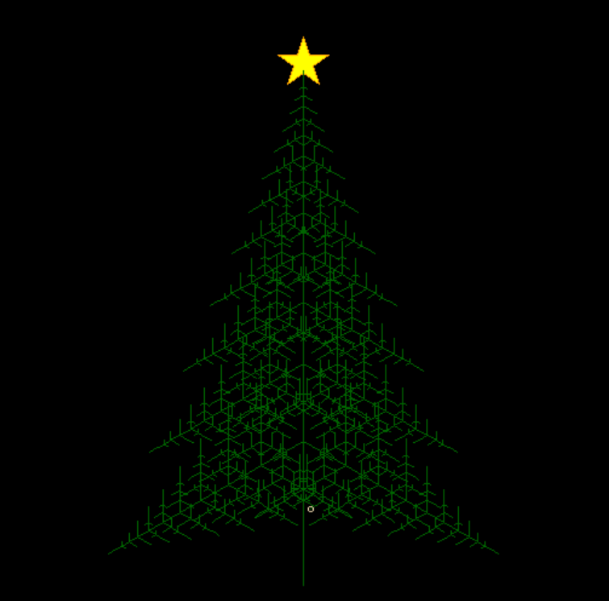
接著將圣誕樹作為背景圖添加雪落效果及音樂(lè),主要用到的 Python 庫(kù)為 pygame,主要代碼實(shí)現(xiàn)如下:
#?初始化?pygame
pygame.init()
#設(shè)置屏幕寬高,根據(jù)背景圖調(diào)整
bg_img?=?"bg.png"
bg_size?=?(609,?601)
screen?=?pygame.display.set_mode(bg_size)
pygame.display.set_caption("雪夜圣誕樹")
bg?=?pygame.image.load(bg_img)
#?雪花列表
snow_list?=?[]
for?i?in?range(150):
????x_site?=?random.randrange(0,?bg_size[0])???#?雪花圓心位置
????y_site?=?random.randrange(0,?bg_size[1])???#?雪花圓心位置
????X_shift?=?random.randint(-1,?1)?????????#?x?軸偏移量
????radius?=?random.randint(4,?6)???????????#?半徑和?y?周下降量
????snow_list.append([x_site,?y_site,?X_shift,?radius])
#?創(chuàng)建時(shí)鐘對(duì)象
clock?=?pygame.time.Clock()
#?添加音樂(lè)
track?=?pygame.mixer.music.load('my.mp3')??#?加載音樂(lè)文件
pygame.mixer.music.play()?#?播放音樂(lè)流
pygame.mixer.music.fadeout(600000)??#?設(shè)置音樂(lè)結(jié)束時(shí)間
done?=?False
while?not?done:
????#?消息事件循環(huán),判斷退出
????for?event?in?pygame.event.get():
????????if?event.type?==?pygame.QUIT:
????????????done?=?True
????screen.blit(bg,?(0,?0))
????#?雪花列表循環(huán)
????for?i?in?range(len(snow_list)):
????????#?繪制雪花,顏色、位置、大小
????????pygame.draw.circle(screen,?(255,?255,?255),?snow_list[i][:2],?snow_list[i][3]?-?3)
????????#?移動(dòng)雪花位置(下一次循環(huán)起效)
????????snow_list[i][0]?+=?snow_list[i][2]
????????snow_list[i][1]?+=?snow_list[i][3]
????????#?如果雪花落出屏幕,重設(shè)位置
????????if?snow_list[i][1]?>?bg_size[1]:
????????????snow_list[i][1]?=?random.randrange(-50,?-10)
????????????snow_list[i][0]?=?random.randrange(0,?bg_size[0])
????#?刷新屏幕
????pygame.display.flip()
????clock.tick(30)
#?退出
pygame.quit()
看一下最終效果:

這里就不放視頻了,大家如果想聽一下音樂(lè)效果可以自己獲取源碼執(zhí)行一下。
源碼及相應(yīng)文件在公號(hào)后臺(tái)回復(fù)201225獲取。
評(píng)論
圖片
表情