
Java 導(dǎo)出 Excel 利器:JXLS
點擊關(guān)注公眾號,Java干貨及時送達??
 來源:blog.csdn.net/baidu_14958441/article/details/128528237
-
簡介 -
引入maven依賴 -
后臺代碼 -
創(chuàng)建模板 -
XLS表達式 -
jx:area -
jx:each 最常用的xls表達式 -
jx:mergeCells 合并單元格 -
動態(tài)列-綜合使用 -
總結(jié)
簡介
相信大家能經(jīng)常性的遇到項目上各類excel的導(dǎo)出,簡單的excel格式,用簡單的poi,easyExcel等工具都能導(dǎo)出。但是針對復(fù)雜的excel,有固定的樣式、合并單元格、動態(tài)列等各類要求,導(dǎo)致excel 導(dǎo)出需要花很大一部分精力去寫代碼。jxls在很大程度上解決了以上問題。
這里簡單介紹下jxls,JXLS是國外一個簡單的、輕量級的excel導(dǎo)出庫,鏈接:JXLS官網(wǎng),這里有詳細的文檔說明教程(英文版),為了方便大家使用,我舉例幾個常見的excel模板配置,方便大家使用。
?
https://jxls.sourceforge.net/ ?
引入maven依賴
<!-- 版本具體看官網(wǎng)Release,這里我們使用 2.11.0 -->
<dependency>
    <groupId>org.jxls</groupId>
    <artifactId>jxls</artifactId>
    <version>2.11.0</version>
</dependency>
<dependency>
    <groupId>org.jxls</groupId>
    <artifactId>jxls-poi</artifactId>
    <version>2.11.0</version>
</dependency>

<!-- 要使用基于JavaExcelAPI的轉(zhuǎn)換器實現(xiàn),請?zhí)砑右韵乱蕾図?nbsp;-->
<dependency>
    <groupId>org.jxls</groupId>
    <artifactId>jxls-jexcel</artifactId>
    <version>${jxlsJexcelVersion}</version>
</dependency>
后臺代碼
工具類:JxlsUtils,導(dǎo)出靜態(tài)方法
public static void exportExcel(InputStream is, OutputStream os, Map<String, Object> model) throws IOException {
  Context context = new Context();
  if (model != null) {
   for (String key : model.keySet()) {
    context.putVar(key, model.get(key));
   }
  }
  JxlsHelper jxlsHelper = JxlsHelper.getInstance();
  Transformer transformer = jxlsHelper.createTransformer(is, os);
  JexlExpressionEvaluator evaluator = (JexlExpressionEvaluator) transformer.getTransformationConfig()
    .getExpressionEvaluator();
  Map<String, Object> funcs = new HashMap<String, Object>();
  funcs.put("utils", new JxlsUtils()); // 添加自定義功能
  evaluator.setJexlEngine(new JexlBuilder().namespaces(funcs).create());
  jxlsHelper.processTemplate(context, transformer);
 }
導(dǎo)出controller
//導(dǎo)出示例Controller
@PostMapping("/export/exportTradeCreditData")
@ResponseBody
public void exportTradeCreditData(HttpServletRequest request, HttpServletResponse response, Date countDate) {
  String templatePath = "template/excel/trade_credit_data.xlsx";
        //查找模板文件路徑,這里PathTools類為系統(tǒng)內(nèi)部封裝類,大家注意copy
  URL templateResource = PathTools.findResource(templatePath);
  try (OutputStream out = response.getOutputStream();
    InputStream templateStream = templateResource.openStream();) {
            //業(yè)務(wù)數(shù)據(jù)查詢
   List<CindaTradeCreditDto> list = countingReportService.queryTradeCreditData(countDate);

            //excel模板內(nèi),數(shù)據(jù)組裝
   Map<String, Object> map = new HashMap<String, Object>();
   map.put("year", getYear(countDate));
   map.put("contracts", list);
   JxlsUtils.exportExcel(templateStream, out, map);
   out.close();
  }  catch (Exception e) {
   e.printStackTrace();
   log.error("導(dǎo)出excel異常, {}", JxlsUtils.executeException(e));
  }
 }
創(chuàng)建模板
?
注意事項:excel模板工作表要使用xlsx格式,不要使用xls格式,防止導(dǎo)出時數(shù)據(jù)轉(zhuǎn)換出錯
?
-
新建excel模板,xlsx格式 -
工作表中按照的導(dǎo)出要求,設(shè)置表格樣式 -
僅限于簡單的表頭與行、列的寬度、高度 -
編寫寫表達式,在工作表中右鍵插入批注,office中添加批注快捷鍵(Shit + F2) -
設(shè)置區(qū)域、數(shù)據(jù)行、合并單元格、動態(tài)列等
基于 Spring Boot + MyBatis Plus + Vue 3.2 + Vite + Element Plus 實現(xiàn)的前后端分離博客,包含后臺管理系統(tǒng),支持文章、分類、標簽管理、儀表盤等功能。
GitHub 地址:https://github.com/weiwosuoai/WeBlog Gitee 地址:https://gitee.com/AllenJiang/WeBlog
XLS表達式
簡單列舉常用的幾個表達式
jx:area
jx:area(lastCell = "H3")
XLS Area 是JxlsPlus中的一個重要概念,它表明excel模板中須要被解析的矩形區(qū)域,由A1到最后一個單元格表示,有利于加快解析速度。它須要被定義在excel 模板的第一個單元格(A1).
示例圖:

jx:each 最常用的xls表達式
jx:each(items="contracts" var="contract" lastCell="H3")
-
items:上下文中集合的變量名; -
var:在遍歷集合的時候每一條記錄的變量名; -
area:該XLS Command的解析區(qū)域; -
direction:數(shù)據(jù)在excel中填充的方向,默認(DOWN)向下; -
select:其值為一個表達式,用來過濾數(shù)據(jù)
?
注:如果涉及到動態(tài)列,橫向遍歷,需注意其用法,特別需注意動態(tài)列的數(shù)據(jù)顯示問題,下面會講到
?
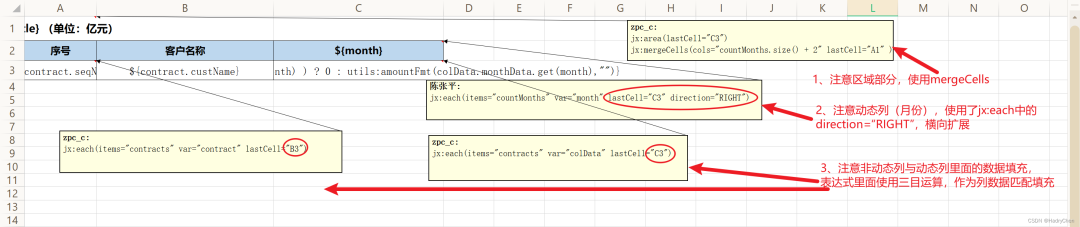
jx:each(items="countMonths" var="month" lastCell="C3" direction="RIGHT")
簡單的示例圖:

復(fù)雜的示例圖:
jx:mergeCells 合并單元格
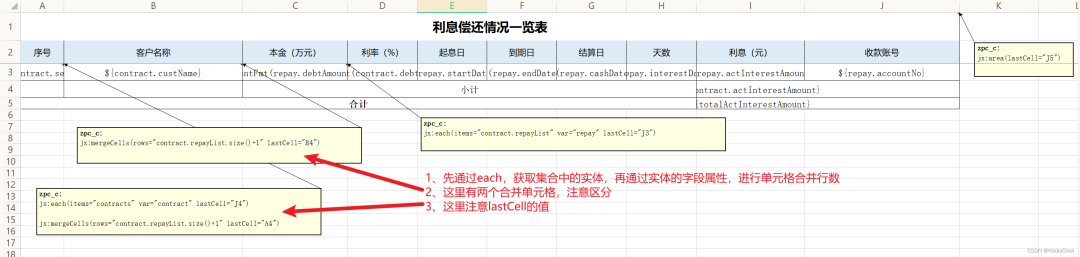
jx:mergeCells(lastCell="合并單元格范圍"
[, cols="合并的列數(shù)"]
[, rows="合并的行數(shù)"]
[, minCols="要合并的最小列數(shù)"]
[, minRows="要合并的最小行數(shù)"]
)
-
lastCell:合并單元格范圍; -
cols:合并的列數(shù); -
rows:合并的行數(shù); -
minCols:要合并的最小列數(shù); -
minRows:要合并的最小行數(shù);
?
注意:此命令只能用于還沒有合并的單元格。
?
示例圖:
動態(tài)列-綜合使用
jx:each(items="countMonths" var="month" lastCell="C3" direction="RIGHT")
這里還是通過jx:each來使用,不同的是direction 屬性的值為:RIGHT(向右),默認為:DOWN(向下)。
示例截圖:
以上截圖中幾個參數(shù)說明:
-
countMonths:動態(tài)列集合,month為集合循環(huán)的實體,取值為:${month} -
contracts:行數(shù)據(jù)集合,contract、colData 都是集合循環(huán)的實體,取值為:${contract.custName}等 -
colData.monthData.get(month):動態(tài)列的數(shù)據(jù),根據(jù)列名去匹配實體字段 -
${empty()}:判斷集合對應(yīng)動態(tài)列數(shù)據(jù) 是否為空,做好判斷,寫入數(shù)據(jù)
動態(tài)列數(shù)據(jù)行的數(shù)據(jù)獲取:
${empty(colData.monthData.get(month) ) ? 0 : colData.monthData.get(month)}
總結(jié)
以上為我使用過程中,幾個較常用的操作。

1. 前后端分離,開源的 Spring Boot + Vue 3.2 的博客,泰褲辣!
最近面試BAT,整理一份面試資料《Java面試BATJ通關(guān)手冊》,覆蓋了Java核心技術(shù)、JVM、Java并發(fā)、SSM、微服務(wù)、數(shù)據(jù)庫、數(shù)據(jù)結(jié)構(gòu)等等。
獲取方式:點“在看”,關(guān)注公眾號并回復(fù) Java 領(lǐng)取,更多內(nèi)容陸續(xù)奉上。
PS:因公眾號平臺更改了推送規(guī)則,如果不想錯過內(nèi)容,記得讀完點一下“在看”,加個“星標”,這樣每次新文章推送才會第一時間出現(xiàn)在你的訂閱列表里。
點“在看”支持小哈呀,謝謝啦