
Android實(shí)現(xiàn)炫酷的圖片展示效果
效果展示

實(shí)現(xiàn)原理

實(shí)現(xiàn)步驟
這里我們選擇在onSizeChanged方法中初始化Bitmap,
@Overrideprotected void onSizeChanged(int w, int h, int oldw, int oldh) {mBitmap = Bitmap.createScaledBitmap(BitmapFactory.decodeResource(getResources(), R.mipmap.timg), w, h, false);//根據(jù)控件大小創(chuàng)建一個(gè)與控件寬高相同的Bitmap對(duì)象postInvalidate();//創(chuàng)建完Bitmap后對(duì)控件進(jìn)行刷新super.onSizeChanged(w, h, oldw, oldh);}
2. 構(gòu)建矩形裁剪區(qū)域并添加到Path中
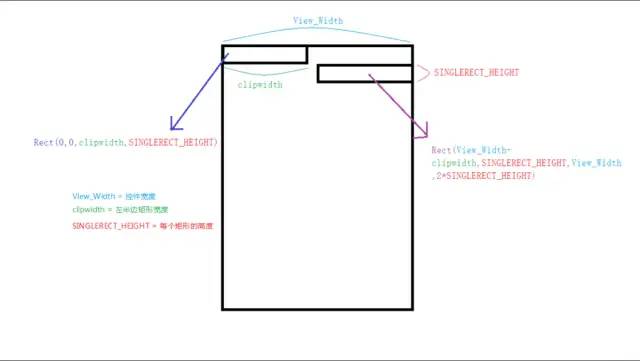
左邊矩形的構(gòu)建參數(shù):
右邊矩形的構(gòu)建參數(shù):
根據(jù)如上構(gòu)建參數(shù)的規(guī)律我們總結(jié)出如下公式(其中i代表由上到下第幾個(gè)矩形):
左邊矩形構(gòu)建公式:
RectF rectleft = new RectF(0,i * SINGLEREGION_HEIGHT,cilpWidth,(i + 1) * SINGLEREGION_HEIGHT)
右邊矩形構(gòu)建公式:
RectF rectright = new RectF(View_Width - cilpWidth,i * SINGLEREGION_HEIGHT,getWidth(),(i + 1) * SINGLEREGION_HEIGHT)
根據(jù)如上公式我們?cè)诖a中添加路徑:
//根據(jù)控件的高度來(lái)添加矩形路徑for(int i=0;i*SINGLEREGION_HEIGHT<getHeight();i++){if(i%2==0){mPath.addRect(new RectF(0,i*SINGLEREGION_HEIGHT,cilpWidth,(i+1)*SINGLEREGION_HEIGHT), Path.Direction.CCW);}else {mPath.addRect(new RectF(getWidth()-cilpWidth,i*SINGLEREGION_HEIGHT,getWidth(),(i+1)*SINGLEREGION_HEIGHT), Path.Direction.CCW);}}
這里使用Canvas的clipPath方法將畫布裁切成路徑的形狀,
canvas.clipPath(mPath);//根據(jù)路徑裁切畫布canvas.drawBitmap(mBitmap,0,0,mPaint);//在裁切后的畫布上繪制圖片
4. 利用遞歸實(shí)現(xiàn)動(dòng)畫效果
if(cilpWidth>getWidth()){//當(dāng)矩形的寬度等于控件寬度時(shí)停止重繪return;}cilpWidth+=5;//每次繪制完需要增加clipWidth的寬度invalidate();//重繪(運(yùn)用遞歸)
圖片完全顯示也是cilpWidth>控件寬度的時(shí)候。
if(cilpWidth>getWidth()){//當(dāng)圖片完全展示時(shí)替換圖片mBitmap=Bitmap.createScaledBitmap(BitmapFactory.decodeResource(getResources(), R.mipmap.baozou), getWidth(), getHeight(), false);canvas.drawBitmap(mBitmap,0,0,mPaint);return;}
完整代碼展示
public class View_ClipAnim extends View {private Paint mPaint;private Path mPath;private final float SINGLEREGION_HEIGHT=30;//每個(gè)長(zhǎng)條的高度private Bitmap mBitmap;float cilpWidth=0;//矩形寬度public View_ClipAnim(Context context) {this(context,null);}public View_ClipAnim(Context context, @Nullable AttributeSet attrs) {this(context, attrs,0);}public View_ClipAnim(Context context, @Nullable AttributeSet attrs, int defStyleAttr) {super(context, attrs, defStyleAttr);init();}/*** 初始化畫筆等*/private void init() {mPaint = new Paint(Paint.ANTI_ALIAS_FLAG);mPath = new Path();}@Overrideprotected void onSizeChanged(int w, int h, int oldw, int oldh) {mBitmap = Bitmap.createScaledBitmap(BitmapFactory.decodeResource(getResources(), R.mipmap.timg), w, h, false);cilpWidth=0;postInvalidate();super.onSizeChanged(w, h, oldw, oldh);}@Overrideprotected void onDraw(Canvas canvas) {super.onDraw(canvas);mPath.reset();//每次繪制之前先將Path重置for(int i=0;i*SINGLEREGION_HEIGHT<getHeight();i++){if(i%2==0){mPath.addRect(new RectF(0,i*SINGLEREGION_HEIGHT,cilpWidth,(i+1)*SINGLEREGION_HEIGHT), Path.Direction.CCW);}else {mPath.addRect(new RectF(getWidth()-cilpWidth,i*SINGLEREGION_HEIGHT,getWidth(),(i+1)*SINGLEREGION_HEIGHT), Path.Direction.CCW);}}canvas.clipPath(mPath);//根據(jù)路徑裁切畫布canvas.drawBitmap(mBitmap,0,0,mPaint);//在裁切后的畫布上繪制圖片if(cilpWidth>getWidth()){//當(dāng)圖片完全展示時(shí)替換圖片mBitmap=Bitmap.createScaledBitmap(BitmapFactory.decodeResource(getResources(), R.mipmap.baozou), getWidth(), getHeight(), false);canvas.drawBitmap(mBitmap,0,0,mPaint);return;}cilpWidth+=5;//每次繪制完需要增加clipWidth的寬度invalidate();//重繪(運(yùn)用遞歸)}}
擴(kuò)展
掃描式圖片展示

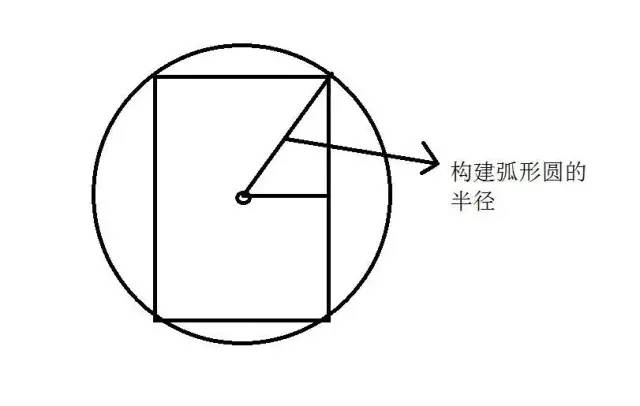
public class View_ClipCircleAnim extends View {private Paint mPaint;private float mRadius;//圓形的半徑private Path mPath;private Bitmap mBitmap;private int mAngle=0;//圓形角度public View_ClipCircleAnim(Context context) {this(context,null);}public View_ClipCircleAnim(Context context, @Nullable AttributeSet attrs) {this(context, attrs,0);}public View_ClipCircleAnim(Context context, @Nullable AttributeSet attrs, int defStyleAttr) {super(context, attrs, defStyleAttr);init();}private void init() {mPaint = new Paint(Paint.ANTI_ALIAS_FLAG);mPath = new Path();}protected void onSizeChanged(int w, int h, int oldw, int oldh) {float a = w/2;float b = h/2;mRadius = (float) Math.sqrt(a*a+b*b);//根據(jù)勾股定理算出圓形的半徑mBitmap = Bitmap.createScaledBitmap(BitmapFactory.decodeResource(getResources(), R.mipmap.timg), w, h, false);super.onSizeChanged(w, h, oldw, oldh);}protected void onDraw(Canvas canvas) {super.onDraw(canvas);canvas.translate(getWidth()/2,getHeight()/2);//將(0,0)點(diǎn)移動(dòng)到畫布中心if(mAngle>=360){canvas.drawBitmap(Bitmap.createScaledBitmap(BitmapFactory.decodeResource(getResources(), R.mipmap.baozou), getWidth(), getHeight(), false),-getWidth()/2,-getHeight()/2,mPaint);return;}mPath.reset();//清空路徑mPath.moveTo(0,0);mPath.arcTo(new RectF(-mRadius,-mRadius,mRadius,mRadius),0,mAngle,false);//添加閉合的弧形canvas.clipPath(mPath);//裁剪畫布為路徑的形狀canvas.drawBitmap(mBitmap,-getWidth()/2,-getHeight()/2,mPaint);mAngle++;postInvalidate();}}
評(píng)論
圖片
表情