
SpringBoot + Mybatis + Druid + PageHelper 實(shí)現(xiàn)多數(shù)據(jù)源分頁
點(diǎn)擊上方藍(lán)色“程序猿DD”,選擇“設(shè)為星標(biāo)”
回復(fù)“資源”獲取獨(dú)家整理的學(xué)習(xí)資料!

作者 |?虛無境的博客
前言
本篇文章主要講述的是SpringBoot整合Mybatis、Druid和PageHelper?并實(shí)現(xiàn)多數(shù)據(jù)源和分頁。其中SpringBoot整合Mybatis這塊,在之前的的一篇文章中已經(jīng)講述了,這里就不過多說明了。重點(diǎn)是講述在多數(shù)據(jù)源下的如何配置使用Druid和PageHelper 。
Druid介紹和使用
在使用Druid之前,先來簡單的了解下Druid。
Druid是一個數(shù)據(jù)庫連接池。Druid可以說是目前最好的數(shù)據(jù)庫連接池!因其優(yōu)秀的功能、性能和擴(kuò)展性方面,深受開發(fā)人員的青睞。Druid已經(jīng)在阿里巴巴部署了超過600個應(yīng)用,經(jīng)過一年多生產(chǎn)環(huán)境大規(guī)模部署的嚴(yán)苛考驗(yàn)。Druid是阿里巴巴開發(fā)的號稱為監(jiān)控而生的數(shù)據(jù)庫連接池!
同時Druid不僅僅是一個數(shù)據(jù)庫連接池,Druid 核心主要包括三部分:
基于Filter-Chain模式的插件體系。 DruidDataSource 高效可管理的數(shù)據(jù)庫連接池。 SQLParser
Druid的主要功能如下:
是一個高效、功能強(qiáng)大、可擴(kuò)展性好的數(shù)據(jù)庫連接池。 可以監(jiān)控數(shù)據(jù)庫訪問性能。 數(shù)據(jù)庫密碼加密 獲得SQL執(zhí)行日志 擴(kuò)展JDBC
介紹方面這塊就不再多說,具體的可以看官方文檔。那么開始介紹Druid如何使用。
首先是Maven依賴,只需要添加druid這一個jar就行了。
????com.alibaba
????druid
????1.1.8
配置方面,主要的只需要在application.properties或application.yml添加如下就可以了。說明:因?yàn)檫@里我是用來兩個數(shù)據(jù)源,所以稍微有些不同而已。Druid 配置的說明在下面中已經(jīng)說的很詳細(xì)了,這里我就不在說明了。
##?默認(rèn)的數(shù)據(jù)源
master.datasource.url=jdbc:mysql://localhost:3306/springBoot?useUnicode=true&characterEncoding=utf8&allowMultiQueries=true
master.datasource.username=root
master.datasource.password=123456
master.datasource.driverClassName=com.mysql.jdbc.Driver

##?另一個的數(shù)據(jù)源
cluster.datasource.url=jdbc:mysql://localhost:3306/springBoot_test?useUnicode=true&characterEncoding=utf8
cluster.datasource.username=root
cluster.datasource.password=123456
cluster.datasource.driverClassName=com.mysql.jdbc.Driver

#?連接池的配置信息??
#?初始化大小,最小,最大??
spring.datasource.type=com.alibaba.druid.pool.DruidDataSource
spring.datasource.initialSize=5??
spring.datasource.minIdle=5??
spring.datasource.maxActive=20??
#?配置獲取連接等待超時的時間??
spring.datasource.maxWait=60000??
#?配置間隔多久才進(jìn)行一次檢測,檢測需要關(guān)閉的空閑連接,單位是毫秒??
spring.datasource.timeBetweenEvictionRunsMillis=60000??
#?配置一個連接在池中最小生存的時間,單位是毫秒??
spring.datasource.minEvictableIdleTimeMillis=300000??
spring.datasource.validationQuery=SELECT?1?FROM?DUAL??
spring.datasource.testWhileIdle=true??
spring.datasource.testOnBorrow=false??
spring.datasource.testOnReturn=false??
#?打開PSCache,并且指定每個連接上PSCache的大小??
spring.datasource.poolPreparedStatements=true??
spring.datasource.maxPoolPreparedStatementPerConnectionSize=20??
#?配置監(jiān)控統(tǒng)計攔截的filters,去掉后監(jiān)控界面sql無法統(tǒng)計,'wall'用于防火墻??
spring.datasource.filters=stat,wall,log4j??
#?通過connectProperties屬性來打開mergeSql功能;慢SQL記錄??
spring.datasource.connectionProperties=druid.stat.mergeSql=true;druid.stat.slowSqlMillis=5000??
成功添加了配置文件之后,我們再來編寫Druid相關(guān)的類。首先是MasterDataSourceConfig.java這個類,這個是默認(rèn)的數(shù)據(jù)源配置類。
@Configuration
@MapperScan(basePackages?=?MasterDataSourceConfig.PACKAGE,?sqlSessionFactoryRef?=?"masterSqlSessionFactory")
public?class?MasterDataSourceConfig?{

????static?final?String?PACKAGE?=?"com.pancm.dao.master";
????static?final?String?MAPPER_LOCATION?=?"classpath:mapper/master/*.xml";

????@Value("${master.datasource.url}")??
????private?String?url;??
??????
????@Value("${master.datasource.username}")??
????private?String?username;??
??????
????@Value("${master.datasource.password}")??
????private?String?password;??
??????
????@Value("${master.datasource.driverClassName}")??
????private?String?driverClassName;??
??????
????
????
????
????@Value("${spring.datasource.initialSize}")??
????private?int?initialSize;??
??????
????@Value("${spring.datasource.minIdle}")??
????private?int?minIdle;??
??????
????@Value("${spring.datasource.maxActive}")??
????private?int?maxActive;??
??????
????@Value("${spring.datasource.maxWait}")??
????private?int?maxWait;??
??????
????@Value("${spring.datasource.timeBetweenEvictionRunsMillis}")??
????private?int?timeBetweenEvictionRunsMillis;??
??????
????@Value("${spring.datasource.minEvictableIdleTimeMillis}")??
????private?int?minEvictableIdleTimeMillis;??
??????
????@Value("${spring.datasource.validationQuery}")??
????private?String?validationQuery;??
??????
????@Value("${spring.datasource.testWhileIdle}")??
????private?boolean?testWhileIdle;??
??????
????@Value("${spring.datasource.testOnBorrow}")??
????private?boolean?testOnBorrow;??
??????
????@Value("${spring.datasource.testOnReturn}")??
????private?boolean?testOnReturn;??
??????
????@Value("${spring.datasource.poolPreparedStatements}")??
????private?boolean?poolPreparedStatements;??
??????
????@Value("${spring.datasource.maxPoolPreparedStatementPerConnectionSize}")??
????private?int?maxPoolPreparedStatementPerConnectionSize;??
??????
????@Value("${spring.datasource.filters}")??
????private?String?filters;??
??????
????@Value("{spring.datasource.connectionProperties}")??
????private?String?connectionProperties;??
????
????
????@Bean(name?=?"masterDataSource")
????@Primary?
????public?DataSource?masterDataSource()?{
????????DruidDataSource?dataSource?=?new?DruidDataSource();
????????dataSource.setUrl(url);??
????????dataSource.setUsername(username);??
????????dataSource.setPassword(password);??
????????dataSource.setDriverClassName(driverClassName);??
??????????
????????//具體配置?
????????dataSource.setInitialSize(initialSize);??
????????dataSource.setMinIdle(minIdle);??
????????dataSource.setMaxActive(maxActive);??
????????dataSource.setMaxWait(maxWait);??
????????dataSource.setTimeBetweenEvictionRunsMillis(timeBetweenEvictionRunsMillis);??
????????dataSource.setMinEvictableIdleTimeMillis(minEvictableIdleTimeMillis);??
????????dataSource.setValidationQuery(validationQuery);??
????????dataSource.setTestWhileIdle(testWhileIdle);??
????????dataSource.setTestOnBorrow(testOnBorrow);??
????????dataSource.setTestOnReturn(testOnReturn);??
????????dataSource.setPoolPreparedStatements(poolPreparedStatements);??
????????dataSource.setMaxPoolPreparedStatementPerConnectionSize(maxPoolPreparedStatementPerConnectionSize);??
????????try?{??
????????????dataSource.setFilters(filters);??
????????}?catch?(SQLException?e)?{?
?????????e.printStackTrace();
????????}??
????????dataSource.setConnectionProperties(connectionProperties);??
????????return?dataSource;
????}

????@Bean(name?=?"masterTransactionManager")
????@Primary
????public?DataSourceTransactionManager?masterTransactionManager()?{
????????return?new?DataSourceTransactionManager(masterDataSource());
????}

????@Bean(name?=?"masterSqlSessionFactory")
????@Primary
????public?SqlSessionFactory?masterSqlSessionFactory(@Qualifier("masterDataSource")?DataSource?masterDataSource)
????????????throws?Exception?{
????????final?SqlSessionFactoryBean?sessionFactory?=?new?SqlSessionFactoryBean();
????????sessionFactory.setDataSource(masterDataSource);
????????sessionFactory.setMapperLocations(new?PathMatchingResourcePatternResolver()
????????????????.getResources(MasterDataSourceConfig.MAPPER_LOCATION));
????????return?sessionFactory.getObject();
????}
}
其中這兩個注解說明下:
@Primary?:標(biāo)志這個 Bean 如果在多個同類 Bean 候選時,該 Bean 優(yōu)先被考慮。多數(shù)據(jù)源配置的時候注意,必須要有一個主數(shù)據(jù)源,用 @Primary 標(biāo)志該 Bean。 @MapperScan:掃描 Mapper 接口并容器管理。
需要注意的是sqlSessionFactoryRef?表示定義一個唯一?SqlSessionFactory?實(shí)例。
上面的配置完之后,就可以將Druid作為連接池使用了。但是Druid并不簡簡單單的是個連接池,它也可以說是一個監(jiān)控應(yīng)用,它自帶了web監(jiān)控界面,可以很清晰的看到SQL相關(guān)信息。在SpringBoot中運(yùn)用Druid的監(jiān)控作用,只需要編寫StatViewServlet和WebStatFilter類,實(shí)現(xiàn)注冊服務(wù)和過濾規(guī)則。這里我們可以將這兩個寫在一起,使用@Configuration和@Bean。為了方便理解,相關(guān)的配置說明也寫在代碼中了,這里就不再過多贅述了。代碼如下:
@Configuration
public?class?DruidConfiguration?{

?@Bean
?public?ServletRegistrationBean?druidStatViewServle()?{
??//注冊服務(wù)
??ServletRegistrationBean?servletRegistrationBean?=?new?ServletRegistrationBean(
????new?StatViewServlet(),?"/druid/*");
??//?白名單(為空表示,所有的都可以訪問,多個IP的時候用逗號隔開)
??servletRegistrationBean.addInitParameter("allow",?"127.0.0.1");
??//?IP黑名單?(存在共同時,deny優(yōu)先于allow)?
??servletRegistrationBean.addInitParameter("deny",?"127.0.0.2");
??//?設(shè)置登錄的用戶名和密碼
??servletRegistrationBean.addInitParameter("loginUsername",?"pancm");
??servletRegistrationBean.addInitParameter("loginPassword",?"123456");
??//?是否能夠重置數(shù)據(jù).
??servletRegistrationBean.addInitParameter("resetEnable",?"false");
??return?servletRegistrationBean;
?}

?@Bean
?public?FilterRegistrationBean?druidStatFilter()?{
??FilterRegistrationBean?filterRegistrationBean?=?new?FilterRegistrationBean(
????new?WebStatFilter());
??//?添加過濾規(guī)則
??filterRegistrationBean.addUrlPatterns("/*");
??//?添加不需要忽略的格式信息
??filterRegistrationBean.addInitParameter("exclusions",
????"*.js,*.gif,*.jpg,*.png,*.css,*.ico,/druid/*");
??System.out.println("druid初始化成功!");
??return?filterRegistrationBean;

?}
}
編寫完之后,啟動程序,在瀏覽器輸入:http://127.0.0.1:8084/druid/index.html ,然后輸入設(shè)置的用戶名和密碼,便可以訪問Web界面了。
多數(shù)據(jù)源配置
在進(jìn)行多數(shù)據(jù)源配置之前,先分別在springBoot和springBoot_test的mysql數(shù)據(jù)庫中執(zhí)行如下腳本。
--?springBoot庫的腳本

CREATE?TABLE?`t_user`?(
??`id`?int(11)?NOT?NULL?AUTO_INCREMENT?COMMENT?'自增id',
??`name`?varchar(10)?DEFAULT?NULL?COMMENT?'姓名',
??`age`?int(2)?DEFAULT?NULL?COMMENT?'年齡',
??PRIMARY?KEY?(`id`)
)?ENGINE=InnoDB?AUTO_INCREMENT=15?DEFAULT?CHARSET=utf8

--?springBoot_test庫的腳本

CREATE?TABLE?`t_student`?(
??`id`?int(11)?NOT?NULL?AUTO_INCREMENT,
??`name`?varchar(16)?DEFAULT?NULL,
??`age`?int(11)?DEFAULT?NULL,
??PRIMARY?KEY?(`id`)
)?ENGINE=InnoDB?AUTO_INCREMENT=2?DEFAULT?CHARSET=utf8
注:為了偷懶,將兩張表的結(jié)構(gòu)弄成一樣了!不過不影響測試!
在application.properties中已經(jīng)配置這兩個數(shù)據(jù)源的信息,上面已經(jīng)貼出了一次配置,這里就不再貼了。這里重點(diǎn)說下 第二個數(shù)據(jù)源的配置。和上面的MasterDataSourceConfig.java差不多,區(qū)別在與沒有使用**@Primary** 注解和名稱不同而已。需要注意的是MasterDataSourceConfig.java對package和mapper的掃描是精確到目錄的,這里的第二個數(shù)據(jù)源也是如此。那么代碼如下:
@Configuration
@MapperScan(basePackages?=?ClusterDataSourceConfig.PACKAGE,?sqlSessionFactoryRef?=?"clusterSqlSessionFactory")
public?class?ClusterDataSourceConfig?{

?static?final?String?PACKAGE?=?"com.pancm.dao.cluster";
?static?final?String?MAPPER_LOCATION?=?"classpath:mapper/cluster/*.xml";

?@Value("${cluster.datasource.url}")
?private?String?url;

?@Value("${cluster.datasource.username}")
?private?String?username;

?@Value("${cluster.datasource.password}")
?private?String?password;

?@Value("${cluster.datasource.driverClassName}")
?private?String?driverClass;

?//?和MasterDataSourceConfig一樣,這里略

?@Bean(name?=?"clusterDataSource")
?public?DataSource?clusterDataSource()?{
?????DruidDataSource?dataSource?=?new?DruidDataSource();
?????dataSource.setUrl(url);??
?????dataSource.setUsername(username);??
?????dataSource.setPassword(password);??
?????dataSource.setDriverClassName(driverClass);??
???
?????//?和MasterDataSourceConfig一樣,這里略?...
?????return?dataSource;
?}

?@Bean(name?=?"clusterTransactionManager")
?public?DataSourceTransactionManager?clusterTransactionManager()?{
?????return?new?DataSourceTransactionManager(clusterDataSource());
?}

?@Bean(name?=?"clusterSqlSessionFactory")
?public?SqlSessionFactory?clusterSqlSessionFactory(@Qualifier("clusterDataSource")?DataSource?clusterDataSource)
?????????throws?Exception?{
?????final?SqlSessionFactoryBean?sessionFactory?=?new?SqlSessionFactoryBean();
?????sessionFactory.setDataSource(clusterDataSource);
?????sessionFactory.setMapperLocations(new?PathMatchingResourcePatternResolver().getResources(ClusterDataSourceConfig.MAPPER_LOCATION));
?????return?sessionFactory.getObject();
?}
}
成功寫完配置之后,啟動程序,進(jìn)行測試。分別在springBoot和springBoot_test庫中使用接口進(jìn)行添加數(shù)據(jù)。
t_user
POST?http://localhost:8084/api/user
{"name":"張三","age":25}
{"name":"李四","age":25}
{"name":"王五","age":25}
t_student
POST?http://localhost:8084/api/student
{"name":"學(xué)生A","age":16}
{"name":"學(xué)生B","age":17}
{"name":"學(xué)生C","age":18}
成功添加數(shù)據(jù)之后,然后進(jìn)行調(diào)用不同的接口進(jìn)行查詢。
請求:
GET?http://localhost:8084/api/user?name=李四
返回:
{
????"id":?2,
????"name":?"李四",
????"age":?25
}
請求:
?GET?http://localhost:8084/api/student?name=學(xué)生C
返回:
{
????"id":?1,
????"name":?"學(xué)生C",
????"age":?16
}
通過數(shù)據(jù)可以看出,成功配置了多數(shù)據(jù)源了。
PageHelper 分頁實(shí)現(xiàn)
PageHelper是Mybatis的一個分頁插件,非常的好用!這里強(qiáng)烈推薦!!!
PageHelper的使用很簡單,只需要在Maven中添加pagehelper這個依賴就可以了。Maven的依賴如下:
???
???com.github.pagehelper
???pagehelper-spring-boot-starter
???1.2.3
??
注:這里我是用springBoot版的!也可以使用其它版本的。
添加依賴之后,只需要添加如下配置或代碼就可以了。第一種,在application.properties或application.yml添加
??pagehelper:
??helperDialect:?mysql
??offsetAsPageNum:?true
??rowBoundsWithCount:?true
??reasonable:?false
第二種,在mybatis.xml配置中添加
??"sqlSessionFactory"?class="org.mybatis.spring.SqlSessionFactoryBean">
????"dataSource"?ref="dataSource"?/>
????
????"mapperLocations"?value="classpath:mapper/*.xml">
????
?????"plugins">
????????
??????????"com.github.pagehelper.PageHelper">
????????????"properties">
??????????????
????????????????helperDialect=mysql
????offsetAsPageNum=true
????rowBoundsWithCount=true
????reasonable=false
??????????????
????????????
??????????
????????
??????
??
第三種,在代碼中添加,使用@Bean注解在啟動程序的時候初始化。
?@Bean
??public?PageHelper?pageHelper(){
????PageHelper?pageHelper?=?new?PageHelper();
???Properties?properties?=?new?Properties();
???//數(shù)據(jù)庫
???properties.setProperty("helperDialect",?"mysql");
???//是否將參數(shù)offset作為PageNum使用
???properties.setProperty("offsetAsPageNum",?"true");
???//是否進(jìn)行count查詢
???properties.setProperty("rowBoundsWithCount",?"true");
???//是否分頁合理化
???properties.setProperty("reasonable",?"false");
???pageHelper.setProperties(properties);
??}
因?yàn)檫@里我們使用的是多數(shù)據(jù)源,所以這里的配置稍微有些不同。我們需要在sessionFactory這里配置。這里就對MasterDataSourceConfig.java進(jìn)行相應(yīng)的修改。在masterSqlSessionFactory方法中,添加如下代碼。
????@Bean(name?=?"masterSqlSessionFactory")
????@Primary
????public?SqlSessionFactory?masterSqlSessionFactory(@Qualifier("masterDataSource")?DataSource?masterDataSource)
????????????throws?Exception?{
????????final?SqlSessionFactoryBean?sessionFactory?=?new?SqlSessionFactoryBean();
????????sessionFactory.setDataSource(masterDataSource);
????????sessionFactory.setMapperLocations(new?PathMatchingResourcePatternResolver()
????????????????.getResources(MasterDataSourceConfig.MAPPER_LOCATION));
????????//分頁插件
????????Interceptor?interceptor?=?new?PageInterceptor();
????????Properties?properties?=?new?Properties();
????????//數(shù)據(jù)庫
????????properties.setProperty("helperDialect",?"mysql");
????????//是否將參數(shù)offset作為PageNum使用
????????properties.setProperty("offsetAsPageNum",?"true");
????????//是否進(jìn)行count查詢
????????properties.setProperty("rowBoundsWithCount",?"true");
????????//是否分頁合理化
????????properties.setProperty("reasonable",?"false");
????????interceptor.setProperties(properties);
????????sessionFactory.setPlugins(new?Interceptor[]?{interceptor});
????????
????return?sessionFactory.getObject();
??}
注:其它的數(shù)據(jù)源也想進(jìn)行分頁的時候,參照上面的代碼即可。
這里需要注意的是reasonable參數(shù),表示分頁合理化,默認(rèn)值為false。如果該參數(shù)設(shè)置為 true 時,pageNum<=0 時會查詢第一頁,pageNum>pages(超過總數(shù)時),會查詢最后一頁。默認(rèn)false 時,直接根據(jù)參數(shù)進(jìn)行查詢。
設(shè)置完P(guān)ageHelper 之后,使用的話,只需要在查詢的sql前面添加PageHelper.startPage(pageNum,pageSize);,如果是想知道總數(shù)的話,在查詢的sql語句后買呢添加?page.getTotal()?就可以了。代碼示例:
public?List?findByListEntity(T?entity)?{
??List?list?=?null;
??try?{
???Page?page?=PageHelper.startPage(1,2);?
???System.out.println(getClassName(entity)+"設(shè)置第一頁兩條數(shù)據(jù)!");
???list?=?getMapper().findByListEntity(entity);
???System.out.println("總共有:"+page.getTotal()+"條數(shù)據(jù),實(shí)際返回:"+list.size()+"兩條數(shù)據(jù)!");
??}?catch?(Exception?e)?{
???logger.error("查詢"+getClassName(entity)+"失敗!原因是:",e);
??}
??return?list;
?}
代碼編寫完畢之后,開始進(jìn)行最后的測試。
查詢t_user表的所有的數(shù)據(jù),并進(jìn)行分頁。
請求:
GET?http://localhost:8084/api/user
返回:
[
????{
????????"id":?1,
????????"name":?"張三",
????????"age":?25
????},
????{
????????"id":?2,
????????"name":?"李四",
????????"age":?25
????}
]
控制臺打印:
開始查詢...
User設(shè)置第一頁兩條數(shù)據(jù)!
2018-04-27?19:55:50.769?DEBUG?6152?---?[io-8084-exec-10]?c.p.d.m.UserDao.findByListEntity_COUNT???:?==>??Preparing:?SELECT?count(0)?FROM?t_user?WHERE?1?=?1?
2018-04-27?19:55:50.770?DEBUG?6152?---?[io-8084-exec-10]?c.p.d.m.UserDao.findByListEntity_COUNT???:?==>?Parameters:?
2018-04-27?19:55:50.771?DEBUG?6152?---?[io-8084-exec-10]?c.p.d.m.UserDao.findByListEntity_COUNT???:?<==??????Total:?1
2018-04-27?19:55:50.772?DEBUG?6152?---?[io-8084-exec-10]?c.p.dao.master.UserDao.findByListEntity??:?==>??Preparing:?select?id,?name,?age?from?t_user?where?1=1?LIMIT???
2018-04-27?19:55:50.773?DEBUG?6152?---?[io-8084-exec-10]?c.p.dao.master.UserDao.findByListEntity??:?==>?Parameters:?2(Integer)
2018-04-27?19:55:50.774?DEBUG?6152?---?[io-8084-exec-10]?c.p.dao.master.UserDao.findByListEntity??:?<==??????Total:?2
總共有:3條數(shù)據(jù),實(shí)際返回:2兩條數(shù)據(jù)!
查詢t_student表的所有的數(shù)據(jù),并進(jìn)行分頁。
請求:
GET??http://localhost:8084/api/student
返回:
[
????{
????????"id":?1,
????????"name":?"學(xué)生A",
????????"age":?16
????},
????{
????????"id":?2,
????????"name":?"學(xué)生B",
????????"age":?17
????}
]
控制臺打印:
開始查詢...
Studnet設(shè)置第一頁兩條數(shù)據(jù)!
2018-04-27?19:54:56.155?DEBUG?6152?---?[nio-8084-exec-8]?c.p.d.c.S.findByListEntity_COUNT?????????:?==>??Preparing:?SELECT?count(0)?FROM?t_student?WHERE?1?=?1?
2018-04-27?19:54:56.155?DEBUG?6152?---?[nio-8084-exec-8]?c.p.d.c.S.findByListEntity_COUNT?????????:?==>?Parameters:?
2018-04-27?19:54:56.156?DEBUG?6152?---?[nio-8084-exec-8]?c.p.d.c.S.findByListEntity_COUNT?????????:?<==??????Total:?1
2018-04-27?19:54:56.157?DEBUG?6152?---?[nio-8084-exec-8]?c.p.d.c.StudentDao.findByListEntity??????:?==>??Preparing:?select?id,?name,?age?from?t_student?where?1=1?LIMIT???
2018-04-27?19:54:56.157?DEBUG?6152?---?[nio-8084-exec-8]?c.p.d.c.StudentDao.findByListEntity??????:?==>?Parameters:?2(Integer)
2018-04-27?19:54:56.157?DEBUG?6152?---?[nio-8084-exec-8]?c.p.d.c.StudentDao.findByListEntity??????:?<==??????Total:?2
總共有:3條數(shù)據(jù),實(shí)際返回:2兩條數(shù)據(jù)!
查詢完畢之后,我們再來看Druid 的監(jiān)控界面。在瀏覽器輸入:http://127.0.0.1:8084/druid/index.html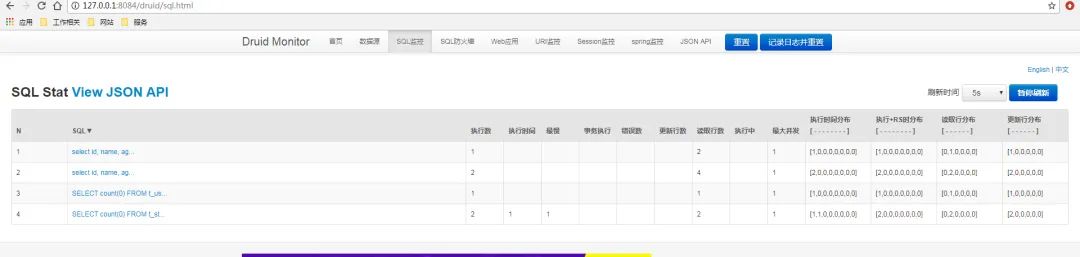
可以很清晰的看到操作記錄! 如果想知道更多的Druid相關(guān)知識,可以查看官方文檔!
結(jié)語
這篇終于寫完了,在進(jìn)行代碼編寫的時候,碰到過很多問題,然后慢慢的嘗試和找資料解決了。本篇文章只是很淺的介紹了這些相關(guān)的使用,在實(shí)際的應(yīng)用可能會更復(fù)雜。如果有有更好的想法和建議,歡迎留言進(jìn)行討論!
參考文章:https://www.bysocket.com/?p=1712
Durid官方地址:https://github.com/alibaba/druid
PageHelper官方地址:https://github.com/pagehelper/Mybatis-PageHelper
往期推薦

我的星球是否適合你?
點(diǎn)擊閱讀原文看看我們都聊過啥?