
手摸手服務(wù)端渲染-react

目錄
服務(wù)端渲染基礎(chǔ)
添加路由
添加ajax異步請(qǐng)求
添加樣式
代碼拆分
引入react-helmet
服務(wù)端渲染基礎(chǔ)
類似vue ssr思路,在react ssr我們也需要?jiǎng)?chuàng)建兩個(gè)入口文件,entry-client.js、entry-server.js,這兩個(gè)文件都引入react的主入口App.jsx文件,entry-server返回一個(gè)渲染react應(yīng)用的渲染函數(shù),在node server中拿到entry-server端返回的渲染函數(shù)并獲取到html字符串,最后將其處理好并返回給客戶端,client端則負(fù)責(zé)激活html字符串,react管這個(gè)步驟叫做hydrate(水合)
mkdir?ssr
cd?ssr
npm?init?-y
npm?install?--save-dev?webpack?webpack-cli?webpack-node-externals?babel-loader?@babel/core?@babel/preset-env?@babel/preset-react
npm?install?--save?express?react?react-dom
我們先簡(jiǎn)單創(chuàng)建一個(gè)React應(yīng)用,新建App.jsx
ssr/src/App.jsx
import?React,?{?useState?}?from?'react'

export?default?function?App?()?{
??const?[name,?setName]?=?useState('初始姓名')
??const?[age,?setAge]?=?useState(0)

??function?onClick?()?{
????setAge(age?+?1)
??}
??return?(
????<article>
??????<p>姓名:?{?name?}p>
??????<p>年齡:?{?age?}p>
??????<button?onClick={onClick}>年齡+1button>
????article>
??)
}
創(chuàng)建雙端入口
ssr/src/entry-client.jsx
import?React?from?'react'
import?ReactDOM?from?'react-dom'

import?App?from?'./App.jsx'

ReactDOM.hydrate(<App?/>,?document.querySelector('#root'))
ssr/src/entry-server.jsx
import?React?from?'react'
import?ReactDOMServer?from?'react-dom/server'

import?App?from?'./App.jsx'

export?default?function?createAppString?()?{
??return?ReactDOMServer.renderToString(<App?/>)
}
我們需要將連個(gè)入口打包變異成node.js可解析的es5版本語(yǔ)法,我們需要配置webpack
ssr/webpack.client.js
const?path?=?require('path')

module.exports?=?{
??mode:?'development',
??entry:?'./src/entry-client.jsx',
??output:?{
????path:?path.join(__dirname,?'dist',?'client'),
????filename:?'index.js'
??},
??module:?{
????rules:?[
??????{
????????test:?/\.(js|jsx)$/,
????????use:?'babel-loader',
????????exclude:?/node_modules/,
????????use:?{
??????????loader:?'babel-loader',
??????????options:?{
??????????????presets:?['@babel/preset-env',?'@babel/preset-react']
??????????}
????????}
??????}
????]
??}
}
ssr/webpack.server.js
const?path?=?require('path')
const?nodeExternals?=?require('webpack-node-externals');

module.exports?=?{
??mode:?'development',
??entry:?'./src/entry-server.jsx',
??output:?{
????path:?path.join(__dirname,?'dist',?'server'),
????filename:?'index.js',
????libraryTarget:?'umd',
????umdNamedDefine:?true,
????globalObject:?'this',
??},
??module:?{
????rules:?[
??????{
????????test:?/\.(js|jsx)$/,
????????use:?'babel-loader',
????????exclude:?/node_modules/,
????????use:?{
??????????loader:?'babel-loader',
??????????options:?{
??????????????presets:?['@babel/preset-env',?'@babel/preset-react']
??????????}
????????}
??????}
????]
??},
??externals:?[nodeExternals()],
??target:?'node',
}
修改ssr/package.json的scripts如下
{
??"name":?"init",
??"version":?"1.0.0",
??"description":?"",
??"main":?"index.js",
??"scripts":?{
????"build:client":?"webpack?--config?webpack.client.js",
????"build:server":?"webpack?--config?webpack.server.js",
????"build":?"npm?run?build:client?&&?npm?run?build:server",
????"start":?"nodemon?server.js"
??},
??"author":?"",
??"license":?"ISC",
??"devDependencies":?{
????"@babel/core":?"^7.17.8",
????"@babel/preset-env":?"^7.16.11",
????"@babel/preset-react":?"^7.16.7",
????"babel-loader":?"^8.2.4",
????"webpack":?"^5.70.0",
????"webpack-cli":?"^4.9.2",
????"webpack-node-externals":?"^3.0.0"
??},
??"dependencies":?{
????"express":?"^4.17.3",
????"react":?"^17.0.2",
????"react-dom":?"^17.0.2"
??}
}
執(zhí)行npm run build
此時(shí)目錄結(jié)構(gòu)如下
ssr
├── dist
│   ├── client
│   │   └── index.js
│   └── server
│       └── index.js
├── package-lock.json
├── package.json
├── src
│   ├── App.jsx
│   ├── entry-client.jsx
│   └── entry-server.jsx
├── webpack.client.js
└── webpack.server.js
ssr/dist為編譯產(chǎn)物,其中node server渲染靜態(tài)html時(shí)需要用ssr/dist/server/index.js,客戶端激活時(shí)需要使用ssr/dist/client/index.js
我們搭建一個(gè)node server服務(wù),來將SSR服務(wù)整體跑起來
ssr/server.js
const?express?=?require('express')
const?path?=?require('path')
const?fs?=?require('fs/promises')
const?server?=?express()
const?createAppString?=?require('./dist/server/index').default
server.use('/js',?express.static(path.join(__dirname,?'dist',?'client')))
server.get('/',?async?(req,?res)?=>?{
??const?htmlTemplate?=?await?fs.readFile('./public/index.html',?'utf-8')
??const?appString?=?createAppString()
??const?html?=?htmlTemplate.replace('' ,?`${appString}` )
??res.send(html)
})
server.listen(1234)
創(chuàng)建html模版文件
ssr/public/index.html
html>
<html?lang="en">
<head>
??<meta?charset="UTF-8">
??<meta?http-equiv="X-UA-Compatible"?content="IE=edge">
??<meta?name="viewport"?content="width=device-width,?initial-scale=1.0">
??<title>Documenttitle>
head>
<body>
??<article?id="root">article>
??<script?src="/js/index.js">script>
body>
html>
運(yùn)行npm start
我們打開http://localhost:1234/并查看源碼如下
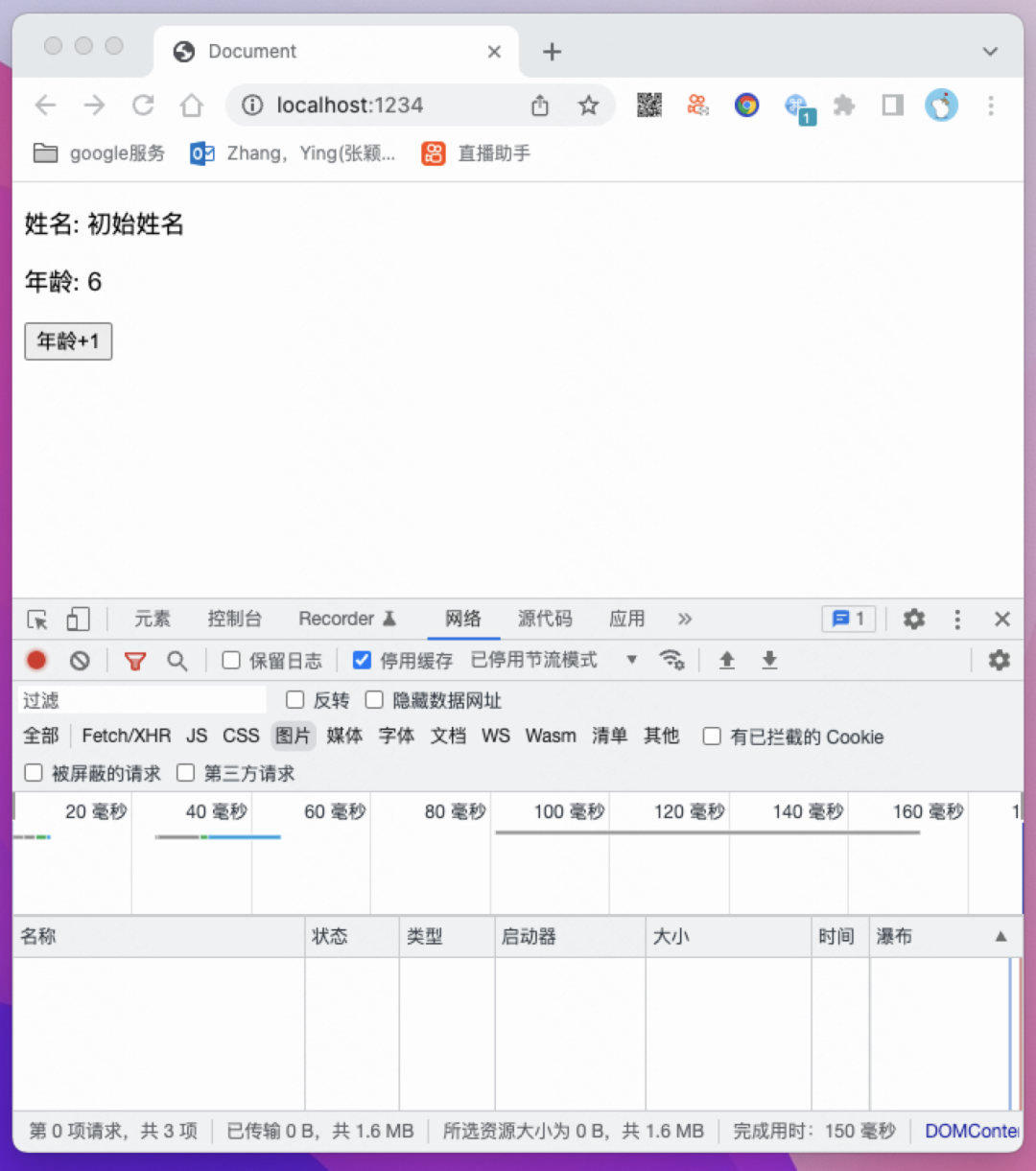
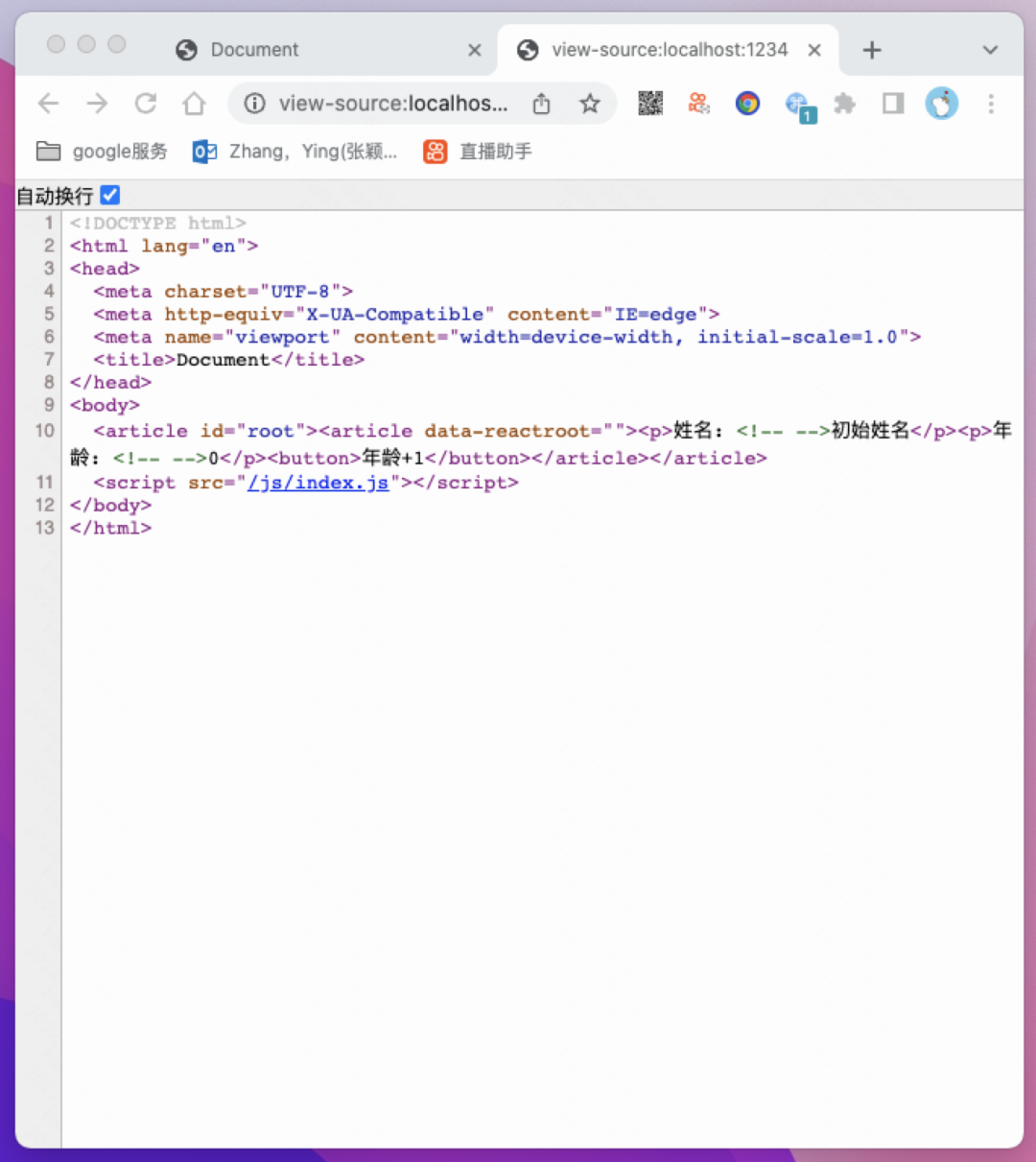
通過點(diǎn)擊按鈕我們可以知道現(xiàn)在頁(yè)面已經(jīng)是一個(gè)可交互的react應(yīng)用了,我們查看源碼發(fā)現(xiàn)源碼已經(jīng)正確的渲染出來react應(yīng)用。
添加路由
npm?install?--save?react-router-dom
創(chuàng)建路由映射表
ssr/src/routes.js
import?Home?from?'./pages/Home.jsx'
import?About?from?'./pages/About.jsx'

const?routes?=?[
??{
????path:?'/',
????element:?Home
??},
??{
????path:?'/about',
????element:?About
??}
]

export?default?routes
ssr/src/pages/Home.jsx
import?React?from?'react'

export?default?function?Home?()?{
??return?(
????<article>我是首頁(yè)article>
??)
}
ssr/src/pages/About.jsx
import?React,?{?useState?}?from?'react'

export?default?function?About?()?{
??const?[name,?setName]?=?useState('姓名默認(rèn)值')
??const?[age,?setAge]?=?useState(0)

??function?onClick?()?{
????setAge(age?+?1)
??}

??return?(
????<article>
??????<p>name:?{?name?}p>
??????<p>age:?{?age?}p>
??????<button?onClick={onClick}>過年button>
????article>
??)
}
修改ssr/src/App.jsx
import?React?from?'react'
import?{?Route,?NavLink,?Routes?}?from?'react-router-dom'

import?routes?from?'./routes'

export?default?function?App?()?{
??return?(
????<article>
??????<nav>
????????<NavLink?to="/">HomeNavLink>?|
????????<NavLink?to="/about">AboutNavLink>
??????nav>
??????<main>
????????<Routes>
??????????{
????????????routes.map(item?=>?
??????????????<Route?key={item.path}?exact?path={item.path}?element={<item.element?/>}?/>
????????????)
??????????}
????????Routes>
??????main>
????article>
??)
}
修改ssr/src/entry-client.jsx
import?React?from?'react'
import?ReactDOM?from?'react-dom'
import?{?BrowserRouter?}?from?'react-router-dom'

import?App?from?'./App.jsx'

ReactDOM.hydrate(
??<BrowserRouter>
????<App?/>
??BrowserRouter>
,?document.querySelector('#root'))
修改ssr/src/entry-server.jsx
import?React?from?"react";
import?{?renderToString?}?from?"react-dom/server";
import?{?StaticRouter?}?from?"react-router-dom/server";

import?App?from?'./App.jsx'

export?default?function?createAppString({url})?{
??console.log('url',?url)
??return?renderToString(
????<StaticRouter?location={url}>
??????<App?/>
????StaticRouter>
??);
}
運(yùn)行npm run build
此時(shí)目錄結(jié)構(gòu)如下
ssr
├── dist
│   ├── client
│   │   └── index.js
│   └── server
│       └── index.js
├── package-lock.json
├── package.json
├── public
│   └── index.html
├── server.js
├── src
│   ├── App.jsx
│   ├── entry-client.jsx
│   ├── entry-server.jsx
│   ├── pages
│   │   ├── About.jsx
│   │   └── Home.jsx
│   └── routes.js
├── webpack.client.js
└── webpack.server.js
修改ssr/server.js
const?express?=?require("express");
const?path?=?require("path");
const?fs?=?require("fs/promises");
(async?()?=>?{
??const?indexTemplate?=?await?fs.readFile(path.join(__dirname,?"public",?"index.html"),"utf-8");
??const?server?=?express();
??server.use('/js',?express.static(path.join(__dirname,?'dist/client')))
??server.get("*",?async?(req,?res)?=>?{
????const?createAppString?=?require('./dist/server/index').default
????const?appString?=?createAppString({?url:?req.url?})
????const?html?=?indexTemplate.replace(
??????'' ,
??????`${appString}`
????);
????res.send(html);
??});
??server.listen(1234);
})();
運(yùn)行npm start
打開頁(yè)面http://localhost:1234/并查看源碼
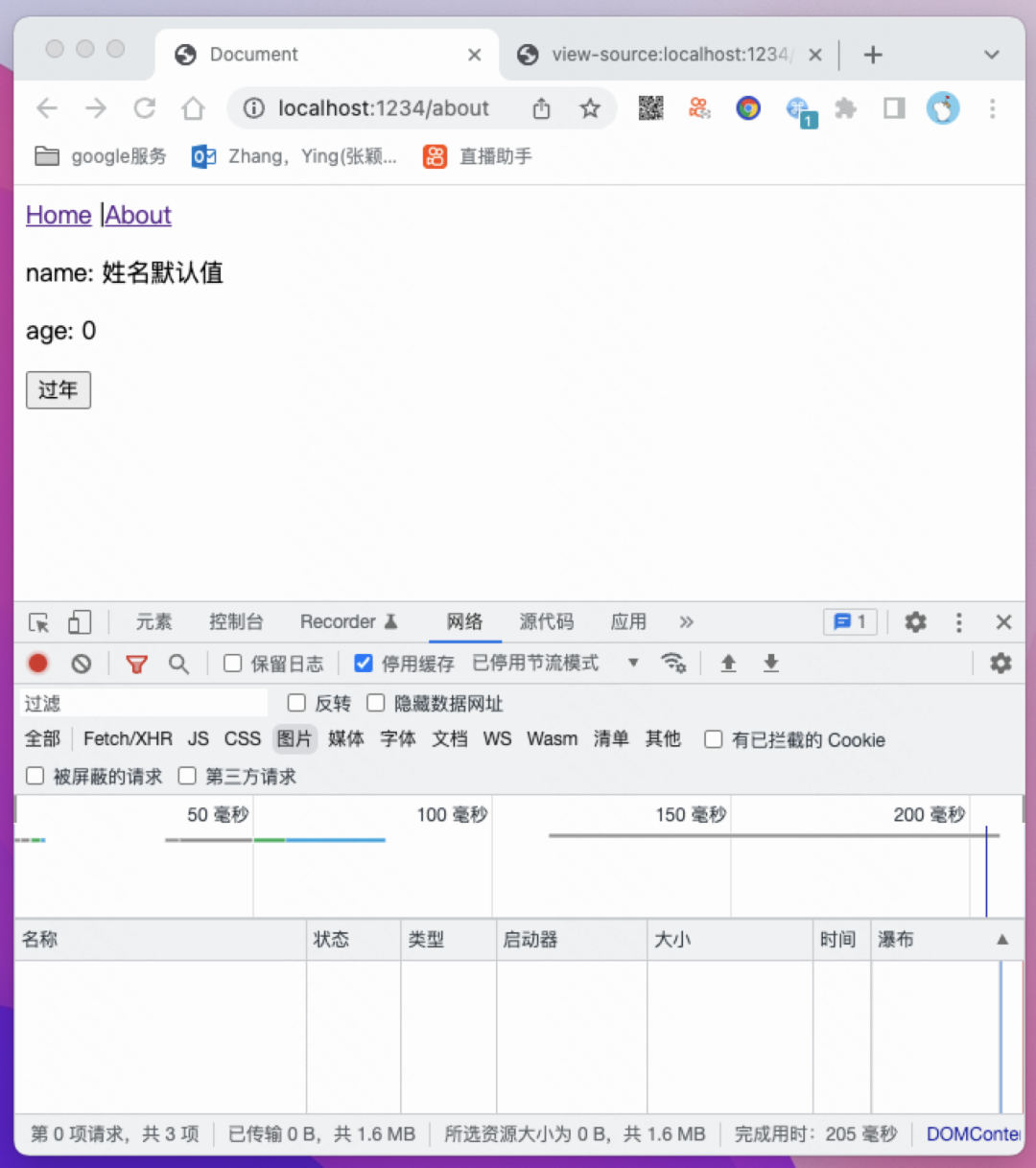
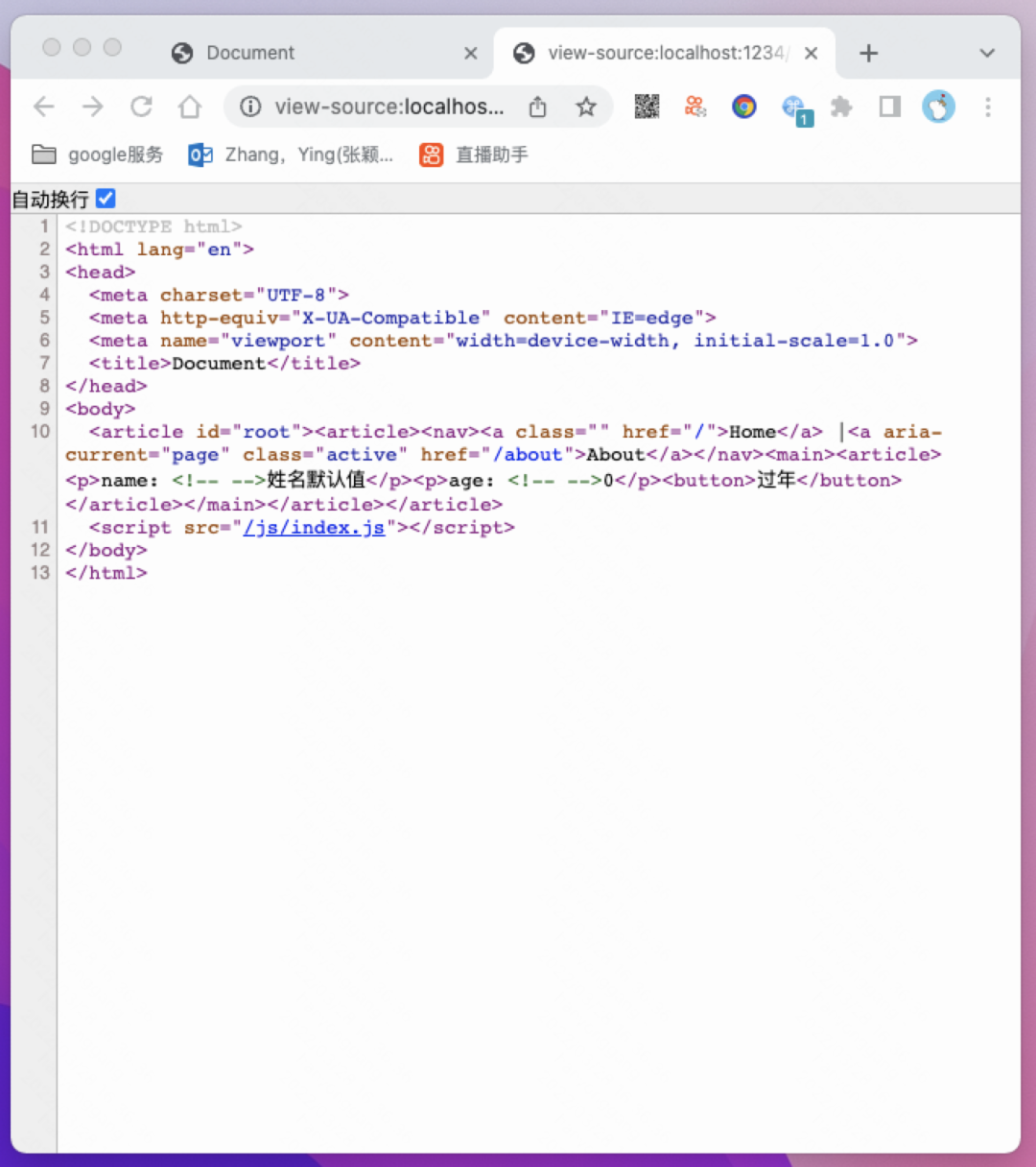
如上圖所示,服務(wù)端渲染正確
添加ajax異步請(qǐng)求
npm?install?--save?axios
npm?install?--save-dev?@babel/plugin-transform-runtime
修改webpack配置,使其支持async function語(yǔ)法
ssr/webpack.server.js
const?path?=?require('path')
const?nodeExternals?=?require('webpack-node-externals');

module.exports?=?{
??mode:?'development',
??entry:?'./src/entry-server.jsx',
??output:?{
????path:?path.join(__dirname,?'dist',?'server'),
????filename:?'index.js',
????libraryTarget:?'umd',
????umdNamedDefine:?true,
????globalObject:?'this',
??},
??module:?{
????rules:?[
??????{
????????test:?/\.(js|jsx)$/,
????????use:?'babel-loader',
????????exclude:?/node_modules/,
????????use:?{
??????????loader:?'babel-loader',
??????????options:?{
??????????????presets:?['@babel/preset-env',?'@babel/preset-react'],
??????????????plugins:?['@babel/plugin-transform-runtime']
??????????}
????????}
??????}
????]
??},
??externals:?[nodeExternals()],
??target:?'node',
}
ssr/webpack.client.js
const?path?=?require('path')

module.exports?=?{
??mode:?'development',
??entry:?'./src/entry-client.jsx',
??output:?{
????path:?path.join(__dirname,?'dist',?'client'),
????filename:?'index.js'
??},
??module:?{
????rules:?[
??????{
????????test:?/\.(js|jsx)$/,
????????use:?'babel-loader',
????????exclude:?/node_modules/,
????????use:?{
??????????loader:?'babel-loader',
??????????options:?{
????????????presets:?['@babel/preset-env',?'@babel/preset-react'],
????????????plugins:?['@babel/plugin-transform-runtime']
??????????}
????????}
??????}
????]
??}
}
創(chuàng)建文件 ssr/src/api.js
import?axios?from?'axios'

export?function?getInfo?()?{
??return?axios.get('http://localhost:1234/info')
}

export?function?getText?()?{
??return?axios.get('http://localhost:1234/text')
}
我們?cè)赟SR階段可以通過瀏覽器返回的url與路由表信息來獲取與之匹配的頁(yè)面組件,我們假設(shè)匹配到的頁(yè)面組件中有getInitData方法,我們通過該方法拿到頁(yè)面初始數(shù)據(jù)后再渲染react app,然后我們將初始數(shù)據(jù)傳入 App中
ssr/src/entry-server.jsx
import?React?from?"react";
import?{?renderToString?}?from?"react-dom/server";
import?{?StaticRouter,?matchPath?}?from?"react-router-dom/server";

import?routes?from?'./routes'

import?App?from?'./App.jsx'

export?default?async?function?createAppString({url})?{
??const?match?=?routes.filter(item?=>?item.path?===?url)
??let?__INIT_DATA__?=?{}
??if?(match.length?>?0)?{
????await?Promise.all(match.map(async?item?=>?{
??????const?{?getInitData,?initDataId?}?=?item.element
??????const?{?data?}?=?await?getInitData()
??????__INIT_DATA__[initDataId]?=?data
????}))
??}
??const?appString?=?renderToString(
????<StaticRouter?location={url}>
??????<App?initData={__INIT_DATA__}?/>
????StaticRouter>
??)
??return?{?appString,?__INIT_DATA__?};
}
App在服務(wù)端渲染時(shí)傳入了initData初始數(shù)據(jù),我們拿到初始數(shù)據(jù)并將其傳入匹配到的頁(yè)面組件中
ssr/src/App.jsx
import?React,?{?useState?}?from?'react'
import?{?Route,?NavLink,?Routes?}?from?'react-router-dom'

import?routes?from?'./routes'

export?default?function?App?(props)?{
??const?[initData,?setInitData]?=?useState((props.initData???props.initData?:?window.__INIT_DATA__)?||?{})
??return?(
????<article>
??????<nav>
????????<NavLink?to="/">HomeNavLink>?|
????????<NavLink?to="/about">AboutNavLink>
??????nav>
??????<main>
????????<Routes>
??????????{
????????????routes.map(item?=>?
??????????????<Route?key={item.path}?exact?path={item.path}?element={<item.element?initData={initData}?setInitData={setInitData}?/>}?/>
????????????)
??????????}
????????Routes>
??????main>
????article>
??)
}
接下來我們需要在頁(yè)面組件定義getInitData方法,以使其在服務(wù)端渲染時(shí)能夠獲取到初始化數(shù)據(jù)。
因?yàn)槊總€(gè)頁(yè)面都有一部分相同的處理初始數(shù)據(jù)的邏輯,所以需要我們將這部分邏輯抽離出來做成一個(gè)公共組件。
ssr/src/components/Layout.jsx
import?React?from?'react'

export?default?function?Layout?(Component,?{?getInitData,?initDataId?})?{
??const?PageComponent?=?(props)?=>?{
????const?initData?=?props.initData[initDataId]
????if?(!initData)?{
??????(async?()?=>?{
????????const?{?data?}?=?await?getInitData()
????????props.setInitData({?...props.initData,?[initDataId]:?data?})
??????})()
????}

????return?<Component?initData={initData?||?{}}?/>
??}

??PageComponent.getInitData?=?getInitData
??PageComponent.initDataId?=?initDataId

??return?PageComponent
}
如上代碼所示,我們定義了一個(gè)Layout方法,專門用來處理初始數(shù)據(jù),執(zhí)行Layout會(huì)返回一個(gè)PageComponent組件,該組件包含當(dāng)前頁(yè)面的getInitData方法與initDataId屬性。這兩個(gè)對(duì)象會(huì)被用于SSR階段獲取和保存數(shù)據(jù),PageComponent組件渲染并返回了我們傳入Layout方法的頁(yè)面組件(Home、About),頁(yè)面組件在渲染時(shí)傳入了已經(jīng)處理好的當(dāng)前頁(yè)面的初始數(shù)據(jù)initData,所以我們?cè)陧?yè)面組件Home、About組件中可以直接通過props.initData獲取初始數(shù)據(jù)。
initDataId的含義:我們?cè)诿總€(gè)頁(yè)面會(huì)定義一個(gè)唯一的 initDataId變量,我們儲(chǔ)存數(shù)據(jù)時(shí)會(huì)使用該變量作為key值。用于在不同的頁(yè)面獲取與其對(duì)應(yīng)的初始數(shù)據(jù)。
接下來我們修改頁(yè)面組件Home與About,我們?cè)陧?yè)面組件中引入Layout,并傳入getInitData方法與initDataId屬性。
ssr/src/pages/Home.jsx
import?React,?{?useState,?useEffect?}?from?"react";

import?Layout?from?"../components/Layout.jsx";
import?{?getText?}?from?"./../api";

function?Home({?initData?})?{
??const?[text,?setText]?=?useState(initData?&&?initData.text?||?"首頁(yè)");

??useEffect(()?=>?{
????initData.text?&&?setText(initData.text);
??},?[initData]);

??return?<article>{text}article>;
}

export?default?Layout(Home,?{?getInitData:?getText,?initDataId:?'home'?})
ssr/src/pages/About.jsx
import?React,?{?useEffect,?useState?}?from?"react";

import?Layout?from?"../components/Layout.jsx";
import?{?getInfo?}?from?"./../api";

function?About({?initData?})?{
??const?[name,?setName]?=?useState(initData.name?||?"姓名默認(rèn)值");
??const?[age,?setAge]?=?useState(initData.age?||?0);

??useEffect(()?=>?{
????initData.name?&&?setName(initData.name)
????initData.age?&&?setAge(initData.age)
??},?[initData])

??function?onClick()?{
????setAge(age?+?1);
??}

??return?(
????<article>
??????<p>name:?{name}p>
??????<p>age:?{age}p>
??????<button?onClick={onClick}>過年button>
????article>
??);
}

export?default?Layout(About,?{?getInitData:?getInfo,?initDataId:?'about'?})
我們?cè)?em style="font-style: italic;color: black;font-size: 15px;">ssr/server.js中添加幾個(gè)接口。
調(diào)用createAppString后我們能得到頁(yè)面的初始數(shù)據(jù),我們將其放入html的全局變量window.__INIT_DATA__中,用于客戶端激活與數(shù)據(jù)的初始化。
const?express?=?require("express");
const?path?=?require("path");
const?fs?=?require("fs/promises");
(async?()?=>?{
??const?indexTemplate?=?await?fs.readFile(path.join(__dirname,?"public",?"index.html"),"utf-8");
??const?server?=?express();
??server.get('/info',?async?(req,?res)?=>?{
????setTimeout(()?=>?{
??????res.send({
????????name:?'hagan',
????????age:?22
??????})
????},?1000)
??})
??server.get('/text',?async?(req,?res)?=>?{
????setTimeout(()?=>?{
??????res.send({
????????text:?'我是服務(wù)端渲染出來的首頁(yè)文案'
??????})
????},?1000)
??})
??server.use('/js',?express.static(path.join(__dirname,?'dist/client')))
??server.get("*",?async?(req,?res)?=>?{
????const?createAppString?=?require('./dist/server/index').default
????const?{?appString,?__INIT_DATA__?}?=?await?createAppString({?url:?req.url?})
????const?html?=?indexTemplate.replace(
??????'' ,
??????`${appString}`
????);
????res.send(html);
??});
??server.listen(1234);
})();
npm?run?build
此時(shí)目錄結(jié)構(gòu)如下
.
├── dist
│   ├── client
│   │   └── index.js
│   └── server
│       └── index.js
├── package-lock.json
├── package.json
├── public
│   └── index.html
├── server.js
├── src
│   ├── App.jsx
│   ├── api.js
│   ├── components
│   │   └── Layout.jsx
│   ├── entry-client.jsx
│   ├── entry-server.jsx
│   ├── pages
│   │   ├── About.jsx
│   │   └── Home.jsx
│   └── routes.js
├── webpack.client.js
└── webpack.server.js
我們運(yùn)行npm start后打開頁(yè)面http://localhost:1234/并查看源碼
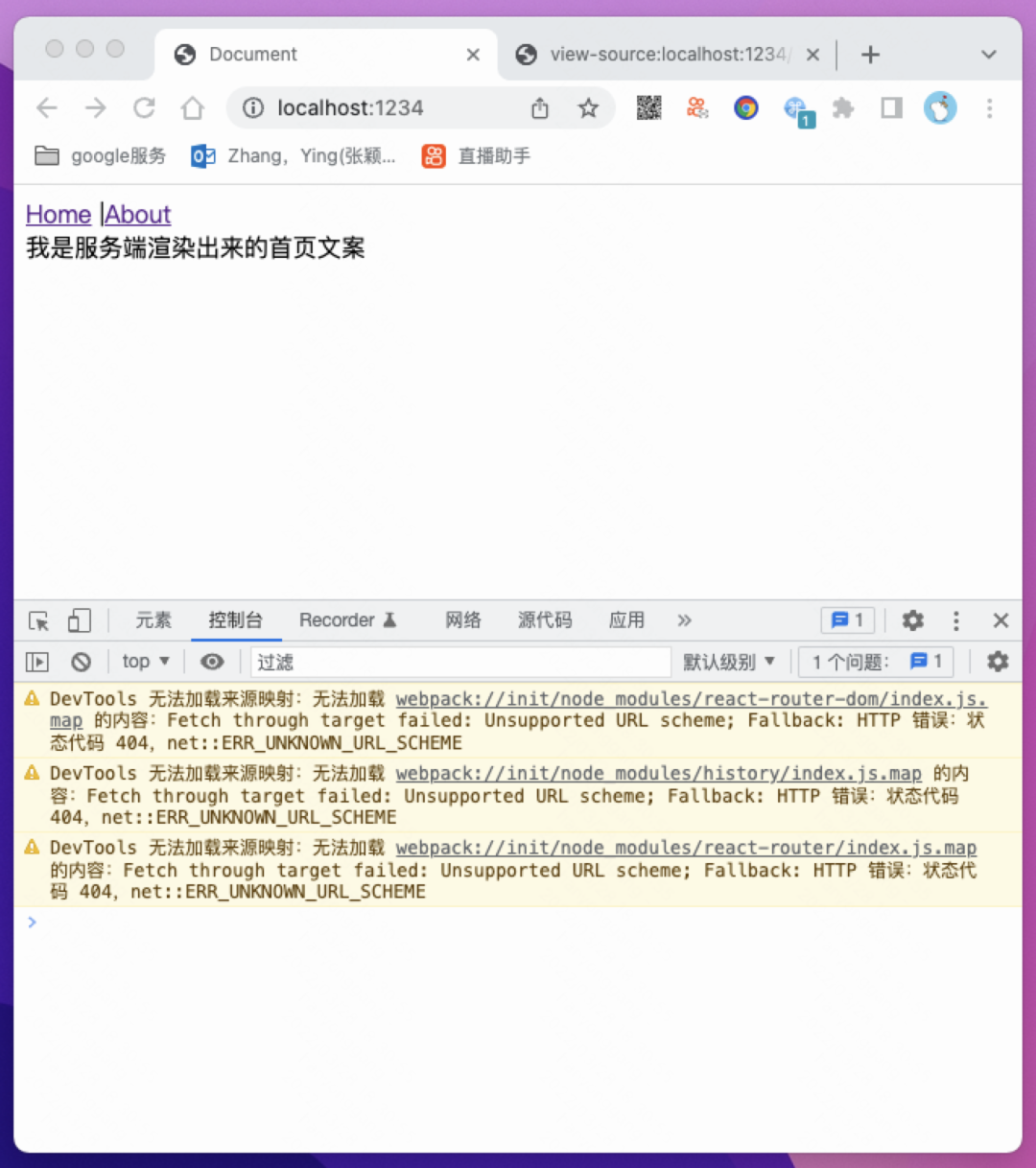
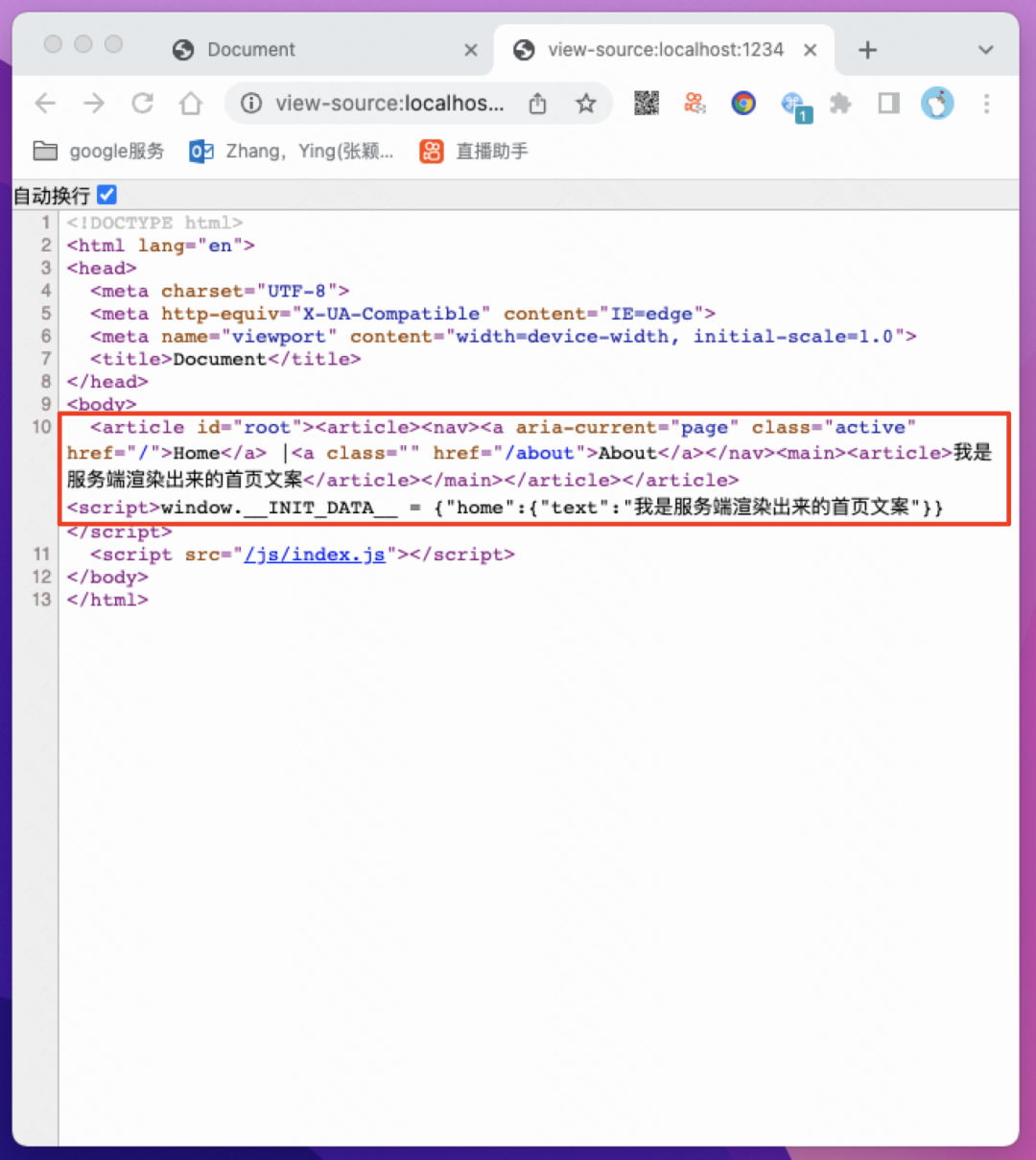
此時(shí)服務(wù)端渲染已正確運(yùn)行。
添加樣式
我們使用css-loader來處理css,在客戶端渲染階段我們使用style-loader來將樣式插入到html,在服務(wù)端渲染階段我們使用isomorphic-style-loader來獲取css字符串并手動(dòng)將其插入到html模版中。
npm?install?--save-dev?css-loader?style-loader?isomorphic-style-loader
修改webpack配置
ssr/webpack.client.js
const?path?=?require('path')

module.exports?=?{
??mode:?'development',
??entry:?'./src/entry-client.jsx',
??output:?{
????path:?path.join(__dirname,?'dist',?'client'),
????filename:?'index.js'
??},
??module:?{
????rules:?[
??????{
????????test:?/\.(js|jsx)$/,
????????use:?'babel-loader',
????????exclude:?/node_modules/,
????????use:?{
??????????loader:?'babel-loader',
??????????options:?{
????????????presets:?['@babel/preset-env',?'@babel/preset-react'],
????????????plugins:?['@babel/plugin-transform-runtime']
??????????}
????????}
??????},
??????{
????????test:?/\.css?$/,
????????use:?[
??????????//?"isomorphic-style-loader",
??????????"style-loader",
??????????{
????????????loader:?"css-loader",
????????????options:?{
??????????????modules:?{
????????????????localIdentName:?'[name]__[local]--[hash:base64:5]'
??????????????},
????????????},
??????????},
????????],
??????},
????]
??}
}
ssr/webpack.server.js
const?path?=?require('path')
const?nodeExternals?=?require('webpack-node-externals');

module.exports?=?{
??mode:?'development',
??entry:?'./src/entry-server.jsx',
??output:?{
????path:?path.join(__dirname,?'dist',?'server'),
????filename:?'index.js',
????libraryTarget:?'umd',
????umdNamedDefine:?true,
????globalObject:?'this',
??},
??module:?{
????rules:?[
??????{
????????test:?/\.(js|jsx)$/,
????????use:?'babel-loader',
????????exclude:?/node_modules/,
????????use:?{
??????????loader:?'babel-loader',
??????????options:?{
??????????????presets:?['@babel/preset-env',?'@babel/preset-react'],
??????????????plugins:?['@babel/plugin-transform-runtime']
??????????}
????????}
??????},
??????{
????????test:?/\.css?$/,
????????use:?[
??????????"isomorphic-style-loader",
??????????{
????????????loader:?"css-loader",
????????????options:?{
??????????????modules:?{
????????????????localIdentName:?'[name]__[local]--[hash:base64:5]'
??????????????},
??????????????esModule:?false,?//?不加這個(gè)CSS內(nèi)容會(huì)顯示為[Object?Module],且styles['name']方式拿不到樣式名
????????????},
??????????},
????????],
??????},
????]
??},
??externals:?[nodeExternals()],
??target:?'node',
}
ssr/src/entry-server.jsx
import?React?from?"react";
import?{?renderToString?}?from?"react-dom/server";
import?{?StaticRouter,?matchPath?}?from?"react-router-dom/server";
import?StyleContext?from'isomorphic-style-loader/StyleContext'

import?routes?from?'./routes'

import?App?from?'./App.jsx'

export?default?async?function?createAppString({url})?{
??const?css?=?new?Set();
??const?insertCss?=?(...styles)?=>?styles.forEach(style?=>?css.add(style._getCss()))

??const?match?=?routes.filter(item?=>?item.path?===?url)
??let?__INIT_DATA__?=?{}
??if?(match.length?>?0)?{
????await?Promise.all(match.map(async?item?=>?{
??????const?{?getInitData,?initDataId?}?=?item.element
??????const?{?data?}?=?await?getInitData()
??????__INIT_DATA__[initDataId]?=?data
????}))
??}
??const?appString?=?renderToString(
????<StyleContext.Provider?value={{?insertCss?}}>
??????<StaticRouter?location={url}>
????????<App?initData={__INIT_DATA__}?/>
??????StaticRouter>
????StyleContext.Provider>
??)
??return?{?appString,?__INIT_DATA__,?styles:?[...css].join('?')?};
}
如上代碼所示,我們定義了一個(gè)css變量和一個(gè)insertCss方法,用來收集匹配到的css。我們將insertCss傳入到StyleContext.Provider中,然后我們?cè)陧?yè)面組件中調(diào)用useStyles就能收集到匹配頁(yè)面的css了。最后我們將收集到的css轉(zhuǎn)換成字符串返回給server.js
創(chuàng)建 ssr/src/pages/home.css
.home?{
??width:?80vw;
??height:?200px;
??display:?flex;
??align-items:?center;
??justify-content:?center;
??background-color:?azure;
??border:?1px?solid?blue;
}
ssr/src/pages/Home.jsx
import?React,?{?useState,?useEffect?}?from?"react";
import?useStyles?from?"isomorphic-style-loader/useStyles";

import?Layout?from?"../components/Layout.jsx";
import?{?getText?}?from?"./../api";
import?styles?from?'./home.css'

function?Home({?initData?})?{
??if?(styles._insertCss)?{
????useStyles(styles);
??}
??
??const?[text,?setText]?=?useState(initData?&&?initData.text?||?"首頁(yè)");

??useEffect(()?=>?{
????initData.text?&&?setText(initData.text);
??},?[initData]);

??return?<article?className={styles['home']}>{text}article>;
}

export?default?Layout(Home,?{?getInitData:?getText,?initDataId:?'home'?})
創(chuàng)建ssr/src/pages/about.css
.about?{
??width:?80vw;
??height:?300px;
??background-color:?cornsilk;
??border:?1px?solid?rgb(183,?116,?255);
??display:?flex;
??align-items:?center;
??justify-content:?center;
??flex-direction:?column;
}

.name?{
??color:?red;
??margin:?0;
}

.age?{
??color:?blue;
??margin:?0;
??padding:?5px;
}
ssr/src/pages/About.jsx
import?React,?{?useEffect,?useState?}?from?"react";
import?useStyles?from?"isomorphic-style-loader/useStyles";

import?Layout?from?"../components/Layout.jsx";
import?{?getInfo?}?from?"./../api";
import?styles?from?'./about.css'

function?About({?initData?})?{
??if?(styles._insertCss)?{
????useStyles(styles);
??}
??
??const?[name,?setName]?=?useState(initData.name?||?"姓名默認(rèn)值");
??const?[age,?setAge]?=?useState(initData.age?||?0);

??useEffect(()?=>?{
????initData.name?&&?setName(initData.name)
????initData.age?&&?setAge(initData.age)
??},?[initData])

??function?onClick()?{
????setAge(age?+?1);
??}

??return?(
????<article?className={styles["about"]}>
??????<p?className={styles["name"]}>name:?{name}p>
??????<p?className={styles["age"]}>age:?{age}p>
??????<button?onClick={onClick}>過年button>
????article>
??);
}

export?default?Layout(About,?{?getInitData:?getInfo,?initDataId:?'about'?})
執(zhí)行npm run build后目錄結(jié)構(gòu)如下
ssr
├── dist
│   ├── client
│   │   └── index.js
│   └── server
│       └── index.js
├── package-lock.json
├── package.json
├── public
│   └── index.html
├── server.js
├── src
│   ├── App.jsx
│   ├── api.js
│   ├── components
│   │   └── Layout.jsx
│   ├── entry-client.jsx
│   ├── entry-server.jsx
│   ├── pages
│   │   ├── About.jsx
│   │   ├── Home.jsx
│   │   ├── about.css
│   │   └── home.css
│   └── routes.js
├── webpack.client.js
└── webpack.server.js
我們接收createAppString返回的css字符串,并添加到html中。
ssr/server.js
const?express?=?require("express");
const?path?=?require("path");
const?fs?=?require("fs/promises");
(async?()?=>?{
??const?indexTemplate?=?await?fs.readFile(path.join(__dirname,?"public",?"index.html"),"utf-8");
??const?server?=?express();
??server.get('/info',?async?(req,?res)?=>?{
????setTimeout(()?=>?{
??????res.send({
????????name:?'hagan',
????????age:?22
??????})
????},?1000)
??})
??server.get('/text',?async?(req,?res)?=>?{
????setTimeout(()?=>?{
??????res.send({
????????text:?'我是服務(wù)端渲染出來的首頁(yè)文案'
??????})
????},?1000)
??})
??server.use('/js',?express.static(path.join(__dirname,?'dist/client')))
??server.get("*",?async?(req,?res)?=>?{
????const?createAppString?=?require('./dist/server/index').default
????const?{?appString,?__INIT_DATA__,?styles?}?=?await?createAppString({?url:?req.url?})
????const?html?=?indexTemplate
??????.replace(
????????'' ,
????????`${appString}`
??????)
??????.replace(
????????"Document ",
????????`Document ${styles}`
??????);
????res.send(html);
??});
??server.listen(1234);
})();
執(zhí)行npm start后打開頁(yè)面http://localhost:1234/并查看源碼
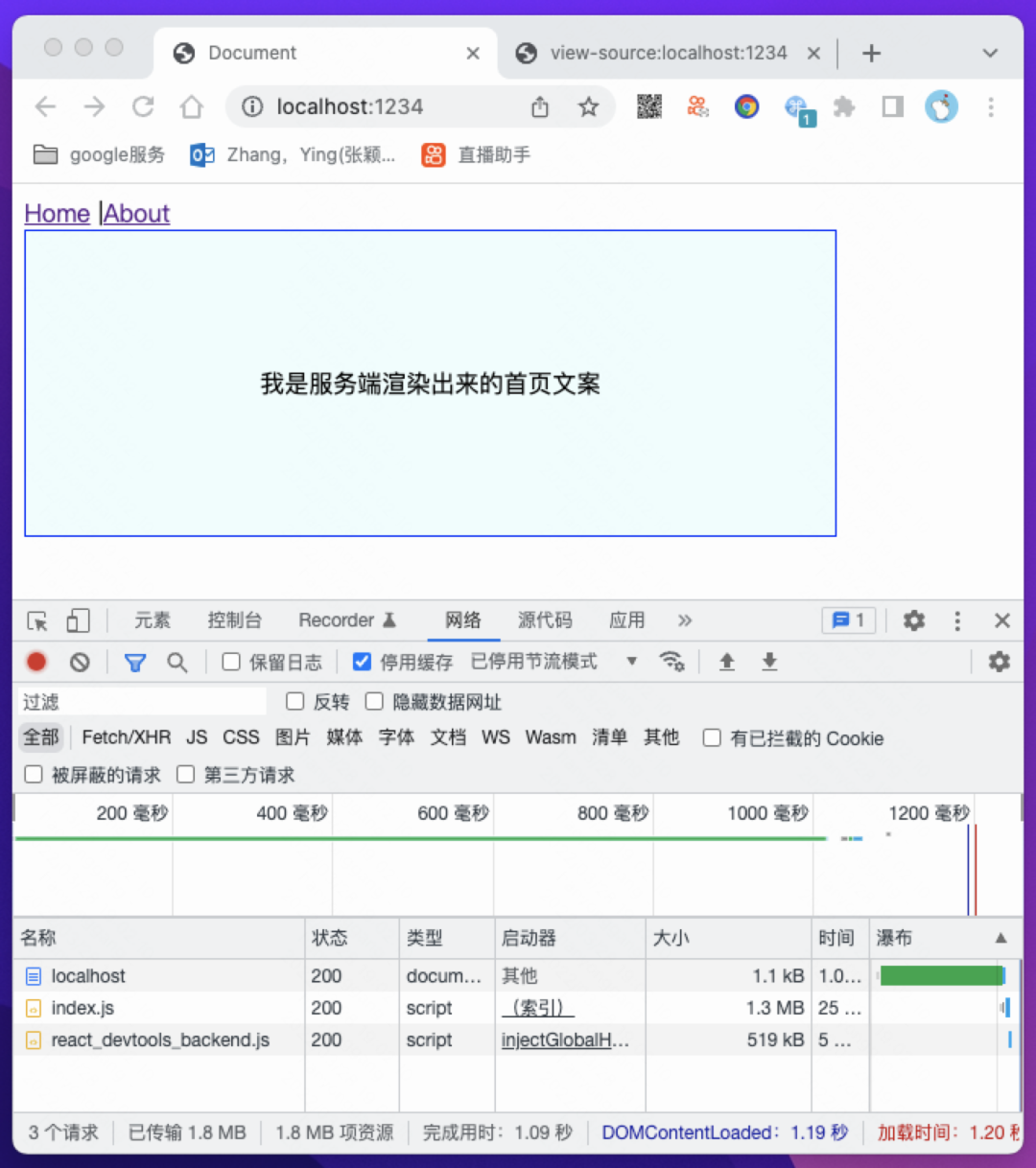
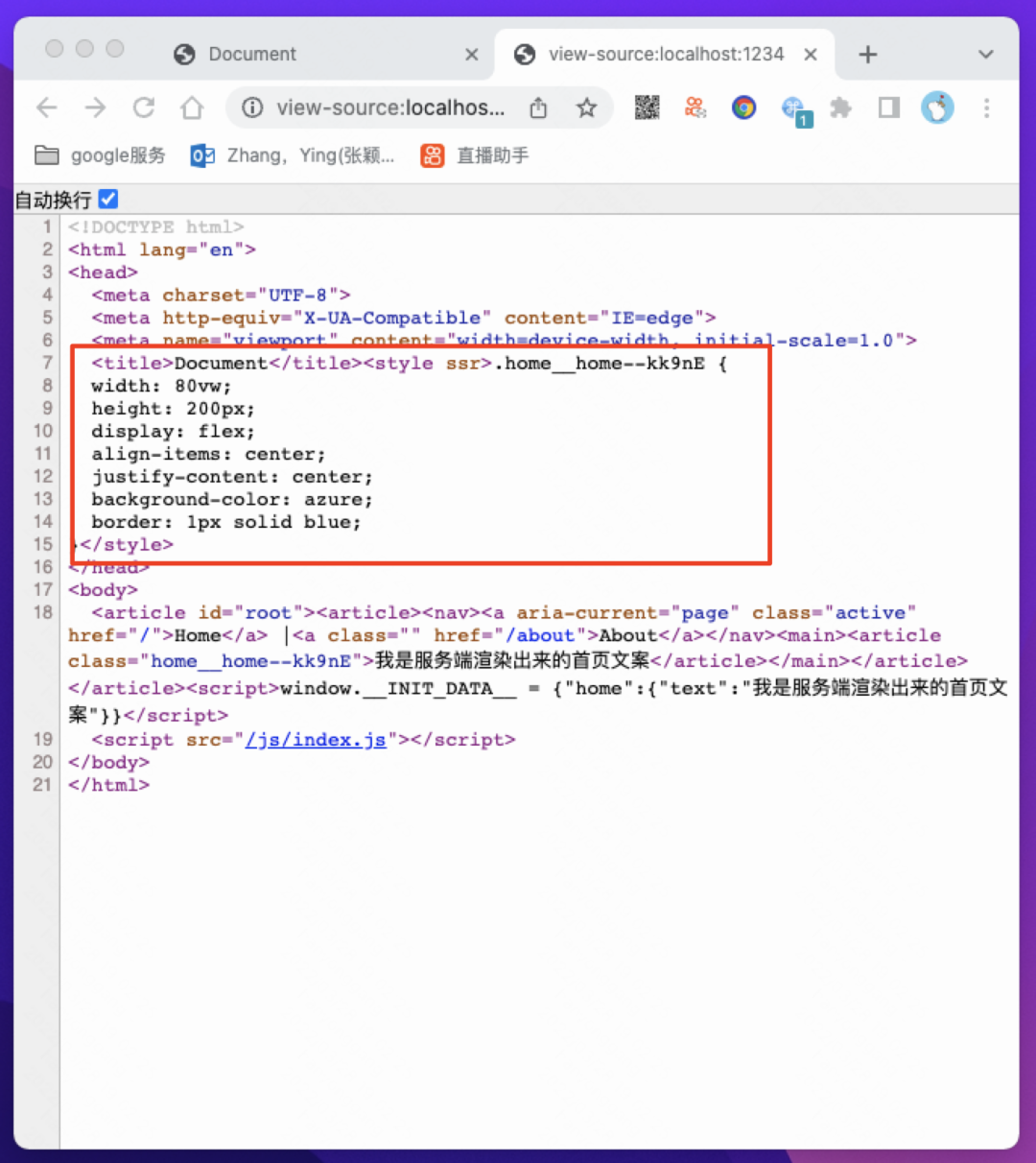
我們可以看到樣式已經(jīng)生效,并且服務(wù)端渲染也返回了