
JWT 和 JJWT,別再傻傻分不清了!

jwt是什么?
JWTs是JSON對象的編碼表示。JSON對象由零或多個名稱/值對組成,其中名稱為字符串,值為任意JSON值。
JWT有助于在clear(例如在URL中)發(fā)送這樣的信息,可以被信任為不可讀(即加密的)、不可修改的(即簽名)和URL - safe(即Base64編碼的)。
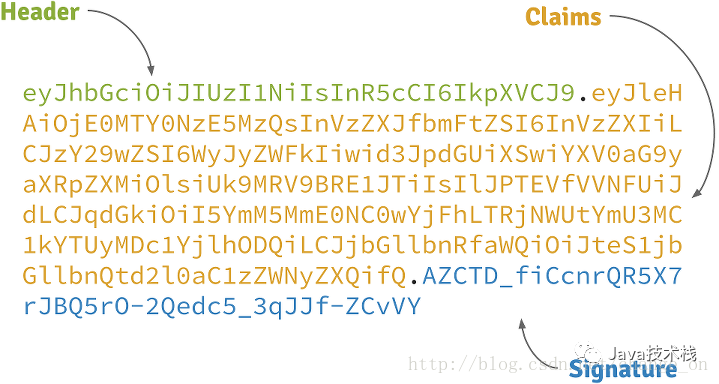
jwt的組成
Header: 標題包含了令牌的元數(shù)據(jù),并且在最小包含簽名和/或加密算法的類型 Claims: Claims包含您想要簽署的任何信息 JSON Web Signature (JWS): 在header中指定的使用該算法的數(shù)字簽名和聲明
例如:
Header:

{
??"alg":?"HS256",
??"typ":?"JWT"
}

Claims:

{
??"sub":?"1234567890",
??"name":?"John?Doe",
??"admin":?true
}

Signature:

base64UrlEncode(Header)?+?"."?+?base64UrlEncode(Claims),
加密生成的token:
如何保證 JWT 安全
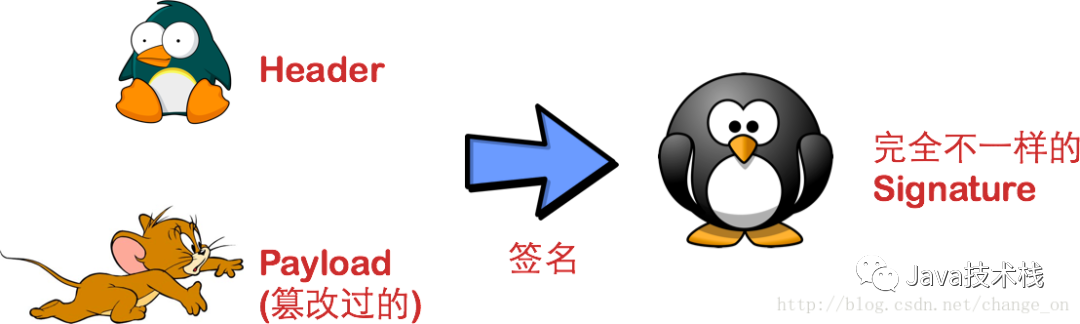
有很多庫可以幫助您創(chuàng)建和驗證JWT,但是當使用JWT時,仍然可以做一些事情來限制您的安全風險。在您信任JWT中的任何信息之前,請始終驗證簽名。這應該是給定的。
換句話說,如果您正在傳遞一個秘密簽名密鑰到驗證簽名的方法,并且簽名算法被設置為“none”,那么它應該失敗驗證。
確保簽名的秘密簽名,用于計算和驗證簽名。秘密簽名密鑰只能由發(fā)行者和消費者訪問,不能在這兩方之外訪問。
不要在JWT中包含任何敏感數(shù)據(jù)。這些令牌通常是用來防止操作(未加密)的,因此索賠中的數(shù)據(jù)可以很容易地解碼和讀取。
如果您擔心重播攻擊,包括一個nonce(jti索賠)、過期時間(exp索賠)和創(chuàng)建時間(iat索賠)。這些在JWT規(guī)范中定義得很好。
jwt的框架:JJWT
JJWT是一個提供端到端的JWT創(chuàng)建和驗證的Java庫。永遠免費和開源(Apache License,版本2.0),JJWT很容易使用和理解。它被設計成一個以建筑為中心的流暢界面,隱藏了它的大部分復雜性。
JJWT的目標是最容易使用和理解用于在JVM上創(chuàng)建和驗證JSON Web令牌(JWTs)的庫。 JJWT是基于JWT、JWS、JWE、JWK和JWA RFC規(guī)范的Java實現(xiàn)。 JJWT還添加了一些不屬于規(guī)范的便利擴展,比如JWT壓縮和索賠強制。
規(guī)范兼容:
創(chuàng)建和解析明文壓縮JWTs 創(chuàng)建、解析和驗證所有標準JWS算法的數(shù)字簽名緊湊JWTs(又稱JWSs): HS256: HMAC using SHA-256 HS384: HMAC using SHA-384 HS512: HMAC using SHA-512 RS256: RSASSA-PKCS-v1_5 using SHA-256 RS384: RSASSA-PKCS-v1_5 using SHA-384 RS512: RSASSA-PKCS-v1_5 using SHA-512 PS256: RSASSA-PSS using SHA-256 and MGF1 with SHA-256 PS384: RSASSA-PSS using SHA-384 and MGF1 with SHA-384 PS512: RSASSA-PSS using SHA-512 and MGF1 with SHA-512 ES256: ECDSA using P-256 and SHA-256 ES384: ECDSA using P-384 and SHA-384 ES512: ECDSA using P-521 and SHA-512
這里以github上的demo演示,理解原理,集成到自己項目中即可。
應用采用 spring boot + angular + jwt
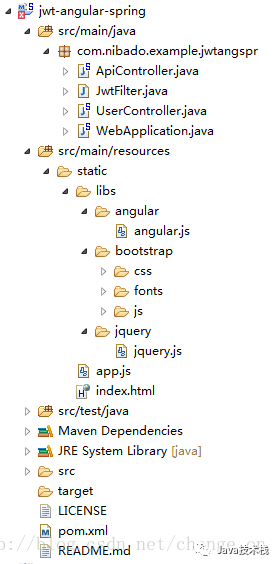
結構圖
Maven 引進 : pom.xml
"http://maven.apache.org/POM/4.0.0"?xmlns:xsi="http://www.w3.org/2001/XMLSchema-instance"
????xsi:schemaLocation="http://maven.apache.org/POM/4.0.0?http://maven.apache.org/xsd/maven-4.0.0.xsd">
????4.0.0
????com.nibado.example
????jwt-angular-spring
????0.0.2-SNAPSHOT
????
????????1.8
????????1.8

????????2.4
????????0.6.0
????????4.12
????????1.5.3.RELEASE
????

????
????????
????????????
????????????????org.springframework.boot
????????????????spring-boot-maven-plugin
????????????????${spring.boot.version}
????????????????
????????????????????
????????????????????????
????????????????????????????repackage
????????????????????????
????????????????????
????????????????
????????????
????????
????

????
????????
????????????org.springframework.boot
????????????spring-boot-starter-web
????????????${spring.boot.version}
????????
????????
????????????commons-io
????????????commons-io
????????????${commons.io.version}
????????
????????
????????????io.jsonwebtoken
????????????jjwt
????????????${jjwt.version}
????????
????????
????????????junit
????????????junit
????????????${junit.version}
????????
????
WebApplication.java
package?com.nibado.example.jwtangspr;

import?org.springframework.boot.SpringApplication;
import?org.springframework.boot.autoconfigure.EnableAutoConfiguration;
import?org.springframework.boot.web.servlet.FilterRegistrationBean;
import?org.springframework.context.annotation.Bean;
import?org.springframework.context.annotation.ComponentScan;
import?org.springframework.context.annotation.Configuration;

@EnableAutoConfiguration
@ComponentScan
@Configuration
public?class?WebApplication?{
?
????//過濾器
????@Bean
????public?FilterRegistrationBean?jwtFilter()?{
????????final?FilterRegistrationBean?registrationBean?=?new?FilterRegistrationBean();
????????registrationBean.setFilter(new?JwtFilter());
????????registrationBean.addUrlPatterns("/api/*");
????????return?registrationBean;
????}

????public?static?void?main(final?String[]?args)?throws?Exception?{
????????SpringApplication.run(WebApplication.class,?args);
????}

}
JwtFilter.java
package?com.nibado.example.jwtangspr;

import?java.io.IOException;

import?javax.servlet.FilterChain;
import?javax.servlet.ServletException;
import?javax.servlet.ServletRequest;
import?javax.servlet.ServletResponse;
import?javax.servlet.http.HttpServletRequest;

import?org.springframework.web.filter.GenericFilterBean;

import?io.jsonwebtoken.Claims;
import?io.jsonwebtoken.Jwts;
import?io.jsonwebtoken.SignatureException;

public?class?JwtFilter?extends?GenericFilterBean?{

????@Override
????public?void?doFilter(final?ServletRequest?req,
?????????????????????????final?ServletResponse?res,
?????????????????????????final?FilterChain?chain)?throws?IOException,?ServletException?{
????????final?HttpServletRequest?request?=?(HttpServletRequest)?req;

????????//客戶端將token封裝在請求頭中,格式為(Bearer后加空格):Authorization:Bearer +token
????????final?String?authHeader?=?request.getHeader("Authorization");
????????if?(authHeader?==?null?||?!authHeader.startsWith("Bearer?"))?{
????????????throw?new?ServletException("Missing?or?invalid?Authorization?header.");
????????}

????????//去除Bearer?后部分
????????final?String?token?=?authHeader.substring(7);

????????try?{
?????????//解密token,拿到里面的對象claims
????????????final?Claims?claims?=?Jwts.parser().setSigningKey("secretkey")
????????????????.parseClaimsJws(token).getBody();
????????????//將對象傳遞給下一個請求
????????????request.setAttribute("claims",?claims);
????????}
????????catch?(final?SignatureException?e)?{
????????????throw?new?ServletException("Invalid?token.");
????????}

????????chain.doFilter(req,?res);
????}

}
UserController.java
package?com.nibado.example.jwtangspr;

import?java.util.Arrays;
import?java.util.Date;
import?java.util.HashMap;
import?java.util.List;
import?java.util.Map;

import?javax.servlet.ServletException;

import?org.springframework.web.bind.annotation.RequestBody;
import?org.springframework.web.bind.annotation.RequestMapping;
import?org.springframework.web.bind.annotation.RequestMethod;
import?org.springframework.web.bind.annotation.RestController;

import?io.jsonwebtoken.Jwts;
import?io.jsonwebtoken.SignatureAlgorithm;

@RestController
@RequestMapping("/user")
public?class?UserController?{

?//這里模擬數(shù)據(jù)庫
????private?final?Map>?userDb?=?new?HashMap<>();

????@SuppressWarnings("unused")
????private?static?class?UserLogin?{
????????public?String?name;
????????public?String?password;
????}
????
????public?UserController()?{
????????userDb.put("tom",?Arrays.asList("user"));
????????userDb.put("wen",?Arrays.asList("user",?"admin"));
????}
????/*以上是模擬數(shù)據(jù)庫,并往數(shù)據(jù)庫插入tom和sally兩條記錄*/
????
????
????@RequestMapping(value?=?"login",?method?=?RequestMethod.POST)
????public?LoginResponse?login(@RequestBody?final?UserLogin?login)
????????throws?ServletException?{
????????if?(login.name?==?null?||?!userDb.containsKey(login.name))?{
????????????throw?new?ServletException("Invalid?login");
????????}
????????
????????//加密生成token
????????return?new?LoginResponse(Jwts.builder().setSubject(login.name)
????????????.claim("roles",?userDb.get(login.name)).setIssuedAt(new?Date())
????????????.signWith(SignatureAlgorithm.HS256,?"secretkey").compact());
????}

????@SuppressWarnings("unused")
????private?static?class?LoginResponse?{
????????public?String?token;

????????public?LoginResponse(final?String?token)?{
????????????this.token?=?token;
????????}
????}
}
ApiController.java
package?com.nibado.example.jwtangspr;

import?io.jsonwebtoken.Claims;

import?java.util.List;

import?javax.servlet.ServletException;
import?javax.servlet.http.HttpServletRequest;

import?org.springframework.web.bind.annotation.PathVariable;
import?org.springframework.web.bind.annotation.RequestMapping;
import?org.springframework.web.bind.annotation.RequestMethod;
import?org.springframework.web.bind.annotation.RestController;

@RestController
@RequestMapping("/api")
public?class?ApiController?{
?@SuppressWarnings("unchecked")
?@RequestMapping(value?=?"role/{role}",?method?=?RequestMethod.GET)
?public?Boolean?login(@PathVariable?final?String?role,
???final?HttpServletRequest?request)?throws?ServletException?{
??final?Claims?claims?=?(Claims)?request.getAttribute("claims");
??return?((List)?claims.get("roles")).contains(role);
?}
}
index.html
"myApp">
????"utf-8"/>
????"X-UA-Compatible"?content="IE=edge,chrome=1"/>
????JSON?Web?Token?/?AngularJS?/?Spring?Boot?example
????"description"?content="">
????"viewport"?content="width=device-width">
????"stylesheet"?href="libs/bootstrap/css/bootstrap.css">
????
????
????
????
"container"?ng-controller='MainCtrl'>
?{{greeting}}
?"!loggedIn()">
??Please?log?in?(tom?and?sally?are?valid?names)
??"login()">
???Username:?type="text"?ng-model="userName"/>type ="submit"?value="Login"/>
??
? ?
???"glyphicon?glyphicon-exclamation-sign"?aria-hidden="true">
???"sr-only">Error:
???{{error.data.message}}
?
?
??
???
????
"label?label-success">Success!?Welcome?{{userName}}
?????
???
???
???
???
??