
Vue3組件庫(kù)工程化實(shí)戰(zhàn) --Element3
Element3組件庫(kù)工程化實(shí)戰(zhàn)
隨著對(duì)前端功能和性能的不斷提高,前端早就不是一段內(nèi)嵌于頁(yè)面的一段JS代碼了。已經(jīng)進(jìn)化為一個(gè)系統(tǒng)復(fù)雜的工程了。下面我就結(jié)合element3組件庫(kù)的搭建經(jīng)驗(yàn)。帶大家搭建一個(gè)mini版組件庫(kù)。
https://github.com/hug-sun/mini-element
一、前端工程化是什么
前端工程化概述 https://juejin.im/post/6844904073817227277
前端工程化大體可以分為四個(gè)方面內(nèi)容。
模塊化
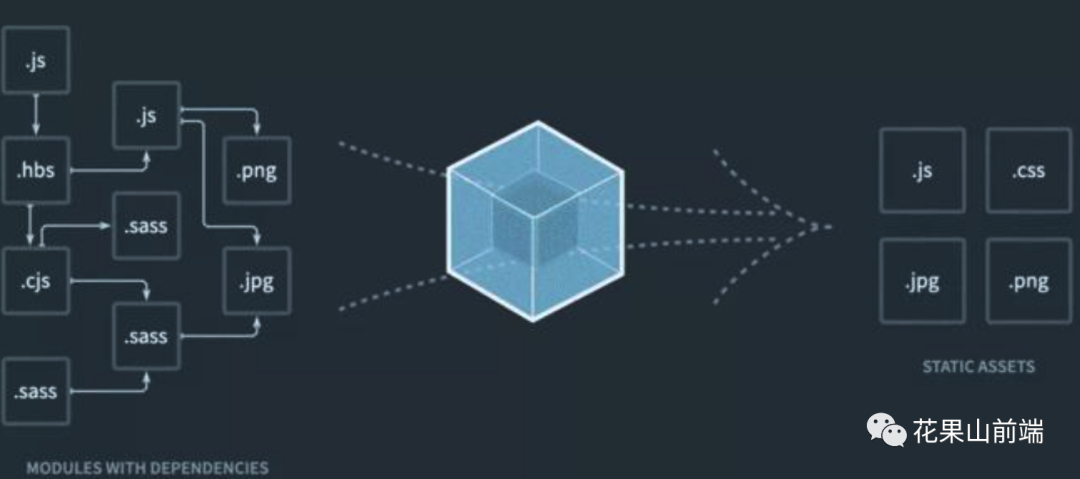 一個(gè)文件分拆為多個(gè)互相依賴的文件,最后進(jìn)行統(tǒng)一打包和加載,保證高效多人協(xié)作。
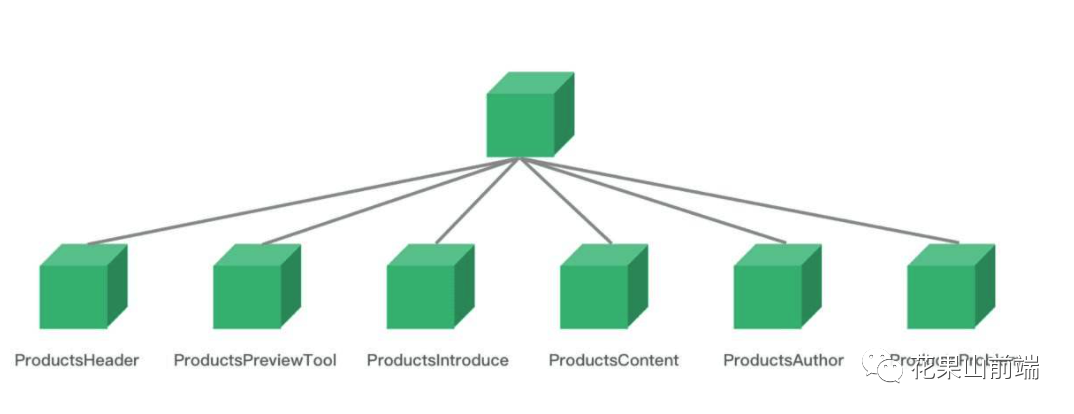
JS模塊 CMD AMD CommonJS 及 ES6 Module CSS模塊 Sass Less Stylus 資源模塊化 文件、CSS、圖片通過(guò)JS進(jìn)行統(tǒng)一依賴關(guān)聯(lián) 組件化 相對(duì)于文件的拆分,組件是對(duì)于UI層面的拆分,每一個(gè)組件需要包括對(duì)應(yīng)的CSS、圖片、JS邏輯、視圖模板等并且能完成一個(gè)獨(dú)立的功能。
自動(dòng)化
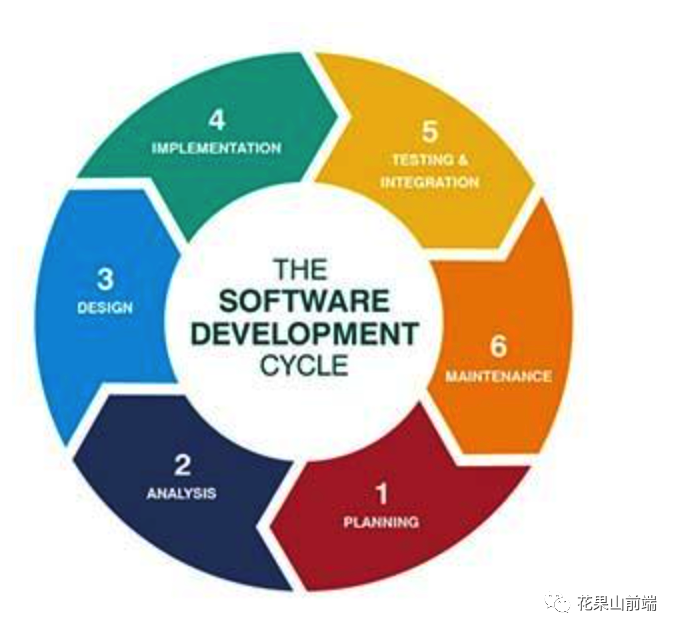
調(diào)試 編譯 部署 測(cè)試 文檔化 規(guī)范性

項(xiàng)目目錄結(jié)構(gòu) 語(yǔ)法提示 編碼風(fēng)格規(guī)范 聯(lián)調(diào)規(guī)范 文件命名規(guī)范 代碼樣式規(guī)范 git flow
二、實(shí)戰(zhàn)步驟
1. 開(kāi)發(fā)規(guī)范
JS代碼規(guī)范
airbnb-中文版 standard (24.5k star) 中文版 百度前端編碼規(guī)范 3.9k CSS代碼規(guī)范
styleguide 2.3k spec 3.9k
1.1 項(xiàng)目目錄結(jié)構(gòu)
.
├── build        # 編譯腳本
├── coverage         # 覆蓋率報(bào)告
├── examples       # 代碼范例
├── lib         # CSS樣式 編譯后
├── node_modules
├── packages      # 組件代碼
├── rollup-plugin-vue
├── scripts       # 腳本 發(fā)布、提交信息檢查
├── src         # 通用代碼
├── test        # 測(cè)試
└── types        # TS類型定義
1.2 文件命名規(guī)范
.
├── button
│   ├── Button.vue        # 組件SFC
│   ├── __tests__
│   │   └── Button.spec.js   # 測(cè)試文件
│   └── index.js        # 組件入口
1.3 代碼樣式規(guī)范(ESLint)
JS代碼規(guī)范
airbnb-中文版 standard (24.5k star) 中文版 百度前端編碼規(guī)范 3.9k CSS代碼規(guī)范
styleguide 2.3k spec 3.9k
# .eslintrc.js
module.exports = {
  root: true,
  env: {
    browser: true,
    es2020: true,
    node: true,
    jest: true
  },
  globals: {
    ga: true,
    chrome: true,
    __DEV__: true
  },
  extends: [
    'plugin:json/recommended',
    'plugin:vue/vue3-essential',
    'eslint:recommended',
    '@vue/prettier'
  ],
  parserOptions: {
    parser: 'babel-eslint'
  },
  rules: {
    'no-console': process.env.NODE_ENV === 'production' ? 'warn' : 'off',
    'no-debugger': process.env.NODE_ENV === 'production' ? 'warn' : 'off',
    'prettier/prettier': 'error'
  }
}
# .eslintignore
src/utils/popper.js
src/utils/date.js
examples/play
*.sh
node_modules
lib
coverage
*.md
*.scss
*.woff
*.ttf
src/index.js
dist
yarn add eslint
yarn add eslint-formatter-pretty
yarn add eslint-plugin-json
yarn add eslint-plugin-prettier
yarn add eslint-plugin-vue
yarn add @vue/eslint-config-prettier
yarn add babel-eslint
yarn add prettier
package.json
{
"scripts": {
   "lint": "eslint --no-error-on-unmatched-pattern --ext .vue --ext .js --ext .jsx packages/**/ src/**/ --fix",
  },
}
1.6 Git版本規(guī)范
分支管理
一般項(xiàng)目分主分支(master)和其他分支。當(dāng)有團(tuán)隊(duì)成員要開(kāi)發(fā)新功能(Feather)或改 BUG(Fix) 時(shí),就從 master 分支開(kāi)一個(gè)新的分支。比如你修改一個(gè)Bug應(yīng)該用bug的編號(hào)作為分支(例:[Fix:12323])
Commit規(guī)范
內(nèi)容規(guī)范
<type>(<scope>): <subject>
<BLANK LINE>
<body>
<BLANK LINE>
<footer>
復(fù)制代碼
大致分為三個(gè)部分(使用空行分割):
標(biāo)題行: 必填, 描述主要修改類型和內(nèi)容 主題內(nèi)容: 描述為什么修改, 做了什么樣的修改, 以及開(kāi)發(fā)的思路等等 頁(yè)腳注釋: 可以寫(xiě)注釋,BUG 號(hào)鏈接
type: commit 的類型 feat: 新功能、新特性 fix: 修改 bug perf: 更改代碼,以提高性能 refactor: 代碼重構(gòu)(重構(gòu),在不影響代碼內(nèi)部行為、功能下的代碼修改) docs: 文檔修改 style: 代碼格式修改, 注意不是 css 修改(例如分號(hào)修改) test: 測(cè)試用例新增、修改 build: 影響項(xiàng)目構(gòu)建或依賴項(xiàng)修改 revert: 恢復(fù)上一次提交 ci: 持續(xù)集成相關(guān)文件修改 chore: 其他修改(不在上述類型中的修改) release: 發(fā)布新版本 workflow: 工作流相關(guān)文件修改
scope: commit 影響的范圍, 比如: route, component, utils, build... subject: commit 的概述 body: commit 具體修改內(nèi)容, 可以分為多行. footer: 一些備注, 通常是 BREAKING CHANGE 或修復(fù)的 bug 的鏈接.
示例
fix(修復(fù)BUG)
如果修復(fù)的這個(gè)BUG只影響當(dāng)前修改的文件,可不加范圍。如果影響的范圍比較大,要加上范圍描述。
例如這次 BUG 修復(fù)影響到全局,可以加個(gè) global。如果影響的是某個(gè)目錄或某個(gè)功能,可以加上該目錄的路徑,或者對(duì)應(yīng)的功能名稱。
// 示例1
fix(global):修復(fù)checkbox不能復(fù)選的問(wèn)題
// 示例2 下面圓括號(hào)里的 common 為通用管理的名稱
fix(common): 修復(fù)字體過(guò)小的BUG,將通用管理下所有頁(yè)面的默認(rèn)字體大小修改為 14px
// 示例3
fix: value.length -> values.length
復(fù)制代碼
feat(添加新功能或新頁(yè)面)
feat: 添加網(wǎng)站主頁(yè)靜態(tài)頁(yè)面

這是一個(gè)示例,假設(shè)對(duì)點(diǎn)檢任務(wù)靜態(tài)頁(yè)面進(jìn)行了一些描述。

這里是備注,可以是放BUG鏈接或者一些重要性的東西。
復(fù)制代碼
chore(其他修改)
chore 的中文翻譯為日常事務(wù)、例行工作,顧名思義,即不在其他 commit 類型中的修改,都可以用 chore 表示。
chore: 將表格中的查看詳情改為詳情
復(fù)制代碼
其他類型的 commit 和上面三個(gè)示例差不多,就不說(shuō)了。
自動(dòng)化提交驗(yàn)證
驗(yàn)證 git commit 規(guī)范,主要通過(guò) git 的 pre-commit 鉤子函數(shù)來(lái)進(jìn)行。當(dāng)然,你還需要下載一個(gè)輔助工具來(lái)幫助你進(jìn)行驗(yàn)證。
下載輔助工具
npm i -D husky
在 package.json 加上下面的代碼
"husky": {
  "hooks": {
    "pre-commit": "npm run lint",
    "commit-msg": "node script/verify-commit.js",
    "pre-push": "npm test"
  }
}
復(fù)制代碼
然后在你項(xiàng)目根目錄下新建一個(gè)文件夾 script,并在下面新建一個(gè)文件 verify-commit.js,輸入以下代碼:
const msgPath = process.env.HUSKY_GIT_PARAMS
const msg = require('fs')
.readFileSync(msgPath, 'utf-8')
.trim()

const commitRE = /^(feat|fix|docs|style|refactor|perf|test|workflow|build|ci|chore|release|workflow)(\(.+\))?: .{1,50}/

if (!commitRE.test(msg)) {
    console.log()
    console.error(`
        不合法的 commit 消息格式。
        請(qǐng)查看 git commit 提交規(guī)范:https://github.com/woai3c/Front-end-articles/blob/master/git%20commit%20style.md
    `)

    process.exit(1)
}
復(fù)制代碼
現(xiàn)在來(lái)解釋下各個(gè)鉤子的含義:
"pre-commit": "npm run lint",在git commit前執(zhí)行npm run lint檢查代碼格式。"commit-msg": "node script/verify-commit.js",在git commit時(shí)執(zhí)行腳本verify-commit.js驗(yàn)證 commit 消息。如果不符合腳本中定義的格式,將會(huì)報(bào)錯(cuò)。"pre-push": "npm test",在你執(zhí)行git push將代碼推送到遠(yuǎn)程倉(cāng)庫(kù)前,執(zhí)行npm test進(jìn)行測(cè)試。如果測(cè)試失敗,將不會(huì)執(zhí)行這次推送。
/scripts/verifyCommit.js
// Invoked on the commit-msg git hook by yorkie.

const chalk = require('chalk')
const msgPath = process.env.GIT_PARAMS
const msg = require('fs').readFileSync(msgPath, 'utf-8').trim()

const commitRE = /^(revert: )?(feat|fix|docs|dx|style|refactor|perf|test|workflow|build|ci|chore|types|wip|release)(\(.+\))?(.{1,10})?: .{1,50}/
const mergeRe = /^(Merge pull request|Merge branch)/

if (!commitRE.test(msg)) {
  if (!mergeRe.test(msg)) {
    console.log(msg)
    console.error(
      `  ${chalk.bgRed.white(' ERROR ')} ${chalk.red(
        `invalid commit message format.`
      )}\n\n` +
        chalk.red(
          `  Proper commit message format is required for automated changelog generation. Examples:\n\n`
        ) +
        `    ${chalk.green(`feat(compiler): add 'comments' option`)}\n` +
        `    ${chalk.green(
          `fix(v-model): handle events on blur (close #28)`
        )}\n\n` +
        chalk.red(
          `  See https://github.com/vuejs/vue-next/blob/master/.github/commit-convention.md for more details.\n`
        )
    )
    process.exit(1)
  }
}
2. 模塊化與組件化
npm init -y
https://github.com/cuixiaorui/course-vue3-test/tree/main/chapters/two參考資料
2.1 編寫(xiě)B(tài)uttun組件
yarn add vue@next
/packages/button/Button.vue
<template>
  <button
    class="el-button"
    @click="handleClick"
    :disabled="buttonDisabled || loading"
    :autofocus="autofocus"
    :type="nativeType"
    :class="[
      type ? 'el-button--' + type : '',
      buttonSize ? 'el-button--' + buttonSize : '',
      {
        'is-disabled': buttonDisabled,
        'is-loading': loading,
        'is-plain': plain,
        'is-round': round,
        'is-circle': circle,
      },
    ]"
  >
    <i class="el-icon-loading" v-if="loading"></i>
    <i :class="icon" v-if="icon && !loading"></i>
    <span v-if="$slots.default">
      <slot></slot>
    </span>
  </button>
</template>
<script>
import { computed, inject, toRefs, unref, getCurrentInstance } from "vue";

export default {
  name: "ElButton",

  props: {
    type: {
      type: String,
      default: "default",
    },
    size: {
      type: String,
      default: "",
    },
    icon: {
      type: String,
      default: "",
    },
    nativeType: {
      type: String,
      default: "button",
    },
    loading: Boolean,
    disabled: Boolean,
    plain: Boolean,
    autofocus: Boolean,
    round: Boolean,
    circle: Boolean,
  },
  emits: ["click"],
  setup(props, ctx) {
    const { size, disabled } = toRefs(props);

    const buttonSize = useButtonSize(size);
    const buttonDisabled = useButtonDisabled(disabled);

    const handleClick = (evt) => {
      ctx.emit("click", evt);
    };

    return {
      handleClick,
      buttonSize,
      buttonDisabled,
    };
  },
};

const useButtonSize = (size) => {
  const elFormItem = inject("elFormItem", {});

  const _elFormItemSize = computed(() => {
    return unref(elFormItem.elFormItemSize);
  });

  const buttonSize = computed(() => {
    return (
      size.value ||
      _elFormItemSize.value ||
      (getCurrentInstance().proxy.$ELEMENT || {}).size
    );
  });

  return buttonSize;
};

const useButtonDisabled = (disabled) => {
  const elForm = inject("elForm", {});

  const buttonDisabled = computed(() => {
    return disabled.value || unref(elForm.disabled);
  });

  return buttonDisabled;
};
</script>
2.2 集成Babel
yarn add babel
yarn add babel-plugin-syntax-dynamic-import
yarn add babel-plugin-syntax-jsx
yarn add babel-preset-env
yarn add @babel/plugin-proposal-optional-chaining
yarn add @babel/preset-env
yarn add @vue/babel-plugin-jsx
新建.babelrc文件
{
  "presets": [["@babel/preset-env", { "targets": { "node": "current" } }]],
  "plugins": [
    "syntax-dynamic-import",
    ["@vue/babel-plugin-jsx"],
    "@babel/plugin-proposal-optional-chaining",
    "@babel/plugin-proposal-nullish-coalescing-operator"
  ],
  "env": {
    "utils": {
      "presets": [
        [
          "env",
          {
            "loose": true,
            "modules": "commonjs",
            "targets": {
              "browsers": ["> 1%", "last 2 versions", "not ie <= 8"]
            }
          }
        ]
      ],
      "plugins": [
        [
          "module-resolver",
          {
            "root": ["element-ui"],
            "alias": {
              "element-ui/src": "element-ui/lib"
            }
          }
        ]
      ]
    },
    "test": {
      "plugins": ["istanbul"],
      "presets": [["env", { "targets": { "node": "current" } }]]
    },
    "esm": {
      "presets": [["@babel/preset-env", { "modules": false }]]
    }
  }
}
2.2 集成VTU
安裝依賴
yarn add jest
# 此版本這個(gè)支持Vue3.0
yarn add [email protected]
yarn add babel-jest
yarn add @vue/[email protected]
yarn add @vue/test-utils@next
yarn add typescript
jest.config.js
module.exports = {
  testEnvironment: 'jsdom', // 默認(rèn)JSdom
  roots: [
    '<rootDir>/src',
    '<rootDir>/packages',
  ], //
  transform: {
    '^.+\\.vue$': 'vue-jest', // vue單文件
    '^.+\\js$': 'babel-jest' // esm最新語(yǔ)法 import
  },
  moduleFileExtensions: ['vue', 'js', 'json', 'jsx', 'ts', 'tsx', 'node'],
  testMatch: ['**/__tests__/**/*.spec.js'],
  // 別名
  moduleNameMapper: {
    '^element-ui(.*)$': '<rootDir>$1',
    '^main(.*)$': '<rootDir>/src$1'
  }
}
/packages/button/tests/Button.spec.js
import Button from "../Button.vue";
import { mount } from "@vue/test-utils";

it("content", () => {
  const Comp = {
    template: `<div><Button>默認(rèn)按鈕</Button></div>`,
  };

  const wrapper = mount(Comp, {
    global: {
      components: {
        Button,
      },
    },
  });

  expect(wrapper.findComponent({ name: "ElButton" }).text()).toContain(
    "默認(rèn)按鈕"
  );
});

describe("size", () => {
  it("should have a el-button--mini class when set size prop value equal to mini", () => {
    const wrapper = mount(Button, {
      props: {
        size: "mini",
      },
    });

    expect(wrapper.classes()).toContain("el-button--mini");
  });

  it("should have a el-button--mini class by elFormItem ", () => {
    const wrapper = mount(Button, {
      global: {
        provide: {
          elFormItem: {
            elFormItemSize: "mini",
          },
        },
      },
    });

    expect(wrapper.classes()).toContain("el-button--mini");
  });
  it("should have a el-button--mini class by $ELEMENT value ", () => {
    const wrapper = mount(Button, {
      global: {
        config: {
          globalProperties: {
            $ELEMENT: {
              size: "mini",
            },
          },
        },
      },
    });

    expect(wrapper.classes()).toContain("el-button--mini");
  });
});

it("type", () => {
  const wrapper = mount(Button, {
    props: {
      type: "primary",
    },
  });

  expect(wrapper.classes()).toContain("el-button--primary");
});

it("plain", () => {
  const wrapper = mount(Button, {
    props: {
      plain: true,
    },
  });

  expect(wrapper.classes()).toContain("is-plain");
});
it("round", () => {
  const wrapper = mount(Button, {
    props: {
      round: true,
    },
  });

  expect(wrapper.classes()).toContain("is-round");
});

it("circle", () => {
  const wrapper = mount(Button, {
    props: {
      circle: true,
    },
  });

  expect(wrapper.classes()).toContain("is-circle");
});
it("loading", () => {
  const wrapper = mount(Button, {
    props: {
      loading: true,
    },
  });

  expect(wrapper.find(".el-icon-loading").exists()).toBe(true);
  expect(wrapper.classes()).toContain("is-loading");
});

describe("icon", () => {
  it("should show icon element", () => {
    const wrapper = mount(Button, {
      props: {
        icon: "el-icon-edit",
      },
    });

    expect(wrapper.find(".el-icon-edit").exists()).toBe(true);
  });

  it("should not show icon element when set loading prop equal to true", () => {
    const wrapper = mount(Button, {
      props: {
        loading: true,
        icon: "el-icon-edit",
      },
    });

    expect(wrapper.find(".el-icon-edit").exists()).toBe(false);
  });
});

describe("click", () => {
  it("should emit click event ", () => {
    const wrapper = mount(Button);

    wrapper.trigger("click");

    expect(wrapper.emitted("click")).toBeTruthy();
  });

  it("should not emit click event when disabled equal to true", () => {
    const wrapper = mount(Button, {
      props: {
        disabled: true,
      },
    });

    wrapper.trigger("click");

    expect(wrapper.emitted("click")).toBeFalsy();
  });

  it("should not emit click event when elForm disabled equal to true", () => {
    const wrapper = mount(Button, {
      global: {
        provide: {
          elForm: {
            disabled: true,
          },
        },
      },
    });

    wrapper.trigger("click");

    expect(wrapper.emitted("click")).toBeFalsy();
  });

  it("should not emit click event when loading prop equal to true", () => {
    const wrapper = mount(Button, {
      props: {
        loading: true,
      },
    });

    wrapper.trigger("click");

    expect(wrapper.emitted("click")).toBeFalsy();
  });
});

it("native-type", () => {
  const wrapper = mount(Button, {
    props: {
      nativeType: "button",
    },
  });

  expect(wrapper.attributes("type")).toBe("button");
});
測(cè)試
"test": "jest --runInBand", # 序列化執(zhí)行
2.4 樣式打包
yarn add gulp
yarn add gulp-autoprefixer
yarn add gulp-sass
yarn add gulp-cssmin

# cp-cli
yarn add cp-cli
yarn add tslib
/bin/gen-cssfile
package.json
"build:theme": "gulp build --gulpfile packages/theme-chalk/gulpfile.js && cp-cli packages/theme-chalk/lib lib/theme-chalk",
2.4 Rollup打包
https://www.rollupjs.com/ Rollup中文網(wǎng)https://juejin.im/post/6844903731343933453 使用 rollup 打包 JS
yarn add rollup
yarn add rollup-plugin-peer-deps-external
yarn add rollup-plugin-scss
yarn add rollup-plugin-terser
yarn add rollup-plugin-vue
yarn add @rollup/plugin-node-resolve
yarn add @rollup/plugin-commonjs
yarn add @rollup/plugin-json
yarn add @rollup/plugin-replace
yarn add @rollup/plugin-babel
yarn add rollup-plugin-vue
Package.json
"build:next": "rollup -c",
import pkg from './package.json'
// 等 rollup-plugin-vue 發(fā)版后在切換官方版
// 暫時(shí)先用本地的 rollup-plugin-vue
// 修復(fù)了 render 函數(shù)的編譯問(wèn)題,但是還沒(méi)發(fā)版
// import vuePlugin from 'rollup-plugin-vue'
const vuePlugin = require('./rollup-plugin-vue/index')
import scss from 'rollup-plugin-scss'
import peerDepsExternal from 'rollup-plugin-peer-deps-external'
import resolve from '@rollup/plugin-node-resolve'
import commonjs from '@rollup/plugin-commonjs'
import json from '@rollup/plugin-json'
import replace from '@rollup/plugin-replace'
import babel from '@rollup/plugin-babel'
import { terser } from 'rollup-plugin-terser'

const name = 'Element3'

const createBanner = () => {
  return `/*!
  * ${pkg.name} v${pkg.version}
  * (c) ${new Date().getFullYear()} kkb
  * @license MIT
  */`
}

const createBaseConfig = () => {
  return {
    input: 'src/entry.js',
    external: ['vue'],
    plugins: [
      peerDepsExternal(),
      babel(),
      resolve({
        extensions: ['.vue', '.jsx']
      }),
      commonjs(),
      json(),
      vuePlugin({
        css: true
      }),
      scss()
    ],
    output: {
      sourcemap: false,
      banner: createBanner(),
      externalLiveBindings: false,
      globals: {
        vue: 'Vue'
      }
    }
  }
}

function mergeConfig(baseConfig, configB) {
  const config = Object.assign({}, baseConfig)
  // plugin
  if (configB.plugins) {
    baseConfig.plugins.push(...configB.plugins)
  }

  // output
  config.output = Object.assign({}, baseConfig.output, configB.output)

  return config
}

function createFileName(formatName) {
  return `dist/element3-ui.${formatName}.js`
}

// es-bundle
const esBundleConfig = {
  plugins: [
    replace({
      __DEV__: `(process.env.NODE_ENV !== 'production')`
    })
  ],
  output: {
    file: createFileName('esm-bundler'),
    format: 'es'
  }
}

// es-browser
const esBrowserConfig = {
  plugins: [
    replace({
      __DEV__: true
    })
  ],
  output: {
    file: createFileName('esm-browser'),
    format: 'es'
  }
}

// es-browser.prod
const esBrowserProdConfig = {
  plugins: [
    terser(),
    replace({
      __DEV__: false
    })
  ],
  output: {
    file: createFileName('esm-browser.prod'),
    format: 'es'
  }
}

// cjs
const cjsConfig = {
  plugins: [
    replace({
      __DEV__: true
    })
  ],
  output: {
    file: createFileName('cjs'),
    format: 'cjs'
  }
}
// cjs.prod
const cjsProdConfig = {
  plugins: [
    terser(),
    replace({
      __DEV__: false
    })
  ],
  output: {
    file: createFileName('cjs.prod'),
    format: 'cjs'
  }
}

// global
const globalConfig = {
  plugins: [
    replace({
      __DEV__: true,
      'process.env.NODE_ENV': true
    })
  ],
  output: {
    file: createFileName('global'),
    format: 'iife',
    name
  }
}
// global.prod
const globalProdConfig = {
  plugins: [
    terser(),
    replace({
      __DEV__: false
    })
  ],
  output: {
    file: createFileName('global.prod'),
    format: 'iife',
    name
  }
}

const formatConfigs = [
  esBundleConfig,
  esBrowserProdConfig,
  esBrowserConfig,
  cjsConfig,
  cjsProdConfig,
  globalConfig,
  globalProdConfig
]

function createPackageConfigs() {
  return formatConfigs.map((formatConfig) => {
    return mergeConfig(createBaseConfig(), formatConfig)
  })
}

export default createPackageConfigs()
2.3 編寫(xiě)Entry入口
3. 自動(dòng)化
3.1 文檔自動(dòng)化
文檔自動(dòng)化其實(shí)就是根據(jù)代碼自動(dòng)生成開(kāi)發(fā)文檔。比如element3項(xiàng)目中的。https://element3-ui.com/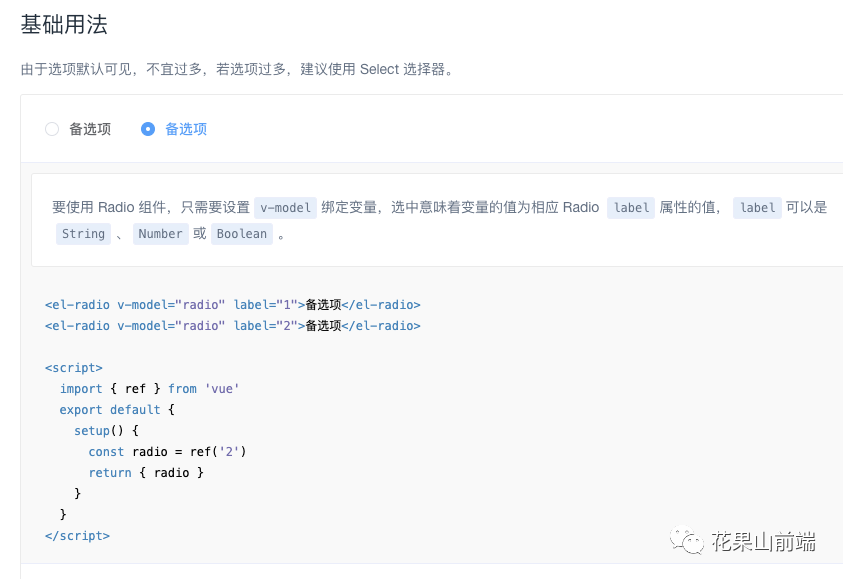 其實(shí)可以用StoryBook。這個(gè)我們后面寫(xiě)專題更新。大家保持關(guān)注。
3.2 規(guī)范檢查
yarn add husky
.huskyrc
{
    "hooks": {
        "pre-commit": "npm run lint",
        "commit-msg": "node scripts/verifyCommit.js",
        "pre-push": "npm run test"
  },
}
3.4 回歸測(cè)試
GitHub Action
.github/workflows/main.yml
3.3 持續(xù)集成CI
Travis CI 提供的是持續(xù)集成服務(wù),它僅支持 Github,不支持其他代碼托管。它需要綁定 Github 上面的項(xiàng)目,還需要該項(xiàng)目含有構(gòu)建或者測(cè)試腳本。只要有新的代碼,就會(huì)自動(dòng)抓取。然后,提供一個(gè)虛擬機(jī)環(huán)境,執(zhí)行測(cè)試,完成構(gòu)建,還能部署到服務(wù)器。只要代碼有變更,就自動(dòng)運(yùn)行構(gòu)建和測(cè)試,反饋運(yùn)行結(jié)果。確保符合預(yù)期以后,再將新代碼集成到主干。
這個(gè)項(xiàng)目需要Travis在提交后自動(dòng)進(jìn)行測(cè)試并且向codecov提供測(cè)試報(bào)告。
測(cè)試 報(bào)告分析
登錄TravicCI網(wǎng)站
登錄https://www.travis-ci.org/網(wǎng)站
使用github賬號(hào)登錄系統(tǒng)
配置.travis.yml
運(yùn)行自動(dòng)化測(cè)試框架
language: node_js               # 項(xiàng)目語(yǔ)言,node 項(xiàng)目就按照這種寫(xiě)法就OK了
node_js:
- 13.2.0    # 項(xiàng)目環(huán)境
cache:    # 緩存 node_js 依賴,提升第二次構(gòu)建的效率
  directories:
  - node_modules
test:
  - npm run test # 運(yùn)行自動(dòng)測(cè)試框架
參考教程:Travis CI Tutorial
上傳配置到github
啟動(dòng)持續(xù)集成
通過(guò)github賬號(hào)登錄travis
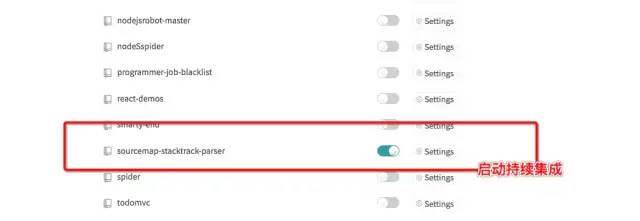
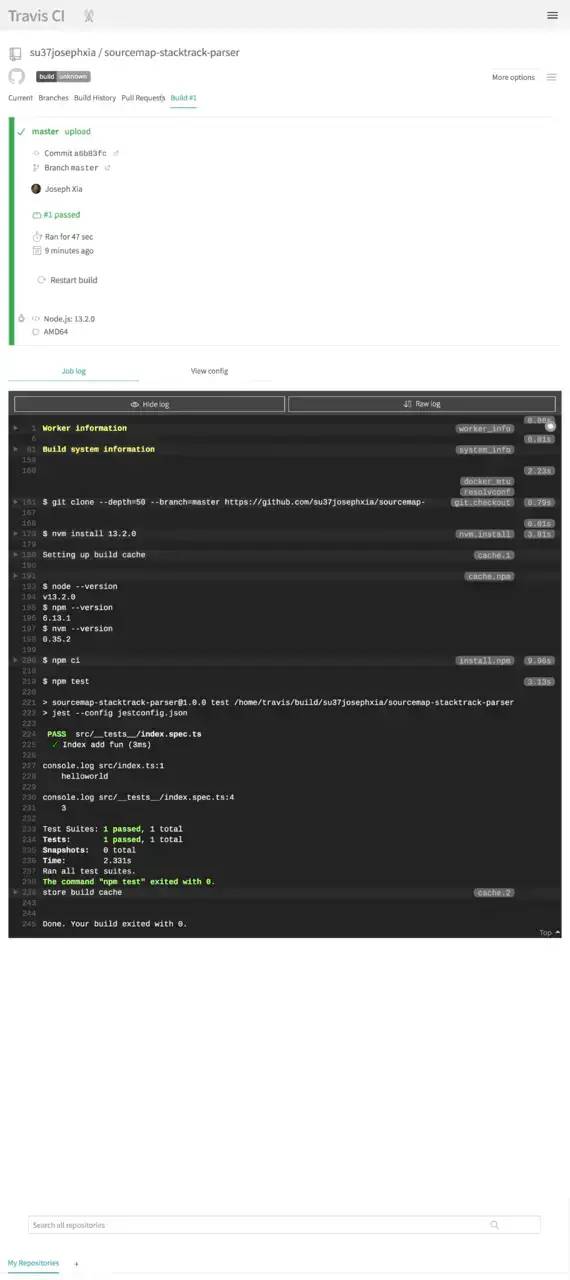
獲取持續(xù)集成通過(guò)徽標(biāo)
將上面 URL 中的 {GitHub 用戶名} 和 {項(xiàng)目名稱} 替換為自己項(xiàng)目的即可,最后可以將集成完成后的 markdown 代碼貼在自己的項(xiàng)目上
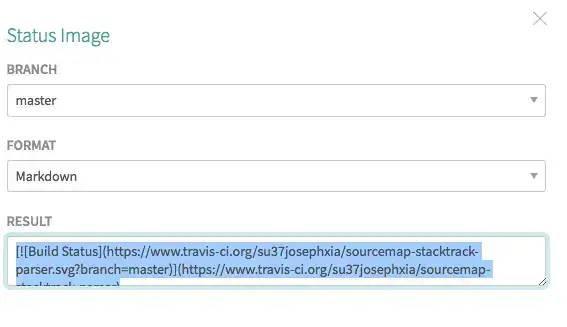
http://img.shields.io/travis/{GitHub 用戶名}/{項(xiàng)目名稱}.svg
復(fù)制代碼
3.5 持續(xù)交付CD - 上傳Npm庫(kù)
創(chuàng)建發(fā)布腳本
publish.sh
#!/usr/bin/env bash
npm config get registry # 檢查倉(cāng)庫(kù)鏡像庫(kù)
npm config set registry=http://registry.npmjs.org
echo '請(qǐng)進(jìn)行登錄相關(guān)操作:'
npm login # 登陸
echo "-------publishing-------"
npm publish # 發(fā)布
npm config set registry=https://registry.npm.taobao.org # 設(shè)置為淘寶鏡像
echo "發(fā)布完成"
exit
執(zhí)行發(fā)布
./publish.sh
復(fù)制代碼
填入github用戶名密碼后
3.7 覆蓋率測(cè)試Codecov
Codecov是一個(gè)開(kāi)源的測(cè)試結(jié)果展示平臺(tái),將測(cè)試結(jié)果可視化。Github上許多開(kāi)源項(xiàng)目都使用了Codecov來(lái)展示單測(cè)結(jié)果。Codecov跟Travis CI一樣都支持Github賬號(hào)登錄,同樣會(huì)同步Github中的項(xiàng)目。
yarn add codecov
 "scripts": {
 ...,
 "codecov": "codecov"
 }
4. 其他
4.1 標(biāo)準(zhǔn)的README文檔
4.2 開(kāi)源許可證
每個(gè)開(kāi)源項(xiàng)目都需要配置一份合適的開(kāi)源許可證來(lái)告知所有瀏覽過(guò)我們的項(xiàng)目的用戶他們擁有哪些權(quán)限,具體許可證的選取可以參照阮一峰前輩繪制的這張圖表:
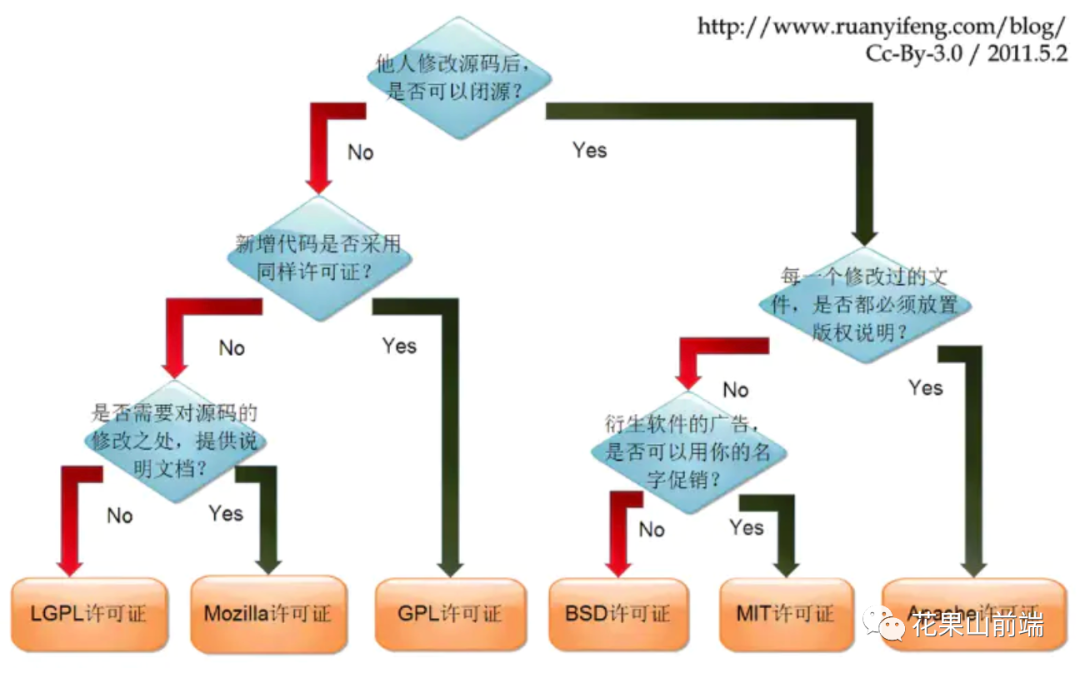
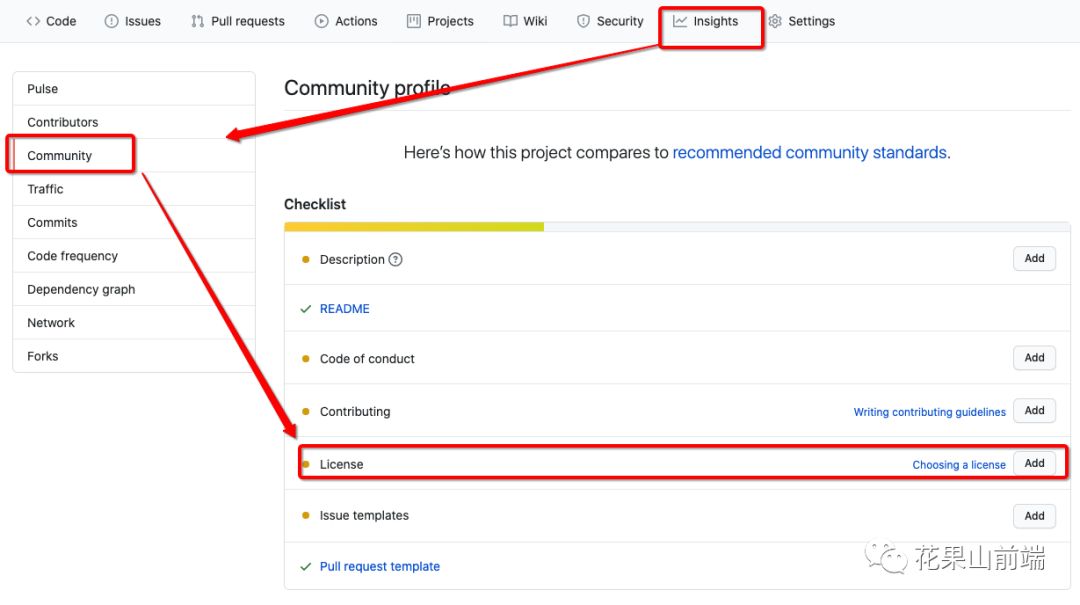
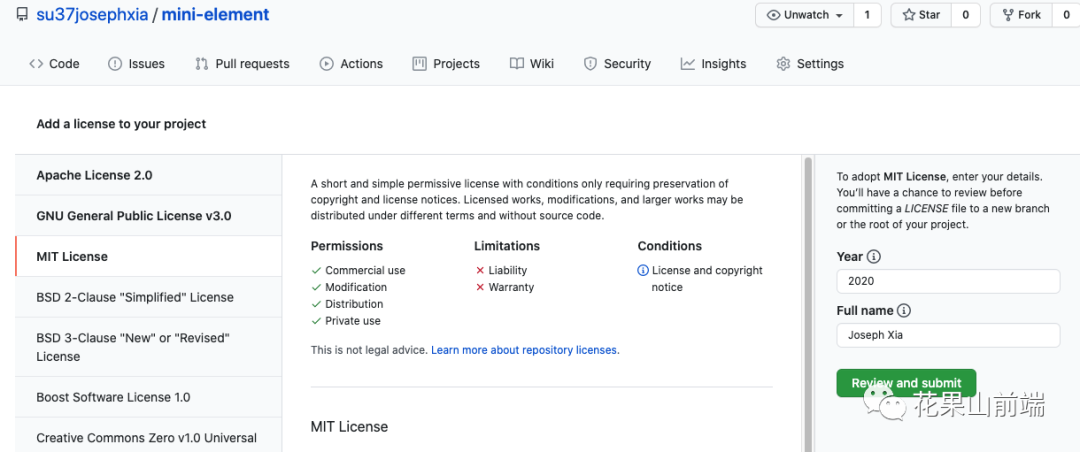
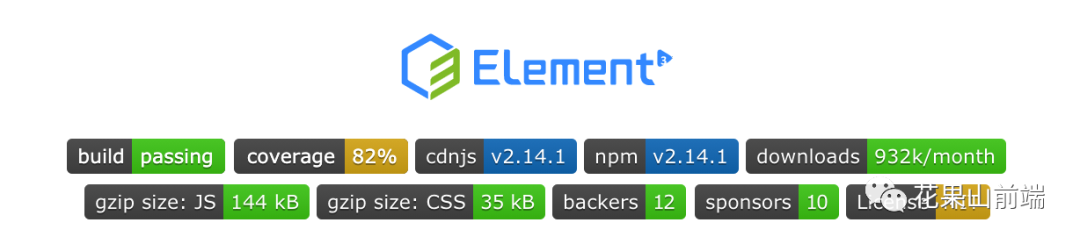
那我們又該怎樣為我們的項(xiàng)目添加許可證了?其實(shí) Github 已經(jīng)為我們提供了非常簡(jiǎn)便的可視化操作: 我們平時(shí)在逛 github 網(wǎng)站的時(shí)候,發(fā)現(xiàn)不少項(xiàng)目都在 README.md 中添加徽標(biāo),對(duì)項(xiàng)目進(jìn)行標(biāo)記和說(shuō)明,這些小圖標(biāo)給項(xiàng)目增色不少,不僅簡(jiǎn)單美觀,而且還包含清晰易懂的信息。
打開(kāi)我們的開(kāi)源項(xiàng)目并切換至 Insights 面板 點(diǎn)擊 Community 標(biāo)簽 如果您的項(xiàng)目沒(méi)有添加 License,在 Checklist 里會(huì)提示您添加許可證,點(diǎn)擊 Add 按鈕就進(jìn)入可視化操作流程了
4.3 申請(qǐng)開(kāi)源徽標(biāo) (Badge)
Github 徽章 https://docs.github.com/cn/free-pro-team@latest/actions/managing-workflow-runs/adding-a-workflow-status-badge
三、附錄
3.1 Vue組件與插件
<!DOCTYPE html>
<html lang="en">
  <head>
    <meta charset="UTF-8" />
    <meta name="viewport" content="width=device-width, initial-scale=1.0" />
    <meta http-equiv="X-UA-Compatible" content="ie=edge" />
    <title>Document</title>
    <script src="/node_modules/vue/dist/vue.global.js"></script>
    <script src="/dist/element3-ui.global.js"></script>
    <link href="/lib/theme-chalk/index.css" rel="stylesheet" />
    <style></style>
  </head>

  <body>
    <div id="app"></div>
    <script>
      const { createApp, reactive, computed, watchEffect } = Vue;

      const MyButton = {
        name: "MyButton",
        data: function () {
          return {
            count: 0,
          };
        },
        template:
          '<button v-on:click="count++">You clicked me {{ count }} times.</button>',
      };

      // 添加插件
      MyButton.install = (app) => app.component("MyButton", MyButton);

      // 組件庫(kù)
      const Element = {
          MyButton,
          install: app => {
              app.use(MyButton)
          }
      }

      const MyComponent = {
        template: `
                <my-button />
            `,
      };

      createApp(MyComponent)
        // .use(MyButton)
        .use(Element)
        .mount("#app");
    </script>
  </body>
</html>
3.2 rollup打包

rollup是一款小巧的javascript模塊打包工具,更適合于庫(kù)應(yīng)用的構(gòu)建工具;可以將小塊代碼編譯成大塊復(fù)雜的代碼,基于ES6 modules,它可以讓你的 bundle 最小化,有效減少文件請(qǐng)求大小,vue在開(kāi)發(fā)的時(shí)候用的是webpack,但是最后將文件打包在一起的時(shí)候用的是 rollup.js
首次發(fā)表在個(gè)人博客
rollup官方文檔 rollupGithub
https://juejin.im/post/6844903570974703629 Rollup基礎(chǔ)
Button
/src/MyButton.js
export default {
  name: "MyButton",
  data: function () {
    return {
      count: 0,
    };
  },
  template:
    '<button v-on:click="count++">You clicked me {{ count }} times.</button>',
};
入口
/src/entry.js
import MyButton from "./MyButton";
import SfcButton from "./SfcButton.vue";
import JsxButton from "./JsxButton.vue";

// 添加插件
MyButton.install = (app) => app.component("MyButton", MyButton);
SfcButton.install = (app) => app.component("SfcButton", SfcButton);
JsxButton.install = (app) => app.component("JsxButton", JsxButton);

// 組件庫(kù)
const Element = {
  MyButton,
  SfcButton,
  JsxButton,
  install: (app) => {
    app.use(MyButton);
    app.use(SfcButton);
    app.use(JsxButton);
  },
};

export default Element;
格式聲明
https://juejin.im/post/6885542715782594568 AMD CMD UMD區(qū)別
amd – 異步模塊定義,用于像 RequireJS 這樣的模塊加載器 cjs – CommonJS,適用于 Node 和 Browserify/Webpack es – 將軟件包保存為 ES 模塊文件 iife – 一個(gè)自動(dòng)執(zhí)行的功能,適合作為 <script>標(biāo)簽。(如果要為應(yīng)用程序創(chuàng)建一個(gè)捆綁包,您可能想要使用它,因?yàn)樗鼤?huì)使文件大小變小。)umd – 通用模塊定義,以 amd,cjs 和 iife 為一體
const vuePlugin = require("../../rollup-plugin-vue/index");
import babel from "@rollup/plugin-babel";
// import vuePlugin from "rollup-plugin-vue";
const es = {
  input: "src/entry.js",
  output: {
    file: "dist/index.js",
    name: "Element",
    format: "iife",
    globals: {
      vue: "Vue",
    },
  },
  external: ["vue"],
  plugins: [
    babel(),
    vuePlugin({
      css: true,
    }),
  ],
};

import { terser } from "rollup-plugin-terser";
const minEs = {
  input: "src/entry.js",
  external: ["vue"],
  output: {
    file: "dist/index.min.js",
    name: "Element",
    format: "umd",
  },
  plugins: [
    babel(),
    vuePlugin({
      css: true,
    }),
    terser(),
  ],
};

const cjs = {
  input: "src/entry.js",
  external: ["vue"],
  output: {
    file: "dist/index.cjs.js",
    name: "Element",
    format: "cjs",
  },
  plugins: [
    babel(),
    vuePlugin({
      css: true,
    }),
  ],
};

export default [es, minEs, cjs];
測(cè)試頁(yè)面
<!DOCTYPE html>
<html lang="en">
  <head>
    <meta charset="UTF-8" />
    <meta name="viewport" content="width=device-width, initial-scale=1.0" />
    <meta http-equiv="X-UA-Compatible" content="ie=edge" />
    <title>Document</title>
    <script src="/node_modules/vue/dist/vue.global.js"></script>
    <script src="dist/index.js"></script>
    <style></style>
  </head>

  <body>
    <div id="app"></div>
    <script>
      const { createApp, reactive, computed, watchEffect } = Vue;

      const MyComponent = {
        template: `
                <my-button />
                <sfc-button />
                <jsx-button />
            `,
      };

      createApp(MyComponent)
        .use(Element)
        .mount("#app");
    </script>
  </body>
</html>
單文件組件
<template>
  <button>Sfc 666</button>
</template>
<script>
export default {
  name: "SfcButton",
};
</script>
const vuePlugin = require("../../rollup-plugin-vue/index");
// import vuePlugin from "rollup-plugin-vue";
# plugin
vuePlugin({
css: true,
}),
JSX支持
jsx的定義
JSX 是一種類似于 XML 的 JavaScript 語(yǔ)法擴(kuò)展 JSX 不是由引擎或?yàn)g覽器實(shí)現(xiàn)的。相反,我們將使用像 Babel 這樣的轉(zhuǎn)換器將 JSX 轉(zhuǎn)換為常規(guī) JavaScript。基本上,JSX 允許我們?cè)?JavaScript 中使用類似 HTML 的語(yǔ)法。
jsx的優(yōu)勢(shì)
可以將 模版分離 這樣模版的每個(gè)部分更加獨(dú)立,又可以隨機(jī)的組合,復(fù)用性更高。相比與組件的組合,粒度更細(xì) 使用 js 可配置每項(xiàng)要渲染的 dom,更加動(dòng)態(tài)可配置化
import babel from "@rollup/plugin-babel";
# plugin
babel(),
<script>
export default {
  name: "JsxButton",
  render() {
    return <button>JSX 666</button>;
  },
};
</script>
3.3 Vue-cli插件開(kāi)發(fā)
請(qǐng)參考 https://juejin.cn/post/6899334776860180494
關(guān)注數(shù):10億+ 文章數(shù):10億+
粉絲量:10億+ 點(diǎn)擊量:10億+
 微信群管理員請(qǐng)掃描這里
微信群管理員請(qǐng)掃描這里
喜歡本文的朋友,歡迎關(guān)注公眾號(hào) 程序員哆啦A夢(mèng),收看更多精彩內(nèi)容
點(diǎn)個(gè)[在看],是對(duì)小達(dá)最大的支持!
如果覺(jué)得這篇文章還不錯(cuò),來(lái)個(gè)【分享、點(diǎn)贊、在看】三連吧,讓更多的人也看
