
手把手從0到1實(shí)現(xiàn)一個(gè)web工程通用腳手架工具
前言
前端工程化是人們常常提到的東西,其目的基本上都是為了提高開發(fā)效率,降低成本以及保證質(zhì)量。而腳手架工具則是前端工程化中很重要的環(huán)節(jié),一個(gè)好用的web工程通用腳手架工具可以在很大程度上做到上面所提到的。
我們不僅要會用市面上很多成熟的腳手架,還要能根據(jù)實(shí)際的項(xiàng)目情況,去實(shí)現(xiàn)一些適合自己項(xiàng)目的腳手架。本文就將和大家一起實(shí)現(xiàn)一個(gè)基礎(chǔ)的通用腳手架工具,后續(xù)就可以隨意拓展了。
項(xiàng)目結(jié)構(gòu)
項(xiàng)目的整體結(jié)構(gòu)如下,后面我們會一步步編寫代碼,最終實(shí)現(xiàn)整個(gè)腳手架工具。
xman-cli
├─?bin
│??└─?xman.js
├─?command
│??├─?add.js
│??├─?delete.js
│??├─?init.js
│??└─?list.js
├─?lib
│??├─?remove.js
│??└─?update.js
├─?.gitignore
├─?LICENSE
├─?package.json
├─?README.md
└─?templates.json
具體實(shí)現(xiàn)
初始化項(xiàng)目
可以用 npm init 進(jìn)行創(chuàng)建,也可以根據(jù)下面列出的 package.json 進(jìn)行修改。
{
??"name":?"xman-cli",
??"version":?"1.0.0",
??"description":?"web通用腳手架工具",
??"bin":?{
????"xman":?"bin/xman.js"
??},
??"scripts":?{
????"test":?"echo?\"Error:?no?test?specified\"?&&?exit?1"
??},
??"repository":?{
????"type":?"git",
????"url":?"https://github.com/XmanLin/xman-cli.git"
??},
??"keywords":?[
????"cli"
??],
??"author":?"xmanlin",
??"license":?"MIT",
??"bugs":?{
????"url":?"https://github.com/XmanLin/xman-cli/issues"
??},
??"homepage":?"https://github.com/XmanLin/xman-cli#readme",
??"dependencies":?{
????"chalk":?"^4.1.2",
????"clear":?"^0.1.0",
????"clui":?"^0.3.6",
????"commander":?"^8.2.0",
????"figlet":?"^1.5.2",
????"handlebars":?"^4.7.7",
????"inquirer":?"^8.1.5",
????"update-notifier":?"^5.1.0"
??}
}
這里提兩點(diǎn):
bin字段:可以自定義腳手架工具的命令,例如上面的xman,而xman后面的就是命令的執(zhí)行腳本。項(xiàng)目中的依賴后面會用到,用到的時(shí)候會介紹。
編寫bin/xman.js
要使得腳本可執(zhí)行,就需要在xman.js的最頂部添加以下代碼:
#!/usr/bin/env?node
編寫好后引入commander(node.js命令行界面的完整解決方案),可以點(diǎn)擊鏈接或者到npm官網(wǎng)查看具體API的用法,后面一些列的相關(guān)依賴都一樣。
#!/usr/bin/env?node

const?{?program?}?=?require('commander');
此時(shí),我們可以定義當(dāng)前腳手架的版本以及版本查看的命令。
#!/usr/bin/env?node

const?{?program?}?=?require('commander');

program
?.version(require('../package').version,?'-v,?--version');
?
program.parse(process.argv);?//?這里是必要的

if?(!program.args.length)?{
?program.help();
}
在當(dāng)前xman-cli目錄下,執(zhí)行 npm link 后,就可以在本地對腳手架工具進(jìn)行調(diào)試了。
然后在當(dāng)前目錄下執(zhí)行
xman?-v
就能看到我們定義的版本號了,也證明腳手架工具初步搭建成功。

利用腳手架工具初始化搭建項(xiàng)目
這個(gè)是腳手架工具的最核心的功能點(diǎn),通過腳手架工具命令快速選擇拉取,事先在git倉庫中構(gòu)建好基礎(chǔ)項(xiàng)目模板。我們可以根據(jù)實(shí)際需求,自定義項(xiàng)目模板,并在項(xiàng)目中制定相關(guān)的開發(fā)規(guī)范和約定。
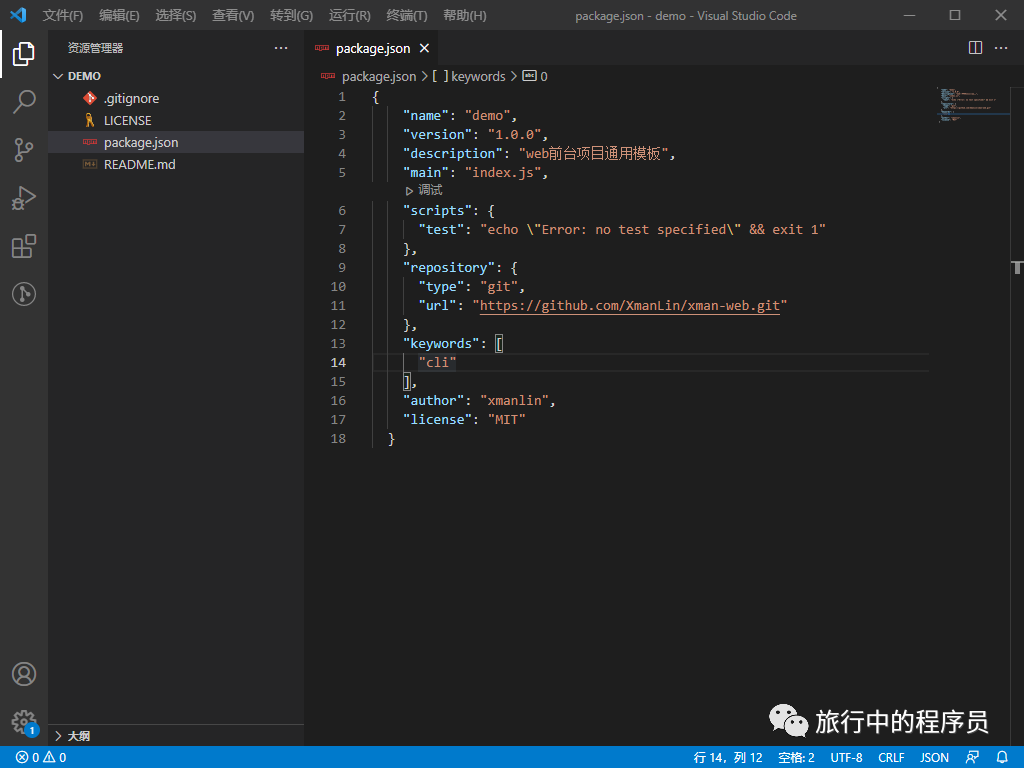
首先在git上搭建好自己的基礎(chǔ)項(xiàng)目,這里需要注意的是:在搭建基礎(chǔ)項(xiàng)目模板的時(shí)候,項(xiàng)目的 package.json中的 name 字段要寫成下面這種形式:
{
????"name":?"{{name}}",
}
至于為什么要這樣寫,后面的代碼中會有體現(xiàn)。
然后在根目錄下創(chuàng)建 templates.json:
{
????"templates":?{
????????"xman-manage":?{
????????????"url":?"https://github.com/XmanLin/xman-manage.git",
????????????"branch":?"master"
????????},
????????"xman-web":?{
????????????"url":?"https://github.com/XmanLin/xman-web.git",
????????????"branch":?"master"
????????}
????}
}
以上 xman-manage 和 xman-web 分別代表不同的項(xiàng)目,可以根據(jù)實(shí)際情況自定義,url 為基礎(chǔ)項(xiàng)目的地址, branch為自動拉取時(shí)的分支。
接著在command文件夾(這個(gè)文件夾下會放后續(xù)一些列命令的實(shí)現(xiàn)邏輯)下創(chuàng)建init.js:
const?fs?=?require('fs');?//?node.js文件系統(tǒng)
const?exec?=?require('child_process').exec;?//?啟動一個(gè)新進(jìn)程,用來執(zhí)行命令
const?config?=?require('../templates');?//?引入定義好的基礎(chǔ)項(xiàng)目列表
const?chalk?=?require('chalk');?//?給提示語添加色彩
const?clear?=?require('clear');?//?清除命令
const?figlet?=?require('figlet');?//?可以用來定制CLI執(zhí)行時(shí)的頭部
const?inquirer?=?require('inquirer');?//?提供交互式命令行
const?handlebars?=?require('handlebars');?//?一種簡單的模板語言,可以自行百度一下
const?clui?=?require('clui');?//?提供等待的狀態(tài)
const?Spinner?=?clui.Spinner;
const?status?=?new?Spinner('正在下載...');
const?removeDir?=?require('../lib/remove');?//?用來刪除文件和文件夾

module.exports?=?()?=>?{
????let?gitUrl;
????let?branch;
????clear();
????//?定制酷炫CLI頭部
????console.log(chalk.yellow(figlet.textSync('XMAN-CLI',?{
????????horizontalLayout:?'full'
????})));
????inquirer.prompt([
????????{
????????????name:?'templateName',
????????????type:?'list',
????????????message:?'請選擇你需要的項(xiàng)目模板:',
????????????choices:?Object.keys(config.templates),
????????},
????????{
????????????name:?'projectName',
????????????type:?'input',
????????????message:?'請輸入你的項(xiàng)目名稱:',
????????????validate:?function?(value)?{
????????????????if?(value.length)?{
????????????????????return?true;
????????????????}?else?{
????????????????????return?'請輸入你的項(xiàng)目名稱';
????????????????}
????????????},
????????}
????])
????.then(answers?=>?{
????????gitUrl?=?config.templates[answers.templateName].url;
????????branch?=?config.templates[answers.templateName].branch;
????????//?執(zhí)行的命令,從git上克隆想要的項(xiàng)目模板
????????let?cmdStr?=?`git?clone?${gitUrl}?${answers.projectName}?&&?cd?${answers.projectName}?&&?git?checkout?${branch}`;
????????status.start();
????????exec(cmdStr,?(error,?stdou,?stderr)?=>?{
????????????status.stop();
????????????if?(error)?{
????????????????console.log('發(fā)生了一個(gè)錯(cuò)誤:',?chalk.red(JSON.stringify(error)));
????????????????process.exit();
????????????}
????????????const?meta?=?{
????????????????name:?answers.projectName
????????????};
????????????//?這里需要注意:項(xiàng)目模板的 package.json 中的 name 要寫成?"name":?"{{name}}"的形式
????????????const?content?=?fs.readFileSync(`${answers.projectName}/package.json`).toString();
????????????//?利用handlebars.compile來進(jìn)行?{{name}}?的填寫?
????????????const?result?=?handlebars.compile(content)(meta);
????????????fs.writeFileSync(`${answers.projectName}/package.json`,?result);
????????????//?刪除模板自帶的?.git?文件
????????????removeDir(`${answers.projectName}/.git`);
????????????console.log(chalk.green('\n?√?下載完成!'));
????????????console.log(chalk.cyan(`\n?cd?${answers.projectName}?&&?yarn?\n`));
????????????process.exit();
????????})
????})
????.catch(error?=>?{
????????console.log(error);
????????console.log('發(fā)生了一個(gè)錯(cuò)誤:',?chalk.red(JSON.stringify(error)));
????????process.exit();
????});
}
lib/remove.js
const?fs?=?require('fs');
let?path?=?require('path');

function?removeDir(dir)?{
????let?files?=?fs.readdirSync(dir);?//返回一個(gè)包含“指定目錄下所有文件名稱”的數(shù)組對象
????for?(var?i?=?0;?i?????????let?newPath?=?path.join(dir,?files[i]);
????????let?stat?=?fs.statSync(newPath);?//?獲取fs.Stats?對象
????????if?(stat.isDirectory())?{
????????????//判斷是否是文件夾,如果是文件夾就遞歸下去
????????????removeDir(newPath);
????????}?else?{
????????????//刪除文件
????????????fs.unlinkSync(newPath);
????????}
????}
????fs.rmdirSync(dir);?//如果文件夾是空的,就將自己刪除掉
};

module.exports?=?removeDir;
最后繼續(xù)在 xman.js 定義命令:
#!/usr/bin/env?node

const?{?program?}?=?require('commander');

...
?
program
?.command('init')
?.description('Generate?a?new?project')
?.alias('i')
?.action(()?=>?{
??require('../command/init')()
?});
?

...
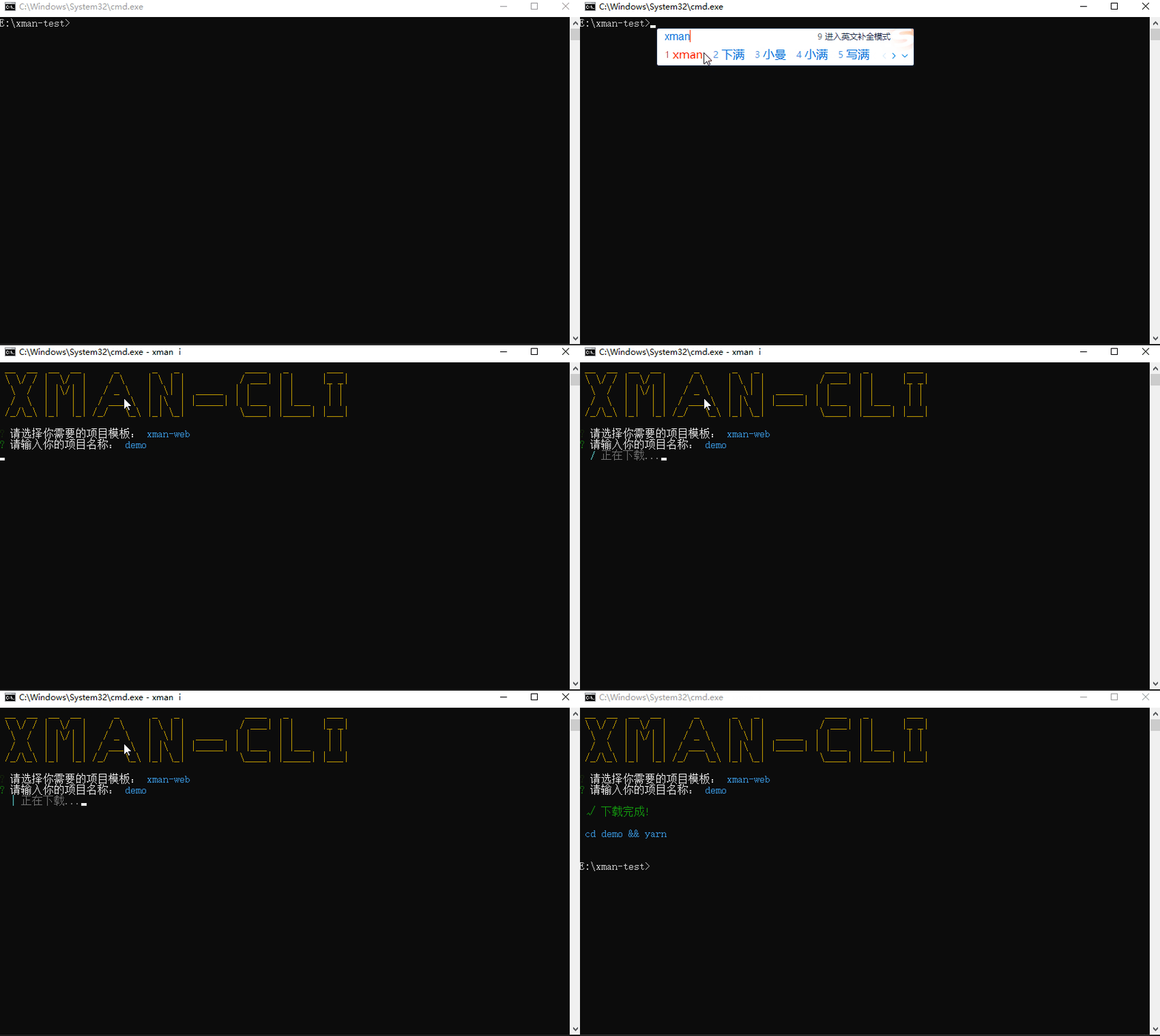
隨便再找個(gè)文件夾下執(zhí)行定義好的命令:
xman?i
打開我們下載好的模板項(xiàng)目看看:
通過命令添加項(xiàng)目模板配置
現(xiàn)在我們能夠通過命令拉取構(gòu)建項(xiàng)目了,但是如果以后有了新的項(xiàng)目模板了怎么辦?難道每次都是手動去修改 templates.json 嗎。這當(dāng)然是不合理的,所以接下來我們要實(shí)現(xiàn)通過命令添加項(xiàng)目模板。
首先在git倉庫里面新建一個(gè)項(xiàng)目模板,隨便叫什么,我這里叫 xman-mobile ,然后開始編寫項(xiàng)目模板添加的邏輯和命令,新建command/add.js:
const?config?=?require('../templates.json');
const?chalk?=?require('chalk');
const?fs?=?require('fs');
const?inquirer?=?require('inquirer');
const?clear?=?require('clear');

module.exports?=?()?=>?{
????clear();
????inquirer.prompt([
????????{
????????????name:?'templateName',
????????????type:?'input',
????????????message:?'請輸入模板名稱:',
????????????validate:?function?(value)?{
????????????????if?(value.length)?{
????????????????????if?(config.templates[value])?{
????????????????????????return?'模板已存在,請重新輸入';
????????????????????}?else?{
????????????????????????return?true;
????????????????????}
????????????????}?else?{
????????????????????return?'請輸入模板名稱';
????????????????}
????????????},
????????},
????????{
????????????name:?'gitLink',
????????????type:?'input',
????????????message:?'請輸入 Git https link:',
????????????validate:?function?(value)?{
????????????????if?(value.length)?{
????????????????????return?true;
????????????????}?else?{
????????????????????return?'請輸入?Git?https?link';
????????????????}
????????????},
????????},
????????{
????????????name:?'branch',
????????????type:?'input',
????????????message:?'請輸入分支名稱:',
????????????validate:?function?(value)?{
????????????????if?(value.length)?{
????????????????????return?true;
????????????????}?else?{
????????????????????return?'請輸入分支名稱';
????????????????}
????????????},
????????}
????])
????.then(res?=>?{
????????config.templates[res.templateName]?=?{};
????????config.templates[res.templateName]['url']?=?res.gitLink.replace(/[\u0000-\u0019]/g,?'');?//?過濾unicode字符
????????config.templates[res.templateName]['branch']?=?res.branch;
????????fs.writeFile(__dirname?+?'/../templates.json',?JSON.stringify(config),?'utf-8',?(err)?=>?{
????????????if?(err)?{
????????????????console.log(err);
????????????}?else?{
????????????????console.log(chalk.green('新模板添加成功!\n'));
????????????}
????????????process.exit();
????????})
????})
????.catch(error?=>?{
????????console.log(error);
????????console.log('發(fā)生了一個(gè)錯(cuò)誤:',?chalk.red(JSON.stringify(error)));
????????process.exit();
????});
}
繼續(xù)在bin/xman.js中添加命令
#!/usr/bin/env?node

const?{?program?}?=?require('commander');

...

program
?.command('add')
?.description('Add?a?new?template')
?.alias('a')
?.action(()?=>?{
??require('../command/add')()
?});
?
...
執(zhí)行 npm link --force ,然后再執(zhí)行配置好的命令 xman a:
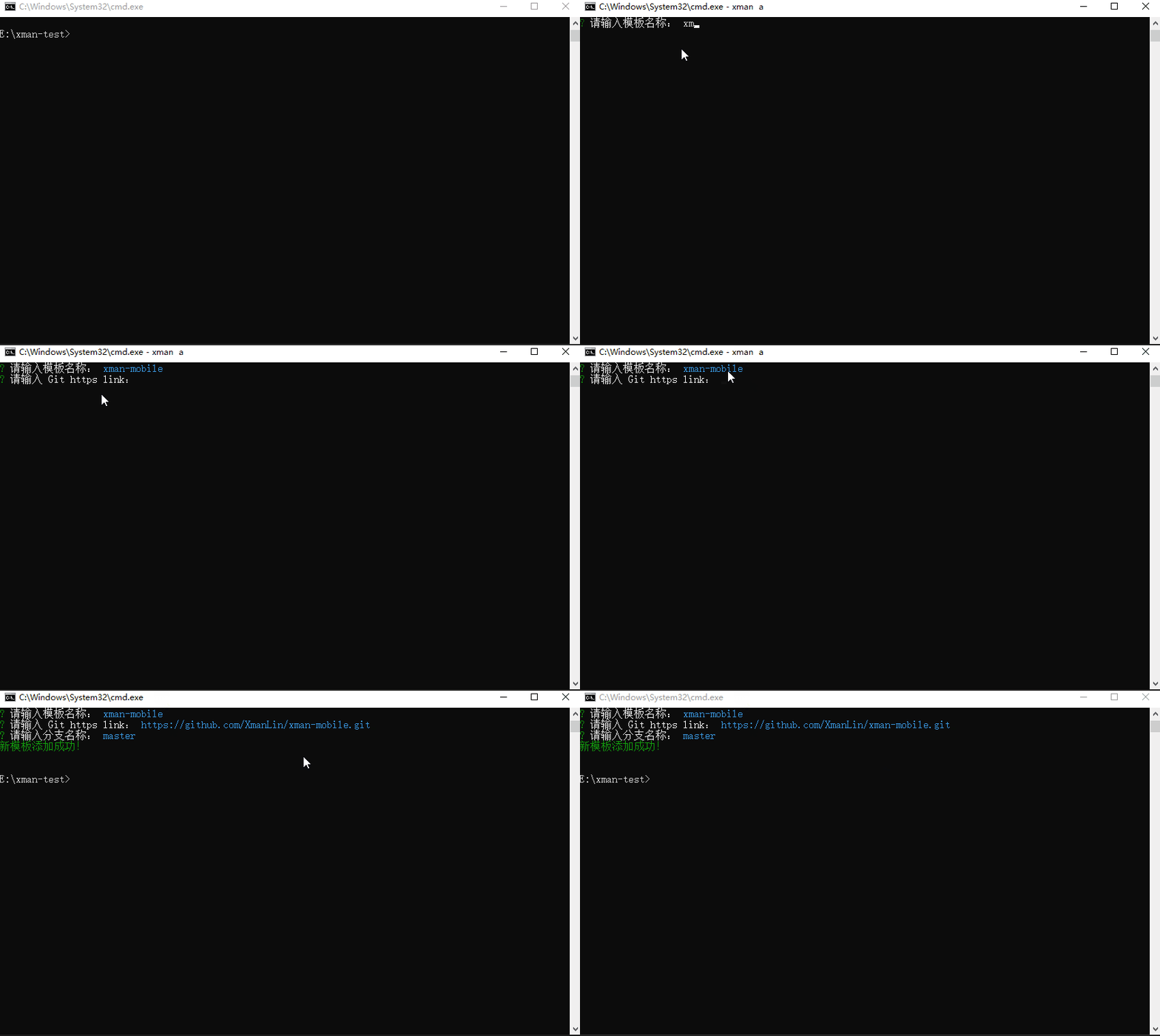
可以看到 templates.json 中,新的模板信息已經(jīng)被添加上了。
通過命令刪除項(xiàng)目模板配置
既然有添加,那就肯定有刪除命令了。同樣,新建command/delete.js:
const?fs?=?require('fs');
const?config?=?require('../templates');
const?chalk?=?require('chalk');
const?inquirer?=?require('inquirer');
const?clear?=?require('clear');

module.exports?=?()?=>?{
????clear();
????inquirer.prompt([
????????{
????????????name:?'templateName',
????????????type:?'input',
????????????message:?'請輸入要刪除的模板名稱:',
????????????validate:?function?(value)?{
????????????????if?(value.length)?{
????????????????????if?(!config.templates[value])?{
????????????????????????return?'模板不存在,請重新輸入';
????????????????????}?else?{
????????????????????????return?true;
????????????????????}
????????????????}?else?{
????????????????????return?'請輸入要刪除的模板名稱';
????????????????}
????????????},
????????}
????])
????.then(res?=>?{
????????config.templates[res.templateName]?=?undefined;
????????fs.writeFile(__dirname?+?'/../templates.json',?JSON.stringify(config),?'utf-8',?(err)?=>?{
????????????if?(err)?{
????????????????console.log(err);
????????????}?else?{
????????????????console.log(chalk.green('模板已刪除!'));
????????????}
????????????process.exit();
????????});
????})
????.catch(error?=>?{
????????console.log(error);
????????console.log('發(fā)生了一個(gè)錯(cuò)誤:',?chalk.red(JSON.stringify(error)));
????????process.exit();
????});
}
繼續(xù)添加命令:
#!/usr/bin/env?node

const?{?program?}?=?require('commander');

...

program
?.command('delete')
?.description('Delete?a?template')
?.alias('d')
?.action(()?=>?{
??require('../command/delete')()
?});

...
執(zhí)行 npm link --force ,然后再執(zhí)行配置好的命令 xman d。查看 ?templates.json ,我們已經(jīng)刪除了想要刪除的模板信息。
通過命令快速查看已有模板
一般來說我們不可能記住已經(jīng)添加的所有模板,有時(shí)候需要去快速查看。所以接下來我們將要實(shí)現(xiàn)一個(gè)簡單的快速查看模板列表的命令:
新建command/list.js
const?config?=?require('../templates');
const?chalk?=?require('chalk');

module.exports?=?()?=>?{
????let?str?=?'';
????Object.keys(config.templates).forEach((item,?index,?array)?=>?{
????????if?(index?===?array.length?-?1)?{
????????????str?+=?item;
????????}?else?{
????????????str?+=?`${item}?\n`;
????????}
????});
????console.log(chalk.cyan(str));
????process.exit();

}
添加命令:
#!/usr/bin/env?node

const?{?program?}?=?require('commander');

...

program
?.command('list')
?.description('show?temlpate?list')
?.alias('l')
?.action(()?=>?{
??require('../command/list')()
?});

...
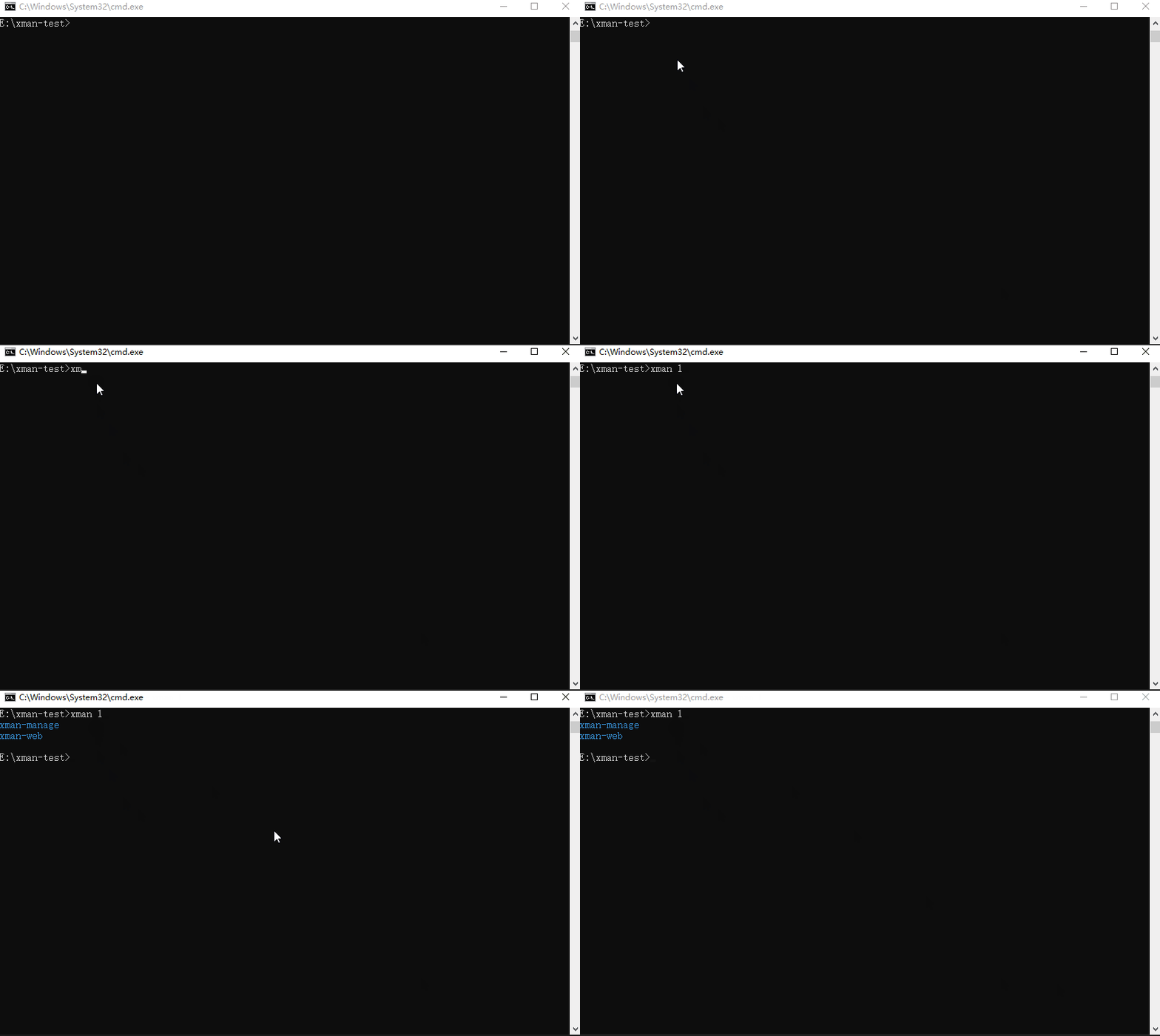
執(zhí)行 npm link --force ,然后再執(zhí)行配置好的命令 xman l:
通過命令檢查CLI版本是否是最新版本
一個(gè)通用的腳手架工具肯定不是自己一個(gè)人用的,使用的人可能需要知道CLI是不是有最新版本,所以也需要有檢查CLI版本的功能。
新建 bin/update.js:
const?updateNotifier?=?require('update-notifier');??//?更新CLI應(yīng)用程序的通知
const?chalk?=?require('chalk');
const?pkg?=?require('../package.json');

const?notifier?=?updateNotifier({
????pkg,
????updateCheckInterval:?1000?*?60?*?60,?//?默認(rèn)為?1000?*?60?*?60?*?24(1?天)
})

function?updateChk()?{
????if?(notifier.update)?{
????????console.log(`有新版本可用:${chalk.cyan(notifier.update.latest)},建議您在使用前進(jìn)行更新`);
????????notifier.notify();
????}?else?{
????????console.log(chalk.cyan('已經(jīng)是最新版本'));
????}
};

module.exports?=?updateChk;
添加命令:
#!/usr/bin/env?node

const?{?program?}?=?require('commander');

...

program
?.command('upgrade')
?.description("Check?the?js-plugin-cli?version.")
?.alias('u')
?.action(()?=>?{
??updateChk();
?});

...
執(zhí)行 npm link --force ,然后再執(zhí)行配置好的命令 xman u:
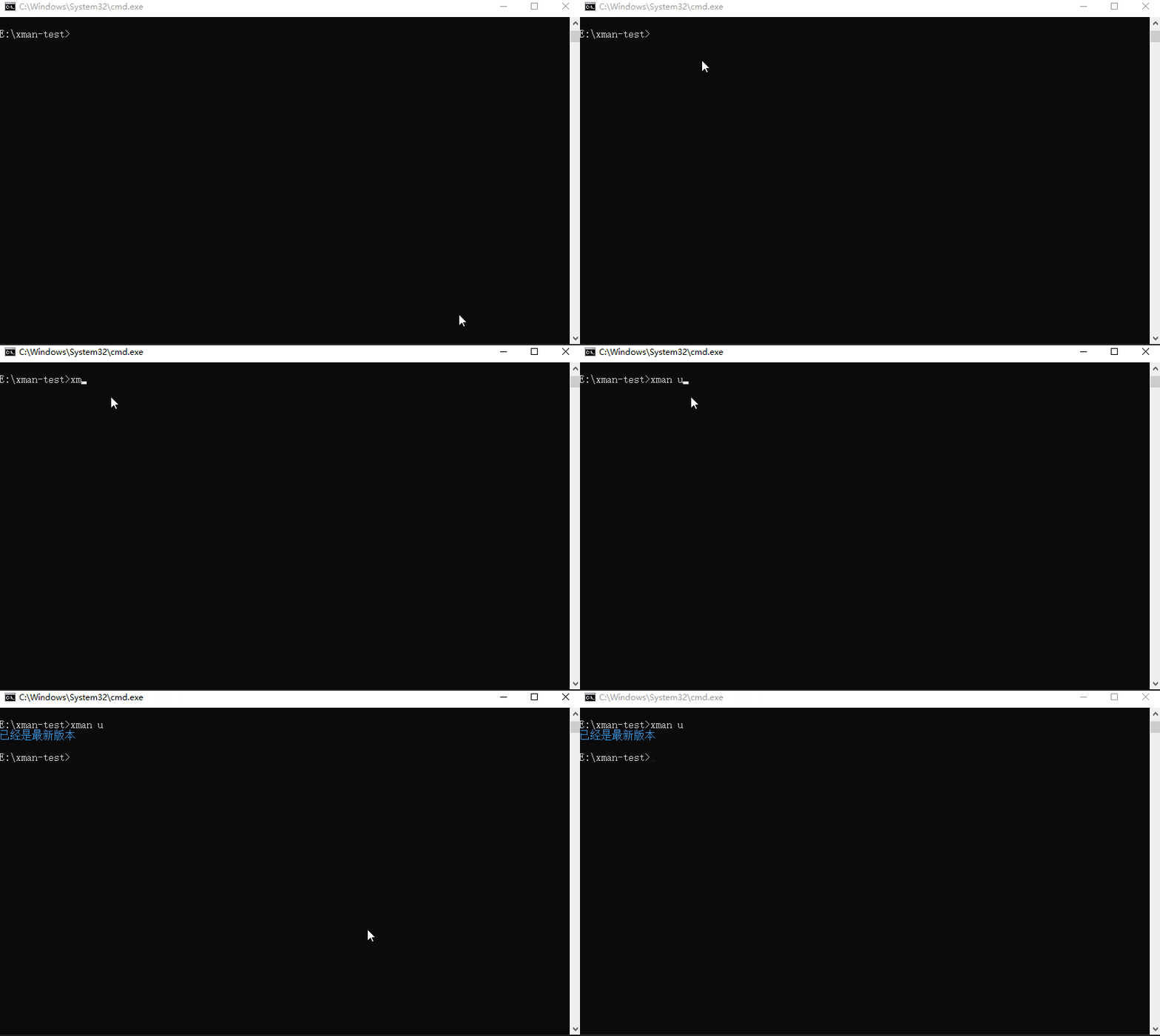
到此,我們已經(jīng)實(shí)現(xiàn)了一個(gè)基礎(chǔ)但很完整的web工程通用腳手架工具。大家可以根據(jù)自己的實(shí)際需求進(jìn)行修改和拓展了。
總結(jié)
一個(gè)web工程通用腳手架的本質(zhì)作用其實(shí)就是以下幾點(diǎn):
快速的創(chuàng)建基礎(chǔ)項(xiàng)目結(jié)構(gòu); 提供項(xiàng)目開發(fā)的規(guī)范和約定; 根據(jù)實(shí)際項(xiàng)目需求,定制不同的功能,來提高我們的效率。