
WPF開源項目:WPF-ControlBase
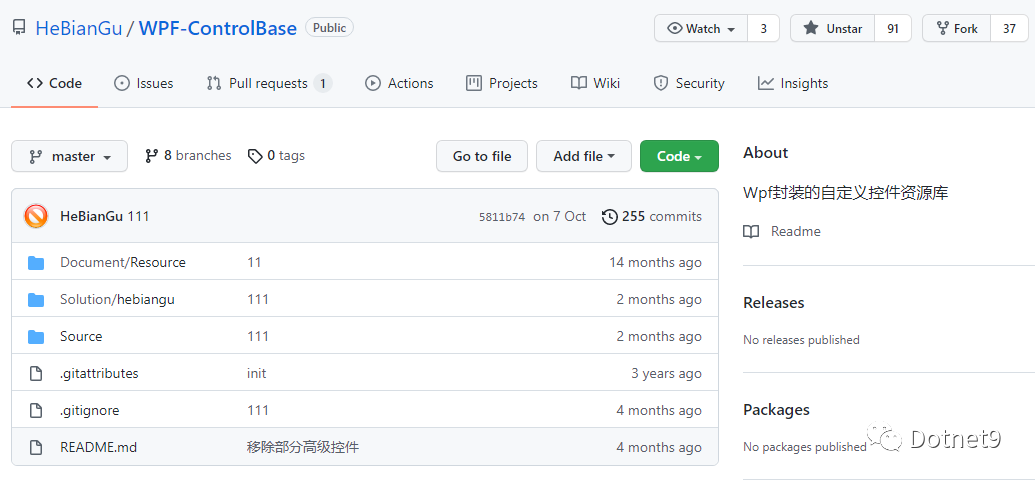
倉庫README很素,但看作者README貼的幾篇博文介紹,你會喜歡上它的,廢話不多說,上介紹目錄:
動畫封裝
https://blog.csdn.net/u010975589/article/details/95974854
屬性表單
https://blog.csdn.net/u010975589/article/details/95970200
消息對話
https://blog.csdn.net/u010975589/article/details/95985190
在WPF中應(yīng)用MVC
https://blog.csdn.net/u010975589/article/details/100019431
其他功能說明
https://blog.csdn.net/u010975589/article/details/103083605
下面詳細介紹:
1. 動畫封裝
原文標題:示例:WPF中自定義StoryBoarService在代碼中封裝StoryBoard、Animation用于簡化動畫編寫
原文鏈接:https://blog.csdn.net/u010975589/article/details/95974854
1.1 目的:通過對StoryBoard和Animation的封裝來簡化動畫的編寫
1.2 示例
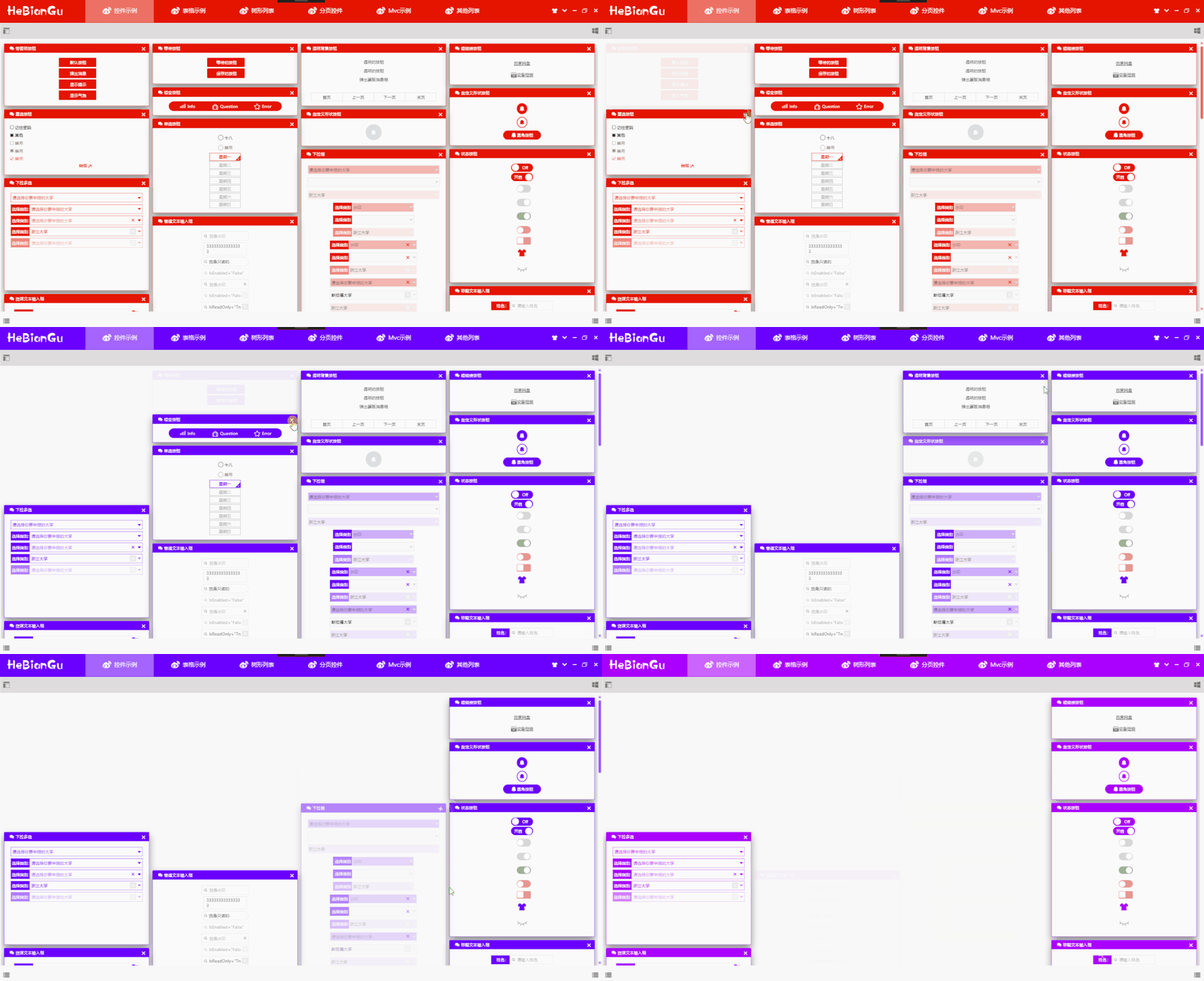
說明:漸隱藏是WPF中比較常用的動畫,上圖是通過StoryBoarService封裝后的效果,在代碼中只要執(zhí)行如下代碼即可:
DoubleStoryboardEngine.Create(1,?0,?1,?"Opacity").Start(element);
上面的關(guān)閉效果可以定義一個命令如下:
public?class?CollapsedOfOpacityCommand?:?ICommand
{

????public?bool?CanExecute(object?parameter)?=>?true;

????public?void?Execute(object?parameter)
????{
????????if(parameter?is?UIElement?element)
????????{
????????????var?engine?=?DoubleStoryboardEngine.Create(1,?0,?1,?"Opacity");

????????????engine.Start(element);
????????}
????}

????public?event?EventHandler?CanExecuteChanged;
}
在Xaml中調(diào)用如下命令即可完成關(guān)閉漸隱藏的效果
Command="{x:Static?base:CommandService.CollapsedOfOpacityCommand}"
CommandParameter="{Binding?RelativeSource={RelativeSource?AncestorType=GroupBox}}"
傳入的CommandParmeter將會在執(zhí)行命令時漸隱藏
其中動畫效果的代碼只需一句代碼即可,簡化了動畫在代碼中繁瑣的編碼過程
DoubleStoryboardEngine.Create(1,?0,?1,?"Opacity").Start(element);
1.3 代碼:
目前只實現(xiàn)DoubleAnimation的封裝,后續(xù)將會對其他類型進行封裝
1.3.1 封閉修改基類
///?
public?abstract?class?StoryboardEngineBase?:?IDisposable
{
????protected?Storyboard?storyboard?=?new?Storyboard();
????public?EventHandler?CompletedEvent?{?get;?set;?}
????public?EasingFunctionBase?Easing?{?get;?set;?}?=?EasingFunctionFactroy.PowerEase;
????public?PropertyPath?PropertyPath?{?get;?set;?}
????public?Duration?Duration?{?get;?set;?}
????public?void?Dispose()
????{
????????storyboard.Completed?-=?CompletedEvent;
????}
????public?abstract?StoryboardEngineBase?Start(UIElement?element);
????public?abstract?StoryboardEngineBase?Stop();
????public?StoryboardEngineBase(int?second,?string?property)
????{
????????this.PropertyPath?=?new?PropertyPath(property);
????????this.Duration?=?new?Duration(TimeSpan.FromSeconds(second));
????}
}
///?
public?abstract?class?StoryboardEngineBase<T>?:?StoryboardEngineBase
{
????public?StoryboardEngineBase(T?from,?T?to,?int?second,?string?property)?:?base(second,?property)
????{
????????this.FromValue?=?from;
????????this.ToValue?=?to;
????}
????public?T?FromValue?{?get;?set;?}
????public?T?ToValue?{?get;?set;?}
????//public?RepeatBehavior?RepeatBehavior?{?get;?set;?};
}
1.3.2 開放擴展DoubleStoryboardEngine
///?
public?class?DoubleStoryboardEngine?:?StoryboardEngineBase<double>
{
????public?static?DoubleStoryboardEngine?Create(double?from,?double?to,?int?second,?string?property)
????{
????????return?new?DoubleStoryboardEngine(from,?to,?second,?property);
????}
????public?DoubleStoryboardEngine(double?from,?double?to,?int?second,?string?property)?:?base(from,?to,?second,?property)
????{
????}
????public?override?StoryboardEngineBase?Start(UIElement?element)
????{
????????//? Do:時間線
????????DoubleAnimation?animation?=?new?DoubleAnimation(1,?0,?this.Duration);
????????if?(this.Easing?!=?null)
????????????animation.EasingFunction?=?this.Easing;
????????//if?(this.RepeatBehavior?!=?default(RepeatBehavior))
????????//????animation.RepeatBehavior?=?(RepeatBehavior);
????????//? Do:屬性動畫
????????storyboard.Children.Add(animation);
????????Storyboard.SetTarget(animation,?element);
????????Storyboard.SetTargetProperty(animation,?this.PropertyPath);
????????if?(CompletedEvent?!=?null)
????????????storyboard.Completed?+=?CompletedEvent;
????????storyboard.Begin();
????????return?this;
????}
????public?override?StoryboardEngineBase?Stop()
????{
????????this.storyboard.Stop();
????????return?this;
????}
}
1.3.3 過度效果工廠
///?
public?static?class?EasingFunctionFactroy
{
????///?
????public?static?PowerEase?PowerEase?{?get;?set;?}?=?new?PowerEase();
????///?
????public?static?BackEase?BackEase?{?get;?set;?}?=?new?BackEase();
????///?
????public?static?ElasticEase?ElasticEase?{?get;?set;?}?=?new?ElasticEase();
????///?
????public?static?BounceEase?BounceEase?{?get;?set;?}?=?new?BounceEase();
????///?
????public?static?CircleEase?CircleEase?{?get;?set;?}?=?new?CircleEase();
????///?
????public?static?QuadraticEase?QuadraticEase?{?get;?set;?}?=?new?QuadraticEase();
????///?
????public?static?CubicEase?CubicEase?{?get;?set;?}?=?new?CubicEase();
????///?
????public?static?QuarticEase?QuarticEase?{?get;?set;?}?=?new?QuarticEase();
????///?
????public?static?QuinticEase?QuinticEase?{?get;?set;?}?=?new?QuinticEase();
????///?
????public?static?ExponentialEase?ExponentialEase?{?get;?set;?}?=?new?ExponentialEase();
????///?
????public?static?SineEase?SineEase?{?get;?set;?}?=?new?SineEase();
}
1.3.4 使用方法
///?
///?
///?
///?
///?
///?
public?static?DoubleStoryboardEngine?Create(double?from,?double?to,?int?second,?string?property)
{
????return?new?DoubleStoryboardEngine(from,?to,?second,?property);
}
2. 屬性表單
原文標題:示例:WPF開發(fā)的簡單ObjectProperyForm用來綁定實體表單
原文鏈接:https://blog.csdn.net/u010975589/article/details/95970200
2.1 目的:自定義控件,用來直接綁定實體數(shù)據(jù),簡化開發(fā)周期
2.2 實現(xiàn)
綁定實體對象 通過特性顯示屬性名稱 通過特性增加驗證條件 已經(jīng)實現(xiàn)String、Int、Double、DateTime、Bool幾種簡單類型的DataTemplate模板,其他模板支持擴展 其他后續(xù)更新...
2.3 示例
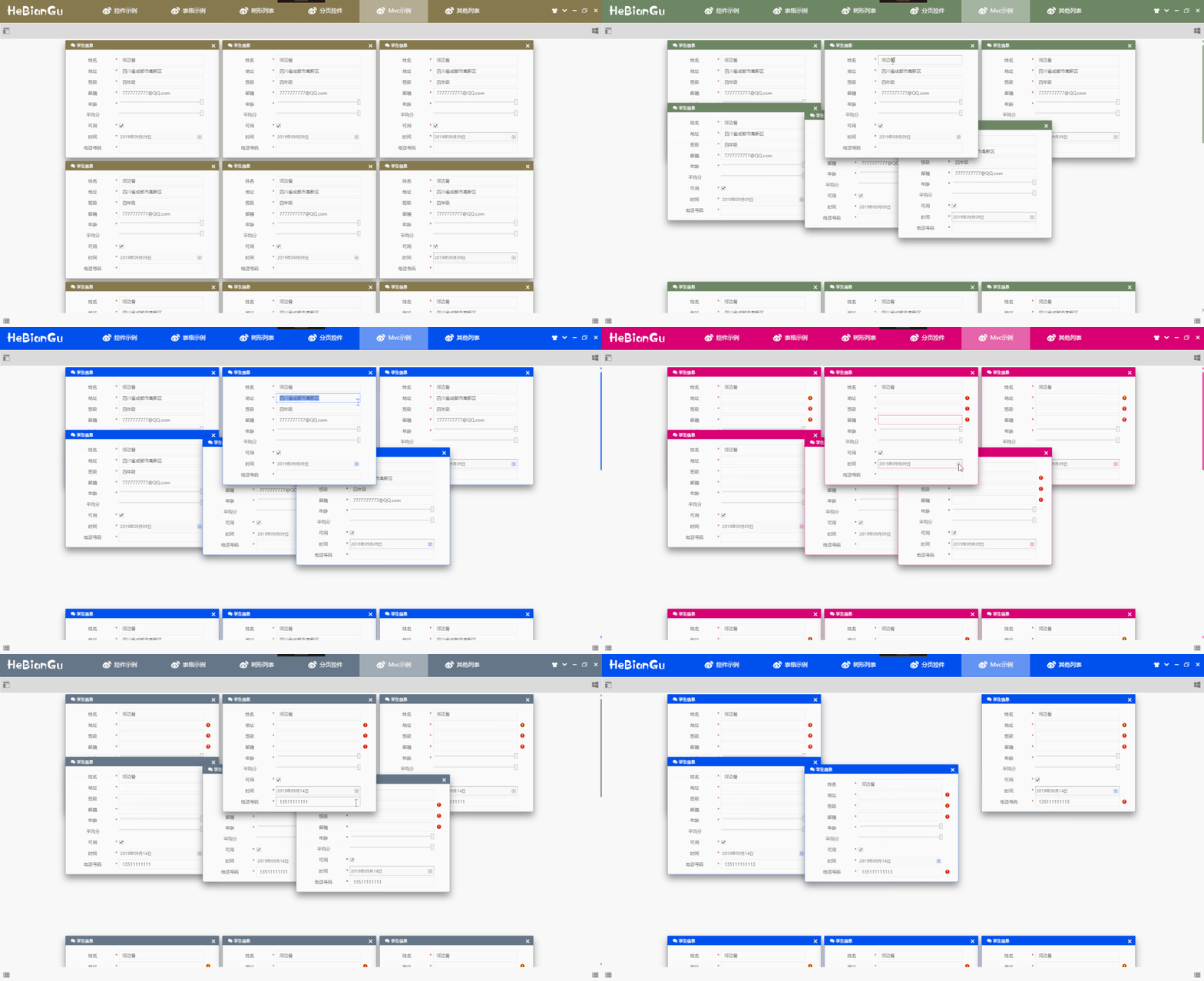
實體定義如下:
public?class?Student
{
????[Display("姓名")]
????[Required]
????public?string?Name?{?get;?set;?}

????[Display("班級")]
????[Required]
????public?string?Class?{?get;?set;?}

????[Display("地址")]
????[Required]
????public?string?Address?{?get;?set;?}

????[Display("郵箱")]
????[Required]
????public?string?Emall?{?get;?set;?}

????[Display("可用")]
????[Required]
????public?bool?IsEnbled?{?get;?set;?}

????[Display("時間")]
????[Required]
????public?DateTime?time?{?get;?set;?}

????[Display("年齡")]
????[Required]
????public?int?Age?{?get;?set;?}

????[Display("平均分")]?
????public?double?Score?{?get;?set;?}

????[Display("電話號碼")]
????[Required]
????[RegularExpression(@"^1[3|4|5|7|8][0-9]{9}$",?ErrorMessage?=?"手機號碼不合法!")]
????public?string?Tel?{?get;?set;?}
}
DisplayAttribute:用來標識顯示名稱 ResuiredAttribute:用來標識數(shù)據(jù)不能為空 RgularExpression:引用正則表達式驗證數(shù)據(jù)是否匹配 其他特性后續(xù)更新...
應(yīng)用方式:
<UserControl.Resources>
????<local:Student?x:Key="S.Student.HeBianGu"?
????????????????????Name="河邊骨"?
????????????????????Address="四川省成都市高新區(qū)"?
????????????????????Class="四年級"?
????????????????????Emall="[email protected]"?Age="33"?Score="99.99"?IsEnbled="True"?time="2019-09-09"/>
UserControl.Resources>
?
<wpfcontrollib:ObjectPropertyForm?Grid.Row="1"?Title="學生信息"??SelectObject="{StaticResource?S.Student.HeBianGu}"?>
????<base:Interaction.Behaviors>
????????<base:MouseDragElementBehavior?ConstrainToParentBounds="True"/>
????????<base:SelectZIndexElementBehavior/>
????base:Interaction.Behaviors>
2.4 代碼
2.4.1 通過反射獲取屬性和特性
?ObservableCollection?PropertyItemSource
{
????get?{?return?(ObservableCollection)GetValue(PropertyItemSourceProperty);?}
????set?{?SetValue(PropertyItemSourceProperty,?value);?}
}

//?Using?a?DependencyProperty?as?the?backing?store?for?MyProperty.??This?enables?animation,?styling,?binding,?etc...
public?static?readonly?DependencyProperty?PropertyItemSourceProperty?=
????DependencyProperty.Register("PropertyItemSource",?typeof(ObservableCollection),?typeof(ObjectPropertyForm),?new?PropertyMetadata(new?ObservableCollection(),?(d,?e)?=>
??????{
??????????ObjectPropertyForm?control?=?d?as?ObjectPropertyForm;

??????????if?(control?==?null)?return;

??????????ObservableCollection?config?=?e.NewValue?as?ObservableCollection;

??????}));


void?RefreshObject(object?o)
{
????Type?type?=?o.GetType();

????var?propertys?=?type.GetProperties();

????this.PropertyItemSource.Clear();

????foreach?(var?item?in?propertys)
????{
????????var?from?=?ObjectPropertyFactory.Create(item,?o);

????????this.PropertyItemSource.Add(from);
????}

????this.ItemsSource?=?this.PropertyItemSource;
}
2.4.2 定義類型基類、擴展之類和工廠方法
///?
public?class?ObjectPropertyItem?:?NotifyPropertyChanged
{
????public?string?Name?{?get;?set;?}
????public?PropertyInfo?PropertyInfo?{?get;?set;?}
????public?object?Obj?{?get;?set;?}
????public?ObjectPropertyItem(PropertyInfo?property,?object?obj)
????{
????????PropertyInfo?=?property;
????????var?display?=?property.GetCustomAttribute();
????????Name?=?display?==?null???property.Name?:?display.Name;
????????Obj?=?obj;
????}
}
///?
public?class?ObjectPropertyItem<T>?:?ObjectPropertyItem
{
????private?T?_value;
????///?
????public?T?Value
????{
????????get?{?return?_value;?}
????????set
????????{
????????????this.Message?=?null;
????????????//? Do:檢驗數(shù)據(jù)有效性
????????????if?(Validations?!=?null)
????????????{
????????????????foreach?(var?item?in?Validations)
????????????????{
????????????????????if?(!item.IsValid(value))
????????????????????{
????????????????????????this.Message?=?item.ErrorMessage;??
????????????????????}
????????????????}
????????????}
????????????_value?=?value;?
????????????RaisePropertyChanged("Value");
????????????this.SetValue(value);
????????}
????}
????void?SetValue(T?value)
????{
????????this.PropertyInfo.SetValue(Obj,?value);
????}
????List?Validations?{?get;?}
????public?ObjectPropertyItem(PropertyInfo?property,?object?obj)?:?base(property,?obj)
????{
????????Value?=?(T)property.GetValue(obj);?
????????Validations?=?property.GetCustomAttributes()?.ToList();
????????if(Validations!=null&&?Validations.Count>0)
????????{
????????????this.Flag?=?"*";
????????}
????}
????private?string?_message;
????///?
????public?string?Message
????{
????????get?{?return?_message;?}
????????set
????????{
????????????_message?=?value;
????????????RaisePropertyChanged("Message");
????????}
????}
????public?string?Flag?{?get;?set;?}
}
///?
public?class?StringPropertyItem?:?ObjectPropertyItem<string>
{
????public?StringPropertyItem(PropertyInfo?property,?object?obj)?:?base(property,?obj)
????{
????}
}
///?
public?class?DateTimePropertyItem?:?ObjectPropertyItem<DateTime>
{
????public?DateTimePropertyItem(PropertyInfo?property,?object?obj)?:?base(property,?obj)
????{
????}
}
///?
public?class?DoublePropertyItem?:?ObjectPropertyItem<double>
{
????public?DoublePropertyItem(PropertyInfo?property,?object?obj)?:?base(property,?obj)
????{
????}
}
///?
public?class?IntPropertyItem?:?ObjectPropertyItem<int>
{
????public?IntPropertyItem(PropertyInfo?property,?object?obj)?:?base(property,?obj)
????{
????}
}
///?
public?class?BoolPropertyItem?:?ObjectPropertyItem<bool>
{
????public?BoolPropertyItem(PropertyInfo?property,?object?obj)?:?base(property,?obj)
????{
????}
}
類型工廠:
public?class?ObjectPropertyFactory
{
????public?static?ObjectPropertyItem?Create(PropertyInfo?info,?object?obj)
????{
????????if?(info.PropertyType?==?typeof(int))
????????{
????????????return?new?IntPropertyItem(info,?obj);
????????}
????????else?if?(info.PropertyType?==?typeof(string))
????????{
????????????return?new?StringPropertyItem(info,?obj);
????????}
????????else?if?(info.PropertyType?==?typeof(DateTime))
????????{
????????????return?new?DateTimePropertyItem(info,?obj);
????????}
????????else?if?(info.PropertyType?==?typeof(double))
????????{
????????????return?new?DoublePropertyItem(info,?obj);
????????}
????????else?if?(info.PropertyType?==?typeof(bool))
????????{
????????????return?new?BoolPropertyItem(info,?obj);
????????}

????????return?null;
????}
}
2.4.3 樣式模板
<DataTemplate?DataType="{x:Type?base:StringPropertyItem}">
????<Grid?Width="{Binding?RelativeSource={RelativeSource?AncestorType=local:ObjectPropertyForm},Path=Width-5}"?
??????????Height="35"?Margin="5,0">
????????<Grid.ColumnDefinitions>
????????????<ColumnDefinition?Width="*"/>
????????????<ColumnDefinition?Width="Auto"/>
????????????<ColumnDefinition?Width="2*"/>
????????????<ColumnDefinition?Width="30"/>
????????Grid.ColumnDefinitions>
????????<TextBlock?Text="{Binding?Name}"?
????????????????????FontSize="14"?
????????????????????HorizontalAlignment="Center"?
????????????????????VerticalAlignment="Center"/>
????????<TextBlock?Text="{Binding?Flag}"?
????????????????????Grid.Column="1"?Margin="5,0"
????????????????????FontSize="14"??Foreground="{DynamicResource?S.Brush.Red.Notice}"?
????????????????????HorizontalAlignment="Right"?
????????????????????VerticalAlignment="Center"/>
????????<local:FTextBox?Text="{Binding?Value,UpdateSourceTrigger=PropertyChanged}"?Style="{DynamicResource?DefaultTextBox}"
??????????????????FontSize="14"?Width="Auto"?CaretBrush="Black"
??????????????????Grid.Column="2"?Height="30"?base:ControlAttachProperty.FIcon=""
??????????????????VerticalContentAlignment="Center"?
??????????????????HorizontalAlignment="Stretch"?VerticalAlignment="Center"/>
????????<TextBlock?Text=""?Grid.Column="3"?Style="{DynamicResource?FIcon?}"
????????????????????Foreground="{DynamicResource?S.Brush.Red.Notice}"?
????????????????????Visibility="{Binding?Message,Converter={x:Static?base:XConverter.VisibilityWithOutStringConverter},ConverterParameter={x:Null},Mode=TwoWay}"
????????????????????FontSize="14"?TextTrimming="CharacterEllipsis"?ToolTip="{Binding?Message}"
????????????????????HorizontalAlignment="Center"?
????????????????????VerticalAlignment="Center"/>
????Grid>
DataTemplate>
<DataTemplate?DataType="{x:Type?base:BoolPropertyItem}">
????<Grid?Width="{Binding?RelativeSource={RelativeSource?AncestorType=local:ObjectPropertyForm},Path=Width-5}"?Height="35"?Margin="5,0">
????????<Grid.ColumnDefinitions>
????????????<ColumnDefinition?Width="*"/>
????????????<ColumnDefinition?Width="Auto"/>
????????????<ColumnDefinition?Width="2*"/>
????????????<ColumnDefinition?Width="30"/>
????????Grid.ColumnDefinitions>
????????<TextBlock?Text="{Binding?Name}"?
????????????????????FontSize="14"?
????????????????????HorizontalAlignment="Center"?
????????????????????VerticalAlignment="Center"/>
????????<TextBlock?Text="{Binding?Flag}"?
????????????????????Grid.Column="1"?Margin="5,0"
????????????????????FontSize="14"??Foreground="{DynamicResource?S.Brush.Red.Notice}"?
????????????????????HorizontalAlignment="Right"?
????????????????????VerticalAlignment="Center"/>
????????<CheckBox?IsChecked="{Binding?Value}"??FontSize="14"?Grid.Column="2"?Height="30"?
??????????????????VerticalContentAlignment="Center"??
??????????????????HorizontalAlignment="Left"?VerticalAlignment="Center"/>
????????<TextBlock?Text=""?Grid.Column="3"?Style="{DynamicResource?FIcon?}"
????????????????????Foreground="{DynamicResource?S.Brush.Red.Notice}"?Visibility="{Binding?Message,Converter={x:Static?base:XConverter.VisibilityWithOutStringConverter},ConverterParameter={x:Null}}"
????????????????????FontSize="14"???TextTrimming="CharacterEllipsis"?ToolTip="{Binding?Message}"
????????????????????HorizontalAlignment="Center"?
????????????????????VerticalAlignment="Center"/>
????Grid>
DataTemplate>
<DataTemplate?DataType="{x:Type?base:DateTimePropertyItem}">
????<Grid?Width="{Binding?RelativeSource={RelativeSource?AncestorType=local:ObjectPropertyForm},Path=Width-5}"?Height="35"?Margin="5,0">
????????<Grid.ColumnDefinitions>
????????????<ColumnDefinition?Width="*"/>
????????????<ColumnDefinition?Width="Auto"/>
????????????<ColumnDefinition?Width="2*"/>
????????????<ColumnDefinition?Width="30"/>
????????Grid.ColumnDefinitions>
????????<TextBlock?Text="{Binding?Name}"?
????????????????????FontSize="14"?
????????????????????HorizontalAlignment="Center"?
????????????????????VerticalAlignment="Center"/>
????????<TextBlock?Text="{Binding?Flag}"?
????????????????????Grid.Column="1"?Margin="5,0"
????????????????????FontSize="14"??Foreground="{DynamicResource?S.Brush.Red.Notice}"?
????????????????????HorizontalAlignment="Right"?
????????????????????VerticalAlignment="Center"/>
????????<DatePicker?SelectedDate="{Binding?Value}"??FontSize="14"?Grid.Column="2"?Height="30"?
??????????????????VerticalContentAlignment="Center"??Width="Auto"
??????????????????HorizontalAlignment="Stretch"?VerticalAlignment="Center"/>
????????<TextBlock?Text=""?Grid.Column="3"?Style="{DynamicResource?FIcon?}"
????????????????????Foreground="{DynamicResource?S.Brush.Red.Notice}"?Visibility="{Binding?Message,Converter={x:Static?base:XConverter.VisibilityWithOutStringConverter},ConverterParameter={x:Null}}"
????????????????????FontSize="14"???TextTrimming="CharacterEllipsis"?ToolTip="{Binding?Message}"
????????????????????HorizontalAlignment="Center"?
????????????????????VerticalAlignment="Center"/>
????Grid>
DataTemplate>
<DataTemplate?DataType="{x:Type?base:IntPropertyItem}">
????<Grid?Width="{Binding?RelativeSource={RelativeSource?AncestorType=local:ObjectPropertyForm},Path=Width-5}"?Height="35"?Margin="5,0">
????????<Grid.ColumnDefinitions>
????????????<ColumnDefinition?Width="*"/>
????????????<ColumnDefinition?Width="Auto"/>
????????????<ColumnDefinition?Width="2*"/>
????????????<ColumnDefinition?Width="30"/>
????????Grid.ColumnDefinitions>
????????<TextBlock?Text="{Binding?Name}"?
????????????????????FontSize="14"?
????????????????????HorizontalAlignment="Center"?
????????????????????VerticalAlignment="Center"/>
????????<TextBlock?Text="{Binding?Flag}"?
????????????????????Grid.Column="1"?Margin="5,0"
????????????????????FontSize="14"??Foreground="{DynamicResource?S.Brush.Red.Notice}"?
????????????????????HorizontalAlignment="Right"?
????????????????????VerticalAlignment="Center"/>
????????<Slider?Value="{Binding?Value}"??FontSize="14"?Grid.Column="2"?Height="30"?
??????????????????VerticalContentAlignment="Center"??
??????????????????HorizontalAlignment="Stretch"?VerticalAlignment="Center"/>
????????<TextBlock?Text=""?Grid.Column="3"?Style="{DynamicResource?FIcon?}"
????????????????????Foreground="{DynamicResource?S.Brush.Red.Notice}"?Visibility="{Binding?Message,Converter={x:Static?base:XConverter.VisibilityWithOutStringConverter},ConverterParameter={x:Null}}"
????????????????????FontSize="14"???TextTrimming="CharacterEllipsis"?ToolTip="{Binding?Message}"
????????????????????HorizontalAlignment="Center"?
????????????????????VerticalAlignment="Center"/>
????Grid>
DataTemplate>
<DataTemplate?DataType="{x:Type?base:DoublePropertyItem}">
????<Grid?Width="{Binding?RelativeSource={RelativeSource?AncestorType=local:ObjectPropertyForm},Path=Width-5}"?Height="35"?Margin="5,0">
????????<Grid.ColumnDefinitions>
????????????<ColumnDefinition?Width="*"/>
????????????<ColumnDefinition?Width="Auto"/>
????????????<ColumnDefinition?Width="2*"/>
????????????<ColumnDefinition?Width="30"/>
????????Grid.ColumnDefinitions>
????????<TextBlock?Text="{Binding?Name}"?
????????????????????FontSize="14"?
????????????????????HorizontalAlignment="Center"?
????????????????????VerticalAlignment="Center"/>
????????<TextBlock?Text="{Binding?Flag}"?
????????????????????Grid.Column="1"?Margin="5,0"
????????????????????FontSize="14"??Foreground="{DynamicResource?S.Brush.Red.Notice}"?
????????????????????HorizontalAlignment="Right"?
????????????????????VerticalAlignment="Center"/>
????????<Slider?Value="{Binding?Value}"??FontSize="14"?Grid.Column="2"?Height="30"?
??????????????????VerticalContentAlignment="Center"??
??????????????????HorizontalAlignment="Stretch"?VerticalAlignment="Center"/>
????????<TextBlock?Text=""?Grid.Column="3"?Style="{DynamicResource?FIcon?}"
????????????????????Foreground="{DynamicResource?S.Brush.Red.Notice}"?Visibility="{Binding?Message,Converter={x:Static?base:XConverter.VisibilityWithOutStringConverter},ConverterParameter={x:Null}}"
????????????????????FontSize="14"???TextTrimming="CharacterEllipsis"?ToolTip="{Binding?Message}"
????????????????????HorizontalAlignment="Center"?
????????????????????VerticalAlignment="Center"/>
????Grid>
DataTemplate>
<Style?TargetType="local:ObjectPropertyForm">
????<Setter?Property="Background"?Value="{DynamicResource?S.Brush.TextBackgroud.Default}"/>
????<Setter?Property="BorderThickness"?Value="0"/>
????
????<Setter?Property="HorizontalAlignment"?Value="Stretch"/>
????<Setter?Property="VerticalAlignment"?Value="Center"/>
????<Setter?Property="HorizontalContentAlignment"?Value="Center"/>
????<Setter?Property="VerticalContentAlignment"?Value="Center"/>
????
????<Setter?Property="Padding"?Value="0"?/>
????<Setter?Property="Width"?Value="500"?/>
????<Setter?Property="Height"?Value="Auto"?/>
????<Setter?Property="ItemsSource"?Value="{Binding?PropertyItemSource,Mode=TwoWay}"?/>
????<Setter?Property="ItemsPanel">
????????<Setter.Value>
????????????<ItemsPanelTemplate>
????????????????<StackPanel/>
????????????ItemsPanelTemplate>
????????Setter.Value>
????Setter>
????<Setter?Property="Template">
????????<Setter.Value>
????????????<ControlTemplate?TargetType="local:ObjectPropertyForm">
????????????????<GroupBox?Header="{TemplateBinding?Title}">
????????????????????<Border?HorizontalAlignment="{TemplateBinding?HorizontalAlignment}"
????????????????????????VerticalAlignment="{TemplateBinding?VerticalAlignment}"
????????????????????????Background="{TemplateBinding?Background}"
????????????????????????BorderBrush="{TemplateBinding?BorderBrush}"
????????????????????????BorderThickness="{TemplateBinding?BorderThickness}">
????????????????????????<ItemsPresenter/>
????????????????????Border>
????????????????GroupBox>
????????????ControlTemplate>
????????Setter.Value>
????Setter>
Style>
2.4.4 開放擴展
2.4.4.1 只需定義一個擴展類型,如:
///?
public?class?StringPropertyItem?:?ObjectPropertyItem<string>
{
????public?StringPropertyItem(PropertyInfo?property,?object?obj)?:?base(property,?obj)
????{
????}
}
2.4.4.2 再添加一個DataTmeplate,如:
<DataTemplate?DataType="{x:Type?base:StringPropertyItem}">
????<Grid?Width="{Binding?RelativeSource={RelativeSource?AncestorType=local:ObjectPropertyForm},Path=Width-5}"?
??????????Height="35"?Margin="5,0">
????????<Grid.ColumnDefinitions>
????????????<ColumnDefinition?Width="*"/>
????????????<ColumnDefinition?Width="Auto"/>
????????????<ColumnDefinition?Width="2*"/>
????????????<ColumnDefinition?Width="30"/>
????????Grid.ColumnDefinitions>
????????<TextBlock?Text="{Binding?Name}"?
????????????????????FontSize="14"?
????????????????????HorizontalAlignment="Center"?
????????????????????VerticalAlignment="Center"/>
????????<TextBlock?Text="{Binding?Flag}"?
????????????????????Grid.Column="1"?Margin="5,0"
????????????????????FontSize="14"??Foreground="{DynamicResource?S.Brush.Red.Notice}"?
????????????????????HorizontalAlignment="Right"?
????????????????????VerticalAlignment="Center"/>
????????<local:FTextBox?Text="{Binding?Value,UpdateSourceTrigger=PropertyChanged}"?Style="{DynamicResource?DefaultTextBox}"
??????????????????FontSize="14"?Width="Auto"?CaretBrush="Black"
??????????????????Grid.Column="2"?Height="30"?base:ControlAttachProperty.FIcon=""
??????????????????VerticalContentAlignment="Center"?
??????????????????HorizontalAlignment="Stretch"?VerticalAlignment="Center"/>
????????<TextBlock?Text=""?Grid.Column="3"?Style="{DynamicResource?FIcon?}"
????????????????????Foreground="{DynamicResource?S.Brush.Red.Notice}"?
????????????????????Visibility="{Binding?Message,Converter={x:Static?base:XConverter.VisibilityWithOutStringConverter},ConverterParameter={x:Null},Mode=TwoWay}"
????????????????????FontSize="14"?TextTrimming="CharacterEllipsis"?ToolTip="{Binding?Message}"
????????????????????HorizontalAlignment="Center"?
????????????????????VerticalAlignment="Center"/>
????Grid>
DataTemplate>
3. 消息對話
原文標題:示例:WPF中自定義MessageService應(yīng)用DialogHost、Snackbar、NotifyIcon顯示各種場景提示消息
原文鏈接:https://blog.csdn.net/u010975589/article/details/95985190
3.1 目的
不同交互場景需要提示不同的消息,不同的消息需要用不同的效果來展示,應(yīng)用DialogHost(對話框)、NotifyIcon(消息提示)、Snackbar(氣泡消息)顯示各種場景提示消息,應(yīng)用在ViewModel中
3.2 實現(xiàn)
等待對話框 確定對話框 確定與取消對話框 百分比進度和文本進度對話框 氣泡提示消息(NotifyIcon) 提示消息(Snackbar)
3.3 示例
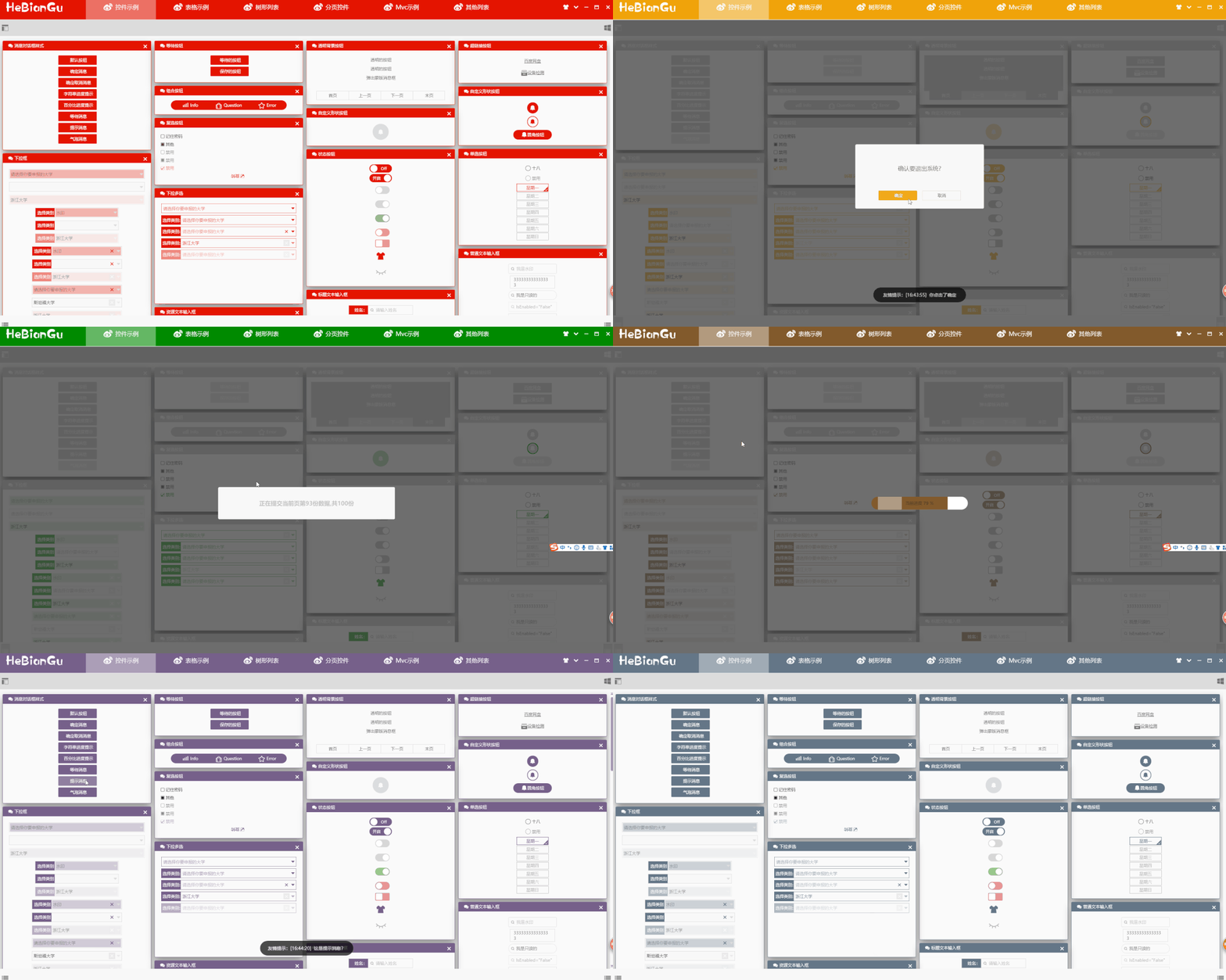
說明:
對話框:常規(guī)對話消息如上圖,等待對話框、消息對話、進度對話框;
(目前只封裝如上這幾種,自定義對話框只需創(chuàng)建用戶控件調(diào)用通用加載方法即可,后續(xù)更新...)
提示消息:當進度保存成功是需要一個提示消息,顯示2s自動隱藏即可(如圖中友情提示部分分) ;
氣泡消息:當程序處于隱藏或某種狀態(tài)時需要應(yīng)用氣泡提示消息;
3.4 代碼
[ViewModel("Loyout")]
class?LoyoutViewModel?:?MvcViewModelBase
{
????
????///?
????protected?override?async?void?RelayMethod(object?obj)
????{
????????string?command?=?obj?.ToString();
????????//? Do:對話消息
????????if?(command?==?"Button.ShowDialogMessage")
????????{
????????????await?MessageService.ShowSumitMessge("這是消息對話框?");
????????}
????????//? Do:等待消息
????????else?if?(command?==?"Button.ShowWaittingMessge")
????????{
????????????await?MessageService.ShowWaittingMessge(()?=>?Thread.Sleep(2000));
????????}
????????//? Do:百分比進度對話框
????????else?if?(command?==?"Button.ShowPercentProgress")
????????{
????????????Action?action?=?l?=>
????????????????{
????????????????????for?(int?i?=?0;?i?100;?i++)
????????????????????{
????????????????????????l.Value?=?i;
????????????????????????Thread.Sleep(50);
????????????????????}
????????????????????Thread.Sleep(1000);
????????????????????MessageService.ShowSnackMessageWithNotice("加載完成!");
????????????????};
????????????await?MessageService.ShowPercentProgress(action);
????????}
????????//? Do:文本進度對話框
????????else?if?(command?==?"Button.ShowStringProgress")
????????{
????????????Action?action?=?l?=>
????????????{
????????????????for?(int?i?=?1;?i?<=?100;?i++)
????????????????{
????????????????????l.MessageStr?=?$"正在提交當前頁第{i}份數(shù)據(jù),共100份";
????????????????????Thread.Sleep(50);
????????????????}
????????????????Thread.Sleep(1000);
????????????????MessageService.ShowSnackMessageWithNotice("提交完成:成功100條,失敗0條!");
????????????};
????????????await?MessageService.ShowStringProgress(action);
????????}
????????//? Do:確認取消對話框
????????else?if?(command?==?"Button.ShowResultMessge")
????????{
????????????Action<object,?DialogClosingEventArgs>?action?=?(l,?k)?=>
????????????{
????????????????if?((bool)k.Parameter)
????????????????{
????????????????????MessageService.ShowSnackMessageWithNotice("你點擊了取消");
????????????????}
????????????????else
????????????????{
????????????????????MessageService.ShowSnackMessageWithNotice("你點擊了確定");
????????????????}
????????????};
????????????MessageService.ShowResultMessge("確認要退出系統(tǒng)?",?action);
????????}
????????//? Do:提示消息
????????else?if?(command?==?"Button.ShowSnackMessage")
????????{
????????????MessageService.ShowSnackMessageWithNotice("這是提示消息?");
????????}?
????????//? Do:氣泡消息
????????else?if?(command?==?"Button.ShowNotifyMessage")
????????{
????????????MessageService.ShowNotifyMessage("你有一條報警信息需要處理,請檢查",?"Notify?By?HeBianGu");
????????}
????}
}
4. 在WPF中應(yīng)用MVC
原文標題:封裝:簡要介紹自定義開發(fā)基于WPF的MVC框架
原文鏈接:https://blog.csdn.net/u010975589/article/details/100019431
4.1 目的
在使用Asp.net Core時,深感MVC框架作為頁面跳轉(zhuǎn)數(shù)據(jù)處理的方便,但WPF中似乎沒有現(xiàn)成的MVC框架,由此自定義開發(fā)一套MVC的框架,在使用過程中也體會到框架的優(yōu)勢,下面簡要介紹一下這套基于MVVM的MVC框架
4.2 項目結(jié)構(gòu)
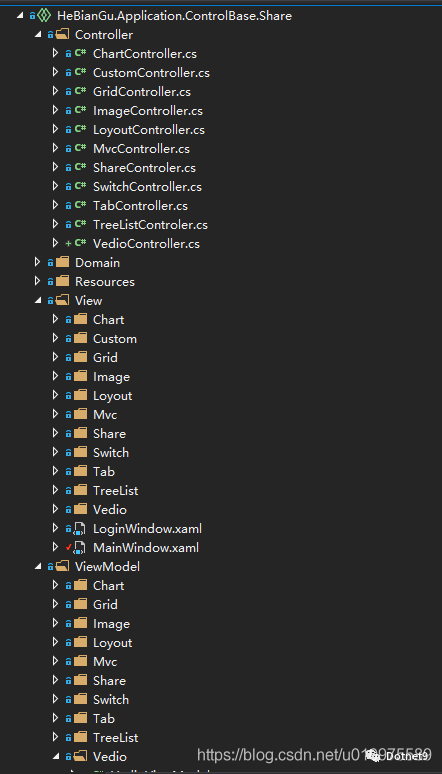
主要有三部分組成:Controller、View、ViewModel
其中View和ViewModel就是傳統(tǒng)WPF中的MVVM模式
不同地方在于頁面的跳轉(zhuǎn)應(yīng)用到了Controller做控制,如下示例Controller的定義
4.3 Controller的結(jié)構(gòu)和定義
4.3.1 定義LoyoutController
[Route("Loyout")]
class?LoyoutController?:?Controller
{

????public?LoyoutController(ShareViewModel?shareViewModel)?:?base(shareViewModel)
????{

????}

????public?async?Task?Center()
????{
????????return?View();
????}

????[Route("OverView/Button")]
????public?async?Task?Mdi()
????{
????????return?View();
????}

????public?async?Task?Left()
????{
????????return?View();
????}

????public?async?Task?Right()
????{
????????return?View();
????}

????public?async?Task?Top()
????{
????????return?View();
????}

????public?async?Task?Bottom()
????{
????????return?View();
????}

????[Route("OverView/Toggle")]
????public?async?Task?Toggle()
????{
????????return?View();
????}

????[Route("OverView/Carouse")]
????public?async?Task?Carouse()
????{
????????return?View();
????}

????[Route("OverView/Evaluate")]
????public?async?Task?Evaluate()
????{
????????return?View();
????}

????[Route("OverView/Expander")]
????public?async?Task?Expander()
????{
????????return?View();
????}

????[Route("OverView/Gif")]
????public?async?Task?Gif()
????{
????????return?View();
????}

????[Route("OverView/Message")]
????public?async?Task?Message()
????{
????????return?View();
????}

????[Route("OverView/Upgrade")]
????public?async?Task?Upgrade()
????{
????????return?View();
????}

????[Route("OverView/Property")]
????public?async?Task?Property()
????{
????????return?View();
????}

????[Route("OverView/ProgressBar")]
????public?async?Task?ProgressBar()
????{
????????return?View();
????}

????[Route("OverView/Slider")]
????public?async?Task?Slider()
????{
????????return?View();
????}

????[Route("OverView/Tab")]
????public?async?Task?Tab()
????{
????????return?View();
????}

????[Route("OverView/Tree")]
????public?async?Task?Tree()
????{
????????return?View();
????}

????[Route("OverView/Observable")]
????public?async?Task?Observable()
????{
????????return?View();
????}

????[Route("OverView/Brush")]
????public?async?Task?Brush()
????{
????????return?View();
????}

????[Route("OverView/Shadow")]
????public?async?Task?Shadow()
????{
????????return?View();
????}

????[Route("OverView/Button")]
????public?async?Task?Button()
????{
????????await?MessageService.ShowWaittingMessge(()?=>?Thread.Sleep(500));

????????this.ViewModel.ButtonContentText?=?DateTime.Now.ToString();

????????return?View();

????}


????[Route("OverView/Grid")]
????public?async?Task?Grid()
????{
????????return?View();
????}

????[Route("OverView/Combobox")]
????public?async?Task?Combobox()
????{
????????return?View();
????}

????[Route("OverView")]
????public?async?Task?OverView()
????{
????????await?MessageService.ShowWaittingMessge(()?=>?Thread.Sleep(500));

????????MessageService.ShowSnackMessageWithNotice("OverView");

????????return?View();
????}

????[Route("OverView/TextBox")]
????public?async?Task?TextBox()
????{
????????return?View();
????}

????[Route("OverView/Book")]
????public?async?Task?Book()
????{
????????return?View();
????}

????[Route("OverView/Xaml")]
????public?async?Task?Xaml()
????{
????????return?View();
????}

????[Route("OverView/Dimension")]
????public?async?Task?Dimension()
????{
????????return?View();
????}

????[Route("OverView/Geometry")]
????public?async?Task?Geometry()
????{
????????return?View();
????}

????[Route("OverView/Panel")]
????public?async?Task?Panel()
????{
????????return?View();
????}
????[Route("OverView/Transform3D")]
????public?async?Task?Transform3D()
????{
????????return?View();
????}

????[Route("OverView/Drawer")]
????public?async?Task?Drawer()
????{
????????return?View();
????}
}
4.3.2 前端的頁面
如下,其中紅色部分對應(yīng)Controller里面的要跳轉(zhuǎn)的Route
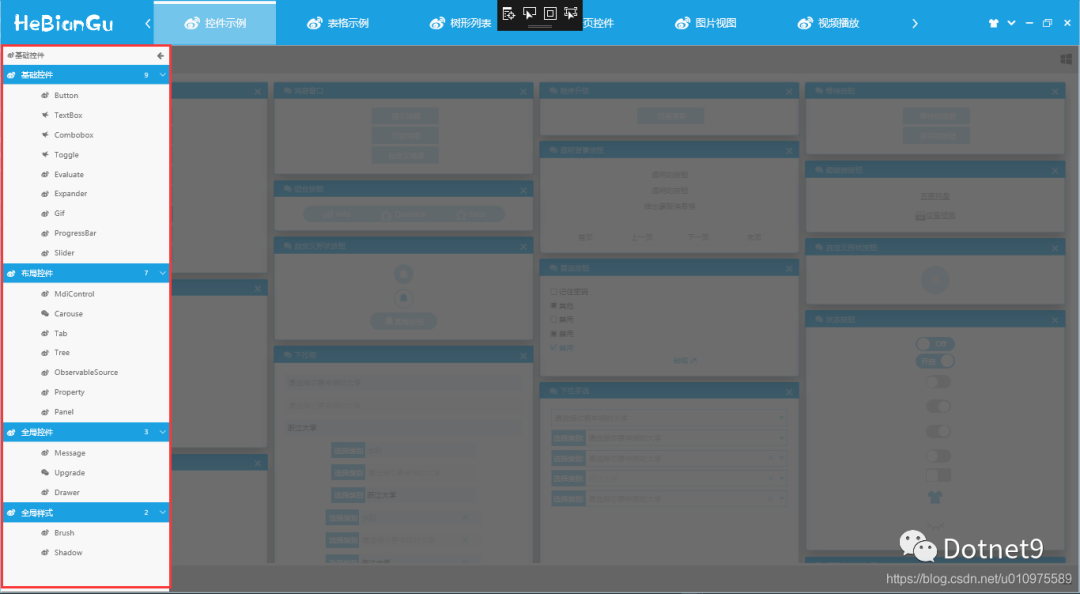
如:選擇了紅色部分的Button,首先會調(diào)用Button()方法,跳轉(zhuǎn)到當前Controller對應(yīng)的View文件加下的ButtonControl.xaml頁面
[Route("OverView/Button")]
public?async?Task?Button()
{
????await?MessageService.ShowWaittingMessge(()?=>?Thread.Sleep(500);

????this.ViewModel.ButtonContentText?=?DateTime.Now.ToString();

????return?View();

}
可以在Button()方法中,寫一些業(yè)務(wù)邏輯,如對當前ViewModel的增刪改查等常規(guī)操作,其中當前Controller成員ViewModel是內(nèi)部封裝好的ViewModel,對應(yīng)ViewModel文件下面的當前Controller的ViewModel
4.3.3 示例
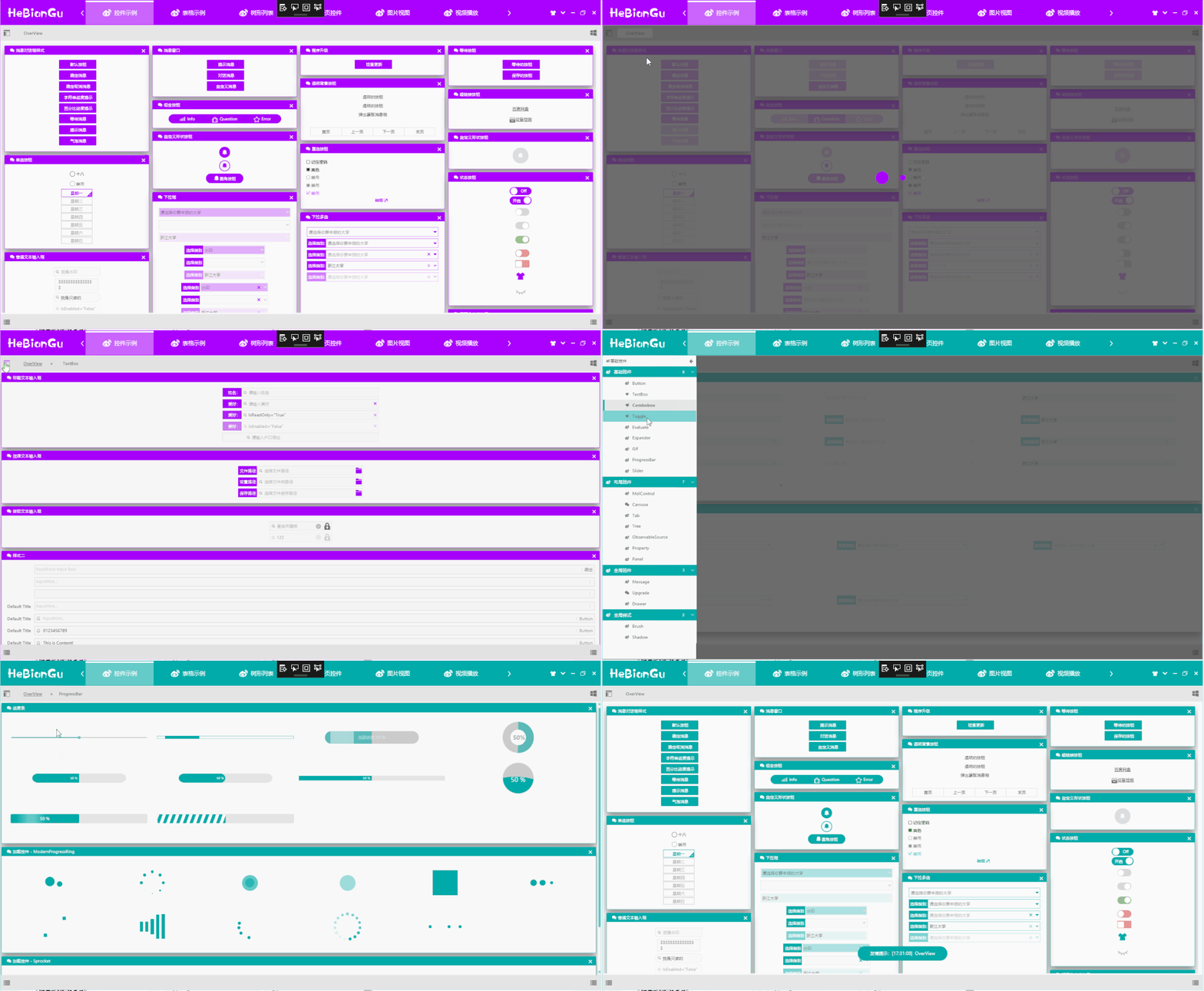
4.3.4 左側(cè)的Xaml列表可以定義成如下形式
<Grid>
????<wpfcontrollib:LinkGroupExpander?ScrollViewer.HorizontalScrollBarVisibility="Disabled"?x:Name="selectloyout"?
??????????????????????????????????????SelectedLink="{Binding?SelectLink,Mode=TwoWay}"
??????????????????????????????????????Command="{x:Static?wpfcontrollib:DrawerHost.CloseDrawerCommand}"
??????????????????????????????????????CommandParameter="{x:Static?Dock.Left}">
????????<wpfcontrollib:LinkActionGroup?DisplayName="基礎(chǔ)控件"?Logo="">
????????????<wpfcontrollib:LinkActionGroup.Links>
????????????????<wpfcontrollib:LinkAction??DisplayName="Button"?Logo=""??Controller="Loyout"?Action="Button"?/>
????????????????<wpfcontrollib:LinkAction??DisplayName="TextBox"??Logo=""?Controller="Loyout"??Action="TextBox"/>
????????????????<wpfcontrollib:LinkAction??DisplayName="Combobox"??Logo=""?Controller="Loyout"?Action="Combobox"??/>
????????????????<wpfcontrollib:LinkAction??DisplayName="Toggle"??Logo=""?Controller="Loyout"?Action="Toggle"/>
????????????????<wpfcontrollib:LinkAction??DisplayName="Evaluate"?Logo=""?Controller="Loyout"?Action="Evaluate"/>
????????????????<wpfcontrollib:LinkAction??DisplayName="Expander"?Logo=""?Controller="Loyout"?Action="Expander"/>
????????????????<wpfcontrollib:LinkAction??DisplayName="Gif"?Logo=""?Controller="Loyout"?Action="Gif"/>
????????????????<wpfcontrollib:LinkAction??DisplayName="ProgressBar"?Logo=""?Controller="Loyout"?Action="ProgressBar"/>
????????????????<wpfcontrollib:LinkAction??DisplayName="Slider"?Logo=""?Controller="Loyout"?Action="Slider"/>
????????????wpfcontrollib:LinkActionGroup.Links>
????????wpfcontrollib:LinkActionGroup>
????????<wpfcontrollib:LinkActionGroup?DisplayName="布局控件"?Logo="">
????????????<wpfcontrollib:LinkActionGroup.Links>
????????????????<wpfcontrollib:LinkAction??DisplayName="MdiControl"?Logo=""?Controller="Loyout"?Action="Mdi"/>
????????????????<wpfcontrollib:LinkAction??DisplayName="Carouse"?Logo=""?Controller="Loyout"?Action="Carouse"/>
????????????????<wpfcontrollib:LinkAction??DisplayName="Tab"?Logo=""?Controller="Loyout"?Action="Tab"/>
????????????????<wpfcontrollib:LinkAction??DisplayName="Tree"?Logo=""?Controller="Loyout"?Action="Tree"/>
????????????????<wpfcontrollib:LinkAction??DisplayName="ObservableSource"?Logo=""?Controller="Loyout"?Action="Observable"/>
????????????????<wpfcontrollib:LinkAction??DisplayName="Property"?Logo=""?Controller="Loyout"?Action="Property"/>
????????????????<wpfcontrollib:LinkAction??DisplayName="Panel"?Logo=""?Controller="Loyout"?Action="Panel"/>?
????????????wpfcontrollib:LinkActionGroup.Links>
????????
????????wpfcontrollib:LinkActionGroup>
????????<wpfcontrollib:LinkActionGroup?DisplayName="全局控件"?Logo="">
????????????<wpfcontrollib:LinkActionGroup.Links>
????????????????<wpfcontrollib:LinkAction??DisplayName="Message"?Logo=""?Controller="Loyout"?Action="Message"/>
????????????????<wpfcontrollib:LinkAction??DisplayName="Upgrade"?Logo=""?Controller="Loyout"?Action="Upgrade"/>
????????????????<wpfcontrollib:LinkAction??DisplayName="Drawer"?Logo=""?Controller="Loyout"?Action="Drawer"/>?
????????????wpfcontrollib:LinkActionGroup.Links>
????????wpfcontrollib:LinkActionGroup>
????????<wpfcontrollib:LinkActionGroup?DisplayName="全局樣式"?Logo="">
????????????<wpfcontrollib:LinkActionGroup.Links>
????????????????<wpfcontrollib:LinkAction??DisplayName="Brush"?Logo=""?Controller="Loyout"?Action="Brush"/>
????????????????<wpfcontrollib:LinkAction??DisplayName="Shadow"?Logo=""?Controller="Loyout"?Action="Shadow"/>
????????????????
????????????wpfcontrollib:LinkActionGroup.Links>
????????wpfcontrollib:LinkActionGroup>
????wpfcontrollib:LinkGroupExpander>
Grid>
通過LinkGroupExpander控件,封裝LinkAction去實現(xiàn)頁面的跳轉(zhuǎn),其中只需要定義LinkAction的幾個屬性即可達到跳轉(zhuǎn)到指定頁面的效果,如:
Controller屬性:用來指示要跳轉(zhuǎn)到哪個Controller Action屬性:用來指示跳轉(zhuǎn)到哪個方法 DisplayName屬性:在UI中顯示的名稱 Logo屬性:在UI中顯示的圖標
如下,Controller中的Button()方法對應(yīng)的跳轉(zhuǎn)配置如下
[Route("OverView/Button")]
public?async?Task?Button()
<wpfcontrollib:LinkAction?DisplayName="Button"?Logo=""??Controller="Loyout"?Action="Button"?/>
4.3.5 Controller基類的定義ControllerBase
主要方法是IActionResult View([CallerMemberName] string name = ""),這個方法是MVC實現(xiàn)的核心功能,主要通過反射去動態(tài)加載程序集,加載項目結(jié)構(gòu)中的View、ViewModel去生成IActionResult返回給主頁面進行頁面跳轉(zhuǎn),代碼如下:
public?abstract?class?ControllerBase?:?IController
{
????protected?virtual?IActionResult?View([CallerMemberName]?string?name?=?"")
????{
????????var?route?=?this.GetType().GetCustomAttributes(typeof(RouteAttribute),?true).Cast();

????????string?controlName?=?null;

????????if?(route.FirstOrDefault()?==?null)
????????{
????????????controlName?=?this.GetType().Name;
????????}
????????else
????????{
????????????controlName?=?route.FirstOrDefault().Name;
????????}

????????var?ass?=?Assembly.GetEntryAssembly().GetName();

????????string?path?=?$"/{ass.Name};component/View/{controlName}/{name}Control.xaml";

????????Uri?uri?=?new?Uri(path,?UriKind.RelativeOrAbsolute);

????????var?content?=?Application.Current.Dispatcher.Invoke(()?=>
????????{
????????????return?Application.LoadComponent(uri);
????????});

????????ActionResult?result?=?new?ActionResult();

????????result.Uri?=?uri;
????????result.View?=?content?as?ContentControl;

????????Type?type?=?Assembly.GetEntryAssembly().GetTypeOfMatch(l?=>?l.Name?==?controlName?+?"ViewModel");

????????result.ViewModel?=?ServiceRegistry.Instance.GetInstance(type);

????????Application.Current.Dispatcher.Invoke(()?=>
????????{
????????????(result.View?as?FrameworkElement).DataContext?=?result.ViewModel;

????????});

????????return?result;
????}


????protected?virtual?IActionResult?LinkAction([CallerMemberName]?string?name?=?"")
????{
????????var?route?=?this.GetType().GetCustomAttributes(typeof(RouteAttribute),?true).Cast();

????????string?controlName?=?null;

????????if?(route.FirstOrDefault()?==?null)
????????{
????????????controlName?=?this.GetType().Name;
????????}
????????else
????????{
????????????controlName?=?route.FirstOrDefault().Name;
????????}

????????var?ass?=?Assembly.GetEntryAssembly().GetName();

????????string?path?=?$"/{ass.Name};component/View/{controlName}/{name}Control.xaml";

????????Uri?uri?=?new?Uri(path,?UriKind.RelativeOrAbsolute);

????????var?content?=?Application.Current.Dispatcher.Invoke(()?=>
????????{
????????????return?Application.LoadComponent(uri);
????????});

????????ActionResult?result?=?new?ActionResult();

????????result.Uri?=?uri;
????????result.View?=?content;

????????Type?type?=?Assembly.GetEntryAssembly().GetTypeOfMatch(l?=>?l.Name?==?controlName?+?"ViewModel");

????????result.ViewModel?=?ServiceRegistry.Instance.GetInstance(type);

????????Application.Current.Dispatcher.Invoke(()?=>
????????{
????????????(result.View?as?FrameworkElement).DataContext?=?result.ViewModel;
????????});

????????return?result;
????}

}
說明:
通過Application.LoadComponent(uri);來加載生成Control 通過反射ViewModel基類NotifyPropertyChanged去找到對應(yīng)ViewModel,綁定到View中 將View和ViewModel封裝到IActionResult中返回給主頁面進行加載
其中Controller中的方法返回類型是async Task
4.4 View中的結(jié)構(gòu)和定義
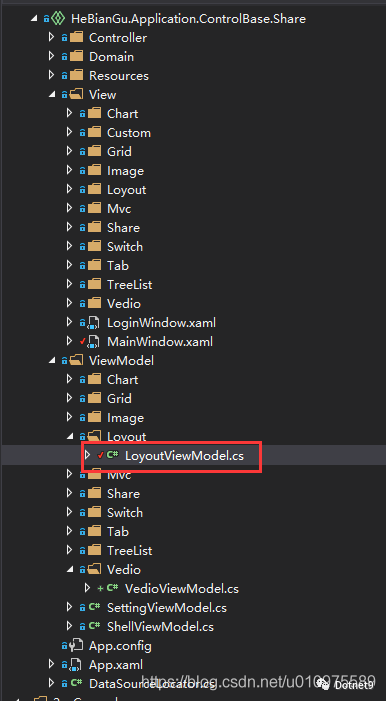
其中View在項目中的定義就是根據(jù)Controller中的方法對應(yīng),在MVC中要嚴格按照結(jié)構(gòu)定義[View/Loyout],好處是可以減少代碼量,同時使格式統(tǒng)一代碼整齊,結(jié)構(gòu)如下:
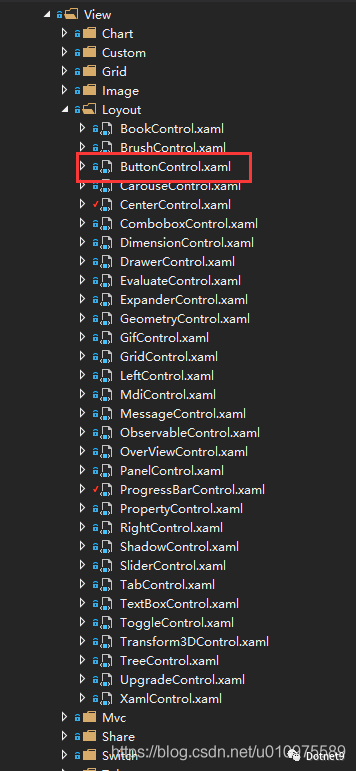
其中紅色ButtonControl.xaml即是Controller中Button()方法要跳轉(zhuǎn)的頁面,其他頁面同理
4.5 ViewModel的結(jié)構(gòu)和定義
其中LoyoutViewModel即是LoyoutController和整個View/Loyout下所有頁面對應(yīng)的ViewModel
4.6 整體MVC結(jié)構(gòu)實現(xiàn)的效果如下
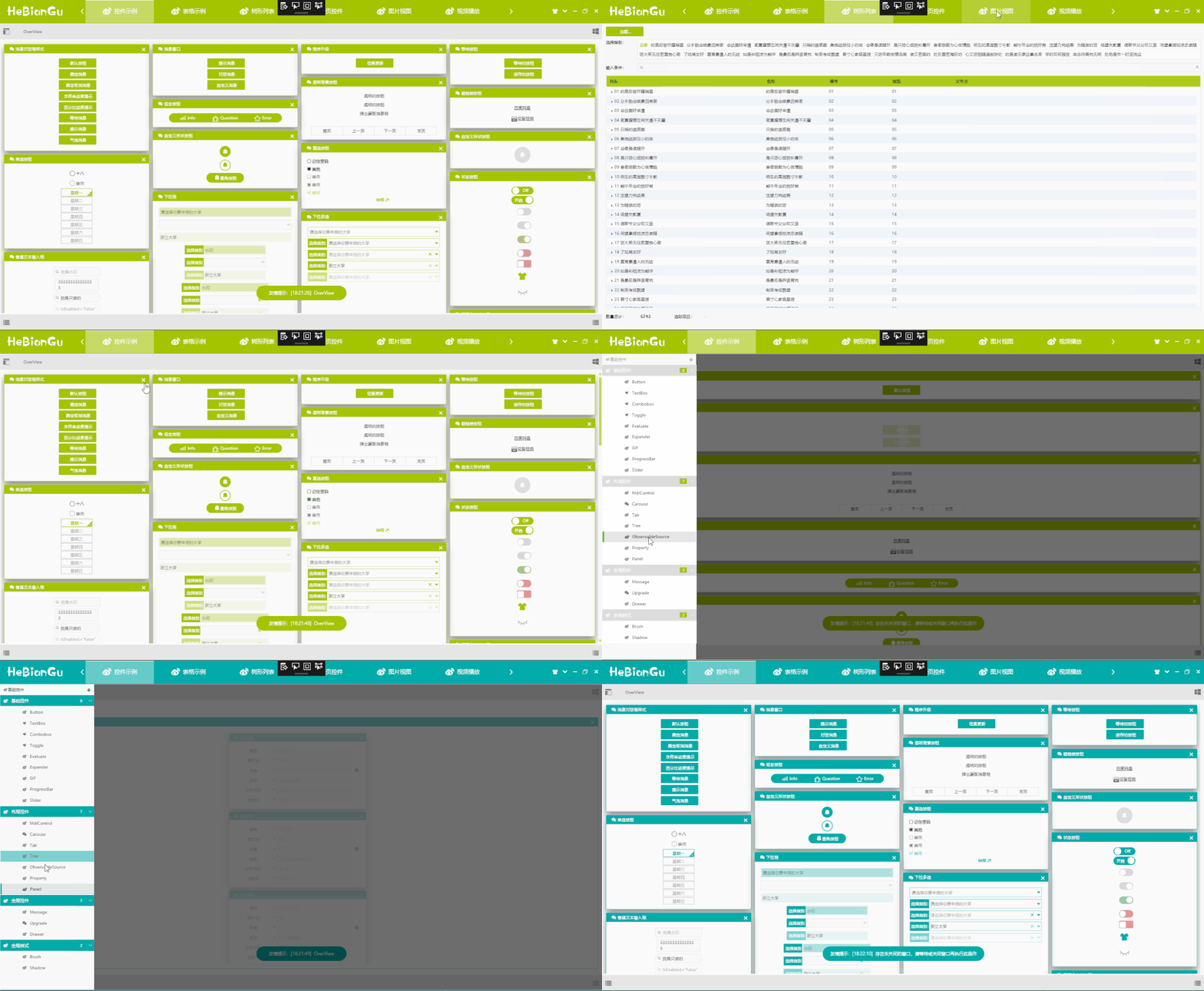
以上就是MVC應(yīng)用在WPF中的簡要示例,具體內(nèi)容和示例可從如下鏈接中下載代碼查看
代碼地址:https://github.com/HeBianGu/WPF-ControlBase.git
另一個應(yīng)用Sqlite數(shù)據(jù)庫的示例如下
代碼地址:https://github.com/HeBianGu/WPF-ExplorerManager.git
5. 其他功能說明
原文標題:示例:自定義WPF底層控件UI庫 HeBianGu.General.WpfControlLib V2.0版本
原文鏈接:https://blog.csdn.net/u010975589/article/details/103083605
5.1 目的
封裝了一些控件到自定義的控件庫中,方便快速開發(fā)
5.2 實現(xiàn)功能
基本實現(xiàn)常用基礎(chǔ)控件,滿足常規(guī)軟件快速開發(fā) 同時支持框架.Net Core 3.0 + ,.Net FrameWork 4.5+
5.3 整體概況
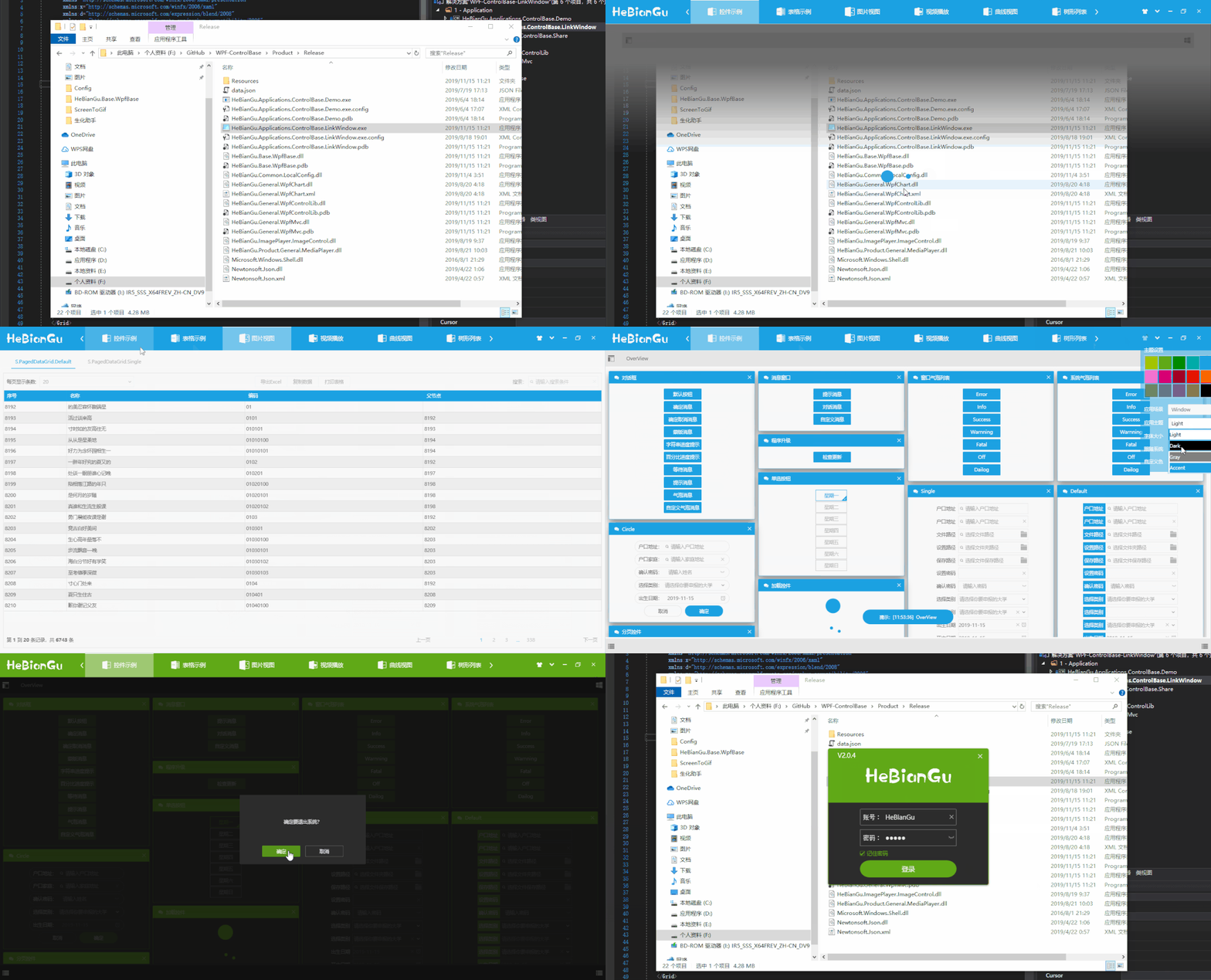
5.3.1 登錄頁面
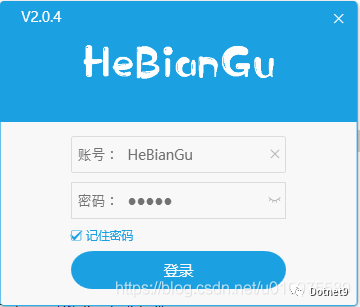
登錄頁面只需要繼承LoginWindowBase基類,并且設(shè)置樣式 Style="{StaticResource S.Window.Login.Default}"即可
5.3.2 主頁面
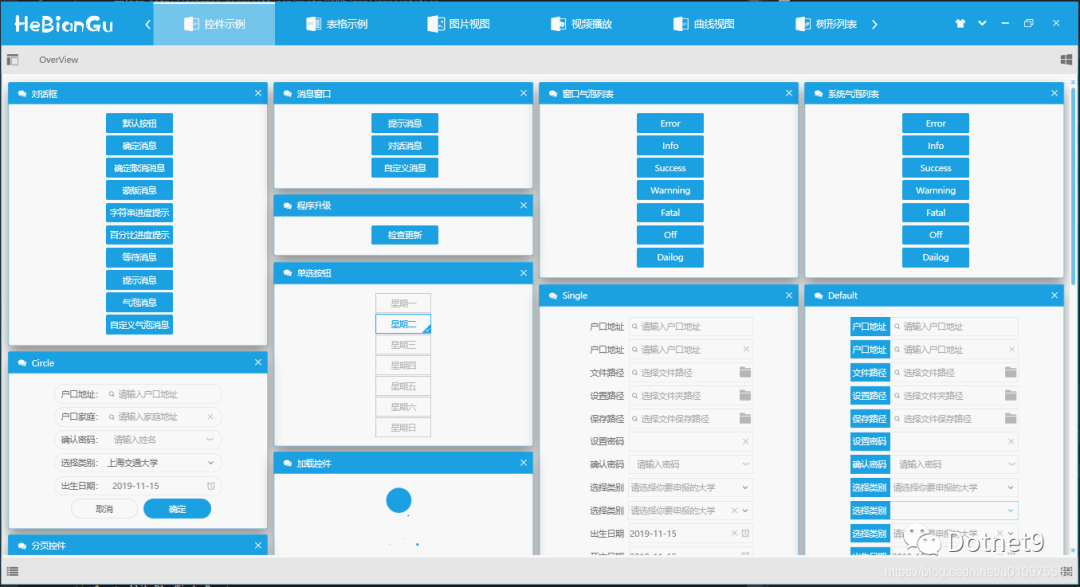
主頁面只需繼承LinkWindowBase基類,并且設(shè)置樣式Style="{DynamicResource S.Window.Link.Default}"即可
整體主窗口采用ViewBox方式加載,當縮放窗口或應(yīng)用到到其他分辨率設(shè)備都會兼容
5.3.3 主題配置信息保存
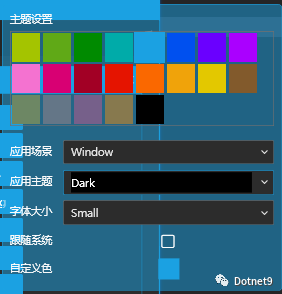
主題配置信息已經(jīng)封裝在ApplicationBase中,會自動在退出時保存設(shè)置好的配置信息(如:主題顏色、字體大小等)
總結(jié): 應(yīng)用此模式可以達到復(fù)用的目的,將通用部分封裝到底層,如需修改樣式只需修改Style樣式文件或修改依賴屬性即可滿足功能修改
5.4 主題設(shè)置

淺色主題示例如下:
深色主題示例如下圖:
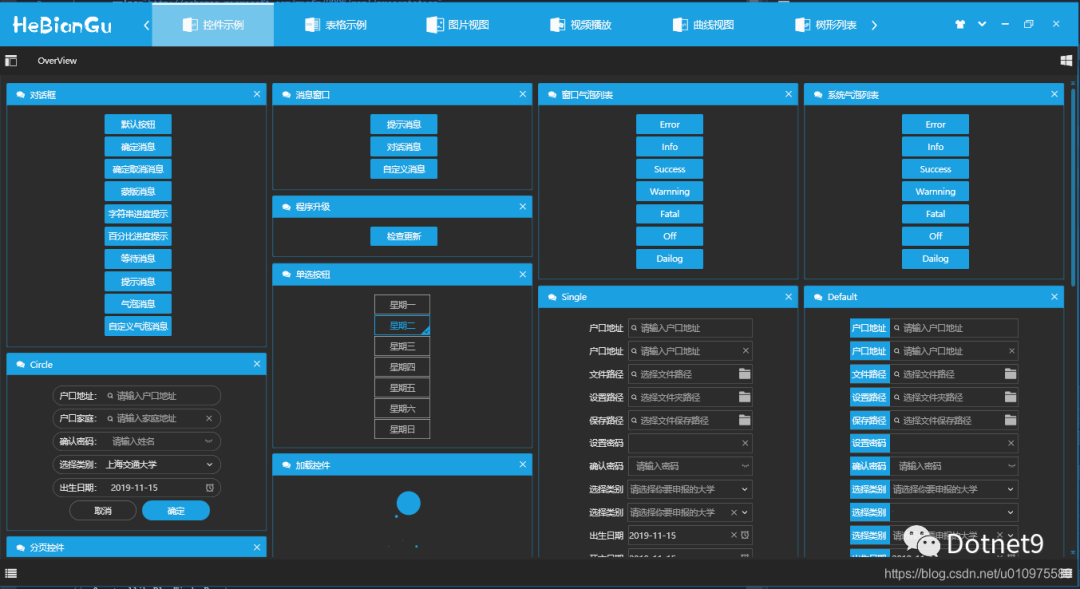
主題設(shè)置功能主要包括:
設(shè)置主題主顏色
主題顏色主要用來標識要突出顯示的部分,目前可以選擇內(nèi)置顏色、可以選擇跟隨系統(tǒng)主題顏色、可以自定義選擇顏色、可以使用動態(tài)主題(即設(shè)置主題每隔指定時間自動變化)
設(shè)置主題
主題目前實現(xiàn)四中主題,分別是淺色主題、深色主題、灰色主題、主顏色為主題
設(shè)置字體大小
字體大小目前內(nèi)置兩種,分別是Large和Small,其中這兩種顏色采用注入的方式加載,即可以在程序加載時設(shè)置著兩種字體的初始值
其他配置
包括中英文、設(shè)置標準行高等等可以在程序加載時進行初始化設(shè)置,這里不做過多介紹
**總結(jié):**這樣設(shè)計的目的是審美因人而異,使用自定義配置的方式可以盡可能多的滿足多變的需求
5.5 其他基礎(chǔ)控件
5.5.1 數(shù)據(jù)表格
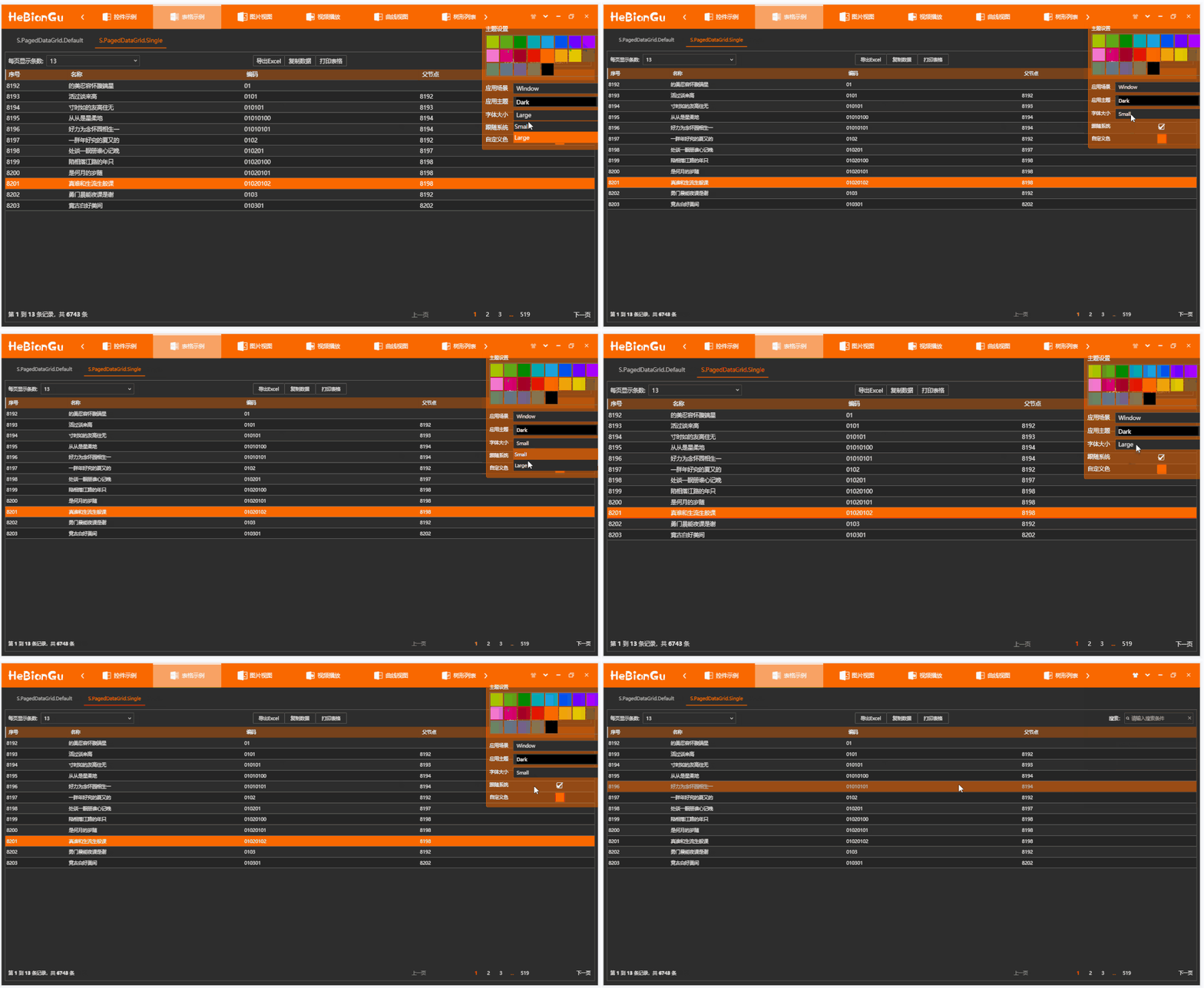
a 兼容主題字體和主題設(shè)置,后面將要提到的所有控件均已應(yīng)用主題設(shè)置,不做再說明 b 每頁顯示條數(shù)
可以設(shè)置每頁要顯示的條數(shù)
c 搜索
可以設(shè)置搜索過濾條件,包含指定搜索項的條目才會顯示
d 頁面跳轉(zhuǎn)
可以上一頁、下一頁、第一頁、最后一頁、指定頁
e 頁面信息
當前頁屬于數(shù)據(jù)源的第幾條至第幾條,數(shù)據(jù)源的總條目數(shù)
f 兩種風格的網(wǎng)格頁面
**總結(jié):**以上功能封裝在控件PagedDataGrid中,只需綁定數(shù)據(jù)源即可實現(xiàn)以上功能,其中打印、導出等功能暫時沒有實現(xiàn)
5.5.2 樹形列表
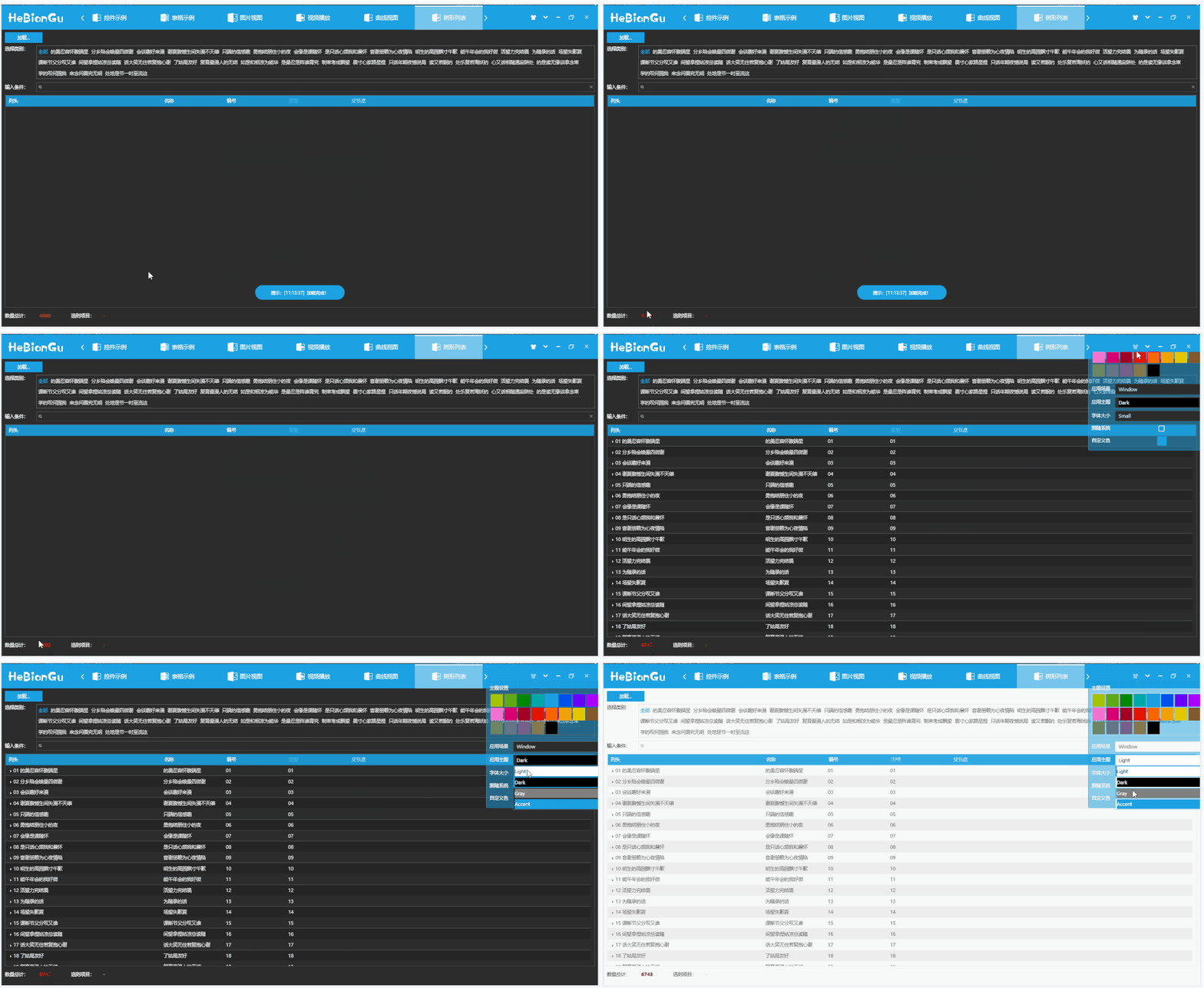
a 支持按類別篩選
如上圖、選擇指定類型來過濾列表
b 支持按條件搜索
如上圖、輸入條件可以過濾指定條件
**總結(jié):**使用方式為綁定數(shù)據(jù)源到TreeListView控件中
5.5.3 其他常用控件
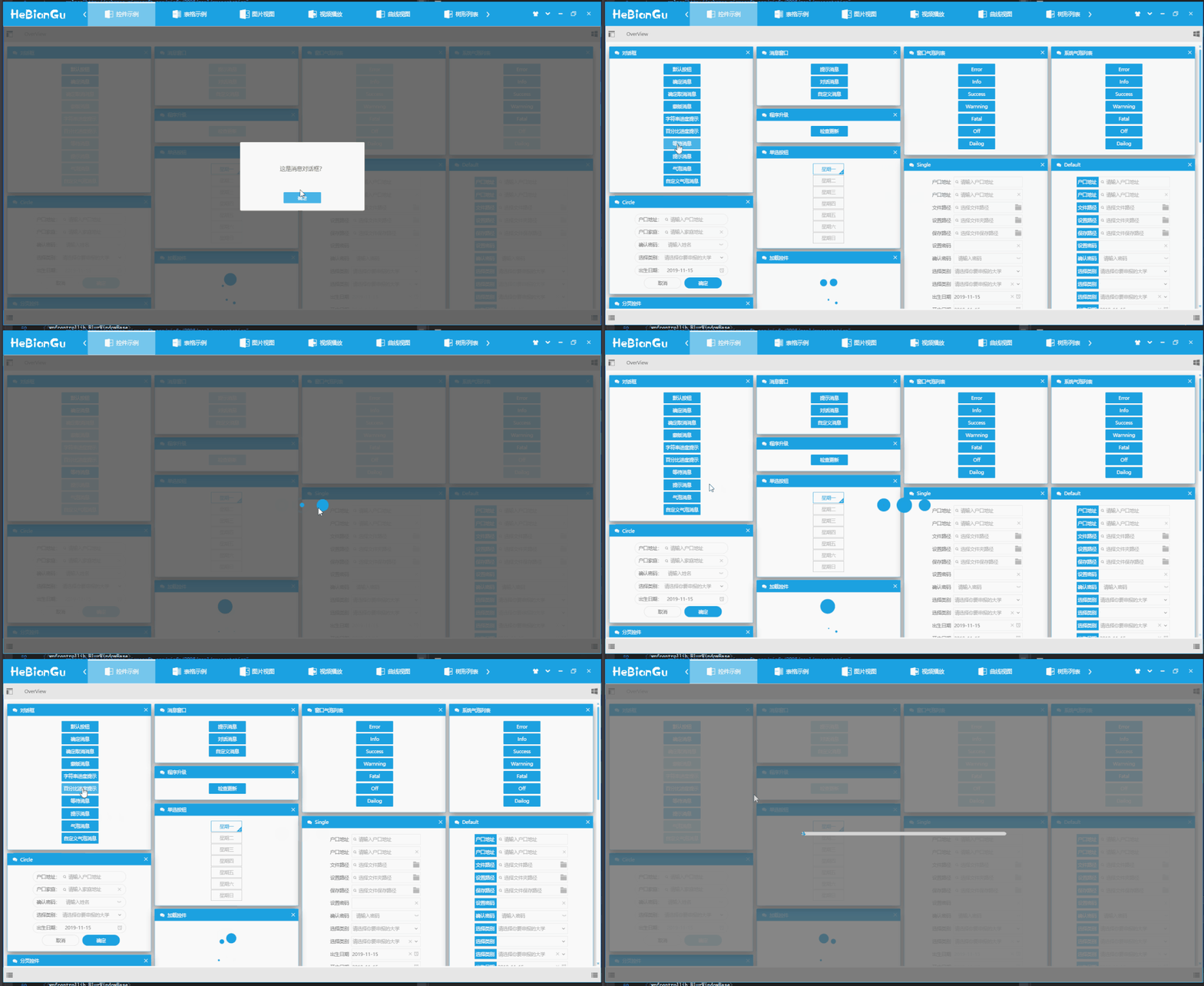

a 對話框
采用內(nèi)置對話框,不是應(yīng)用窗口,只是覆蓋層,可以避免窗口對話框引起的一些問題
b 對話窗口自定義對話窗口
相對系統(tǒng)對話窗口更美觀,增加顯示和隱藏效果,通過注入的方式可以自定義按鈕個數(shù)和功能
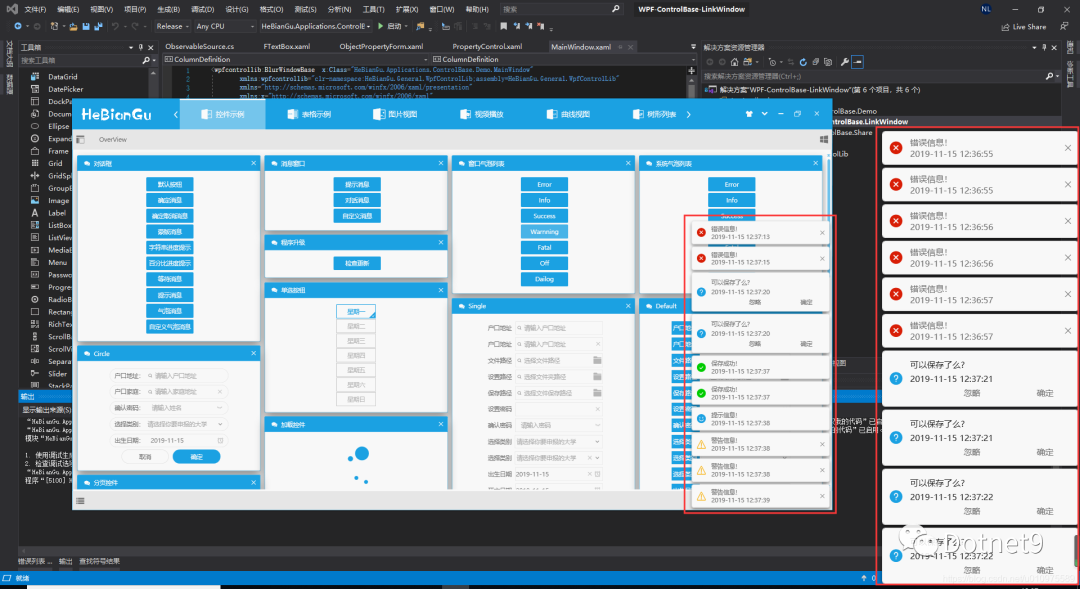
c消息列表
目前有兩種模式,分別是在窗口內(nèi)顯示和Window系統(tǒng)中顯示,可以根據(jù)需求自定義顯示方式,示例如下
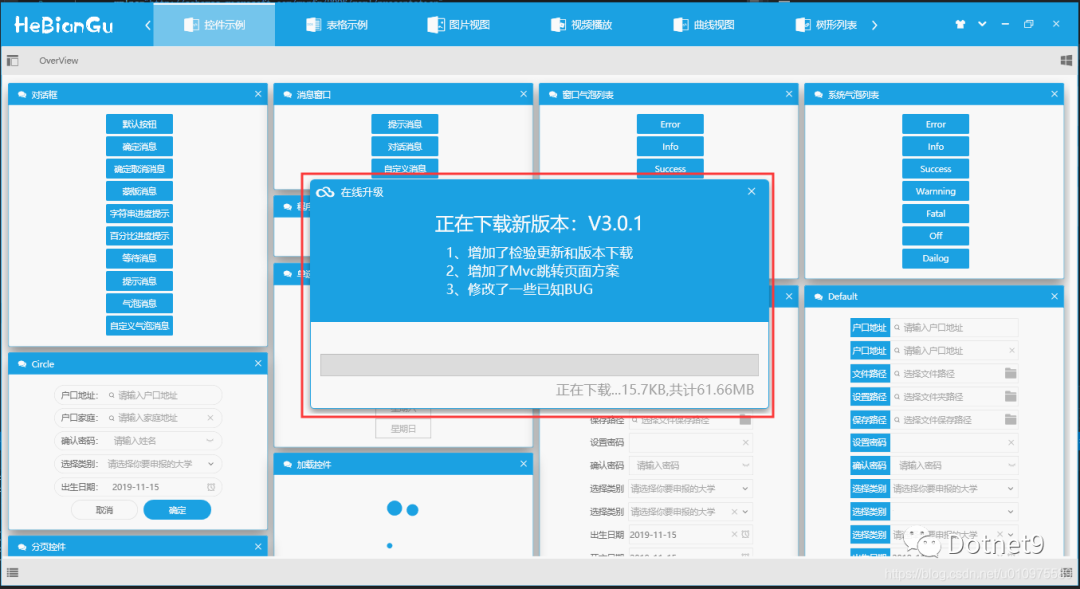
d 在線升級示例如下
e 導航菜單示例如下
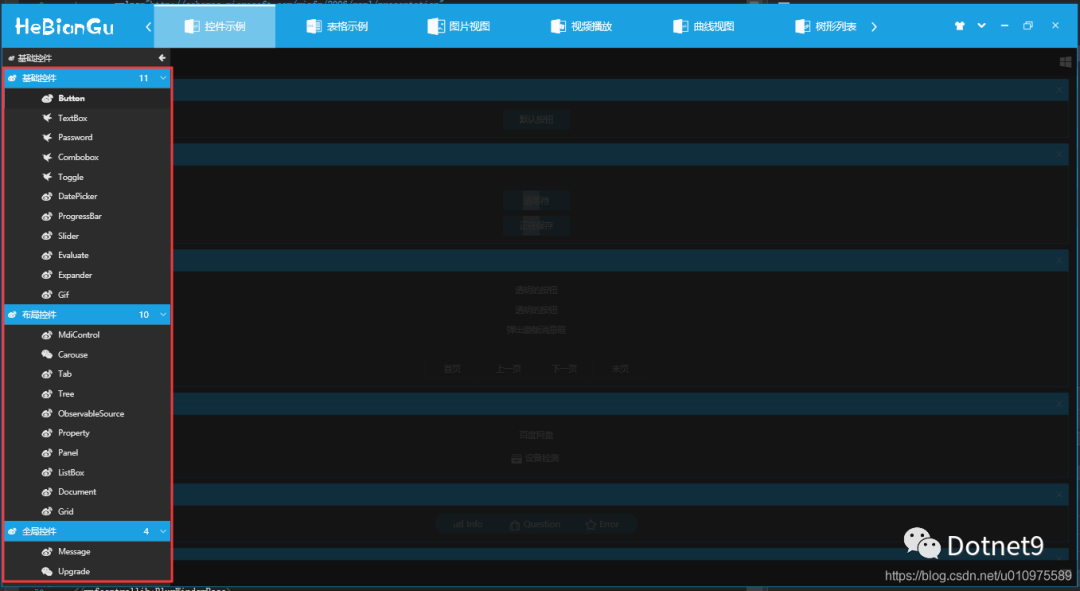
f 其他功能包括
按鈕控件、文本輸入框控件、下拉列表控件、數(shù)字控件、日期選擇控件、支持綁定的密碼框控件、進度條控件、拖動控件、樹形控件、分頁控件以及其他自定義控件。
以上控件均已實現(xiàn)主題顏色、字體大小切換等,可以滿足常用軟件的功能
其中整體結(jié)構(gòu)使用的自定義Mvc方式加載,參考地址:https://blog.csdn.net/u010975589/article/details/100019431
由于控件過多不做詳細介紹,有興趣的可以下載源碼或加載nuget包
5.6 使用方式
nuget包添加如下圖
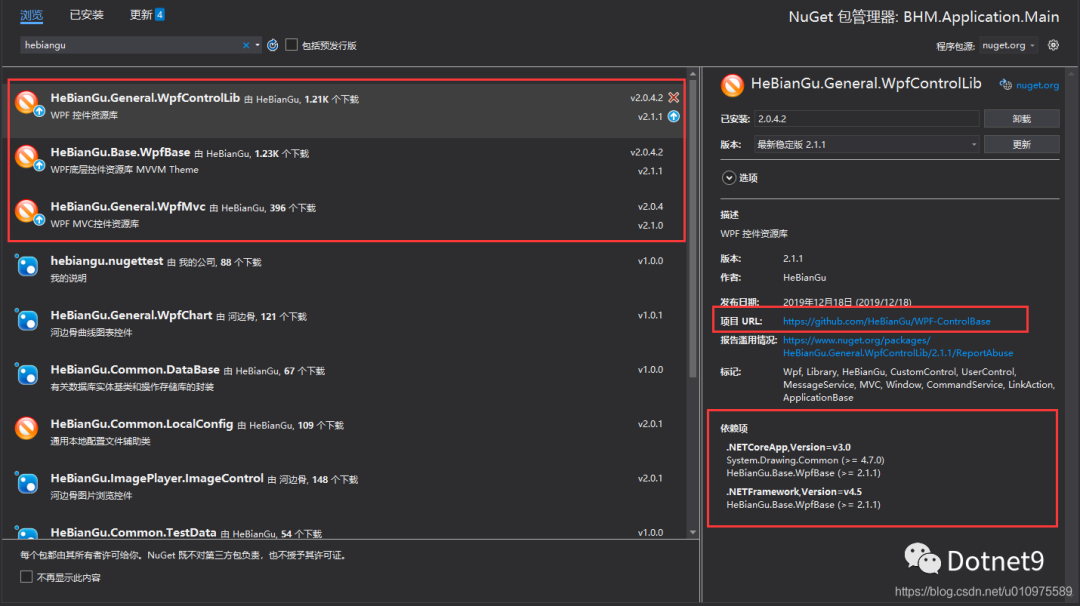
說明:此示例部分功能部分代碼參考第三方框架,開源只應(yīng)用于學習和參考,不做商用目的。
應(yīng)用此框架的其他示例:
示例:應(yīng)用WPF開發(fā)的仿制GitHub客戶端UI布局_HeBianGu的博客-CSDN博客 示例:應(yīng)用WPF開發(fā)的仿制百度網(wǎng)盤客戶端UI布局_HeBianGu的博客-CSDN博客_wpf 網(wǎng)盤 示例:應(yīng)用WPF繪制輕量Chart圖表之組合圖效果預(yù)覽_HeBianGu的博客-CSDN博客 封裝:WPF基于Vlc.DotNet.Wpf封裝的視頻播放器_HeBianGu的博客-CSDN博客 示例:WPF開發(fā)的Image圖片控件,支持鳥撖圖、滾輪放大、放大鏡、圈定范圍以及圈定范圍放大等(示例一)_HeBianGu的博客-CSDN博客
5.7 下載地址
GitHub下載地址:GitHub - HeBianGu/WPF-ControlBase: Wpf封裝的自定義控件資源庫
安裝包示例下載地址:
鏈接:https://pan.baidu.com/s/1y2UfDKIxoSOffj36gl7fOw 提取碼:l2ia
更新:2019.12.16 ?增加.Net Core 3.0
目前已支持Core3.0 和.net 4.5 如有解決方案程序集無法加載請安裝這兩個框架