
5分鐘學會Flutter開發(fā)
????關注后回復 “進群” ,拉你進程序員交流群????

一、環(huán)境配置:
1.1 下載Flutter SDK
git clone https://github.com/flutter/flutter.git
1.2 配置環(huán)境變量
# FLUTTER_HOME為下載的Flutter文件夾路徑export FLUTTER_HOME=/Users/.../flutterexport PATH=$PATH:$FLUTTER_HOME/binexport PATH=$PATH:$FLUTTER_HOME/bin/cache/dart-sdk/bin
1.3 刷新環(huán)境變量
source ~/.bash_profilesource ~/.zshrc(如安裝zsh插件)
1.4 開發(fā)工具
1. Xcode + Android Studio(推薦) 2. Visual Studio Code
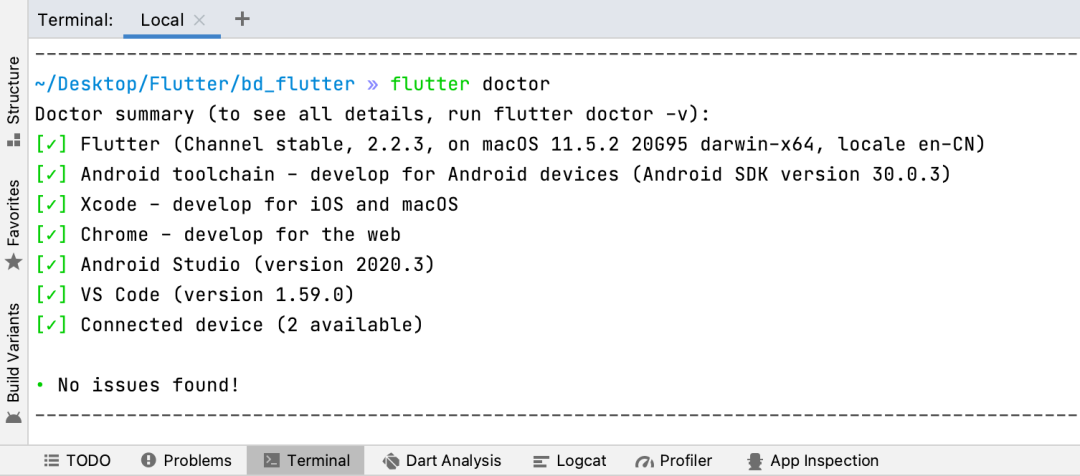
cd /Applications/Android\ Studio.app/Contents/jreln -s ../jre jdkln -s "/Library/Internet Plug-Ins/JavaAppletPlugin.plugin" jdkflutter doctor
二、工程創(chuàng)建
2.1 創(chuàng)建Flutter項目
flutter create xxx
2.2 創(chuàng)建Flutter模塊(用于原生集成Flutter)
create --template module xxx
2.3 工程結構
bd_flutter .dart_tool.............記錄依賴庫信息 .idea..................當前項目配置 android................Android工程目錄 iOS....................iOS工程目錄 lib....................Flutter代碼目錄 test...................單元測試目錄 web....................Web工程目錄 pubspec.yaml...........Pub第三方依賴配置文件,類似Cocoapods、Gradle
三、編程范式
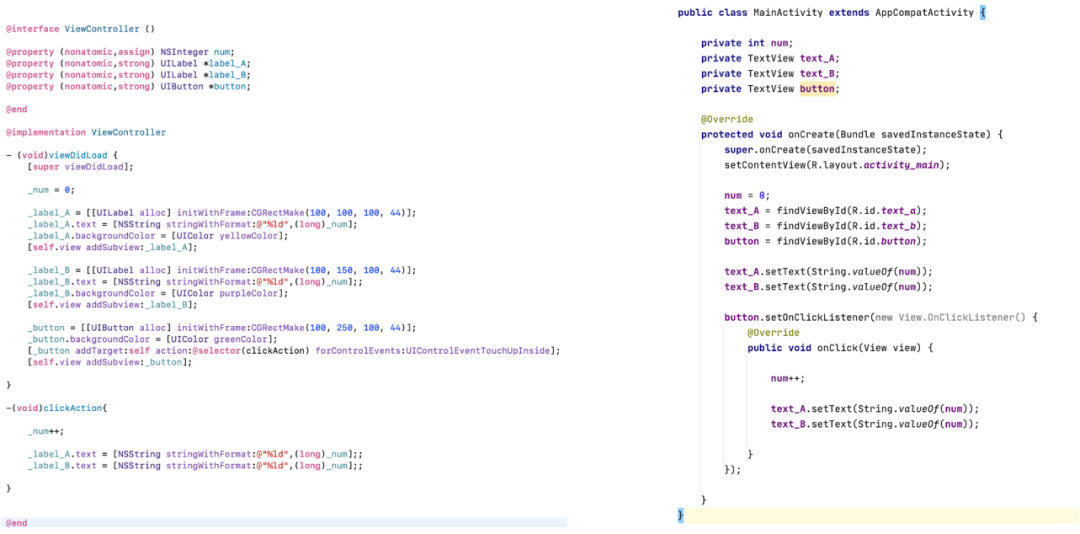
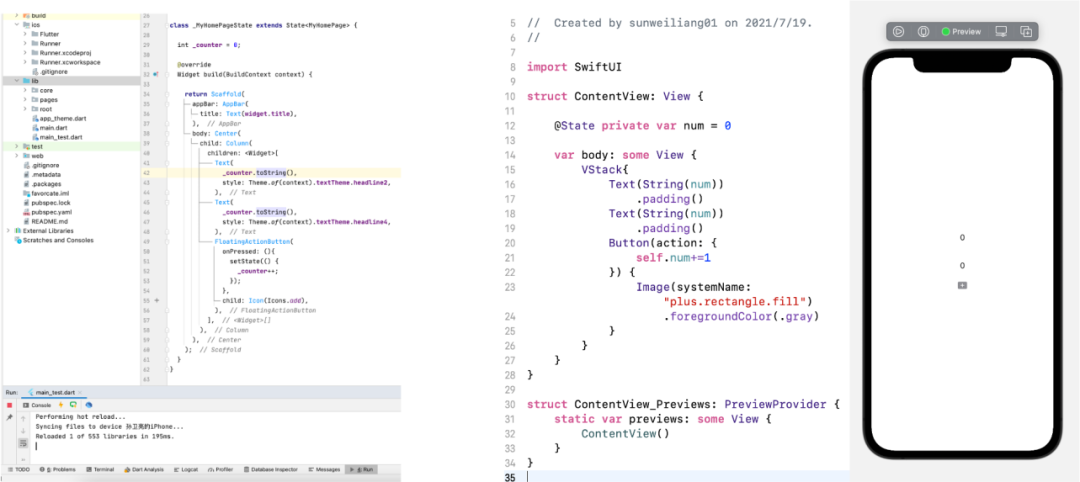
3.1 命令式編程
3.2 聲明式編程
3.3 我們舉一個栗子,來幫我我們理解這兩者的區(qū)別

四、基礎架構
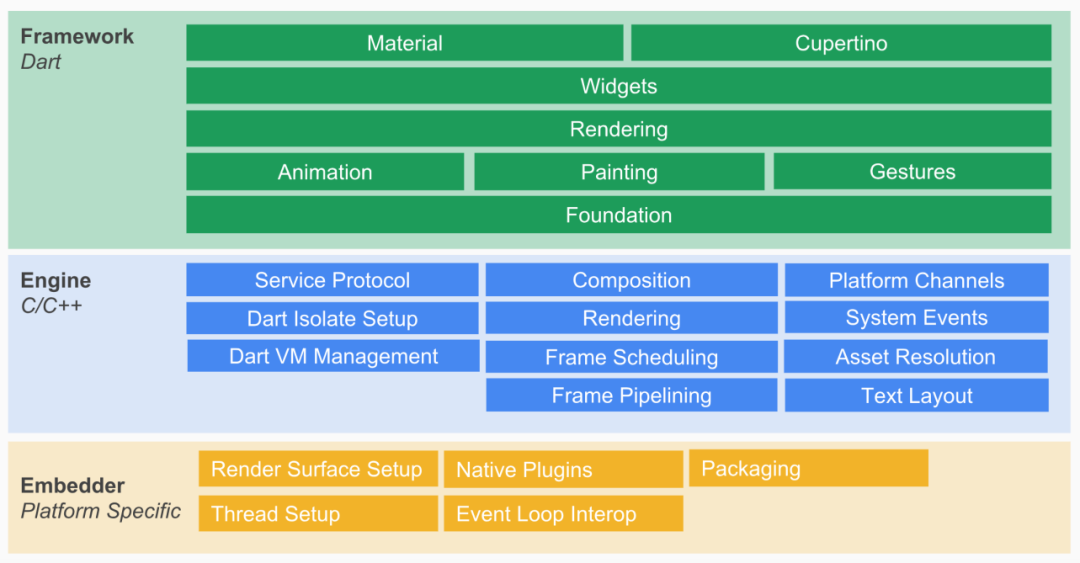
4.1 Embedder
4.2 Engine
4.3 Framework
五、視圖渲染
5.1 Widget
5.2 渲染過程
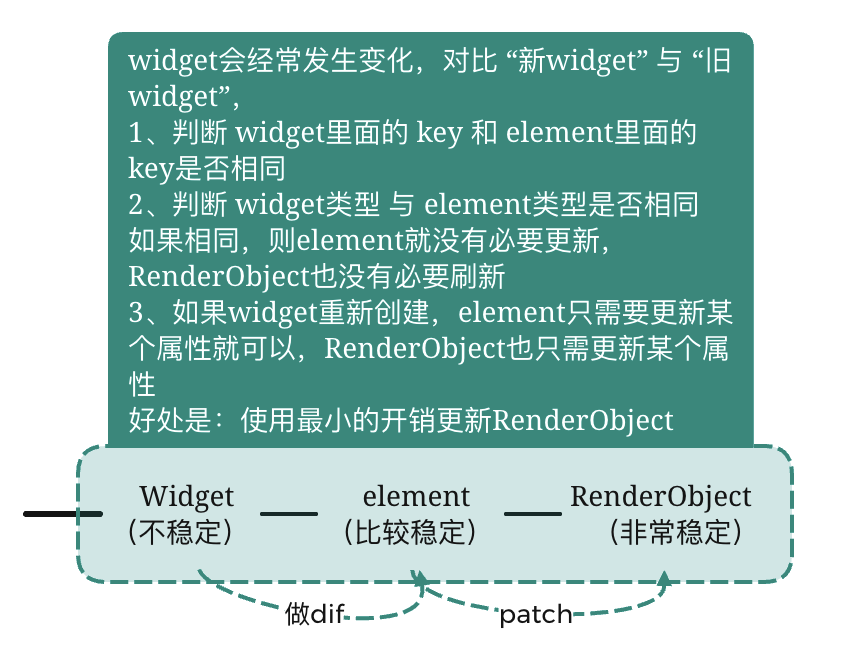
     //Text -> StatelessWidget -> Widget
class Text extends StatelessWidget {}abstract class StatelessWidget extends Widget {StatelessElement createElement() => StatelessElement(this);}abstract class Widget extends DiagnosticableTree {Element createElement(); // 創(chuàng)建element抽象方法}
//Column -> Flex -> MultiChildRenderObjectWidget - > RenderObjectWidget -> Widgetclass Column extends Flex {}class Flex extends MultiChildRenderObjectWidget {// ?法實現(xiàn)RenderFlex createRenderObject(BuildContext context) {//返回RenderFlexreturn RenderFlex -> RenderBox -> RenderObject} }abstract class MultiChildRenderObjectWidget extends RenderObjectWidget {}abstract class RenderObjectWidget extends Widget {RenderObjectElement createElement();RenderObject createRenderObject(BuildContext context); // 抽象?法-創(chuàng)建RenderObjectvoid updateRenderObject(BuildContext context, covariant RenderObject renderObject) {}void didUnmountRenderObject(covariant RenderObject renderObject) { }}abstract class Widget extends DiagnosticableTree {Element createElement(); // 抽象?法-創(chuàng)建element}class RenderFlex extends RenderBox with ContainerRenderObjectMixin<RenderBox,FlexParentData>, RenderBoxContainerDefaultsMixin<RenderBox,FlexParentData>, DebugOverflowIndicatorMixin {}abstract class RenderBox extends RenderObject {}
六、混合開發(fā)
6.1 Flutter調(diào)用原生方法
/*Flutter代碼*/static const platform = const MethodChannel("leo.com/getudid");void getUDID() async {final result = await platform.invokeMethod("nativeGetUDID"); // 要調(diào)?的?法// final result = await platform.invokeMethod("nativeGetUDID",["flutter參數(shù)"]);setState(() {_udid = result; });}
/*iOS代碼*/// 1.獲取FlutterViewControllerlet controller: FlutterViewController = window.rootViewController as!FlutterViewController;// 2.創(chuàng)建FlutterMethodChannel,跟controller?進制消息通信let channel = FlutterMethodChannel(name: "leo.com/getudid", binaryMessenger:controller.binaryMessenger);// 3.監(jiān)聽channel調(diào)??法,當flutter調(diào)?nativeGetUDID的時候調(diào)?channel.setMethodCallHandler { (call: FlutterMethodCall, result: @escapingFlutterResult) in// 1.判斷當前是否是nativeGetUDIDguard call.method == "nativeGetUDID" else {result(FlutterMethodNotImplemented); // 報?個沒有?法的錯誤return; }call.arguments; //傳遞過來的參數(shù)// 2.獲取UDIDlet udid = "xxxx-xxxx-xxxx-xxxx"result(udid) //回調(diào)值}
/*Android代碼*/private val CHANNEL = "leo.com/getudid"override fun configureFlutterEngine(@NonNull flutterEngine: FlutterEngine) {GeneratedPluginRegistrant.registerWith(flutterEngine);// 1.創(chuàng)建MethodChannel對象val methodChannel = MethodChannel(flutterEngine.dartExecutor.binaryMessenger,CHANNEL)// 2.添加調(diào)??法的回調(diào)methodChannel.setMethodCallHandler {// Note: this method is invoked on the main thread.call, result ->// 2.1.如果調(diào)?的?法是nativeGetUDID,那么正常執(zhí)?if (call.method == "nativeGetUDID") {// 2.1.1.調(diào)?另外?個?定義?法回去電量信息val udid = "xxxx-xxxx-xxxx-xxxx";result.success(udid) } else {//?法找不到,回調(diào)notImplementedresult.notImplemented() } }}
create --template module native_add_flutter
// CocoaPods集成flutter_application_path = '../native_add_flutter'load File.join(flutter_application_path, '.ios', 'Flutter', 'podhelper.rb’)
// 初始化Flutter引擎 , 為引擎起名為leolet flutterEngine:FlutterEngine = FlutterEngine(name: "leo");// 啟動flutter引擎,默認函數(shù)??為mainflutterEngine.run();let flutterVC = FlutterViewController(engine: engine, nibName: nil, bundle: nil);flutterVC.modalPresentationStyle = .fullScreen;self.present(flutterVC, animated: true, completion: nil);
// 在gradle進?配置// 創(chuàng)建Android項?、添加相關的依賴// 1、修改Android項?settings.gradlesetBinding(new Binding([gradle: this])) // newevaluate(new File( // newsettingsDir.parentFile, // new'native_add_flutter/.android/include_flutter.groovy' // new))include ':native_add_flutter'project(':native_add_flutter').projectDir = new File('../native_add_flutter')// 2、配置Android項?的build.gradledependencies { ...implementation project(':flutter') //增加flutter依賴}// 3、AndroidManifest.xml配置<activity android:name="io.flutter.embedding.android.FlutterActivity"android:configChanges="orientation|keyboardHidden|keyboard|screenSize|locale|layoutDirection|fontScale|screenLayout|density|uiMode"android:hardwareAccelerated="true"android:windowSoftInputMode="adjustResize"/>
import io.flutter.embedding.android.FlutterActivity;public class MainActivity extends AppCompatActivity {@Overrideprotected void onCreate(Bundle savedInstanceState) {super.onCreate(savedInstanceState);startActivity(FlutterActivity.createDefaultIntent(this) ); }}
flutter create flutterdemo main.dart
// 導?類import 'package:flutter/material.dart';//??函數(shù),程序加載時調(diào)?void main() {runApp(MyApp()); //調(diào)?runApp?法,并初始化MyApp}class MyApp extends StatelessWidget {// This widget is the root of your application.@overrideWidget build(BuildContext context) { //初始化會調(diào)?build?法return MaterialApp( //Material為Google的?種UI?格,MaterialApp可為項?配置App標題、主題等title: 'Flutter Demo',theme: ThemeData(// This is the theme of your application.//// Try running your application with "flutter run". You'll see the// application has a blue toolbar. Then, without quitting the app, try// changing the primarySwatch below to Colors.green and then invoke// "hot reload" (press "r" in the console where you ran "flutter run",// or simply save your changes to "hot reload" in a Flutter IDE).// Notice that the counter didn't reset back to zero; the application// is not restarted.primarySwatch: Colors.blue, ),home: MyHomePage(title: 'Flutter Demo Home Page'), //設置主?為MyHomePage ); }}//由于點擊需要更改Text顯示,所以此處繼承StatefulWidgetclass MyHomePage extends StatefulWidget {MyHomePage({Key? key, required this.title}) : super(key: key);// This widget is the home page of your application. It is stateful, meaning// that it has a State object (defined below) that contains fields that affect// how it looks.// This class is the configuration for the state. It holds the values (in this// case the title) provided by the parent (in this case the App widget) and// used by the build method of the State. Fields in a Widget subclass are// always marked "final".final String title;@override_MyHomePageState createState() => _MyHomePageState();}class _MyHomePageState extends State<MyHomePage> {int _counter = 0;//下的按鈕的點擊事件void _incrementCounter() {// setState會標記需要刷新UIsetState(() {// This call to setState tells the Flutter framework that something has// changed in this State, which causes it to rerun the build method below// so that the display can reflect the updated values. If we changed// _counter without calling setState(), then the build method would not be// called again, and so nothing would appear to happen._counter++; //點擊按鈕時候,counter+1, 并?動更新UI顯示 }); }@overrideWidget build(BuildContext context) {// This method is rerun every time setState is called, for instance as done// by the _incrementCounter method above.//// The Flutter framework has been optimized to make rerunning build methods// fast, so that you can just rebuild anything that needs updating rather// than having to individually change instances of widgets.return Scaffold(appBar: AppBar( //配置導航// Here we take the value from the MyHomePage object that was created by// the App.build method, and use it to set our appbar title.title: Text(widget.title), ),body: Center( //配置布局顯示在中?// Center is a layout widget. It takes a single child and positions it// in the middle of the parent.child: Column( //?種豎向布局?式,相當于listview// Column is also a layout widget. It takes a list of children and// arranges them vertically. By default, it sizes itself to fit its// children horizontally, and tries to be as tall as its parent.//// Invoke "debug painting" (press "p" in the console, choose the// "Toggle Debug Paint" action from the Flutter Inspector in Android// Studio, or the "Toggle Debug Paint" command in Visual Studio Code)// to see the wireframe for each widget.//// Column has various properties to control how it sizes itself and// how it positions its children. Here we use mainAxisAlignment to// center the children vertically; the main axis here is the vertical// axis because Columns are vertical (the cross axis would be// horizontal).mainAxisAlignment: MainAxisAlignment.center,children: <Widget>[ //返回多個widget數(shù)組,Text('You have pushed the button this many times:', ),Text( '$_counter',//顯示_counter的值style: Theme.of(context).textTheme.headline4,//顯示樣式,使?主題的headline4顯示 ), ], ), ),floatingActionButton: FloatingActionButton( //?個可點擊的按鈕,固定在右下?onPressed: _incrementCounter, //點擊事件tooltip: 'Increment',child: Icon(Icons.add), //按鈕顯示為內(nèi)部?帶的add圖? ), // This trailing comma makes auto-formatting nicer for build methods. ); }}
八、附:近期重要更新
支持java1.8
增加了JavaScript與Dart的通信通道
增加了對Android App Bundles的支持
通過減少調(diào)用構造函數(shù)和靜態(tài)方法,提升AOT(預編譯)10%-20%的性能
添加了集成測試
提高熱重載性能
決定刪除動態(tài)更新計劃
添加對Linux和Windows的Flutter運行支持
優(yōu)化Flutter tools支持
支持32位和64位Android bundles
開始支持web端和實驗性支持桌面端
桌面平臺實驗性支持
新增24種語言環(huán)境支持
支持macOS Catalina和iOS 13
Android增加對構建AAR的支持
支持Android 10
支持iOS13暗黑模式
可以將Flutter模塊集成到Android或iOS應用中
將Web支持從開發(fā)版轉變?yōu)閎eta版;將MacOS支持納入開發(fā)版本
推出新工具DartPad(DartPad 是一個可以讓你在任何現(xiàn)代化的瀏覽器中體驗 Dart 編程語言線上工具)
減少18.5%應用體積
提升了20%-37%導航性能
降低了40% iOS動畫CPU/GPU使用率
增加對谷歌字體的支持:fonts.google.com
完成對Type Scale部分的重構,符合 2018 Material 設計規(guī)范
提升了iOS 50%渲染速度(iPhone5s+、iOS10+支持Metal 渲染);不完全支持扔使用OpenGL渲染
增強了UTF-8解碼
pubspec.yaml插件不再支持舊格式
在Visual Studio Code中預覽嵌入式Dart DevTools
引入新的混編插件-Pigeon,可以在Dart方法中直接調(diào)用Java/Objective-C/Kotlin/Swift方法并傳遞非原始數(shù)據(jù)對象。
增加應用體積分析工具
提供了國際化和本地化工具,并實現(xiàn)了熱重載支持
支持Android 11;支持新的屏幕類型 (如挖孔屏和瀑布屏),以及同步Android 11動畫效果
支持iOS 14、Xcode 12新圖標以及對新iOS 14 App Clips功能的預覽支持;默認模板版本從8.0升級到9.0
可正式使用的 Google Maps 和 WebView 插件,將 Android 和 iOS 系統(tǒng)的原生界面組件托管在 Flutter 應用中
Web支持從測試版轉變?yōu)榉€(wěn)定版
除了HTML渲染,增加了CanvasKit渲染,桌面端瀏覽器會默認調(diào)用CanvasKit版本,移動端的瀏覽器會調(diào)用HTML版本。
混合開發(fā)多flutter實例(經(jīng)測試iOS平臺存在內(nèi)存問題)
桌面平臺的支持(beta)
Google Mobile Ads(Beta)
Dart 2.12 增加了空安全
更好的iOS、Android、Web跨平臺支持
Dart 2.13 更新,引入Type aliases
Flutter Web 提升穩(wěn)定性
優(yōu)化iOS端渲染動畫幀時間、實現(xiàn)了增量iOS安裝,縮短更新安裝時間。
Android中引入延遲組件,允許Flutter應用在運行時下載包含提前編譯的代碼模塊,減少初始安裝大小。
面試題】即可獲取
 好文分享給更多人↓↓
評論
圖片
表情