
Android使用LabelsView實(shí)現(xiàn)標(biāo)簽列表控件功能
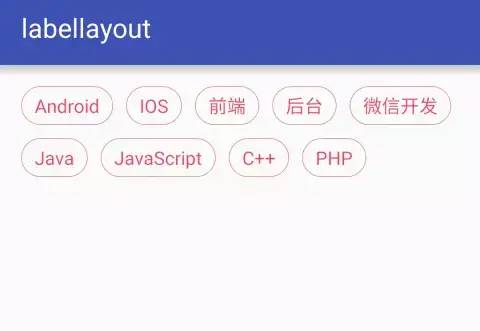
要實(shí)現(xiàn)這樣一個(gè)標(biāo)簽列表其實(shí)并不難,列表中的item可以直接用TextView來(lái)實(shí)現(xiàn),我們只需要關(guān)心列表控件的大小和標(biāo)簽的擺放就可以了。也就是說(shuō)我們需要做的只要兩件事:測(cè)量布局(onMeasure)和擺放標(biāo)簽(onLayout)。這是自定義ViewGroup的基本步驟,相信對(duì)自定義View有所了解的同學(xué)都不會(huì)陌生。下面我們就來(lái)看看具體的代碼實(shí)現(xiàn)。
控件的測(cè)量:
@Overrideprotected void onMeasure(int widthMeasureSpec, int heightMeasureSpec) {int count = getChildCount();int maxWidth = MeasureSpec.getSize(widthMeasureSpec) - getPaddingLeft() - getPaddingRight();int contentHeight = 0; //記錄內(nèi)容的高度int lineWidth = 0; //記錄行的寬度int maxLineWidth = 0; //記錄最寬的行寬int maxItemHeight = 0; //記錄一行中item高度最大的高度boolean begin = true; //是否是行的開(kāi)頭//循環(huán)測(cè)量item并計(jì)算控件的內(nèi)容寬高for (int i = 0; i < count; i++) {View view = getChildAt(i);measureChild(view, widthMeasureSpec, heightMeasureSpec);if(!begin) {lineWidth += mWordMargin;}else {begin = false;}//當(dāng)前行顯示不下item時(shí)換行。if (maxWidth <= lineWidth + view.getMeasuredWidth()) {contentHeight += mLineMargin;contentHeight += maxItemHeight;maxItemHeight = 0;maxLineWidth = Math.max(maxLineWidth, lineWidth);lineWidth = 0;begin = true;}maxItemHeight = Math.max(maxItemHeight, view.getMeasuredHeight());lineWidth += view.getMeasuredWidth();}contentHeight += maxItemHeight;maxLineWidth = Math.max(maxLineWidth, lineWidth);//測(cè)量控件的最終寬高setMeasuredDimension(measureWidth(widthMeasureSpec,maxLineWidth),measureHeight(heightMeasureSpec, contentHeight));}//測(cè)量控件的寬private int measureWidth(int measureSpec, int contentWidth) {int result = 0;int specMode = MeasureSpec.getMode(measureSpec);int specSize = MeasureSpec.getSize(measureSpec);if (specMode == MeasureSpec.EXACTLY) {result = specSize;} else {result = contentWidth + getPaddingLeft() + getPaddingRight();if (specMode == MeasureSpec.AT_MOST) {result = Math.min(result, specSize);}}//這一句是為了支持minWidth屬性。result = Math.max(result, getSuggestedMinimumWidth());return result;}//測(cè)量控件的高private int measureHeight(int measureSpec, int contentHeight) {int result = 0;int specMode = MeasureSpec.getMode(measureSpec);int specSize = MeasureSpec.getSize(measureSpec);if (specMode == MeasureSpec.EXACTLY) {result = specSize;} else {result = contentHeight + getPaddingTop() + getPaddingBottom();if (specMode == MeasureSpec.AT_MOST) {result = Math.min(result, specSize);}}//這一句是為了支持minHeight屬性。result = Math.max(result, getSuggestedMinimumHeight());return result;}
標(biāo)簽的擺放:
@Overrideprotected void onLayout(boolean changed, int left, int top, int right, int bottom) {int x = getPaddingLeft();int y = getPaddingTop();int contentWidth = right - left;int maxItemHeight = 0;int count = getChildCount();//循環(huán)擺放itemfor (int i = 0; i < count; i++) {View view = getChildAt(i);//當(dāng)前行顯示不下item時(shí)換行。if (contentWidth < x + view.getMeasuredWidth() + getPaddingRight()) {x = getPaddingLeft();y += mLineMargin;y += maxItemHeight;maxItemHeight = 0;}view.layout(x, y, x + view.getMeasuredWidth(), y + view.getMeasuredHeight());x += view.getMeasuredWidth();x += mWordMargin;maxItemHeight = Math.max(maxItemHeight, view.getMeasuredHeight());}}
以上是LabelsView的核心代碼,LabelsView除了實(shí)現(xiàn)了item的測(cè)量和擺放以外,還提供了一系列的方法讓使用者可以方便設(shè)置標(biāo)簽的樣式(包括標(biāo)簽被選中的樣式)和標(biāo)簽點(diǎn)擊、選中的監(jiān)聽(tīng)等。
1、引入依賴
在Project的build.gradle在添加以下代碼
allprojects {repositories {...maven { url 'https://jitpack.io' }}}
在Module的build.gradle在添加以下代碼
dependencies {compile 'com.github.donkingliang:LabelsView:1.4.1'}
2、編寫布局:
xmlns:app="http://schemas.android.com/apk/res-auto"android:id="@+id/labels"android:layout_width="match_parent"android:layout_height="wrap_content"app:labelBackground="@drawable/label_bg" //標(biāo)簽的背景app:labelTextColor="@drawable/label_text_color" //標(biāo)簽的字體顏色 可以是一個(gè)顏色值app:labelTextSize="14sp" //標(biāo)簽的字體大小app:labelTextPaddingBottom="5dp" //標(biāo)簽的上下左右邊距app:labelTextPaddingLeft="10dp"app:labelTextPaddingRight="10dp"app:labelTextPaddingTop="5dp"app:lineMargin="10dp" //行與行的距離app:wordMargin="10dp" //標(biāo)簽與標(biāo)簽的距離app:selectType="SINGLE" //標(biāo)簽的選擇類型 有單選(可反選)、單選(不可反選)、多選、不可選四種類型app:maxSelect="5" /> //標(biāo)簽的最大選擇數(shù)量,只有多選的時(shí)候才有用,0為不限數(shù)量
3、設(shè)置標(biāo)簽:
labelsView = (LabelsView) findViewById(labels);ArrayListlabel = new ArrayList<>(); label.add("Android");label.add("IOS");label.add("前端");label.add("后臺(tái)");label.add("微信開(kāi)發(fā)");label.add("游戲開(kāi)發(fā)");labelsView.setLabels(label); //直接設(shè)置一個(gè)字符串?dāng)?shù)組就可以了。//LabelsView可以設(shè)置任何類型的數(shù)據(jù),而不僅僅是String。ArrayListtestList = new ArrayList<>(); testList.add(new TestBean("Android",1));testList.add(new TestBean("IOS",2));testList.add(new TestBean("前端",3));testList.add(new TestBean("后臺(tái)",4));testList.add(new TestBean("微信開(kāi)發(fā)",5));testList.add(new TestBean("游戲開(kāi)發(fā)",6));labelsView.setLabels(testList, new LabelsView.LabelTextProvider() { @Overridepublic CharSequence getLabelText(TextView label, int position, TestBean data) {//根據(jù)data和position返回label需要顯示的數(shù)據(jù)。return data.getName();}});
//標(biāo)簽的點(diǎn)擊監(jiān)聽(tīng)labelsView.setOnLabelClickListener(new LabelsView.OnLabelClickListener() {@Overridepublic void onLabelClick(TextView label, Object data, int position) {//label是被點(diǎn)擊的標(biāo)簽,data是標(biāo)簽所對(duì)應(yīng)的數(shù)據(jù),position是標(biāo)簽的位置。}});//標(biāo)簽的選中監(jiān)聽(tīng)labelsView.setOnLabelSelectChangeListener(new LabelsView.OnLabelSelectChangeListener() {@Overridepublic void onLabelSelectChange(TextView label, Object data, boolean isSelect, int position) {//label是被選中的標(biāo)簽,data是標(biāo)簽所對(duì)應(yīng)的數(shù)據(jù),isSelect是是否選中,position是標(biāo)簽的位置。}});
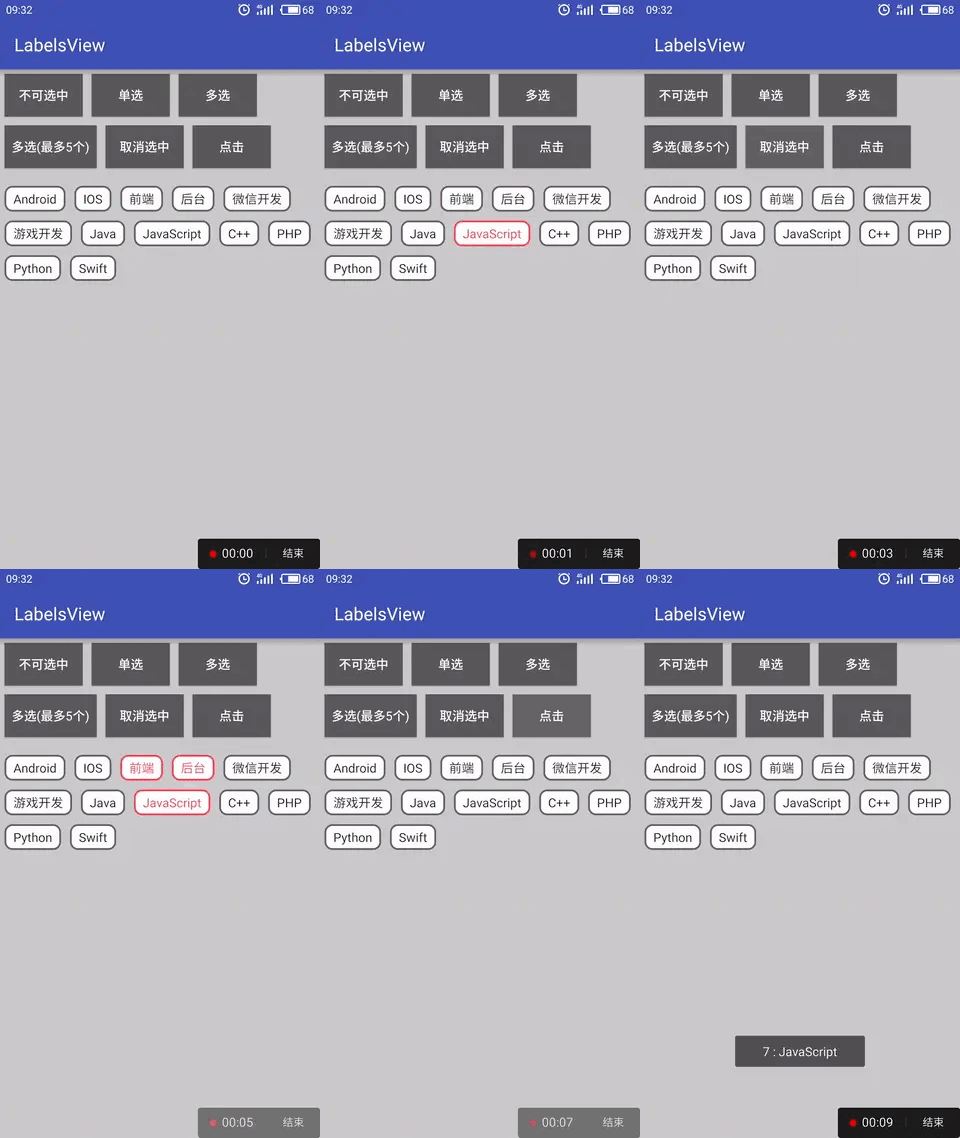
//設(shè)置選中標(biāo)簽。//positions是個(gè)可變類型,表示被選中的標(biāo)簽的位置。//比喻labelsView.setSelects(1,2,5);選中第1,3,5個(gè)標(biāo)簽。如果是單選的話,只有第一個(gè)參數(shù)有效。public void setSelects(int... positions);public void setSelects(Listpositions); //獲取選中的標(biāo)簽(返回的是所有選中的標(biāo)簽的位置)。返回的是一個(gè)Integer的數(shù)組,表示被選中的標(biāo)簽的下標(biāo)。如果沒(méi)有選中,數(shù)組的size等于0。public ArrayListgetSelectLabels(); //獲取選中的label(返回的是所有選中的標(biāo)簽的數(shù)據(jù))。如果沒(méi)有選中,數(shù)組的size等于0。T表示標(biāo)簽的數(shù)據(jù)類型。publicList getSelectLabelDatas(); //取消所有選中的標(biāo)簽。public void clearAllSelect();//設(shè)置標(biāo)簽的選擇類型,有NONE、SINGLE、SINGLE_IRREVOCABLY和MULTI四種類型。public void setSelectType(SelectType selectType);//設(shè)置最大的選擇數(shù)量,只有selectType等于MULTI是有效。public void setMaxSelect(int maxSelect);//設(shè)置必選項(xiàng),只有在多項(xiàng)模式下,這個(gè)方法才有效public void setCompulsorys(int... positions)public void setCompulsorys(Listpositions) //清空必選項(xiàng),只有在多項(xiàng)模式下,這個(gè)方法才有效public void clearCompulsorys()//設(shè)置標(biāo)簽背景public void setLabelBackgroundResource(int resId);//設(shè)置標(biāo)簽的文字顏色public void setLabelTextColor(int color);public void setLabelTextColor(ColorStateList color);//設(shè)置標(biāo)簽的文字大小(單位是px)public void setLabelTextSize(float size);//設(shè)置標(biāo)簽內(nèi)邊距public void setLabelTextPadding(int left, int top, int right, int bottom);//設(shè)置行間隔public void setLineMargin(int margin);//設(shè)置標(biāo)簽的間隔public void setWordMargin(int margin);
源碼地址:
評(píng)論
圖片
表情