
提高 DevTools 控制臺調(diào)試的 12 種方法
作者:夜盡天明
來源:SegmentFault 思否社區(qū)
很多開發(fā)人員都只是略知道一些瀏覽器 DevTool 調(diào)試的基礎(chǔ)知識。
使用最多的 console.log() 對于在代碼運行時輸出值非常有用,通常可以幫助查明錯誤。
但是,還有一高級的用法還有很多人不知道,所以并未得到充分利用,更快,更容易和更有用的高級的用法,這些高級的用法可用于客戶端腳本,Web 工作人員和服務(wù)工作人員。
Node.js 和 Deno 運行時控制臺也支持許多功能。
1. 使用 ES6 解構(gòu)輸出變量名稱
當(dāng)監(jiān)視多個值時,日志記錄可能會變得很復(fù)雜。通常有必要添加更多信息,例如
const x = 42;

console.log('variableX:', variableX);
// or
console.log(`variableX: ${ variableX }`);

/*
output:
variableX: 42
*/
更快的選擇是使用 ES6 對象銷毀分配。這會將變量添加到具有匹配屬性名稱的對象。
換句話說,只要地方 { and } 括號一個變量來顯示其名稱和值:
console.log({ variableX });

/*
output:
{ variableX: 42 }
*/
2. 使用適當(dāng)?shù)娜罩鞠㈩愋?/span>
console.log() 眾所周知的最簡單的方法:
console.log('no-frills log message');
但這不是唯一的類型。消息可以歸類為信息(與相同處理 console.log() ):
console.info('this is an information message');
warnings:
console.warn('I warned you this could happen!');
errors:
console.error('I\'m sorry Dave, I\'m afraid I can\'t do that');
或更不重要的 debug 調(diào)試消息:
console.debug('nothing to see here - please move along');
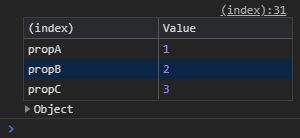
console.table() 可以以更友好的格式輸出對象值:
const obj = {
    propA: 1,
    propB: 2,
    propC: 3
  };

console.table( obj );
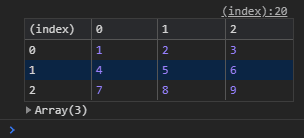
console.table() 也可以用于一維或多維數(shù)組:
const arr1 = [
    [ 1, 2, 3 ],
    [ 4, 5, 6 ],
    [ 7, 8, 9 ]
  ];

console.table( arr1 );
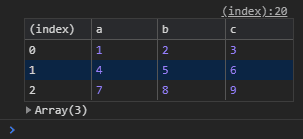
或?qū)ο髷?shù)組:
const arr2 = [
    { a: 1, b: 2, c: 3 },
    { a: 4, b: 5, c: 6 },
    { a: 7, b: 8, c: 9 }
  ];

console.table( arr2 );
其他選項包括:
console.dir( obj )在 JavaScript 對象中顯示屬性的交互式列表console.dirxml( element )顯示來自指定 HTML 或 XML 節(jié)點的后代元素的交互式樹console.clear()清除控制臺中所有以前的消息。
3. 過濾日志消息
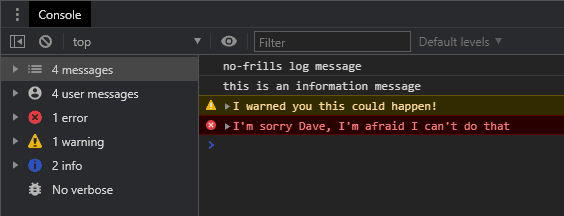
console.debug() 僅在查看 詳細(xì) 選項時才會顯示消息。4. 使用 printf-type 消息
printf消息格式,該格式定義帶有 % 指示符的模板,該指示符用于替換變量。console.log(
'The answer to %s is %d.',
'life, the universe and everything',
42
);
// The answer to life, the universe and everything is 42.5. 記錄樣式
%c 消息中的標(biāo)記指示樣式的應(yīng)用位置,例如console.log(
'%cOK, things are really bad now!',
`
font-size: 2em;
padding: 0.5em 2em;
margin: 1em 0;
color: yellow;
background-color: red;
border-radius: 50%;
`
);

6. 使用類似測試的斷言
console.assert() 當(dāng)條件失敗時,可以使用類似 test 的命令來輸出消息。console.assert(
life === 42,
'life is expected to be',
42,
'but is set to',
life
);
console.assert(
  life === 42,
  'life is expected to be %s but is set to %s',
  42,
  life
);

7. 運行堆棧跟蹤
console.trace():function callMeTwo() {
console.trace();
return true;
}
function callMeOne() {
return callMeTwo();
}
const r = callMeOne();
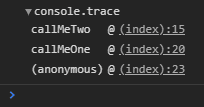
8. 組日志消息
console.group( label ) 在開頭和 console.groupEnd() 結(jié)尾使用來將日志消息分為命名組。console.groupCollapsed( label ) 最初顯示該組處于折疊狀態(tài)):// start log group
console.group('iloop');
for (let i = 3; i > 0; i--) {
console.log(i);
// start collapsed log group
console.groupCollapsed('jloop');
for (let j = 97; j < 100; j++) {
console.log(j);
}
// end log group (jloop)
console.groupEnd();
}
// end log group (iloop)
console.groupEnd();
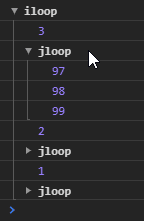
9. 使用性能計時器
time( label ) 命令啟動一個計時器。timeEnd( label ) 到達關(guān)聯(lián)的命令后,將報告經(jīng)過的時間(以毫秒為單位)。// start timer
console.time('bigloop');
for (let i = 999999999; i > 0; i--);
// show elapsed time
console.timeEnd('bigloop');
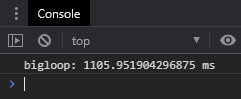
10,000 個計時器,并且該 console.timeLog( label ) 命令將報告經(jīng)過的時間而不會停止計時器。console.count( label ) 報告命令被調(diào)用的次數(shù)。console.countReset( label ) 將命名計數(shù)器重置為零。10. 按名稱調(diào)試和監(jiān)視功能
DevTools Sources 面板(或 Firefox 中的 Debugger)允許您通過單擊行號來打開文件并設(shè)置斷點。debug( functionName ) 在控制臺中輸入來設(shè)置斷點,例如debug( doSomething );
undebug( functionName ) 或通過重新加載頁面來取消調(diào)試。monitor( functionName ) 和其相關(guān)聯(lián)的 unmonitor( functionName ) 命令被以類似的方式使用。他們沒有停止執(zhí)行,而是記錄了對函數(shù)的每次調(diào)用并顯示了傳遞的參數(shù):function doSomething called with arguments: "hello", 2
11. 查找并修復(fù)事件偵聽器
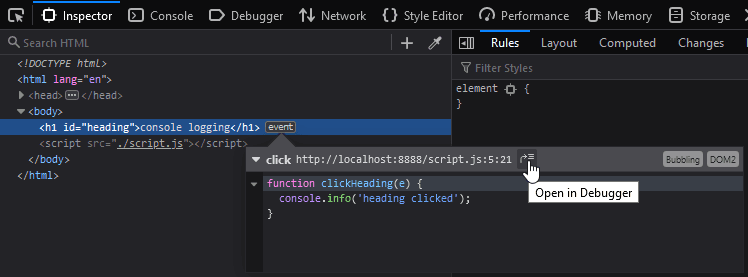
DOM 節(jié)點傳遞給 getEventListeners() 函數(shù)來查看所有事件偵聽器。例如,getEventListeners( $0 ) 顯示應(yīng)用于“元素”面板中當(dāng)前突出顯示的 DOM 節(jié)點的偵聽器: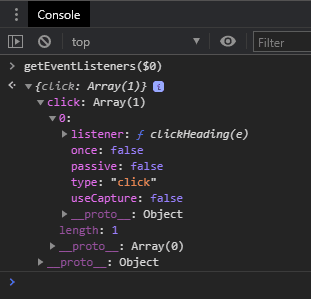
12. 將屬性復(fù)制到剪貼板
console copy() 命令可以將任何值復(fù)制到剪貼板。它可以是原始值,數(shù)組,對象或 DOM 節(jié)點。copy() 將該元素及其所有子元素的 HTML 放置在剪貼板上。copy( document.documentElement ) 復(fù)制整個 HTML 文檔。可以將其粘貼到文本編輯器中,以方便閱讀標(biāo)記。最后
console.log() 始終會很受歡迎,但其他選項可能會提供更快,更輕松的方法來實現(xiàn)零錯誤!
評論
圖片
表情