
發(fā)布npm包,你也可以的
本文簡單地記錄了發(fā)布一個npm包的過程,以便自己后續(xù)參考使用,也為有需要的朋友提供一點思路。
初始化npm init
通過npm init創(chuàng)建一個package.json文件
D:\robin\lib\weapp-utils>npm init
This utility will walk you through creating a package.json file.
It only covers the most common items, and tries to guess sensible defaults.

See `npm help json` for definitive documentation on these fields
and exactly what they do.

Use `npm install <pkg>` afterwards to install a package and
save it as a dependency in the package.json file.

Press ^C at any time to quit.
package name: (weapp-utils)
version: (1.0.0)
description: some foundmental utils for weapp
entry point: (lib/index.js)
test command:
git repository:
keywords: weapp,utils
author: tusi666
license: (ISC) MIT
About to write to D:\robin\lib\weapp-utils\package.json:

{
  "name": "weapp-utils",
  "version": "1.0.0",
  "description": "some foundmental utils for weapp",
  "main": "lib/index.js",
  "scripts": {
    "test": "echo \"Error: no test specified\" && exit 1"
  },
  "keywords": [
    "weapp",
    "utils"
  ],
  "author": "tusi666",
  "license": "MIT"
}
其中main字段是入口文件
寫好README
一個完備的README文件是必要的,以便別人了解你的包是做什么用途。
確認registry
一般我們開發(fā)時會修改npm registry為https://registry.npm.taobao.org。
但是發(fā)布npm包時,我們需要將其改回來,不然是會報錯的。
npm config set registry http://registry.npmjs.org/
npm注冊賬號
打開npm官網(wǎng),開始注冊賬號。
ps:記得要驗證郵箱哦!
添加npm賬戶
使用npm adduser添加賬戶,別名npm login
D:\robin\lib\weapp-utils>npm adduser
Username: tusi666
Password:
Email: (this IS public) cumtrobin@163.com
Logged in as tusi666 on https://registry.npm.taobao.org/.
添加github倉庫
在package.json添加配置項,不加也沒事,看自己需求。
"repository": {
  "type": "git",
  "url": "https://github.com/xxx/zqh_test2.git"
}
發(fā)布
npm publish
如果發(fā)布時報這樣的錯,
The operation was rejected by your operating system.
npm ERR! It's possible that the file was already in use (by a text editor or antivirus),
npm ERR! or that you lack permissions to access it.
建議還是檢查下registry,或者npm adduser是不是成功了。
發(fā)布成功,會有這樣的提示,
npm notice
npm notice package: [email protected]
npm notice === Tarball Contents ===
npm notice 397B   package.json
npm notice 1.1kB  LICENSE
npm notice 2.7kB  README.md
npm notice 12.9kB lib/index.js
npm notice === Tarball Details ===
npm notice name:          weapp-utils
npm notice version:       1.0.0
npm notice package size:  5.1 kB
npm notice unpacked size: 17.1 kB
npm notice shasum:        a7f2f428d9334dd1dd749d2a492dbc4df7195d0d
npm notice integrity:     sha512-Cp8jPhOMq73y6[...]bfofe7X+4cLeg==
npm notice total files:   4
npm notice
+ [email protected]
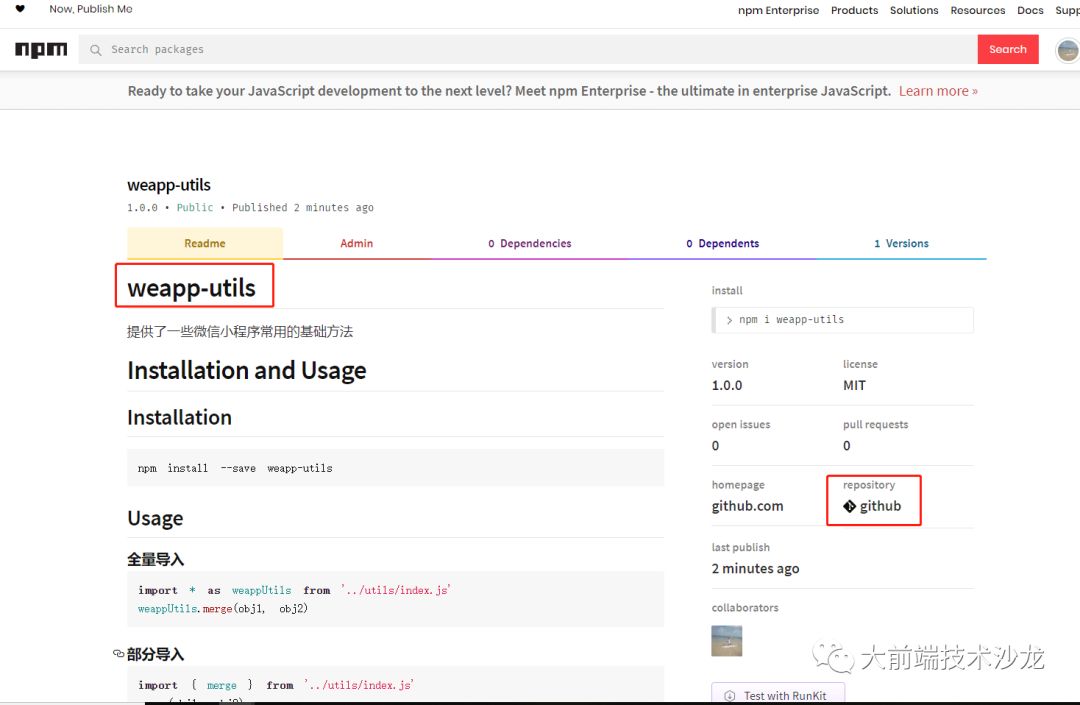
上npm搜索weapp-utils,發(fā)現(xiàn)有了!
調(diào)用
發(fā)布成功了,也要驗證下,是否可正常使用。
import { merge } from "weapp-utils"

let mergedOptions = merge(DEFAULT_OPTIONS, options)
評論
圖片
表情