
手寫系列-實(shí)現(xiàn)一個(gè)鉑金段位的 React
大廠技術(shù) 高級(jí)前端 Node進(jìn)階
點(diǎn)擊上方 程序員成長指北,關(guān)注公眾號(hào)
回復(fù)1,加入高級(jí)Node交流群
為什么是鉑金呢,因?yàn)楹屯跽哌€有很遠(yuǎn)的距離。本文僅實(shí)現(xiàn)簡單版本的 React,參考 React 16.8 的基本功能,包括虛擬 DOM、Fiber、Diff 算法、函數(shù)式組件、hooks 等。
一、前言
本文基于 pomb.us/build-your-…[2] 實(shí)現(xiàn)簡單版 React。
本文學(xué)習(xí)思路來自 卡頌-b站-React源碼,你在第幾層[3]。
模擬的版本為 React 16.8。
將實(shí)現(xiàn)以下功能:
-
createElement(虛擬 DOM); -
render; -
并發(fā)模式; -
Fibers; -
Render and Commit Phases ; -
協(xié)調(diào)(Diff 算法); -
函數(shù)組件; -
hooks;
下面上正餐,請繼續(xù)閱讀。
二、準(zhǔn)備
1. React Demo
先來看看一個(gè)簡單的 React Demo,代碼如下:
const element = <div title="foo">hello</div>
const container = document.getElementById('container')
ReactDOM.render(element, container);
復(fù)制代碼
本例完整源碼見:reactDemo[4]
在瀏覽器中打開 reactDemo.html,展示如下:
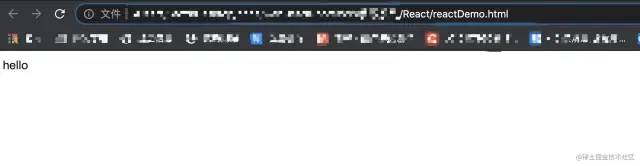
我們需要實(shí)現(xiàn)自己的 React,那么就需要知道上面的代碼到底做了什么。
1.1 element
const element = <div>123</div> 實(shí)際上是 JSX 語法。
React 官網(wǎng)[5] 對 JSX 的解釋如下:
JSX 是一個(gè) JavaScript 語法擴(kuò)展。它類似于模板語言,但它具有 JavaScript 的全部能力。JSX 最終會(huì)被 babel 編譯為 React.createElement() 函數(shù)調(diào)用。
通過 babel 在線編譯[6] const element = <div>123</div> 。
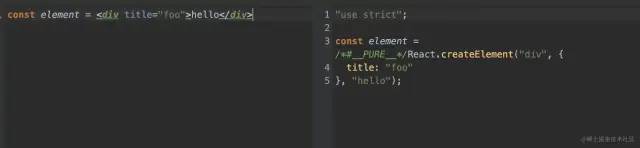
可知 const element = <div>123</div> 經(jīng)過編譯后的實(shí)際代碼如下:
const element = React.createElement("div", {
  title: "foo"
}, "hello");
復(fù)制代碼
再來看看上文的 React.createElement 實(shí)際生成了一個(gè)怎么樣的對象。
在 demo 中打印試試:
const element = <div title="foo">hello</div>
console.log(element)
const container = document.getElementById('container')
ReactDOM.render(element, container);
復(fù)制代碼
可以看到輸出的 element 如下:
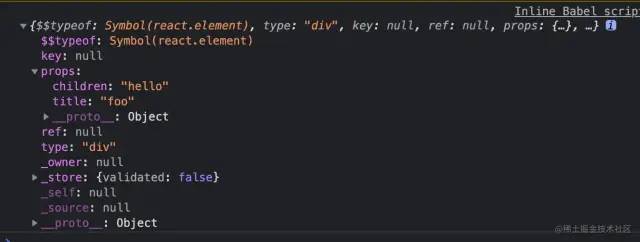
簡化一下 element:
const element = {
    type: 'div',
    props: {
        title: 'foo',
        children: 'hello'
    }
}
復(fù)制代碼
簡單總結(jié)一下,React.createElement 實(shí)際上是生成了一個(gè) element 對象,該對象擁有以下屬性:
-
type: 標(biāo)簽名 -
props -
title: 標(biāo)簽屬性 -
children: 子節(jié)點(diǎn)
1.2 render
ReactDOM.render() 將 element 添加到 id 為 container 的 DOM 節(jié)點(diǎn)中,下面我們將簡單手寫一個(gè)方法代替 ReactDOM.render()。
-
創(chuàng)建標(biāo)簽名為 element.type 的節(jié)點(diǎn);
const node = document.createElement(element.type)
復(fù)制代碼
-
設(shè)置 node 節(jié)點(diǎn)的 title 為 element.props.title;
node["title"] = element.props.title
復(fù)制代碼
-
創(chuàng)建一個(gè)空的文本節(jié)點(diǎn) text;
const text = document.createTextNode("")
復(fù)制代碼
-
設(shè)置文本節(jié)點(diǎn)的 nodeValue 為 element.props.children;
text["nodeValue"] = element.props.children
復(fù)制代碼
-
將文本節(jié)點(diǎn) text 添加進(jìn) node 節(jié)點(diǎn);
node.appendChild(text)
復(fù)制代碼
-
將 node 節(jié)點(diǎn)添加進(jìn) container 節(jié)點(diǎn)
container.appendChild(node)
復(fù)制代碼
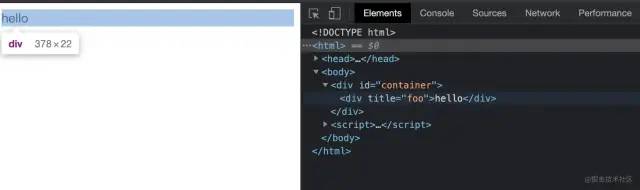
本例完整源碼見:reactDemo2[7]
運(yùn)行源碼,結(jié)果如下,和引入 React 的結(jié)果一致:
三、開始
上文通過模擬 React,簡單代替了 React.createElement、ReactDOM.render 方法,接下來將真正開始實(shí)現(xiàn) React 的各個(gè)功能。
1. createElement(虛擬 DOM)
上面有了解到 createElement 的作用是創(chuàng)建一個(gè) element 對象,結(jié)構(gòu)如下:
// 虛擬 DOM 結(jié)構(gòu)
const element = {
    type: 'div', // 標(biāo)簽名
    props: { // 節(jié)點(diǎn)屬性,包含 children
        title: 'foo', // title 屬性
        children: 'hello' // 子節(jié)點(diǎn),注:實(shí)際上這里應(yīng)該是數(shù)組結(jié)構(gòu),幫助我們存儲(chǔ)更多子節(jié)點(diǎn)
    }
}
復(fù)制代碼
根據(jù) element 的結(jié)構(gòu),設(shè)計(jì)了 createElement 函數(shù),代碼如下:
/**
 * 創(chuàng)建虛擬 DOM 結(jié)構(gòu)
 * @param {type} 標(biāo)簽名
 * @param {props} 屬性對象
 * @param {children} 子節(jié)點(diǎn)
 * @return {element} 虛擬 DOM
 */
function createElement (type, props, ...children) {
    return {
        type,
        props: {
            ...props,
            children: children.map(child =>
                typeof child === 'object'
                ? child
                : createTextElement(child)
            )
        }
    }
}
復(fù)制代碼
這里有考慮到,當(dāng) children 是非對象時(shí),應(yīng)該創(chuàng)建一個(gè) textElement 元素, 代碼如下:
/**
 * 創(chuàng)建文本節(jié)點(diǎn)
 * @param {text} 文本值
 * @return {element} 虛擬 DOM
 */
function createTextElement (text) {
    return {
        type: "TEXT_ELEMENT",
        props: {
            nodeValue: text,
            children: []
        }
    }
}
復(fù)制代碼
接下來試一下,代碼如下:
const myReact = {
    createElement
}
const element = myReact.createElement(
  "div",
  { id: "foo" },
  myReact.createElement("a", null, "bar"),
  myReact.createElement("b")
)
console.log(element)
復(fù)制代碼
本例完整源碼見:reactDemo3[8]
得到的 element 對象如下:
const element = {
    "type": "div",
    "props": {
        "id": "foo",
        "children": [
            {
                "type": "a",
                "props": {
                    "children": [
                        {
                            "type": "TEXT_ELEMENT",
                            "props": {
                                "nodeValue": "bar",
                                "children": [ ]
                            }
                        }
                    ]
                }
            },
            {
                "type": "b",
                "props": {
                    "children": [ ]
                }
            }
        ]
    }
}
復(fù)制代碼
JSX
實(shí)際上我們在使用 react 開發(fā)的過程中,并不會(huì)這樣創(chuàng)建組件:
const element = myReact.createElement(
  "div",
  { id: "foo" },
  myReact.createElement("a", null, "bar"),
  myReact.createElement("b")
)
復(fù)制代碼
而是通過 JSX 語法,代碼如下:
const element = (
    <div id='foo'>
        <a>bar</a>
        <b></b>
    </div>
)
復(fù)制代碼
在 myReact 中,可以通過添加注釋的形式,告訴 babel 轉(zhuǎn)譯我們指定的函數(shù),來使用 JSX 語法,代碼如下:
/** @jsx myReact.createElement */
const element = (
    <div id='foo'>
        <a>bar</a>
        <b></b>
    </div>
)
復(fù)制代碼
本例完整源碼見:reactDemo4[9]
2. render
render 函數(shù)幫助我們將 element 添加至真實(shí)節(jié)點(diǎn)中。
將分為以下步驟實(shí)現(xiàn):
-
創(chuàng)建 element.type 類型的 dom 節(jié)點(diǎn),并添加至容器中;
/**
 * 將虛擬 DOM 添加至真實(shí) DOM
 * @param {element} 虛擬 DOM
 * @param {container} 真實(shí) DOM
 */
function render (element, container) {
    const dom = document.createElement(element.type)
    container.appendChild(dom)
}
復(fù)制代碼
-
將 element.children 都添加至 dom 節(jié)點(diǎn)中;
element.props.children.forEach(child =>
    render(child, dom)
)
復(fù)制代碼
-
對文本節(jié)點(diǎn)進(jìn)行特殊處理;
const dom = element.type === 'TEXT_ELEMENT'
    ? document.createTextNode("")
    : document.createElement(element.type)
復(fù)制代碼
-
將 element 的 props 屬性添加至 dom;
const isProperty = key => key !== "children"
Object.keys(element.props)
    .filter(isProperty)
    .forEach(name => {
      dom[name] = element.props[name]
})
復(fù)制代碼
以上我們實(shí)現(xiàn)了將 JSX 渲染到真實(shí) DOM 的功能,接下來試一下,代碼如下:
const myReact = {
    createElement,
    render
}
/** @jsx myReact.createElement */
const element = (
    <div id='foo'>
        <a>bar</a>
        <b></b>
    </div>
)

myReact.render(element, document.getElementById('container'))
復(fù)制代碼
本例完整源碼見:reactDemo5[10]
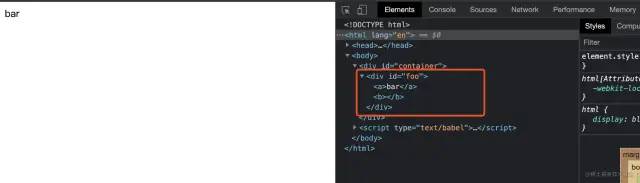
結(jié)果如圖,成功輸出:
3. 并發(fā)模式(requestIdleCallback)
再來看看上面寫的 render 方法中關(guān)于子節(jié)點(diǎn)的處理,代碼如下:
/**
 * 將虛擬 DOM 添加至真實(shí) DOM
 * @param {element} 虛擬 DOM
 * @param {container} 真實(shí) DOM
 */
function render (element, container) {
    // 省略
    // 遍歷所有子節(jié)點(diǎn),并進(jìn)行渲染
    element.props.children.forEach(child =>
        render(child, dom)
    )
    // 省略
}
復(fù)制代碼
這個(gè)遞歸調(diào)用是有問題的,一旦開始渲染,就會(huì)將所有節(jié)點(diǎn)及其子節(jié)點(diǎn)全部渲染完成這個(gè)進(jìn)程才會(huì)結(jié)束。
當(dāng) dom tree 很大的情況下,在渲染過程中,頁面上是卡住的狀態(tài),無法進(jìn)行用戶輸入等交互操作。
可分為以下步驟解決上述問題:
-
允許中斷渲染工作,如果有優(yōu)先級(jí)更高的工作插入,則暫時(shí)中斷瀏覽器渲染,待完成該工作后,恢復(fù)瀏覽器渲染; -
將渲染工作進(jìn)行分解,分解成一個(gè)個(gè)小單元;
使用 requestIdleCallback 來解決允許中斷渲染工作的問題。
window.requestIdleCallback[11] 將在瀏覽器的空閑時(shí)段內(nèi)調(diào)用的函數(shù)排隊(duì)。這使開發(fā)者能夠在主事件循環(huán)上執(zhí)行后臺(tái)和低優(yōu)先級(jí)工作,而不會(huì)影響延遲關(guān)鍵事件,如動(dòng)畫和輸入響應(yīng)。
window.requestIdleCallback 詳細(xì)介紹可查看文檔:文檔[12]
代碼如下:
// 下一個(gè)工作單元
let nextUnitOfWork = null
/**
 * workLoop 工作循環(huán)函數(shù)
 * @param {deadline} 截止時(shí)間
 */
function workLoop(deadline) {
  // 是否應(yīng)該停止工作循環(huán)函數(shù)
  let shouldYield = false

  // 如果存在下一個(gè)工作單元,且沒有優(yōu)先級(jí)更高的其他工作時(shí),循環(huán)執(zhí)行
  while (nextUnitOfWork && !shouldYield) {
    nextUnitOfWork = performUnitOfWork(
      nextUnitOfWork
    )

    // 如果截止時(shí)間快到了,停止工作循環(huán)函數(shù)
    shouldYield = deadline.timeRemaining() < 1
  }

  // 通知瀏覽器,空閑時(shí)間應(yīng)該執(zhí)行 workLoop
  requestIdleCallback(workLoop)
}
// 通知瀏覽器,空閑時(shí)間應(yīng)該執(zhí)行 workLoop
requestIdleCallback(workLoop)

// 執(zhí)行單元事件,并返回下一個(gè)單元事件
function performUnitOfWork(nextUnitOfWork) {
  // TODO
}
復(fù)制代碼
performUnitOfWork 是用來執(zhí)行單元事件,并返回下一個(gè)單元事件的,具體實(shí)現(xiàn)將在下文介紹。
4. fiber
上文介紹了通過 requestIdleCallback 讓瀏覽器在空閑時(shí)間渲染工作單元,避免渲染過久導(dǎo)致頁面卡頓的問題。
注:實(shí)際上 requestIdleCallback 功能并不穩(wěn)定,不建議用于生產(chǎn)環(huán)境,本例僅用于模擬 React 的思路,React 本身并不是通過 requestIdleCallback 來實(shí)現(xiàn)讓瀏覽器在空閑時(shí)間渲染工作單元的。
另一方面,為了讓渲染工作可以分離成一個(gè)個(gè)小單元,React 設(shè)計(jì)了 fiber。
每一個(gè) element 都是一個(gè) fiber 結(jié)構(gòu),每一個(gè) fiber 都是一個(gè)渲染工作單元。
所以 fiber 既是一種數(shù)據(jù)結(jié)構(gòu),也是一個(gè)工作單元。
下文將通過簡單的示例對 fiber 進(jìn)行介紹。
假設(shè)需要渲染這樣一個(gè) element 樹:
myReact.render(
  <div>
    <h1>
      <p />
      <a />
    </h1>
    <h2 />
  </div>,
  container
)
復(fù)制代碼
生成的 fiber tree 如圖:
橙色代表子節(jié)點(diǎn),黃色代表父節(jié)點(diǎn),藍(lán)色代表兄弟節(jié)點(diǎn)。
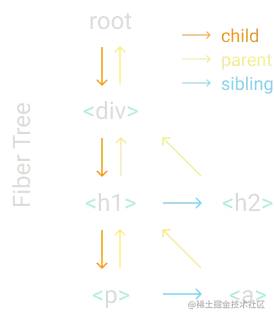
每個(gè) fiber 都有一個(gè)鏈接指向它的第一個(gè)子節(jié)點(diǎn)、下一個(gè)兄弟節(jié)點(diǎn)和它的父節(jié)點(diǎn)。這種數(shù)據(jù)結(jié)構(gòu)可以讓我們更方便的查找下一個(gè)工作單元。
上圖的箭頭也表明了 fiber 的渲染過程,渲染過程詳細(xì)描述如下:
-
從 root 開始,找到第一個(gè)子節(jié)點(diǎn) div; -
找到 div 的第一個(gè)子節(jié)點(diǎn) h1; -
找到 h1 的第一個(gè)子節(jié)點(diǎn) p; -
找 p 的第一個(gè)子節(jié)點(diǎn),如無子節(jié)點(diǎn),則找下一個(gè)兄弟節(jié)點(diǎn),找到 p 的兄弟節(jié)點(diǎn) a; -
找 a 的第一個(gè)子節(jié)點(diǎn),如無子節(jié)點(diǎn),也無兄弟節(jié)點(diǎn),則找它的父節(jié)點(diǎn)的下一個(gè)兄弟節(jié)點(diǎn),找到 a 的 父節(jié)點(diǎn)的兄弟節(jié)點(diǎn) h2; -
找 h2 的第一個(gè)子節(jié)點(diǎn),找不到,找兄弟節(jié)點(diǎn),找不到,找父節(jié)點(diǎn) div 的兄弟節(jié)點(diǎn),也找不到,繼續(xù)找 div 的父節(jié)點(diǎn)的兄弟節(jié)點(diǎn),找到 root; -
第 6 步已經(jīng)找到了 root 節(jié)點(diǎn),渲染已全部完成。
下面將渲染過程用代碼實(shí)現(xiàn)。
-
將 render 中創(chuàng)建 DOM 節(jié)點(diǎn)的部分抽離為 creactDOM 函數(shù);
/**
 * createDom 創(chuàng)建 DOM 節(jié)點(diǎn)
 * @param {fiber} fiber 節(jié)點(diǎn)
 * @return {dom} dom 節(jié)點(diǎn)
 */
function createDom (fiber) {
    // 如果是文本類型,創(chuàng)建空的文本節(jié)點(diǎn),如果不是文本類型,按 type 類型創(chuàng)建節(jié)點(diǎn)
    const dom = fiber.type === 'TEXT_ELEMENT'
        ? document.createTextNode("")
        : document.createElement(fiber.type)

    // isProperty 表示不是 children 的屬性
    const isProperty = key => key !== "children"

    // 遍歷 props,為 dom 添加屬性
    Object.keys(fiber.props)
        .filter(isProperty)
        .forEach(name => {
            dom[name] = fiber.props[name]
        })

    // 返回 dom
    return dom
}
復(fù)制代碼
-
在 render 中設(shè)置第一個(gè)工作單元為 fiber 根節(jié)點(diǎn);
fiber 根節(jié)點(diǎn)僅包含 children 屬性,值為參數(shù) fiber。
// 下一個(gè)工作單元
let nextUnitOfWork = null
/**
 * 將 fiber 添加至真實(shí) DOM
 * @param {element} fiber
 * @param {container} 真實(shí) DOM
 */
function render (element, container) {
    nextUnitOfWork = {
        dom: container,
        props: {
            children: [element]
        }
    }
}
復(fù)制代碼
-
通過 requestIdleCallback 在瀏覽器空閑時(shí),渲染 fiber;
/**
 * workLoop 工作循環(huán)函數(shù)
 * @param {deadline} 截止時(shí)間
 */
function workLoop(deadline) {
  // 是否應(yīng)該停止工作循環(huán)函數(shù)
  let shouldYield = false

  // 如果存在下一個(gè)工作單元,且沒有優(yōu)先級(jí)更高的其他工作時(shí),循環(huán)執(zhí)行
  while (nextUnitOfWork && !shouldYield) {
    nextUnitOfWork = performUnitOfWork(
      nextUnitOfWork
    )

    // 如果截止時(shí)間快到了,停止工作循環(huán)函數(shù)
    shouldYield = deadline.timeRemaining() < 1
  }

  // 通知瀏覽器,空閑時(shí)間應(yīng)該執(zhí)行 workLoop
  requestIdleCallback(workLoop)
}
// 通知瀏覽器,空閑時(shí)間應(yīng)該執(zhí)行 workLoop
requestIdleCallback(workLoop)
復(fù)制代碼
-
渲染 fiber 的函數(shù) performUnitOfWork;
/**
 * performUnitOfWork 處理工作單元
 * @param {fiber} fiber
 * @return {nextUnitOfWork} 下一個(gè)工作單元
 */
function performUnitOfWork(fiber) {
  // TODO 添加 dom 節(jié)點(diǎn)
  // TODO 新建 filber
  // TODO 返回下一個(gè)工作單元(fiber)
}
復(fù)制代碼
4.1 添加 dom 節(jié)點(diǎn)
function performUnitOfWork(fiber) {
    // 如果 fiber 沒有 dom 節(jié)點(diǎn),為它創(chuàng)建一個(gè) dom 節(jié)點(diǎn)
    if (!fiber.dom) {
        fiber.dom = createDom(fiber)
    }

    // 如果 fiber 有父節(jié)點(diǎn),將 fiber.dom 添加至父節(jié)點(diǎn)
    if (fiber.parent) {
        fiber.parent.dom.appendChild(fiber.dom)
    }
}
復(fù)制代碼
4.2 新建 filber
function performUnitOfWork(fiber) {
    // ~~省略~~
    // 子節(jié)點(diǎn)
    const elements = fiber.props.children
    // 索引
    let index = 0
    // 上一個(gè)兄弟節(jié)點(diǎn)
    let prevSibling = null
    // 遍歷子節(jié)點(diǎn)
    while (index < elements.length) {
        const element = elements[index]

        // 創(chuàng)建 fiber
        const newFiber = {
            type: element.type,
            props: element.props,
            parent: fiber,
            dom: null,
        }

        // 將第一個(gè)子節(jié)點(diǎn)設(shè)置為 fiber 的子節(jié)點(diǎn)
        if (index === 0) {
            fiber.child = newFiber
        } else if (element) {
        // 第一個(gè)之外的子節(jié)點(diǎn)設(shè)置為該節(jié)點(diǎn)的兄弟節(jié)點(diǎn)
            prevSibling.sibling = newFiber
        }

        prevSibling = newFiber
        index++
    }
}
復(fù)制代碼
4.3 返回下一個(gè)工作單元(fiber)
 function performUnitOfWork(fiber) {
    // ~~省略~~
    // 如果有子節(jié)點(diǎn),返回子節(jié)點(diǎn)
    if (fiber.child) {
        return fiber.child
    }
    let nextFiber = fiber
    while (nextFiber) {
        // 如果有兄弟節(jié)點(diǎn),返回兄弟節(jié)點(diǎn)
        if (nextFiber.sibling) {
            return nextFiber.sibling
        }

        // 否則繼續(xù)走 while 循環(huán),直到找到 root。
        nextFiber = nextFiber.parent
    }
}
復(fù)制代碼
以上我們實(shí)現(xiàn)了將 fiber 渲染到頁面的功能,且渲染過程是可中斷的。
現(xiàn)在試一下,代碼如下:
const element = (
    <div>
        <h1>
        <p />
        <a />
        </h1>
        <h2 />
    </div>
)

myReact.render(element, document.getElementById('container'))
復(fù)制代碼
本例完整源碼見:reactDemo7[13]
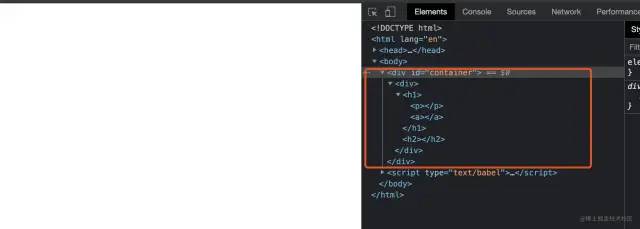
如預(yù)期輸出 dom,如圖:
5. 渲染提交階段
由于渲染過程被我們做了可中斷的,那么中斷的時(shí)候,我們肯定不希望瀏覽器給用戶展示的是渲染了一半的 UI。
對渲染提交階段優(yōu)化的處理如下:
-
把 performUnitOfWork 中關(guān)于把子節(jié)點(diǎn)添加至父節(jié)點(diǎn)的邏輯刪除;
function performUnitOfWork(fiber) {
    // 把這段刪了
    if (fiber.parent) {
       fiber.parent.dom.appendChild(fiber.dom)
    }
}
復(fù)制代碼
-
新增一個(gè)根節(jié)點(diǎn)變量,存儲(chǔ) fiber 根節(jié)點(diǎn);
// 根節(jié)點(diǎn)
let wipRoot = null
function render (element, container) {
    wipRoot = {
        dom: container,
        props: {
            children: [element]
        }
    }
    // 下一個(gè)工作單元是根節(jié)點(diǎn)
    nextUnitOfWork = wipRoot
}
復(fù)制代碼
-
當(dāng)所有 fiber 都工作完成時(shí),nextUnitOfWork 為 undefined,這時(shí)再渲染真實(shí) DOM;
function workLoop (deadline) {
    // 省略
    if (!nextUnitOfWork && wipRoot) {
        commitRoot()
    }
    // 省略
}
復(fù)制代碼
-
新增 commitRoot 函數(shù),執(zhí)行渲染真實(shí) DOM 操作,遞歸將 fiber tree 渲染為真實(shí) DOM;
// 全部工作單元完成后,將 fiber tree 渲染為真實(shí) DOM;
function commitRoot () {
    commitWork(wipRoot.child)
    // 需要設(shè)置為 null,否則 workLoop 在瀏覽器空閑時(shí)不斷的執(zhí)行。
    wipRoot = null
}
/**
 * performUnitOfWork 處理工作單元
 * @param {fiber} fiber
 */
function commitWork (fiber) {
    if (!fiber) return
    const domParent = fiber.parent.dom
    domParent.appendChild(fiber.dom)
    // 渲染子節(jié)點(diǎn)
    commitWork(fiber.child)
    // 渲染兄弟節(jié)點(diǎn)
    commitWork(fiber.sibling)
}
復(fù)制代碼
本例完整源碼見:reactDemo8[14]
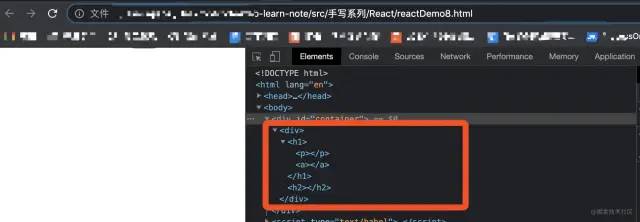
源碼運(yùn)行結(jié)果如圖:
6. 協(xié)調(diào)(diff 算法)
當(dāng) element 有更新時(shí),需要將更新前的 fiber tree 和更新后的 fiber tree 進(jìn)行比較,得到比較結(jié)果后,僅對有變化的 fiber 對應(yīng)的 dom 節(jié)點(diǎn)進(jìn)行更新。
通過協(xié)調(diào),減少對真實(shí) DOM 的操作次數(shù)。
1. currentRoot
新增 currentRoot 變量,保存根節(jié)點(diǎn)更新前的 fiber tree,為 fiber 新增 alternate 屬性,保存 fiber 更新前的 fiber tree;
let currentRoot = null
function render (element, container) {
    wipRoot = {
        // 省略
        alternate: currentRoot
    }
}
function commitRoot () {
    commitWork(wipRoot.child)
    currentRoot = wipRoot
    wipRoot = null
}
復(fù)制代碼
2. performUnitOfWork
將 performUnitOfWork 中關(guān)于新建 fiber 的邏輯,抽離到 reconcileChildren 函數(shù);
/**
 * 協(xié)調(diào)子節(jié)點(diǎn)
 * @param {fiber} fiber
 * @param {elements} fiber 的 子節(jié)點(diǎn)
 */
function reconcileChildren (fiber, elements) {
    // 用于統(tǒng)計(jì)子節(jié)點(diǎn)的索引值
    let index = 0
    // 上一個(gè)兄弟節(jié)點(diǎn)
    let prevSibling = null

    // 遍歷子節(jié)點(diǎn)
    while (index < elements.length) {
        const element = elements[index]

        // 新建 fiber
        const newFiber = {
            type: element.type,
            props: element.props,
            parent: fiber,
            dom: null,
        }

        // fiber的第一個(gè)子節(jié)點(diǎn)是它的子節(jié)點(diǎn)
        if (index === 0) {
            fiber.child = newFiber
        } else if (element) {
        // fiber 的其他子節(jié)點(diǎn),是它第一個(gè)子節(jié)點(diǎn)的兄弟節(jié)點(diǎn)
            prevSibling.sibling = newFiber
        }

        // 把新建的 newFiber 賦值給 prevSibling,這樣就方便為 newFiber 添加兄弟節(jié)點(diǎn)了
        prevSibling = newFiber

        // 索引值 + 1
        index++
    }
}
復(fù)制代碼
3. reconcileChildren
在 reconcileChildren 中對比新舊 fiber;
3.1 當(dāng)新舊 fiber 類型相同時(shí)
保留 dom,僅更新 props,設(shè)置 effectTag 為 UPDATE;
function reconcileChildren (wipFiber, elements) {
    // ~~省略~~
    // oldFiber 可以在 wipFiber.alternate 中找到
    let oldFiber = wipFiber.alternate && wipFiber.alternate.child

    while (index < elements.length || oldFiber != null) {
        const element = elements[index]
        let newFiber = null

        // fiber 類型是否相同
        const sameType =
            oldFiber &&
            element &&
            element.type == oldFiber.type

        // 如果類型相同,僅更新 props
        if (sameType) {
            newFiber = {
                type: oldFiber.type,
                props: element.props,
                dom: oldFiber.dom,
                parent: wipFiber,
                alternate: oldFiber,
                effectTag: "UPDATE",
            }
        }
        // ~~省略~~
    }
    // ~~省略~~
}
復(fù)制代碼
3.2 當(dāng)新舊 fiber 類型不同,且有新元素時(shí)
創(chuàng)建一個(gè)新的 dom 節(jié)點(diǎn),設(shè)置 effectTag 為 PLACEMENT;
function reconcileChildren (wipFiber, elements) {
    // ~~省略~~
    if (element && !sameType) {
        newFiber = {
            type: element.type,
            props: element.props,
            dom: null,
            parent: wipFiber,
            alternate: null,
            effectTag: "PLACEMENT",
        }
    }
    // ~~省略~~
}
復(fù)制代碼
3.3 當(dāng)新舊 fiber 類型不同,且有舊 fiber 時(shí)
刪除舊 fiber,設(shè)置 effectTag 為 DELETION;
function reconcileChildren (wipFiber, elements) {
    // ~~省略~~
    if (oldFiber && !sameType) {
        oldFiber.effectTag = "DELETION"
        deletions.push(oldFiber)
    }
    // ~~省略~~
}
復(fù)制代碼
4. deletions
新建 deletions 數(shù)組存儲(chǔ)需刪除的 fiber 節(jié)點(diǎn),渲染 DOM 時(shí),遍歷 deletions 刪除舊 fiber;
let deletions = null
function render (element, container) {
    // 省略
    // render 時(shí),初始化 deletions 數(shù)組
    deletions = []
}

// 渲染 DOM 時(shí),遍歷 deletions 刪除舊 fiber
function commitRoot () {
    deletions.forEach(commitWork)
}
復(fù)制代碼
5. commitWork
在 commitWork 中對 fiber 的 effectTag 進(jìn)行判斷,并分別處理。
5.1 PLACEMENT
當(dāng) fiber 的 effectTag 為 PLACEMENT 時(shí),表示是新增 fiber,將該節(jié)點(diǎn)新增至父節(jié)點(diǎn)中。
if (
    fiber.effectTag === "PLACEMENT" &&
    fiber.dom != null
) {
    domParent.appendChild(fiber.dom)
}
復(fù)制代碼
5.2 DELETION
當(dāng) fiber 的 effectTag 為 PLACEMENT 時(shí),表示是刪除 fiber,將父節(jié)點(diǎn)的該節(jié)點(diǎn)刪除。
else if (fiber.effectTag === "DELETION") {
    domParent.removeChild(fiber.dom)
}
復(fù)制代碼
5.3 DELETION
當(dāng) fiber 的 effectTag 為 UPDATE 時(shí),表示是更新 fiber,更新 props 屬性。
else if (fiber.effectTag === 'UPDATE' && fiber.dom != null) {
    updateDom(fiber.dom, fiber.alternate.props, fiber.props)
}
復(fù)制代碼
updateDom 函數(shù)根據(jù)不同的更新類型,對 props 屬性進(jìn)行更新。
const isProperty = key => key !== "children"

// 是否是新屬性
const isNew = (prev, next) => key => prev[key] !== next[key]

// 是否是舊屬性
const isGone = (prev, next) => key => !(key in next)

function updateDom(dom, prevProps, nextProps) {
    // 刪除舊屬性
    Object.keys(prevProps)
        .filter(isProperty)
        .filter(isGone(prevProps, nextProps))
        .forEach(name => {
            dom[name] = ""
        })

    // 更新新屬性
    Object.keys(nextProps)
        .filter(isProperty)
        .filter(isNew(prevProps, nextProps))
        .forEach(name => {
            dom[name] = nextProps[name]
        })
}
復(fù)制代碼
另外,為 updateDom 添加事件屬性的更新、刪除,便于追蹤 fiber 事件的更新。
function updateDom(dom, prevProps, nextProps) {
    // ~~省略~~
    const isEvent = key => key.startsWith("on")
    //刪除舊的或者有變化的事件
    Object.keys(prevProps)
        .filter(isEvent)
        .filter(
          key =>
            !(key in nextProps) ||
            isNew(prevProps, nextProps)(key)
        )
        .forEach(name => {
          const eventType = name
            .toLowerCase()
            .substring(2)
          dom.removeEventListener(
            eventType,
            prevProps[name]
          )
        })

    // 注冊新事件
    Object.keys(nextProps)
        .filter(isEvent)
        .filter(isNew(prevProps, nextProps))
        .forEach(name => {
        const eventType = name
            .toLowerCase()
            .substring(2)
        dom.addEventListener(
            eventType,
            nextProps[name]
        )
    })
    // ~~省略~~
}
復(fù)制代碼
替換 creactDOM 中設(shè)置 props 的邏輯。
function createDom (fiber) {
    const dom = fiber.type === 'TEXT_ELEMENT'
        ? document.createTextNode("")
        : document.createElement(fiber.type)
    // 看這里鴨
    updateDom(dom, {}, fiber.props)
    return dom
}
復(fù)制代碼
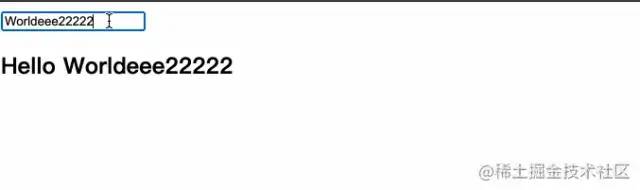
新建一個(gè)包含輸入表單項(xiàng)的例子,嘗試更新 element,代碼如下:
/** @jsx myReact.createElement */
const container = document.getElementById("container")

const updateValue = e => {
    rerender(e.target.value)
}

const rerender = value => {
    const element = (
        <div>
            <input onInput={updateValue} value={value} />
            <h2>Hello {value}</h2>
        </div>
    )
    myReact.render(element, container)
}

rerender("World")
復(fù)制代碼
本例完整源碼見:reactDemo9[15]
輸出結(jié)果如圖:
7. 函數(shù)式組件
先來看一個(gè)簡單的函數(shù)式組件示例:
myReact 還不支持函數(shù)式組件,下面代碼運(yùn)行會(huì)報(bào)錯(cuò),這里僅用于比照函數(shù)式組件的常規(guī)使用方式。
/** @jsx myReact.createElement */
const container = document.getElementById("container")

function App (props) {
    return (
        <h1>hi~ {props.name}</h1>
    )
}

const element = (
    <App name='foo' />
)

myReact.render(element, container)
復(fù)制代碼
函數(shù)式組件和 html 標(biāo)簽組件相比,有以下兩點(diǎn)不同:
-
函數(shù)組件的 fiber 沒有 dom 節(jié)點(diǎn); -
函數(shù)組件的 children 需要運(yùn)行函數(shù)后得到;
通過下列步驟實(shí)現(xiàn)函數(shù)組件:
-
修改 performUnitOfWork,根據(jù) fiber 類型,執(zhí)行 fiber 工作單元;
function performUnitOfWork(fiber) {
    // 是否是函數(shù)類型組件
    const isFunctionComponent = fiber && fiber.type && fiber.type instanceof Function
    // 如果是函數(shù)組件,執(zhí)行 updateFunctionComponent 函數(shù)
    if (isFunctionComponent) {
        updateFunctionComponent(fiber)
    } else {
    // 如果不是函數(shù)組件,執(zhí)行 updateHostComponent 函數(shù)
        updateHostComponent(fiber)
    }
    // 省略
}
復(fù)制代碼
-
定義 updateHostComponent 函數(shù),執(zhí)行非函數(shù)組件;
非函數(shù)式組件可直接將 fiber.props.children 作為參數(shù)傳遞。
function updateHostComponent(fiber) {
    if (!fiber.dom) {
        fiber.dom = createDom(fiber)
    }
    reconcileChildren(fiber, fiber.props.children)
}
復(fù)制代碼
-
定義 updateFunctionComponent 函數(shù),執(zhí)行函數(shù)組件;
函數(shù)組件需要運(yùn)行來獲得 fiber.children。
function updateFunctionComponent(fiber) {
    // fiber.type 就是函數(shù)組件本身,fiber.props 就是函數(shù)組件的參數(shù)
    const children = [fiber.type(fiber.props)]
    reconcileChildren(fiber, children)
}
復(fù)制代碼
-
修改 commitWork 函數(shù),兼容沒有 dom 節(jié)點(diǎn)的 fiber;
4.1 修改 domParent 的獲取邏輯,通過 while 循環(huán)不斷向上尋找,直到找到有 dom 節(jié)點(diǎn)的父 fiber;
function commitWork (fiber) {
    // 省略
    let domParentFiber = fiber.parent
    // 如果 fiber.parent 沒有 dom 節(jié)點(diǎn),則繼續(xù)找 fiber.parent.parent.dom,直到有 dom 節(jié)點(diǎn)。
    while (!domParentFiber.dom) {
        domParentFiber = domParentFiber.parent
    }
    const domParent = domParentFiber.dom
    // 省略
}
復(fù)制代碼
4.2 修改刪除節(jié)點(diǎn)的邏輯,當(dāng)刪除節(jié)點(diǎn)時(shí),需要不斷向下尋找,直到找到有 dom 節(jié)點(diǎn)的子 fiber;
function commitWork (fiber) {
    // 省略
    // 如果 fiber 的更新類型是刪除,執(zhí)行 commitDeletion
     else if (fiber.effectTag === "DELETION") {
        commitDeletion(fiber.dom, domParent)
    }
    // 省略
}

// 刪除節(jié)點(diǎn)
function commitDeletion (fiber, domParent) {
    // 如果該 fiber 有 dom 節(jié)點(diǎn),直接刪除
    if (fiber.dom) {
        domParent.removeChild(fiber.dom)
    } else {
    // 如果該 fiber 沒有 dom 節(jié)點(diǎn),則繼續(xù)找它的子節(jié)點(diǎn)進(jìn)行刪除
        commitDeletion(fiber.child, domParent)
    }
}
復(fù)制代碼
下面試一下上面的例子,代碼如下:
/** @jsx myReact.createElement */
const container = document.getElementById("container")

function App (props) {
    return (
        <h1>hi~ {props.name}</h1>
    )
}

const element = (
    <App name='foo' />
)

myReact.render(element, container)
復(fù)制代碼
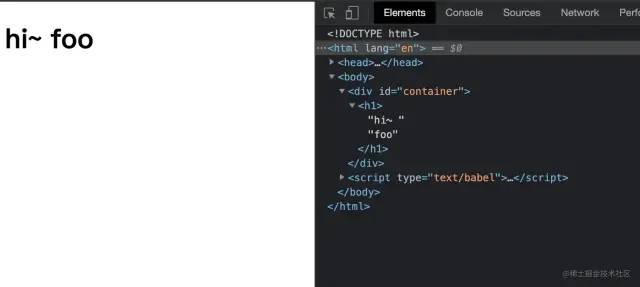
本例完整源碼見:reactDemo10[16]
運(yùn)行結(jié)果如圖:
8. hooks
下面繼續(xù)為 myReact 添加管理狀態(tài)的功能,期望是函數(shù)組件擁有自己的狀態(tài),且可以獲取、更新狀態(tài)。
一個(gè)擁有計(jì)數(shù)功能的函數(shù)組件如下:
function Counter() {
    const [state, setState] = myReact.useState(1)
    return (
        <h1 onClick={() => setState(c => c + 1)}>
        Count: {state}
        </h1>
    )
}
const element = <Counter />
復(fù)制代碼
已知需要一個(gè) useState 方法用來獲取、更新狀態(tài)。
這里再重申一下,渲染函數(shù)組件的前提是,執(zhí)行該函數(shù)組件,因此,上述 Counter 想要更新計(jì)數(shù),就會(huì)在每次更新都執(zhí)行一次 Counter 函數(shù)。
通過以下步驟實(shí)現(xiàn):
-
新增全局變量 wipFiber;
// 當(dāng)前工作單元 fiber
let wipFiber = null
function updateFunctionComponent(fiber) {
    wipFiber = fiber
    // 當(dāng)前工作單元 fiber 的 hook
    wipFiber.hook = []
    // 省略
}
復(fù)制代碼
-
新增 useState 函數(shù);
// initial 表示初始參數(shù),在本例中,initail=1
function useState (initial) {
    // 是否有舊鉤子,舊鉤子存儲(chǔ)了上一次更新的 hook
    const oldHook =
        wipFiber.alternate &&
        wipFiber.alternate.hook

    // 初始化鉤子,鉤子的狀態(tài)是舊鉤子的狀態(tài)或者初始狀態(tài)
    const hook = {
        state: oldHook ? oldHook.state : initial,
        queue: [],
    }

    // 從舊的鉤子隊(duì)列中獲取所有動(dòng)作,然后將它們一一應(yīng)用到新的鉤子狀態(tài)
    const actions = oldHook ? oldHook.queue : []
    actions.forEach(action => {
        hook.state = action(hook.state)
    })

    // 設(shè)置鉤子狀態(tài)
    const setState = action => {
        // 將動(dòng)作添加至鉤子隊(duì)列
        hook.queue.push(action)
        // 更新渲染
        wipRoot = {
            dom: currentRoot.dom,
            props: currentRoot.props,
            alternate: currentRoot,
        }
        nextUnitOfWork = wipRoot
        deletions = []
    }

    // 把鉤子添加至工作單元
    wipFiber.hook = hook

    // 返回鉤子的狀態(tài)和設(shè)置鉤子的函數(shù)
    return [hook.state, setState]
}
復(fù)制代碼
下面運(yùn)行一下計(jì)數(shù)組件,代碼如下:
function Counter() {
    const [state, setState] = myReact.useState(1)
    return (
        <h1 onClick={() => setState(c => c + 1)}>
        Count: {state}
        </h1>
    )
}
const element = <Counter />
復(fù)制代碼
本例完整源碼見:reactDemo11[17]
運(yùn)行結(jié)果如圖: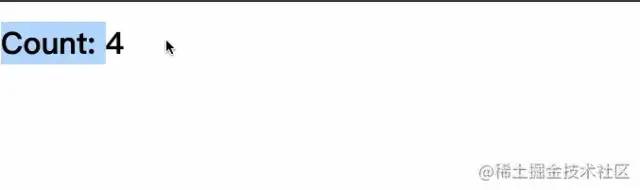
本章節(jié)簡單實(shí)現(xiàn)了 myReact 的 hooks 功能。
撒花完結(jié),react 還有很多實(shí)現(xiàn)值得我們?nèi)W(xué)習(xí)和研究,希望有下期,和大家一起手寫 react 的更多功能。
總結(jié)
本文參考 pomb.us[18] 進(jìn)行學(xué)習(xí),實(shí)現(xiàn)了包括虛擬 DOM、Fiber、Diff 算法、函數(shù)式組件、hooks 等功能的自定義 React。
在實(shí)現(xiàn)過程中小編對 React 的基本術(shù)語及實(shí)現(xiàn)思路有了大概的掌握,pomb.us[19] 是非常適合初學(xué)者的學(xué)習(xí)資料,可以直接通過 pomb.us[20] 進(jìn)行學(xué)習(xí),也推薦跟著本文一步步實(shí)現(xiàn) React 的常見功能。
本文源碼:github源碼[21] 。
建議跟著一步步敲,進(jìn)行實(shí)操練習(xí)。
希望能對你有所幫助,感謝閱讀~
別忘了點(diǎn)個(gè)贊鼓勵(lì)一下我哦,筆芯??
我組建了一個(gè)氛圍特別好的 Node.js 社群,里面有很多 Node.js小伙伴,如果你對Node.js學(xué)習(xí)感興趣的話(后續(xù)有計(jì)劃也可以),我們可以一起進(jìn)行Node.js相關(guān)的交流、學(xué)習(xí)、共建。下方加 考拉 好友回復(fù)「Node」即可。
“分享、點(diǎn)贊、在看” 支持一波??
參考資料
-
pomb.us/build-your-…[22]
-
卡頌-b站-React源碼,你在第幾層[23]
-
手寫一個(gè)簡單的 React[24]
參考資料
https://juejin.cn/post/6967194882926444557: https://juejin.cn/post/6967194882926444557
[2]https://pomb.us/build-your-own-react/: https://link.juejin.cn?target=https%3A%2F%2Fpomb.us%2Fbuild-your-own-react%2F
[3]https://www.bilibili.com/video/BV1Ki4y1u7Vr?t=78z: https://link.juejin.cn?target=https%3A%2F%2Fwww.bilibili.com%2Fvideo%2FBV1Ki4y1u7Vr%3Ft%3D78z
[4]https://github.com/jiaozitang/web-learn-note/blob/main/src/%E6%89%8B%E5%86%99%E7%B3%BB%E5%88%97/React/reactDemo.html: https://link.juejin.cn?target=https%3A%2F%2Fgithub.com%2Fjiaozitang%2Fweb-learn-note%2Fblob%2Fmain%2Fsrc%2F%25E6%2589%258B%25E5%2586%2599%25E7%25B3%25BB%25E5%2588%2597%2FReact%2FreactDemo.html
[5]https://zh-hans.reactjs.org/docs/glossary.html#jsx: https://link.juejin.cn?target=https%3A%2F%2Fzh-hans.reactjs.org%2Fdocs%2Fglossary.html%23jsx
[6]https://www.babeljs.cn/repl: https://link.juejin.cn?target=https%3A%2F%2Fwww.babeljs.cn%2Frepl
[7]https://github.com/jiaozitang/web-learn-note/blob/main/src/%E6%89%8B%E5%86%99%E7%B3%BB%E5%88%97/React/reactDemo2.html: https://link.juejin.cn?target=https%3A%2F%2Fgithub.com%2Fjiaozitang%2Fweb-learn-note%2Fblob%2Fmain%2Fsrc%2F%25E6%2589%258B%25E5%2586%2599%25E7%25B3%25BB%25E5%2588%2597%2FReact%2FreactDemo2.html
[8]https://github.com/jiaozitang/web-learn-note/blob/main/src/%E6%89%8B%E5%86%99%E7%B3%BB%E5%88%97/React/reactDemo3.html: https://link.juejin.cn?target=https%3A%2F%2Fgithub.com%2Fjiaozitang%2Fweb-learn-note%2Fblob%2Fmain%2Fsrc%2F%25E6%2589%258B%25E5%2586%2599%25E7%25B3%25BB%25E5%2588%2597%2FReact%2FreactDemo3.html
[9]https://github.com/jiaozitang/web-learn-note/blob/main/src/%E6%89%8B%E5%86%99%E7%B3%BB%E5%88%97/React/reactDemo4.html: https://link.juejin.cn?target=https%3A%2F%2Fgithub.com%2Fjiaozitang%2Fweb-learn-note%2Fblob%2Fmain%2Fsrc%2F%25E6%2589%258B%25E5%2586%2599%25E7%25B3%25BB%25E5%2588%2597%2FReact%2FreactDemo4.html
[10]https://github.com/jiaozitang/web-learn-note/blob/main/src/%E6%89%8B%E5%86%99%E7%B3%BB%E5%88%97/React/reactDemo5.html: https://link.juejin.cn?target=https%3A%2F%2Fgithub.com%2Fjiaozitang%2Fweb-learn-note%2Fblob%2Fmain%2Fsrc%2F%25E6%2589%258B%25E5%2586%2599%25E7%25B3%25BB%25E5%2588%2597%2FReact%2FreactDemo5.html
[11]https://developer.mozilla.org/zh-CN/docs/Web/API/Window/requestIdleCallback: https://link.juejin.cn?target=https%3A%2F%2Fdeveloper.mozilla.org%2Fzh-CN%2Fdocs%2FWeb%2FAPI%2FWindow%2FrequestIdleCallback
[12]https://developer.mozilla.org/zh-CN/docs/Web/API/Window/requestIdleCallback: https://link.juejin.cn?target=https%3A%2F%2Fdeveloper.mozilla.org%2Fzh-CN%2Fdocs%2FWeb%2FAPI%2FWindow%2FrequestIdleCallback
[13]https://github.com/jiaozitang/web-learn-note/blob/main/src/%E6%89%8B%E5%86%99%E7%B3%BB%E5%88%97/React/reactDemo7.html: https://link.juejin.cn?target=https%3A%2F%2Fgithub.com%2Fjiaozitang%2Fweb-learn-note%2Fblob%2Fmain%2Fsrc%2F%25E6%2589%258B%25E5%2586%2599%25E7%25B3%25BB%25E5%2588%2597%2FReact%2FreactDemo7.html
[14]https://github.com/jiaozitang/web-learn-note/blob/main/src/%E6%89%8B%E5%86%99%E7%B3%BB%E5%88%97/React/reactDemo8.html: https://link.juejin.cn?target=https%3A%2F%2Fgithub.com%2Fjiaozitang%2Fweb-learn-note%2Fblob%2Fmain%2Fsrc%2F%25E6%2589%258B%25E5%2586%2599%25E7%25B3%25BB%25E5%2588%2597%2FReact%2FreactDemo8.html
[15]https://github.com/jiaozitang/web-learn-note/blob/main/src/%E6%89%8B%E5%86%99%E7%B3%BB%E5%88%97/React/reactDemo9.html: https://link.juejin.cn?target=https%3A%2F%2Fgithub.com%2Fjiaozitang%2Fweb-learn-note%2Fblob%2Fmain%2Fsrc%2F%25E6%2589%258B%25E5%2586%2599%25E7%25B3%25BB%25E5%2588%2597%2FReact%2FreactDemo9.html
[16]https://github.com/jiaozitang/web-learn-note/blob/main/src/%E6%89%8B%E5%86%99%E7%B3%BB%E5%88%97/React/reactDemo10.html: https://link.juejin.cn?target=https%3A%2F%2Fgithub.com%2Fjiaozitang%2Fweb-learn-note%2Fblob%2Fmain%2Fsrc%2F%25E6%2589%258B%25E5%2586%2599%25E7%25B3%25BB%25E5%2588%2597%2FReact%2FreactDemo10.html
[17]https://github.com/jiaozitang/web-learn-note/blob/main/src/%E6%89%8B%E5%86%99%E7%B3%BB%E5%88%97/React/reactDemo11.html: https://link.juejin.cn?target=https%3A%2F%2Fgithub.com%2Fjiaozitang%2Fweb-learn-note%2Fblob%2Fmain%2Fsrc%2F%25E6%2589%258B%25E5%2586%2599%25E7%25B3%25BB%25E5%2588%2597%2FReact%2FreactDemo11.html
[18]https://pomb.us/build-your-own-react/: https://link.juejin.cn?target=https%3A%2F%2Fpomb.us%2Fbuild-your-own-react%2F
[19]https://pomb.us/build-your-own-react/: https://link.juejin.cn?target=https%3A%2F%2Fpomb.us%2Fbuild-your-own-react%2F
[20]https://pomb.us/build-your-own-react/: https://link.juejin.cn?target=https%3A%2F%2Fpomb.us%2Fbuild-your-own-react%2F
[21]https://github.com/jiaozitang/web-learn-note/tree/main/src/%E6%89%8B%E5%86%99%E7%B3%BB%E5%88%97/Promise: https://link.juejin.cn?target=https%3A%2F%2Fgithub.com%2Fjiaozitang%2Fweb-learn-note%2Ftree%2Fmain%2Fsrc%2F%25E6%2589%258B%25E5%2586%2599%25E7%25B3%25BB%25E5%2588%2597%2FPromise
[22]https://pomb.us/build-your-own-react/: https://link.juejin.cn?target=https%3A%2F%2Fpomb.us%2Fbuild-your-own-react%2F
[23]https://www.bilibili.com/video/BV1Ki4y1u7Vr?t=78z: https://link.juejin.cn?target=https%3A%2F%2Fwww.bilibili.com%2Fvideo%2FBV1Ki4y1u7Vr%3Ft%3D78z
[24]https://jelly.jd.com/article/60aceb6b27393b0169c85231: https://link.juejin.cn?target=https%3A%2F%2Fjelly.jd.com%2Farticle%2F60aceb6b27393b0169c85231
來自:清湯餃子
https://juejin.cn/post/6978654109893132318