
<kbd id="afajh"><form id="afajh"></form></kbd>
<strong id="afajh"><dl id="afajh"></dl></strong>
    <del id="afajh"><form id="afajh"></form></del>
        1. <th id="afajh"><progress id="afajh"></progress></th>
          <b id="afajh"><abbr id="afajh"></abbr></b>
          <th id="afajh"><progress id="afajh"></progress></th>

          TensorFlow和Pytorch中的音頻增強(qiáng)

          共 5093字,需瀏覽 11分鐘

           ·

          2022-04-10 08:32


          來源:Deephub Imba

          本文約2100字,建議閱讀9分鐘

          本文將介紹如何將增強(qiáng)應(yīng)用到 TensorFlow 中的數(shù)據(jù)集的兩種方法。

          對(duì)于圖像相關(guān)的任務(wù),對(duì)圖像進(jìn)行旋轉(zhuǎn)、模糊或調(diào)整大小是常見的數(shù)據(jù)增強(qiáng)的方法。因?yàn)閳D像的自身屬性與其他數(shù)據(jù)類型數(shù)據(jù)增強(qiáng)相比,圖像的數(shù)據(jù)增強(qiáng)是非常直觀的,我們只需要查看圖像就可以看到特定圖像是如何轉(zhuǎn)換的,并且使用肉眼就能對(duì)效果有一個(gè)初步的評(píng)判結(jié)果。盡管增強(qiáng)在圖像域中很常見,但在其他的領(lǐng)域中也是可以進(jìn)行數(shù)據(jù)增強(qiáng)的操作的,本篇文章將介紹音頻方向的數(shù)據(jù)增強(qiáng)方法。

          在這篇文章中,將介紹如何將增強(qiáng)應(yīng)用到 TensorFlow 中的數(shù)據(jù)集的兩種方法。第一種方式直接修改數(shù)據(jù);第二種方式是在網(wǎng)絡(luò)的前向傳播期間這樣做的。除此以外我們還會(huì)介紹使用torchaudio的內(nèi)置方法實(shí)現(xiàn)與TF相同的功能。

          直接音頻增強(qiáng)


          首先需要生成一個(gè)人工音頻數(shù)據(jù)集。我們不需要加載預(yù)先存在的數(shù)據(jù)集,而是根據(jù)需要重復(fù) librosa 庫中的一個(gè)樣本:

          import librosa
          import tensorflow as tf

          def build_artificial_dataset(num_samples: int):
          ? data = []
          ? sampling_rates = []

          ? for i in range(num_samples):
          ? ? ? y, sr = librosa.load(librosa.ex('nutcracker'))
          ? ? ? data.append(y)
          ? ? ? sampling_rates.append(sr)
          ? features_dataset = tf.data.Dataset.from_tensor_slices(data)
          ? labels_dataset = tf.data.Dataset.from_tensor_slices(sampling_rates)
          ? dataset = tf.data.Dataset.zip((features_dataset, labels_dataset))

          ? return dataset

          ds = build_artificial_dataset(10)
          在此過程中創(chuàng)建了一個(gè) Dataset 對(duì)象,我們也可以使用純 NumPy 數(shù)組這個(gè)可以根據(jù)實(shí)際需求選擇。

          現(xiàn)在小數(shù)據(jù)集已經(jīng)可以使用,可以開始應(yīng)用增強(qiáng)了。對(duì)于這一步,為了簡(jiǎn)單起見,本文中使用 audiomentations 庫,我們只使用三個(gè)增強(qiáng)方式, PitchShift、Shift 和 ApplyGaussianNoise。前兩個(gè)移動(dòng)音高(PitchShift)和數(shù)據(jù)(Shift,可以認(rèn)為是滾動(dòng)數(shù)據(jù);例如,狗的叫聲將移動(dòng) + 5 秒)。最后一次轉(zhuǎn)換使信號(hào)更嘈雜,增加了神經(jīng)網(wǎng)絡(luò)的挑戰(zhàn)。接下來,將所有三個(gè)增強(qiáng)功能組合到一個(gè)管道中:

          from audiomentations import Compose, AddGaussianNoise, PitchShift, Shift

          augmentations_pipeline = Compose(
          ? [
          ? ? ? AddGaussianNoise(min_amplitude=0.001, max_amplitude=0.015, p=0.5),
          ? ? ? PitchShift(min_semitones=-4, max_semitones=4, p=0.5),
          ? ? ? Shift(min_fraction=-0.5, max_fraction=0.5, p=0.5),
          ? ]
          )

          在輸入數(shù)據(jù)之前,必須編寫一些額外的代碼。這因?yàn)槲覀冋谑褂靡粋€(gè) Dataset 對(duì)象,這些代碼告訴 TensorFlow 臨時(shí)將張量轉(zhuǎn)換為 NumPy 數(shù)組,然后再輸入到數(shù)據(jù)增強(qiáng)的處理流程中:

          def apply_pipeline(y, sr):
          ? shifted = augmentations_pipeline(y, sr)
          ? return shifted


          @tf.function
          def tf_apply_pipeline(feature, sr, ):
          ? """
          ? Applies the augmentation pipeline to audio files
          ? @param y: audio data
          ? @param sr: sampling rate
          ? @return: augmented audio data
          ? """
          ? augmented_feature = tf.numpy_function(
          ? ? ? apply_pipeline, inp=[feature, sr], Tout=tf.float32, name="apply_pipeline"
          ? )

          ? return augmented_feature, sr


          def augment_audio_dataset(dataset: tf.data.Dataset):
          ? dataset = dataset.map(tf_apply_pipeline)

          ? return dataset

          有了這些輔助函數(shù),就可以擴(kuò)充我們的數(shù)據(jù)集了。最后,還需要再末尾添加維度來添加一個(gè)維度,這會(huì)將單個(gè)音頻樣本從 (num_data_point,) 轉(zhuǎn)換為 (num_data_points, 1),表明我們有單聲道音頻:

          ds = augment_audio_dataset(ds)
          ds = ds.map(lambda y, sr: (tf.expand_dims(y, axis=-1), sr))

          這樣就完成了直接的音頻數(shù)據(jù)增強(qiáng)

          前向傳播期間進(jìn)行音頻增強(qiáng)


          上面的方式相比,在網(wǎng)絡(luò)中增加音頻數(shù)據(jù)會(huì)將計(jì)算負(fù)載放在前向傳遞上。

          為了達(dá)到這個(gè)目的,這里使用提供自定義 TensorFlow 層的 kapre 庫。我們使用 MelSpectrogram 層,它接受原始(即未修改的)音頻數(shù)據(jù)并在 GPU 上計(jì)算 Mel 頻譜圖。

          雖然與數(shù)據(jù)增強(qiáng)沒有直接關(guān)系,但這有兩個(gè)好處:

          • 我們可以在例如超參數(shù)搜索期間優(yōu)化頻譜圖生成的參數(shù),從而無需重復(fù)將音頻生成頻譜圖。

          • 轉(zhuǎn)換直接在 GPU 上進(jìn)行,因此在原始轉(zhuǎn)換速度和設(shè)備內(nèi)存放置方面都會(huì)更快。


          首先加載由 kapre 庫提供的音頻層。這些層獲取原始音頻數(shù)據(jù)并計(jì)算頻譜圖表示:

          import kapre

          input_layer = tf.keras.layers.Input(shape=input_shape, dtype=tf.float32)

          melspectrogram = kapre.composed.get_melspectrogram_layer(
          ? n_fft=1024,
          ? return_decibel=True,
          ? n_mels=256,
          ? input_data_format='channels_last',
          ? output_data_format='channels_last')(input_layer)

          然后,我們從 spec-augment 包中添加一個(gè)增強(qiáng)層。這個(gè)包實(shí)現(xiàn)了 SpecAugment 論文。[1],它掩蓋了頻譜圖的一部分。掩蔽混淆了神經(jīng)網(wǎng)絡(luò)所需的信息,增加了學(xué)習(xí)的效果。這種修改迫使網(wǎng)絡(luò)關(guān)注其他特征,從而擴(kuò)展其泛化到看不見的數(shù)據(jù)的能力:

          from spec_augment import SpecAugment

          spec_augment = SpecAugment(freq_mask_param=27, # F in paper
          ? ? ? ? ? ? ? ? ? ? ? ? ? time_mask_param=100, # T in paper
          ? ? ? ? ? ? ? ? ? ? ? ? ? n_freq_mask=1, # mF in paper
          ? ? ? ? ? ? ? ? ? ? ? ? ? n_time_mask=2, # mT in paper
          ? ? ? ? ? ? ? ? ? ? ? ? ? mask_value=-1, )(melspectrogram)

          最后,對(duì)于我們的案例,添加了一個(gè)未經(jīng)訓(xùn)練的殘差網(wǎng)絡(luò),其中包含任意十個(gè)類來將數(shù)據(jù)分類:

          spec_augment = tf.keras.applications.resnet_v2.preprocess_input(spec_augment)
          core = tf.keras.applications.resnet_v2.ResNet152V2(
          ? ? ? input_tensor=spec_augment,
          ? ? ? include_top=False,
          ? ? ? pooling="avg",
          ? ? ? weights=None,
          ? )
          core = core.output

          output = tf.keras.layers.Dense(units=10)(core)

          resnet_model = tf.keras.Model(inputs=[input_layer], outputs=[output], name="audio_model")

          這樣我們就有了一個(gè)深度神經(jīng)網(wǎng)絡(luò),可以在前向傳播期間增強(qiáng)音頻數(shù)據(jù)。

          torchaudio


          上面介紹的都是tf的方法,那么對(duì)于pytorch我們?cè)趺崔k?可以直接使用官方提供的torchaudio包

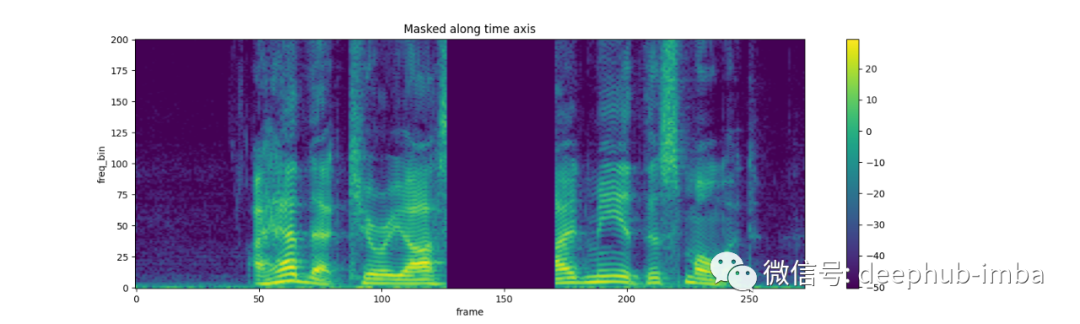
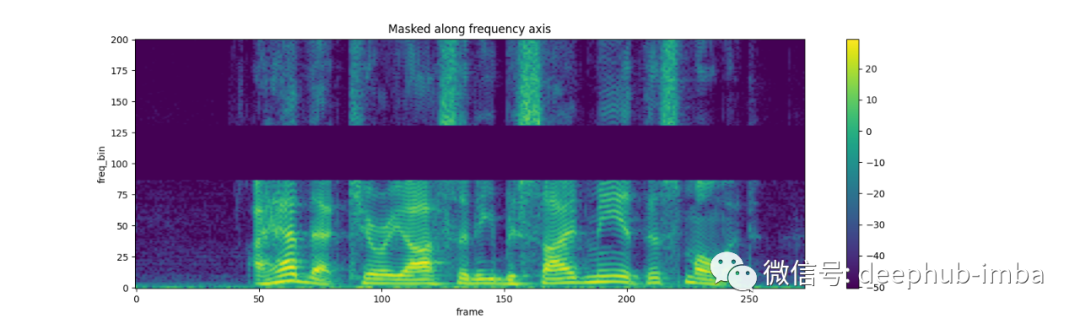
          torchaudio 實(shí)現(xiàn)了TimeStrech, TimeMasking 和FrequencyMasking.三種方式,我們看看官方給的代碼

          TimeStrech:

          spec = get_spectrogram(power=None)
          strech = T.TimeStretch()

          rate = 1.2
          spec_ = strech(spec, rate)
          plot_spectrogram(spec_[0].abs(), title=f"Stretched x{rate}", aspect='equal', xmax=304)
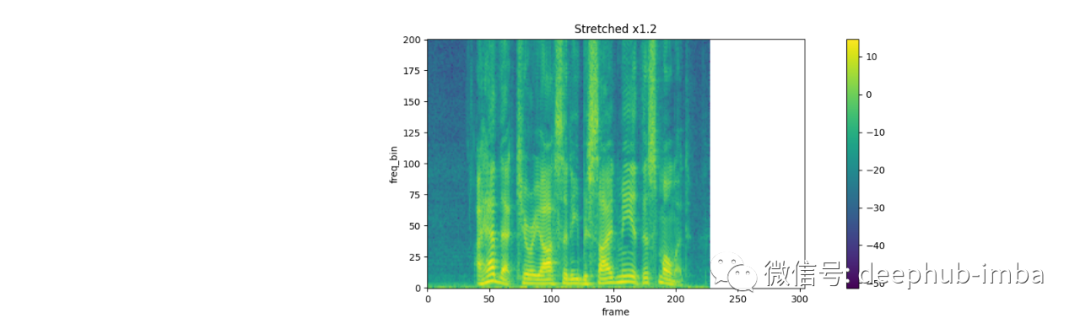
          plot_spectrogram(spec[0].abs(), title="Original", aspect='equal', xmax=304)

          rate = 0.9
          spec_ = strech(spec, rate)
          plot_spectrogram(spec_[0].abs(), title=f"Stretched x{rate}", aspect='equal', xmax=304)


          TimeMasking:

          torch.random.manual_seed(4)

          spec = get_spectrogram()
          plot_spectrogram(spec[0], title="Original")

          masking = T.TimeMasking(time_mask_param=80)
          spec = masking(spec)

          plot_spectrogram(spec[0], title="Masked along time axis")

          FrequencyMasking:


          torch.random.manual_seed(4)

          spec = get_spectrogram()
          plot_spectrogram(spec[0], title="Original")

          masking = T.FrequencyMasking(freq_mask_param=80)
          spec = masking(spec)

          plot_spectrogram(spec[0], title="Masked along frequency axis")

          總結(jié)


          在這篇博文中,我們介紹了2個(gè)主流深度學(xué)習(xí)框架的音頻增強(qiáng)的方法,所以如果你是TF的愛好者,可以使用我們介紹的兩種方法進(jìn)行測(cè)試,如果你是pytorch的愛好者,直接使用官方的torchaudio包就可以了。

          引用

          [1] Park et al., Specaugment: A simple data augmentation method for automatic speech recognition, 2019, Proc. Interspeech 2019

          https://ai.googleblog.com/2019/04/specaugment-new-data-augmentation.html


          編輯:王菁


          瀏覽 37
          點(diǎn)贊
          評(píng)論
          收藏
          分享

          手機(jī)掃一掃分享

          分享
          舉報(bào)
          評(píng)論
          圖片
          表情
          推薦
          點(diǎn)贊
          評(píng)論
          收藏
          分享

          手機(jī)掃一掃分享

          分享
          舉報(bào)
          <kbd id="afajh"><form id="afajh"></form></kbd>
          <strong id="afajh"><dl id="afajh"></dl></strong>
            <del id="afajh"><form id="afajh"></form></del>
                1. <th id="afajh"><progress id="afajh"></progress></th>
                  <b id="afajh"><abbr id="afajh"></abbr></b>
                  <th id="afajh"><progress id="afajh"></progress></th>
                  国产一级婬乱片A片 | 免费无码一区二区在线观看 | 豆花视频免费 | 五月天婷婷丁香在线播放 | 先锋影音亚洲AV每日资源网站 |