Excel大批量數(shù)據(jù)的導入和導出,如何做優(yōu)化?
點擊上方?好好學java?,選擇?星標?公眾號
重磅資訊、干貨,第一時間送達
重磅資訊、干貨,第一時間送達
今日推薦:硬剛一周,3W字總結(jié),一年的經(jīng)驗告訴你如何準備校招!
個人原創(chuàng)100W+訪問量博客:點擊前往,查看更多
個人原創(chuàng)100W+訪問量博客:點擊前往,查看更多
作者:Alben
https://albenw.github.io/posts/d093ca4e
概要
Java對Excel的操作一般都是用POI,但是數(shù)據(jù)量大的話可能會導致頻繁的FGC或OOM,這篇文章跟大家說下如果避免踩POI的坑,以及分別對于xls和xlsx文件怎么優(yōu)化大批量數(shù)據(jù)的導入和導出。
一次線上問題
這是一次線上的問題,因為一個大數(shù)據(jù)量的Excel導出功能,而導致服務(wù)器頻繁FGC,具體如圖所示

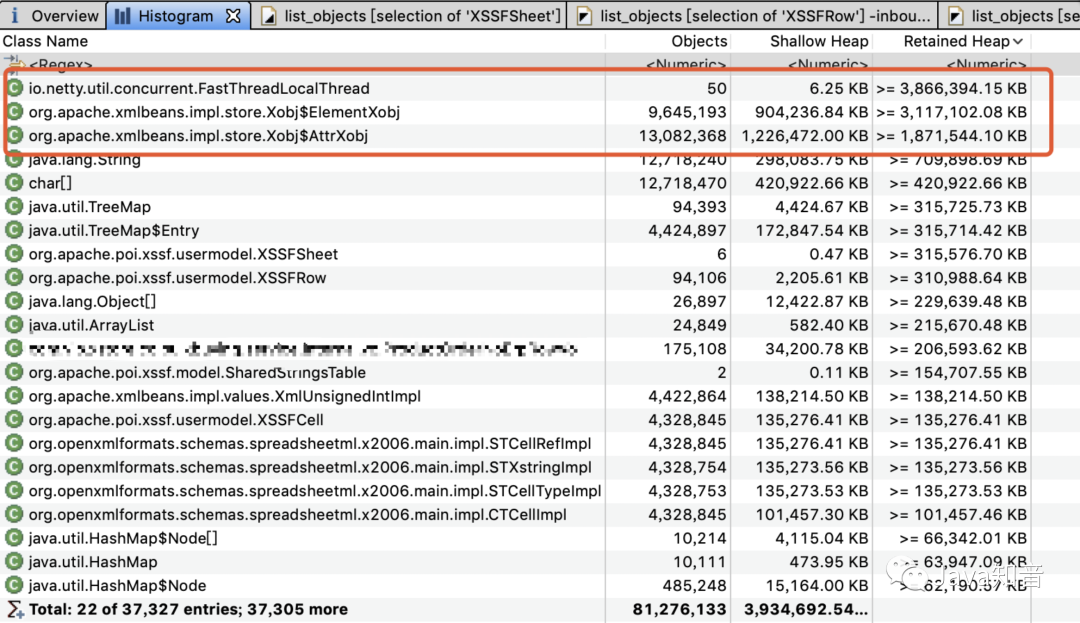
可以看出POI的對象以及相關(guān)的XML對象占用了絕大部分的內(nèi)存消耗,頻繁FGC說明這些對象一直存活,沒有被回收。
原因是由于導出的數(shù)據(jù)比較大量,大概有10w行 * 50列,由于后臺直接用XSSFWorkbook導出,在導出結(jié)束前內(nèi)存有大量的Row,Cell,Style等,以及基于XLSX底層存儲的XML對象沒有被釋放。
Excel的存儲格式
下面的優(yōu)化內(nèi)容涉及Excel的底層存儲格式,所以要先跟大家講一下。
XLS
03版的XLS采用的是一種名為BIFF8(Binary-Interchange-File-Format),基于OLE2規(guī)范的二進制文件格式。大概就是一種結(jié)構(gòu)很復(fù)雜的二進制文件,具體細節(jié)我也不是很清楚,大家也沒必要去了解它,已經(jīng)被淘汰了。想了解的話可以看看Excel XLS文件格式
XLSX
07版的XLSX則是采用OOXML(Office Open Xml)的格式存儲數(shù)據(jù)。簡單來說就是一堆xml文件用zip打包之后文件。這個對于大家來說就熟悉了,把xlsx文件后綴名改為zip后,再解壓出來就可以看到文件結(jié)構(gòu)
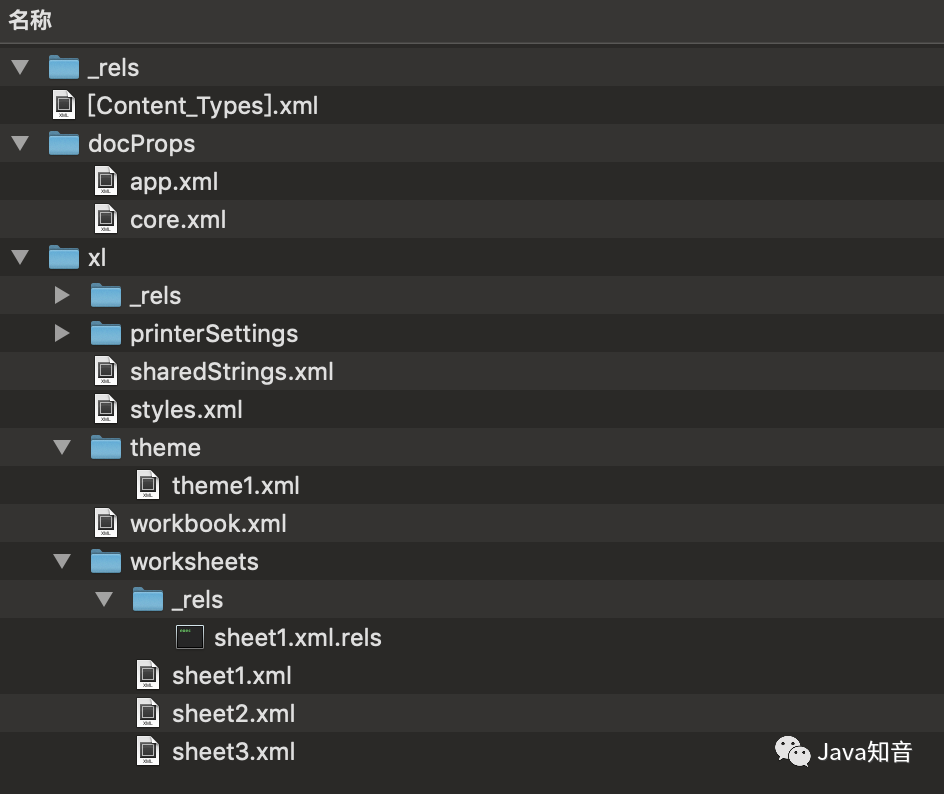
打開sheet1.xml,可以看到是描述第一個sheet的內(nèi)容

導出優(yōu)化
事例源碼基于POI3.17版本
XLSX
由于xlsx底層使用xml存儲,占用內(nèi)存會比較大,官方也意識到這個問題,在3.8版本之后,提供了SXSSFWorkbook來優(yōu)化寫性能。
官方說明
https://poi.apache.org/components/spreadsheet/how-to.html#sxssf
使用
SXSSFWorkbook使用起來特別的簡單,只需要改一行代碼就OK了。
原來你的代碼可能是長這樣的
Workbook?workbook?=?new?XSSFWorkbook(inputStream);
那么你只需要改成這樣子,就可以用上SXSSFWorkbook了
Workbook?workbook?=?new?SXSSFWorkbook(new?XSSFWorkbook(inputStream));
其原理是可以定義一個window size(默認100),生成Excel期間只在內(nèi)存維持window size那么多的行數(shù)Row,超時window size時會把之前行Row寫到一個臨時文件并且remove釋放掉,這樣就可以達到釋放內(nèi)存的效果。
SXSSFSheet在創(chuàng)建Row時會判斷并刷盤、釋放超過window size的Row。
@Override
????public?SXSSFRow?createRow(int?rownum)
????{
????????int?maxrow?=?SpreadsheetVersion.EXCEL2007.getLastRowIndex();
????????if?(rownum?0?||?rownum?>?maxrow)?{
????????????throw?new?IllegalArgumentException("Invalid?row?number?("?+?rownum
????????????????????+?")?outside?allowable?range?(0.."?+?maxrow?+?")");
????????}

????????//?attempt?to?overwrite?a?row?that?is?already?flushed?to?disk
????????if(rownum?<=?_writer.getLastFlushedRow()?)?{
????????????throw?new?IllegalArgumentException(
????????????????????"Attempting?to?write?a?row["+rownum+"]?"?+
????????????????????"in?the?range?[0,"?+?_writer.getLastFlushedRow()?+?"]?that?is?already?written?to?disk.");
????????}

????????//?attempt?to?overwrite?a?existing?row?in?the?input?template
????????if(_sh.getPhysicalNumberOfRows()?>?0?&&?rownum?<=?_sh.getLastRowNum()?)?{
????????????throw?new?IllegalArgumentException(
????????????????????"Attempting?to?write?a?row["+rownum+"]?"?+
????????????????????????????"in?the?range?[0,"?+?_sh.getLastRowNum()?+?"]?that?is?already?written?to?disk.");
????????}

????????SXSSFRow?newRow=new?SXSSFRow(this);
????????_rows.put(rownum,newRow);
????????allFlushed?=?false;
????????//如果大于窗口的size,就會flush
????????if(_randomAccessWindowSize>=0&&_rows.size()>_randomAccessWindowSize)
????????{
????????????try
????????????{
???????????????flushRows(_randomAccessWindowSize);
????????????}
????????????catch?(IOException?ioe)
????????????{
????????????????throw?new?RuntimeException(ioe);
????????????}
????????}
????????return?newRow;
????}

????public?void?flushRows(int?remaining)?throws?IOException
????{
????????//flush每一個row
????????while(_rows.size()?>?remaining)?{
????????????flushOneRow();
????????}
????????if?(remaining?==?0)?{
????????????allFlushed?=?true;
????????}
????}

????private?void?flushOneRow()?throws?IOException
????{
????????Integer?firstRowNum?=?_rows.firstKey();
????????if?(firstRowNum!=null)?{
????????????int?rowIndex?=?firstRowNum.intValue();
????????????SXSSFRow?row?=?_rows.get(firstRowNum);
????????????//?Update?the?best?fit?column?widths?for?auto-sizing?just?before?the?rows?are?flushed
????????????_autoSizeColumnTracker.updateColumnWidths(row);
????????????//寫盤
????????????_writer.writeRow(rowIndex,?row);
????????????//然后把row?remove掉,這里的_rows是一個TreeMap結(jié)構(gòu)
????????????_rows.remove(firstRowNum);
????????????lastFlushedRowNumber?=?rowIndex;
????????}
????}
我們再看看刷盤的具體操作
SXSSFSheet在創(chuàng)建的時候,都會創(chuàng)建一個SheetDataWriter,刷盤動作正是由這個類完成的
看下SheetDataWriter的初始化
public?SheetDataWriter()?throws?IOException?{
????//創(chuàng)建臨時文件
????_fd?=?createTempFile();
????//拿到文件的BufferedWriter
????_out?=?createWriter(_fd);
}
//在本地創(chuàng)建了一個臨時文件前綴為poi-sxssf-sheet,后綴為.xml
public?File?createTempFile()?throws?IOException?{
????return?TempFile.createTempFile("poi-sxssf-sheet",?".xml");
}

public?static?File?createTempFile(String?prefix,?String?suffix)?throws?IOException?{
????//用一個策略去創(chuàng)建文件
????return?strategy.createTempFile(prefix,?suffix);
}

//這個策略就是在執(zhí)行路徑先創(chuàng)建一個目錄(如果不存在的話),然后再在里面創(chuàng)建一個隨機唯一命名的文件
public?File?createTempFile(String?prefix,?String?suffix)?throws?IOException?{
????//?Identify?and?create?our?temp?dir,?if?needed
????createPOIFilesDirectory();
????
????//?Generate?a?unique?new?filename?
????File?newFile?=?File.createTempFile(prefix,?suffix,?dir);

????//?Set?the?delete?on?exit?flag,?unless?explicitly?disabled
????if?(System.getProperty(KEEP_FILES)?==?null)?{
????????newFile.deleteOnExit();
????}

????//?All?done
????return?newFile;
}
POI就是把超過window size的Row刷到臨時文件里,然后再把臨時文件轉(zhuǎn)為正常的xlsx文件格式輸出。
我們看看刷盤時寫了什么,SheetDataWriter的writeRow方法
public?void?writeRow(int?rownum,?SXSSFRow?row)?throws?IOException?{
????if?(_numberOfFlushedRows?==?0)
????????_lowestIndexOfFlushedRows?=?rownum;
????_numberLastFlushedRow?=?Math.max(rownum,?_numberLastFlushedRow);
????_numberOfCellsOfLastFlushedRow?=?row.getLastCellNum();
????_numberOfFlushedRows++;
????beginRow(rownum,?row);
????Iterator?cells?=?row.allCellsIterator();
????int?columnIndex?=?0;
????while?(cells.hasNext())?{
????????writeCell(columnIndex++,?cells.next());
????}
????endRow();
}
void?beginRow(int?rownum,?SXSSFRow?row)?throws?IOException?{
????_out.write(");
????writeAttribute("r",?Integer.toString(rownum?+?1));
????if?(row.hasCustomHeight())?{
????????writeAttribute("customHeight",?"true");
????????writeAttribute("ht",?Float.toString(row.getHeightInPoints()));
????}
????if?(row.getZeroHeight())?{
????????writeAttribute("hidden",?"true");
????}
????if?(row.isFormatted())?{
????????writeAttribute("s",?Integer.toString(row.getRowStyleIndex()));
????????writeAttribute("customFormat",?"1");
????}
????if?(row.getOutlineLevel()?!=?0)?{
????????writeAttribute("outlineLevel",?Integer.toString(row.getOutlineLevel()));
????}
????if(row.getHidden()?!=?null)?{
????????writeAttribute("hidden",?row.getHidden()???"1"?:?"0");
????}
????if(row.getCollapsed()?!=?null)?{
????????writeAttribute("collapsed",?row.getCollapsed()???"1"?:?"0");
????}
????
????_out.write(">\n");
????this._rownum?=?rownum;
}
void?endRow()?throws?IOException?{
????_out.write("\n");
}
public?void?writeCell(int?columnIndex,?Cell?cell)?throws?IOException?{
????if?(cell?==?null)?{
????????return;
????}
????String?ref?=?new?CellReference(_rownum,?columnIndex).formatAsString();
????_out.write(");
????writeAttribute("r",?ref);
????CellStyle?cellStyle?=?cell.getCellStyle();
????if?(cellStyle.getIndex()?!=?0)?{
????????//?need?to?convert?the?short?to?unsigned?short?as?the?indexes?can?be?up?to?64k
????????//?ideally?we?would?use?int?for?this?index,?but?that?would?need?changes?to?some?more?
????????//?APIs
????????writeAttribute("s",?Integer.toString(cellStyle.getIndex()?&?0xffff));
????}
????CellType?cellType?=?cell.getCellTypeEnum();
????switch?(cellType)?{
????????case?BLANK:?{
????????????_out.write('>');
????????????break;
????????}
????????case?FORMULA:?{
????????????_out.write(">" );
????????????outputQuotedString(cell.getCellFormula());
????????????_out.write("");
????????????switch?(cell.getCachedFormulaResultTypeEnum())?{
????????????????case?NUMERIC:
????????????????????double?nval?=?cell.getNumericCellValue();
????????????????????if?(!Double.isNaN(nval))?{
????????????????????????_out.write("" );
????????????????????????_out.write(Double.toString(nval));
????????????????????????_out.write("");
????????????????????}
????????????????????break;
????????????????default:
????????????????????break;
????????????}
????????????break;
????????}
????????case?STRING:?{
????????????if?(_sharedStringSource?!=?null)?{
????????????????XSSFRichTextString?rt?=?new?XSSFRichTextString(cell.getStringCellValue());
????????????????int?sRef?=?_sharedStringSource.addEntry(rt.getCTRst());
????????????????writeAttribute("t",?STCellType.S.toString());
????????????????_out.write(">" );
????????????????_out.write(String.valueOf(sRef));
????????????????_out.write("");
????????????}?else?{
????????????????writeAttribute("t",?"inlineStr");
????????????????_out.write(">);
????????????????if?(hasLeadingTrailingSpaces(cell.getStringCellValue()))?{
????????????????????writeAttribute("xml:space",?"preserve");
????????????????}
????????????????_out.write(">");
????????????????outputQuotedString(cell.getStringCellValue());
????????????????_out.write("
????????????}
????????????break;
????????}
????????case?NUMERIC:?{
????????????writeAttribute("t",?"n");
????????????_out.write(">" );
????????????_out.write(Double.toString(cell.getNumericCellValue()));
????????????_out.write("");
????????????break;
????????}
????????case?BOOLEAN:?{
????????????writeAttribute("t",?"b");
????????????_out.write(">" );
????????????_out.write(cell.getBooleanCellValue()???"1"?:?"0");
????????????_out.write("");
????????????break;
????????}
????????case?ERROR:?{
????????????FormulaError?error?=?FormulaError.forInt(cell.getErrorCellValue());
????????????writeAttribute("t",?"e");
????????????_out.write(">" );
????????????_out.write(error.getString());
????????????_out.write("");
????????????break;
????????}
????????default:?{
????????????throw?new?IllegalStateException("Invalid?cell?type:?"?+?cellType);
????????}
????}
????_out.write("");
}
| 可以看到臨時文件里內(nèi)容跟xlsx的文件格式是保持一致的。
測試
本地測試使用SXSSFWorkbook導出30w行 * 10列內(nèi)存使用情況
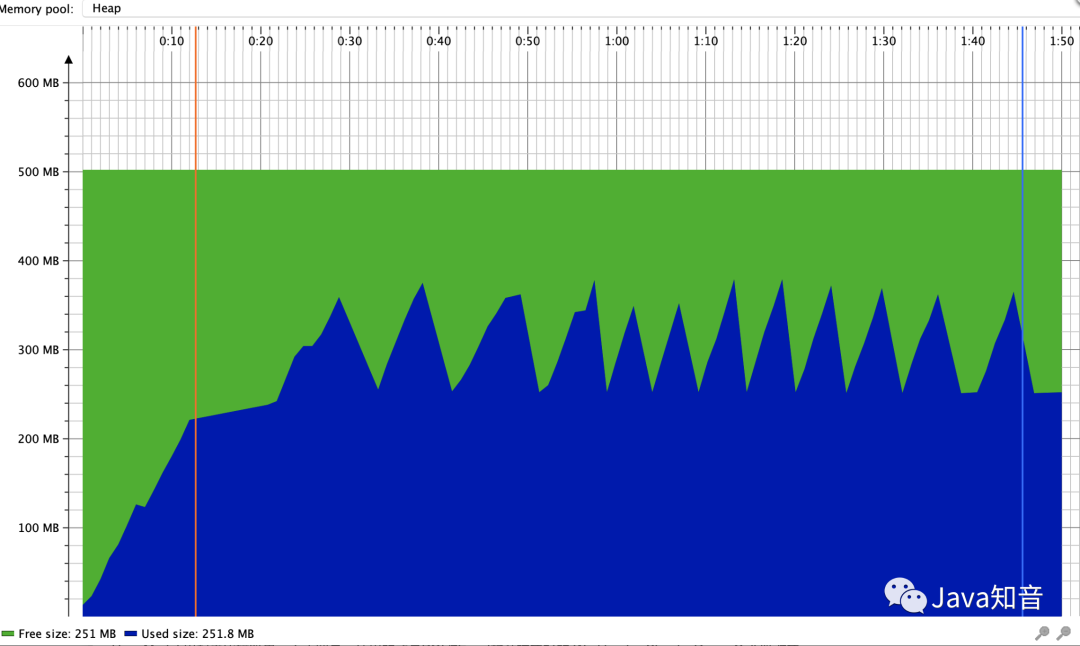
可以看出內(nèi)存有被回收的情況,比較平穩(wěn)。
XLS
POI沒有像XLSX那樣對XLS的寫做出性能的優(yōu)化,原因是:
官方認為XLS的不像XLSX那樣占內(nèi)存 XLS一個Sheet最多也只能有65535行數(shù)據(jù)
導入優(yōu)化
POI對導入分為3種模式,用戶模式User Model,事件模式Event Model,還有Event User Model。
用戶模式
用戶模式(User Model)就類似于dom方式的解析,是一種high level api,給人快速、方便開發(fā)用的。缺點是一次性將文件讀入內(nèi)存,構(gòu)建一顆Dom樹。并且在POI對Excel的抽象中,每一行,每一個單元格都是一個對象。當文件大,數(shù)據(jù)量多的時候?qū)?nèi)存的占用可想而知。
用戶模式就是類似用 WorkbookFactory.create(inputStream),poi 會把整個文件一次性解析,生成全部的Sheet,Row,Cell以及對象,如果導入文件數(shù)據(jù)量大的話,也很可能會導致OOM。
本地測試用戶模式讀取XLSX文件,數(shù)據(jù)量10w行 * 50列,內(nèi)存使用如下
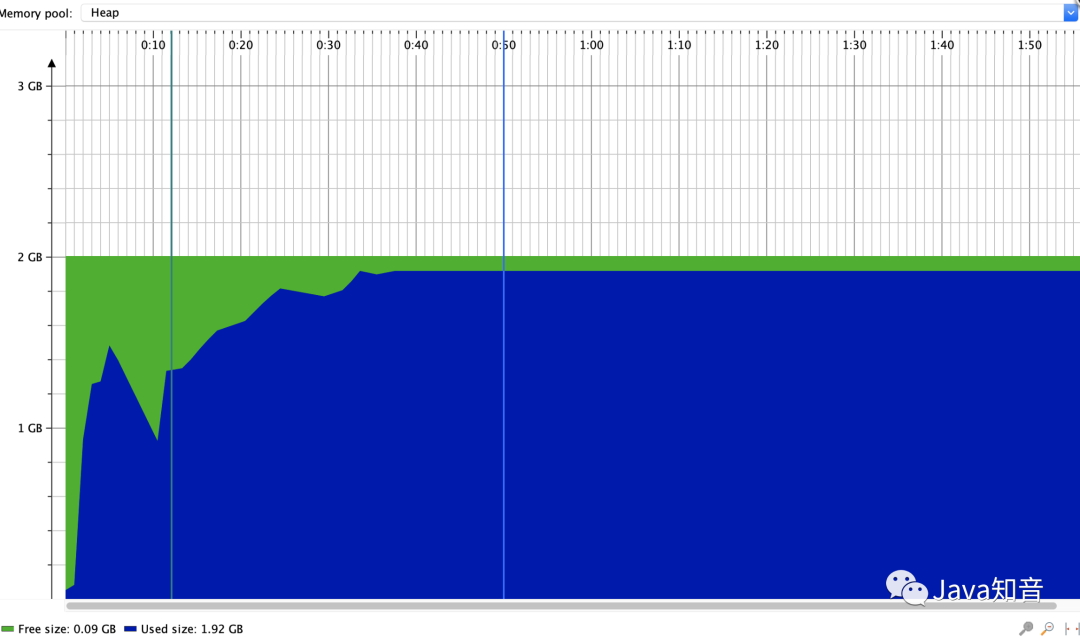
事件模式
事件模式(Event Model)就是SAX解析。Event Model使用的方式是邊讀取邊解析,并且不會將這些數(shù)據(jù)封裝成Row,Cell這樣的對象。而都只是普通的數(shù)字或者是字符串。并且這些解析出來的對象是不需要一直駐留在內(nèi)存中,而是解析完使用后就可以回收。所以相比于User Model,Event Model更節(jié)省內(nèi)存,效率也更。
但是作為代價,相比User Model功能更少,門檻也要高一些。我們需要去學習Excel存儲數(shù)據(jù)的各個Xml中每個標簽,標簽中的屬性的含義,然后對解析代碼進行設(shè)計。
User Event Model
User Event Model也是采用流式解析,但是不同于Event Model,POI基于Event Model為我們封裝了一層。我們不再面對Element的事件編程,而是面向StartRow,EndRow,Cell等事件編程。而提供的數(shù)據(jù),也不再像之前是原始數(shù)據(jù),而是全部格式化好,方便開發(fā)者開箱即用。大大簡化了我們的開發(fā)效率。
XLSX
POI對XLSX支持Event Model和Event User Model
XLSX的Event Model
使用
官網(wǎng)例子:
http://svn.apache.org/repos/asf/poi/trunk/src/examples/src/org/apache/poi/examples/xssf/eventusermodel/FromHowTo.java
簡單來說就是需要繼承DefaultHandler,覆蓋其startElement,endElement方法。然后方法里獲取你想要的數(shù)據(jù)。
原理
DefaultHandler相信熟悉的人都知道,這是JDK自帶的對XML的SAX解析用到處理類,POI在進行SAX解析時,把讀取到每個XML的元素時則會回調(diào)這兩個方法,然后我們就可以獲取到想用的數(shù)據(jù)了。
我們回憶一下上面說到的XLSX存儲格式中sheet存儲數(shù)據(jù)的格式。
再看看官方例子中的解析過程
@Override
public?void?startElement(String?uri,?String?localName,?String?name,
????????????????????????????Attributes?attributes)?throws?SAXException?{
????//c代表是一個單元格cell,判斷c這個xml元素里面屬性attribute?t
????//?c?=>?cell
????if(name.equals("c"))?{
????????//?Print?the?cell?reference
????????System.out.print(attributes.getValue("r")?+?"?-?");
????????//?Figure?out?if?the?value?is?an?index?in?the?SST
????????String?cellType?=?attributes.getValue("t");
????????nextIsString?=?cellType?!=?null?&&?cellType.equals("s");
????????inlineStr?=?cellType?!=?null?&&?cellType.equals("inlineStr");
????}
????//?Clear?contents?cache
????lastContents?=?"";
}

@Override
public?void?endElement(String?uri,?String?localName,?String?name)
????????throws?SAXException?{
????//?Process?the?last?contents?as?required.
????//?Do?now,?as?characters()?may?be?called?more?than?once
????if(nextIsString)?{
????????Integer?idx?=?Integer.valueOf(lastContents);
????????lastContents?=?lruCache.get(idx);
????????if?(lastContents?==?null?&&?!lruCache.containsKey(idx))?{
????????????lastContents?=?new?XSSFRichTextString(sst.getEntryAt(idx)).toString();
????????????lruCache.put(idx,?lastContents);
????????}
????????nextIsString?=?false;
????}

????//v?元素代表這個cell的內(nèi)容
????//?v?=>?contents?of?a?cell
????//?Output?after?we've?seen?the?string?contents
????if(name.equals("v")?||?(inlineStr?&&?name.equals("c")))?{
????????System.out.println(lastContents);
????}
}
可以看出你需要對XLSX的XML格式清楚,才能獲取到你想要的東西。
XLSX的Event User Model
使用
官方例子
https://svn.apache.org/repos/asf/poi/trunk/src/examples/src/org/apache/poi/examples/xssf/eventusermodel/XLSX2CSV.java
簡單來說就是繼承XSSFSheetXMLHandler.SheetContentsHandler,覆蓋其startRow,endRow,cell,endSheet 等方法。POI每開始讀行,結(jié)束讀行,讀取一個cell,結(jié)束讀取一個sheet時回調(diào)的方法。從方法名上看Event User Model有更好的用戶體驗。
原理
其實Event User Model也是 Event Model的封裝,在XSSFSheetXMLHandler(其實也是一個DefaultHandler來的)中持有一個SheetContentsHandler,在其startElement,endElement方法中會調(diào)用SheetContentsHandler的startRow,endRow,cell,endSheet等方法。
我們看看XSSFSheetXMLHandler的startElement和endElement方法
public?void?startElement(String?uri,?String?localName,?String?qName,
?????????????????????????Attributes?attributes)?throws?SAXException?{

????if?(uri?!=?null?&&?!?uri.equals(NS_SPREADSHEETML))?{
????????return;
????}

????if?(isTextTag(localName))?{
????????vIsOpen?=?true;
????????//?Clear?contents?cache
????????value.setLength(0);
????}?else?if?("is".equals(localName))?{
???????//?Inline?string?outer?tag
???????isIsOpen?=?true;
????}?else?if?("f".equals(localName))?{
???????//?Clear?contents?cache
???????formula.setLength(0);
???????
???????//?Mark?us?as?being?a?formula?if?not?already
???????if(nextDataType?==?xssfDataType.NUMBER)?{
??????????nextDataType?=?xssfDataType.FORMULA;
???????}
???????
???????//?Decide?where?to?get?the?formula?string?from
???????String?type?=?attributes.getValue("t");
???????if(type?!=?null?&&?type.equals("shared"))?{
??????????//?Is?it?the?one?that?defines?the?shared,?or?uses?it?
??????????String?ref?=?attributes.getValue("ref");
??????????String?si?=?attributes.getValue("si");
??????????
??????????if(ref?!=?null)?{
?????????????//?This?one?defines?it
?????????????//?TODO?Save?it?somewhere
?????????????fIsOpen?=?true;
??????????}?else?{
?????????????//?This?one?uses?a?shared?formula
?????????????//?TODO?Retrieve?the?shared?formula?and?tweak?it?to?
?????????????//??match?the?current?cell
?????????????if(formulasNotResults)?{
?????????????????logger.log(POILogger.WARN,?"shared?formulas?not?yet?supported!");
?????????????}?/*else?{
????????????????//?It's?a?shared?formula,?so?we?can't?get?at?the?formula?string?yet
????????????????//?However,?they?don't?care?about?the?formula?string,?so?that's?ok!
?????????????}*/
??????????}
???????}?else?{
??????????fIsOpen?=?true;
???????}
????}
????else?if("oddHeader".equals(localName)?||?"evenHeader".equals(localName)?||
??????????"firstHeader".equals(localName)?||?"firstFooter".equals(localName)?||
??????????"oddFooter".equals(localName)?||?"evenFooter".equals(localName))?{
???????hfIsOpen?=?true;
???????//?Clear?contents?cache
???????headerFooter.setLength(0);
????}
????else?if("row".equals(localName))?{
????????String?rowNumStr?=?attributes.getValue("r");
????????if(rowNumStr?!=?null)?{
????????????rowNum?=?Integer.parseInt(rowNumStr)?-?1;
????????}?else?{
????????????rowNum?=?nextRowNum;
????????}
????????//回調(diào)了SheetContentsHandler的startRow方法
????????output.startRow(rowNum);
????}
????//?c?=>?cell
????else?if?("c".equals(localName))?{
????????//?Set?up?defaults.
????????this.nextDataType?=?xssfDataType.NUMBER;
????????this.formatIndex?=?-1;
????????this.formatString?=?null;
????????cellRef?=?attributes.getValue("r");
????????String?cellType?=?attributes.getValue("t");
????????String?cellStyleStr?=?attributes.getValue("s");
????????if?("b".equals(cellType))
????????????nextDataType?=?xssfDataType.BOOLEAN;
????????else?if?("e".equals(cellType))
????????????nextDataType?=?xssfDataType.ERROR;
????????else?if?("inlineStr".equals(cellType))
????????????nextDataType?=?xssfDataType.INLINE_STRING;
????????else?if?("s".equals(cellType))
????????????nextDataType?=?xssfDataType.SST_STRING;
????????else?if?("str".equals(cellType))
????????????nextDataType?=?xssfDataType.FORMULA;
????????else?{
????????????//?Number,?but?almost?certainly?with?a?special?style?or?format
????????????XSSFCellStyle?style?=?null;
????????????if?(stylesTable?!=?null)?{
????????????????if?(cellStyleStr?!=?null)?{
????????????????????int?styleIndex?=?Integer.parseInt(cellStyleStr);
????????????????????style?=?stylesTable.getStyleAt(styleIndex);
????????????????}?else?if?(stylesTable.getNumCellStyles()?>?0)?{
????????????????????style?=?stylesTable.getStyleAt(0);
????????????????}
????????????}
????????????if?(style?!=?null)?{
????????????????this.formatIndex?=?style.getDataFormat();
????????????????this.formatString?=?style.getDataFormatString();
????????????????if?(this.formatString?==?null)
????????????????????this.formatString?=?BuiltinFormats.getBuiltinFormat(this.formatIndex);
????????????}
????????}
????}
}
~
@Override
?public?void?endElement(String?uri,?String?localName,?String?qName)
????????throws?SAXException?{

????if?(uri?!=?null?&&?!?uri.equals(NS_SPREADSHEETML))?{
????????return;
????}

????String?thisStr?=?null;

????//?v?=>?contents?of?a?cell
????if?(isTextTag(localName))?{
????????vIsOpen?=?false;
????????
????????//?Process?the?value?contents?as?required,?now?we?have?it?all
????????switch?(nextDataType)?{
????????????case?BOOLEAN:
????????????????char?first?=?value.charAt(0);
????????????????thisStr?=?first?==?'0'???"FALSE"?:?"TRUE";
????????????????break;

????????????case?ERROR:
????????????????thisStr?=?"ERROR:"?+?value;
????????????????break;

????????????case?FORMULA:
????????????????if(formulasNotResults)?{
???????????????????thisStr?=?formula.toString();
????????????????}?else?{
???????????????????String?fv?=?value.toString();
???????????????????
???????????????????if?(this.formatString?!=?null)?{
??????????????????????try?{
?????????????????????????//?Try?to?use?the?value?as?a?formattable?number
?????????????????????????double?d?=?Double.parseDouble(fv);
?????????????????????????thisStr?=?formatter.formatRawCellContents(d,?this.formatIndex,?this.formatString);
??????????????????????}?catch(NumberFormatException?e)?{
?????????????????????????//?Formula?is?a?String?result?not?a?Numeric?one
?????????????????????????thisStr?=?fv;
??????????????????????}
???????????????????}?else?{
??????????????????????//?No?formatting?applied,?just?do?raw?value?in?all?cases
??????????????????????thisStr?=?fv;
???????????????????}
????????????????}
????????????????break;

????????????case?INLINE_STRING:
????????????????//?TODO:?Can?these?ever?have?formatting?on?them?
????????????????XSSFRichTextString?rtsi?=?new?XSSFRichTextString(value.toString());
????????????????thisStr?=?rtsi.toString();
????????????????break;

????????????case?SST_STRING:
????????????????String?sstIndex?=?value.toString();
????????????????try?{
????????????????????int?idx?=?Integer.parseInt(sstIndex);
????????????????????XSSFRichTextString?rtss?=?new?XSSFRichTextString(sharedStringsTable.getEntryAt(idx));
????????????????????thisStr?=?rtss.toString();
????????????????}
????????????????catch?(NumberFormatException?ex)?{
????????????????????logger.log(POILogger.ERROR,?"Failed?to?parse?SST?index?'"?+?sstIndex,?ex);
????????????????}
????????????????break;

????????????case?NUMBER:
????????????????String?n?=?value.toString();
????????????????if?(this.formatString?!=?null?&&?n.length()?>?0)
????????????????????thisStr?=?formatter.formatRawCellContents(Double.parseDouble(n),?this.formatIndex,?this.formatString);
????????????????else
????????????????????thisStr?=?n;
????????????????break;

????????????default:
????????????????thisStr?=?"(TODO:?Unexpected?type:?"?+?nextDataType?+?")";
????????????????break;
????????}
????????
????????//?Do?we?have?a?comment?for?this?cell?
????????checkForEmptyCellComments(EmptyCellCommentsCheckType.CELL);
????????XSSFComment?comment?=?commentsTable?!=?null???commentsTable.findCellComment(new?CellAddress(cellRef))?:?null;
????????
????????//回調(diào)了SheetContentsHandler的cell方法
????????//?Output
????????output.cell(cellRef,?thisStr,?comment);
????}?else?if?("f".equals(localName))?{
???????fIsOpen?=?false;
????}?else?if?("is".equals(localName))?{
???????isIsOpen?=?false;
????}?else?if?("row".equals(localName))?{
???????//?Handle?any?"missing"?cells?which?had?comments?attached
???????checkForEmptyCellComments(EmptyCellCommentsCheckType.END_OF_ROW);
???????
???????//回調(diào)了SheetContentsHandler的endRow方法
???????//?Finish?up?the?row
???????output.endRow(rowNum);
???????
???????//?some?sheets?do?not?have?rowNum?set?in?the?XML,?Excel?can?read?them?so?we?should?try?to?read?them?as?well
???????nextRowNum?=?rowNum?+?1;
????}?else?if?("sheetData".equals(localName))?{
????????//?Handle?any?"missing"?cells?which?had?comments?attached
????????checkForEmptyCellComments(EmptyCellCommentsCheckType.END_OF_SHEET_DATA);
????}
????else?if("oddHeader".equals(localName)?||?"evenHeader".equals(localName)?||
??????????"firstHeader".equals(localName))?{
???????hfIsOpen?=?false;
???????output.headerFooter(headerFooter.toString(),?true,?localName);
????}
????else?if("oddFooter".equals(localName)?||?"evenFooter".equals(localName)?||
??????????"firstFooter".equals(localName))?{
???????hfIsOpen?=?false;
???????output.headerFooter(headerFooter.toString(),?false,?localName);
????}
}
代碼有點多,
一是為了展示一下XSSFSheetXMLHandler解析XML的過程,大家可以粗略看看 二是可以看出Event User Model也是Event Model的封裝
測試
本地測試使用Event User Model讀取XLSX文件,數(shù)據(jù)量10w行 * 50列
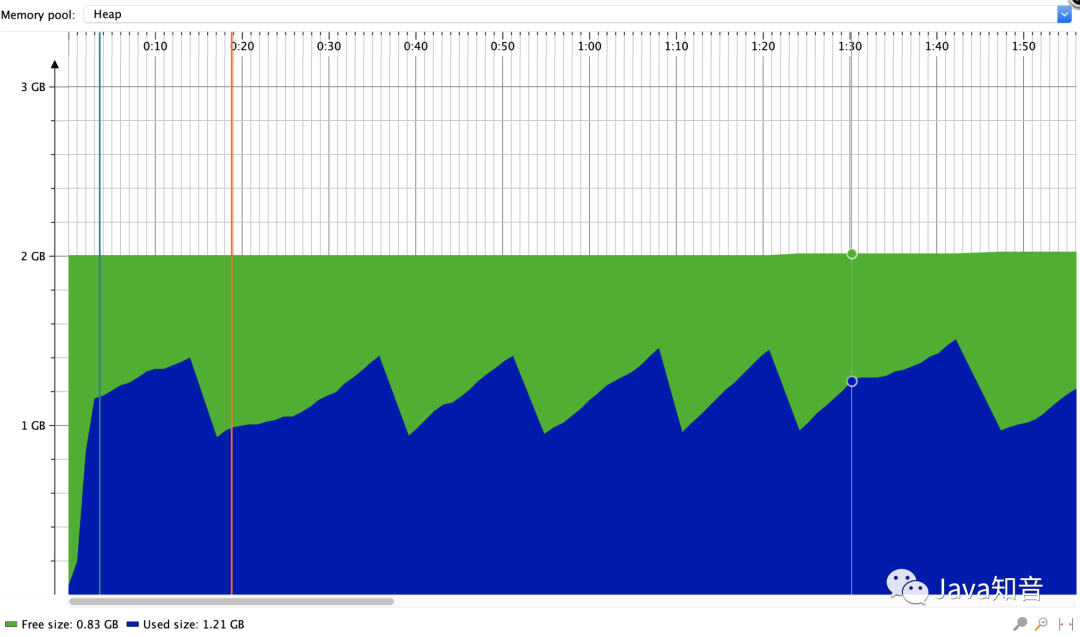
可以看出內(nèi)存有回收的情況,比User Model好多了。
XLS
POI對XLS支持Event Model
使用
官方例子
http://svn.apache.org/repos/asf/poi/trunk/src/examples/src/org/apache/poi/examples/hssf/eventusermodel/XLS2CSVmra.java
需要繼承HSSFListener,覆蓋processRecord 方法,POI每讀取到一個單元格的數(shù)據(jù)則會回調(diào)次方法。
原理
這里涉及BIFF8格式以及POI對其的封裝,大家可以了解一下(因為其格式比較復(fù)雜,我也不是很清楚)
總結(jié)
POI優(yōu)化了對XLSX的大批量寫,以及支持對XLS和XLSX的SAX讀,我們在實際開發(fā)時需要根據(jù)業(yè)務(wù)量來選擇正確的處理,不然可能會導致OOM。
希望這篇文章能給大家啟發(fā)。另外阿里開源了一個easyexcel,其實做的事情也差不多,大家可以看下。
參考資料
https://www.jianshu.com/p/6d6772f339cb https://poi.apache.org/components/spreadsheet/how-to.html
推薦文章
原創(chuàng)電子書
歷時整整一年總結(jié)的?Java 面試 + Java 后端技術(shù)學習指南,這是本人這幾年及校招的總結(jié),各種高頻面試題已經(jīng)全部進行總結(jié),按照章節(jié)復(fù)習即可,已經(jīng)拿到了大廠offer。
原創(chuàng)思維導圖
掃碼或者微信搜?程序員的技術(shù)圈子?回復(fù)?面試?領(lǐng)取原創(chuàng)電子書和思維導圖。