
SpringCloud+SpringBoot+OAuth2+Spring Security+Redis微服務(wù)統(tǒng)一認證授權(quán)
點擊上方 Java學習之道,選擇 設(shè)為星標
來源: blog.csdn.net/WYA1993/article/details/85050120
作者: myCat、
Part1序
因為目前做了一個基于Spring Cloud的微服務(wù)項目,所以了解到了OAuth2,打算整合一下OAuth2來實現(xiàn)統(tǒng)一授權(quán)。關(guān)于OAuth是一個關(guān)于授權(quán)的開放網(wǎng)絡(luò)標準,目前的版本是2.0,這里我就不多做介紹了。
Part2開發(fā)環(huán)境
Windows10 Intellij Idea2018.2 jdk1.8 redis3.2.9 Spring Boot 2.0.2 Release Spring Cloud Finchley.RC2 Spring 5.0.6
Part3項目目錄
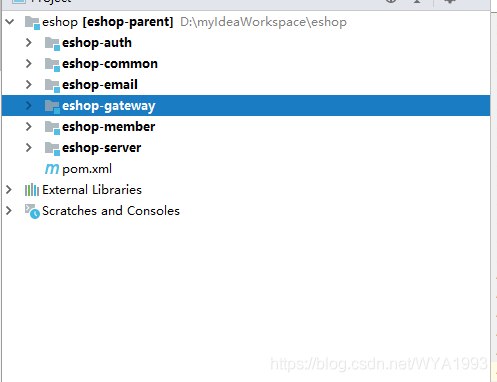
eshop —— 父級工程,管理jar包版本 eshop-server —— Eureka服務(wù)注冊中心 eshop-gateway —— Zuul網(wǎng)關(guān) eshop-auth —— 授權(quán)服務(wù) eshop-member —— 會員服務(wù) eshop-email —— 郵件服務(wù)(暫未使用) eshop-common —— 通用類 關(guān)于如何構(gòu)建一個基本的Spring Cloud 微服務(wù)這里就不贅述了
Part4授權(quán)服務(wù)
首先構(gòu)建eshop-auth服務(wù),引入相關(guān)依賴
<?xml version="1.0" encoding="UTF-8"?>
<project xmlns="http://maven.apache.org/POM/4.0.0"
         xmlns:xsi="http://www.w3.org/2001/XMLSchema-instance"
         xsi:schemaLocation="http://maven.apache.org/POM/4.0.0 http://maven.apache.org/xsd/maven-4.0.0.xsd">
    <parent>
        <artifactId>eshop-parent</artifactId>
        <groupId>com.curise.eshop</groupId>
        <version>1.0-SNAPSHOT</version>
    </parent>
    <modelVersion>4.0.0</modelVersion>
    <artifactId>eshop-auth</artifactId>
    <packaging>war</packaging>
    <description>授權(quán)模塊</description>

    <dependencies>
        <dependency>
            <groupId>com.curise.eshop</groupId>
            <artifactId>eshop-common</artifactId>
            <version>1.0-SNAPSHOT</version>
        </dependency>
        <dependency>
            <groupId>org.springframework.boot</groupId>
            <artifactId>spring-boot-starter-web</artifactId>
        </dependency>
        <dependency>
            <groupId>org.springframework.cloud</groupId>
            <artifactId>spring-cloud-starter-netflix-eureka-client</artifactId>
        </dependency>
        <dependency>
            <groupId>org.springframework.cloud</groupId>
            <artifactId>spring-cloud-starter-oauth2</artifactId>
        </dependency>
        <dependency>
            <groupId>org.springframework.cloud</groupId>
            <artifactId>spring-cloud-starter-security</artifactId>
        </dependency>
        <dependency>
            <groupId>org.springframework.boot</groupId>
            <artifactId>spring-boot-starter-data-redis</artifactId>
        </dependency>
        <dependency>
            <groupId>org.mybatis.spring.boot</groupId>
            <artifactId>mybatis-spring-boot-starter</artifactId>
        </dependency>
        <dependency>
            <groupId>org.springframework.boot</groupId>
            <artifactId>spring-boot-starter-actuator</artifactId>
        </dependency>
        <dependency>
            <groupId>mysql</groupId>
            <artifactId>mysql-connector-java</artifactId>
        </dependency>
        <dependency>
            <groupId>com.alibaba</groupId>
            <artifactId>druid</artifactId>
        </dependency>
        <dependency>
            <groupId>log4j</groupId>
            <artifactId>log4j</artifactId>
        </dependency>
    </dependencies>

    <build>
        <plugins>
            <plugin>
                <groupId>org.springframework.boot</groupId>
                <artifactId>spring-boot-maven-plugin</artifactId>
            </plugin>
        </plugins>
    </build>
</project>
接下來,配置Mybatis、redis、eureka,貼一下配置文件
server:
  port: 1203

spring:
  application:
    name: eshop-auth
  redis:
    database: 0
    host: 192.168.0.117
    port: 6379
    password:
    jedis:
      pool:
        max-active: 8
        max-idle: 8
        min-idle: 0
  datasource:
    driver-class-name: com.mysql.jdbc.Driver
    url: jdbc:mysql://localhost:3306/eshop_member?useUnicode=true&characterEncoding=utf-8&useSSL=false&allowMultiQueries=true
    username: root
    password: root
  druid:
    initialSize: 5 #初始化連接大小
    minIdle: 5     #最小連接池數(shù)量
    maxActive: 20  #最大連接池數(shù)量
    maxWait: 60000 #獲取連接時最大等待時間,單位毫秒
    timeBetweenEvictionRunsMillis: 60000 #配置間隔多久才進行一次檢測,檢測需要關(guān)閉的空閑連接,單位是毫秒
    minEvictableIdleTimeMillis: 300000   #配置一個連接在池中最小生存的時間,單位是毫秒
    validationQuery: SELECT 1 from DUAL  #測試連接
    testWhileIdle: true                  #申請連接的時候檢測,建議配置為true,不影響性能,并且保證安全性
    testOnBorrow: false                  #獲取連接時執(zhí)行檢測,建議關(guān)閉,影響性能
    testOnReturn: false                  #歸還連接時執(zhí)行檢測,建議關(guān)閉,影響性能
    poolPreparedStatements: false        #是否開啟PSCache,PSCache對支持游標的數(shù)據(jù)庫性能提升巨大,oracle建議開啟,mysql下建議關(guān)閉
    maxPoolPreparedStatementPerConnectionSize: 20 #開啟poolPreparedStatements后生效
    filters: stat,wall,log4j #配置擴展插件,常用的插件有=>stat:監(jiān)控統(tǒng)計  log4j:日志  wall:防御sql注入
    connectionProperties: 'druid.stat.mergeSql=true;druid.stat.slowSqlMillis=5000' #通過connectProperties屬性來打開mergeSql功能;慢SQL記錄


eureka:
  instance:
    prefer-ip-address: true
    instance-id: ${spring.cloud.client.ip-address}:${server.port}
  client:
    service-url:
      defaultZone: http://localhost:1111/eureka/

mybatis:
  type-aliases-package: com.curise.eshop.common.entity
  configuration:
    map-underscore-to-camel-case: true  #開啟駝峰命名,l_name -> lName
    jdbc-type-for-null: NULL
    lazy-loading-enabled: true
    aggressive-lazy-loading: true
    cache-enabled: true #開啟二級緩存
    call-setters-on-nulls: true #map空列不顯示問題
  mapper-locations:
    - classpath:mybatis/*.xml
AuthApplication添加@EnableDiscoveryClient和@MapperScan注解。
接下來配置認證服務(wù)器AuthorizationServerConfig ,并添加@Configuration和@EnableAuthorizationServer注解,其中ClientDetailsServiceConfigurer配置在內(nèi)存中,當然也可以從數(shù)據(jù)庫讀取,以后慢慢完善。
@Configuration
@EnableAuthorizationServer
public class AuthorizationServerConfig extends AuthorizationServerConfigurerAdapter {

    @Autowired
    private AuthenticationManager authenticationManager;

    @Autowired
    private DataSource dataSource;

    @Autowired
    private RedisConnectionFactory redisConnectionFactory;

    @Autowired
    private MyUserDetailService userDetailService;

    @Bean
    public TokenStore tokenStore() {
        return new RedisTokenStore(redisConnectionFactory);
    }

    @Override
    public void configure(AuthorizationServerSecurityConfigurer security) throws Exception {
        security
                .allowFormAuthenticationForClients()
                .tokenKeyAccess("permitAll()")
                .checkTokenAccess("isAuthenticated()");
    }

    @Override
    public void configure(ClientDetailsServiceConfigurer clients) throws Exception {
       // clients.withClientDetails(clientDetails());
        clients.inMemory()
                .withClient("android")
                .scopes("read")
                .secret("android")
                .authorizedGrantTypes("password", "authorization_code", "refresh_token")
                .and()
                .withClient("webapp")
                .scopes("read")
                .authorizedGrantTypes("implicit")
                .and()
                .withClient("browser")
                .authorizedGrantTypes("refresh_token", "password")
                .scopes("read");
    }
    @Bean
    public ClientDetailsService clientDetails() {
        return new JdbcClientDetailsService(dataSource);
    }

    @Bean
    public WebResponseExceptionTranslator webResponseExceptionTranslator(){
        return new MssWebResponseExceptionTranslator();
    }

    @Override
    public void configure(AuthorizationServerEndpointsConfigurer endpoints) throws Exception {
        endpoints.tokenStore(tokenStore())
                .userDetailsService(userDetailService)
                .authenticationManager(authenticationManager);
        endpoints.tokenServices(defaultTokenServices());
        //認證異常翻譯
       // endpoints.exceptionTranslator(webResponseExceptionTranslator());
    }

    /**
     * <p>注意,自定義TokenServices的時候,需要設(shè)置@Primary,否則報錯,</p>
     * @return
     */
    @Primary
    @Bean
    public DefaultTokenServices defaultTokenServices(){
        DefaultTokenServices tokenServices = new DefaultTokenServices();
        tokenServices.setTokenStore(tokenStore());
        tokenServices.setSupportRefreshToken(true);
        //tokenServices.setClientDetailsService(clientDetails());
        // token有效期自定義設(shè)置,默認12小時
        tokenServices.setAccessTokenValiditySeconds(60*60*12);
        // refresh_token默認30天
        tokenServices.setRefreshTokenValiditySeconds(60 * 60 * 24 * 7);
        return tokenServices;
    }
}
在上述配置中,認證的token是存到redis里的,如果你這里使用了Spring5.0以上的版本的話,使用默認的RedisTokenStore認證時會報如下異常:
nested exception is java.lang.NoSuchMethodError: org.springframework.data.redis.connection.RedisConnection.set([B[B)V
原因是spring-data-redis 2.0版本中set(String,String)被棄用了,要使用RedisConnection.stringCommands().set(…),所有我自定義一個RedisTokenStore,代碼和RedisTokenStore一樣,只是把所有conn.set(…)都換成conn..stringCommands().set(…),測試后方法可行。
public class RedisTokenStore implements TokenStore {

    private static final String ACCESS = "access:";
    private static final String AUTH_TO_ACCESS = "auth_to_access:";
    private static final String AUTH = "auth:";
    private static final String REFRESH_AUTH = "refresh_auth:";
    private static final String ACCESS_TO_REFRESH = "access_to_refresh:";
    private static final String REFRESH = "refresh:";
    private static final String REFRESH_TO_ACCESS = "refresh_to_access:";
    private static final String CLIENT_ID_TO_ACCESS = "client_id_to_access:";
    private static final String UNAME_TO_ACCESS = "uname_to_access:";
    private final RedisConnectionFactory connectionFactory;
    private AuthenticationKeyGenerator authenticationKeyGenerator = new DefaultAuthenticationKeyGenerator();
    private RedisTokenStoreSerializationStrategy serializationStrategy = new JdkSerializationStrategy();
    private String prefix = "";

    public RedisTokenStore(RedisConnectionFactory connectionFactory) {
        this.connectionFactory = connectionFactory;
    }

    public void setAuthenticationKeyGenerator(AuthenticationKeyGenerator authenticationKeyGenerator) {
        this.authenticationKeyGenerator = authenticationKeyGenerator;
    }

    public void setSerializationStrategy(RedisTokenStoreSerializationStrategy serializationStrategy) {
        this.serializationStrategy = serializationStrategy;
    }

    public void setPrefix(String prefix) {
        this.prefix = prefix;
    }

    private RedisConnection getConnection() {
        return this.connectionFactory.getConnection();
    }

    private byte[] serialize(Object object) {
        return this.serializationStrategy.serialize(object);
    }

    private byte[] serializeKey(String object) {
        return this.serialize(this.prefix + object);
    }

    private OAuth2AccessToken deserializeAccessToken(byte[] bytes) {
        return (OAuth2AccessToken)this.serializationStrategy.deserialize(bytes, OAuth2AccessToken.class);
    }

    private OAuth2Authentication deserializeAuthentication(byte[] bytes) {
        return (OAuth2Authentication)this.serializationStrategy.deserialize(bytes, OAuth2Authentication.class);
    }

    private OAuth2RefreshToken deserializeRefreshToken(byte[] bytes) {
        return (OAuth2RefreshToken)this.serializationStrategy.deserialize(bytes, OAuth2RefreshToken.class);
    }

    private byte[] serialize(String string) {
        return this.serializationStrategy.serialize(string);
    }

    private String deserializeString(byte[] bytes) {
        return this.serializationStrategy.deserializeString(bytes);
    }

    @Override
    public OAuth2AccessToken getAccessToken(OAuth2Authentication authentication) {
        String key = this.authenticationKeyGenerator.extractKey(authentication);
        byte[] serializedKey = this.serializeKey(AUTH_TO_ACCESS + key);
        byte[] bytes = null;
        RedisConnection conn = this.getConnection();
        try {
            bytes = conn.get(serializedKey);
        } finally {
            conn.close();
        }
        OAuth2AccessToken accessToken = this.deserializeAccessToken(bytes);
        if (accessToken != null) {
            OAuth2Authentication storedAuthentication = this.readAuthentication(accessToken.getValue());
            if (storedAuthentication == null || !key.equals(this.authenticationKeyGenerator.extractKey(storedAuthentication))) {
                this.storeAccessToken(accessToken, authentication);
            }
        }
        return accessToken;
    }

    @Override
    public OAuth2Authentication readAuthentication(OAuth2AccessToken token) {
        return this.readAuthentication(token.getValue());
    }

    @Override
    public OAuth2Authentication readAuthentication(String token) {
        byte[] bytes = null;
        RedisConnection conn = this.getConnection();
        try {
            bytes = conn.get(this.serializeKey("auth:" + token));
        } finally {
            conn.close();
        }
        OAuth2Authentication auth = this.deserializeAuthentication(bytes);
        return auth;
    }

    @Override
    public OAuth2Authentication readAuthenticationForRefreshToken(OAuth2RefreshToken token) {
        return this.readAuthenticationForRefreshToken(token.getValue());
    }

    public OAuth2Authentication readAuthenticationForRefreshToken(String token) {
        RedisConnection conn = getConnection();
        try {
            byte[] bytes = conn.get(serializeKey(REFRESH_AUTH + token));
            OAuth2Authentication auth = deserializeAuthentication(bytes);
            return auth;
        } finally {
            conn.close();
        }
    }

    @Override
    public void storeAccessToken(OAuth2AccessToken token, OAuth2Authentication authentication) {
        byte[] serializedAccessToken = serialize(token);
        byte[] serializedAuth = serialize(authentication);
        byte[] accessKey = serializeKey(ACCESS + token.getValue());
        byte[] authKey = serializeKey(AUTH + token.getValue());
        byte[] authToAccessKey = serializeKey(AUTH_TO_ACCESS + authenticationKeyGenerator.extractKey(authentication));
        byte[] approvalKey = serializeKey(UNAME_TO_ACCESS + getApprovalKey(authentication));
        byte[] clientId = serializeKey(CLIENT_ID_TO_ACCESS + authentication.getOAuth2Request().getClientId());

        RedisConnection conn = getConnection();
        try {
            conn.openPipeline();
            conn.stringCommands().set(accessKey, serializedAccessToken);
            conn.stringCommands().set(authKey, serializedAuth);
            conn.stringCommands().set(authToAccessKey, serializedAccessToken);
            if (!authentication.isClientOnly()) {
                conn.rPush(approvalKey, serializedAccessToken);
            }
            conn.rPush(clientId, serializedAccessToken);
            if (token.getExpiration() != null) {
                int seconds = token.getExpiresIn();
                conn.expire(accessKey, seconds);
                conn.expire(authKey, seconds);
                conn.expire(authToAccessKey, seconds);
                conn.expire(clientId, seconds);
                conn.expire(approvalKey, seconds);
            }
            OAuth2RefreshToken refreshToken = token.getRefreshToken();
            if (refreshToken != null && refreshToken.getValue() != null) {
                byte[] refresh = serialize(token.getRefreshToken().getValue());
                byte[] auth = serialize(token.getValue());
                byte[] refreshToAccessKey = serializeKey(REFRESH_TO_ACCESS + token.getRefreshToken().getValue());
                conn.stringCommands().set(refreshToAccessKey, auth);
                byte[] accessToRefreshKey = serializeKey(ACCESS_TO_REFRESH + token.getValue());
                conn.stringCommands().set(accessToRefreshKey, refresh);
                if (refreshToken instanceof ExpiringOAuth2RefreshToken) {
                    ExpiringOAuth2RefreshToken expiringRefreshToken = (ExpiringOAuth2RefreshToken) refreshToken;
                    Date expiration = expiringRefreshToken.getExpiration();
                    if (expiration != null) {
                        int seconds = Long.valueOf((expiration.getTime() - System.currentTimeMillis()) / 1000L)
                                .intValue();
                        conn.expire(refreshToAccessKey, seconds);
                        conn.expire(accessToRefreshKey, seconds);
                    }
                }
            }
            conn.closePipeline();
        } finally {
            conn.close();
        }
    }

    private static String getApprovalKey(OAuth2Authentication authentication) {
        String userName = authentication.getUserAuthentication() == null ? "": authentication.getUserAuthentication().getName();
        return getApprovalKey(authentication.getOAuth2Request().getClientId(), userName);
    }

    private static String getApprovalKey(String clientId, String userName) {
        return clientId + (userName == null ? "" : ":" + userName);
    }

    @Override
    public void removeAccessToken(OAuth2AccessToken accessToken) {
        this.removeAccessToken(accessToken.getValue());
    }

    @Override
    public OAuth2AccessToken readAccessToken(String tokenValue) {
        byte[] key = serializeKey(ACCESS + tokenValue);
        byte[] bytes = null;
        RedisConnection conn = getConnection();
        try {
            bytes = conn.get(key);
        } finally {
            conn.close();
        }
        OAuth2AccessToken accessToken = deserializeAccessToken(bytes);
        return accessToken;
    }

    public void removeAccessToken(String tokenValue) {
        byte[] accessKey = serializeKey(ACCESS + tokenValue);
        byte[] authKey = serializeKey(AUTH + tokenValue);
        byte[] accessToRefreshKey = serializeKey(ACCESS_TO_REFRESH + tokenValue);
        RedisConnection conn = getConnection();
        try {
            conn.openPipeline();
            conn.get(accessKey);
            conn.get(authKey);
            conn.del(accessKey);
            conn.del(accessToRefreshKey);
            // Don't remove the refresh token - it's up to the caller to do that
            conn.del(authKey);
            List<Object> results = conn.closePipeline();
            byte[] access = (byte[]) results.get(0);
            byte[] auth = (byte[]) results.get(1);

            OAuth2Authentication authentication = deserializeAuthentication(auth);
            if (authentication != null) {
                String key = authenticationKeyGenerator.extractKey(authentication);
                byte[] authToAccessKey = serializeKey(AUTH_TO_ACCESS + key);
                byte[] unameKey = serializeKey(UNAME_TO_ACCESS + getApprovalKey(authentication));
                byte[] clientId = serializeKey(CLIENT_ID_TO_ACCESS + authentication.getOAuth2Request().getClientId());
                conn.openPipeline();
                conn.del(authToAccessKey);
                conn.lRem(unameKey, 1, access);
                conn.lRem(clientId, 1, access);
                conn.del(serialize(ACCESS + key));
                conn.closePipeline();
            }
        } finally {
            conn.close();
        }
    }

    @Override
    public void storeRefreshToken(OAuth2RefreshToken refreshToken, OAuth2Authentication authentication) {
        byte[] refreshKey = serializeKey(REFRESH + refreshToken.getValue());
        byte[] refreshAuthKey = serializeKey(REFRESH_AUTH + refreshToken.getValue());
        byte[] serializedRefreshToken = serialize(refreshToken);
        RedisConnection conn = getConnection();
        try {
            conn.openPipeline();
            conn.stringCommands().set(refreshKey, serializedRefreshToken);
            conn.stringCommands().set(refreshAuthKey, serialize(authentication));
            if (refreshToken instanceof ExpiringOAuth2RefreshToken) {
                ExpiringOAuth2RefreshToken expiringRefreshToken = (ExpiringOAuth2RefreshToken) refreshToken;
                Date expiration = expiringRefreshToken.getExpiration();
                if (expiration != null) {
                    int seconds = Long.valueOf((expiration.getTime() - System.currentTimeMillis()) / 1000L)
                            .intValue();
                    conn.expire(refreshKey, seconds);
                    conn.expire(refreshAuthKey, seconds);
                }
            }
            conn.closePipeline();
        } finally {
            conn.close();
        }
    }

    @Override
    public OAuth2RefreshToken readRefreshToken(String tokenValue) {
        byte[] key = serializeKey(REFRESH + tokenValue);
        byte[] bytes = null;
        RedisConnection conn = getConnection();
        try {
            bytes = conn.get(key);
        } finally {
            conn.close();
        }
        OAuth2RefreshToken refreshToken = deserializeRefreshToken(bytes);
        return refreshToken;
    }

    @Override
    public void removeRefreshToken(OAuth2RefreshToken refreshToken) {
        this.removeRefreshToken(refreshToken.getValue());
    }

    public void removeRefreshToken(String tokenValue) {
        byte[] refreshKey = serializeKey(REFRESH + tokenValue);
        byte[] refreshAuthKey = serializeKey(REFRESH_AUTH + tokenValue);
        byte[] refresh2AccessKey = serializeKey(REFRESH_TO_ACCESS + tokenValue);
        byte[] access2RefreshKey = serializeKey(ACCESS_TO_REFRESH + tokenValue);
        RedisConnection conn = getConnection();
        try {
            conn.openPipeline();
            conn.del(refreshKey);
            conn.del(refreshAuthKey);
            conn.del(refresh2AccessKey);
            conn.del(access2RefreshKey);
            conn.closePipeline();
        } finally {
            conn.close();
        }
    }

    @Override
    public void removeAccessTokenUsingRefreshToken(OAuth2RefreshToken refreshToken) {
        this.removeAccessTokenUsingRefreshToken(refreshToken.getValue());
    }

    private void removeAccessTokenUsingRefreshToken(String refreshToken) {
        byte[] key = serializeKey(REFRESH_TO_ACCESS + refreshToken);
        List<Object> results = null;
        RedisConnection conn = getConnection();
        try {
            conn.openPipeline();
            conn.get(key);
            conn.del(key);
            results = conn.closePipeline();
        } finally {
            conn.close();
        }
        if (results == null) {
            return;
        }
        byte[] bytes = (byte[]) results.get(0);
        String accessToken = deserializeString(bytes);
        if (accessToken != null) {
            removeAccessToken(accessToken);
        }
    }

    @Override
    public Collection<OAuth2AccessToken> findTokensByClientIdAndUserName(String clientId, String userName) {
        byte[] approvalKey = serializeKey(UNAME_TO_ACCESS + getApprovalKey(clientId, userName));
        List<byte[]> byteList = null;
        RedisConnection conn = getConnection();
        try {
            byteList = conn.lRange(approvalKey, 0, -1);
        } finally {
            conn.close();
        }
        if (byteList == null || byteList.size() == 0) {
            return Collections.<OAuth2AccessToken> emptySet();
        }
        List<OAuth2AccessToken> accessTokens = new ArrayList<OAuth2AccessToken>(byteList.size());
        for (byte[] bytes : byteList) {
            OAuth2AccessToken accessToken = deserializeAccessToken(bytes);
            accessTokens.add(accessToken);
        }
        return Collections.<OAuth2AccessToken> unmodifiableCollection(accessTokens);
    }

    @Override
    public Collection<OAuth2AccessToken> findTokensByClientId(String clientId) {
        byte[] key = serializeKey(CLIENT_ID_TO_ACCESS + clientId);
        List<byte[]> byteList = null;
        RedisConnection conn = getConnection();
        try {
            byteList = conn.lRange(key, 0, -1);
        } finally {
            conn.close();
        }
        if (byteList == null || byteList.size() == 0) {
            return Collections.<OAuth2AccessToken> emptySet();
        }
        List<OAuth2AccessToken> accessTokens = new ArrayList<OAuth2AccessToken>(byteList.size());
        for (byte[] bytes : byteList) {
            OAuth2AccessToken accessToken = deserializeAccessToken(bytes);
            accessTokens.add(accessToken);
        }
        return Collections.<OAuth2AccessToken> unmodifiableCollection(accessTokens);
    }
}
配置資源服務(wù)器
@Configuration
@EnableResourceServer
@Order(3)
public class ResourceServerConfig extends ResourceServerConfigurerAdapter {
    @Override
    public void configure(HttpSecurity http) throws Exception {
        http.csrf().disable()
            .exceptionHandling()
            .authenticationEntryPoint((request, response, authException) -> response.sendError(HttpServletResponse.SC_UNAUTHORIZED))
            .and()
            .requestMatchers().antMatchers("/api/**")
            .and()
            .authorizeRequests()
            .antMatchers("/api/**").authenticated()
            .and()
            .httpBasic();
    }
}
配置Spring Security
@Configuration
@EnableWebSecurity
@Order(2)
public class SecurityConfig extends WebSecurityConfigurerAdapter {
    @Autowired
    private MyUserDetailService userDetailService;

    @Bean
    public PasswordEncoder passwordEncoder() {
        //return new BCryptPasswordEncoder();
        return new NoEncryptPasswordEncoder();
    }

    @Override
    protected void configure(HttpSecurity http) throws Exception {
        http.requestMatchers().antMatchers("/oauth/**")
                .and()
                .authorizeRequests()
                .antMatchers("/oauth/**").authenticated()
                .and()
                .csrf().disable();
    }

    @Override
    protected void configure(AuthenticationManagerBuilder auth) throws Exception {
        auth.userDetailsService(userDetailService).passwordEncoder(passwordEncoder());
    }

    /**
     * 不定義沒有password grant_type
     *
     * @return
     * @throws Exception
     */
    @Override
    @Bean
    public AuthenticationManager authenticationManagerBean() throws Exception {
        return super.authenticationManagerBean();
    }
}
可以看到ResourceServerConfig 是比SecurityConfig 的優(yōu)先級低的。
二者的關(guān)系:
ResourceServerConfig 用于保護oauth相關(guān)的endpoints,同時主要作用于用戶的登錄(form login,Basic auth) SecurityConfig 用于保護oauth要開放的資源,同時主要作用于client端以及token的認證(Bearer auth)
所以我們讓SecurityConfig優(yōu)先于ResourceServerConfig,且在SecurityConfig 不攔截oauth要開放的資源,在ResourceServerConfig 中配置需要token驗證的資源,也就是我們對外提供的接口。所以這里對于所有微服務(wù)的接口定義有一個要求,就是全部以/api開頭。
如果這里不這樣配置的話,在你拿到access_token去請求各個接口時會報 invalid_token 的提示。
另外,由于我們自定義認證邏輯,所以需要重寫UserDetailService
@Service("userDetailService")
public class MyUserDetailService implements UserDetailsService {

    @Autowired
    private MemberDao memberDao;

    @Override
    public UserDetails loadUserByUsername(String memberName) throws UsernameNotFoundException {
        Member member = memberDao.findByMemberName(memberName);
        if (member == null) {
            throw new UsernameNotFoundException(memberName);
        }
        Set<GrantedAuthority> grantedAuthorities = new HashSet<>();
        // 可用性 :true:可用 false:不可用
        boolean enabled = true;
        // 過期性 :true:沒過期 false:過期
        boolean accountNonExpired = true;
        // 有效性 :true:憑證有效 false:憑證無效
        boolean credentialsNonExpired = true;
        // 鎖定性 :true:未鎖定 false:已鎖定
        boolean accountNonLocked = true;
        for (Role role : member.getRoles()) {
            //角色必須是ROLE_開頭,可以在數(shù)據(jù)庫中設(shè)置
            GrantedAuthority grantedAuthority = new SimpleGrantedAuthority(role.getRoleName());
            grantedAuthorities.add(grantedAuthority);
            //獲取權(quán)限
            for (Permission permission : role.getPermissions()) {
                GrantedAuthority authority = new SimpleGrantedAuthority(permission.getUri());
                grantedAuthorities.add(authority);
            }
        }
        User user = new User(member.getMemberName(), member.getPassword(),
                enabled, accountNonExpired, credentialsNonExpired, accountNonLocked, grantedAuthorities);
        return user;
    }

}
密碼驗證為了方便我使用了不加密的方式,重寫了PasswordEncoder,實際開發(fā)還是建議使用BCryptPasswordEncoder。
public class NoEncryptPasswordEncoder implements PasswordEncoder {

    @Override
    public String encode(CharSequence charSequence) {
        return (String) charSequence;
    }

    @Override
    public boolean matches(CharSequence charSequence, String s) {
        return s.equals((String) charSequence);
    }
}
另外,OAuth的密碼模式需要AuthenticationManager支持
@Override
@Bean
public AuthenticationManager authenticationManagerBean() throws Exception {
    return super.authenticationManagerBean();
}
定義一個Controller,提供兩個接口,/api/member用來獲取當前用戶信息,/api/exit用來注銷當前用戶
@RestController
@RequestMapping("/api")
public class MemberController {

    @Autowired
    private MyUserDetailService userDetailService;

    @Autowired
    private ConsumerTokenServices consumerTokenServices;

    @GetMapping("/member")
    public Principal user(Principal member) {
        return member;
    }

    @DeleteMapping(value = "/exit")
    public Result revokeToken(String access_token) {
        Result result = new Result();
        if (consumerTokenServices.revokeToken(access_token)) {
            result.setCode(ResultCode.SUCCESS.getCode());
            result.setMessage("注銷成功");
        } else {
            result.setCode(ResultCode.FAILED.getCode());
            result.setMessage("注銷失敗");
        }
        return result;
    }
}
Part5會員服務(wù)配置
引入依賴
<?xml version="1.0" encoding="UTF-8"?>
<project xmlns="http://maven.apache.org/POM/4.0.0"
         xmlns:xsi="http://www.w3.org/2001/XMLSchema-instance"
         xsi:schemaLocation="http://maven.apache.org/POM/4.0.0 http://maven.apache.org/xsd/maven-4.0.0.xsd">
    <parent>
        <artifactId>eshop-parent</artifactId>
        <groupId>com.curise.eshop</groupId>
        <version>1.0-SNAPSHOT</version>
    </parent>
    <modelVersion>4.0.0</modelVersion>
    <artifactId>eshop-member</artifactId>
    <packaging>war</packaging>
    <description>會員模塊</description>

    <dependencies>
        <dependency>
            <groupId>org.springframework.boot</groupId>
            <artifactId>spring-boot-starter-web</artifactId>
        </dependency>
        <dependency>
            <groupId>org.springframework.boot</groupId>
            <artifactId>spring-boot-starter-test</artifactId>
            <scope>test</scope>
        </dependency>
        <dependency>
            <groupId>org.springframework.cloud</groupId>
            <artifactId>spring-cloud-starter-netflix-eureka-client</artifactId>
        </dependency>
        <dependency>
            <groupId>org.springframework.cloud</groupId>
            <artifactId>spring-cloud-starter-oauth2</artifactId>
        </dependency>
        <dependency>
            <groupId>org.springframework.cloud</groupId>
            <artifactId>spring-cloud-starter-security</artifactId>
        </dependency>
        <dependency>
            <groupId>com.alibaba</groupId>
            <artifactId>fastjson</artifactId>
        </dependency>
    </dependencies>

    <build>
        <plugins>
            <plugin>
                <groupId>org.springframework.boot</groupId>
                <artifactId>spring-boot-maven-plugin</artifactId>
            </plugin>
        </plugins>
    </build>
</project>
配置資源服務(wù)器
@Configuration
@EnableResourceServer
public class ResourceServerConfig extends ResourceServerConfigurerAdapter {

    @Override
    public void configure(HttpSecurity http) throws Exception {
        http
                .csrf().disable()
                .exceptionHandling()
                .authenticationEntryPoint((request, response, authException) -> response.sendError(HttpServletResponse.SC_UNAUTHORIZED))
                .and()
                .requestMatchers().antMatchers("/api/**")
                .and()
                .authorizeRequests()
                .antMatchers("/api/**").authenticated()
                .and()
                .httpBasic();
    }
}
配置文件配置
spring:
  application:
    name: eshop-member

server:
  port: 1201

eureka:
  instance:
    prefer-ip-address: true
    instance-id: ${spring.cloud.client.ip-address}:${server.port}
  client:
    service-url:
      defaultZone: http://localhost:1111/eureka/

security:
  oauth2:
    resource:
      id: eshop-member
      user-info-uri: http://localhost:1202/auth/api/member
      prefer-token-info: false
MemberApplication主類配置
@SpringBootApplication
@EnableDiscoveryClient
@EnableGlobalMethodSecurity(prePostEnabled = true)
public class MemberApplication {

    public static void main(String[] args) {
        SpringApplication.run(MemberApplication.class,args);
    }
}
提供對外接口
@RestController
@RequestMapping("/api")
public class MemberController {

    @GetMapping("hello")
    @PreAuthorize("hasAnyAuthority('hello')")
    public String hello(){
        return "hello";
    }

    @GetMapping("current")
    public Principal user(Principal principal) {
        return principal;
    }

    @GetMapping("query")
    @PreAuthorize("hasAnyAuthority('query')")
    public String query() {
        return "具有query權(quán)限";
    }
}
Part6配置網(wǎng)關(guān)
引入依賴
<?xml version="1.0" encoding="UTF-8"?>
<project xmlns="http://maven.apache.org/POM/4.0.0"
         xmlns:xsi="http://www.w3.org/2001/XMLSchema-instance"
         xsi:schemaLocation="http://maven.apache.org/POM/4.0.0 http://maven.apache.org/xsd/maven-4.0.0.xsd">
    <parent>
        <artifactId>eshop-parent</artifactId>
        <groupId>com.curise.eshop</groupId>
        <version>1.0-SNAPSHOT</version>
    </parent>
    <modelVersion>4.0.0</modelVersion>
    <packaging>jar</packaging>
    <artifactId>eshop-gateway</artifactId>
    <description>網(wǎng)關(guān)</description>

    <dependencies>
        <dependency>
            <groupId>org.springframework.boot</groupId>
            <artifactId>spring-boot-starter-web</artifactId>
        </dependency>
        <dependency>
            <groupId>org.springframework.cloud</groupId>
            <artifactId>spring-cloud-starter-netflix-eureka-client</artifactId>
        </dependency>
        <dependency>
            <groupId>org.springframework.cloud</groupId>
            <artifactId>spring-cloud-starter-netflix-zuul</artifactId>
        </dependency>
        <dependency>
            <groupId>org.springframework.cloud</groupId>
            <artifactId>spring-cloud-starter-oauth2</artifactId>
        </dependency>
        <dependency>
            <groupId>org.springframework.cloud</groupId>
            <artifactId>spring-cloud-starter-security</artifactId>
        </dependency>
        <dependency>
            <groupId>org.springframework.boot</groupId>
            <artifactId>spring-boot-starter-actuator</artifactId>
        </dependency>
    </dependencies>

    <build>
        <plugins>
            <plugin>
                <groupId>org.springframework.boot</groupId>
                <artifactId>spring-boot-maven-plugin</artifactId>
            </plugin>
        </plugins>
    </build>
</project>
配置文件
server:
  port: 1202

spring:
  application:
    name: eshop-gateway

#--------------------eureka---------------------
eureka:
  instance:
    prefer-ip-address: true
    instance-id: ${spring.cloud.client.ip-address}:${server.port}
  client:
    service-url:
      defaultZone: http://localhost:1111/eureka/

#--------------------Zuul-----------------------
zuul:
  routes:
    member:
      path: /member/**
      serviceId: eshop-member
      sensitiveHeaders: "*"
    auth:
      path: /auth/**
      serviceId: eshop-auth
      sensitiveHeaders: "*"
  retryable: false
  ignored-services: "*"
  ribbon:
    eager-load:
      enabled: true
  host:
    connect-timeout-millis: 3000
    socket-timeout-millis: 3000
  add-proxy-headers: true
#---------------------OAuth2---------------------
security:
  oauth2:
    client:
      access-token-uri: http://localhost:${server.port}/auth/oauth/token
      user-authorization-uri: http://localhost:${server.port}/auth/oauth/authorize
      client-id: web
    resource:
      user-info-uri:  http://localhost:${server.port}/auth/api/member
      prefer-token-info: false
#----------------------超時配置-------------------
ribbon:
  ReadTimeout: 3000
  ConnectTimeout: 3000
  MaxAutoRetries: 1
  MaxAutoRetriesNextServer: 2
  eureka:
    enabled: true
hystrix:
  command:
    default:
      execution:
        timeout:
          enabled: true
        isolation:
          thread:
            timeoutInMilliseconds: 3500
ZuulApplication主類
@SpringBootApplication
@EnableDiscoveryClient
@EnableZuulProxy
@EnableOAuth2Sso
public class ZuulApplication {
    public static void main(String[] args) {
        SpringApplication.run(ZuulApplication.class, args);
    }
}
Spring Security配置
@Configuration
@EnableWebSecurity
@Order(99)
public class SecurityConfig extends WebSecurityConfigurerAdapter {
    @Override
    protected void configure(HttpSecurity http) throws Exception {
        http.csrf().disable();
    }
}
接下來分別啟動eshop-server、eshop-member、eshop-auth、eshop-gateway。
先發(fā)送一個請求測試一下未認證的效果
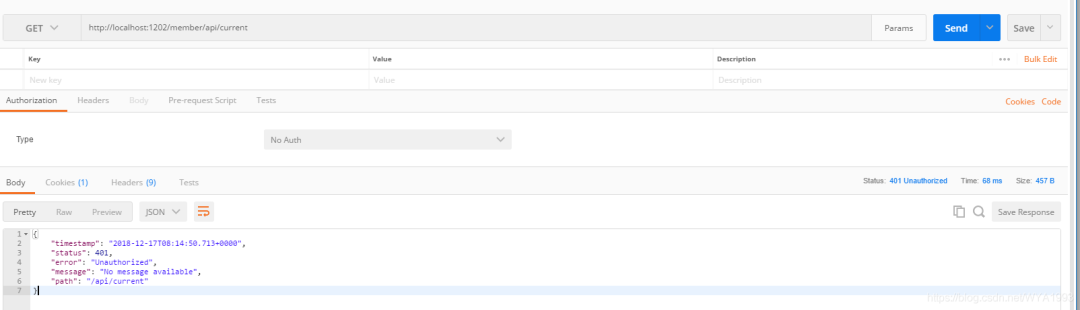
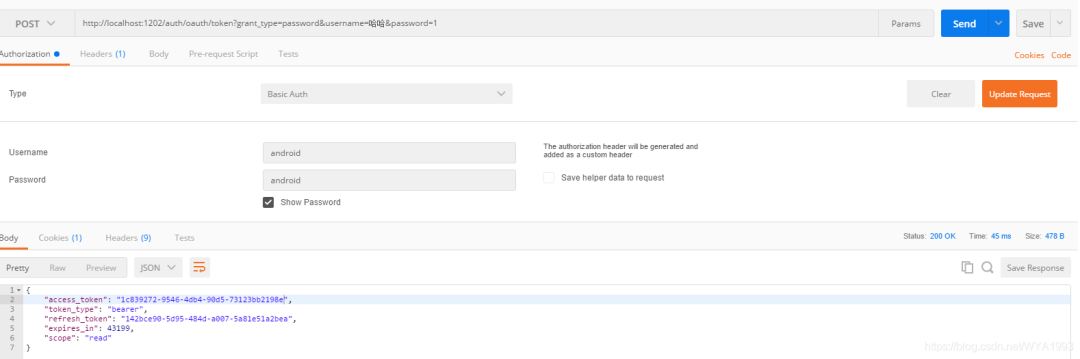
獲取認證
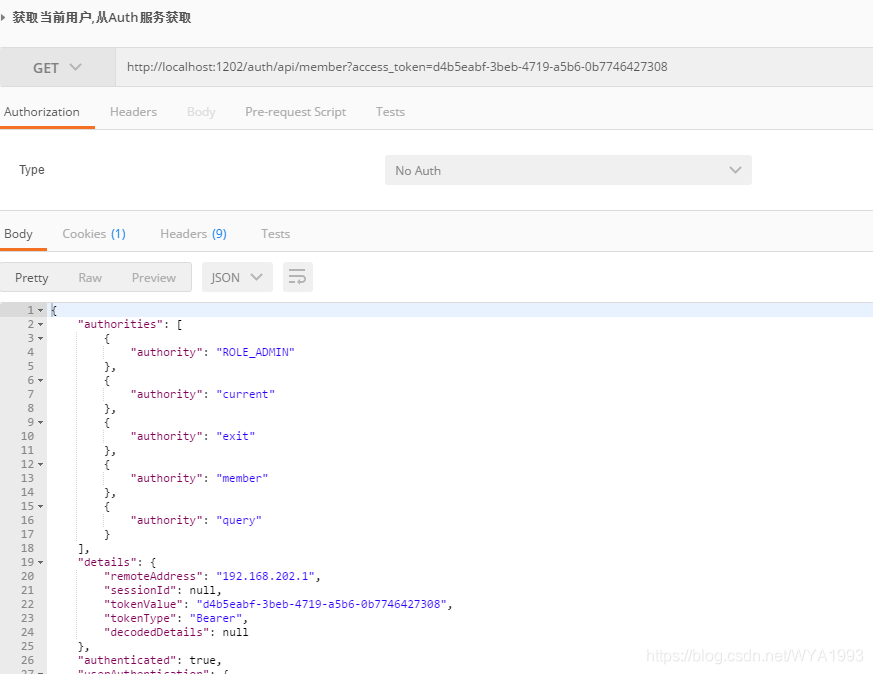
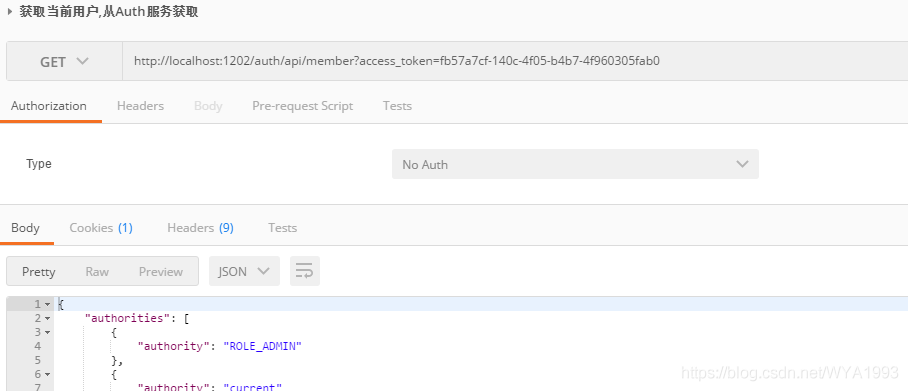
使用access_token請求auth服務(wù)下的用戶信息接口
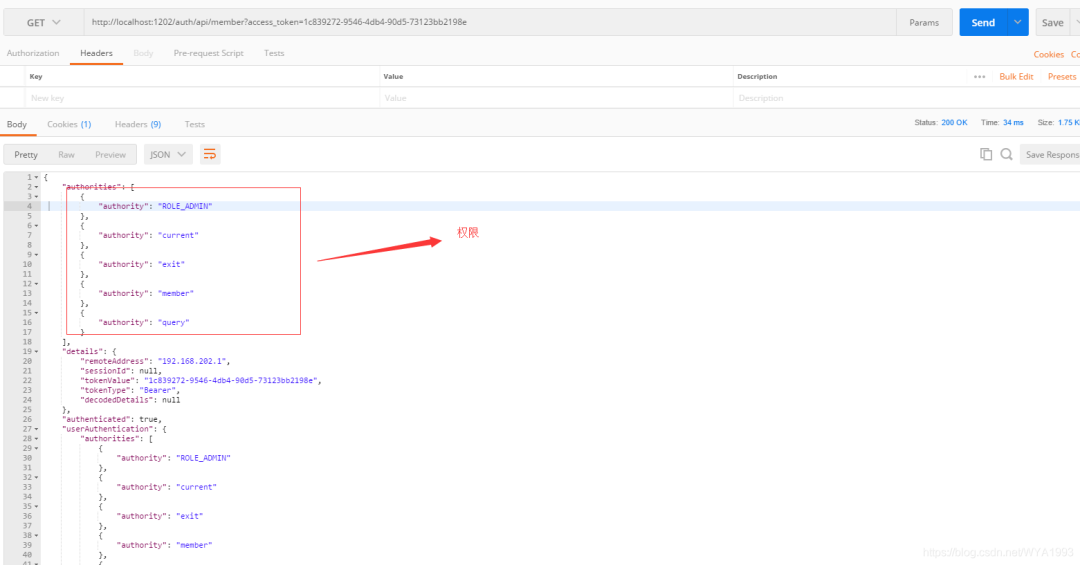
使用access_token請求member服務(wù)下的用戶信息接口
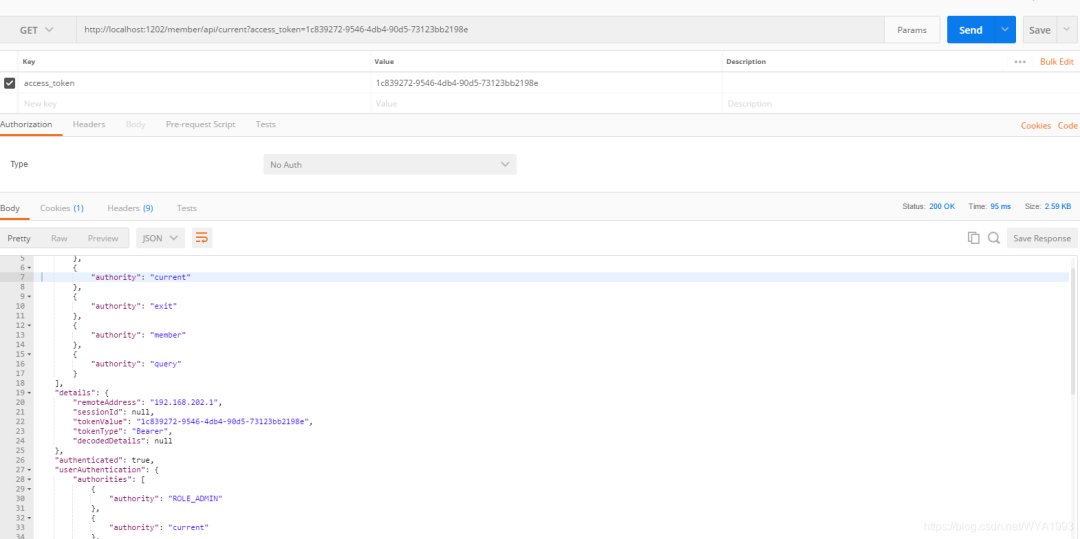
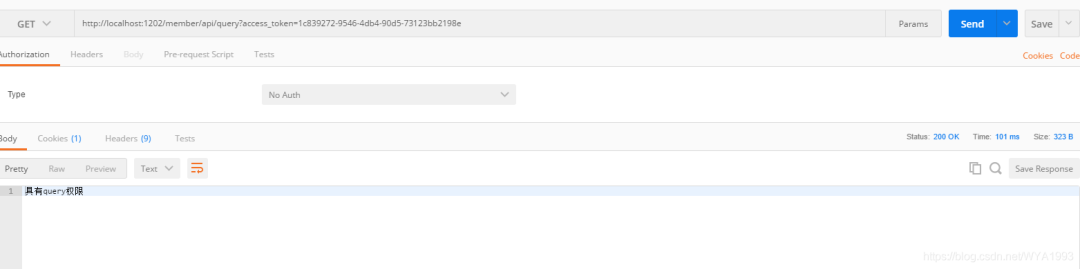
請求member服務(wù)的query接口
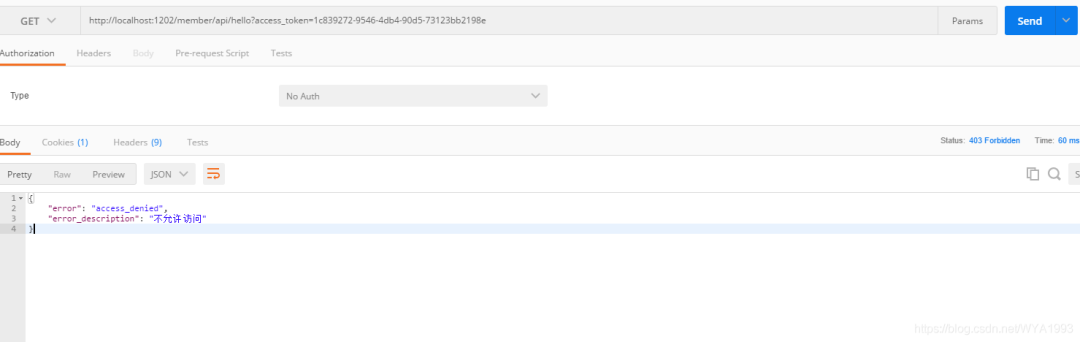
請求member服務(wù)的hello接口,數(shù)據(jù)庫里并沒有給用戶hello權(quán)限
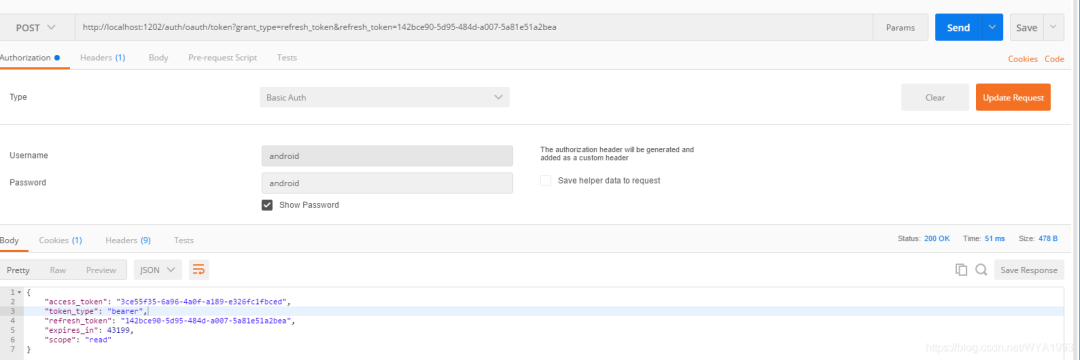
刷新token
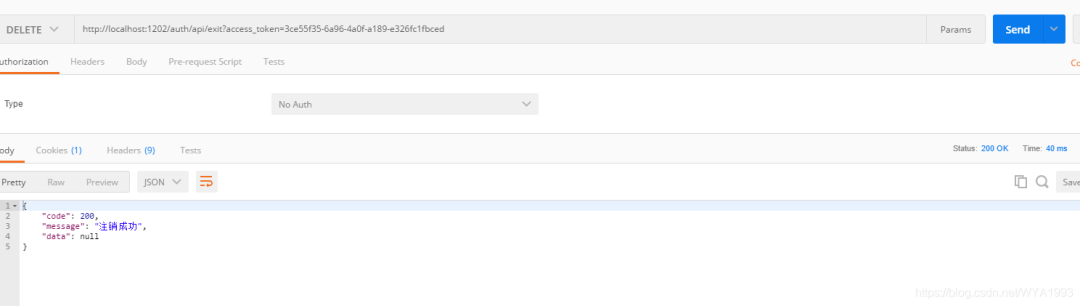
注銷
Part7獲取認證時返回401
獲取認證時返回401,如下:
{
    "timestamp": "2019-08-13T03:25:27.161+0000",
    "status": 401,
    "error": "Unauthorized",
    "message": "Unauthorized",
    "path": "/oauth/token"
}
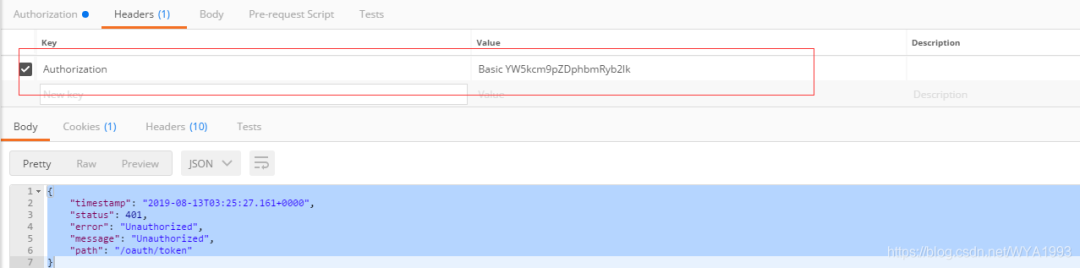
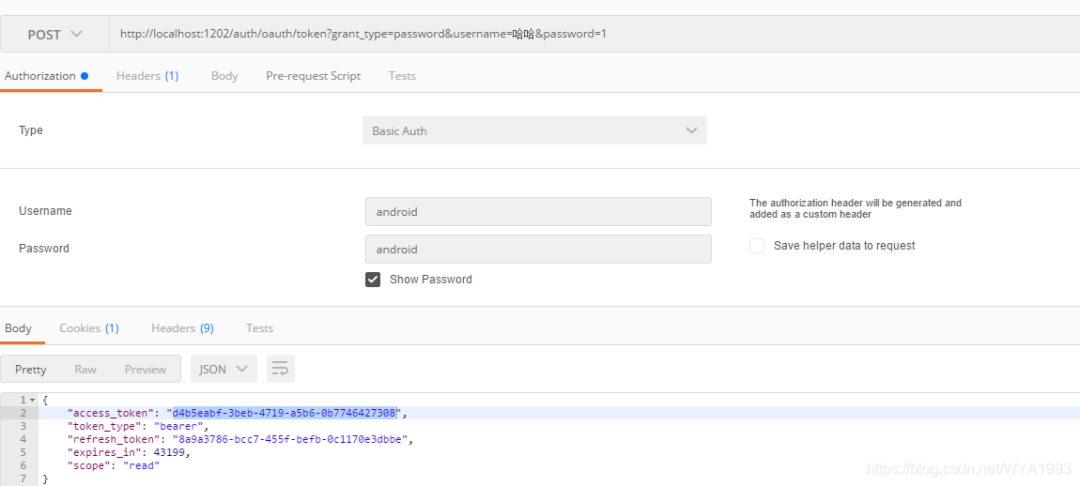
原因是在發(fā)起請求的時候沒有添加Basic Auth認證,如下圖: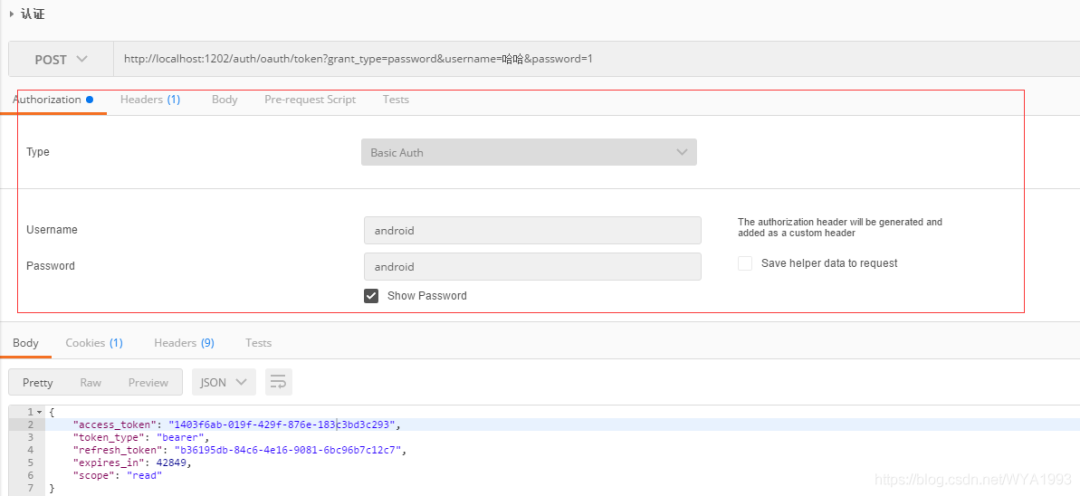 添加Basic Auth認證后會在headers添加一個認證消息頭
 添加Basic Auth認證的信息在代碼中有體現(xiàn):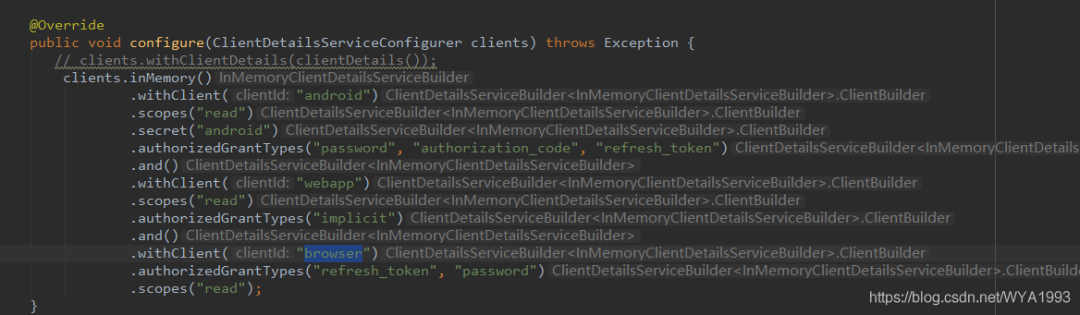
Part8客戶端信息和token信息從MySQL數(shù)據(jù)庫中獲取
現(xiàn)在客戶端信息都是存在內(nèi)存中的,生產(chǎn)環(huán)境肯定不可以這么做,要支持客戶端的動態(tài)添加或刪除,所以我選擇把客戶端信息存到MySQL中。
首先,創(chuàng)建數(shù)據(jù)表,數(shù)據(jù)表的結(jié)構(gòu)官方已經(jīng)給出,地址在
https://github.com/spring-projects/spring-security-oauth/blob/master/spring-security-oauth2/src/test/resources/schema.sql
其次,需要修改一下sql腳本,把主鍵的長度改為128,LONGVARBINARY類型改為blob,調(diào)整后的sql腳本:
create table oauth_client_details (
  client_id VARCHAR(128) PRIMARY KEY,
  resource_ids VARCHAR(256),
  client_secret VARCHAR(256),
  scope VARCHAR(256),
  authorized_grant_types VARCHAR(256),
  web_server_redirect_uri VARCHAR(256),
  authorities VARCHAR(256),
  access_token_validity INTEGER,
  refresh_token_validity INTEGER,
  additional_information VARCHAR(4096),
  autoapprove VARCHAR(256)
);

create table oauth_client_token (
  token_id VARCHAR(256),
  token BLOB,
  authentication_id VARCHAR(128) PRIMARY KEY,
  user_name VARCHAR(256),
  client_id VARCHAR(256)
);

create table oauth_access_token (
  token_id VARCHAR(256),
  token BLOB,
  authentication_id VARCHAR(128) PRIMARY KEY,
  user_name VARCHAR(256),
  client_id VARCHAR(256),
  authentication BLOB,
  refresh_token VARCHAR(256)
);

create table oauth_refresh_token (
  token_id VARCHAR(256),
  token BLOB,
  authentication BLOB
);

create table oauth_code (
  code VARCHAR(256), authentication BLOB
);

create table oauth_approvals (
 userId VARCHAR(256),
 clientId VARCHAR(256),
 scope VARCHAR(256),
 status VARCHAR(10),
 expiresAt TIMESTAMP,
 lastModifiedAt TIMESTAMP
);


-- customized oauth_client_details table
create table ClientDetails (
  appId VARCHAR(128) PRIMARY KEY,
  resourceIds VARCHAR(256),
  appSecret VARCHAR(256),
  scope VARCHAR(256),
  grantTypes VARCHAR(256),
  redirectUrl VARCHAR(256),
  authorities VARCHAR(256),
  access_token_validity INTEGER,
  refresh_token_validity INTEGER,
  additionalInformation VARCHAR(4096),
  autoApproveScopes VARCHAR(256)
);
調(diào)整后的sql腳步也放到了GitHub中,需要的可以自行下載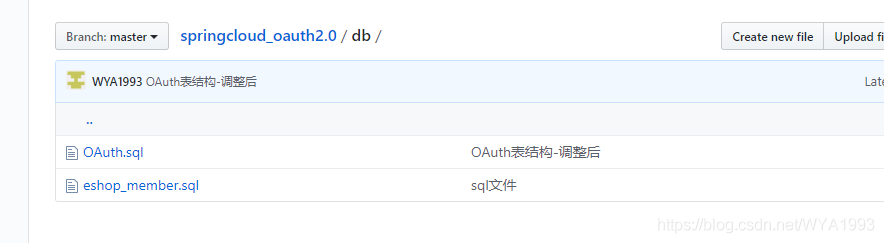 然后在eshop_member數(shù)據(jù)庫創(chuàng)建數(shù)據(jù)表,將客戶端信息添加到oauth_client_details表中
 如果你的密碼不是明文,記得client_secret需要加密后存儲。
然后修改代碼,配置從數(shù)據(jù)庫讀取客戶端信息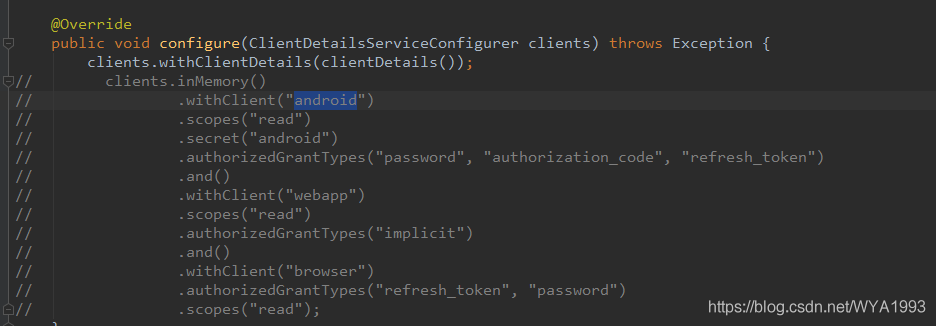 接下來啟動服務(wù)測試即可。
獲取授權(quán)
獲取用戶信息
刷新token
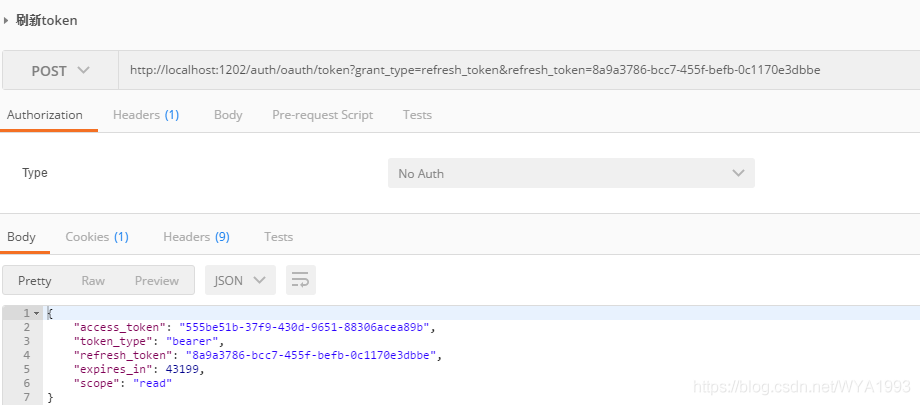 打開數(shù)據(jù)表發(fā)現(xiàn)token這些信息并沒有存到表中,因為tokenStore使用的是redis方式,我們可以替換為從數(shù)據(jù)庫讀取。修改配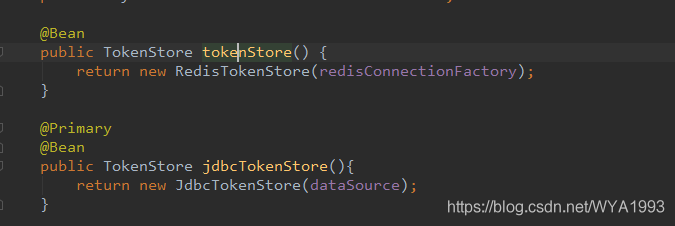
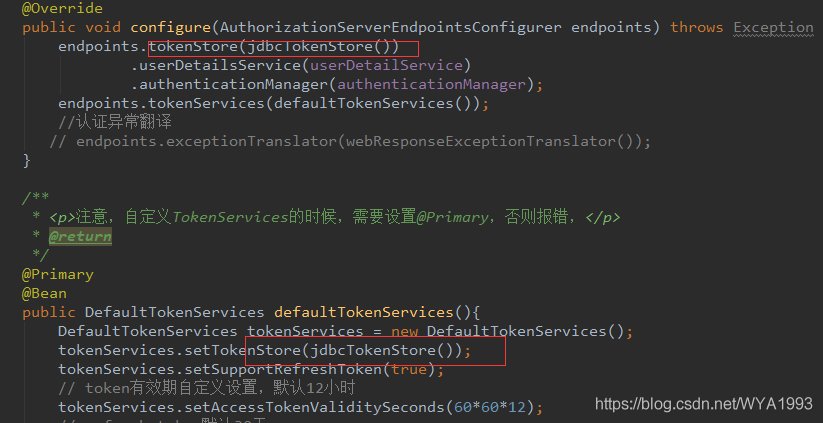
重啟服務(wù)再次測試
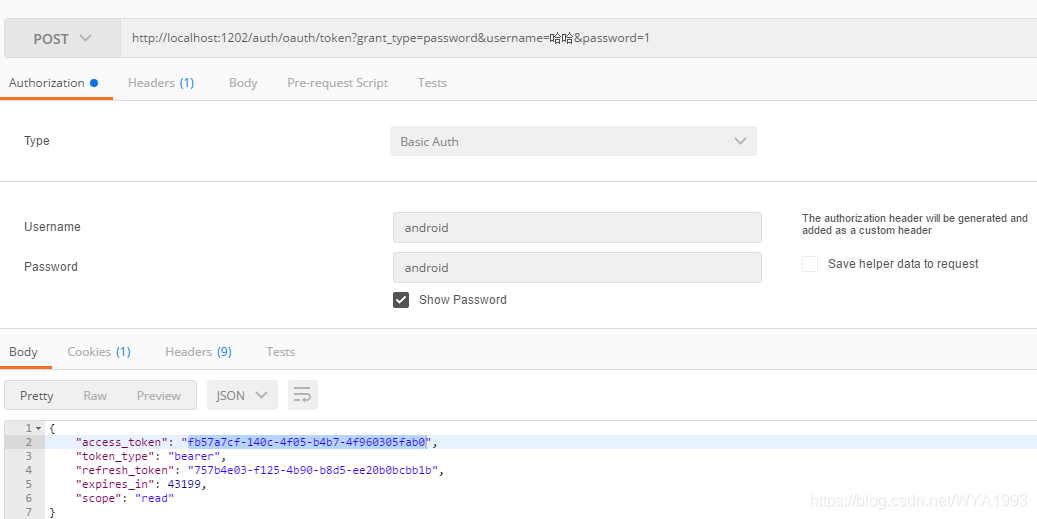
查看數(shù)據(jù)表,發(fā)現(xiàn)token數(shù)據(jù)已經(jīng)存到表里了。

Part9源碼
關(guān)于代碼和數(shù)據(jù)表sql已經(jīng)上傳到GitHub。
注意把數(shù)據(jù)庫和redis替換成自己的地址
地址:https://github.com/WYA1993/springcloud_oauth2.0
-  | 更多精彩文章 -
▽加我微信,交個朋友 長按/掃碼添加↑↑↑


