
Android自定義繪制更多操作按鈕
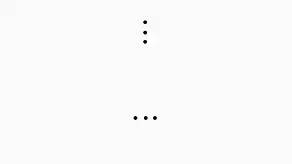
一般更多按鈕,就是3個圓點,如果用自定義View繪制也很簡單,就是繪制3個點,從左到右,或者從上到下。
原理
關鍵參數(shù)
1、圓點半徑(畫圓點必須的)
2、圓點間的間距,一般采用百分比的方式,無論怎么改變View尺寸,都可以等比縮放,例如間距的計算就是將半徑 * 固定比例計算的。
步驟:
水平3個圓點,畫布移動到中心后,canvas.drawCircle()畫一個中心圓點,再計算左邊圓點的位置,和中心圓點坐標差別的地方就是x坐標不再為0,而是負的圓點間距,而右邊圓點則是正的圓點間距。
垂直3個圓點,難道我們又要重新計算坐標?其實不需要,有了上面畫水平3點的方法,水平和垂直的區(qū)別就是旋轉90度而已,所以我們將Canvas旋轉90度即可。
完整代碼
自定義屬性
<declare-styleable name="MoreActionView"><!-- 點的顏色 --><attr name="mav_color" format="color" /><!-- 點大小 --><attr name="mav_dot_radius" format="integer|float|dimension" /><!-- 排列方向,水平或垂直 --><attr name="mav_orientation" format="enum"><enum name="horizontal" value="1" /><enum name="vertical" value="2" /></attr></declare-styleable>
Java代碼
public class MoreActionView extends View {/*** 水平排列*/private static final int ORIENTATION_HORIZONTAL = 1;/*** 垂直排列*/private static final int ORIENTATION_VERTICAL = 2;/*** View默認最小寬度*/private static final int DEFAULT_MIN_WIDTH = 100;/*** 控件寬*/private int mViewWidth;/*** 控件高*/private int mViewHeight;/*** 畫筆*/private Paint mPaint;/*** 點的半徑*/private float mDotRadius;/*** 每個點之間的距離*/private float mDotDistance;/*** 排列方向*/private int mOrientation;/*** 點顏色*/private int mColor;public MoreActionView(Context context) {this(context, null);}public MoreActionView(Context context, @Nullable AttributeSet attrs) {this(context, attrs, 0);}public MoreActionView(Context context, @Nullable AttributeSet attrs, int defStyleAttr) {super(context, attrs, defStyleAttr);init(context, attrs, defStyleAttr);}private void init(Context context, @Nullable AttributeSet attrs, int defStyleAttr) {initAttr(context, attrs, defStyleAttr);mPaint = new Paint();mPaint.setColor(mColor);mPaint.setStyle(Paint.Style.FILL);mPaint.setAntiAlias(true);mPaint.setStrokeWidth(mDotRadius);}private void initAttr(Context context, @Nullable AttributeSet attrs, int defStyleAttr) {TypedArray array = context.obtainStyledAttributes(attrs, R.styleable.MoreActionView, defStyleAttr, 0);mColor = array.getColor(R.styleable.MoreActionView_mav_color, Color.argb(255, 0, 0, 0));mOrientation = array.getInt(R.styleable.MoreActionView_mav_orientation, ORIENTATION_HORIZONTAL);mDotRadius = array.getDimension(R.styleable.MoreActionView_mav_dot_radius, dip2px(context, 2f));array.recycle();}@Overrideprotected void onSizeChanged(int w, int h, int oldw, int oldh) {super.onSizeChanged(w, h, oldw, oldh);mViewWidth = w;mViewHeight = h;//計算半徑float radius = Math.min(mViewWidth, mViewHeight) / 2f;//計算每個點之間的距離,半徑的一般,再減去原點的直徑mDotDistance = (radius / 2f) - (mDotRadius * 2);}@Overrideprotected void onDraw(Canvas canvas) {super.onDraw(canvas);canvas.translate(mViewWidth / 2, mViewHeight / 2);//垂直排列if (mOrientation == ORIENTATION_VERTICAL) {canvas.rotate(90);} else {//水平排列canvas.rotate(0);}//畫中心的點canvas.drawCircle(0, 0, mDotRadius, mPaint);//畫左側的點canvas.drawCircle(-mDotDistance, 0, mDotRadius, mPaint);//畫右側的點canvas.drawCircle(mDotDistance, 0, mDotRadius, mPaint);}@Overrideprotected void onMeasure(int widthMeasureSpec, int heightMeasureSpec) {super.onMeasure(widthMeasureSpec, heightMeasureSpec);setMeasuredDimension(handleMeasure(widthMeasureSpec), handleMeasure(heightMeasureSpec));}/*** 處理MeasureSpec*/private int handleMeasure(int measureSpec) {int result = DEFAULT_MIN_WIDTH;int specMode = MeasureSpec.getMode(measureSpec);int specSize = MeasureSpec.getSize(measureSpec);if (specMode == MeasureSpec.EXACTLY) {result = specSize;} else {//處理wrap_content的情況if (specMode == MeasureSpec.AT_MOST) {result = Math.min(result, specSize);}}return result;}public static int dip2px(Context context, float dipValue) {final float scale = context.getResources().getDisplayMetrics().density;return (int) (dipValue * scale + 0.5f);}}
簡單使用
<com.zh.cavas.sample.widget.MoreActionViewandroid:id="@+id/more_action"android:layout_width="40dp"android:layout_height="40dp"android:layout_marginTop="20dp"app:mav_color="@android:color/black"app:mav_dot_radius="1.5dp"app:mav_orientation="vertical" /><com.zh.cavas.sample.widget.MoreActionViewandroid:id="@+id/more_action2"android:layout_width="40dp"android:layout_height="40dp"android:layout_marginTop="20dp"app:mav_color="@android:color/black"app:mav_dot_radius="1.5dp"app:mav_orientation="horizontal" />
到這里就結束啦。
評論
圖片
表情