
還在用 HttpUtil?全新 HTTP 客戶端來了
我們平時開發(fā)項目的時候,經(jīng)常會需要遠(yuǎn)程調(diào)用下其他服務(wù)提供的接口,于是我們會使用一些 HTTP 工具類比如 Hutool 提供的 HttpUtil。SpringBoot 3.0 出了一個
Http Interface的新特性,它允許我們使用聲明式服務(wù)調(diào)用的方式來調(diào)用遠(yuǎn)程接口,今天我們就來聊聊它的使用!
簡介
Http Interface讓你可以像定義 Java 接口那樣定義 HTTP 服務(wù),而且用法和你平時寫 Controller 中方法完全一致。它會為這些 HTTP 服務(wù)接口自動生成代理實現(xiàn)類,底層是基于 Webflux 的 WebClient 實現(xiàn)的。
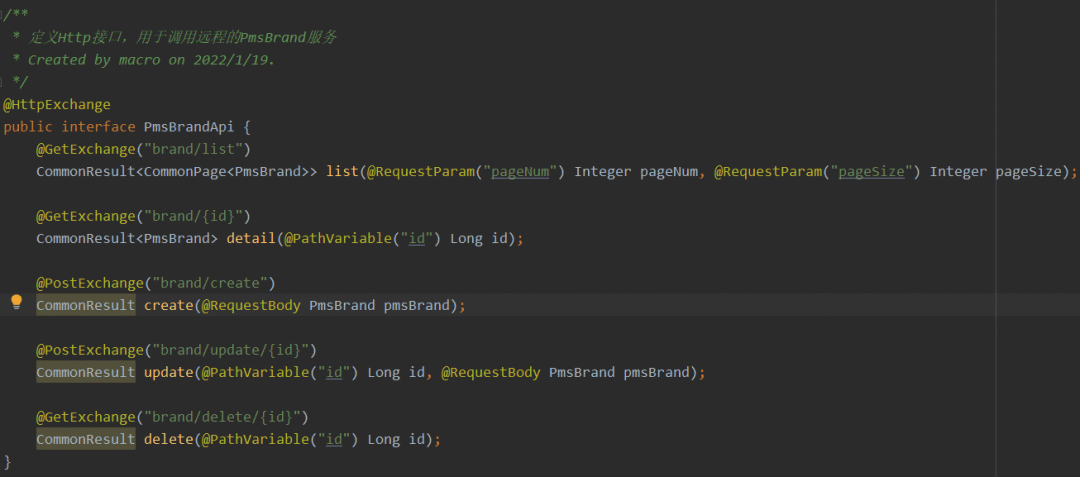
使用聲明式服務(wù)調(diào)用確實夠優(yōu)雅,下面是一段使用Http Interface聲明的Http服務(wù)代碼。
使用
在 SpringBoot 3.0 中使用
Http Interface是非常簡單的,下面我們就來體驗下。
依賴集成
- 首先在項目的
pom.xml中定義好 SpringBoot 的版本為3.0.0;
      <parent>
    <groupId>org.springframework.boot</groupId>
    <artifactId>spring-boot-starter-parent</artifactId>
    <version>3.0.0</version>
    <relativePath/> <!-- lookup parent from repository -->
</parent>
- 由于 SpringBoot 最低要求為
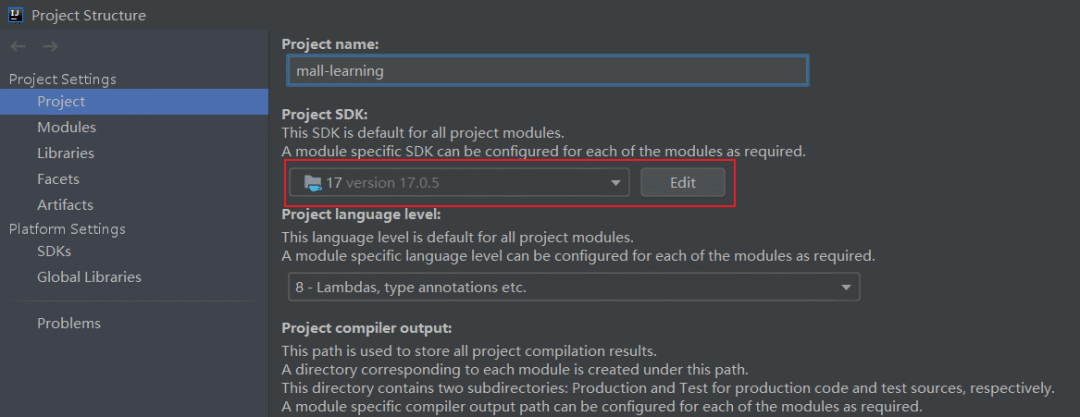
Java 17,我們需要先安裝好 JDK 17,安裝完成后配置項目的 SDK 版本為Java 17,JDK 下載地址:https://www.oracle.com/cn/java/technologies/downloads/
- 由于
Http Interface需要依賴 webflux 來實現(xiàn),我們還需添加它的依賴。
      <dependency>
    <groupId>org.springframework.boot</groupId>
    <artifactId>spring-boot-starter-webflux</artifactId>
</dependency>
基本使用
下面,我們來體驗下
Http Interface的基本使用。
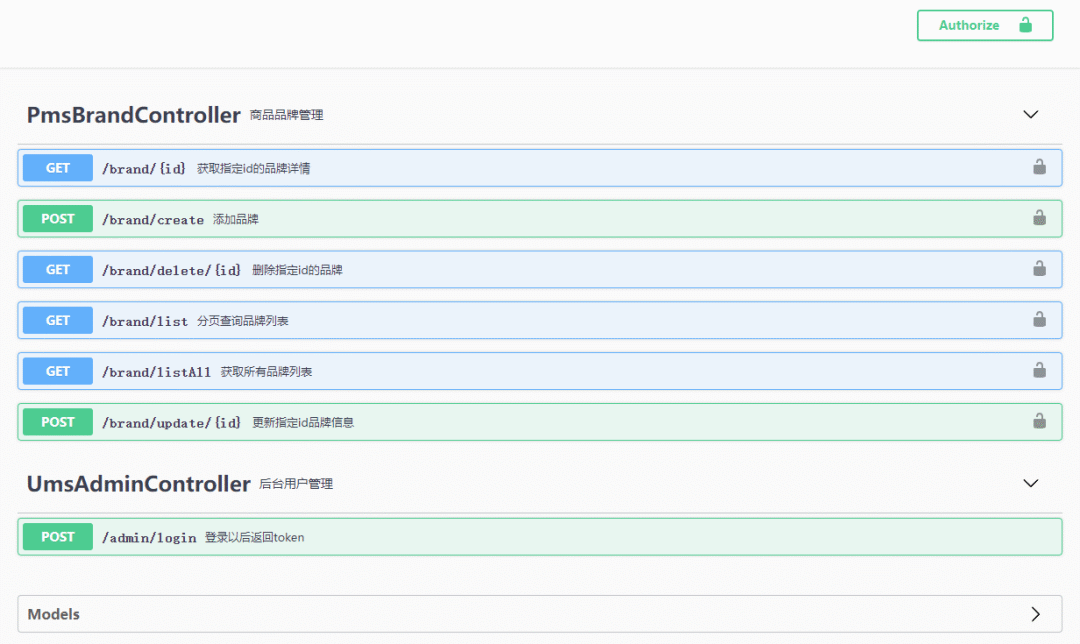
- 首先我們準(zhǔn)備一個服務(wù)來方便遠(yuǎn)程調(diào)用,打開 Swagger 看下,里面有一個登錄接口和需要登錄認(rèn)證的商品品牌 CRUD 接口
- 先在
application.yml中配置好服務(wù)地址;
      remote:
  baseUrl: http://localhost:8088/
- 再通過
@HttpExchange聲明一個 Http 服務(wù),使用@PostExchange注解表示進(jìn)行 POST 請求;
      /**
 * 定義Http接口,用于調(diào)用遠(yuǎn)程的UmsAdmin服務(wù)
 * Created by macro on 2022/1/19.
 */
@HttpExchange
public interface UmsAdminApi {

    @PostExchange("admin/login")
    CommonResult<LoginInfo> login(@RequestParam("username") String username, @RequestParam("password") String password);
}
- 再創(chuàng)建一個遠(yuǎn)程調(diào)用品牌服務(wù)的接口,參數(shù)注解使用我們平時寫Controller 方法用的那些即可;
      /**
 * 定義Http接口,用于調(diào)用遠(yuǎn)程的PmsBrand服務(wù)
 * Created by macro on 2022/1/19.
 */
@HttpExchange
public interface PmsBrandApi {
    @GetExchange("brand/list")
    CommonResult<CommonPage<PmsBrand>> list(@RequestParam("pageNum") Integer pageNum, @RequestParam("pageSize") Integer pageSize);

    @GetExchange("brand/{id}")
    CommonResult<PmsBrand> detail(@PathVariable("id") Long id);

    @PostExchange("brand/create")
    CommonResult create(@RequestBody PmsBrand pmsBrand);

    @PostExchange("brand/update/{id}")
    CommonResult update(@PathVariable("id") Long id, @RequestBody PmsBrand pmsBrand);

    @GetExchange("brand/delete/{id}")
    CommonResult delete(@PathVariable("id") Long id);
}
- 為方便后續(xù)調(diào)用需要登錄認(rèn)證的接口,我創(chuàng)建了
TokenHolder這個類,把 token 存儲到了 Session 中;
      /**
 * 登錄token存儲(在Session中)
 * Created by macro on 2022/1/19.
 */
@Component
public class TokenHolder {
    /**
     * 添加token
     */
    public void putToken(String token) {
        RequestAttributes ra = RequestContextHolder.getRequestAttributes();
        HttpServletRequest request = ((ServletRequestAttributes) ra).getRequest();
        request.getSession().setAttribute("token", token);
    }

    /**
     * 獲取token
     */
    public String getToken() {
        RequestAttributes ra = RequestContextHolder.getRequestAttributes();
        HttpServletRequest request = ((ServletRequestAttributes) ra).getRequest();
        Object token = request.getSession().getAttribute("token");
        if(token!=null){
            return (String) token;
        }
        return null;
    }

}
- 創(chuàng)建 Java 配置,配置好請求用的客戶端 WebClient 及 Http 服務(wù)對象即可,由于品牌服務(wù)需要添加認(rèn)證頭才能正常訪問,所以使用了過濾器進(jìn)行統(tǒng)一添加;
      @Configuration
public class HttpInterfaceConfig {

    @Value("${remote.baseUrl}")
    private String baseUrl;
    @Autowired
    private TokenHolder tokenHolder;

    @Bean
    WebClient webClient() {
        return WebClient.builder()
                //添加全局默認(rèn)請求頭
                .defaultHeader("source", "http-interface")
                //給請求添加過濾器,添加自定義的認(rèn)證頭
                .filter((request, next) -> {
                    ClientRequest filtered = ClientRequest.from(request)
                            .header("Authorization", tokenHolder.getToken())
                            .build();
                    return next.exchange(filtered);
                })
                .baseUrl(baseUrl).build();
    }

    @Bean
    UmsAdminApi umsAdminApi(WebClient client) {
        HttpServiceProxyFactory factory = HttpServiceProxyFactory.builder(WebClientAdapter.forClient(client)).build();
        return factory.createClient(UmsAdminApi.class);
    }

    @Bean
    PmsBrandApi pmsBrandApi(WebClient client) {
        HttpServiceProxyFactory factory = HttpServiceProxyFactory.builder(WebClientAdapter.forClient(client)).build();
        return factory.createClient(PmsBrandApi.class);
    }
}
- 接下來在 Controller 中注入 Http 服務(wù)對象,然后進(jìn)行調(diào)用即可;
      /**
 * HttpInterface測試接口
 * Created by macro on 2022/1/19.
 */
@RestController
@Api(tags = "HttpInterfaceController")
@Tag(name = "HttpInterfaceController", description = "HttpInterface測試接口")
@RequestMapping("/remote")
public class HttpInterfaceController {

    @Autowired
    private UmsAdminApi umsAdminApi;
    @Autowired
    private PmsBrandApi pmsBrandApi;
    @Autowired
    private TokenHolder tokenHolder;

    @ApiOperation(value = "調(diào)用遠(yuǎn)程登錄接口獲取token")
    @PostMapping(value = "/admin/login")
    public CommonResult<LoginInfo> login(@RequestParam String username, @RequestParam String password) {
        CommonResult<LoginInfo> result = umsAdminApi.login(username, password);
        LoginInfo loginInfo = result.getData();
        if (result.getData() != null) {
            tokenHolder.putToken(loginInfo.getTokenHead() + " " + loginInfo.getToken());
        }
        return result;
    }

    @ApiOperation("調(diào)用遠(yuǎn)程接口分頁查詢品牌列表")
    @GetMapping(value = "/brand/list")
    public CommonResult<CommonPage<PmsBrand>> listBrand(@RequestParam(value = "pageNum", defaultValue = "1")
                                                        @ApiParam("頁碼") Integer pageNum,
                                                        @RequestParam(value = "pageSize", defaultValue = "3")
                                                        @ApiParam("每頁數(shù)量") Integer pageSize) {
        return pmsBrandApi.list(pageNum, pageSize);
    }

    @ApiOperation("調(diào)用遠(yuǎn)程接口獲取指定id的品牌詳情")
    @GetMapping(value = "/brand/{id}")
    public CommonResult<PmsBrand> brand(@PathVariable("id") Long id) {
        return pmsBrandApi.detail(id);
    }

    @ApiOperation("調(diào)用遠(yuǎn)程接口添加品牌")
    @PostMapping(value = "/brand/create")
    public CommonResult createBrand(@RequestBody PmsBrand pmsBrand) {
        return pmsBrandApi.create(pmsBrand);
    }

    @ApiOperation("調(diào)用遠(yuǎn)程接口更新指定id品牌信息")
    @PostMapping(value = "/brand/update/{id}")
    public CommonResult updateBrand(@PathVariable("id") Long id, @RequestBody PmsBrand pmsBrand) {
        return pmsBrandApi.update(id,pmsBrand);
    }

    @ApiOperation("調(diào)用遠(yuǎn)程接口刪除指定id的品牌")
    @GetMapping(value = "/delete/{id}")
    public CommonResult deleteBrand(@PathVariable("id") Long id) {
        return  pmsBrandApi.delete(id);
    }
}
測試
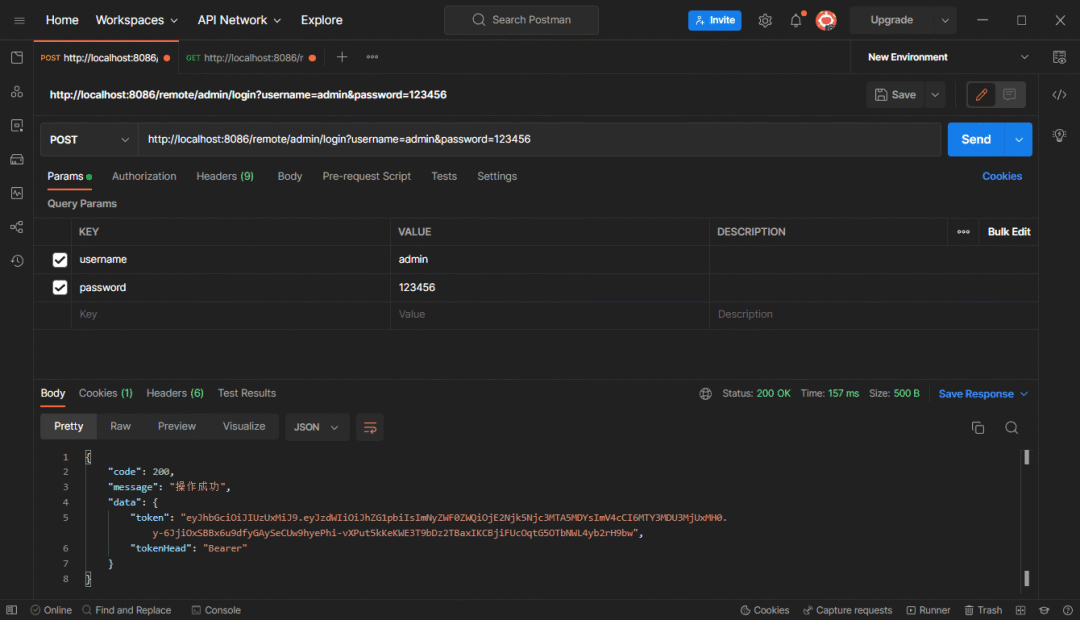
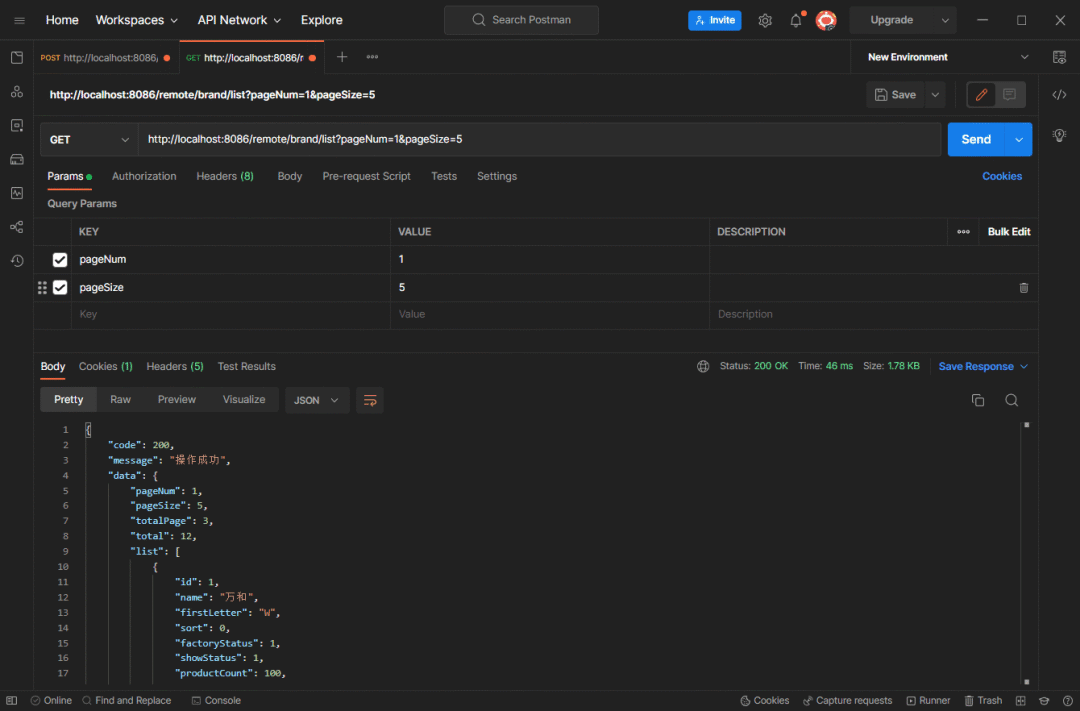
- 下面我們通過 Postman 進(jìn)行測試,首先調(diào)用登錄接口獲取到遠(yuǎn)程服務(wù)返回的 token 了;
- 再調(diào)用下需要登錄認(rèn)證的品牌列表接口,發(fā)現(xiàn)可以正常訪問。
總結(jié)
Http Interface讓我們只需定義接口,無需定義方法實現(xiàn)就能進(jìn)行遠(yuǎn)程 HTTP 調(diào)用,確實非常方便!但是其實現(xiàn)依賴 Webflux 的 WebClient,在我們使用 SpringMVC 時會造成一定的麻煩,如果能獨立出來就更好了!
參考資料
官方文檔:https://docs.spring.io/spring-framework/reference/integration/rest-clients.html
???? 點擊下方閱讀原文,獲取魚皮往期編程干貨。
往期推薦