
自定義仿 IPhone 開關(guān)控件
和你一起終身學(xué)習(xí),這里是程序員Android
經(jīng)典好文推薦,通過閱讀本文,您將收獲以下知識(shí)點(diǎn):
一、自定義View類實(shí)現(xiàn)
二、自定義View 布局
三、自定義View 素材
四、Activity使用自定義View
自定義ItemToggleView?常用于Settings中,主要控制開關(guān)的開啟與關(guān)閉。
自定義ItemToggleView實(shí)現(xiàn)效果如下:
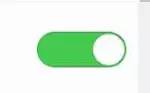
開啟.png
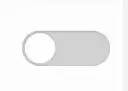
關(guān)閉.png
一 、自定義View類實(shí)現(xiàn)
public class SwitchControlView extends View implements OnTouchListener {
    private Bitmap bg_on, bg_off, slipper_btn;
    private float downX, nowX;

    private boolean onSlip = false;

    private boolean nowStatus = false;

    private OnChangedListener listener;

    public SwitchControlView(Context context) {
        super(context);
        init();
    }

    public SwitchControlView(Context context, AttributeSet attrs) {
        super(context, attrs);
        init();
    }

    public void init() {
        bg_on = BitmapFactory.decodeResource(getResources(), R.drawable.on_btn);
        bg_off = BitmapFactory.decodeResource(getResources(),
                R.drawable.off_btn);
        slipper_btn = BitmapFactory.decodeResource(getResources(),
                R.drawable.white_btn);
        setOnTouchListener(this);
    }

    protected void onDraw(Canvas canvas) {
        super.onDraw(canvas);
        Matrix matrix = new Matrix();
        Paint paint = new Paint();
        float x = 0;
        if (bg_on != null && bg_off != null) {
            if (nowX < (bg_on.getWidth() / 2)) {
                canvas.drawBitmap(bg_off, matrix, paint);
            } else {
                canvas.drawBitmap(bg_on, matrix, paint);
            }
        }

        if (onSlip) {
            if (nowX >= bg_on.getWidth())
                x = bg_on.getWidth() - slipper_btn.getWidth() / 2;
            else
                x = nowX - slipper_btn.getWidth() / 2;
        } else {
            if (nowStatus) {
                x = bg_on.getWidth() - slipper_btn.getWidth();
            } else {
                x = 0;
            }
        }

        if (x < 0) {
            x = 0;
        } else if (x > bg_on.getWidth() - slipper_btn.getWidth()) {
            x = bg_on.getWidth() - slipper_btn.getWidth();
        }

        canvas.drawBitmap(slipper_btn, x, 0, paint);
    }

    @Override
    public boolean onTouch(View v, MotionEvent event) {
        switch (event.getAction()) {
        case MotionEvent.ACTION_DOWN: {
            if (event.getX() > bg_off.getWidth()
                    || event.getY() > bg_off.getHeight()) {
                return false;
            } else {
                onSlip = true;
                downX = event.getX();
                nowX = downX;
            }
            break;
        }
        case MotionEvent.ACTION_MOVE: {
            nowX = event.getX();
            break;
        }
        case MotionEvent.ACTION_UP: {
            onSlip = false;
            if (event.getX() >= (bg_on.getWidth() / 2)) {
                nowStatus = true;
                nowX = bg_on.getWidth() - slipper_btn.getWidth();
            } else {
                nowStatus = false;
                nowX = 0;
            }

            if (listener != null) {
                listener.OnChanged(SwitchControlView.this, nowStatus);
            }
            break;
        }
        }
        invalidate();
        return true;
    }

    public void setOnChangedListener(OnChangedListener listener) {
        this.listener = listener;
    }

    public void setChecked(boolean checked) {
        if (checked) {
            nowX = bg_off.getWidth();
        } else {
            nowX = 0;
        }
        nowStatus = checked;
    }

    public interface OnChangedListener {
        public void OnChanged(SwitchControlView wiperSwitch, boolean checkState);
    }

}
二、自定義View 布局
    <com.programandroid.CustomView.SwitchControlView
        android:id="@+id/switch_control_view"
        android:layout_width="100dp"
        android:layout_height="50dp"
        android:layout_gravity="center_vertical" />
三、自定義View 素材

toggle_off.png

toggle_on.png
四、Activity使用自定義View
        /**
     * InitSwitchView 自定義滑動(dòng)開關(guān)實(shí)現(xiàn)
     */
    private void InitSwitchView() {
        // TODO Auto-generated method stub
        SwitchControlView wiperSwitch = (SwitchControlView) findViewById(R.id.switch_control_view);
        wiperSwitch.setChecked(true);
        wiperSwitch.setOnChangedListener(new OnChangedListener() {

            @Override
            public void OnChanged(SwitchControlView wiperSwitch,
                    boolean checkState) {
                // TODO Auto-generated method stub

                if (checkState) {
                    Toast.makeText(CustomViewMethods.this, "開啟", 1).show();

                } else {
                    Toast.makeText(CustomViewMethods.this, "關(guān)閉", 1).show();
                }
            }
        });
    }
至此,本篇已結(jié)束。轉(zhuǎn)載網(wǎng)絡(luò)的文章,小編覺得很優(yōu)秀,歡迎點(diǎn)擊閱讀原文,支持原創(chuàng)作者,如有侵權(quán),懇請(qǐng)聯(lián)系小編刪除。同時(shí)感謝您的閱讀,期待您的關(guān)注。
點(diǎn)個(gè)在看,方便您使用時(shí)快速查找!
評(píng)論
圖片
表情