
使用 Python 將綠屏背景替換成自定義圖片
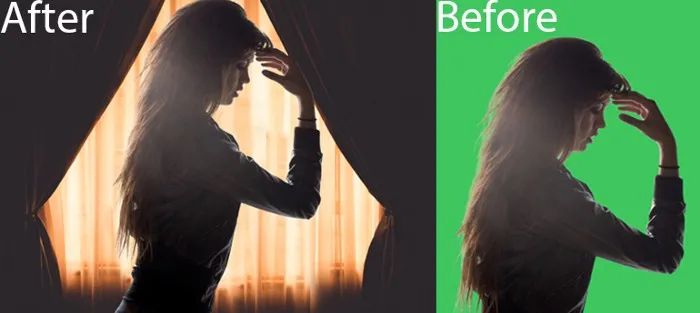
你有沒有想過我們?nèi)绾巫约禾鎿Q圖像中的綠屏背景?
在這里,將教你如何使用 Python 和 OpenCV 替換具有綠屏背景的圖像。
讓我們進入正題,首先將拍攝兩張圖像作為我們程序的輸入,一張是綠屏背景的圖像,另一張是將設(shè)置成背景的圖像。


帶有綠屏背景的圖像和要設(shè)置的背景圖像
首先,你需要安裝一些必需的庫,例如 OpenCV 和 cvzone。
要安裝這些庫,只需打開命令提示符或終端并鍵入以下內(nèi)容,然后按 Enter。
pip install opencv-python
pip install cvzone
安裝庫后,導(dǎo)入安裝的庫并讀取這兩個圖像,如下所示,
# Importing libraries
import cv2
from cvzone.SelfiSegmentationModule import SelfiSegmentation

# Reading the green screen and background image
green_screen_img = cv2.imread("Green Screen Image Path")
bg_img = cv2.imread("Background Image Path")
兩個圖像應(yīng)具有相同的尺寸(相同的寬度和高度)。使用shape屬性檢查尺寸(返回高度、寬度、通道)。如果兩個圖像的尺寸不同,則使用cv2.resize() 將這些圖像的尺寸調(diào)整為相同的尺寸。
# Checking dimensions
print(green_screen_img.shape)
print(bg_img.shape)

# In my case both are having different dimension.
# So, I have to resize my images to same dimensions.
w, h = 640, 480
green_screen_img = cv2.resize(green_screen_img, (w, h))
bg_img = cv2.resize(bg_img, (w, h))
調(diào)整圖像大小后,為SelfiSegmentation創(chuàng)建一個從cvzone.SelfiSegmentationModule導(dǎo)入的對象,然后從該對象調(diào)用一個函數(shù)removeBG(),該函數(shù)接受三個參數(shù)。
源圖像 背景圖像/背景顏色 閾值(默認 = 0.1)(可選)
output_1 = segmentor.removeBG(green_screen_img, bg_img)
cv2.imshow("Output-1", output)
cv2.waitKey(0)

具有默認閾值 (0.1) 的輸出圖像
output_2 = segmentor.removeBG(green_screen_img, bg_img, threshold=0.4)
cv2.imshow("Output-2", output_2)
cv2.waitKey(0)

輸出閾值為 0.4 的圖像
注意:最大閾值可以是1。如果閾值設(shè)置為 1,則整個圖像被背景圖像占據(jù),如下所示,
output_3 = segmentor.removeBG(green_screen_img, bg_img, threshold=1)
cv2.imshow("Output-3", output_3)
cv2.waitKey(0)

閾值為 1 的輸出圖像
你也可以在BGR(藍色、綠色、紅色)值中指定顏色,而不是將圖像指定為背景,如下圖所示,
# In my case, I am choosing Red color as background
# RED - (0, 0, 255)
output = segmentor.removeBG(green_screen_img, (0, 0, 255))
cv2.imshow("Output", output)
cv2.waitKey(0)

以紅色為背景的輸出圖像
評論
圖片
表情