
SpringBoot+ShardingSphereJDBC實(shí)現(xiàn)讀寫分離!
往期熱門文章:
1 概述
MyBatisPlus+ShardingSphereJDBC進(jìn)行讀寫分離,以及利用MySQL進(jìn)行一主一從的主從復(fù)制。MySQL主從復(fù)制環(huán)境準(zhǔn)備(Docker)搭建 ShardingShpereJDBC+MyBatisPlus+Druid環(huán)境測試
2 環(huán)境
OpenJDK 17.0.3Spring Boot 2.7.0MyBatis Plus 3.5.1MyBatis Plus Generator 3.5.2Druid 1.2.10ShardingSphereJDBC 5.1.1MySQL 8.0.29(Docker)
3 一些基礎(chǔ)理論
3.1 讀寫分離
寫操作在主數(shù)據(jù)庫進(jìn)行 讀操作在從數(shù)據(jù)庫進(jìn)行
MySQL上實(shí)現(xiàn),相信會不如一臺MySQL寫,另外兩臺MySQL讀這樣的配置性能高。另一方面,在很多時(shí)候都是讀操作的請求要遠(yuǎn)遠(yuǎn)高于寫操作,這樣就顯得讀寫分離非常有必要了。3.2 主從復(fù)制
MySQL,這里就說一下MySQL主從復(fù)制的原理,如下圖所示: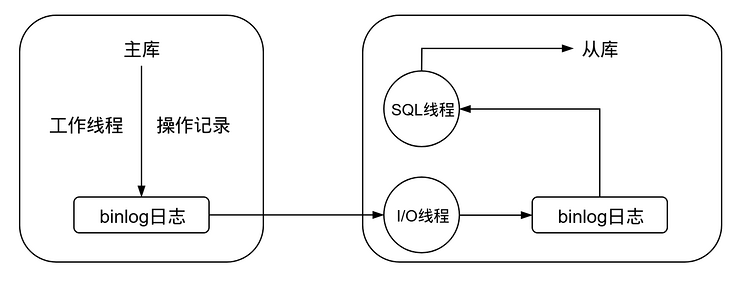
主庫修改數(shù)據(jù)后,將修改日志寫入 binlog從庫的 I/O線程讀取主庫的binlog,并拷貝到從庫本地的binlog中從庫本地的 binlog被SQL線程讀取,執(zhí)行其中的內(nèi)容并同步到從庫中
3.3 數(shù)據(jù)庫中間件簡介
服務(wù)端代理:需要獨(dú)立部署一個代理服務(wù),該代理服務(wù)后面管理多個數(shù)據(jù)庫實(shí)例,在應(yīng)用中通過一個數(shù)據(jù)源與該代理服務(wù)器建立連接,由該代理去操作底層數(shù)據(jù)庫,并返回相應(yīng)結(jié)果。優(yōu)點(diǎn)是支持多語言,對業(yè)務(wù)透明,缺點(diǎn)是實(shí)現(xiàn)復(fù)雜,實(shí)現(xiàn)難度大,同時(shí)代理需要確保自身高可用 客戶端代理:在連接池或數(shù)據(jù)庫驅(qū)動上進(jìn)行一層封裝,內(nèi)部與不同的數(shù)據(jù)庫建立連接,并對 SQL進(jìn)行必要的操作,比如讀寫分離選擇走主庫還是從庫,分庫分表select后如何聚合結(jié)果。優(yōu)點(diǎn)是實(shí)現(xiàn)簡單,天然去中心化,缺點(diǎn)是支持語言較少,版本升級困難
Cobar:阿里開源的關(guān)系型數(shù)據(jù)庫分布式服務(wù)中間件,已停更DRDS:脫胎于Cobar,全稱分布式關(guān)系型數(shù)據(jù)庫服務(wù)MyCat:開源數(shù)據(jù)庫中間件,目前更新了MyCat2版本Atlas:Qihoo 360公司Web平臺部基礎(chǔ)架構(gòu)團(tuán)隊(duì)開發(fā)維護(hù)的一個基于MySQL協(xié)議的數(shù)據(jù)中間層項(xiàng)目,同時(shí)還有一個NoSQL的版本,叫Pikatddl:阿里巴巴自主研發(fā)的分布式數(shù)據(jù)庫服務(wù)Sharding-JDBC:ShardingShpere的一個子產(chǎn)品,一個輕量級Java框架
4 MySQL主從復(fù)制環(huán)境準(zhǔn)備
MySQL主從復(fù)制的環(huán)境,基于Docker+MySQL官方文檔搭建。4.1 主庫操作
4.1.1 拉取鏡像并創(chuàng)建容器運(yùn)行
docker pull mysql
docker run -itd -p 3306:3306 -e MYSQL_ROOT_PASSWORD=123456 --name master mysql
docker exec -it master /bin/bash
vim以及net-tools的操作:cd /etc/apt
echo deb http://mirrors.aliyun.com/debian/ buster main non-free contrib deb-src http://mirrors.aliyun.com/debian/ buster main non-free contrib deb http://mirrors.aliyun.com/debian-security buster/updates main deb-src http://mirrors.aliyun.com/debian-security buster/updates main deb http://mirrors.aliyun.com/debian/ buster-updates main non-free contrib deb-src http://mirrors.aliyun.com/debian/ buster-updates main non-free contrib deb http://mirrors.aliyun.com/debian/ buster-backports main non-free contrib deb-src http://mirrors.aliyun.com/debian/ buster-backports main non-free contrib > sources.list
apt update && apt upgrade
apt install vim net-tools
4.1.2 修改配置文件
vim /etc/mysql/my.cnf
[mysqld]
server-id=1                # 全局唯一,取值[1,2^32-1],默認(rèn)為1
binlog-do-db=test          # 表示需要復(fù)制的是哪個庫
4.1.3 準(zhǔn)備數(shù)據(jù)源
CREATE DATABASE test;
USE test;
CREATE TABLE user(
    id BIGINT PRIMARY KEY,
    name VARCHAR(30) NOT NULL,
);
4.1.4 創(chuàng)建一個復(fù)制操作的用戶(可選但推薦)
mysql_native_password,否則會導(dǎo)致從庫一直處于連接狀態(tài):CREATE USER 'repl'@'172.17.0.3' IDENTIFIED WITH mysql_native_password BY '123456';
GRANT REPLICATION slave ON *.* TO 'repl'@'172.17.0.3';
4.1.5 數(shù)據(jù)備份(可選)
FLUSH TABLES WITH READ LOCK;
mysqldump導(dǎo)出:mysqldump -u root -p --all-databases --master-data > dbdump.db
UNLOCK TABLES;
4.1.6 查看主庫狀態(tài)
SHOW MASTER STATUS;

File以及Position記錄下來,后面從庫的配置需要用到。4.2 從庫操作
4.2.1 拉取鏡像并創(chuàng)建容器運(yùn)行
docker pull mysql
docker run -itd -p 3307:3306 -e MYSQL_ROOT_PASSWORD=123456 --name slave mysql
docker exec -it slave /bin/bash
vim和net-tools:cd /etc/apt
echo deb http://mirrors.aliyun.com/debian/ buster main non-free contrib deb-src http://mirrors.aliyun.com/debian/ buster main non-free contrib deb http://mirrors.aliyun.com/debian-security buster/updates main deb-src http://mirrors.aliyun.com/debian-security buster/updates main deb http://mirrors.aliyun.com/debian/ buster-updates main non-free contrib deb-src http://mirrors.aliyun.com/debian/ buster-updates main non-free contrib deb http://mirrors.aliyun.com/debian/ buster-backports main non-free contrib deb-src http://mirrors.aliyun.com/debian/ buster-backports main non-free contrib > sources.list
apt update && apt upgrade
apt install vim net-tools
4.2.2 修改配置文件
vim /etc/mysql/my.cnf
[mysqld]
server-id=2            # 全局唯一,不能與主庫相同
replicate-do-db=test   # 與主庫相同,表示對該庫進(jìn)行復(fù)制
4.2.3 查看ip地址
ip地址,用于給主庫設(shè)置同步的用戶:ifconfig
inet 172.17.0.3 netmask 255.255.0.0 broadcast 172.17.255.255
[email protected]。4.2.4 導(dǎo)入數(shù)據(jù)(可選)
mysqldump -u root -p --all-databases < dbdump.db
4.2.5 準(zhǔn)備數(shù)據(jù)源
CREATE DATABASE test;
USE test;
CREATE TABLE user(
    id BIGINT PRIMARY KEY,
    name VARCHAR(30) NOT NULL,
);
4.2.6 設(shè)置主庫
change master to/change replication source to(8.0.23+)命令:CHANGE REPLICATION SOURCE TO
source_host='172.17.0.2', # 可以使用ifconfig查看主庫ip
source_user='repl', # 之前主庫創(chuàng)建的用戶
source_password='123456', # 密碼
source_log_file='binlog.000003', # 之前在主庫上使用show master status查看的日志文件
source_log_pos=594; # 同樣使用show master status查看
4.2.7 開啟從庫
START SLAVE;
SHOW SLAVE STATUS\G
8.0.22+)可使用:START REPLICA;
SHOW REPLICA STATUS\G
IO和SQL線程顯示Yes才算成功: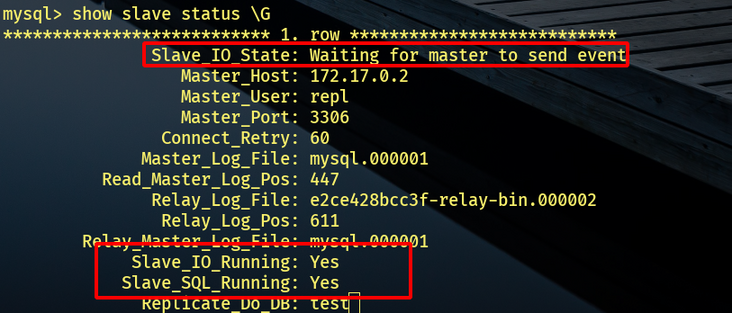
4.3 測試
INSERT INTO user VALUES(1,"name",3);
select到了:
5 搭建Spring Boot環(huán)境
5.1 新建項(xiàng)目并引入依賴
Spring Boot項(xiàng)目,并引入如下依賴:implementation 'com.alibaba:druid:1.2.10'
implementation 'com.baomidou:mybatis-plus-boot-starter:3.5.1'
implementation 'org.freemarker:freemarker:2.3.31'
implementation 'com.baomidou:mybatis-plus-generator:3.5.2'
implementation 'org.apache.shardingsphere:shardingsphere-jdbc-core-spring-boot-starter:5.1.1'
Maven版本:<dependency>
<groupId>com.baomidou</groupId>
<artifactId>mybatis-plus-boot-starter</artifactId>
<version>3.5.1</version>
</dependency>
<dependency>
<groupId>com.baomidou</groupId>
<artifactId>mybatis-plus-generator</artifactId>
<version>3.5.2</version>
</dependency>
<dependency>
<groupId>org.freemarker</groupId>
<artifactId>freemarker</artifactId>
<version>2.3.31</version>
</dependency>
<dependency>
<groupId>com.alibaba</groupId>
<artifactId>druid</artifactId>
<version>1.2.10</version>
</dependency>
<dependency>
<groupId>org.apache.shardingsphere</groupId>
<artifactId>sharding-jdbc-spring-boot-starter</artifactId>
<version>5.1.1</version>
</dependency>
5.2 使用生成器
import com.baomidou.mybatisplus.generator.FastAutoGenerator;
import com.baomidou.mybatisplus.generator.engine.FreemarkerTemplateEngine;

public class Generator {
    public static void main(String[] args) {
        FastAutoGenerator.create("jdbc:mysql://localhost:3306/test", "root", "123456")
        .globalConfig(builder ->
            builder.author("author").outputDir(System.getProperty("user.dir") + "/src/main/java").build())
        .packageConfig(builder ->
            builder.parent("com.example.demo").moduleName("user").build())
        .strategyConfig(builder ->
            builder.addInclude("user").entityBuilder().enableLombok().disableSerialVersionUID().build())
        .templateEngine(new FreemarkerTemplateEngine())
        .execute();
    }
}
main方法即可生成代碼,配置請根據(jù)個人需要進(jìn)行更改。5.3 配置文件
spring:
  shardingsphere:
    mode:
      type: Memory                                     # 內(nèi)存模式,元數(shù)據(jù)保存在當(dāng)前進(jìn)程中
    datasource:
      names: master,slave                              # 數(shù)據(jù)源名稱,這里有兩個
      master:                                          # 跟上面的數(shù)據(jù)源對應(yīng)
        type: com.alibaba.druid.pool.DruidDataSource   # 連接池
        url: jdbc:mysql://127.0.0.1:3306/test          # 連接url
        username: root
        password: 123456
      slave:                                           # 跟上面的數(shù)據(jù)源對應(yīng)
        type: com.alibaba.druid.pool.DruidDataSource
        url: jdbc:mysql://127.0.0.1:3306/test
        username: root
        password: 123456
    rules:
      readwrite-splitting:                             # 讀寫分離規(guī)則
        data-sources:                                  # 數(shù)據(jù)源配置
          random:                                      # 這個名字隨便起
            type: Static                               # 靜態(tài)類型
            load-balancer-name: round_robin            # 負(fù)載均衡算法名字
            props:
              write-data-source-name: master           # 寫數(shù)據(jù)源
              read-data-source-names: slave            # 讀數(shù)據(jù)源
        load-balancers:                                # 負(fù)載均衡配置
          round_robin:                                 # 跟上面負(fù)載均衡算法的名字對應(yīng)
            type: ROUND_ROBIN                          # 負(fù)載均衡算法
    props:
      sql-show: true                                   # 打印SQL
5.3.1 模式
spring.shardingsphere.mode.type,模式有三種:Memory:內(nèi)存模式,初始化配置或執(zhí)行SQL等操作均在當(dāng)前進(jìn)程生效Standalone:單機(jī)模式,可以將數(shù)據(jù)源和規(guī)則等元數(shù)據(jù)信息持久化,但是這些元數(shù)據(jù)不會在集群中同步Cluster:集群模式,提供了多個Apache ShardingSphere實(shí)例之間元數(shù)據(jù)共享以及分布式場景下的狀態(tài)協(xié)調(diào)的能力,也提供水平擴(kuò)展以及高可用的能力
spring.shardingsphere.mode.type=Standalone:設(shè)置單機(jī)模式spring.shardingsphere.mode.repository.type=:持久化倉庫的類型,單機(jī)模式適用類型為Filespring.shardingsphere.mode.repository.props.path=:元數(shù)據(jù)存儲路徑,默認(rèn).shardingspherespring.shardingsphere.mode.overwrite=:是否覆蓋
spring.shardingsphere.mode.type=Cluster:設(shè)置集群模式spring.shardingsphere.mode.repository.type=:持久化倉庫類型,集群模式支持ZooKeeper以及Etcd持久化spring.shardingsphere.mode.repository.props.namespace=:注冊中心命名空間spring.shardingsphere.mode.repository.props.server-lists=:注冊中心服務(wù)器列表spring.shardingsphere.mode.overwrite=:是否覆蓋spring.shardingsphere.mode.repository.props.<key>=:注冊中心的屬性配置,對于ZooKeeper,可以配置retryIntervalMilliseconds(重試間隔毫秒)、maxRetries(客戶端連接最大重試數(shù))、timeToLiveSeconds(臨時(shí)數(shù)據(jù)存活秒數(shù))、operationTimeoutMilliseconds(客戶端操作超時(shí)毫秒數(shù))、digest(登錄密碼),對于Etcd,可以配置timeToLiveSeconds(臨時(shí)數(shù)據(jù)存活秒數(shù))、connectionTimeout(連接超時(shí)秒數(shù))
5.3.2 數(shù)據(jù)源配置
spring.shardingsphere.datasource.names,后面接數(shù)據(jù)源的名稱,使用,分隔,比如此處有兩個數(shù)據(jù)源:masterslave
type:數(shù)據(jù)庫連接池類型,這里使用的是Druidusername:用戶名password:密碼jdbc-url:連接url,注意,對于此處使用的Druid連接池,需要使用url而不是jdbc-url
5.3.3 讀寫分離規(guī)則配置
spring.shardingsphere.rules.readwrite-splitting,需要配置其中的數(shù)據(jù)源以及負(fù)載均衡類型:spring.shardingsphere.rules.readwrite-splitting.data-sourcesspring.shardingsphere.rules.readwrite-splitting.load-balancers
5.3.3.1 數(shù)據(jù)源配置
random,然后需要配置三個屬性:spring.shardingsphere.rules.readwrite-splitting.data-sources.random.type:讀寫分離的類型,可選值為Static與Dynamic,這里選擇Static,如果選擇Dynamic,也就是動態(tài)數(shù)據(jù)源,請配合dynamic-datasource-spring-boot-starter使用spring.shardingsphere.rules.readwrite-splitting.data-sources.random.props.write-data-source-name:寫數(shù)據(jù)源spring.shardingsphere.rules.readwrite-splitting.data-sources.random.props.read-data-source-name:讀數(shù)據(jù)源spring.shardingsphere.rules.readwrite-splitting.data-sources.random.load-balancer-name:負(fù)載均衡算法的名稱,這里寫的是round_robin
5.3.3.2 負(fù)載均衡配置
spring.shardingsphere.rules.readwrite-splitting.data-sources.random.load-balancer-name屬性對應(yīng),比如這里是round_robin,那么需要配置的就是spring.shardingsphere.rules.readwrite-splitting.load-balancers.round_robin。然后下一步就是配置具體的負(fù)載均衡算法。輪詢算法: ROUND_ROBIN,配置type=ROUND_ROBIN即可,也就是spring.shardingsphere.rules.readwrite-splitting.load-balancers.round_robin.type=ROUND_ROBIN隨機(jī)訪問算法: RANDOM,配置type=RANDOM權(quán)重訪問算法: WEIGHT,配置type=WEIGHT,同時(shí)需要配置props,在其中配置各個讀節(jié)點(diǎn)的權(quán)重
5.3.4 屬性配置
spring.shardingsphere.props.sql-show=true,也就是打印SQL,其他支持的屬性有:spring.shardingsphere.props.sql-simple:是否打印簡單風(fēng)格的SQL,默認(rèn)為falsespring.shardingsphere.props.kernel-exector-size:設(shè)置任務(wù)處理線程池大小,默認(rèn)為infinitespring.shardingsphere.props.max-connections-size-per-query:每次查詢所能使用的最多數(shù)據(jù)庫連接數(shù),默認(rèn)為1spring.shardingsphere.props.check-table-metadata-enabled:啟動時(shí)是否檢查分片元數(shù)據(jù)的一致性,默認(rèn)為falsespring.shardingsphere.props.check-duplicate-table-enabled:啟動時(shí)是否檢查重復(fù)表,默認(rèn)為falsespring.shardingsphere.props.sql-federation-enabled:是否開啟聯(lián)邦查詢,默認(rèn)為false
5.4 準(zhǔn)備Controller
@RestController
@RequestMapping("/user")
@RequiredArgsConstructor(onConstructor = @__(@Autowired))
public class UserController {
    private final UserServiceImpl userService;

    @GetMapping("/select")
    public User select() {
        return userService.getById(1);
    }

    @GetMapping("/insert")
    public boolean insert() {
        return userService.saveOrUpdate(User.builder().id(3L).name("name3").build());
    }
}
6 測試
http://localhost:8080/user/insert,可以看到寫操作在主庫進(jìn)行:
http://localhost:8080/user/select,可以看到讀操作在從庫進(jìn)行:
往期熱門文章:
1、線上MySQL的自增id用盡怎么辦?被面試官干趴下了! 2、計(jì)算機(jī)專業(yè)會不會成為下一個土木? 3、xxl-job驚艷的設(shè)計(jì),怎能叫人不愛 4、ArrayList#subList這四個坑,一不小心就中招 5、面試官:大量請求 Redis 不存在的數(shù)據(jù),從而影響數(shù)據(jù)庫,該如何解決? 6、MySQL 暴跌! 7、超越 Xshell!號稱下一代 Terminal 終端神器,用完愛不釋手! 8、IDEA 官宣全新默認(rèn) UI,太震撼了!! 9、讓你直呼「臥槽」的 GitHub 項(xiàng)目! 10、Kafka又笨又重,為啥不選Redis?
評論
圖片
表情