
【Vuejs】1491- 我在 vue3 開發(fā)中踩的坑

由于 vite 在開發(fā)態(tài)是基于 ESM 進行模塊化開發(fā), 而 ESM 的瀏覽器兼容版本有限,如下圖。
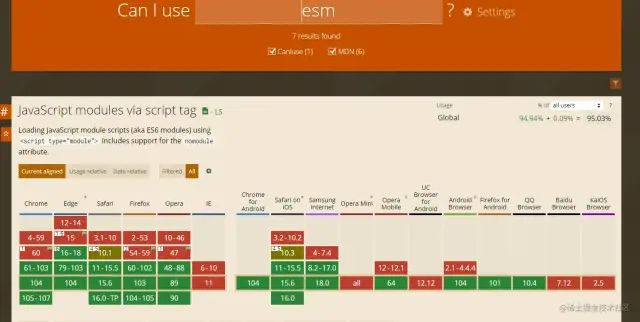
所以,如果你打算使用 vite 作為構(gòu)建工具去開發(fā),你至少要有一個合適版本的瀏覽器。如果你和我一樣,Chrome 版本的瀏覽器比較低,但是又不想升級,想留著偶爾方便自測和定位瀏覽器兼容問題,那我推薦你安裝一個Chromium。這樣你就可以一個電腦里面擁有兩個 Chrome。_沒有兩個chrome的前端不是好前端[狗頭]。_
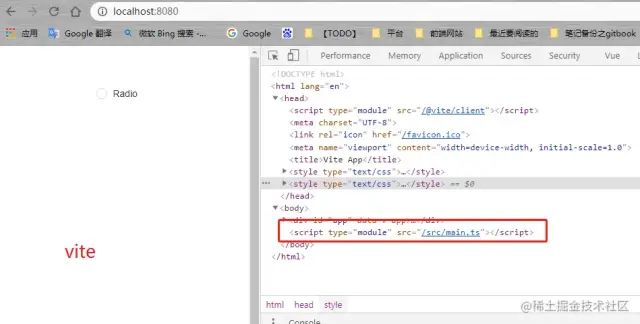
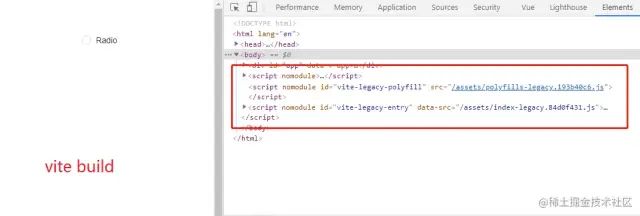
這時候,你可能又會有另外一個問題,_什么是 ESM?_ 關(guān)于這個問題,這里不展開說,有興趣的可以看看這篇文章[1]。通俗易懂的理解,就是在開發(fā)態(tài),我們加載的是模塊化的 ts 或者 js,而且在打包后,我們加載的就是的 CommonJS,如下圖。
除此之外,你要升級你的 node 環(huán)境到 node 14 以上版本。而如果你也是用的 windows 7, 這就有了第二個問題, 如何在 windows 7下安裝 node 14? 需要將下載的 node 包放在指定的 nvm 文件夾同時將系統(tǒng)變量 NODE_SKIP_PLATFORM_CHECK 設(shè)置為 1。
組件準備:因為希望組件風格和之前保持一致,為了更加靈活的修改組件,我們基于antdv[2]進行了簡單封裝,并發(fā)布到私有的 npm 倉庫。
組件自動引入unplugin-vue-components
上面的封裝也帶來另外一個坑,就是會導致無法使用 unplugin-vue-components。我去提了issues 希望可以支持組件名動態(tài)設(shè)置[3] 和 PR[4], 應該下個版本 AntDesignVueResolver 就可以支持了。
你可能要習慣的和 vue2 的不同
在實際開發(fā)過程中,從 vue2 升級到 vue3 我覺得有幾個地方或許是需要適用一下的,這里也提一下。
組合式 API
組合式 API 是一系列 API 的集合, 它是 Vue 3 和 Vue2.7 的內(nèi)置功能,而對于更老的 Vue 2 版本,則可以使用 @vue/composition-api包。組合式 API 包括:

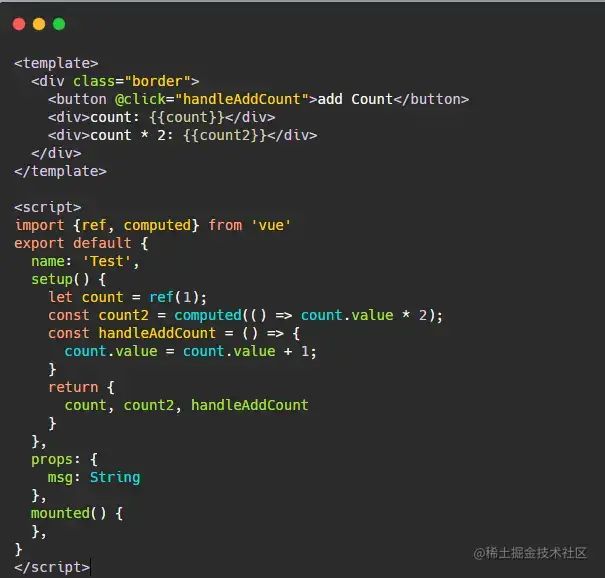
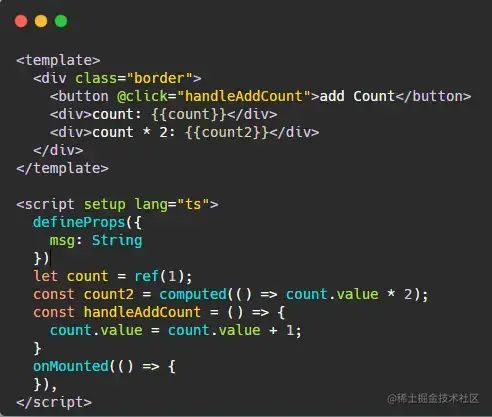
<script setup> 是在單文件組件 (SFC) 中使用組合式 API 的編譯時語法糖。個人感覺,不用這個語法糖寫法上和 Vue 2 更加接近,而使用這個語法糖寫起來則更絲滑些,寫法對比如下圖:
響應式
數(shù)組
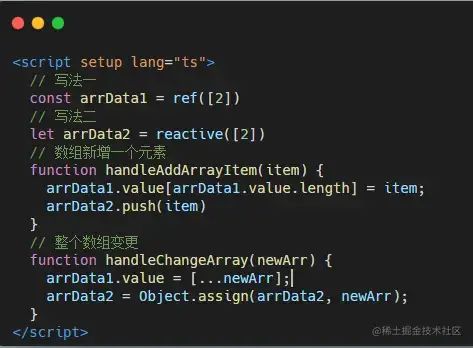
有兩種實現(xiàn)方式,如下圖。我個人用下來,覺得寫法一更絲滑些。
響應式代理
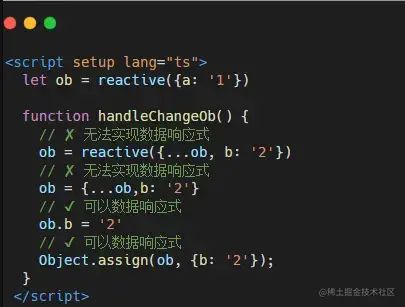
你可能也注意到,對整個數(shù)組的變更,我用的是 Object.assign 去實現(xiàn)的,因為只有這樣,才能保持數(shù)據(jù)的響應式。這和 Vue 2 也是有區(qū)別的,官網(wǎng)也有做說明響應式代理 vs. 原始值[5],原因和 Vue 3 的數(shù)據(jù)響應式原理有關(guān)。至于Vue 3 的數(shù)據(jù)響應式原理這里不展開說,可以參考我之前寫的另一篇文章關(guān)于vue3的Proxy[6]。
雙向綁定實現(xiàn)
父組件
<template>
  <div class="hello">
    <h1 @click="showModal">打開彈窗</h1>
    <Modal v-model="visible"></Modal>
  </div>
</template>
<script setup lang="ts">
  import Modal from './modal-setup.vue'
  defineProps<{ msg: string }>()
  const visible = ref(false)
  const showModal = () => {
    visible.value = true
  }
</script>

<style scoped>
.hello {
  position: relative;
  width: 100px;
}
</style>
復制代碼
子組件
<template>
  <teleport to="#app">
    <div class="modal" @click="hideModal" v-show="visible">
      modal
    </div>
  </teleport>
</template>
<script setup lang="ts">
  const props = defineProps<{ modelValue: Boolean }>()
  const emit = defineEmits(['update:modelValue'])
  const visible = computed({
    get: () => props.modelValue,
    set: val => {
      emit('update:modelValue', val)
    }
  })
  const hideModal = () => {
    visible.value = false
  }
</script>
<style scoped>
.modal {
  position: absolute;
  top: 0;
  right: 0;
  background: #999;
  width: 300px;
  height: 100vh;
}
</style>
復制代碼
echarts 使用
<template>
  <div v-for="(card, index) in cardList" :key="`${card.id}-${index}`">
    <div class="card">
      <!-- 當你放置echart的元素是動態(tài)渲染時, 需要動態(tài)掛載元素-->
      <template v-if="card.type === 1">
        <div :ref="(el) => setEchartRef(el, index)" class="chart"></div>
      </template>
      <div v-else>empty-box</div>
    </div>
  </div>
</template>

<script setup lang="ts">
  import * as echarts from 'echarts/core';
  import { PieChart } from 'echarts/charts';
  import { CanvasRenderer } from 'echarts/renderers';
  import { GridComponent, TooltipComponent } from 'echarts/components';
  echarts.use([GridComponent, PieChart, CanvasRenderer, TooltipComponent]);
  const cardList = ref([]);
  const echartsRef = ref<HTMLElement[]>([]);

  function setEchartRef = (el: HTMLElement, index: number) => {
    echartsRef.value[index] = el;
  }
  function drawEchart(index) {
    cardList.value[index].echart = echarts.init(echartsRef?.value?.[index] as unknown as HTMLElement);
    cardList.value[index].echart.setOption({
      //  ...
    })
  }
  function setEchartData() {
    cardList.value[index].type = 1;
    await nextTick();
    drawEchart(index);
  }
</script>
復制代碼
關(guān)于構(gòu)建部署踩的坑
混用 require和import
如果項目中存在混用 commonJS 和 ES6 模塊的情況,需要使用 @originjs/vite-plugin-commonjs 這個插件的 transformMixedEsModules 配置進行 hotfix。不然會報錯Uncaught ReferenceError: require is not defined。_不過,盡量不要混用,因為尤大大說了這么干不好....Vite will likely never support such dependencies.[7]_
import { defineConfig } from 'vite'
import { viteCommonjs } from '@originjs/vite-plugin-commonjs';
export default defineConfig({
  // ...
  plugins: [
    viteCommonjs({
      transformMixedEsModules: true,
    }),
  ]
})
復制代碼
個人理解,這個配置類似于 babel 的 sourceType[8]配置項。因為之前在babel也踩過類似的坑,這里貼出對應 issues4039[9]。其實簡單概括就是出現(xiàn)了import和module.exports的混用。
所以,原來項目中用 h 函數(shù)渲染圖片的寫法也要改為es引入,如下:
import exampleImg from './assets/example.png'
import { h } from 'vue';
function renderModal() {
   Modal.confirm({
    title: '操作確認',
    icon: null,
    content: () =>
      h('div', { style: 'text-align: center;padding-bottom: 32px;' }, [
        // 原來vue2的寫法 h('img', {attrs: {src: require('./assets/example.png')}})
        h('img', { src: exampleImg })]),
  });
}
復制代碼
關(guān)于瀏覽器兼容問題
vite 的 build.target[10] 配置項可以配置希望兼容的瀏覽器版本或者 ES 版本,cssTarget[11]可以對 CSS 的壓縮設(shè)置一個target,該配置應針對非主流瀏覽器使用。例如,安卓微信中的 webview,并不支持 CSS 中的十六進制顏色符號, 此時將 build.cssTarget 設(shè)置為 chrome61,可以防止 vite 將 rgba() 顏色轉(zhuǎn)化為 #RGBA 十六進制符號的形式。
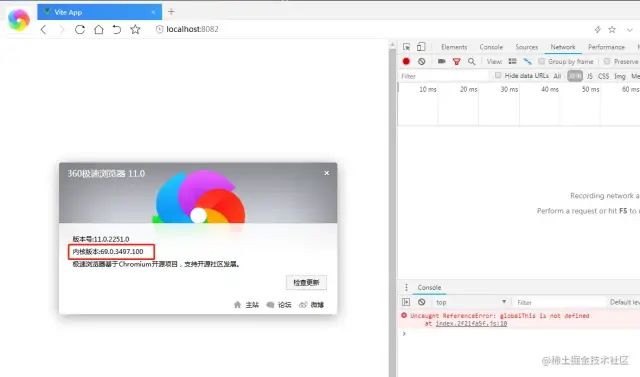
除此之外, 還可以使用插件 @vitejs/plugin-legacy 進行更多的瀏覽器兼容問題處理。例如,在內(nèi)核 chrome 69 版本的360瀏覽器中,遇到過Uncaught ReferenceError: globalThis is not defined這樣的報錯。網(wǎng)上搜到可以通過解決瀏覽器端 globalThis is not defined 報錯[12]簡單快速的 hotfix 可以解決這個問題,但是我始終覺得不夠優(yōu)雅。
后來翻了下文檔,實際可以通過 @vitejs/plugin-legacy 的modernPolyfills配置去解決這個問題,解決配置如下代碼。同理,你也可以 Polyfills 你需要的es[13]。
import { defineConfig } from 'vite'
import vue from '@vitejs/plugin-vue'
import legacy from '@vitejs/plugin-legacy'

export default defineConfig({
  server: {
    port: 8080
  },
  build: {
    target: 'es2015', // js兼容處理
    cssTarget: 'chrome49', // css兼容處理
  }
  plugins: [
    vue(),
    legacy({
      targets: ['chrome 49'],
      modernPolyfills: ['es.global-this'], // 解決瀏覽器端 globalThis is not defined 報錯
    }),
  ]
})
復制代碼
說完這么多坑,最后附上一張比較有意思的圖2021年前端框架開發(fā):滿意度-感興趣程度-使用度-熟知度[14]:
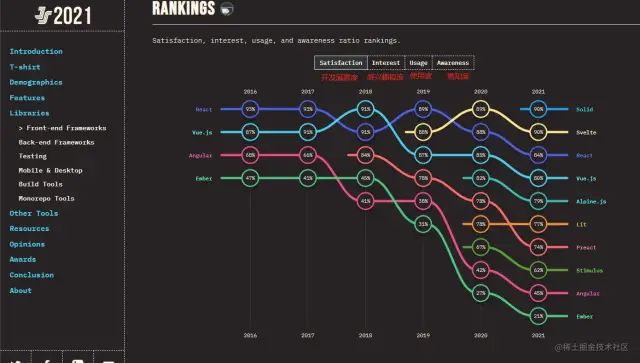
踩了這么多坑,你可能會問,后悔在新項目里面用 vue3了嗎?我的答案是沒有。對于一個不太重的新項目,你又想嘗試卷卷 vue3,我個人覺得或許是個不錯的選擇。
關(guān)于本文
作者:Luin
https://juejin.cn/post/7137967499202527239