
基于 ElasticSearch 實(shí)現(xiàn)站內(nèi)全文搜索
點(diǎn)擊關(guān)注公眾號(hào),實(shí)用技術(shù)文章及時(shí)了解
目錄
摘要 1 技術(shù)選型 1.1 ElasticSearch 1.2 springBoot 1.3 ik分詞器 2 環(huán)境準(zhǔn)備 3 項(xiàng)目架構(gòu) 4 實(shí)現(xiàn)效果 4.1 搜索頁(yè)面 4.2 搜索結(jié)果頁(yè)面 5 具體代碼實(shí)現(xiàn) 5.1 全文檢索的實(shí)現(xiàn)對(duì)象 5.2 客戶端配置 5.3 業(yè)務(wù)代碼編寫 5.4 對(duì)外接口 5.5 頁(yè)面 6 小結(jié)
摘要
對(duì)于一家公司而言,數(shù)據(jù)量越來(lái)越多,如果快速去查找這些信息是一個(gè)很難的問(wèn)題,在計(jì)算機(jī)領(lǐng)域有一個(gè)專門的領(lǐng)域IR(Information Retrival)研究如果獲取信息,做信息檢索。在國(guó)內(nèi)的如百度這樣的搜索引擎也屬于這個(gè)領(lǐng)域,要自己實(shí)現(xiàn)一個(gè)搜索引擎是非常難的,不過(guò)信息查找對(duì)每一個(gè)公司都非常重要,對(duì)于開(kāi)發(fā)人員也可以選則一些市場(chǎng)上的開(kāi)源項(xiàng)目來(lái)構(gòu)建自己的站內(nèi)搜索引擎,本文將通過(guò)ElasticSearch來(lái)構(gòu)建一個(gè)這樣的信息檢索項(xiàng)目。
1 技術(shù)選型
搜索引擎服務(wù)使用ElasticSearch 提供的對(duì)外web服務(wù)選則springboot web
1.1 ElasticSearch
Elasticsearch是一個(gè)基于Lucene的搜索服務(wù)器。它提供了一個(gè)分布式多用戶能力的全文搜索引擎,基于RESTful web接口。Elasticsearch是用Java語(yǔ)言開(kāi)發(fā)的,并作為Apache許可條款下的開(kāi)放源碼發(fā)布,是一種流行的企業(yè)級(jí)搜索引擎。Elasticsearch用于云計(jì)算中,能夠達(dá)到實(shí)時(shí)搜索,穩(wěn)定,可靠,快速,安裝使用方便。
官方客戶端在Java、.NET(C#)、PHP、Python、Apache Groovy、Ruby和許多其他語(yǔ)言中都是可用的。根據(jù)DB-Engines的排名顯示,Elasticsearch是最受歡迎的企業(yè)搜索引擎,其次是Apache Solr,也是基于Lucene。1
現(xiàn)在開(kāi)源的搜索引擎在市面上最常見(jiàn)的就是ElasticSearch和Solr,二者都是基于Lucene的實(shí)現(xiàn),其中ElasticSearch相對(duì)更加重量級(jí),在分布式環(huán)境表現(xiàn)也更好,二者的選則需考慮具體的業(yè)務(wù)場(chǎng)景和數(shù)據(jù)量級(jí)。對(duì)于數(shù)據(jù)量不大的情況下,完全需要使用像Lucene這樣的搜索引擎服務(wù),通過(guò)關(guān)系型數(shù)據(jù)庫(kù)檢索即可。
? 計(jì)算機(jī)電子書(shū)籍推薦
主要包括Java電子書(shū)籍(Java基礎(chǔ),Java多線程,spring、springboot、springcloud,分布式,微服務(wù)等)、Python,Linux,Go,C,C++,數(shù)據(jù)結(jié)構(gòu)與算法,人工智能,計(jì)算機(jī)基礎(chǔ),面試,設(shè)計(jì)模式,數(shù)據(jù)庫(kù),前端等書(shū)籍。
獲取方式
關(guān)注下方公眾號(hào)回復(fù):「好好學(xué)Java」,即可獲取。
1.2 springBoot
Spring Boot makes it easy to create stand-alone, production-grade Spring based Applications that you can “just run”.2
現(xiàn)在springBoot在做web開(kāi)發(fā)上是絕對(duì)的主流,其不僅僅是開(kāi)發(fā)上的優(yōu)勢(shì),在布署,運(yùn)維各個(gè)方面都有著非常不錯(cuò)的表現(xiàn),并且spring生態(tài)圈的影響力太大了,可以找到各種成熟的解決方案。
1.3 ik分詞器
elasticSearch本身不支持中文的分詞,需要安裝中文分詞插件,如果需要做中文的信息檢索,中文分詞是基礎(chǔ),此處選則了ik,下載好后放入elasticSearch的安裝位置的plugin目錄即可。
2 環(huán)境準(zhǔn)備
需要安裝好elastiSearch以及kibana(可選),并且需要lk分詞插件。
安裝elasticSearch elasticsearch官網(wǎng). 筆者使用的是7.5.1。 ik插件下載 ik插件github地址. 注意下載和你下載elasticsearch版本一樣的ik插件。 將ik插件放入elasticsearch安裝目錄下的plugins包下,新建報(bào)名ik,將下載好的插件解壓到該目錄下即可,啟動(dòng)es的時(shí)候會(huì)自動(dòng)加載該插件。

搭建springboot項(xiàng)目 idea ->new project ->spring initializer

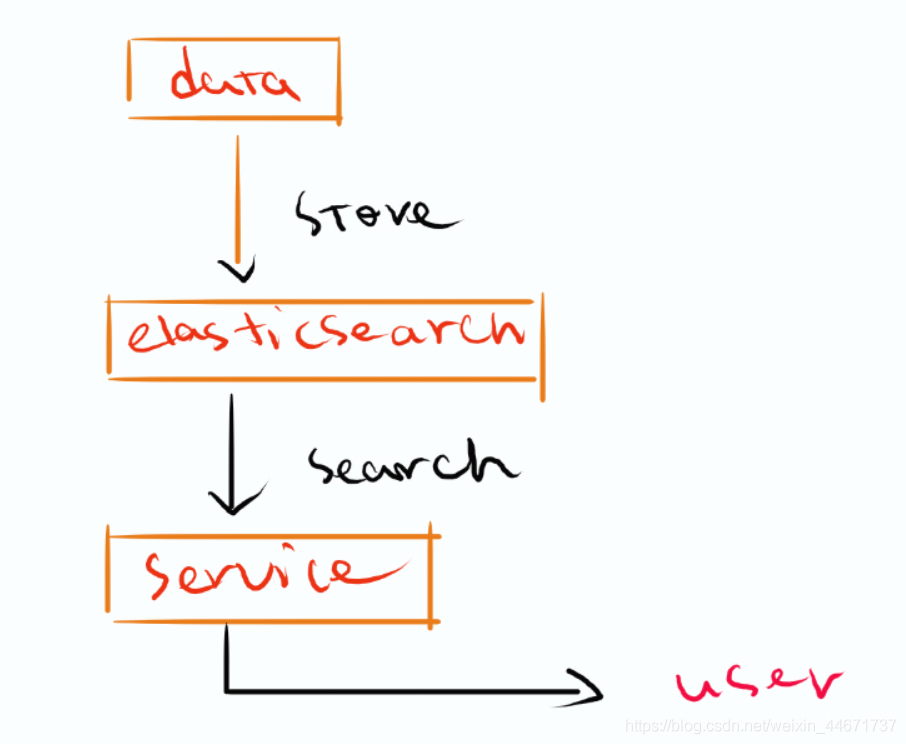
3 項(xiàng)目架構(gòu)
獲取數(shù)據(jù)使用ik分詞插件 將數(shù)據(jù)存儲(chǔ)在es引擎中 通過(guò)es檢索方式對(duì)存儲(chǔ)的數(shù)據(jù)進(jìn)行檢索 使用es的java客戶端提供外部服務(wù)
4 實(shí)現(xiàn)效果
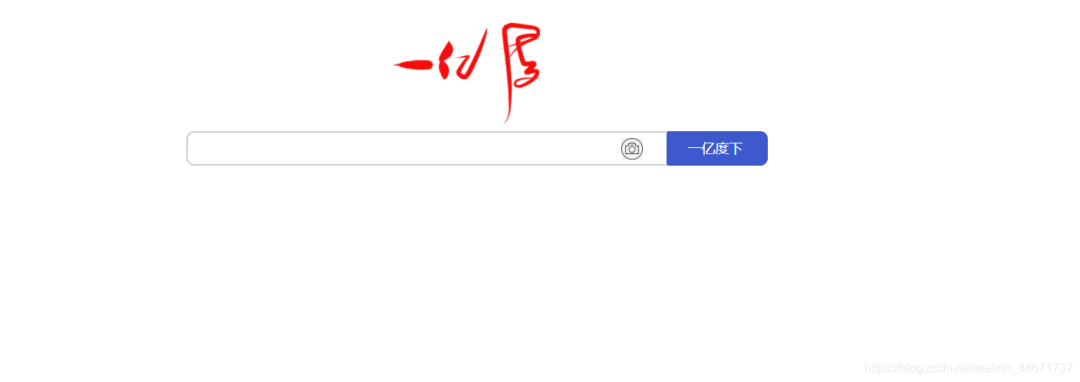
4.1 搜索頁(yè)面
簡(jiǎn)單實(shí)現(xiàn)一個(gè)類似百度的搜索框即可。
4.2 搜索結(jié)果頁(yè)面
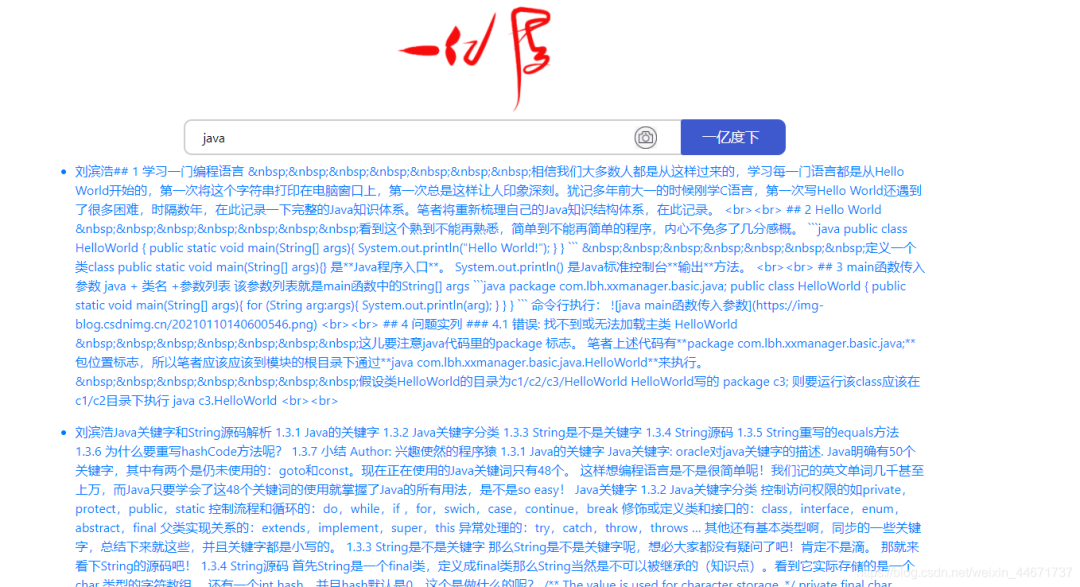
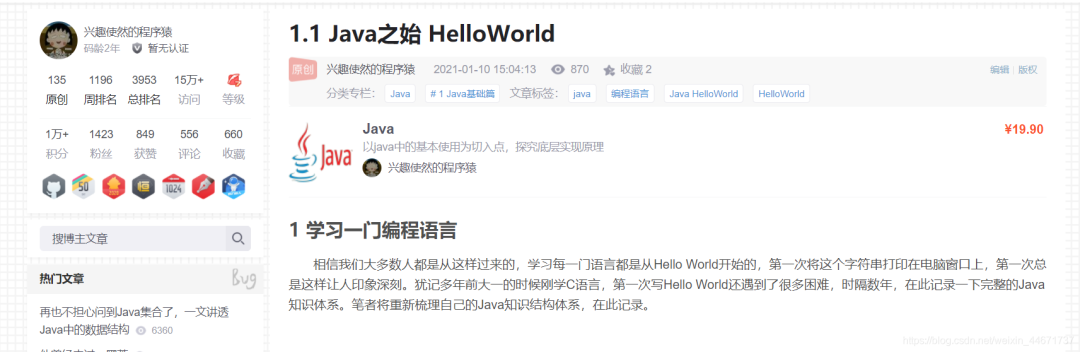
點(diǎn)擊第一個(gè)搜索結(jié)果是我個(gè)人的某一篇博文,為了避免數(shù)據(jù)版權(quán)問(wèn)題,筆者在es引擎中存放的全是個(gè)人的博客數(shù)據(jù)。另外推薦:Java進(jìn)階視頻資源
5 具體代碼實(shí)現(xiàn)
5.1 全文檢索的實(shí)現(xiàn)對(duì)象
按照博文的基本信息定義了如下實(shí)體類,主要需要知道每一個(gè)博文的url,通過(guò)檢索出來(lái)的文章具體查看要跳轉(zhuǎn)到該url。
package com.lbh.es.entity;

import com.fasterxml.jackson.annotation.JsonIgnore;

import javax.persistence.*;

/**
 * PUT articles
 * {
 * "mappings":
 * {"properties":{
 * "author":{"type":"text"},
 * "content":{"type":"text","analyzer":"ik_max_word","search_analyzer":"ik_smart"},
 * "title":{"type":"text","analyzer":"ik_max_word","search_analyzer":"ik_smart"},
 * "createDate":{"type":"date","format":"yyyy-MM-dd HH:mm:ss||yyyy-MM-dd"},
 * "url":{"type":"text"}
 * } },
 * "settings":{
 *     "index":{
 *       "number_of_shards":1,
 *       "number_of_replicas":2
 *     }
 *   }
 * }
 * ---------------------------------------------------------------------------------------------------------------------
 * Copyright(c)[email protected]
 * @author liubinhao
 * @date 2021/3/3
 */
@Entity
@Table(name = "es_article")
public class ArticleEntity {
    @Id
    @JsonIgnore
    @GeneratedValue(strategy = GenerationType.IDENTITY)
    private long id;
    @Column(name = "author")
    private String author;
    @Column(name = "content",columnDefinition="TEXT")
    private String content;
    @Column(name = "title")
    private String title;
    @Column(name = "createDate")
    private String createDate;
    @Column(name = "url")
    private String url;

    public String getAuthor() {
        return author;
    }

    public void setAuthor(String author) {
        this.author = author;
    }

    public String getContent() {
        return content;
    }

    public void setContent(String content) {
        this.content = content;
    }

    public String getTitle() {
        return title;
    }

    public void setTitle(String title) {
        this.title = title;
    }

    public String getCreateDate() {
        return createDate;
    }

    public void setCreateDate(String createDate) {
        this.createDate = createDate;
    }

    public String getUrl() {
        return url;
    }

    public void setUrl(String url) {
        this.url = url;
    }
}
5.2 客戶端配置
通過(guò)java配置es的客戶端。
package com.lbh.es.config;

import org.apache.http.HttpHost;
import org.elasticsearch.client.RestClient;
import org.elasticsearch.client.RestClientBuilder;
import org.elasticsearch.client.RestHighLevelClient;
import org.springframework.beans.factory.annotation.Value;
import org.springframework.context.annotation.Bean;
import org.springframework.context.annotation.Configuration;

import java.util.ArrayList;
import java.util.List;

/**
 * Copyright(c)[email protected]
 * @author liubinhao
 * @date 2021/3/3
 */
@Configuration
public class EsConfig {

    @Value("${elasticsearch.schema}")
    private String schema;
    @Value("${elasticsearch.address}")
    private String address;
    @Value("${elasticsearch.connectTimeout}")
    private int connectTimeout;
    @Value("${elasticsearch.socketTimeout}")
    private int socketTimeout;
    @Value("${elasticsearch.connectionRequestTimeout}")
    private int tryConnTimeout;
    @Value("${elasticsearch.maxConnectNum}")
    private int maxConnNum;
    @Value("${elasticsearch.maxConnectPerRoute}")
    private int maxConnectPerRoute;

    @Bean
    public RestHighLevelClient restHighLevelClient() {
        // 拆分地址
        List<HttpHost> hostLists = new ArrayList<>();
        String[] hostList = address.split(",");
        for (String addr : hostList) {
            String host = addr.split(":")[0];
            String port = addr.split(":")[1];
            hostLists.add(new HttpHost(host, Integer.parseInt(port), schema));
        }
        // 轉(zhuǎn)換成 HttpHost 數(shù)組
        HttpHost[] httpHost = hostLists.toArray(new HttpHost[]{});
        // 構(gòu)建連接對(duì)象
        RestClientBuilder builder = RestClient.builder(httpHost);
        // 異步連接延時(shí)配置
        builder.setRequestConfigCallback(requestConfigBuilder -> {
            requestConfigBuilder.setConnectTimeout(connectTimeout);
            requestConfigBuilder.setSocketTimeout(socketTimeout);
            requestConfigBuilder.setConnectionRequestTimeout(tryConnTimeout);
            return requestConfigBuilder;
        });
        // 異步連接數(shù)配置
        builder.setHttpClientConfigCallback(httpClientBuilder -> {
            httpClientBuilder.setMaxConnTotal(maxConnNum);
            httpClientBuilder.setMaxConnPerRoute(maxConnectPerRoute);
            return httpClientBuilder;
        });
        return new RestHighLevelClient(builder);
    }

}
5.3 業(yè)務(wù)代碼編寫
包括一些檢索文章的信息,可以從文章標(biāo)題,文章內(nèi)容以及作者信息這些維度來(lái)查看相關(guān)信息。另外推薦:Java進(jìn)階視頻資源
package com.lbh.es.service;

import com.google.gson.Gson;
import com.lbh.es.entity.ArticleEntity;
import com.lbh.es.repository.ArticleRepository;
import org.elasticsearch.action.admin.indices.delete.DeleteIndexRequest;
import org.elasticsearch.action.get.GetRequest;
import org.elasticsearch.action.get.GetResponse;
import org.elasticsearch.action.index.IndexRequest;
import org.elasticsearch.action.index.IndexResponse;
import org.elasticsearch.action.search.SearchRequest;
import org.elasticsearch.action.search.SearchResponse;
import org.elasticsearch.action.support.master.AcknowledgedResponse;
import org.elasticsearch.client.RequestOptions;
import org.elasticsearch.client.RestHighLevelClient;
import org.elasticsearch.client.indices.CreateIndexRequest;
import org.elasticsearch.client.indices.CreateIndexResponse;
import org.elasticsearch.common.settings.Settings;
import org.elasticsearch.common.xcontent.XContentType;
import org.elasticsearch.index.query.QueryBuilders;
import org.elasticsearch.search.SearchHit;
import org.elasticsearch.search.builder.SearchSourceBuilder;
import org.springframework.stereotype.Service;

import javax.annotation.Resource;
import java.io.IOException;

import java.util.*;

/**
 * Copyright(c)[email protected]
 * @author liubinhao
 * @date 2021/3/3
 */
@Service
public class ArticleService {

    private static final String ARTICLE_INDEX = "article";

    @Resource
    private RestHighLevelClient client;
    @Resource
    private ArticleRepository articleRepository;

    public boolean createIndexOfArticle(){
        Settings settings = Settings.builder()
                .put("index.number_of_shards", 1)
                .put("index.number_of_replicas", 1)
                .build();
// {"properties":{"author":{"type":"text"},
// "content":{"type":"text","analyzer":"ik_max_word","search_analyzer":"ik_smart"}
// ,"title":{"type":"text","analyzer":"ik_max_word","search_analyzer":"ik_smart"},
// ,"createDate":{"type":"date","format":"yyyy-MM-dd HH:mm:ss||yyyy-MM-dd"}
// }
        String mapping = "{\"properties\":{\"author\":{\"type\":\"text\"},\n" +
                "\"content\":{\"type\":\"text\",\"analyzer\":\"ik_max_word\",\"search_analyzer\":\"ik_smart\"}\n" +
                ",\"title\":{\"type\":\"text\",\"analyzer\":\"ik_max_word\",\"search_analyzer\":\"ik_smart\"}\n" +
                ",\"createDate\":{\"type\":\"date\",\"format\":\"yyyy-MM-dd HH:mm:ss||yyyy-MM-dd\"}\n" +
                "},\"url\":{\"type\":\"text\"}\n" +
                "}";
        CreateIndexRequest indexRequest = new CreateIndexRequest(ARTICLE_INDEX)
                .settings(settings).mapping(mapping,XContentType.JSON);
        CreateIndexResponse response = null;
        try {
            response = client.indices().create(indexRequest, RequestOptions.DEFAULT);
        } catch (IOException e) {
            e.printStackTrace();
        }
        if (response!=null) {
            System.err.println(response.isAcknowledged() ? "success" : "default");
            return response.isAcknowledged();
        } else {
            return false;
        }
    }

    public boolean deleteArticle(){
        DeleteIndexRequest request = new DeleteIndexRequest(ARTICLE_INDEX);
        try {
            AcknowledgedResponse response = client.indices().delete(request, RequestOptions.DEFAULT);
            return response.isAcknowledged();
        } catch (IOException e) {
            e.printStackTrace();
        }
        return false;
    }

    public IndexResponse addArticle(ArticleEntity article){
        Gson gson = new Gson();
        String s = gson.toJson(article);
        //創(chuàng)建索引創(chuàng)建對(duì)象
        IndexRequest indexRequest = new IndexRequest(ARTICLE_INDEX);
        //文檔內(nèi)容
        indexRequest.source(s,XContentType.JSON);
        //通過(guò)client進(jìn)行http的請(qǐng)求
        IndexResponse re = null;
        try {
            re = client.index(indexRequest, RequestOptions.DEFAULT);
        } catch (IOException e) {
            e.printStackTrace();
        }
        return re;
    }

    public void transferFromMysql(){
        articleRepository.findAll().forEach(this::addArticle);
    }

    public List<ArticleEntity> queryByKey(String keyword){
        SearchRequest request = new SearchRequest();
        /*
         * 創(chuàng)建  搜索內(nèi)容參數(shù)設(shè)置對(duì)象:SearchSourceBuilder
         * 相對(duì)于matchQuery,multiMatchQuery針對(duì)的是多個(gè)fi eld,也就是說(shuō),當(dāng)multiMatchQuery中,fieldNames參數(shù)只有一個(gè)時(shí),其作用與matchQuery相當(dāng);
         * 而當(dāng)fieldNames有多個(gè)參數(shù)時(shí),如field1和field2,那查詢的結(jié)果中,要么field1中包含text,要么field2中包含text。
         */
        SearchSourceBuilder searchSourceBuilder = new SearchSourceBuilder();

        searchSourceBuilder.query(QueryBuilders
                .multiMatchQuery(keyword, "author","content","title"));
        request.source(searchSourceBuilder);
        List<ArticleEntity> result = new ArrayList<>();
        try {
            SearchResponse search = client.search(request, RequestOptions.DEFAULT);
            for (SearchHit hit:search.getHits()){
                Map<String, Object> map = hit.getSourceAsMap();
                ArticleEntity item = new ArticleEntity();
                item.setAuthor((String) map.get("author"));
                item.setContent((String) map.get("content"));
                item.setTitle((String) map.get("title"));
                item.setUrl((String) map.get("url"));
                result.add(item);
            }
            return result;
        } catch (IOException e) {
            e.printStackTrace();
        }
        return null;
    }

    public ArticleEntity queryById(String indexId){
        GetRequest request = new GetRequest(ARTICLE_INDEX, indexId);
        GetResponse response = null;
        try {
            response = client.get(request, RequestOptions.DEFAULT);
        } catch (IOException e) {
            e.printStackTrace();
        }
        if (response!=null&&response.isExists()){
            Gson gson = new Gson();
            return gson.fromJson(response.getSourceAsString(),ArticleEntity.class);
        }
        return null;
    }
}
5.4 對(duì)外接口
和使用springboot開(kāi)發(fā)web程序相同。
package com.lbh.es.controller;

import com.lbh.es.entity.ArticleEntity;
import com.lbh.es.service.ArticleService;
import org.elasticsearch.action.index.IndexResponse;
import org.springframework.web.bind.annotation.*;

import javax.annotation.Resource;
import java.util.List;

/**
 * Copyright(c)[email protected]
 * @author liubinhao
 * @date 2021/3/3
 */
@RestController
@RequestMapping("article")
public class ArticleController {

    @Resource
    private ArticleService articleService;

    @GetMapping("/create")
    public boolean create(){
        return articleService.createIndexOfArticle();
    }

    @GetMapping("/delete")
    public boolean delete() {
        return articleService.deleteArticle();
    }

    @PostMapping("/add")
    public IndexResponse add(@RequestBody ArticleEntity article){
        return articleService.addArticle(article);
    }

    @GetMapping("/fransfer")
    public String transfer(){
        articleService.transferFromMysql();
        return "successful";
    }

    @GetMapping("/query")
    public List<ArticleEntity> query(String keyword){
        return articleService.queryByKey(keyword);
    }
}
5.5 頁(yè)面
此處頁(yè)面使用thymeleaf,主要原因是筆者真滴不會(huì)前端,只懂一丟丟簡(jiǎn)單的h5,就隨便做了一個(gè)可以展示的頁(yè)面。
搜索頁(yè)面
<!DOCTYPE html>
<html lang="en" xmlns:th="http://www.thymeleaf.org">
<head>
    <meta charset="UTF-8" />
    <meta name="viewport" content="width=device-width, initial-scale=1.0" />
    <title>YiyiDu</title>
    <!--
        input:focus設(shè)定當(dāng)輸入框被點(diǎn)擊時(shí),出現(xiàn)藍(lán)色外邊框
        text-indent: 11px;和padding-left: 11px;設(shè)定輸入的字符的起始位置與左邊框的距離
    -->
    <style>
        input:focus {
            border: 2px solid rgb(62, 88, 206);
        }
        input {
            text-indent: 11px;
            padding-left: 11px;
            font-size: 16px;
        }
    </style>
    <!--input初始狀態(tài)-->
    <style class="input/css">
        .input {
            width: 33%;
            height: 45px;
            vertical-align: top;
            box-sizing: border-box;
            border: 2px solid rgb(207, 205, 205);
            border-right: 2px solid rgb(62, 88, 206);
            border-bottom-left-radius: 10px;
            border-top-left-radius: 10px;
            outline: none;
            margin: 0;
            display: inline-block;
            background: url(/static/img/camera.jpg) no-repeat 0 0;
            background-position: 565px 7px;
            background-size: 28px;
            padding-right: 49px;
            padding-top: 10px;
            padding-bottom: 10px;
            line-height: 16px;
        }
    </style>
    <!--button初始狀態(tài)-->
    <style class="button/css">
        .button {
            height: 45px;
            width: 130px;
            vertical-align: middle;
            text-indent: -8px;
            padding-left: -8px;
            background-color: rgb(62, 88, 206);
            color: white;
            font-size: 18px;
            outline: none;
            border: none;
            border-bottom-right-radius: 10px;
            border-top-right-radius: 10px;
            margin: 0;
            padding: 0;
        }
    </style>
</head>
<body>
<!--包含table的div-->
<!--包含input和button的div-->
    <div style="font-size: 0px;">
        <div align="center" style="margin-top: 0px;">
            <img src="../static/img/yyd.png" th:src = "@{/static/img/yyd.png}"  alt="一億度" width="280px" class="pic" />
        </div>
        <div align="center">
            <!--action實(shí)現(xiàn)跳轉(zhuǎn)-->
            <form action="/home/query">
                <input type="text" class="input" name="keyword" />
                <input type="submit" class="button" value="一億度下" />
            </form>
        </div>
    </div>
</body>
</html>
搜索結(jié)果頁(yè)面
<!DOCTYPE html>
<html lang="en" xmlns:th="http://www.thymeleaf.org">
<head>
    <link rel="stylesheet" href="https://cdn.staticfile.org/twitter-bootstrap/4.3.1/css/bootstrap.min.css">
    <meta charset="UTF-8">
    <title>xx-manager</title>
</head>
<body>
<header th:replace="search.html"></header>
<div class="container my-2">
    <ul th:each="article : ${articles}">
        <a th:href="${article.url}"><li th:text="${article.author}+${article.content}"></li></a>
    </ul>
</div>
<footer th:replace="footer.html"></footer>
</body>
</html>
6 小結(jié)
上班擼代碼,下班繼續(xù)擼代碼寫博客,花了兩天研究了以下es,其實(shí)這個(gè)玩意兒還是挺有意思的,現(xiàn)在IR領(lǐng)域最基礎(chǔ)的還是基于統(tǒng)計(jì)學(xué)的,所以對(duì)于es這類搜索引擎而言在大數(shù)據(jù)的情況下具有良好的表現(xiàn)。每一次寫實(shí)戰(zhàn)筆者其實(shí)都感覺(jué)有些無(wú)從下手,因?yàn)椴恢雷錾叮克砸蚕M玫揭恍┯幸馑嫉狞c(diǎn)子筆者會(huì)將實(shí)戰(zhàn)做出來(lái)。