
python 實(shí)現(xiàn)自動(dòng)生成驗(yàn)證碼圖片

思路
基本思路是使用opencv來(lái)把隨機(jī)生成的字符,和隨機(jī)生成的線段,放到一個(gè)隨機(jī)生成的圖像中去。
感謝各友的鼓勵(lì)與支持??????,往期文章都在最后梳理出來(lái)了(●'?'●)
??????????????????????????????????????????????????????????????????
代碼一
import cv2import numpy as npline_num = 10pic_num = 1000path = "./imgs/"def randcolor():return (np.random.randint(0,255),np.random.randint(0,255),np.random.randint(0,255))def randchar():return chr(np.random.randint(65,90))def randpos(x_start,x_end,y_start,y_end):return (np.random.randint(x_start,x_end),np.random.randint(y_start,y_end))img_heigth = 60img_width = 240for i in range(pic_num):img_name = ""#生成一個(gè)隨機(jī)矩陣,randint(low[, high, size, dtype])img = np.random.randint(100,200,(img_heigth,img_width, 3), np.uint8)#顯示圖像#cv2.imshow("ranImg",img)x_pos = 0y_pos = 25for i in range(4):char = randchar()img_name += charcv2.putText(img,char,+ 50),np.random.randint(y_pos,y_pos + 35)),cv2.FONT_HERSHEY_SIMPLEX,1.5,randcolor(),2,cv2.LINE_AA)x_pos += 45#cv2.imshow("res",img)#添加線段for i in range(line_num):img = cv2.line(img,randpos(0,img_width,0,img_heigth),randpos(0,img_width,0,img_heigth),randcolor(),np.random.randint(1,2))#cv2.imshow("line",img)+ img_name + ".jpg",img)#cv2.waitKey(0)#cv2.destroyAllWindows()
結(jié)果
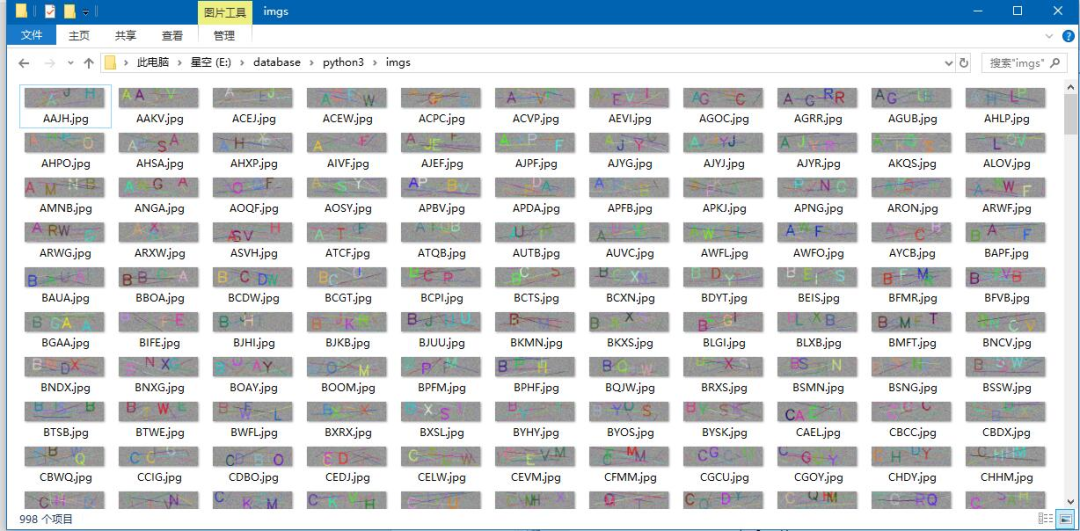
代碼二
import osimport random# captcha是用于生成驗(yàn)證碼圖片的庫(kù),可以 pip install captcha 來(lái)安裝它from captcha.image import ImageCaptchadef random_captcha_text(num):# 驗(yàn)證碼列表captcha_text = []for i in range(10): # 0-9數(shù)字captcha_text.append(str(i))for i in range(65, 91): # 對(duì)應(yīng)從“A”到“Z”的ASCII碼captcha_text.append(chr(i))for i in range(97, 123): #對(duì)應(yīng)從“a”到“z”的ASCII碼captcha_text.append(chr(i))# 從list中隨機(jī)獲取6個(gè)元素,作為一個(gè)片斷返回example = random.sample(captcha_text, num)# 將列表里的片段變?yōu)樽址⒎祷?/span>verification_code = ''.join(example)return verification_code# 生成字符對(duì)應(yīng)的驗(yàn)證碼def generate_captcha_image():image = ImageCaptcha()#獲得隨機(jī)生成的驗(yàn)證碼captcha_text = random_captcha_text(8)#把驗(yàn)證碼列表轉(zhuǎn)為字符串captcha_text = ''.join(captcha_text)#生成驗(yàn)證碼path='E:/pycharm/驗(yàn)證碼識(shí)別/code/test/'if not os.path.exists(path):print("目錄不存在!,已自動(dòng)創(chuàng)建" )os.makedirs(path)print("生成的驗(yàn)證碼的圖片為:", captcha_text)image.write(captcha_text, path + captcha_text + '.png')if __name__ == '__main__':number=1000for i in range(number):generate_captcha_image()
結(jié)果
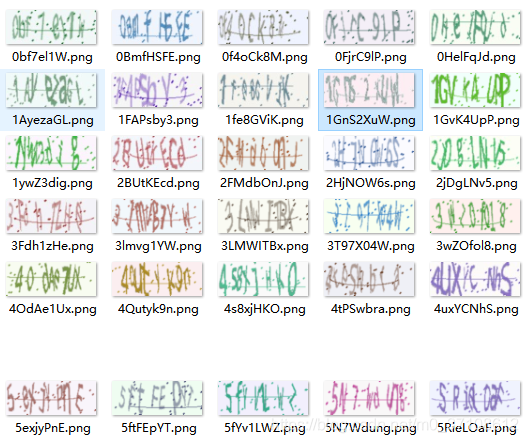
「?? 感謝大家」
如果你覺得這篇內(nèi)容對(duì)你挺有有幫助的話:
- 點(diǎn)贊支持下吧,讓更多的人也能看到這篇內(nèi)容(收藏不點(diǎn)贊,都是耍流氓 -_-)
- 歡迎在留言區(qū)與我分享你的想法,也歡迎你在留言區(qū)記錄你的思考過(guò)程。
- 覺得不錯(cuò)的話,也可以閱讀近期梳理的文章(感謝鼓勵(lì)與支持??????):
- 編程中的惰性思想
- 小程序云開發(fā)資源的管理
- 教你用python進(jìn)行數(shù)字化妝,可愛至極
- 加速Python列表和字典,讓你代碼更加高效
- Origin 2019b 圖文安裝教程及下載(附安裝包)
- python繪制彩虹圖
- python實(shí)現(xiàn)圖片中文字分割效果
- 教你用Python制作實(shí)現(xiàn)自定義字符大小的簡(jiǎn)易小說(shuō)閱讀器?
- 「查缺補(bǔ)漏」鞏固你對(duì)算法復(fù)雜度的理解
- 匯總了32個(gè)為開發(fā)者提供的免費(fèi)工具
- 教你通過(guò)python利用近鄰法實(shí)現(xiàn)圖片縮小后變成另一張圖(類似幻影坦克)
- 30 行代碼實(shí)現(xiàn)螞蟻森林自動(dòng)收能量
老鐵,三連支持一下,好嗎?↓↓↓

歡迎大家加入到知識(shí)星球這個(gè)大家庭,這里一定有與你志同道合的小伙伴,在這里大家可以一起交流,一起學(xué)習(xí),一同吹逼,一同玩耍。。。
長(zhǎng)按按鈕? “識(shí)別二維碼”?關(guān)注我更多精彩內(nèi)容等著你哦


點(diǎn)分享

點(diǎn)點(diǎn)贊

點(diǎn)在看
評(píng)論
圖片
表情