
柱狀圖基本用法
你好,我是郭震
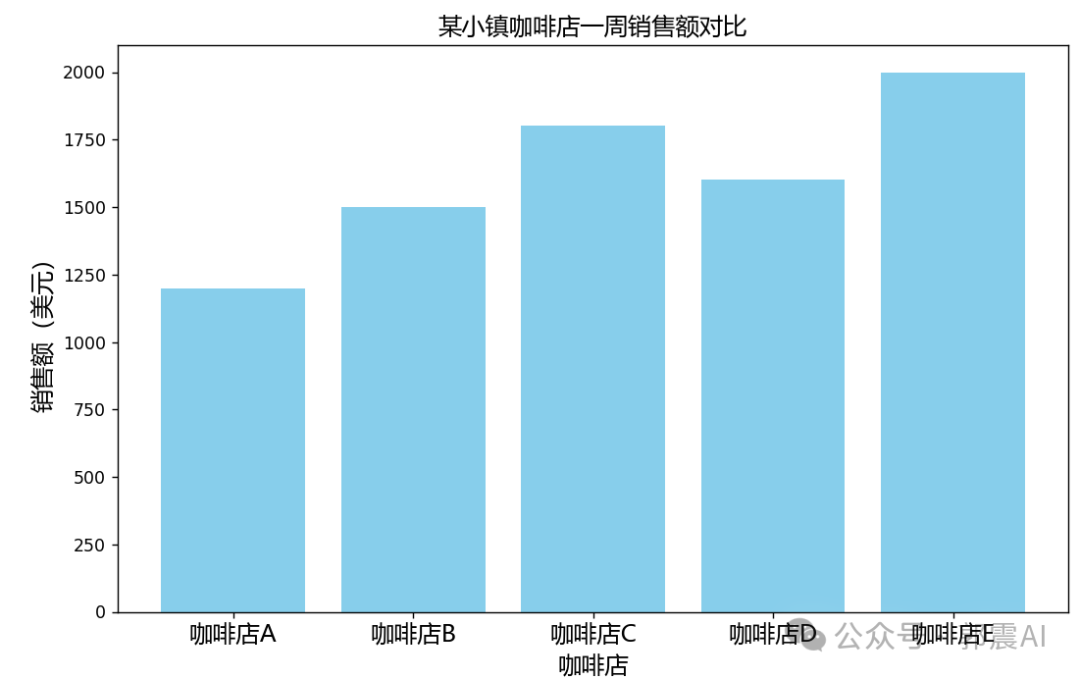
今天介紹:柱狀圖基本用法
附完整代碼:
      import matplotlib.pyplot as plt
from matplotlib.font_manager import FontProperties

# 指定中文字體,這里使用的是微軟雅黑,你可能需要根據(jù)你的系統(tǒng)調(diào)整字體名稱或路徑
font = FontProperties(fname="C:\Windows\Fonts\msyh.ttc", size=14)

# 咖啡店及其銷售額數(shù)據(jù)
coffee_shops = ['咖啡店A', '咖啡店B', '咖啡店C', '咖啡店D', '咖啡店E']
sales = [1200, 1500, 1800, 1600, 2000]

# 創(chuàng)建柱狀圖
plt.figure(figsize=(10, 6))  # 設(shè)置畫布大小
plt.bar(coffee_shops, sales, color='skyblue')  # 繪制柱狀圖

plt.xticks(ticks=range(len(coffee_shops)), labels=coffee_shops, fontproperties=font)

# 繪制X軸和Y軸標(biāo)簽
plt.xlabel('咖啡店',  fontproperties=font)  # X軸標(biāo)簽
plt.ylabel('銷售額(美元)',  fontproperties=font)  # Y軸標(biāo)簽

# 添加圖表標(biāo)題
# plt.title('某小鎮(zhèn)咖啡店一周銷售額對比',  fontproperties=font)  # 圖表標(biāo)題

# 顯示圖表
plt.show()
評論
圖片
表情