
Laravel 后端博客文章數(shù)據(jù)相關(guān) API 接口提供
在前兩篇教程中,我們已經(jīng)為博客單頁(yè)面應(yīng)用準(zhǔn)備好了前端路由和頁(yè)面組件,在這篇教程中,我們將通過(guò) Laravel 后端 API 接口提供文章數(shù)據(jù)來(lái)渲染前端頁(yè)面。
一、模型類(lèi)和數(shù)據(jù)庫(kù)遷移
開(kāi)始之前,先啟動(dòng) MySQL 數(shù)據(jù)庫(kù),創(chuàng)建本項(xiàng)目對(duì)應(yīng)的數(shù)據(jù)庫(kù) demo_spa,并在 .env 配置好數(shù)據(jù)庫(kù)連接信息:
DB_CONNECTION=mysql
DB_HOST=127.0.0.1
DB_PORT=3306
DB_DATABASE=demo_spa
DB_USERNAME=root
DB_PASSWORD=root
接下來(lái),我們使用 Laravel Artisan 命令為博客文章創(chuàng)建模型類(lèi)、數(shù)據(jù)庫(kù)遷移文件和控制器:
php artisan make:model Post -mc
創(chuàng)建完成后,編寫(xiě)剛剛生成的 posts 表對(duì)應(yīng)的數(shù)據(jù)庫(kù)遷移類(lèi)代碼如下:
<?php

use Illuminate\Database\Migrations\Migration;
use Illuminate\Database\Schema\Blueprint;
use Illuminate\Support\Facades\Schema;

class CreatePostsTable extends Migration
{
    /**
     * Run the migrations.
     *
     * @return void
     */
    public function up()
    {
        Schema::create('posts', function (Blueprint $table) {
            $table->id();
            $table->string('title');
            $table->string('summary');
            $table->text('content');
            $table->string('image_url');
            $table->smallInteger('category_id')->unsigned()->default(0)->index();
            $table->bigInteger('user_id')->unsigned()->default(0)->index();
            $table->timestamps();
        });
    }

    /**
     * Reverse the migrations.
     *
     * @return void
     */
    public function down()
    {
        Schema::dropIfExists('posts');
    }
}
在 posts 表中,定義了兩個(gè)邏輯外鍵 —— user_id 和 category_id,分別對(duì)應(yīng)用戶 ID 和分類(lèi) ID(用戶和文章、分類(lèi)和文章都是一對(duì)多關(guān)聯(lián)),由于后續(xù)進(jìn)行數(shù)據(jù)庫(kù)關(guān)聯(lián)查詢時(shí)不可避免地要使用這兩個(gè)外鍵字段,所以我們?yōu)槠湓O(shè)置了索引。
由于 Laravel 默認(rèn)已經(jīng)包含了用戶模型類(lèi)和數(shù)據(jù)表遷移文件,所以我們只需要再創(chuàng)建分類(lèi)模型類(lèi)和數(shù)據(jù)庫(kù)遷移文件即可:
php artisan make:model Category -m
編寫(xiě)分類(lèi)表對(duì)應(yīng)的數(shù)據(jù)庫(kù)遷移類(lèi)代碼如下:
<?php

use Illuminate\Database\Migrations\Migration;
use Illuminate\Database\Schema\Blueprint;
use Illuminate\Support\Facades\Schema;

class CreateCategoriesTable extends Migration
{
    /**
     * Run the migrations.
     *
     * @return void
     */
    public function up()
    {
        Schema::create('categories', function (Blueprint $table) {
            $table->smallIncrements('id');
            $table->string('name', 30)->unique();
            $table->timestamps();
        });
    }

    /**
     * Reverse the migrations.
     *
     * @return void
     */
    public function down()
    {
        Schema::dropIfExists('categories');
    }
}
只包含了分類(lèi) ID、分類(lèi)名稱(chēng)、創(chuàng)建和更新時(shí)間,非常簡(jiǎn)單,對(duì)于個(gè)人博客應(yīng)用而言,分類(lèi)數(shù)量一般不會(huì)過(guò)百,所以這里使用了 small integer 作為主鍵 ID 類(lèi)型降低空間占用,分類(lèi)名是唯一的,所以設(shè)置了唯一索引。
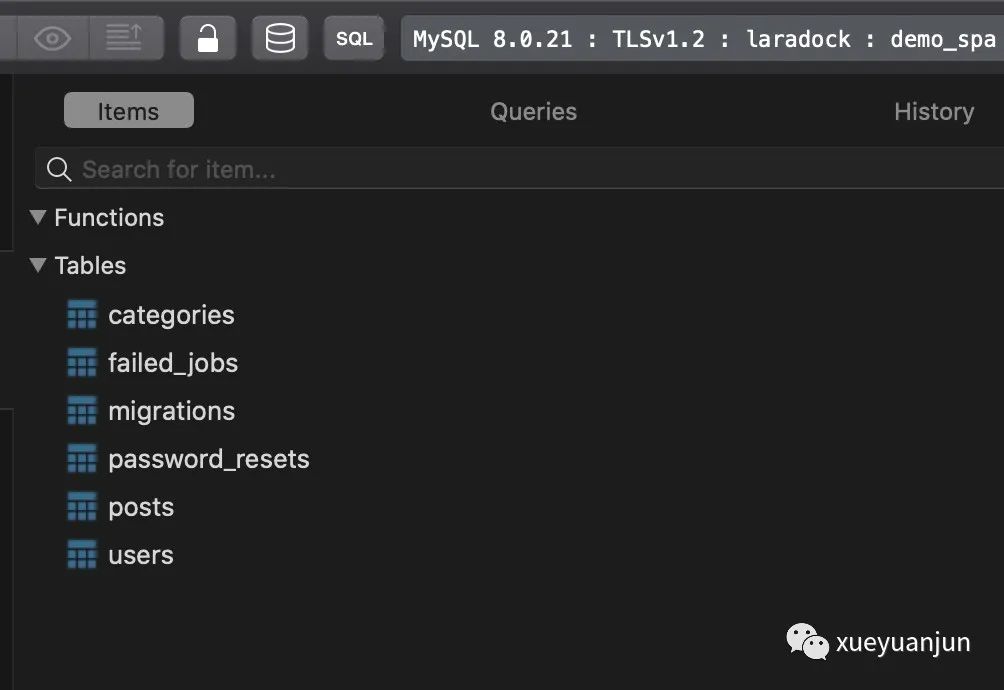
運(yùn)行 php artisan migrate 命令讓數(shù)據(jù)庫(kù)遷移生效,這樣,就可以在數(shù)據(jù)庫(kù)中看到對(duì)應(yīng)的數(shù)據(jù)表都已經(jīng)生成了:
二、關(guān)聯(lián)關(guān)系和 API 接口編寫(xiě)
接下來(lái),我們?cè)谖恼隆⒎诸?lèi)、用戶模型類(lèi)中定義它們之間的關(guān)聯(lián)關(guān)系。
首先是 Post 模型類(lèi),它與分類(lèi)和用戶模型之間是逆向一對(duì)多歸屬關(guān)聯(lián)關(guān)系:
<?php

namespace App\Models;

use Illuminate\Database\Eloquent\Factories\HasFactory;
use Illuminate\Database\Eloquent\Model;

class Post extends Model
{
    use HasFactory;

    protected $fillable = ['title', 'summary', 'content', 'image_url', 'category_id'];

    public function category()
    {
        return $this->belongsTo(Category::class);
    }

    public function author()
    {
        return $this->belongsTo(User::class, 'user_id');
    }
}
接著在 Category 模型類(lèi)中定義其與 Post 模型類(lèi)的一對(duì)多關(guān)聯(lián):
<?php

namespace App\Models;

use Illuminate\Database\Eloquent\Factories\HasFactory;
use Illuminate\Database\Eloquent\Model;

class Category extends Model
{
    use HasFactory;

    public function posts()
    {
        return $this->hasMany(Post::class);
    }
}
以及在 User 模型類(lèi)中定義它與 Post 模型類(lèi)的一對(duì)多關(guān)聯(lián):
public function posts()
{
    return $this->hasMany(Post::class);
}
定義好這些關(guān)聯(lián)關(guān)系后,就可以在 PostController 中編寫(xiě)返回博客首頁(yè)、分類(lèi)列表頁(yè)和文章詳情頁(yè)數(shù)據(jù)的接口方法了:
<?php

namespace App\Http\Controllers;

use App\Models\Category;
use App\Models\Post;

class PostController extends Controller
{
    // 博客首頁(yè)
    public function index()
    {
        return Post::with(['author:id,name,email', 'category'])
            ->select(['id', 'title', 'summary', 'image_url', 'category_id', 'user_id', 'created_at'])
            ->orderByDesc('id')->paginate();
    }

    // 分類(lèi)頁(yè)面
    public function category($name)
    {
        $category = Category::whereName($name)->firstOrFail();
        $posts = Post::with(['author:id,name,email'])
            ->where('category_id', $category->id)
            ->orderByDesc('id')
            ->paginate(10);
        return $posts;
    }

    // 文章詳情頁(yè)
    public function show(Post $post)
    {
        return $post->load(['author:id,name,email', 'category']);
    }
}
非常簡(jiǎn)單,其中使用了渴求式加載獲取關(guān)聯(lián)模型數(shù)據(jù)和分頁(yè)方法獲取分頁(yè)器實(shí)例(列表頁(yè)數(shù)據(jù)需要分頁(yè)獲取)。
這樣一來(lái),就初步完成了后端文章接口的編寫(xiě)工作,當(dāng)然,還需要在 routes/api.php 中注冊(cè)相應(yīng)的 API 路由才能被外部訪問(wèn):
use App\Http\Controllers\PostController;
Route::get('/posts', [PostController::class, 'index']);
Route::get('/posts/category/{name}', [PostController::class, 'category']);
// 使用隱式路由模型綁定獲取文章詳情
Route::get('/posts/{post}', [PostController::class, 'show']);
三、通過(guò)模型工廠填充測(cè)試數(shù)據(jù)
為了測(cè)試上述博客文章 API 接口是否可以正常訪問(wèn),我們來(lái)編寫(xiě)模型工廠和數(shù)據(jù)庫(kù)填充器填充測(cè)試數(shù)據(jù)。
Laravel 默認(rèn)已經(jīng)提供了用戶類(lèi)對(duì)應(yīng)的模型工廠,我們只需要編寫(xiě)分類(lèi)模型和文章模型對(duì)應(yīng)的模型工廠即可。
首先是 Category 模型工廠,使用如下 Artisan 命令創(chuàng)建對(duì)應(yīng)的模型工廠類(lèi):
php artisan make:factory CategoryFactory
然后編寫(xiě) CategoryFactory 類(lèi)代碼如下:
<?php

namespace Database\Factories;

use App\Models\Category;
use Illuminate\Database\Eloquent\Factories\Factory;

class CategoryFactory extends Factory
{
    /**
     * The name of the factory's corresponding model.
     *
     * @var string
     */
    protected $model = Category::class;

    /**
     * Define the model's default state.
     *
     * @return array
     */
    public function definition()
    {
        return [
            'name' => $this->faker->unique()->word
        ];
    }
}
分類(lèi)名是唯一的,所以獲取「?jìng)卧斓摹狗诸?lèi)名之前調(diào)用了
unique函數(shù)。
使用同樣的步驟創(chuàng)建 Post 模型工廠類(lèi):
php artisan make:factory PostFactory
編寫(xiě)對(duì)應(yīng)的模型工廠代碼如下:
<?php

namespace Database\Factories;

use App\Models\Category;
use App\Models\Post;
use App\Models\User;
use Illuminate\Database\Eloquent\Factories\Factory;

class PostFactory extends Factory
{
    /**
     * The name of the factory's corresponding model.
     *
     * @var string
     */
    protected $model = Post::class;

    /**
     * Define the model's default state.
     *
     * @return array
     */
    public function definition()
    {
        return [
            'title' => rtrim($this->faker->sentence, '.'),
            'summary' => $this->faker->text,
            'content' => $this->faker->paragraphs(3, true),
            'user_id' => User::factory(),
            'category_id' => Category::factory(),
            'image_url' => $this->faker->imageUrl()
        ];
    }
}
文章表字段較多,所以更復(fù)雜一些,具體的偽造字段生成邏輯可以通過(guò)結(jié)合官方文檔和查看對(duì)應(yīng)字段源碼了解,關(guān)聯(lián)字段可以直接通過(guò)調(diào)用關(guān)聯(lián)模型的工廠方法生成對(duì)應(yīng)的模型后再返回主鍵 ID 作為對(duì)應(yīng)的字段值。
最后,我們還需要編寫(xiě)一個(gè)數(shù)據(jù)庫(kù)填充器,組合上述模型工廠生成測(cè)試數(shù)據(jù):
php artisan make:seeder BlogSeeder
編寫(xiě)這個(gè)填充器類(lèi) BlogSeeder 的實(shí)現(xiàn)代碼如下:
<?php

namespace Database\Seeders;

use App\Models\Category;
use App\Models\Post;
use App\Models\User;
use Illuminate\Database\Seeder;

class BlogSeeder extends Seeder
{
    /**
     * Run the database seeds.
     *
     * @return void
     */
    public function run()
    {
        // 開(kāi)始之前先清空相關(guān)數(shù)據(jù)表
        User::truncate();
        Category::truncate();
        Post::truncate();

        // 創(chuàng)建一個(gè)測(cè)試用戶
        $user = User::factory([
            'name' => '測(cè)試賬號(hào)',
            'email' => '[email protected]',
        ])->create();

        // 創(chuàng)建三個(gè)測(cè)試分類(lèi)
        $cnames = ['PHP', 'Golang', 'Javascript'];
        foreach ($cnames as $cname) {
            $category = Category::factory(['name' => $cname])->create();
            // 為每個(gè)分類(lèi)創(chuàng)建 100 篇文章
            Post::factory([
                    'category_id' => $category->id,
                    'user_id' => $user->id
                ])
                ->count(100)
                ->create();
        }
    }
}
具體含義在注釋里解釋地很清楚了,運(yùn)行下面這個(gè) Artisan 命令通過(guò)偽造數(shù)據(jù)填充相關(guān)數(shù)據(jù)表:
php artisan db:seed --class=BlogSeeder
四、訪問(wèn)博客文章 API 接口
你可以去 demo_spa 數(shù)據(jù)庫(kù)驗(yàn)證對(duì)應(yīng)的數(shù)據(jù)表是否已經(jīng)成功填充數(shù)據(jù),然后在瀏覽器中訪問(wèn)博客文章 API 接口驗(yàn)證這些接口是否可以正常工作并返回正確的接口數(shù)據(jù):
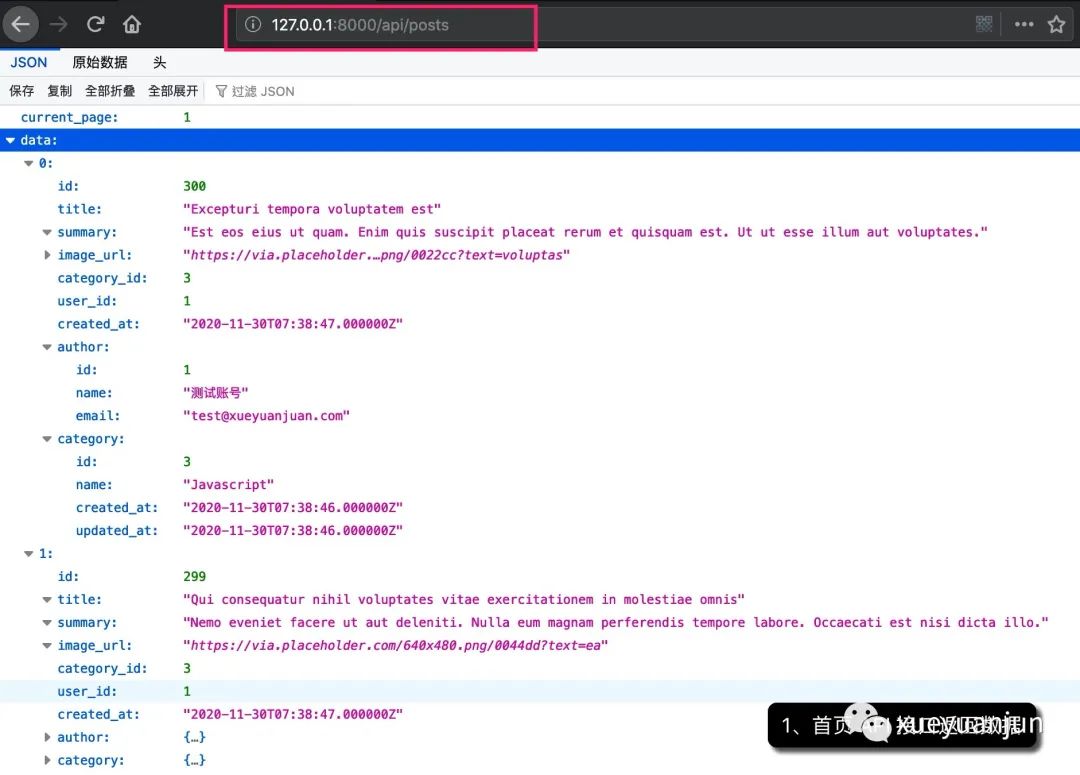
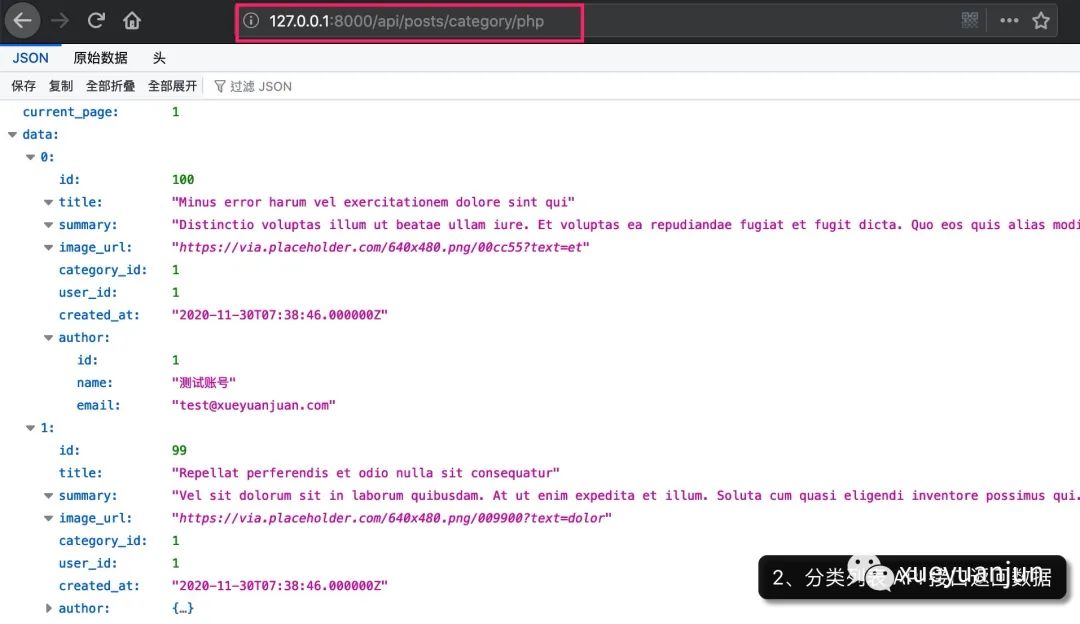
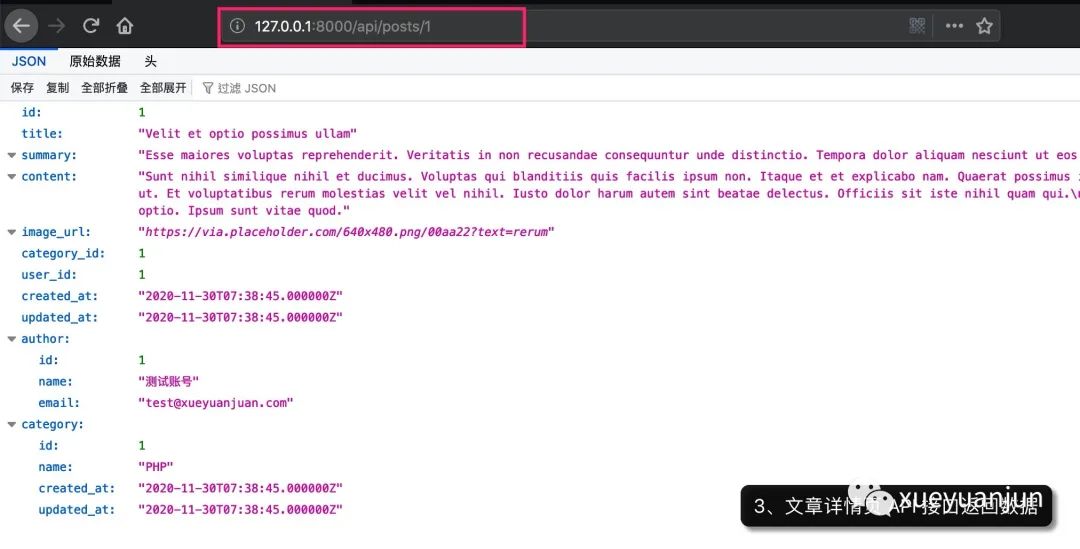
可以看到接口都可以正常工作并返回正確的數(shù)據(jù)。
不過(guò)還有一點(diǎn)問(wèn)題,就是不同的接口返回的數(shù)據(jù)格式不統(tǒng)一,列表頁(yè)分頁(yè)器返回的數(shù)據(jù)包裝在 data 字段里,而詳情頁(yè)直接則返回所有接口數(shù)據(jù),這會(huì)給前端接口調(diào)用者造成困擾。
另外,有些接口字段值返回給調(diào)用方之后,需要進(jìn)行二次處理,比如時(shí)間、用戶頭像、文章詳情等,我們可以在后端進(jìn)行一致性處理后返回給前端,讓他們拿到之后可以直接用,降低客戶端處理成本和不同端處理風(fēng)格不統(tǒng)一的問(wèn)題。
五、引入 API 資源類(lèi)處理接口數(shù)據(jù)格式
以上問(wèn)題可以通過(guò) Laravel 提供的 API 資源類(lèi)解決。
我們通過(guò)如下 Artisan 命令為接口返回的所有資源(模型類(lèi))創(chuàng)建對(duì)應(yīng)的 API 資源類(lèi):
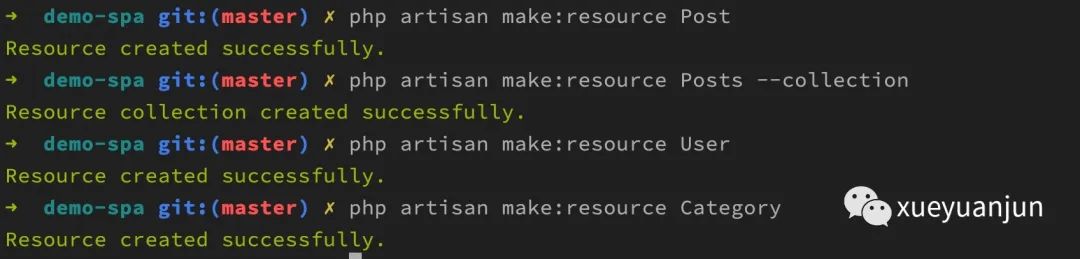
其中文章資源還需要處理文章列表,所以創(chuàng)建了對(duì)應(yīng)的 API 資源集合類(lèi)。
用戶和分類(lèi)資源都是嵌套在文章資源里的,所以我們化繁為簡(jiǎn),逐個(gè)拆解,先編寫(xiě)用戶資源類(lèi):
<?php

namespace App\Http\Resources;

use Illuminate\Http\Resources\Json\JsonResource;

class User extends JsonResource
{
    /**
     * Transform the resource into an array.
     *
     * @param  \Illuminate\Http\Request  $request
     * @return array
     */
    public function toArray($request)
    {
        return [
            'id' => $this->id,
            'name' => $this->name,
            'email' => $this->email,
            'avatar_url' => 'https://i.pravatar.cc/150?u=' . $this->email
        ];
    }
}
在這里,我們僅處理并返回用戶 ID、用戶名、郵箱和頭像鏈接字段(使用 pravatar.cc 網(wǎng)站提供的頭像生成服務(wù)為用戶生成唯一頭像)。
再編寫(xiě)分類(lèi)資源類(lèi)代碼:
<?php

namespace App\Http\Resources;

use Illuminate\Http\Resources\Json\JsonResource;

class Category extends JsonResource
{
    /**
     * Transform the resource into an array.
     *
     * @param  \Illuminate\Http\Request  $request
     * @return array
     */
    public function toArray($request)
    {
        return [
            'id' => $this->id,
            'name' => $this->name
        ];
    }
}
我們僅返回了分類(lèi) ID 和分類(lèi)名稱(chēng),時(shí)間相關(guān)的字段舍棄掉,反正也沒(méi)有用到。
最后,再來(lái)編寫(xiě)文章資源類(lèi)處理代碼:
<?php

namespace App\Http\Resources;

use GrahamCampbell\Markdown\Facades\Markdown;
use Illuminate\Http\Resources\Json\JsonResource;

class Post extends JsonResource
{
    /**
     * Transform the resource into an array.
     *
     * @param  \Illuminate\Http\Request  $request
     * @return array
     */
    public function toArray($request)
    {
        return [
            'id' => $this->id,
            'title' => $this->title,
            'summary' => $this->summary,
            'content' => empty($this->content) ? '' : Markdown::convertToHtml($this->content),
            'image_url' => $this->image_url,
            'author' => User::make($this->author),
            'category' => Category::make($this->category),
            'created_at' => $this->created_at->diffForHumans()
        ];
    }
}
這里我們對(duì)文章詳情字段值做了 Markdown 解析(如果有的話,這里使用了 Laravel-Markdown 擴(kuò)展包提供的門(mén)面方法),對(duì)文章創(chuàng)建時(shí)間進(jìn)行了轉(zhuǎn)化,對(duì)于嵌套的關(guān)聯(lián)模型,則基于對(duì)應(yīng)的模型資源類(lèi)來(lái)處理這些模型實(shí)例即可。
此外,還要編寫(xiě)文章資源集合類(lèi),很簡(jiǎn)單,只需要通過(guò) $collects 屬性指定集合中每個(gè)元素對(duì)應(yīng)的資源處理類(lèi)即可,這里顯然是 Post 資源類(lèi):
<?php

namespace App\Http\Resources;

use Illuminate\Http\Resources\Json\ResourceCollection;

class Posts extends ResourceCollection
{
    public $collects = Post::class;

    /**
     * Transform the resource collection into an array.
     *
     * @param  \Illuminate\Http\Request  $request
     * @return array
     */
    public function toArray($request)
    {
        return parent::toArray($request);
    }
}
編寫(xiě)好所有的 API 資源類(lèi)處理代碼之后,在 PostController 中使用相應(yīng)的資源類(lèi)來(lái)包裝之前返回的接口數(shù)據(jù)即可,Laravel 會(huì)自動(dòng)按照資源類(lèi)中定義的處理方法對(duì)接口數(shù)據(jù)進(jìn)行統(tǒng)一處理(這可以算作是 PHP 不支持注解的情況下實(shí)現(xiàn)的裝飾器模式,如果通過(guò)注解實(shí)現(xiàn)的話,更加簡(jiǎn)潔優(yōu)雅):
<?php

namespace App\Http\Controllers;

use App\Models\Category;
use App\Models\Post;
use App\Http\Resources\Post as PostResource;
use App\Http\Resources\Posts as PostCollection;

class PostController extends Controller
{
    // 博客首頁(yè)
    public function index()
    {
        return new PostCollection(
            Post::with(['author:id,name,email', 'category'])
            ->select(['id', 'title', 'summary', 'image_url', 'category_id', 'user_id', 'created_at'])
            ->orderByDesc('id')
            ->simplePaginate(10)
        );
    }

    // 分類(lèi)頁(yè)面
    public function category($name)
    {
        $category = Category::whereName($name)->firstOrFail();
        return new PostCollection(
            Post::with(['author:id,name,email'])
            ->select(['id', 'title', 'summary', 'image_url', 'category_id', 'user_id', 'created_at'])
            ->where('category_id', $category->id)
            ->orderByDesc('id')
            ->simplePaginate(10)
        );
    }

    // 文章詳情頁(yè)
    public function show(Post $post)
    {
        return new PostResource(
            $post->load(['author:id,name,email', 'category'])
        );
    }
}
六、再次訪問(wèn)博客文章 API 接口
好了,再次訪問(wèn)博客應(yīng)用所有文章相關(guān) API 接口,現(xiàn)在所有文章數(shù)據(jù)都統(tǒng)一被封裝到 data 字段中,并且客戶端不需要再做其他處理,根據(jù)返回的接口數(shù)據(jù)就可以滿足前端的渲染需求:
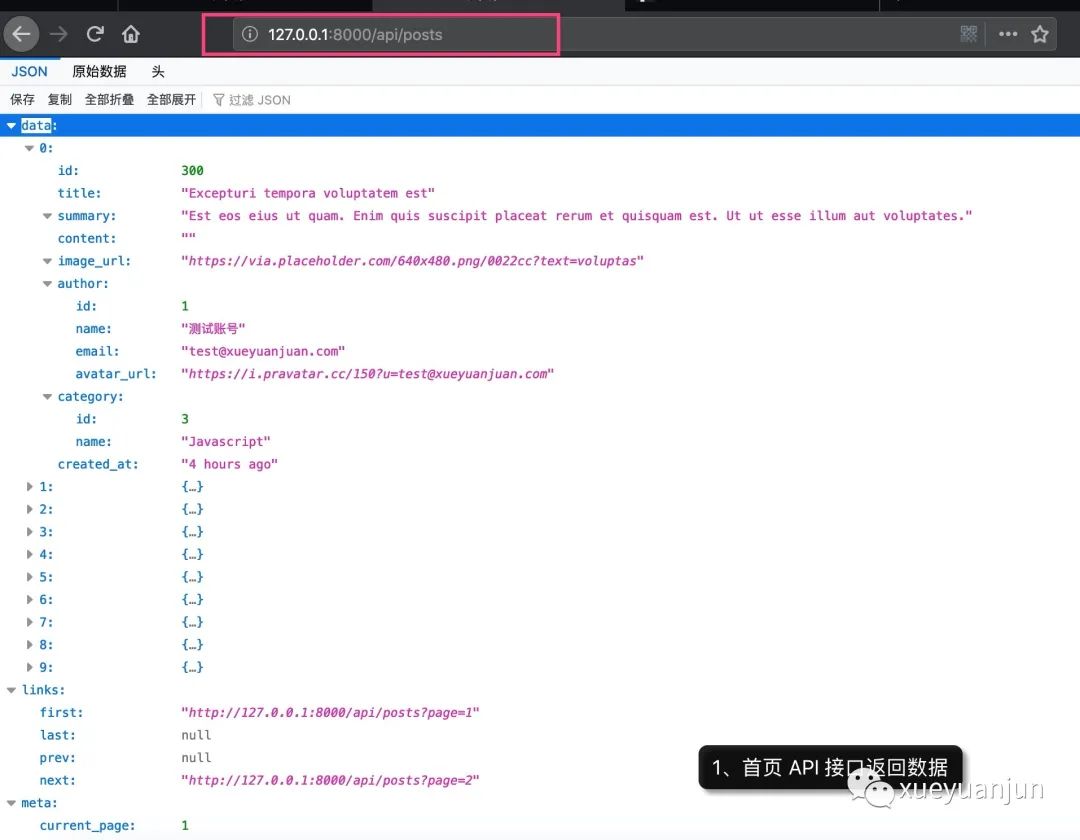
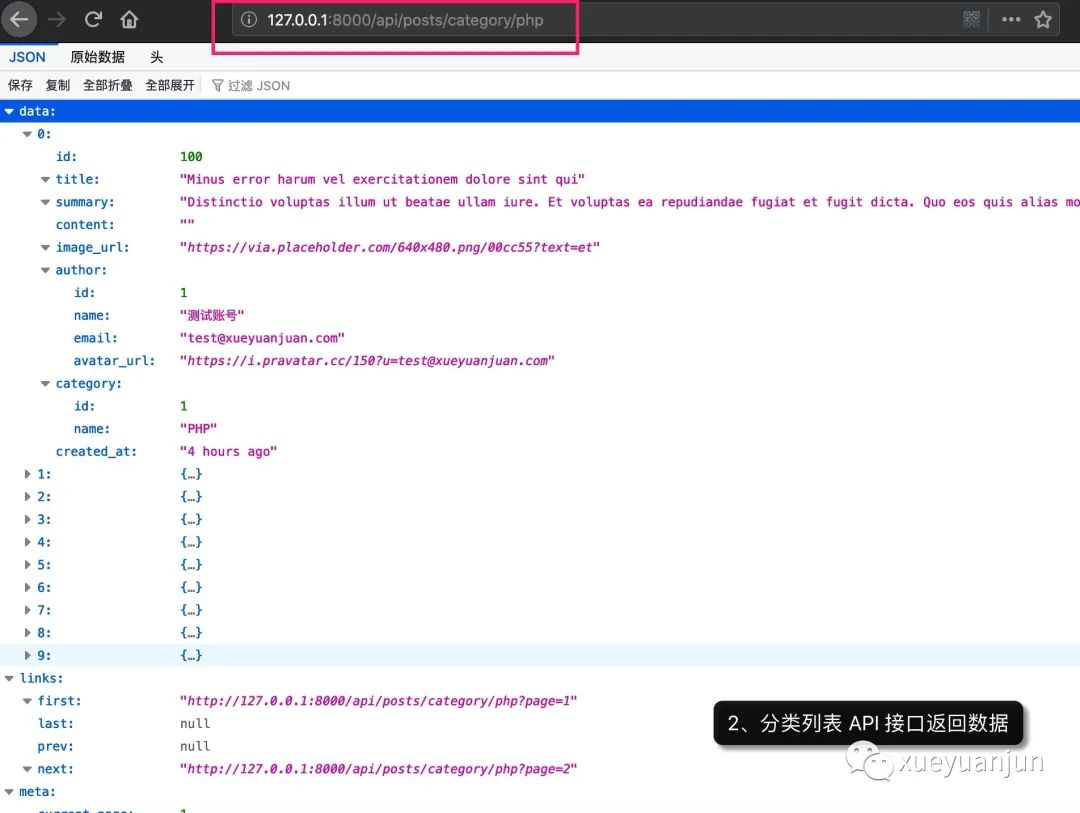
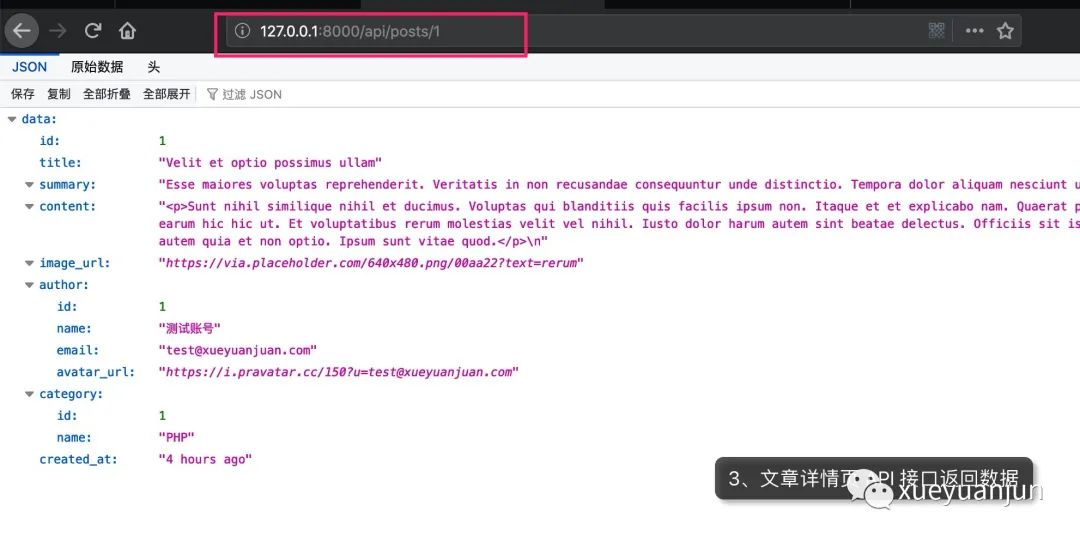
下篇教程,我們將在前端 Vue 組件中根據(jù)這些文章 API 接口返回?cái)?shù)據(jù)來(lái)渲染博客應(yīng)用前端頁(yè)面。
所有源碼可以通過(guò) Github 代碼倉(cāng)庫(kù)中獲取:https://github.com/nonfu/demo-spa.git。
本系列教程首發(fā)在Laravel學(xué)院(laravelacademy.org),你可以點(diǎn)擊頁(yè)面左下角閱讀原文鏈接查看最新更新的教程。