
【CSS】987- 十幾個(gè) CSS 高級(jí)技巧匯總

https://blog.csdn.net/weixin_41556756/article/details/114196921
「列舉一下效果」
設(shè)置input的placeholder的字體樣式 單行和多行文本超出省略號(hào) 負(fù)邊距使用技巧 定位同時(shí)設(shè)置方位情況 相鄰兄弟選擇器之常用場(chǎng)景 outline屬性的妙用技巧 隱藏滾動(dòng)條或更改滾動(dòng)條樣式 純CSS繪制三角形 虛線框繪制技巧 卡券效果制作 隱藏文本的常用兩種方法 表格邊框合并
「1-1. 設(shè)置input 的placeholder的字體樣式」
設(shè)置input占位符的樣式
input::-webkit-input-placeholder {    /* Chrome/Opera/Safari */
    color: red;
}
input::-moz-placeholder { /* Firefox 19+ */
    color: red;
}
input:-ms-input-placeholder { /* IE 10+ */
    color: red;
}
input:-moz-placeholder { /* Firefox 18- */
    color: red;
}

<input type="text" placeholder="請(qǐng)?jiān)O(shè)置用戶名">
設(shè)置input聚焦時(shí)的樣式
input:focus {
  background-color: red;
}
取消input的邊框
border: none;
outline: none;
<!DOCTYPE html>
<html lang="en">
<head>
  <meta charset="UTF-8">
  <title>CSS高級(jí)常見技巧匯總</title>
  <style type="text/css">
    input::-webkit-input-placeholder {    /* Chrome/Opera/Safari */
      color: red;
    }
    input::-moz-placeholder { /* Firefox 19+ */
      color: red;
    }
    input:-ms-input-placeholder { /* IE 10+ */
      color: red;
    }
    input:-moz-placeholder { /* Firefox 18- */
      color: red;
    }
    input:focus {
      background-color: red;
    }
    input{
      border: none;
      outline: none;
    }
</style>
</head>
<body>
<input type="text" placeholder="請(qǐng)?jiān)O(shè)置用戶名">
</body>
</html>
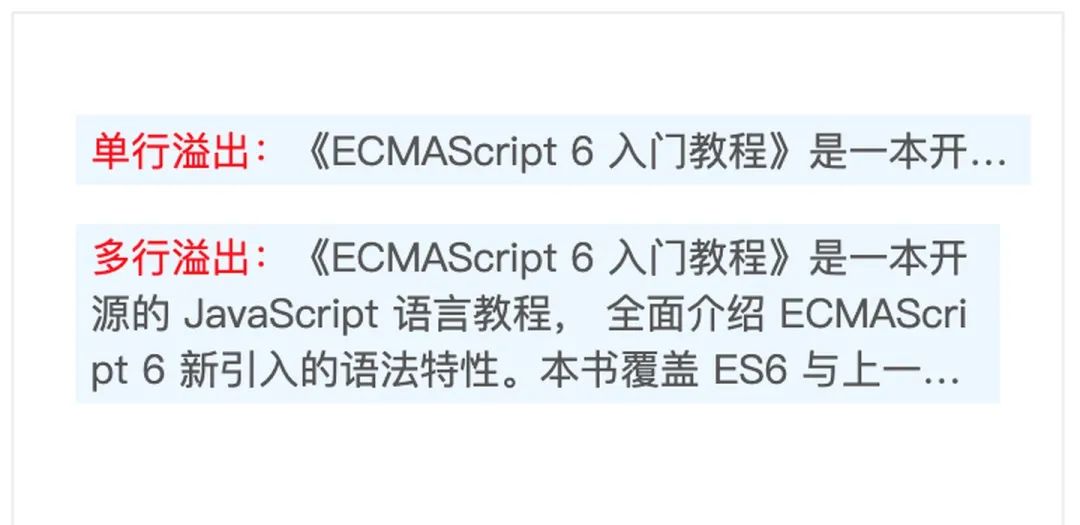
「1-2. 單行和多行文本超出省略號(hào)」
// 單行文本出現(xiàn)省略號(hào)
width: 300px;
overflow: hidden;
text-overflow: ellipsis;
white-space: nowrap;
word-break: break-all;

// 多行文本出現(xiàn)省略號(hào)
display: -webkit-box; /*重點(diǎn),不能用block等其他,將對(duì)象作為彈性伸縮盒子模型顯示*/
-webkit-box-orient: vertical; /*從上到下垂直排列子元素(設(shè)置伸縮盒子的子元素排列方式)*/
-webkit-line-clamp: 3; /*行數(shù),超出三行隱藏且多余的用省略號(hào)表示...*/
line-clamp: 3;
word-break: break-all;
overflow: hidden;
max-width: 100%;
<div class="container">
  <p class="single">
    <span class="c-red">單行溢出:</span>《ECMAScript 6 入門教程》是一本開源的 JavaScript 語言教程,
    全面介紹 ECMAScript 6 新引入的語法特性。
  </p>
  <p class="mutiple">
    <span class="c-red">多行溢出:</span>《ECMAScript 6 入門教程》是一本開源的 JavaScript 語言教程,
    全面介紹 ECMAScript 6 新引入的語法特性。本書覆蓋 ES6 與上一個(gè)版本 ES5 的所有不同之處,
    對(duì)涉及的語法知識(shí)給予詳細(xì)介紹,并給出大量簡(jiǎn)潔易懂的示例代碼。
  </p>
</div>
/*容器*/
    .container {
      width: 300px;
      height: 200px;
      margin: 100px;
      padding: 20px;
      border: 1px solid #eee;
      font-size: 13px;
      color: #555;
    }

    .c-red {
      color: red;
    }

    p {
      background-color: rgba(189, 227, 255, 0.28);
      padding: 2px 5px;
    }

    /*單行*/
    .single {
      width: 300px;
      overflow: hidden;
      text-overflow: ellipsis;
      white-space: nowrap;
      word-break: break-all;
    }

    /*多行*/
    .mutiple {
      display: -webkit-box; /*重點(diǎn),不能用block等其他,將對(duì)象作為彈性伸縮盒子模型顯示*/
      -webkit-box-orient: vertical; /*從上到下垂直排列子元素(設(shè)置伸縮盒子的子元素排列方式)*/
      -webkit-line-clamp: 3; /*行數(shù),超出三行隱藏且多余的用省略號(hào)表示...*/
      line-clamp: 3;
      word-break: break-all;
      overflow: hidden;
      max-width: 100%;
    }
「1-3. 負(fù)邊距使用技巧」
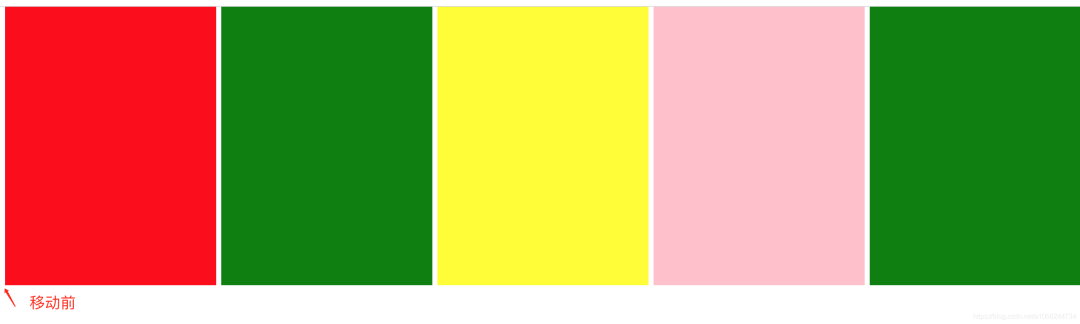
?規(guī)律: 左為負(fù)時(shí),是左移,右為負(fù)時(shí),是左拉。上下與左右類似
?
*{
    margin:0;
    padding:0;
}
.wrap{
    /* 利用負(fù)值技巧進(jìn)行整體移動(dòng) */
    margin-left:-6px;
}
.item{
    float:left;
    width: 20%;
    height: 300px;
    border-left:6px solid #fff;
    box-sizing: border-box;
}
<div class="wrap">
    <div class="item" style="background-color: red;"></div>
    <div class="item" style="background-color: green;"></div>
    <div class="item" style="background-color: yellow;"></div>
    <div class="item" style="background-color: pink;"></div>
    <div class="item" style="background-color: green;"></div>
</div>
「1-4. 定位同時(shí)設(shè)置方位情況」
?規(guī)律: 絕對(duì)定位和固定定位時(shí),同時(shí)設(shè)置 left 和 right 等同于隱式地設(shè)置寬度
?
span{
  border:1px solid red;
  position: absolute;
  left:0;
  right:0;

   /* 等同于設(shè)置  width:100%;display:block */
}
<span>1</span>
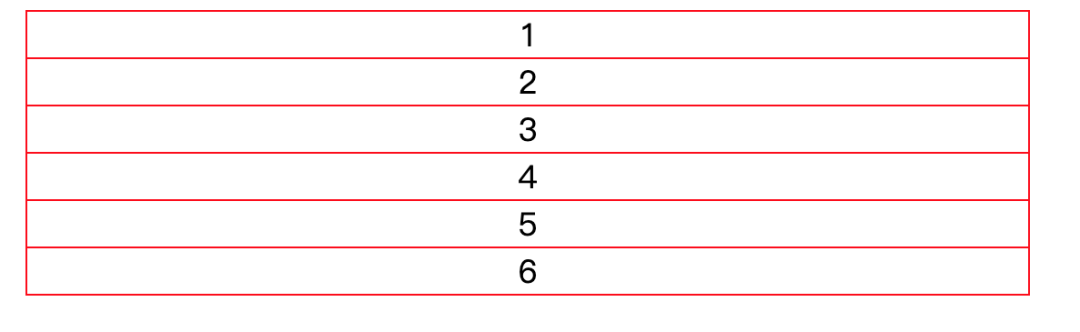
「1-5. 相鄰兄弟選擇器之常用場(chǎng)景」
ul{
  width: 500px;
   margin:auto;
   list-style: none;
   padding:0;
   border:1px solid red;
   text-align: center;
 }
 li+li{
   border-top:1px solid red;
 }
<ul>
 <li>1</li>
  <li>2</li>
  <li>3</li>
  <li>4</li>
  <li>5</li>
  <li>6</li>
</ul>
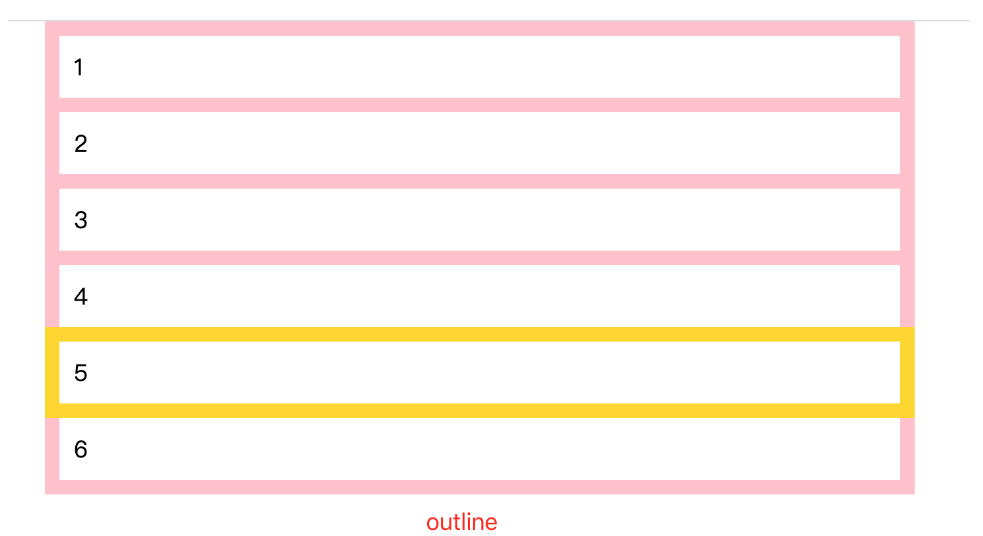
「1-6. outline屬性的妙用技巧」
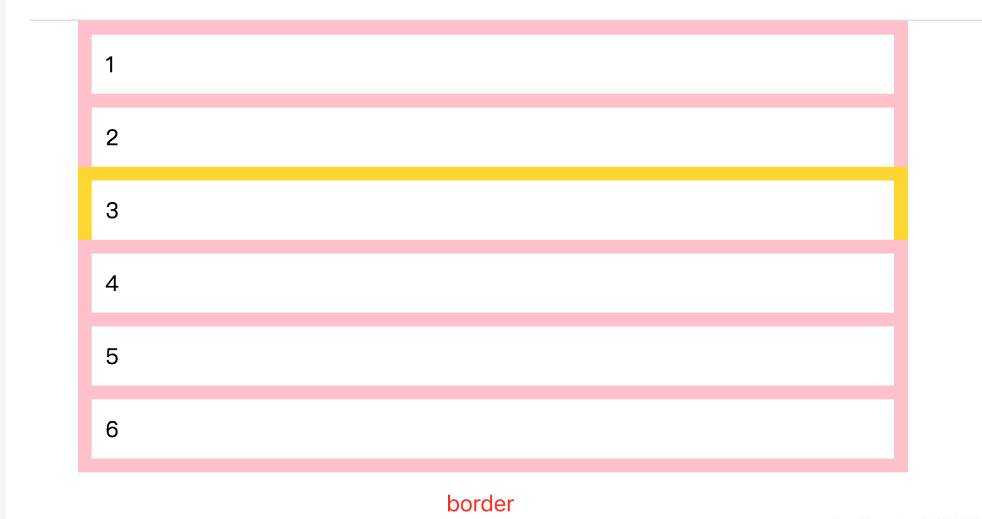
?區(qū)別: outline不計(jì)算大小 border計(jì)算大小
?
* {
    padding: 0;
    margin: 0;
  }

  ul {
    list-style: none;
    width: 600px;
    margin: auto;
  }

  li {
    padding: 10px;
    border: 10px solid pink;
    outline-offset: -10px;
  }
  li+li{
    margin-top:-10px;
  }
  li:hover{
    /* border:10px solid gold; */
    outline:10px solid gold;
  }
<ul>
    <li>1</li>
    <li>2</li>
    <li>3</li>
    <li>4</li>
    <li>5</li>
    <li>6</li>
</ul>
「1-7. 隱藏滾動(dòng)條或更改滾動(dòng)條樣式」
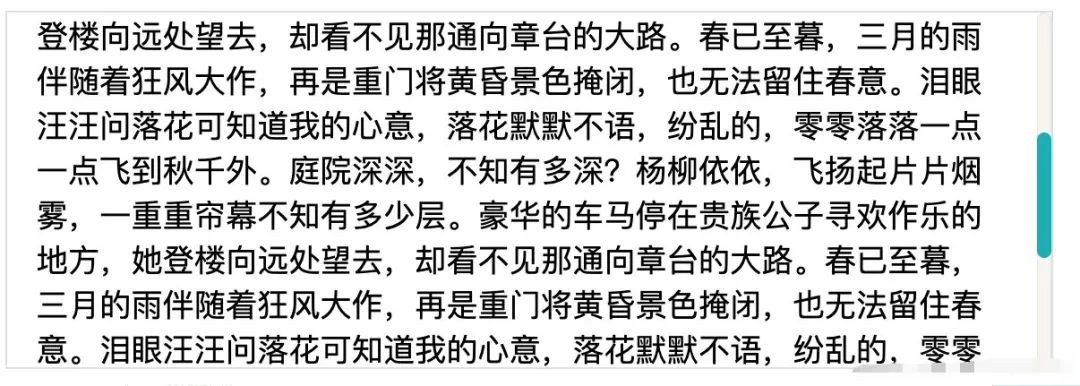
.scroll-container {
   width: 500px;
   height: 150px;
   border: 1px solid #ddd;
   padding: 15px;
   overflow: auto;     /*必須*/
 }

 .scroll-container::-webkit-scrollbar {
   width: 8px;
   background: white;
 }

 .scroll-container::-webkit-scrollbar-corner,
   /* 滾動(dòng)條角落 */
 .scroll-container::-webkit-scrollbar-thumb,
 .scroll-container::-webkit-scrollbar-track {      /*滾動(dòng)條的軌道*/
   border-radius: 4px;
 }

 .scroll-container::-webkit-scrollbar-corner,
 .scroll-container::-webkit-scrollbar-track {
   /* 滾動(dòng)條軌道 */
   background-color: rgba(180, 160, 120, 0.1);
   box-shadow: inset 0 0 1px rgba(180, 160, 120, 0.5);
 }

 .scroll-container::-webkit-scrollbar-thumb {
   /* 滾動(dòng)條手柄 */
   background-color: #00adb5;
 }
<p class="scroll-container">
        庭院深深,不知有多深?楊柳依依,飛揚(yáng)起片片煙霧,一重重簾幕不知有多少層。豪華的車馬停在貴族公子尋歡作樂的地方,她登樓向遠(yuǎn)處望去,卻看不見那通向章臺(tái)的大路。春已至暮,三月的雨伴隨著狂風(fēng)大作,再是重門將黃昏景色掩閉,也無法留住春意。淚眼汪汪問落花可知道我的心意,落花默默不語,紛亂的,零零落落一點(diǎn)一點(diǎn)飛到秋千外。庭院深深,不知有多深?楊柳依依,飛揚(yáng)起片片煙霧,一重重簾幕不知有多少層。豪華的車馬停在貴族公子尋歡作樂的地方,她登樓向遠(yuǎn)處望去,卻看不見那通向章臺(tái)的大路。春已至暮,三月的雨伴隨著狂風(fēng)大作,再是重門將黃昏景色掩閉,也無法留住春意。淚眼汪汪問落花可知道我的心意,落花默默不語,紛亂的,零零落落一點(diǎn)一點(diǎn)飛到秋千外。庭院深深,不知有多深?楊柳依依,飛揚(yáng)起片片煙霧,一重重簾幕不知有多少層。豪華的車馬停在貴族公子尋歡作樂的地方,她登樓向遠(yuǎn)處望去,卻看不見那通向章臺(tái)的大路。春已至暮,三月的雨伴隨著狂風(fēng)大作,再是重門將黃昏景色掩閉,也無法留住春意。淚眼汪汪問落花可知道我的心意,落花默默不語,紛亂的,零零落落一點(diǎn)一點(diǎn)飛到秋千外。庭院深深,不知有多深?楊柳依依,飛揚(yáng)起片片煙霧,一重重簾幕不知有多少層。豪華的車馬停在貴族公子尋歡作樂的地方,她登樓向遠(yuǎn)處望去,卻看不見那通向章臺(tái)的大路。春已至暮,三月的雨伴隨著狂風(fēng)大作,再是重門將黃昏景色掩閉,也無法留住春意。淚眼汪汪問落花可知道我的心意,落花默默不語,紛亂的,零零落落一點(diǎn)一點(diǎn)飛到秋千外。
</p>
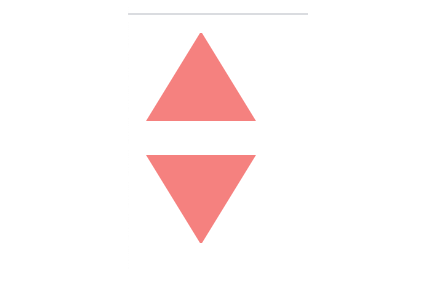
「1-8. 純CSS繪制三角形」
/* 正三角 */
.up-triangle {
   width: 0;
   height: 0;
   border-style: solid;
   border-width: 0 25px 40px 25px;
   border-color: transparent transparent rgb(245, 129, 127) transparent;
 }

 /* 倒三角 */
 .down-triangle {
   width: 0;
   height: 0;
   border-style: solid;
   border-width: 40px 25px 0 25px;
   border-color:  rgb(245, 129, 127) transparent transparent transparent;
 }
 div:last-child {
   margin-top: 1rem;
 }
「1-9. 虛線框繪制技巧」
.dotted-line {
  width: 800px;
  margin: auto;
  padding: 20px;
  border: 1px dashed transparent;
  background: linear-gradient(white, white) padding-box, repeating-linear-gradient(-45deg, red 0, #ccc .25em, white 0, white .75em);
}
<p class="dotted-line">庭院深深,不知有多深?楊柳依依,飛揚(yáng)起片片煙霧,一重重簾幕不知有多少層

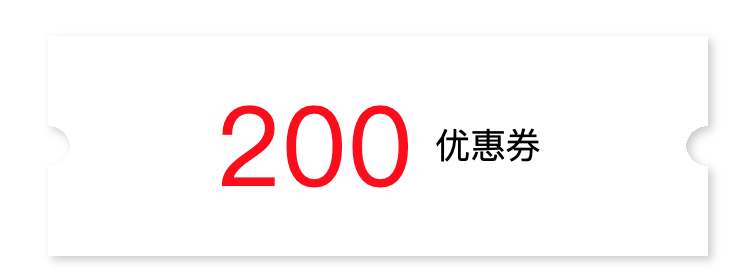
「1-10. 卡券效果制作」
.coupon {
 width: 300px;
  height: 100px;
  line-height: 100px;
  margin: 50px auto;
  text-align: center;
  position: relative;
  background: radial-gradient(circle at right bottom, transparent 10px, #ffffff 0) top right /50% 51px no-repeat,
  radial-gradient(circle at left bottom, transparent 10px, #ffffff 0) top left / 50% 51px no-repeat,
  radial-gradient(circle at right top, transparent 10px, #ffffff 0) bottom right / 50% 51px no-repeat,
  radial-gradient(circle at left top, transparent 10px, #ffffff 0) bottom left / 50% 51px no-repeat;
  filter: drop-shadow(2px 2px 2px rgba(0, 0, 0, .2));
}
.coupon span {
  display: inline-block;
  vertical-align: middle;
  margin-right: 10px;
  color: red;
  font-size: 50px;
  font-weight: 400;
}
<p class="coupon">
 <span>200</span>優(yōu)惠券
</p>
「1-11. 隱藏文本的常用兩種方法」
?text-indent: -9999px; 或者 font-size: 0;
?
.logo {
 width: 190px;
  height: 80px;
  float: left;
  margin-top: 8px
}

.logo h1 {
  position: relative
}

.logo h1 .logo-bd {
  display: block;
  margin-left: 22px;
  padding-top: 58px;
  width: 142px;
  overflow: hidden;
  background: url(http://img.alicdn.com/tfs/TB1_uT8a5ERMeJjSspiXXbZLFXa-143-59.png) 0 0 no-repeat;
  text-indent: -9999px;
}
<h1>
  <a href="#" role="img" class="logo-bd clearfix">淘寶網(wǎng)</a>
</h1>
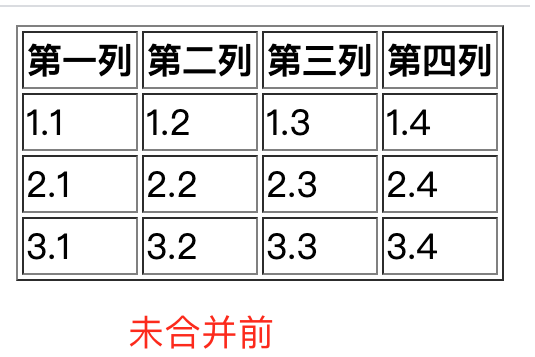
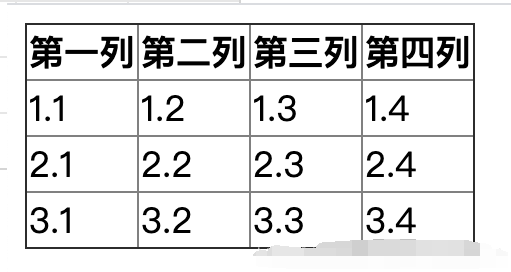
「1-12. 表格邊框合并」
table{
  border-collapse: collapse;
}
<table border="1">
    <thead>
    <tr>
      <th>第一列</th>
      <th>第二列</th>
      <th>第三列</th>
      <th>第四列</th>
    </tr>
    </thead>
    <tbody>
    <tr>
      <td>1.1</td>
      <td>1.2</td>
      <td>1.3</td>
      <td>1.4</td>
    </tr>
    <tr>
      <td>2.1</td>
      <td>2.2</td>
      <td>2.3</td>
      <td>2.4</td>
    </tr>
    <tr>
      <td>3.1</td>
      <td>3.2</td>
      <td>3.3</td>
      <td>3.4</td>
    </tr>
    </tbody>
  </table>
合并后

回復(fù)“加群”與大佬們一起交流學(xué)習(xí)~
點(diǎn)擊“閱讀原文”查看 120+ 篇原創(chuàng)文章
評(píng)論
圖片
表情