
5個常見的JavaScript內(nèi)存錯誤
作者:前端小智
簡介:掘金、思否百萬閱讀,勵志退休后,回家擺地攤的人。
來源:SegmentFault 思否社區(qū)
JavaScript 不提供任何內(nèi)存管理操作。相反,內(nèi)存由 JavaScript VM 通過內(nèi)存回收過程管理,該過程稱為垃圾收集。
既然我們不能強制的垃圾回收,那我們怎么知道它能正常工作?我們對它又了解多少呢?
腳本執(zhí)行在此過程中暫停 它為不可訪問的資源釋放內(nèi)存 它是不確定的 它不會一次檢查整個內(nèi)存,而是在多個周期中運行 它是不可預(yù)測的,但它會在必要時執(zhí)行
什么是內(nèi)存泄漏?
1.計時器的監(jiān)聽
import React, { useRef } from 'react';

const Timer = ({ cicles, onFinish }) => {
    const currentCicles = useRef(0);

    setInterval(() => {
        if (currentCicles.current >= cicles) {
            onFinish();
            return;
        }
        currentCicles.current++;
    }, 500);

    return (
        <div>Loading ...</div>
    );
}

export default Timer;
import React, { useState } from 'react';
import styles from '../styles/Home.module.css'
import Timer from '../components/Timer';

export default function Home() {
    const [showTimer, setShowTimer] = useState();
    const onFinish = () => setShowTimer(false);

    return (
      <div className={styles.container}>
          {showTimer ? (
              <Timer cicles={10} onFinish={onFinish} />
          ): (
              <button onClick={() => setShowTimer(true)}>
                Retry
              </button>
          )}
      </div>
    )
}
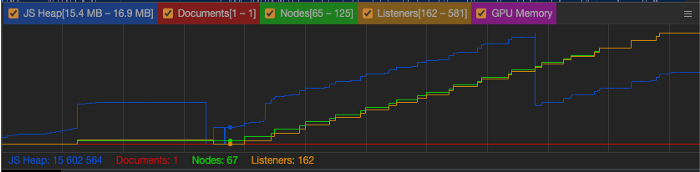
useEffect(() => {
    const intervalId = setInterval(() => {
        if (currentCicles.current >= cicles) {
            onFinish();
            return;
        }
        currentCicles.current++;
    }, 500);

    return () => clearInterval(intervalId);
}, [])
import { useEffect } from 'react';

export const useTimeout = (refreshCycle = 100, callback) => {
    useEffect(() => {
        if (refreshCycle <= 0) {
            setTimeout(callback, 0);
            return;
        }

        const intervalId = setInterval(() => {
            callback();
        }, refreshCycle);

        return () => clearInterval(intervalId);
    }, [refreshCycle, setInterval, clearInterval]);
};

export default useTimeout;
const handleTimeout = () => ...;

useTimeout(100, handleTimeout);
2.事件監(jiān)聽
function homeShortcuts({ key}) {
    if (key === 'E') {
        console.log('edit widget')
    }
}

// 用戶在主頁上登陸,我們執(zhí)行
document.addEventListener('keyup', homeShortcuts);


// 用戶做一些事情,然后導(dǎo)航到設(shè)置

function settingsShortcuts({ key}) {
    if (key === 'E') {
        console.log('edit setting')
    }
}

// 用戶在主頁上登陸,我們執(zhí)行
document.addEventListener('keyup', settingsShortcuts);
document.removeEventListener(‘keyup’, homeShortcuts);
function homeShortcuts({ key}) {
    if (key === 'E') {
        console.log('edit widget')
    }
}

// user lands on home and we execute
document.addEventListener('keyup', homeShortcuts);


// user does some stuff and navigates to settings

function settingsShortcuts({ key}) {
    if (key === 'E') {
        console.log('edit setting')
    }
}

// user lands on home and we execute
document.removeEventListener('keyup', homeShortcuts);
document.addEventListener('keyup', settingsShortcuts);
3.Observers
const ref = ...
const visible = (visible) => {
  console.log(`It is ${visible}`);
}

useEffect(() => {
    if (!ref) {
        return;
    }

    observer.current = new IntersectionObserver(
        (entries) => {
            if (!entries[0].isIntersecting) {
                visible(true);
            } else {
                visbile(false);
            }
        },
        { rootMargin: `-${header.height}px` },
    );

    observer.current.observe(ref);
}, [ref]);
const ref = ...
const visible = (visible) => {
  console.log(`It is ${visible}`);
}

useEffect(() => {
    if (!ref) {
        return;
    }

    observer.current = new IntersectionObserver(
        (entries) => {
            if (!entries[0].isIntersecting) {
                visible(true);
            } else {
                visbile(false);
            }
        },
        { rootMargin: `-${header.height}px` },
    );

    observer.current.observe(ref);

    return () => observer.current?.disconnect();
}, [ref]);
4. Window Object
function addElement(element) {
    if (!this.stack) {
        this.stack = {
            elements: []
        }
    }

    this.stack.elements.push(element);
}
var a = 'example 1'; // 作用域限定在創(chuàng)建var的地方
b = 'example 2'; // 添加到Window對象中
"use strict"
對于 addElement 函數(shù),當(dāng)從全局作用域調(diào)用時,this 是未定義的
如果沒有在一個變量上指定const | let | var,你會得到以下錯誤:
Uncaught ReferenceError: b is not defined
5. 持有DOM引用
const elements = [];
const list = document.getElementById('list');

function addElement() {
    // clean nodes
    list.innerHTML = '';

    const divElement= document.createElement('div');
    const element = document.createTextNode(`adding element ${elements.length}`);
    divElement.appendChild(element);


    list.appendChild(divElement);
    elements.push(divElement);
}

document.getElementById('addElement').onclick = addElement;

總結(jié)

評論
圖片
表情