
Asp.Net Core認(rèn)證-Jwt-基礎(chǔ)篇

一、添加依賴
創(chuàng)建 Core 對應(yīng) WebApplication ,選擇項(xiàng)目類型為 Web Api ,需要引入 Nuget 包 ,Microsoft.AspNetCore.Authentication.JwtBearer 。

二、添加認(rèn)證服務(wù)
在 ConfigureServices 中添加 AddAuthentication 函數(shù),配置如下:
?public void ConfigureServices(IServiceCollection services)
?{
? ? ?services.AddControllers();
? ? ?//設(shè)置secret
? ? ?byte[] secret = System.Text.Encoding.UTF8.GetBytes("1234567890123456");
? ? ?//添加認(rèn)證服務(wù)
? ? ?services.AddAuthentication(config => {
? ? ? ? ?//設(shè)置默認(rèn)架構(gòu)
? ? ? ? ?config.DefaultScheme = JwtBearerDefaults.AuthenticationScheme;
? ?  })
? ? ?
? ? ?//添加Jwt自定義配置
? ?  .AddJwtBearer(config => {
? ? ? ? ?//設(shè)置Token驗(yàn)證參數(shù)項(xiàng)
? ? ? ? ?config.TokenValidationParameters = new TokenValidationParameters
? ? ? ?  {
? ? ? ? ? ? ?//認(rèn)證秘鑰
? ? ? ? ? ? ?IssuerSigningKey = new SymmetricSecurityKey(secret),
? ? ? ? ? ? ?//是否調(diào)用對 securityToken 簽名的
? ? ? ? ? ? ?//Microsoft.IdentityModel.Tokens.SecurityKey 的驗(yàn)證
? ? ? ? ? ? ?ValidateIssuerSigningKey = true,
?
? ? ? ? ? ? ?//頒發(fā)者
? ? ? ? ? ? ?ValidIssuer = "ggcy",
? ? ? ? ? ? ?//是否驗(yàn)證頒發(fā)者
? ? ? ? ? ? ?ValidateIssuer = true,
?
? ? ? ? ? ? ?//受眾
? ? ? ? ? ? ?ValidAudience = "Audience",
? ? ? ? ? ? ?//是否驗(yàn)證受眾
? ? ? ? ? ? ?ValidateAudience = true,
?
? ? ? ? ? ? ?//是否驗(yàn)證憑證有效時(shí)限
? ? ? ? ? ? ?ValidateLifetime = true,
? ? ? ? ? ? ?ClockSkew = TimeSpan.FromMinutes(5)
? ? ? ?  };
? ?  });
?}
上述代碼中 TokenValidationParameters 中的認(rèn)證秘鑰 IssuerSigningKey 、頒發(fā)者 ValidIssuer 、受眾 ValidAudience ?中,認(rèn)證秘鑰作為必須驗(yàn)證項(xiàng),后者兩項(xiàng),理論上也需要進(jìn)行校驗(yàn),提高數(shù)據(jù)到安全性,需要設(shè)置對應(yīng)配置為啟用狀態(tài)。
AddAuthentication 對應(yīng)源碼結(jié)構(gòu)如下:
?public static class AuthenticationServiceCollectionExtensions
?{
? ? ?public static AuthenticationBuilder AddAuthentication(this IServiceCollection services)
? ?  {
? ? ? ? ?//
? ?  }
?
? ? ?public static AuthenticationBuilder AddAuthentication(this IServiceCollection services, Action<AuthenticationOptions> configureOptions)
? ?  {
? ? ? ? ?//
? ?  }
?
? ? ?public static AuthenticationBuilder AddAuthentication(this IServiceCollection services, string defaultScheme)
? ?  {
? ? ? ? ?//
? ?  }
?}
三、啟用認(rèn)證中間件
服務(wù)中,在介于路由中間件 UseRouting 與節(jié)點(diǎn)中間件 UseEndpoints 之間添加認(rèn)證中間件 UseAuthentication,結(jié)構(gòu)如下:
?public void Configure(IApplicationBuilder app, IWebHostEnvironment env)
?{
? ? ?//忽略
? ? ?
? ? ?app.UseRouting();
?
? ? ?//啟用認(rèn)證管道中間件
? ? ?app.UseAuthentication();
?
? ? ?app.UseAuthorization();
?
? ? ?app.UseEndpoints(endpoints =>
? ?  {
? ? ? ? ?//
? ?  });
?}
四、添加認(rèn)證接口
創(chuàng)建簡單的獲取憑證的 Api,創(chuàng)建一個控制器 TokenController,添加內(nèi)容如下:
?[ApiController]
?[Route("[controller]")]
?public class TokenController : ControllerBase
?{
? ?  [HttpGet]
? ? ?public object Get()
? ?  {
? ? ? ? ?//秘鑰
? ? ? ? ?byte[] secret = System.Text.Encoding.UTF8.GetBytes("1234567890123456");
? ? ? ? ?//生成秘鑰
? ? ? ? ?var key = new SymmetricSecurityKey(secret);
? ? ? ? ?//生成數(shù)字簽名的簽名密鑰、簽名密鑰標(biāo)識符和安全算法
? ? ? ? ?var credential = new SigningCredentials(key, SecurityAlgorithms.HmacSha256);
? ? ? ? ?//構(gòu)建JwtSecurityToken類實(shí)例
? ? ? ? ?var token = new JwtSecurityToken(
? ? ? ? ? ? ?//添加頒發(fā)者
? ? ? ? ? ? ?issuer: "ggcy",
? ? ? ? ? ? ?//添加受眾
? ? ? ? ? ? ?audience: "Audience",
? ? ? ? ? ? ?//添加其他聲明
? ? ? ? ? ? ?new List<Claim> {
? ? ? ? ? ? ? ? ?new Claim(ClaimTypes.Name,"zhangsan"),
? ? ? ? ? ? ? ? ?new Claim(ClaimTypes.Role,"admin")
? ? ? ? ? ?  },
? ? ? ? ? ? ?expires: DateTime.UtcNow.AddMinutes(5)
? ? ? ? ? ?  ,signingCredentials:credential);
? ? ? ? ?//簽發(fā)token
? ? ? ? ?return Ok(new
? ? ? ?  {
? ? ? ? ? ? ?access_token = new JwtSecurityTokenHandler().WriteToken(token)
? ? ? ?  });
? ?  }
?}
其中 JwtSecurityToken 函數(shù)的參數(shù) issuer 、 audience ?服務(wù)配置時(shí)的對應(yīng)內(nèi)容 ValidIssuer、 ValidIssuer 保持一致。
五、測試效果
運(yùn)行項(xiàng)目,使用 Postman 請求鏈接 http://localhost:5000/token,獲取結(jié)果如下:
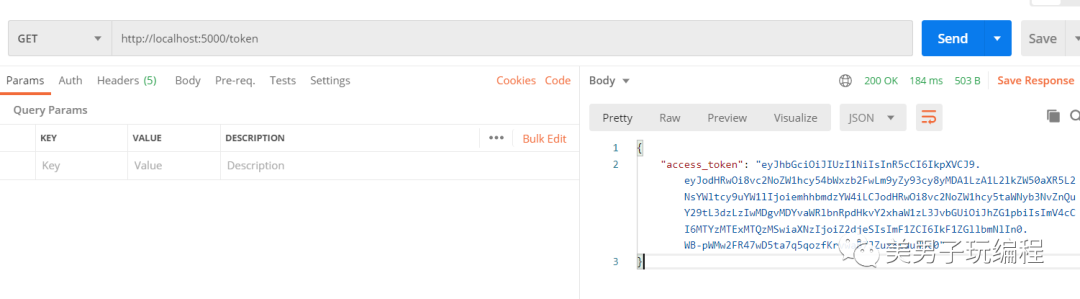
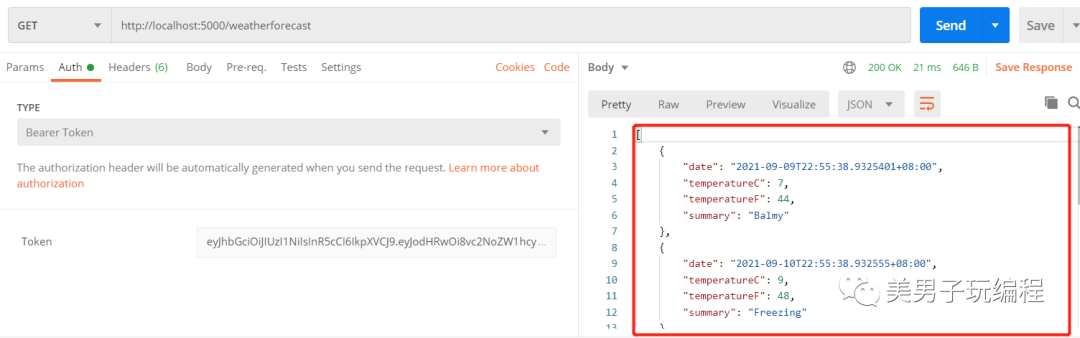
將獲取到的 access_token 本地保留,請求獲取 http://localhost:5000/weatherforecast ,鏈接數(shù)據(jù)時(shí),在Auth頁簽中,選擇添加類型為 Bearer Token 類型的認(rèn)證方式,填入對應(yīng) access_token ,內(nèi)容如下:

1、請求結(jié)果
1)成功
請求成功時(shí),能夠獲取到對應(yīng)的 api 請求結(jié)果,返回如下結(jié)果:
2)錯誤
當(dāng)帶有的 token 無效或者驗(yàn)證不通過時(shí),響應(yīng)結(jié)果常常是 401Unauthorized,具體反饋錯誤內(nèi)容,從實(shí)際請求響應(yīng)結(jié)果中進(jìn)行查看。具體常見內(nèi)容如下:
token 過期
?HTTP/1.1 401 Unauthorized
?Date: Wed, 08 Sep 2021 15:16:10 GMT
?Server: Kestrel
?Content-Length: 0
?WWW-Authenticate: Bearer error="invalid_token", error_description="The token expired at '09/08/2021 15:06:28'"
token 不合法
?HTTP/1.1 401 Unauthorized
?Date: Wed, 08 Sep 2021 14:59:02 GMT
?Server: Kestrel
?Content-Length: 0
?WWW-Authenticate: Bearer error="invalid_token", error_description="The signature is invalid" ?issuer或 aduenice 內(nèi)容與服務(wù)配置不匹配
?HTTP/1.1 401 Unauthorized
?Date: Wed, 08 Sep 2021 15:02:30 GMT
?Server: Kestrel
?Content-Length: 0
?WWW-Authenticate: Bearer error="invalid_token", error_description="The issuer 'xxx' is invalid"?HTTP/1.1 401 Unauthorized
?Date: Wed, 08 Sep 2021 15:04:28 GMT
?Server: Kestrel
?Content-Length: 0
?WWW-Authenticate: Bearer error="invalid_token", error_description="The audience 'xxx' is invalid"以上為 Asp.Net Core 使用 Jwt 基本操作和常見細(xì)節(jié)問題。
六、參考鏈接
[1] Asp.Net Core 5 REST API 使用 JWT 身份驗(yàn)證 - Step by Step
https://www.cnblogs.com/ittranslator/p/asp-net-core-5-rest-api-authentication-with-jwt-step-by-step.html
 往期推薦
往期推薦