
Android仿淘寶搜索歷史界面功能
一 關(guān)于自定義viewGroup
二 關(guān)于MeasureSpec
三 關(guān)于流式布局Measure流程
LayoutParams childLP = childView.getLayoutParams();int childWidthMesureSpec =getChildMeasureSpec(widthMeasureSpec,paddingLeft+paddingRight,childLP.width);int childHeightMesureSpec =getChildMeasureSpec(heightMeasureSpec,paddingBottom+paddingTop,childLP.height);childView.measure(childWidthMesureSpec,childHeightMesureSpec);
if (childMesuredWidth + lineWidthUsed +mHorizontalSpacing > selfWidth){allLines.add(lineViews);lineHeights.add(lineHeight);//一旦換行,可以判斷當(dāng)前所需的寬高了parentNeededWidth = Math.max(parentNeededWidth,lineWidthUsed+mHorizontalSpacing);parentNeededHeight = parentNeededHeight + lineHeight +mVerticalSpacing;lineViews =new ArrayList<>();lineWidthUsed =0;lineHeight =0;}
int widthMode = MeasureSpec.getMode(widthMeasureSpec);int heightMode = MeasureSpec.getMode(heightMeasureSpec);int realWidth = (widthMode == MeasureSpec.EXACTLY)? selfWidth:parentNeededWidth;int realHeight = (heightMode == MeasureSpec.EXACTLY)?selfHeight:parentNeededHeight;setMeasuredDimension(realWidth,realHeight);
四 關(guān)于layout流程
int lineCount =allLines.size();int curL =0;int curT =0;for (int i =0;iList lineViews =allLines.get(i);int lineHeight =lineHeights.get(i);for (int j =0;jView view = lineViews.get(j);int left = curL;int top = curT;int bottom = top + view.getMeasuredHeight();int right = left + view.getMeasuredWidth();view.layout(left,top,right,bottom);curL = right +mHorizontalSpacing;}curL =0;curT = curT + lineHeight +mVerticalSpacing;
public class FlowLayoutextends ViewGroup {private int mHorizontalSpacing =dp2px(16); //每個item橫向間距private int mVerticalSpacing =dp2px(8); //每個item橫向間距private List>allLines ; // 記錄所有的行,一行一行的存儲private ListlineHeights =new ArrayList<>(); // 記錄每一行的行高boolean isMeasuredOver =false;public FlowLayout(Context context) {super(context);}public FlowLayout(Context context, AttributeSet attrs) {super(context, attrs);}public FlowLayout(Context context, AttributeSet attrs, int defStyleAttr) {super(context, attrs, defStyleAttr);}@Overrideprotected void onMeasure(int widthMeasureSpec, int heightMeasureSpec) {initMeasureParams();int childCount = getChildCount();int paddingLeft = getPaddingLeft();int paddingRight = getPaddingRight();int paddingTop = getPaddingTop();int paddingBottom = getPaddingBottom();int selfWidth = MeasureSpec.getSize(widthMeasureSpec); //ViewGroup解析的寬度int selfHeight = MeasureSpec.getSize(heightMeasureSpec); // ViewGroup解析的高度List lineViews =new ArrayList<>(); //保存一行中的所有的viewint lineWidthUsed =0; //記錄這行已經(jīng)使用了多寬的sizeint lineHeight =0; // 一行的行高int parentNeededWidth =0; // measure過程中,子View要求的父ViewGroup的寬int parentNeededHeight =0; // measure過程中,子View要求的父ViewGroup的高for (int i =0;iView childView = getChildAt(i);LayoutParams childLP = childView.getLayoutParams();int childWidthMesureSpec =getChildMeasureSpec(widthMeasureSpec,paddingLeft+paddingRight,childLP.width);int childHeightMesureSpec =getChildMeasureSpec(heightMeasureSpec,paddingBottom+paddingTop,childLP.height);childView.measure(childWidthMesureSpec,childHeightMesureSpec);//獲取子view的寬高int childMesuredWidth = childView.getMeasuredWidth();int childMesuredHeight = childView.getMeasuredHeight();//通過寬度來判斷是否需要換行,通過換行后的每行的行高來獲取整個viewGroup的行高//如果寬度不夠,則需換行if (childMesuredWidth + lineWidthUsed +mHorizontalSpacing > selfWidth){allLines.add(lineViews);lineHeights.add(lineHeight);//一旦換行,可以判斷當(dāng)前所需的寬高了parentNeededWidth = Math.max(parentNeededWidth,lineWidthUsed+mHorizontalSpacing);parentNeededHeight = parentNeededHeight + lineHeight +mVerticalSpacing;lineViews =new ArrayList<>();lineWidthUsed =0;lineHeight =0;}// view 是分行l(wèi)ayout的,所以要記錄每一行有哪些view,這樣可以方便layout布局lineViews.add(childView);lineWidthUsed = lineWidthUsed + childMesuredWidth +mHorizontalSpacing;lineHeight = Math.max(lineHeight,childMesuredHeight);//childview 最后一行if (i == childCount -1){lineHeights.add(lineHeight);allLines.add(lineViews);parentNeededWidth = Math.max(parentNeededWidth,lineWidthUsed );parentNeededHeight += lineHeight;}//根據(jù)子View的度量結(jié)果,來重新度量自己ViewGroup// 作為一個ViewGroup,它自己也是一個View,它的大小也需要根據(jù)它的父親給它提供的寬高來度量int widthMode = MeasureSpec.getMode(widthMeasureSpec);int heightMode = MeasureSpec.getMode(heightMeasureSpec);int realWidth = (widthMode == MeasureSpec.EXACTLY)? selfWidth:parentNeededWidth;int realHeight = (heightMode == MeasureSpec.EXACTLY)?selfHeight:parentNeededHeight;setMeasuredDimension(realWidth,realHeight);isMeasuredOver =true;}}private void initMeasureParams() {allLines =new ArrayList<>();lineHeights =new ArrayList<>();}@Overrideprotected void onLayout(boolean changed, int l, int t, int r, int b) {int lineCount =allLines.size();int curL =0;int curT =0;for (int i =0;iList lineViews =allLines.get(i);int lineHeight =lineHeights.get(i);for (int j =0;jView view = lineViews.get(j);int left = curL;int top = curT;int bottom = top + view.getMeasuredHeight();int right = left + view.getMeasuredWidth();view.layout(left,top,right,bottom);curL = right +mHorizontalSpacing;}curL =0;curT = curT + lineHeight +mVerticalSpacing;}}public static int dp2px(int dp) {return (int) TypedValue.applyDimension(TypedValue.COMPLEX_UNIT_DIP, dp, Resources.getSystem().getDisplayMetrics());}}
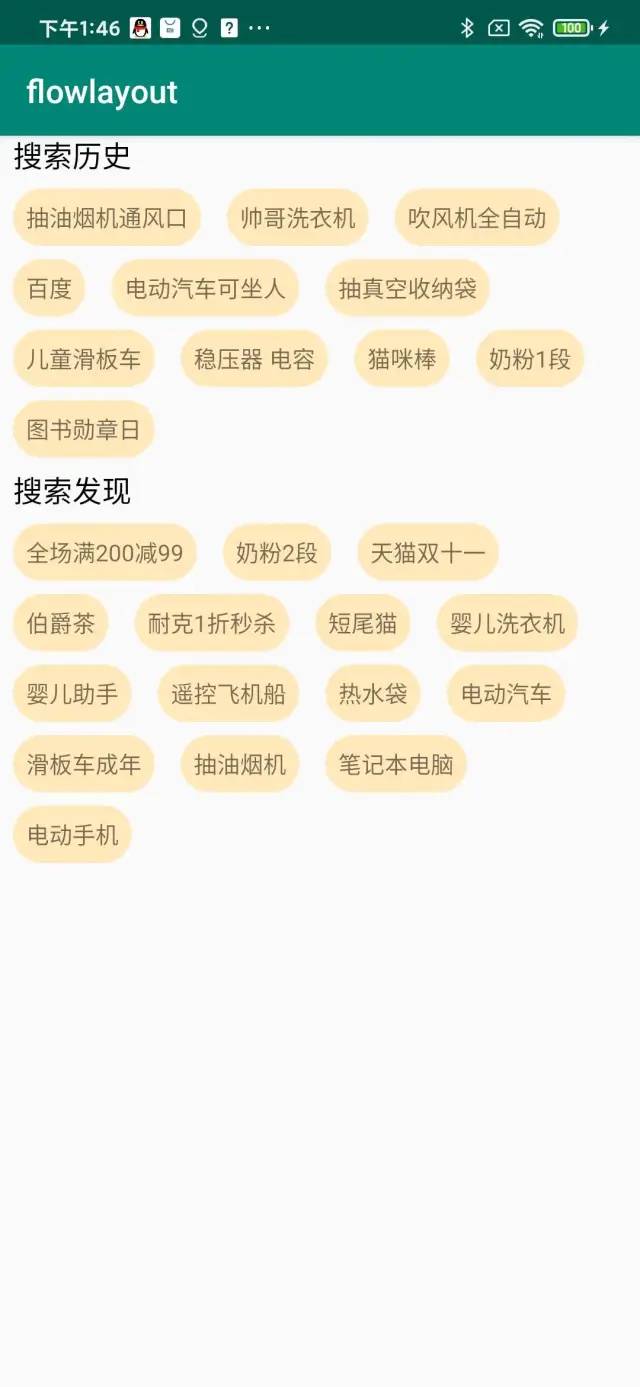
六 項目運行截圖
評論
圖片
表情