
瀏覽器指紋追蹤技術,如何完整修改瀏覽器指紋?
點擊上方 前端Q,關注公眾號
回復加群,加入前端Q技術交流群
來源 | http://www.fly63.com/article/detial/10479
什么是瀏覽器指紋
瀏覽器指紋背景
目前處于2.5代是因為現(xiàn)在需要解決的問題是如何解決跨瀏覽器識別指紋的問題上,稍后會介紹下這方面所取得的成果。
指紋采集
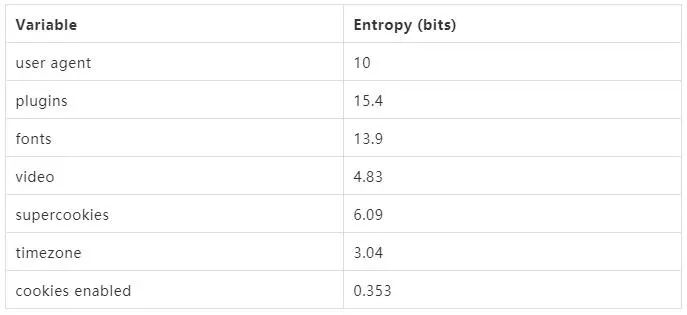
信息熵(entropy)是接收的每條消息中包含的信息的平均量,信息熵越高,則能傳輸越多的信息,信息熵越低,則意味著傳輸?shù)男畔⒃缴佟?/span>
瀏覽器指紋是由許多瀏覽器的特征信息綜合起來的,其中特征值的信息熵也不盡相同。因此,指紋也分為基本指紋和高級指紋。
基本指紋
基本指紋就是容易被發(fā)現(xiàn)和修改的部分,如 http 的 header。
{ "headers": {"Accept": "text/html,application/xhtml+xml,application/xml;q=0.9,image/webp,image/apng,*/*;q=0.8,application/signed-exchange;v=b3","Accept-Encoding": "gzip, deflate, br","Accept-Language": "zh-CN,zh;q=0.9,en;q=0.8","Host": "httpbin.org","Sec-Fetch-Mode": "navigate","Sec-Fetch-Site": "none","Sec-Fetch-User": "?1","Upgrade-Insecure-Requests": "1","User-Agent": "Mozilla/5.0 (Macintosh; Intel Mac OS X 10_14_5) AppleWebKit/537.36 (KHTML, like Gecko) Chrome/77.0.3865.90 Safari/537.36"}}
每個瀏覽器的UA
瀏覽器發(fā)送的 HTTP ACCEPT 標頭
瀏覽器中安裝的瀏覽器擴展/插件,例如 Quicktime,F(xiàn)lash,Java 或 Acrobat,以及這些插件的版本
計算機上安裝的字體。
瀏覽器是否執(zhí)行 JavaScript 腳本
瀏覽器是否能種下各種 cookie 和 “super cookies”
是否瀏覽器設置為“Do Not Track”
系統(tǒng)平臺(例如 Win32、Linux x86)
系統(tǒng)語言(例如 cn、en-US)
瀏覽器是否支持觸摸屏
拿到這些值后可以進行一些運算,得到瀏覽器指紋具體的信息熵以及瀏覽器的 uuid。
這些信息就類似人類的體重、身高、膚色一樣,有很大的重復概率,只能作為輔助識別,所以我們需要更精確的指紋來判斷唯一性。
高級指紋
普通指紋是不夠區(qū)分獨特的個人,這時就需要高級指紋,將范圍進一步縮小,甚至生成一個獨一無二的跨瀏覽器身份。
用于生產(chǎn)指紋的各個信息,有權重大小之分,信息熵大的將擁有較大的權重。
如何完整修改瀏覽器指紋?
接下來教大家如何修改瀏覽器指紋,例如修改navigator全部參數(shù):
(function() {;function fakeActiveVRDisplays() { return "Not Spoofed"; }function fakeAppCodeName() {return "Mozilla";}function fakeAppName() {return "Netscape";}function fakeAppVersion() {return "5.0 (Windows)";}function fakeBattery() { return "Not Spoofed"; }function fakeConnection() { return "Not Spoofed"; }function fakeGeoLocation() { return "Not Spoofed"; }function fakeHardwareConcurrency() {return 1;}function fakeJavaEnabled() {return false;}function fakeLanguage() {// NOTE: TOR Browser uses American Englishreturn "en-US";}function fakeLanguages() {// NOTE: TOR Browser uses American Englishreturn "en-US,en";}function fakeMimeTypes() { return "Not Spoofed"; }function fakeOnLine() {return true;}function fakeOscpu() {return "Windows NT 6.1";}function fakePermissions() { return "Not Spoofed"; }function fakePlatform() {return "Win32";}function fakePlugins() {return window.navigator.plugins;}function fakeProduct() {return "Gecko";}function fakeServiceWorker() { return "Not Spoofed"; }function fakeStorage() { return "Not Spoofed"; }function fakeUserAgent() {// NOTE: Current TOR User Agent as of 19 July 2017// NOTE: This will need constant updating.// NOTE: As TOR changes firefox versions each update,// NOTE: Shape Shifter will need to keep up.return "Mozilla/5.0 (Windows NT 6.1; rv:52.0) Gecko/20100101 Firefox/52.0";}function fakeBuildID() {return "20100101";}const fakeActiveVRDisplaysValue = fakeActiveVRDisplays();const fakeAppCodeNameValue = fakeAppCodeName();const fakeAppNameValue = fakeAppName();const fakeAppVersionValue = fakeAppVersion();const fakeBatteryValue = fakeBattery();const fakeConnectionValue = fakeConnection();const fakeGeoLocationValue = fakeGeoLocation();const fakeHardwareConcurrencyValue = fakeHardwareConcurrency();const fakeJavaEnabledValue = fakeJavaEnabled();const fakeLanguageValue = fakeLanguage();const fakeLanguagesValue = fakeLanguages();const fakeMimeTypesValue = fakeMimeTypes();const fakeOnLineValue = fakeOnLine();const fakeOscpuValue = fakeOscpu();const fakePermissionsValue = fakePermissions();const fakePlatformValue = fakePlatform();const fakePluginsValue = fakePlugins();const fakeProductValue = fakeProduct();const fakeServiceWorkerValue = fakeServiceWorker();const fakeStorageValue = fakeStorage();const fakeUserAgentValue = fakeUserAgent();const fakeBuildIDValue = fakeBuildID();Object.defineProperties(window.navigator, {/*activeVRDisplays: {configurable: true,enumerable: true,get: function getActiveVRDisplays() {console.log("[ALERT] " + window.location.hostname + " accessed property Navigator.activeVRDisplays");return fakeActiveVRDisplaysValue;}},*/appCodeName: {configurable: true,enumerable: true,get: function getAppCodeName() {console.log("[ALERT] " + window.location.hostname + " accessed property Navigator.appCodeName");return fakeAppCodeNameValue;}},appName: {configurable: true,enumerable: true,get: function getAppName() {console.log("[ALERT] " + window.location.hostname + " accessed property Navigator.appName");return fakeAppNameValue;}},appVersion: {configurable: true,enumerable: true,get: function getAppVersion() {console.log("[ALERT] " + window.location.hostname + " accessed property Navigator.appVersion");return fakeAppVersionValue;}},// TODO: This is getBattery() now/*battery: {configurable: true,enumerable: true,get: function getBattery() {console.log("[ALERT] " + window.location.hostname + " accessed property Navigator.battery");return fakeBatteryValue;}},connection: {configurable: true,enumerable: true,get: function getConnection() {console.log("[ALERT] " + window.location.hostname + " accessed property Navigator.connection");return fakeConnectionValue;}},geolocation: {configurable: true,enumerable: true,get: function getGeoLocation() {console.log("[ALERT] " + window.location.hostname + " accessed property Navigator.geolocation");return fakeGeoLocationValue;}},*/hardwareConcurrency: {configurable: true,enumerable: true,get: function getHardwareConcurrency() {console.log("[ALERT] " + window.location.hostname + " accessed property Navigator.hardwareConcurrency");return fakeHardwareConcurrencyValue;}},/*javaEnabled: {configurable: true,enumerable: true,value: function getJavaEnabled() {console.log("[ALERT] " + window.location.hostname + " accessed property Navigator.javaEnabled");return fakeJavaEnabledValue;}},*/language: {configurable: true,enumerable: true,get: function getLanguage() {console.log("[ALERT] " + window.location.hostname + " accessed property Navigator.language");return fakeLanguageValue;}},languages: {configurable: true,enumerable: true,get: function getLanguages() {console.log("[ALERT] " + window.location.hostname + " accessed property Navigator.languages");return fakeLanguagesValue;}},/*mimeTypes: {configurable: true,enumerable: true,get: function getMimeTypes() {console.log("[ALERT] " + window.location.hostname + " accessed property Navigator.mimeTypes");return fakeMimeTypesValue;}},*/onLine: {configurable: true,enumerable: true,get: function getOnLine() {console.log("[ALERT] " + window.location.hostname + " accessed property Navigator.onLine");return fakeOnLineValue;}},oscpu: {configurable: true,enumerable: true,get: function getOscpu() {console.log("[ALERT] " + window.location.hostname + " accessed property Navigator.oscpu");return fakeOscpuValue;}},/*permissions: {configurable: true,enumerable: true,get: function getPermissions() {console.log("[ALERT] " + window.location.hostname + " accessed property Navigator.permissions");return fakePermissionsValue;}},*/platform: {configurable: true,enumerable: true,get: function getPlatform() {console.log("[ALERT] " + window.location.hostname + " accessed property Navigator.platform");return fakePlatformValue;}},/*plugins: {configurable: true,enumerable: true,get: function getPlugins() {console.log("[ALERT] " + window.location.hostname + " accessed property Navigator.plugins");return fakePluginsValue;}},*/product: {configurable: true,enumerable: true,get: function getProduct() {console.log("[ALERT] " + window.location.hostname + " accessed property Navigator.product");return fakeProductValue;}},/*serviceWorker: {configurable: true,enumerable: true,get: function getServiceWorker() {console.log("[ALERT] " + window.location.hostname + " accessed property Navigator.serviceWorker");return fakeServiceWorkerValue;}},storage: {configurable: true,enumerable: true,get: function getStorage() {console.log("[ALERT] " + window.location.hostname + " accessed property Navigator.storage");return fakeStorageValue;}},*/userAgent: {configurable: true,enumerable: true,get: function getUserAgent() {console.log("[ALERT] " + window.location.hostname + " accessed property Navigator.userAgent");return fakeUserAgentValue;}},buildID: {configurable: true,enumerable: true,get: function getBuildID() {console.log("[ALERT] " + window.location.hostname + " accessed property Navigator.buildID");return fakeBuildIDValue;}}});})();
另外關于瀏覽器硬件指紋,包括canvas,webgl,fonts,audio等。
Canvas 指紋
Canvas 是 HTML5 中的動態(tài)繪圖標簽,也可以用它生成圖片或者處理圖片。即便使用 Canvas 繪制相同的元素,但是由于系統(tǒng)的差別,字體渲染引擎不同,對抗鋸齒、次像素渲染等算法也不同,Canvas 將同樣的文字轉成圖片,得到的結果也是不同的。
實現(xiàn)代碼大致為:在畫布上渲染一些文字,再用 toDataURL 轉換出來,即便開啟了隱私模式一樣可以拿到相同的值。
function getCanvasFingerprint () {var canvas = document.createElement('canvas');var context = canvas.getContext("2d");context.font = "18pt Arial";context.textBaseline = "top";context.fillText("Hello, user.", 2, 2);return canvas.toDataURL("image/jpeg");}getCanvasFingerprint()
流程很簡單,渲染文字,toDataURL 是將整個 Canvas 的內(nèi)容導出,得到值。
WebGL 指紋
WebGL(Web圖形庫)是一個 JavaScript API,可在任何兼容的 Web 瀏覽器中渲染高性能的交互式 3D 和 2D 圖形,而無需使用插件。
WebGL 通過引入一個與 OpenGL ES 2.0 非常一致的 API 來做到這一點,該 API 可以在 HTML5 元素中使用。
這種一致性使 API 可以利用用戶設備提供的硬件圖形加速。網(wǎng)站可以利用 WebGL 來識別設備指紋,一般可以用兩種方式來做到指紋生產(chǎn):
WebGL 報告——完整的 WebGL 瀏覽器報告表是可獲取、可被檢測的。在一些情況下,它會被轉換成為哈希值以便更快地進行分析。
WebGL 圖像 ——渲染和轉換為哈希值的隱藏 3D 圖像。由于最終結果取決于進行計算的硬件設備,因此此方法會為設備及其驅動程序的不同組合生成唯一值。
這種方式為不同的設備組合和驅動程序生成了唯一值。
可以通過 Browserleaks test 檢測網(wǎng)站來查看網(wǎng)站可以通過該 API 獲取哪些信息。
產(chǎn)生WebGL指紋原理是首先需要用著色器(shaders)繪制一個梯度對象,并將這個圖片轉換為Base64字符串。
然后枚舉WebGL所有的拓展和功能,并將他們添加到Base64字符串上,從而產(chǎn)生一個巨大的字符串,這個字符串在每臺設備上可能是非常獨特的。
例如fingerprint2js庫的 WebGL 指紋生產(chǎn)方式:
// 部分代碼gl = getWebglCanvas()if (!gl) { return null }var result = []var vShaderTemplate = 'attribute vec2 attrVertex;varying vec2 varyinTexCoordinate;uniform vec2 uniformOffset;void main(){varyinTexCoordinate=attrVertex+uniformOffset;gl_Position=vec4(attrVertex,0,1);}'var fShaderTemplate = 'precision mediump float;varying vec2 varyinTexCoordinate;void main() {gl_FragColor=vec4(varyinTexCoordinate,0,1);}'var vertexPosBuffer = gl.createBuffer()gl.bindBuffer(gl.ARRAY_BUFFER, vertexPosBuffer)var vertices = new Float32Array([-0.2, -0.9, 0, 0.4, -0.26, 0, 0, 0.732134444, 0])// 創(chuàng)建并初始化了Buffer對象的數(shù)據(jù)存儲區(qū)。gl.bufferData(gl.ARRAY_BUFFER, vertices, gl.STATIC_DRAW)vertexPosBuffer.itemSize = 3vertexPosBuffer.numItems = 3// 創(chuàng)建和初始化一個WebGLProgram對象。var program = gl.createProgram()// 創(chuàng)建著色器對象var vshader = gl.createShader(gl.VERTEX_SHADER)// 下兩行配置著色器gl.shaderSource(vshader, vShaderTemplate) // 設置著色器代碼gl.compileShader(vshader) // 編譯一個著色器,以便被WebGLProgram對象所使用var fshader = gl.createShader(gl.FRAGMENT_SHADER)gl.shaderSource(fshader, fShaderTemplate)gl.compileShader(fshader)// 添加預先定義好的頂點著色器和片段著色器gl.attachShader(program, vshader)gl.attachShader(program, fshader)// 鏈接WebGLProgram對象gl.linkProgram(program)// 定義好的WebGLProgram對象添加到當前的渲染狀態(tài)gl.useProgram(program)program.vertexPosAttrib = gl.getAttribLocation(program, 'attrVertex')program.offsetUniform = gl.getUniformLocation(program, 'uniformOffset') gl.enableVertexAttribArray(program.vertexPosArray)gl.vertexAttribPointer(program.vertexPosAttrib, vertexPosBuffer.itemSize, gl.FLOAT, !1, 0, 0)gl.uniform2f(program.offsetUniform, 1, 1)// 從向量數(shù)組中繪制圖元gl.drawArrays(gl.TRIANGLE_STRIP, 0, vertexPosBuffer.numItems)try {result.push(gl.canvas.toDataURL())} catch (e) {/* .toDataURL may be absent or broken (blocked by extension) */}
防御瀏覽器指紋追蹤
這是一個比較暴力的方法,直接禁止網(wǎng)站使用JavaScript可以非常有效地防御瀏覽器指紋追蹤,但是這樣會導致頁面較大部分地功能不可用。
而且非常不幸的是,即便禁止了js但是還可以通過css來采取瀏覽器的信息,例如:
{body {background: url("https://example.org/1080.png");}}
總結
對于瀏覽器指紋,攻與防在不斷的轉換,目前瀏覽器指紋也不能絕對的標識一臺主機,如果用戶切換顯卡或者雙系統(tǒng),虛擬機這些因素,那么目前的瀏覽器指紋就無法唯一標識了。
未來隨著新的HTML5技術不斷更新,新的瀏覽器技術會提供更多的API,以及通過側信道技術,在瀏覽器指紋會有新的突破。
內(nèi)推社群
我組建了一個氛圍特別好的騰訊內(nèi)推社群,如果你對加入騰訊感興趣的話(后續(xù)有計劃也可以),我們可以一起進行面試相關的答疑、聊聊面試的故事、并且在你準備好的時候隨時幫你內(nèi)推。下方加 winty 好友回復「面試」即可。