
YOLOv7 自定義數(shù)據(jù)訓練
對象檢測技術(shù)被廣泛用作業(yè)界許多應(yīng)用程序的后端,包括桌面和 Web 應(yīng)用程序。此外,它是許多計算機視覺任務(wù)的支柱,包括對象分割、對象跟蹤、對象分類、對象計數(shù)等。在現(xiàn)代,每個人對任何應(yīng)用程序的目標是:
應(yīng)用程序必須易于使用、處理時間更少并提供最佳結(jié)果。
日前,YOLOv7 已經(jīng)發(fā)布,由AlexeyAB(YOLOv4作者)和WongKinYiu(YOLOR作者)投稿。與YOLOR、YOLOv5 和 YOLOX 相比,YOLOv7 實現(xiàn)的目的是達到更高的準確性。
作者AlexeyAB:https://github.com/AlexeyAB
YOLOv4:https://github.com/AlexeyAB/darknet
作者WongKinYiu:https://github.com/WongKinYiu
YOLOR:https://github.com/WongKinYiu/yolor
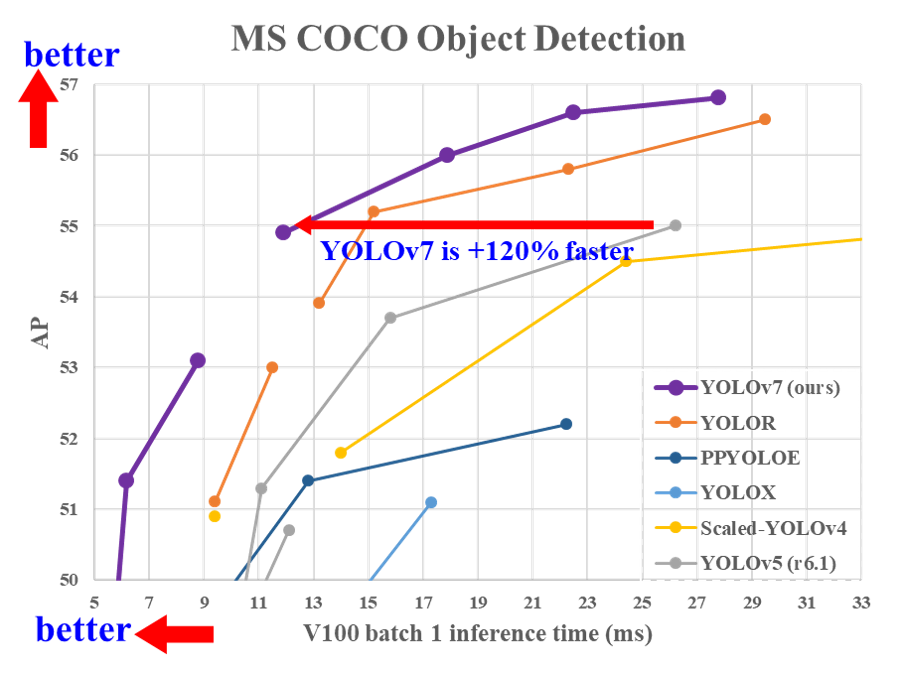
Fig-1 來源:YOLOv7 BenchMarks [ https://github.com/WongKinYiu/yolov7 ]
在圖 1 中,你可以清楚地看到 YOLOv7 在精度和速度方面都超過了 YOLOX、PP-YOLOE、YOLOR 和 YOLOv5。YOLOv7 的開發(fā)是在 PyTorch 中完成的。
在本文中,我們將重點介紹“自定義數(shù)據(jù)上的 YOLOv7 訓練”。你可以按照下面提到的步驟在你自己的數(shù)據(jù)上訓練 YOLOv7。
所有提到的步驟都已在Ubuntu 18.04 和 20.04上使用 CUDA 10.x/11.x 進行了測試。
模塊安裝
預(yù)訓練對象檢測
自定義數(shù)據(jù)訓練
使用自定義權(quán)重進行推理
模塊安裝:
創(chuàng)建一個名為“ YOLOv7 ”的文件夾。在“YOLOv7”文件夾中打開終端/cmd,使用上述命令創(chuàng)建一個虛擬環(huán)境,然后激活它。
python3 -m venv yolov7training     #creation of virtual environment
source yolov7training/bin/activate #activation of virtualenvxxxxxxxxxx python3 -m venv yolov7training     #creation of virtual environmentsource yolov7training/bin/activate #activation of virtualenvpython3 -m venv yolov7training #創(chuàng)建虛擬環(huán)境源碼 yolov7training/bin/activate #激活virtualenv
注意:以上步驟不是必需的,但如果你不想打擾 python 系統(tǒng)包,建議你使用。
從鏈接:https://github.com/WongKinYiu/yolov7 克隆 YOLOv7 存儲庫,升級 pip 并使用上述命令移動到克隆的文件夾。
git clone https://github.com/WongKinYiu/yolov7.git
cd yolov7
pip install --upgrade pip
我們需要安裝所有有助于 YOLOv7 訓練的庫。你可以使用提到的命令來安裝所需的模塊。
pip install -r requirements.txt
sudo apt install -y zip htop screen libgl1-mesa-glx
預(yù)訓練的目標檢測
我們已經(jīng)安裝了所有模塊。我們現(xiàn)在使用預(yù)先訓練的權(quán)重測試檢測,以確認我們所有的模塊都工作正常。你可以在終端/cmd 中使用上述命令來檢測具有預(yù)訓練權(quán)重的對象。
注意: YOLOv7 權(quán)重必須在 yolov7 文件夾中,從這個鏈接:https://github.com/WongKinYiu/yolov7/releases/download/v0.1/yolov7.pt)下載預(yù)訓練的權(quán)重文件并將下載的文件移動到當前工作目錄**{** yolov7}
python detect.py --weights yolov7.pt --source inference/images/horses.jpg --img 640
如果一切正常,那么你將能夠在下面提到的目錄中獲得結(jié)果。
結(jié)果目錄:[yolov7/runs/detect/exp/horses.jpg]
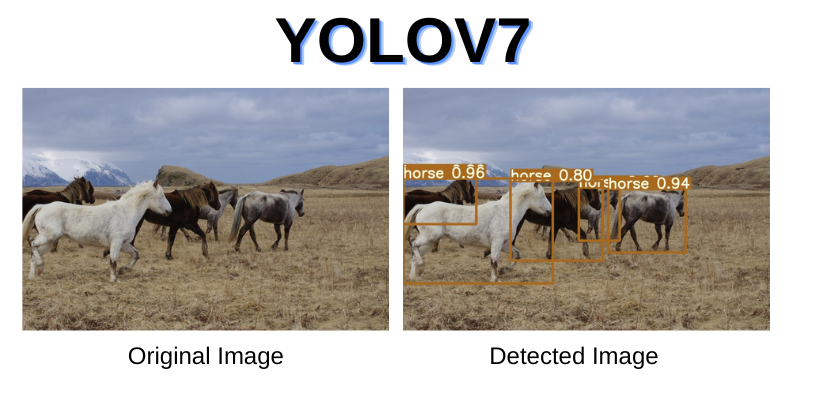
Fig-2 【來源】YOLOv7 官方倉庫:https://github.com/WongKinYiu/yolov7/blob/main/inference/images/horses.jpg
在自定義數(shù)據(jù)上訓練 YOLOv7
自定義訓練的步驟如下:
1- 收集數(shù)據(jù)
2- 標記數(shù)據(jù)
3- 拆分數(shù)據(jù)(訓練和測試)
4- 創(chuàng)建配置文件
5- 開始訓練
第 1 步:我們需要為YOLOv7 自定義訓練創(chuàng)建一個數(shù)據(jù)集。如果你沒有數(shù)據(jù),你可以使用 openimages數(shù)據(jù)庫中的數(shù)據(jù)集。
openimages:https://storage.googleapis.com/openimages/web/index.html
YOLOv7 在 text(.txt) 文件中獲取標簽數(shù)據(jù),格式如下:
<object-class-id> <x> <y> <width> <height>

圖 3:YOLO 標記樣本
第 2 步:對于自定義數(shù)據(jù)的標記,請查看我的文章,內(nèi)容是為對象檢測標記數(shù)據(jù) (Yolo:https://medium.com/nerd-for-tech/labeling-data-for-object-detection-yolo-5a4fa4f05844)
第 3 步:標記數(shù)據(jù)后,我們現(xiàn)在需要將數(shù)據(jù)拆分為訓練和測試文件夾。拆分比例將取決于用戶,而通常優(yōu)選的拆分為 (80–20)%,這意味著 80% 的數(shù)據(jù)用于訓練,而 20% 的數(shù)據(jù)用于測試。
對于數(shù)據(jù)拆分,你可以查看python-library:https://pypi.org/project/split-folders/),它將你的數(shù)據(jù)隨機拆分為訓練、測試和驗證。
文件夾結(jié)構(gòu):
├── yolov7
 ## └── train
 ####└── images (folder including all training images)
 ####└── labels (folder including all training labels)
 ## └── test
 ####└── images (folder including all testing images)
 ####└── labels (folder including all testing labels)
第 4 步:現(xiàn)在我們需要創(chuàng)建一個自定義配置文件。(確保設(shè)置正確的路徑),因為訓練過程將完全依賴于該文件。
創(chuàng)建文件名為“custom. yaml”,在 (yolov7/data) 文件夾中。將以下代碼粘貼到該文件中。設(shè)置數(shù)據(jù)集文件夾的正確路徑,更改類及其名稱,然后保存。
train: (Complete path to dataset train folder)
test: (Complete path to dataset test folder)
valid: (Complete path to dataset valid folder)
#Classes
nc: 1 # replace according to your number of classes
#classes names
#replace all class names list with your classes names
names: ['person', 'bicycle', 'car', 'motorcycle', 'airplane', 'bus', 'train', 'truck', 'boat', 'traffic light',
        'fire hydrant', 'stop sign', 'parking meter', 'bench', 'bird', 'cat', 'dog', 'horse', 'sheep', 'cow',
        'elephant', 'bear', 'zebra', 'giraffe', 'backpack', 'umbrella', 'handbag', 'tie', 'suitcase', 'frisbee',
        'skis', 'snowboard', 'sports ball', 'kite', 'baseball bat', 'baseball glove', 'skateboard', 'surfboard',
        'tennis racket', 'bottle', 'wine glass', 'cup', 'fork', 'knife', 'spoon', 'bowl', 'banana', 'apple',
        'sandwich', 'orange', 'broccoli', 'carrot', 'hot dog', 'pizza', 'donut', 'cake', 'chair', 'couch',
        'potted plant', 'bed', 'dining table', 'toilet', 'tv', 'laptop', 'mouse', 'remote', 'keyboard', 'cell phone',
        'microwave', 'oven', 'toaster', 'sink', 'refrigerator', 'book', 'clock', 'vase', 'scissors', 'teddy bear',
        'hair drier', 'toothbrush']
第 5 步:所有預(yù)處理步驟都完成了,是時候開始訓練了。在主“yolo v7 ”中打開終端,激活虛擬環(huán)境,然后運行下面提到的命令。
source yolov7training/bin/activate
python train.py --weights yolov7.pt --data "data/custom.yaml" --workers 4 --batch-size 4 --img 416 --cfg cfg/training/yolov7.yaml --name yolov7 --hyp data/hyp.scratch.p5.yaml
or
python3 train.py --weights yolov7.pt --data "data/custom.yaml" --workers 4 --batch-size 4 --img 416 --cfg cfg/training/yolov7.yaml --name yolov7 --hyp data/hyp.scratch.p5.yaml --epochs 50
-- img = 模型將訓練的圖像大小,默認值為 640。
-- batch-size= 訓練中使用的批量大小。
-- epochs = 訓練 epoch 的數(shù)量
-- data = 自定義配置文件的路徑
-- 權(quán)重= 預(yù)訓練的權(quán)重
yolov7.pt:https://github.com/WongKinYiu/yolov7/releases/download/v0.1/yolov7_training.pt
yolov7x.pt:https://github.com/WongKinYiu/yolov7/releases/download/v0.1/yolov7x_training.pt
yolov7-w6.pt:https://github.com/WongKinYiu/yolov7/releases/download/v0.1/yolov7-w6_training.pt
yolov7-e6.pt:https://github.com/WongKinYiu/yolov7/releases/download/v0.1/yolov7-e6_training.pt

圖 4:YOLOv7 訓練開始
注意:如果出現(xiàn)任何圖像損壞的話,訓練將不會開始,如果是某些標簽文件損壞,那么訓練不會有問題,因為 yolov7 將忽略該圖像和標簽文件。
等待訓練完成,然后使用新創(chuàng)建的權(quán)重進行推理。自定義訓練的權(quán)重將保存在下面提到的文件夾路徑中。
[yolov7/runs/train/yolov7/weights/best.pt]
使用自定義權(quán)重進行推理
訓練完成后,轉(zhuǎn)到終端并運行下面提到的命令以檢測自定義權(quán)重。
python detect.py --weights runs/train/yolov7/weights/best.pt --source "path to your testing image"
我使用 Person 數(shù)據(jù)進行訓練,自定義權(quán)重的結(jié)果如下所示。
查看視頻:https://youtu.be/hAdyEobLBnQ
基于自定義數(shù)據(jù)的 YOLOv7 人員檢測
這就是“在自定義數(shù)據(jù)上訓練 YOLOv7”的全部內(nèi)容。你可以對自己的數(shù)據(jù)進行嘗試。
從視頻創(chuàng)建數(shù)據(jù)集:文章鏈接:https://medium.com/nerd-for-tech/extraction-of-frames-from-a-single-video-2b9fdd901208
自定義訓練的標簽數(shù)據(jù):文章鏈接:https://medium.com/nerd-for-tech/labeling-data-for-object-detection-yolo-5a4fa4f05844
在自定義數(shù)據(jù)上訓練 YOLO-v5:文章鏈接:https://medium.com/nerd-for-tech/how-to-train-yolov5-on-custom-data-9983a545e509
如何修剪和稀疏 YOLOv5:文章鏈接:https://medium.com/nerd-for-tech/how-to-prune-sparse-yolov5-da19e1d84a6
YOLOv5 的超參數(shù)如何工作:文章鏈接:https://chr043416.medium.com/how-hyperparameters-of-yolov5-works-ec4d25f311a2